tow LINCOLN NAVIGATOR 2018 Owner's Manual
[x] Cancel search | Manufacturer: LINCOLN, Model Year: 2018, Model line: NAVIGATOR, Model: LINCOLN NAVIGATOR 2018Pages: 649, PDF Size: 4.96 MB
Page 109 of 649
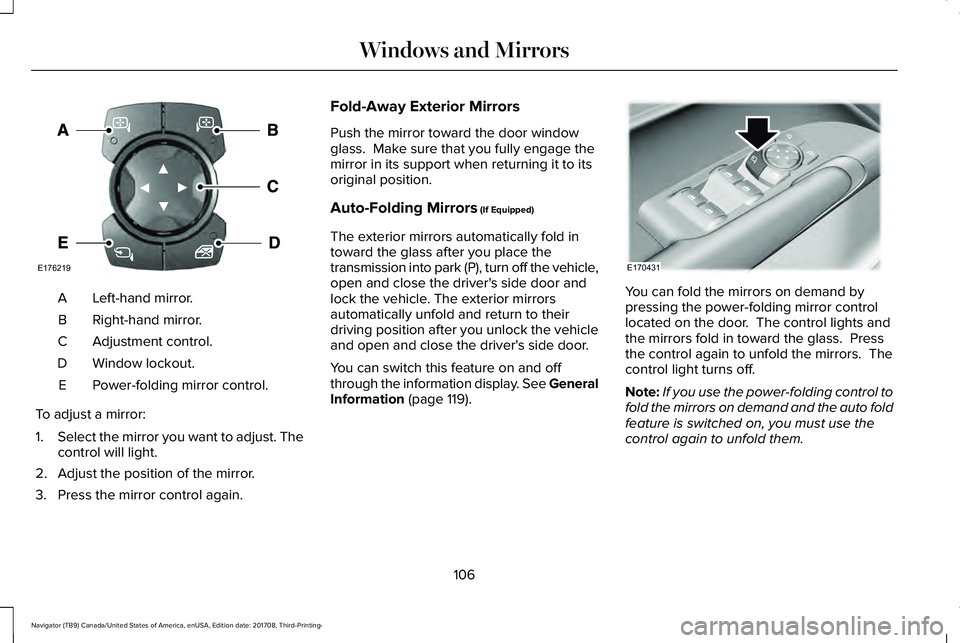
Left-hand mirror.A
Right-hand mirror.B
Adjustment control.C
Window lockout.D
Power-folding mirror control.E
To adjust a mirror:
1.Select the mirror you want to adjust. Thecontrol will light.
2. Adjust the position of the mirror.
3. Press the mirror control again.
Fold-Away Exterior Mirrors
Push the mirror toward the door windowglass. Make sure that you fully engage themirror in its support when returning it to itsoriginal position.
Auto-Folding Mirrors (If Equipped)
The exterior mirrors automatically fold intoward the glass after you place thetransmission into park (P), turn off the vehicle,open and close the driver's side door andlock the vehicle. The exterior mirrorsautomatically unfold and return to theirdriving position after you unlock the vehicleand open and close the driver's side door.
You can switch this feature on and offthrough the information display. See GeneralInformation (page 119).
You can fold the mirrors on demand bypressing the power-folding mirror controllocated on the door. The control lights andthe mirrors fold in toward the glass. Pressthe control again to unfold the mirrors. Thecontrol light turns off.
Note:If you use the power-folding control tofold the mirrors on demand and the auto foldfeature is switched on, you must use thecontrol again to unfold them.
106
Navigator (TB9) Canada/United States of America, enUSA, Edition date: 201708, Third-Printing-
Windows and MirrorsE176219 E170431
Page 112 of 649
SUN VISORS
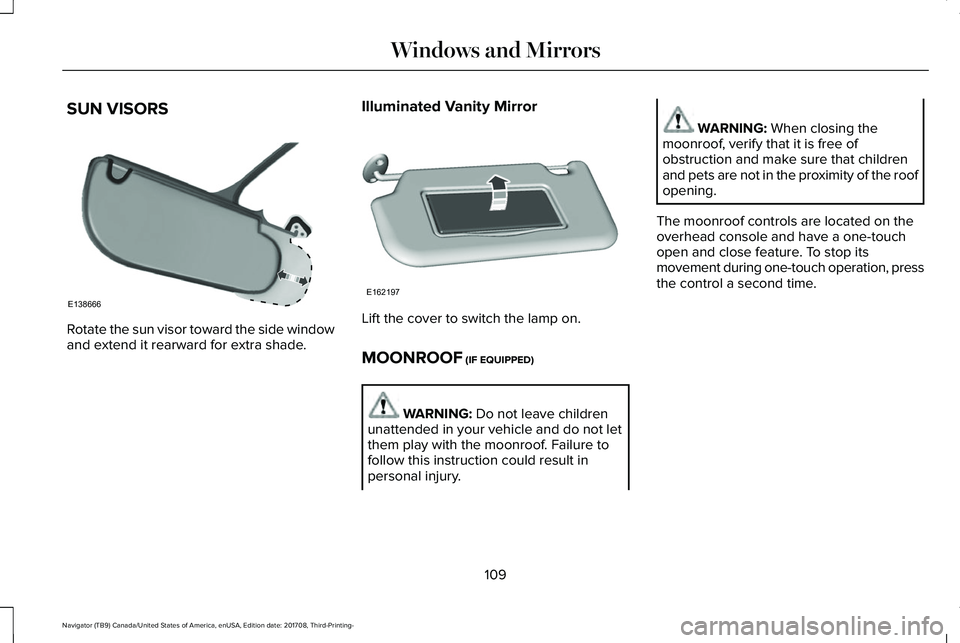
Rotate the sun visor toward the side windowand extend it rearward for extra shade.
Illuminated Vanity Mirror
Lift the cover to switch the lamp on.
MOONROOF (IF EQUIPPED)
WARNING: Do not leave childrenunattended in your vehicle and do not letthem play with the moonroof. Failure tofollow this instruction could result inpersonal injury.
WARNING: When closing themoonroof, verify that it is free ofobstruction and make sure that childrenand pets are not in the proximity of the roofopening.
The moonroof controls are located on theoverhead console and have a one-touchopen and close feature. To stop itsmovement during one-touch operation, pressthe control a second time.
109
Navigator (TB9) Canada/United States of America, enUSA, Edition date: 201708, Third-Printing-
Windows and MirrorsE138666 E162197
Page 120 of 649
Low Beam Malfunction Warning Lamp
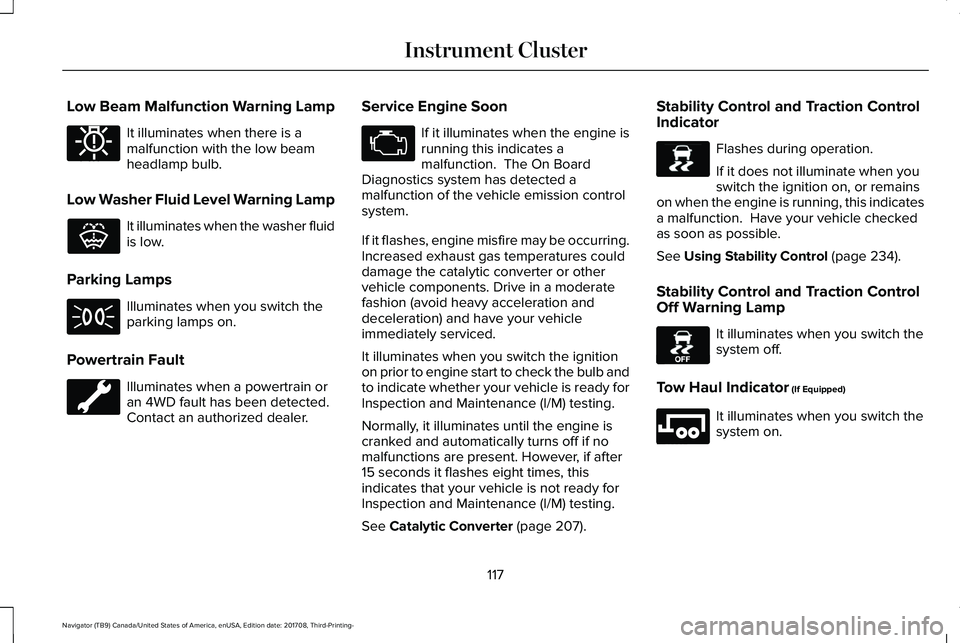
It illuminates when there is amalfunction with the low beamheadlamp bulb.
Low Washer Fluid Level Warning Lamp
It illuminates when the washer fluidis low.
Parking Lamps
Illuminates when you switch theparking lamps on.
Powertrain Fault
Illuminates when a powertrain oran 4WD fault has been detected. Contact an authorized dealer.
Service Engine Soon
If it illuminates when the engine isrunning this indicates amalfunction. The On BoardDiagnostics system has detected amalfunction of the vehicle emission controlsystem.
If it flashes, engine misfire may be occurring.Increased exhaust gas temperatures coulddamage the catalytic converter or othervehicle components. Drive in a moderatefashion (avoid heavy acceleration anddeceleration) and have your vehicleimmediately serviced.
It illuminates when you switch the ignitionon prior to engine start to check the bulb andto indicate whether your vehicle is ready forInspection and Maintenance (I/M) testing.
Normally, it illuminates until the engine iscranked and automatically turns off if nomalfunctions are present. However, if after15 seconds it flashes eight times, thisindicates that your vehicle is not ready forInspection and Maintenance (I/M) testing.
See Catalytic Converter (page 207).
Stability Control and Traction ControlIndicator
Flashes during operation.
If it does not illuminate when youswitch the ignition on, or remainson when the engine is running, this indicatesa malfunction. Have your vehicle checkedas soon as possible.
See Using Stability Control (page 234).
Stability Control and Traction ControlOff Warning Lamp
It illuminates when you switch thesystem off.
Tow Haul Indicator (If Equipped)
It illuminates when you switch thesystem on.
117
Navigator (TB9) Canada/United States of America, enUSA, Edition date: 201708, Third-Printing-
Instrument ClusterE181350 E132353 E138639 E130458 E246592
Page 124 of 649
Settings
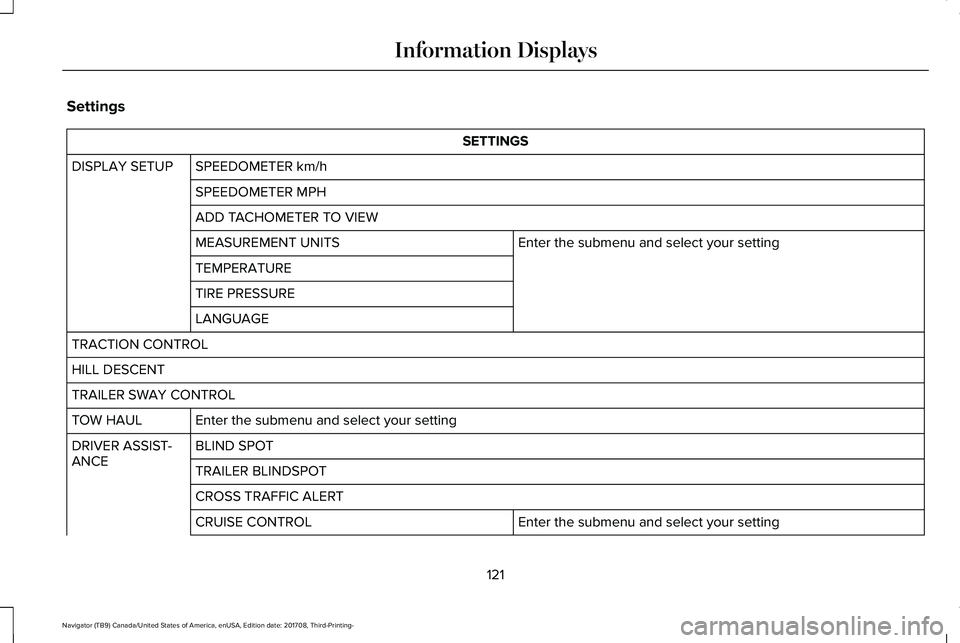
SETTINGS
SPEEDOMETER km/hDISPLAY SETUP
SPEEDOMETER MPH
ADD TACHOMETER TO VIEW
Enter the submenu and select your settingMEASUREMENT UNITS
TEMPERATURE
TIRE PRESSURE
LANGUAGE
TRACTION CONTROL
HILL DESCENT
TRAILER SWAY CONTROL
Enter the submenu and select your settingTOW HAUL
BLIND SPOTDRIVER ASSIST-ANCETRAILER BLINDSPOT
CROSS TRAFFIC ALERT
Enter the submenu and select your settingCRUISE CONTROL
121
Navigator (TB9) Canada/United States of America, enUSA, Edition date: 201708, Third-Printing-
Information Displays
Page 125 of 649
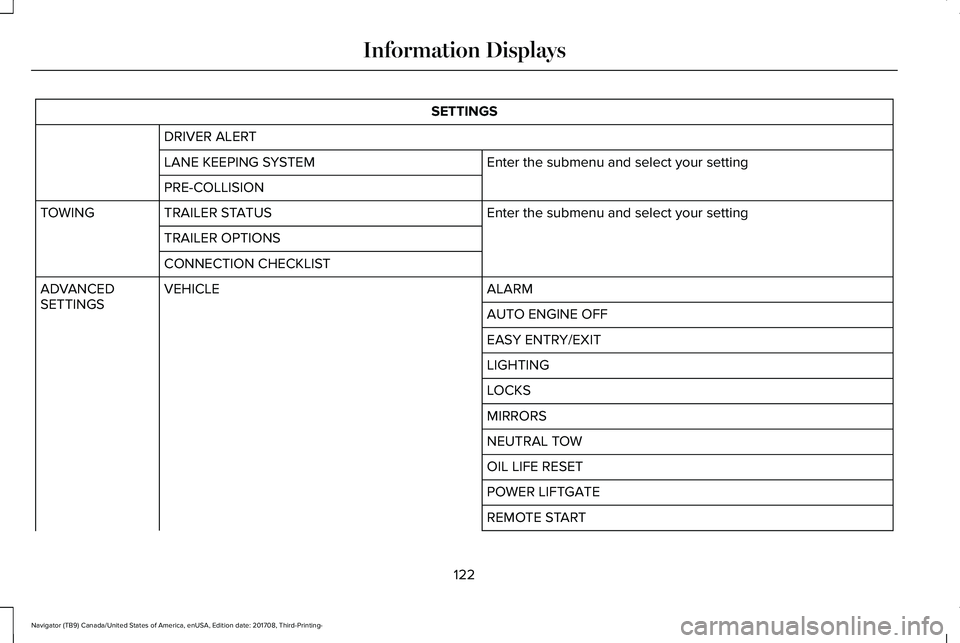
SETTINGS
DRIVER ALERT
Enter the submenu and select your settingLANE KEEPING SYSTEM
PRE-COLLISION
Enter the submenu and select your settingTRAILER STATUSTOWING
TRAILER OPTIONS
CONNECTION CHECKLIST
ALARMVEHICLEADVANCEDSETTINGSAUTO ENGINE OFF
EASY ENTRY/EXIT
LIGHTING
LOCKS
MIRRORS
NEUTRAL TOW
OIL LIFE RESET
POWER LIFTGATE
REMOTE START
122
Navigator (TB9) Canada/United States of America, enUSA, Edition date: 201708, Third-Printing-
Information Displays
Page 134 of 649
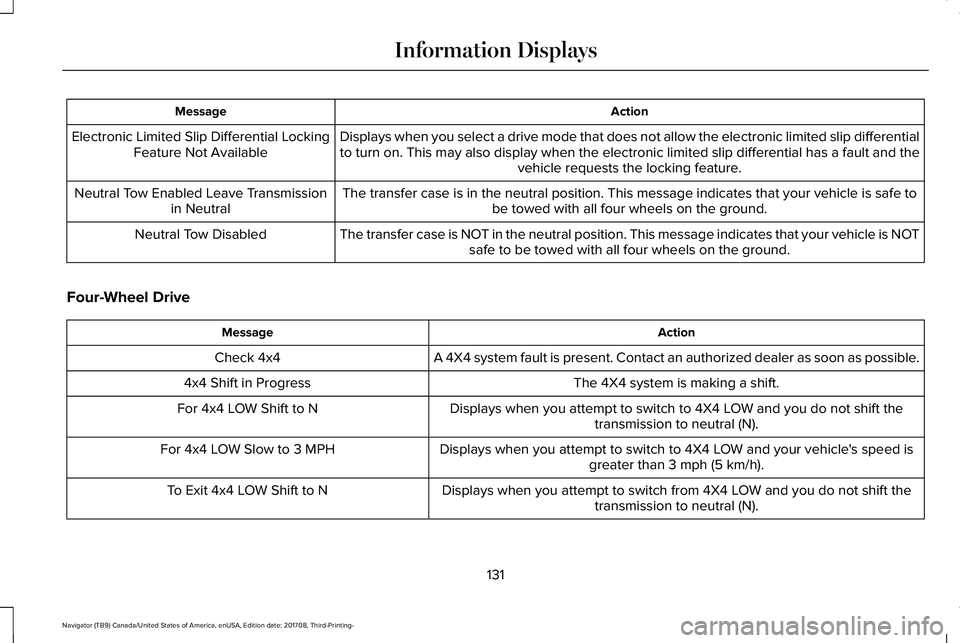
ActionMessage
Displays when you select a drive mode that does not allow the electronic limited slip differentialto turn on. This may also display when the electronic limited slip differential has a fault and thevehicle requests the locking feature.
Electronic Limited Slip Differential LockingFeature Not Available
The transfer case is in the neutral position. This message indicates that your vehicle is safe tobe towed with all four wheels on the ground.Neutral Tow Enabled Leave Transmissionin Neutral
The transfer case is NOT in the neutral position. This message indicates that your vehicle is NOTsafe to be towed with all four wheels on the ground.Neutral Tow Disabled
Four-Wheel Drive
ActionMessage
A 4X4 system fault is present. Contact an authorized dealer as soon as possible.Check 4x4
The 4X4 system is making a shift.4x4 Shift in Progress
Displays when you attempt to switch to 4X4 LOW and you do not shift thetransmission to neutral (N).For 4x4 LOW Shift to N
Displays when you attempt to switch to 4X4 LOW and your vehicle's speed isgreater than 3 mph (5 km/h).For 4x4 LOW Slow to 3 MPH
Displays when you attempt to switch from 4X4 LOW and you do not shift thetransmission to neutral (N).To Exit 4x4 LOW Shift to N
131
Navigator (TB9) Canada/United States of America, enUSA, Edition date: 201708, Third-Printing-
Information Displays
Page 147 of 649
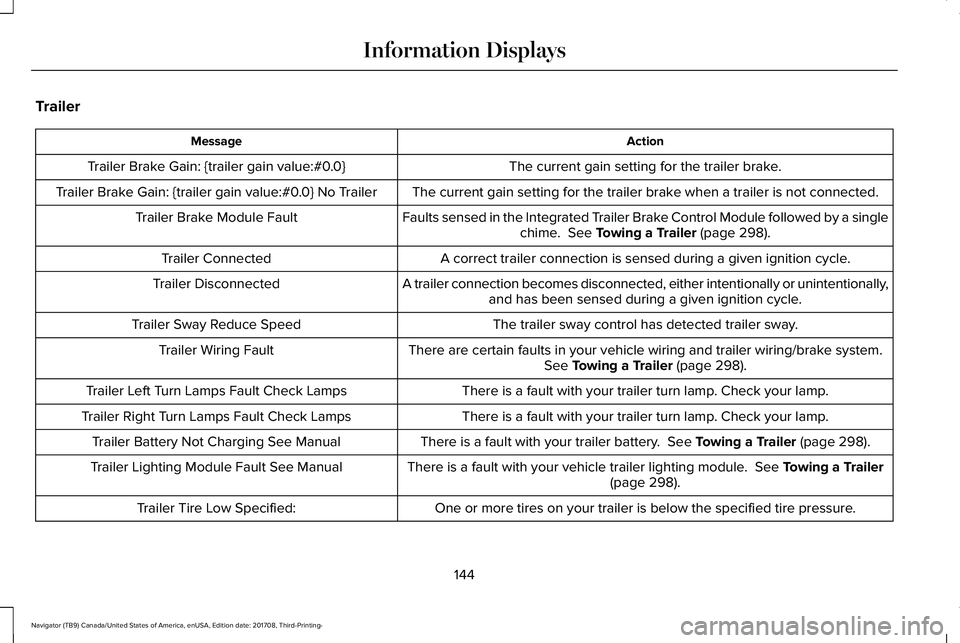
Trailer
ActionMessage
The current gain setting for the trailer brake.Trailer Brake Gain: {trailer gain value:#0.0}
The current gain setting for the trailer brake when a trailer is not connected.Trailer Brake Gain: {trailer gain value:#0.0} No Trailer
Faults sensed in the Integrated Trailer Brake Control Module followed by a singlechime. See Towing a Trailer (page 298).Trailer Brake Module Fault
A correct trailer connection is sensed during a given ignition cycle.Trailer Connected
A trailer connection becomes disconnected, either intentionally or unintentionally,and has been sensed during a given ignition cycle.Trailer Disconnected
The trailer sway control has detected trailer sway.Trailer Sway Reduce Speed
There are certain faults in your vehicle wiring and trailer wiring/brake system.See Towing a Trailer (page 298).Trailer Wiring Fault
There is a fault with your trailer turn lamp. Check your lamp.Trailer Left Turn Lamps Fault Check Lamps
There is a fault with your trailer turn lamp. Check your lamp.Trailer Right Turn Lamps Fault Check Lamps
There is a fault with your trailer battery. See Towing a Trailer (page 298).Trailer Battery Not Charging See Manual
There is a fault with your vehicle trailer lighting module. See Towing a Trailer(page 298).Trailer Lighting Module Fault See Manual
One or more tires on your trailer is below the specified tire pressure.Trailer Tire Low Specified:
144
Navigator (TB9) Canada/United States of America, enUSA, Edition date: 201708, Third-Printing-
Information Displays
Page 163 of 649
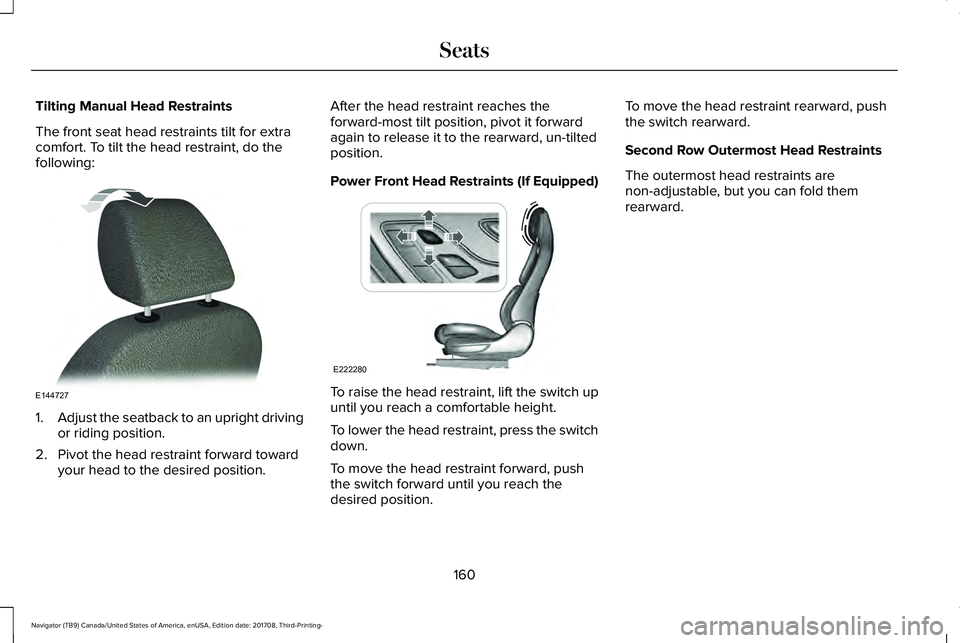
Tilting Manual Head Restraints
The front seat head restraints tilt for extracomfort. To tilt the head restraint, do thefollowing:
1.Adjust the seatback to an upright drivingor riding position.
2. Pivot the head restraint forward towardyour head to the desired position.
After the head restraint reaches theforward-most tilt position, pivot it forwardagain to release it to the rearward, un-tiltedposition.
Power Front Head Restraints (If Equipped)
To raise the head restraint, lift the switch upuntil you reach a comfortable height.
To lower the head restraint, press the switchdown.
To move the head restraint forward, pushthe switch forward until you reach thedesired position.
To move the head restraint rearward, pushthe switch rearward.
Second Row Outermost Head Restraints
The outermost head restraints arenon-adjustable, but you can fold themrearward.
160
Navigator (TB9) Canada/United States of America, enUSA, Edition date: 201708, Third-Printing-
SeatsE144727 E222280
Page 174 of 649
REAR SEATS
Folding the Second Row 40% Seat
WARNING: Do not place cargo orany objects behind the seat backrestbefore returning it to the original position.Pull on the seat backrest to make sure thatit has fully latched after returning the seatbackrest to its original position. Anunlatched seat may become dangerous ifyou stop suddenly or have a crash.
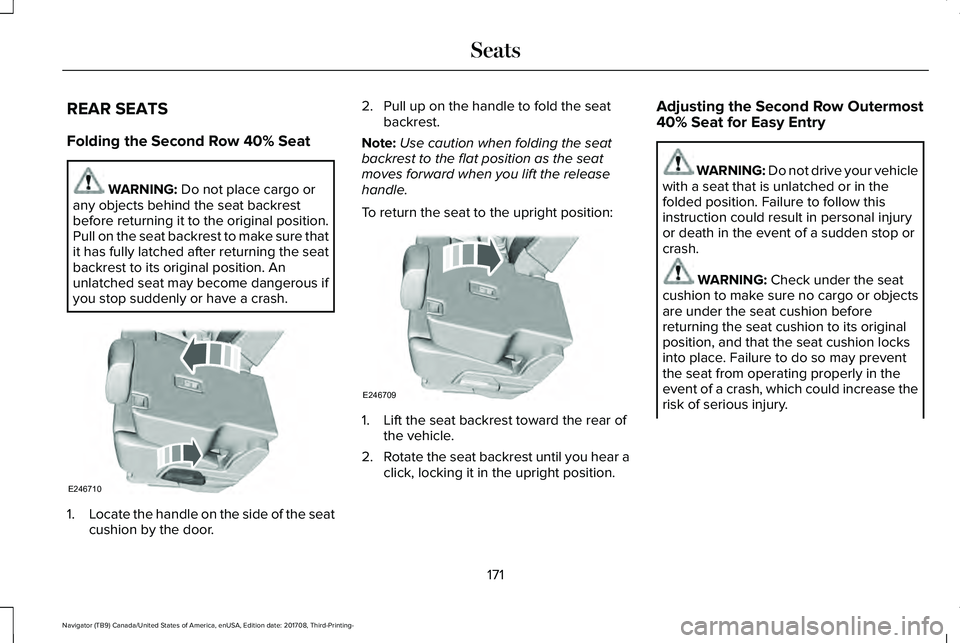
1.Locate the handle on the side of the seatcushion by the door.
2. Pull up on the handle to fold the seatbackrest.
Note:Use caution when folding the seatbackrest to the flat position as the seatmoves forward when you lift the releasehandle.
To return the seat to the upright position:
1. Lift the seat backrest toward the rear ofthe vehicle.
2.Rotate the seat backrest until you hear aclick, locking it in the upright position.
Adjusting the Second Row Outermost40% Seat for Easy Entry
WARNING: Do not drive your vehiclewith a seat that is unlatched or in thefolded position. Failure to follow thisinstruction could result in personal injuryor death in the event of a sudden stop orcrash.
WARNING: Check under the seatcushion to make sure no cargo or objectsare under the seat cushion beforereturning the seat cushion to its originalposition, and that the seat cushion locksinto place. Failure to do so may preventthe seat from operating properly in theevent of a crash, which could increase therisk of serious injury.
171
Navigator (TB9) Canada/United States of America, enUSA, Edition date: 201708, Third-Printing-
SeatsE246710 E246709
Page 192 of 649
CENTER CONSOLE
Stow items in the cup holder carefully asitems may become loose during hardbraking, acceleration or crashes, includinghot drinks which may spill.
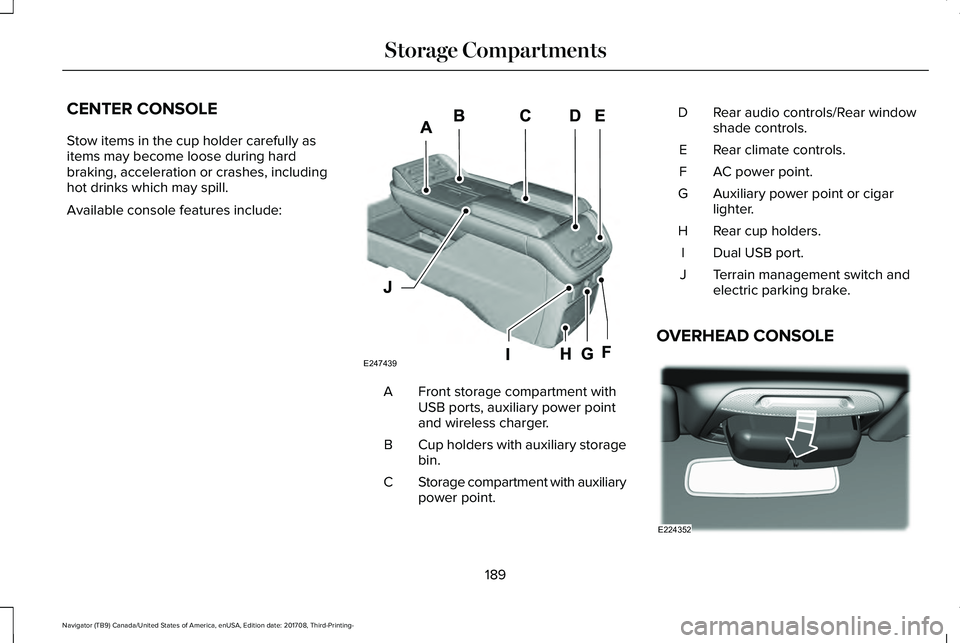
Available console features include:
Front storage compartment withUSB ports, auxiliary power pointand wireless charger.
A
Cup holders with auxiliary storagebin.B
Storage compartment with auxiliarypower point.C
Rear audio controls/Rear windowshade controls.D
Rear climate controls.E
AC power point.F
Auxiliary power point or cigarlighter.G
Rear cup holders.H
Dual USB port.I
Terrain management switch andelectric parking brake.J
OVERHEAD CONSOLE
189
Navigator (TB9) Canada/United States of America, enUSA, Edition date: 201708, Third-Printing-
Storage CompartmentsE247439 E224352