change time LINCOLN NAVIGATOR 2018 Owner's Guide
[x] Cancel search | Manufacturer: LINCOLN, Model Year: 2018, Model line: NAVIGATOR, Model: LINCOLN NAVIGATOR 2018Pages: 649, PDF Size: 4.96 MB
Page 449 of 649
GENERAL INFORMATION
WARNING: Driving while distractedcan result in loss of vehicle control, crashand injury. We strongly recommend thatyou use extreme caution when using anydevice that may take your focus off theroad. Your primary responsibility is the safeoperation of your vehicle. We recommendagainst the use of any hand-held devicewhile driving and encourage the use ofvoice-operated systems when possible.Make sure you are aware of all applicablelocal laws that may affect the use ofelectronic devices while driving.
Getting to Know Your System
The SYNC 3 system allows you to interactwith a variety of features using thetouchscreen and voice commands. Byintegrating with your Bluetooth-enabledphone, the touchscreen provides easyinteraction with audio, multimedia, climatecontrol, navigation, and your phone's SYNC3 compatible apps.
Using the Touchscreen
To operate the touchscreen, you can simplytouch the item or option that you want toselect. The button changes color when youselect it.
The SYNC 3 layout allows you to quicklyselect the feature you wish to use.
446
Navigator (TB9) Canada/United States of America, enUSA, Edition date: 201708, Third-Printing-
SYNC™ 3
Page 464 of 649
the download continues where it left off atthe next Wi-Fi connected opportunity. Uponactivation of an update, a banner displayson the touchscreen indicating the systemupdate. Select the icon to see more detail.This icon displays for two ignition cycles.
To switch this feature off:
Menu Item
Settings
General
In this menu selection, youcan change the selection forautomatic updates to OFF.
AutomaticSystemUpdates
Support
The SYNC support team is available to helpyou with any questions you are not able toanswer on your own.
Monday-Saturday, 8:30am-8:00pm EST.
United States: 1-800-521-4140.
Canada: 1-800-387-9333.
Times are subject to change due to holidays.
Privacy Information
When you connect a cellular phone to SYNC3, the system creates a profile within yourvehicle that links to that cellular phone. Thisprofile helps in offering you more cellularfeatures and operating more efficiently.Among other things, this profile may containdata about your cellular phone book, textmessages (read and unread), and call history,including history of calls when your cellphone was not connected to the system. Inaddition, if you connect a media device, thesystem creates and retains an index ofsupported media content. The system alsorecords a short diagnostic log ofapproximately 10 minutes of all recent systemactivity. The log profile and other system datamay be used to improve the system and helpdiagnose any problems that may occur.
The cellular profile, media device index, anddiagnostic log remain in your vehicle unlessyou delete them and are generally accessibleonly in your vehicle when the cellular phoneor media player is connected.
If you no longer plan to use the system oryour vehicle, we recommend you perform aMaster Reset to erase all stored information.You can find more information about theMaster Reset in General Settings. SeeSettings (page 510). System data cannot beaccessed without special equipment andaccess to your vehicle's SYNC 3 module. TheLincoln Motor Company does not access thesystem data for any purpose other than asdescribed absent consent, a court order, orwhere required by law enforcement, othergovernment authorities, or other third partiesacting with lawful authority. Other partiesmay seek to access the informationindependently of The Lincoln MotorCompany.
HOME SCREEN
461
Navigator (TB9) Canada/United States of America, enUSA, Edition date: 201708, Third-Printing-
SYNC™ 3
Page 480 of 649
For more information on extendedsubscription terms (a service fee is required),the online media player and a list of SiriusXMsatellite radio channels, and other features,please visit www.siriusxm.com in the UnitedStates, www.siriusxm.ca in Canada, or callSiriusXM at 1-888-539-7474.
Note:SiriusXM reserves the unrestrictedright to change, rearrange, add or deleteprogramming. This includes canceling,moving or adding particular channels, andits prices, at any time, with or without noticeto you. Ford Motor Company shall not beresponsible for any such programmingchanges.
Note:This receiver includes the eCosreal-time operating system. eCos ispublished under the eCos License.
The following buttons are available for SiriusXM:
Action and descriptionMenu item
Touch this button to see a list of available stations.Browse
A pop-up appears, allowing you to type in the call numbers of a station.Direct TuneOnce you enter the stations call numbers, you can select:
The system tunes to the station you select.Enter
You exit the pop-up and the current station continues to play.Cancel
You can press the backspace button to delete the previous number.
477
Navigator (TB9) Canada/United States of America, enUSA, Edition date: 201708, Third-Printing-
SYNC™ 3
Page 487 of 649
HD Radio Technology manufactured underlicense from DTS Inc. U.S. and foreignpatents. HD Radio and the HD and HD Radiologos are proprietary trademarks of DTS Inc.Ford Motor Company and DTS Inc. are notresponsible for the content sent using HDRadio technology. Content may be changed,added or deleted at any time at the stationowner's discretion.
* You can find the form here:
Website
http://hdradio.com/stations/feedback
CD
Once you select this option, the systemreturns you to the main audio screen.
The current audio information appears onthe screen.
The following buttons are also available:
FunctionButton
You can use the browse button to select a track.Browse
Select this button and a small number one displays to indicate the track is set to repeat.RepeatFor MP3 CDs, this button allows you to toggle through repeat off, repeat one track (a small numberone displays), and repeat current folder (a small folder displays).
Select the shuffle symbol to have the audio on the disk play in random order.Shuffle
You can use the forward, reverse, pause orplay buttons to control the audio playback.
Bluetooth Stereo or USB
Bluetooth Stereo and USB allow you toaccess media that you store on yourBluetooth device or USB device such asmusic, audio books or podcasts.
484
Navigator (TB9) Canada/United States of America, enUSA, Edition date: 201708, Third-Printing-
SYNC™ 3
Page 511 of 649
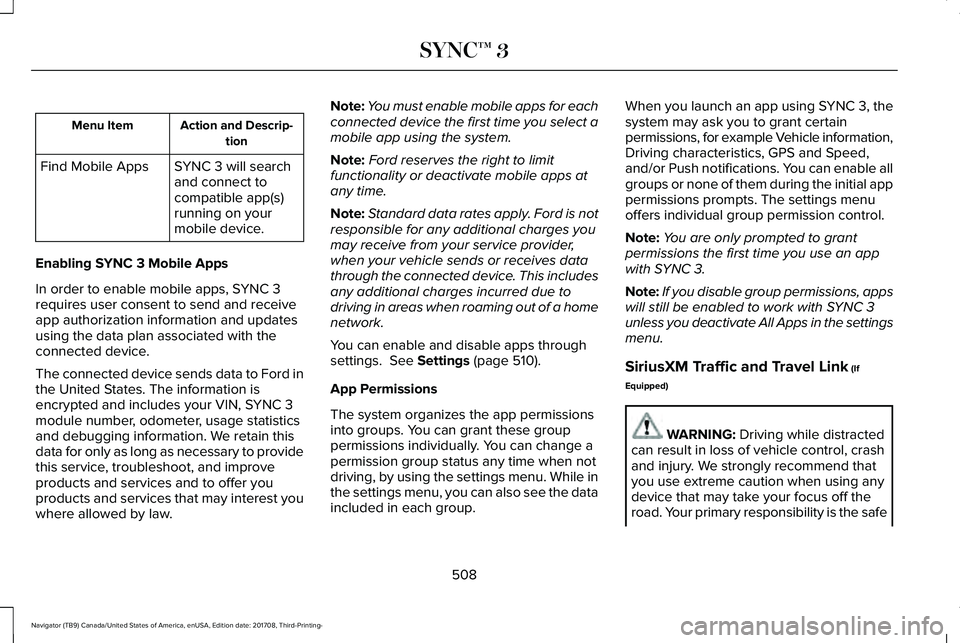
Action and Descrip-tionMenu Item
SYNC 3 will searchand connect tocompatible app(s)running on yourmobile device.
Find Mobile Apps
Enabling SYNC 3 Mobile Apps
In order to enable mobile apps, SYNC 3requires user consent to send and receiveapp authorization information and updatesusing the data plan associated with theconnected device.
The connected device sends data to Ford inthe United States. The information isencrypted and includes your VIN, SYNC 3module number, odometer, usage statisticsand debugging information. We retain thisdata for only as long as necessary to providethis service, troubleshoot, and improveproducts and services and to offer youproducts and services that may interest youwhere allowed by law.
Note:You must enable mobile apps for eachconnected device the first time you select amobile app using the system.
Note:Ford reserves the right to limitfunctionality or deactivate mobile apps atany time.
Note:Standard data rates apply. Ford is notresponsible for any additional charges youmay receive from your service provider,when your vehicle sends or receives datathrough the connected device. This includesany additional charges incurred due todriving in areas when roaming out of a homenetwork.
You can enable and disable apps throughsettings. See Settings (page 510).
App Permissions
The system organizes the app permissionsinto groups. You can grant these grouppermissions individually. You can change apermission group status any time when notdriving, by using the settings menu. While inthe settings menu, you can also see the dataincluded in each group.
When you launch an app using SYNC 3, thesystem may ask you to grant certainpermissions, for example Vehicle information,Driving characteristics, GPS and Speed,and/or Push notifications. You can enable allgroups or none of them during the initial apppermissions prompts. The settings menuoffers individual group permission control.
Note:You are only prompted to grantpermissions the first time you use an appwith SYNC 3.
Note:If you disable group permissions, appswill still be enabled to work with SYNC 3unless you deactivate All Apps in the settingsmenu.
SiriusXM Traffic and Travel Link (If
Equipped)
WARNING: Driving while distractedcan result in loss of vehicle control, crashand injury. We strongly recommend thatyou use extreme caution when using anydevice that may take your focus off theroad. Your primary responsibility is the safe
508
Navigator (TB9) Canada/United States of America, enUSA, Edition date: 201708, Third-Printing-
SYNC™ 3
Page 516 of 649
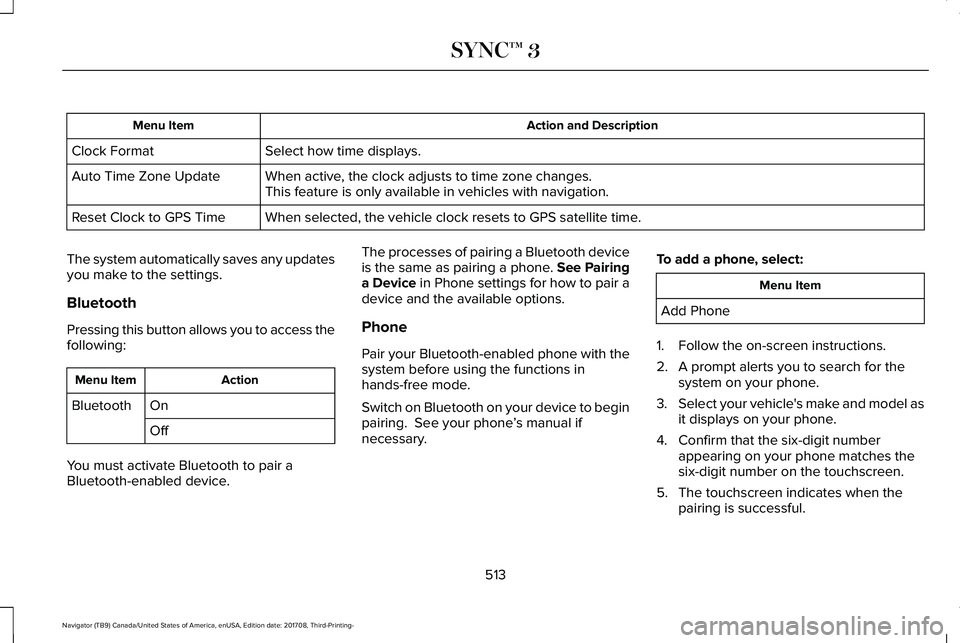
Action and DescriptionMenu Item
Select how time displays.Clock Format
When active, the clock adjusts to time zone changes.Auto Time Zone UpdateThis feature is only available in vehicles with navigation.
When selected, the vehicle clock resets to GPS satellite time.Reset Clock to GPS Time
The system automatically saves any updatesyou make to the settings.
Bluetooth
Pressing this button allows you to access thefollowing:
ActionMenu Item
OnBluetooth
Off
You must activate Bluetooth to pair aBluetooth-enabled device.
The processes of pairing a Bluetooth deviceis the same as pairing a phone. See Pairinga Device in Phone settings for how to pair adevice and the available options.
Phone
Pair your Bluetooth-enabled phone with thesystem before using the functions inhands-free mode.
Switch on Bluetooth on your device to beginpairing. See your phone’s manual ifnecessary.
To add a phone, select:
Menu Item
Add Phone
1. Follow the on-screen instructions.
2. A prompt alerts you to search for thesystem on your phone.
3.Select your vehicle's make and model asit displays on your phone.
4. Confirm that the six-digit numberappearing on your phone matches thesix-digit number on the touchscreen.
5. The touchscreen indicates when thepairing is successful.
513
Navigator (TB9) Canada/United States of America, enUSA, Edition date: 201708, Third-Printing-
SYNC™ 3
Page 554 of 649
There are several Lincoln Protect extendedservice plans available in various time,distance and deductible combinations. Eachplan is tailored to fit your own driving needs,including reimbursement for towing andrental. When you purchase Lincoln Protectextended service plan, you receive addedpeace-of-mind protection throughoutCanada, the United States and Mexico,provided by a network of participatingauthorized Lincoln Motor Company dealers.
Note:Repairs performed outside of Canada,the United States and Mexico are not eligiblefor Lincoln Protect extended service plancoverage.
This information is subject to change. Formore information, visit your local Lincoln ofCanada dealer or www.Lincoln.ca to find theLincoln Protect extended service plan thatis right for you.
551
Navigator (TB9) Canada/United States of America, enUSA, Edition date: 201708, Third-Printing-
Lincoln Protect
Page 556 of 649
Your vehicle is equipped with the IntelligentOil-Life Monitor system, which displays amessage in the information display at theproper oil change interval. This interval maybe up to one year or 10,000 mi (16,000 km).
When the oil change message appears inthe information display, it is time for an oilchange. Make sure you perform the oilchange within two weeks or 500 mi (800 km)of the message appearing. Make sure youreset the Intelligent Oil-Life Monitor aftereach oil change. See Oil Change IndicatorReset (page 365).
If your information display resets prematurelyor becomes inoperative, you should performthe oil change interval at six months or5,000 mi (8,000 km) from your last oilchange. Never exceed one year or 10,000 mi(16,000 km) between oil change intervals.
Your vehicle is very sophisticated and builtwith multiple, complex, performance systems.Every manufacturer develops these systemsusing different specifications andperformance features. That is why it isimportant to rely upon your dealership toproperly diagnose and repair your vehicle.
Ford Motor Company has recommendedmaintenance intervals for various parts andcomponent systems based upon engineeringtesting. Ford Motor Company relies upon thistesting to determine the most appropriatemileage for replacement of oils and fluids toprotect your vehicle at the lowest overall costto you and recommends againstmaintenance schedules that deviate fromthe scheduled maintenance information.
We strongly recommend the use of onlygenuine Ford, Motorcraft or Ford-authorizedre-manufactured replacement partsengineered for your vehicle.
Additives and Chemicals
This owner's manual and the Ford WorkshopManual list the recommended additives andchemicals for your vehicle. We do notrecommend using chemicals or additives notapproved by us as part of your vehicle’snormal maintenance. Please consult yourwarranty information.
Oils, Fluids and Flushing
In many cases, fluid discoloration is a normaloperating characteristic and, by itself, doesnot necessarily indicate a concern or that thefluid needs to be changed. However, aqualified expert, such as the factory-trainedtechnicians at your dealership, shouldinspect discolored fluids that also show signsof overheating or foreign materialcontamination immediately.
Make sure to change your vehicle’s oils andfluids at the specified intervals or inconjunction with a repair. Flushing is a viableway to change fluid for many vehiclesub-systems during scheduled maintenance.It is critical that systems are flushed only withnew fluid that is the same as that requiredto fill and operate the system or using aFord-approved flushing chemical.
Owner Checks and Services
Make sure you perform the following basicmaintenance checks and inspections everymonth or at six-month intervals.
553
Navigator (TB9) Canada/United States of America, enUSA, Edition date: 201708, Third-Printing-
Scheduled Maintenance
Page 559 of 649
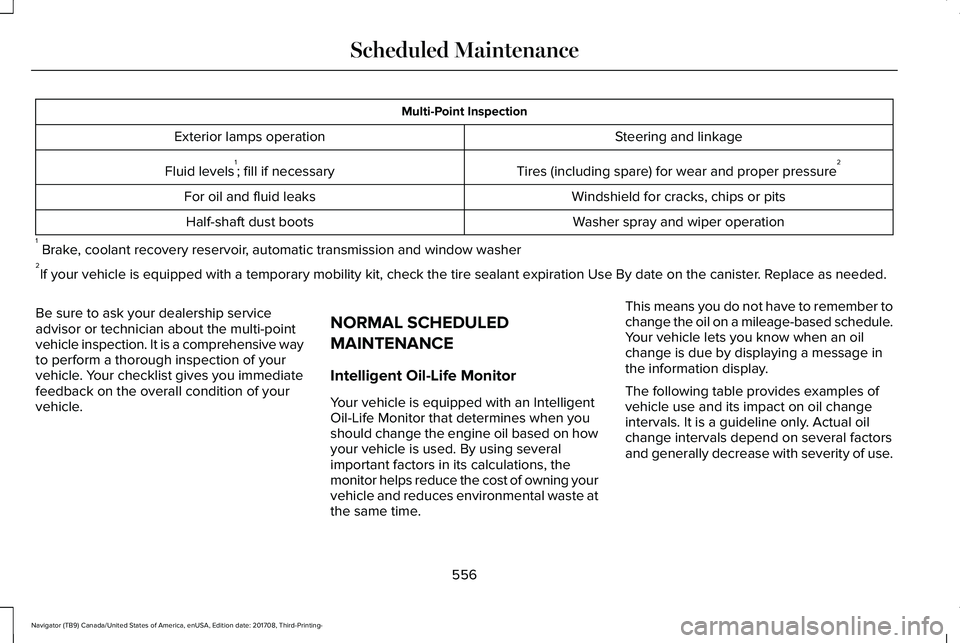
Multi-Point Inspection
Steering and linkageExterior lamps operation
Tires (including spare) for wear and proper pressure2Fluid levels1; fill if necessary
Windshield for cracks, chips or pitsFor oil and fluid leaks
Washer spray and wiper operationHalf-shaft dust boots
1 Brake, coolant recovery reservoir, automatic transmission and window washer2If your vehicle is equipped with a temporary mobility kit, check the tire sealant expiration Use By date on the canister. Replace as needed.
Be sure to ask your dealership serviceadvisor or technician about the multi-pointvehicle inspection. It is a comprehensive wayto perform a thorough inspection of yourvehicle. Your checklist gives you immediatefeedback on the overall condition of yourvehicle.
NORMAL SCHEDULED
MAINTENANCE
Intelligent Oil-Life Monitor
Your vehicle is equipped with an IntelligentOil-Life Monitor that determines when youshould change the engine oil based on howyour vehicle is used. By using severalimportant factors in its calculations, themonitor helps reduce the cost of owning yourvehicle and reduces environmental waste atthe same time.
This means you do not have to remember tochange the oil on a mileage-based schedule.Your vehicle lets you know when an oilchange is due by displaying a message inthe information display.
The following table provides examples ofvehicle use and its impact on oil changeintervals. It is a guideline only. Actual oilchange intervals depend on several factorsand generally decrease with severity of use.
556
Navigator (TB9) Canada/United States of America, enUSA, Edition date: 201708, Third-Printing-
Scheduled Maintenance
Page 620 of 649
Gracenote uses a unique identifier to trackqueries for statistical purposes. The purposeof a randomly assigned numeric identifier isto allow Gracenote to count queries withoutknowing anything about who you are. Formore information, see the web page atwww.gracenote.com for the GracenotePrivacy Policy.
THE GRACENOTE SOFTWARE, EACH ITEMOF GRACENOTE DATA AND THEGRACENOTE CONTENT ARE LICENSED TOYOU "AS IS". NEITHER GRACENOTE MAKESANY REPRESENTATIONS OR WARRANTIES,EXPRESS OR IMPLIED, REGARDING THEACCURACY OF ANY GRACENOTE DATAFROM THE GRACENOTE SERVERS ORGRACENOTE CONTENT. GRACENOTECOLLECTIVELY AND SEPARATELY RESERVETHE RIGHT TO DELETE DATA AND/ORCONTENT FROM THE COMPANIES'RESPECTIVE SERVERS OR, IN THE CASE OFGRACENOTE, CHANGE DATA CATEGORIESFOR ANY CAUSE THAT GRACENOTEDEEMS SUFFICIENT. NO WARRANTY ISMADE THAT EITHER GRACENOTECONTENT OR THE GRACENOTE SOFTWAREOR GRACENOTE SERVERS ARE
ERROR-FREE OR THAT THE FUNCTIONINGOF THE GRACENOTE SOFTWARE ORGRACENOTE SERVERS WILL BEUNINTERRUPTED. GRACENOTE IS NOTOBLIGATED TO PROVIDE YOU WITH ANYENHANCED OR ADDITIONAL DATA TYPESTHAT GRACENOTE MAY CHOOSE TOPROVIDE IN THE FUTURE AND IS FREE TODISCONTINUE ITS ONLINE SERVICES ATANY TIME. GRACENOTE DISCLAIM ALLWARRANTIES EXPRESS OR IMPLIED,INCLUDING, BUT NOT LIMITED TO, IMPLIEDWARRANTIES OF MERCHANTABILITY,FITNESS FOR A PARTICULAR PURPOSE,TITLE, AND NON-INFRINGEMENT. NEITHERGRACENOTE WARRANTS THE RESULTSTHAT WILL BE OBTAINED BY YOUR USEOF THE GRACENOTE SOFTWARE OR ANYGRACENOTE SERVER. IN NO CASE WILLGRACENOTE BE LIABLE FOR ANYCONSEQUENTIAL OR INCIDENTALDAMAGES OR FOR ANY LOST PROFITS ORLOST REVENUES FOR ANY REASONWHATSOEVER. © Gracenote 2007.
Radio Frequency Statement
FCC ID: ACJ-SYNCG3-L
IC: 216B-SYNCG3-L
This device complies with Part 15 of the FCCRules and with RSS-210 of Industry Canada.Operation is subject to the following twoconditions:
(1) This device may not cause harmfulinterference, and
(2) this device must accept any interferencereceived, including interference that maycause undesired operation.
WARNING: Changes or modificationsnot expressively approved by the partyresponsible for compliance could void theuser's authority to operate the equipment.The term "IC:" before the radio certificationnumber only signifies that Industry Canadatechnical specifications were met.
The antenna used for this transmitter mustnot be co-located or operating in conjunctionwith any other antenna or transmitter.
617
Navigator (TB9) Canada/United States of America, enUSA, Edition date: 201708, Third-Printing-
Appendices