child restraint LINCOLN NAVIGATOR 2018 Owner's Guide
[x] Cancel search | Manufacturer: LINCOLN, Model Year: 2018, Model line: NAVIGATOR, Model: LINCOLN NAVIGATOR 2018Pages: 649, PDF Size: 4.96 MB
Page 178 of 649
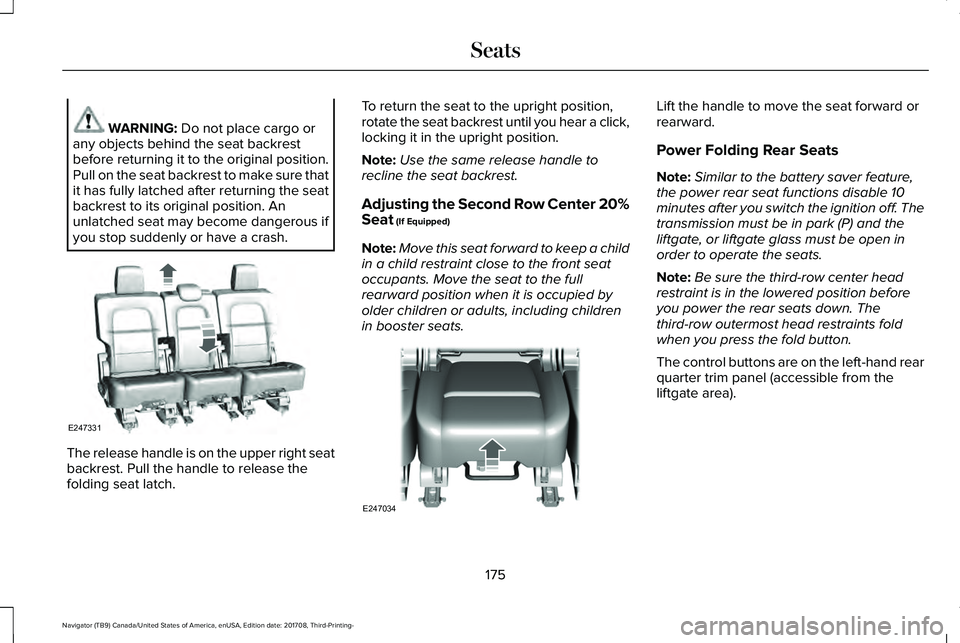
WARNING: Do not place cargo orany objects behind the seat backrestbefore returning it to the original position.Pull on the seat backrest to make sure thatit has fully latched after returning the seatbackrest to its original position. Anunlatched seat may become dangerous ifyou stop suddenly or have a crash.
The release handle is on the upper right seatbackrest. Pull the handle to release thefolding seat latch.
To return the seat to the upright position,rotate the seat backrest until you hear a click,locking it in the upright position.
Note:Use the same release handle torecline the seat backrest.
Adjusting the Second Row Center 20%Seat (If Equipped)
Note:Move this seat forward to keep a childin a child restraint close to the front seatoccupants. Move the seat to the fullrearward position when it is occupied byolder children or adults, including childrenin booster seats.
Lift the handle to move the seat forward orrearward.
Power Folding Rear Seats
Note:Similar to the battery saver feature,the power rear seat functions disable 10minutes after you switch the ignition off. Thetransmission must be in park (P) and theliftgate, or liftgate glass must be open inorder to operate the seats.
Note:Be sure the third-row center headrestraint is in the lowered position beforeyou power the rear seats down. Thethird-row outermost head restraints foldwhen you press the fold button.
The control buttons are on the left-hand rearquarter trim panel (accessible from theliftgate area).
175
Navigator (TB9) Canada/United States of America, enUSA, Edition date: 201708, Third-Printing-
SeatsE247331 E247034
Page 180 of 649
Folding Down the Rear Seats to the LoadFloor
WARNING: To prevent possibledamage to the seat or seatbelts, make surethat the seatbelts are not fastened beforefolding the seatback.
WARNING: Do not place cargo orany objects behind the seatback beforereturning it to the original position.
The third-row seats have obstacle detectionthat prevents the seats from folding orreturning if they are obstructed.
Power Recline
WARNING: Do not recline a rear seaton which a child restraint is installed.Failure to follow this instruction couldreduce the effectiveness of the childrestraint.
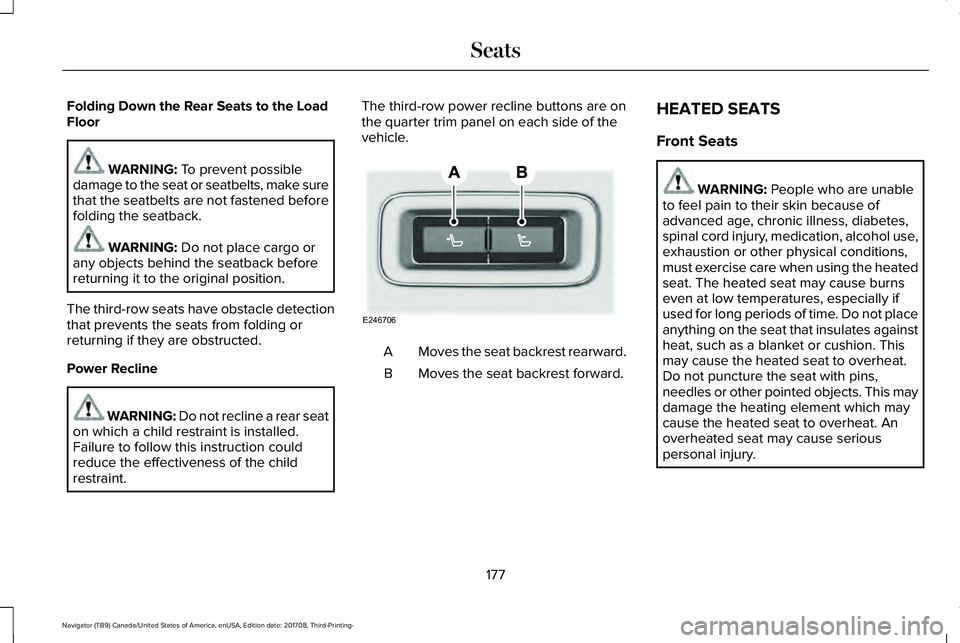
The third-row power recline buttons are onthe quarter trim panel on each side of thevehicle.
Moves the seat backrest rearward.A
Moves the seat backrest forward.B
HEATED SEATS
Front Seats
WARNING: People who are unableto feel pain to their skin because ofadvanced age, chronic illness, diabetes,spinal cord injury, medication, alcohol use,exhaustion or other physical conditions,must exercise care when using the heatedseat. The heated seat may cause burnseven at low temperatures, especially ifused for long periods of time. Do not placeanything on the seat that insulates againstheat, such as a blanket or cushion. Thismay cause the heated seat to overheat.Do not puncture the seat with pins,needles or other pointed objects. This maydamage the heating element which maycause the heated seat to overheat. Anoverheated seat may cause seriouspersonal injury.
177
Navigator (TB9) Canada/United States of America, enUSA, Edition date: 201708, Third-Printing-
SeatsE246706
Page 638 of 649
Location of the Spare Tire and Tools.............415Tire Change Procedure.....................................416
Changing the 12V Battery..........................373Battery Management System..........................375
Changing the Engine Air Filter...................381Changing the Wiper Blades.......................376Checking MyKey System Status.................70MyKey Distance.....................................................70Number of Admin Keys.......................................70Number of MyKeys...............................................70
Checking the Wiper Blades.......................375Childminder Mirror........................................108Child Restraint and SeatbeltMaintenance..................................................49Child Restraint Positioning............................37Child Safety.......................................................19General Information..............................................19
Child Safety Locks..........................................39Left-Hand Side.......................................................39Right-Hand Side....................................................39
Cleaning Leather Seats..............................388Cleaning Products........................................382Materials...............................................................382
Cleaning the Engine....................................385Cleaning the Exterior...................................383Cleaning the Headlamps..................................383Exterior Chrome Parts.......................................384Exterior Plastic Parts..........................................384
Stripes or Graphics.............................................384Underbody...........................................................384Under Hood.........................................................384
Cleaning the Instrument Panel andInstrument Cluster Lens...........................388Cleaning the Interior....................................386Cleaning Black Label or PresidentialInterior..............................................................386
Cleaning the Wheels...................................389Cleaning the Windows and WiperBlades...........................................................385Clearing All MyKeys.......................................70Climate Control...............................................151Climate Controlled Seats............................179Ventilated Seats...................................................179
Coolant CheckSee: Engine Coolant Check............................366
Crash Sensors and Airbag Indicator.........60Creating a MyKey...........................................69Programming and Changing ConfigurableSettings...............................................................69
Cross Traffic Alert.........................................276Blocked Sensors.................................................279Switching the System Off and On..................279System Errors......................................................279System Lights, Messages and AudibleAlerts.................................................................279System Limitations.............................................279
Using the Cross Traffic Alert System.............276
Cruise Control.................................................90Principle of Operation.......................................256Type One................................................................90Type Two..................................................................91
Cruise controlSee: Using Cruise Control...............................256
Customer Assistance...................................334
D
Data Recording................................................10Event Data Recording...........................................10Service Data Recording.......................................10
Daytime Running Lamps...............................98Type One - Conventional(Non-Configurable)..........................................98Type Two - Configurable....................................99
Direction Indicators.......................................101Lane Change.........................................................101
Doors and Locks.............................................72Drive Mode Control.....................................285Lincoln Drive Modes..........................................285
Driver Alert.....................................................265Using Driver Alert...............................................266
Driver and Passenger Airbags....................53Children and Airbags...........................................54
635
Navigator (TB9) Canada/United States of America, enUSA, Edition date: 201708, Third-Printing-
Index
Page 641 of 649
Rear Seats.............................................................178
Heated Steering Wheel................................92Heated Windows and Mirrors....................156Heated Exterior Mirrors.....................................156Heated Rear Window.........................................156Windshield Wiper De-icer.................................156
HeatingSee: Climate Control...........................................151
Hill Descent Control....................................236Principle of Operation.......................................236
Hill Start Assist..............................................228Switching the System On and Off..................229Using Hill Start Assist........................................229
Hints on Controlling the InteriorClimate..........................................................153Defogging the Side Windows in ColdWeather.............................................................154General Hints........................................................153Quickly Cooling the Interior..............................154Quickly Heating the Interior.............................154Recommended Settings for Cooling..............154Recommended Settings for Heating..............154
Hints on Driving With Anti-LockBrakes..........................................................226Home Screen.................................................461Hood LockSee: Opening and Closing the Hood.............361
I
In California (U.S. Only)...............................335Information Display Control..........................91Information Displays......................................119General Information.............................................119
Information Messages..................................124Active Park............................................................125Adaptive Cruise Control....................................125Adaptive Headlamps..........................................126Alarm......................................................................126Automatic Engine Shutdown............................126Battery and Charging System..........................127Blind Spot Information and Cross Traffic AlertSystem...............................................................128Doors and Locks..................................................129Driver Alert............................................................129Drivetrain...............................................................130Four-Wheel Drive..................................................131Fuel.........................................................................132Hill Start Assist.....................................................133Keys and Intelligent Access..............................133Lane Keeping System.........................................134Maintenance.........................................................135MyKey.....................................................................136Off Road.................................................................137Park Aid..................................................................137Park Brake.............................................................138
Power Steering....................................................139Pre-Collision Assist.............................................140Pro Trailer Backup Assist™.................................140Remote Start.........................................................142Seats.......................................................................142Stability Control....................................................142Starting System ...................................................143Tire Pressure Monitoring System....................143Trailer......................................................................144Transmission.........................................................145
Installing Child Restraints..............................21Child Seats..............................................................21Combining Seatbelt and LATCH LowerAnchors for Attaching Child SafetySeats....................................................................29Using Lap and Shoulder Belts............................21Using Lower Anchors and Tethers forCHildren (LATCH).............................................27Using Tether Straps..............................................29
Instrument Cluster..........................................112Instrument Lighting Dimmer........................98Instrument Panel Overview...........................17Interior Lamps................................................102Front Interior Lamp.............................................102Rear Interior Lamps.............................................103
Interior Mirror..................................................107Auto-Dimming Mirror..........................................107
Introduction.........................................................7
638
Navigator (TB9) Canada/United States of America, enUSA, Edition date: 201708, Third-Printing-
Index