weight LINCOLN NAVIGATOR 2018 Owner's Guide
[x] Cancel search | Manufacturer: LINCOLN, Model Year: 2018, Model line: NAVIGATOR, Model: LINCOLN NAVIGATOR 2018Pages: 649, PDF Size: 4.96 MB
Page 398 of 649
Treadwear
The treadwear grade is a comparativerating based on the wear rate of the tirewhen tested under controlled conditionson a specified government test course.For example, a tire graded 150 wouldwear one and one-half (1 ½) times as wellon the government course as a tiregraded 100. The relative performanceof tires depends upon the actualconditions of their use, however, andmay depart significantly from the normdue to variations in driving habits,service practices, and differences inroad characteristics and climate.
Traction AA A B C
WARNING: The traction gradeassigned to this tire is based onstraight-ahead braking traction tests,and does not include acceleration,cornering, hydroplaning or peaktraction characteristics.
The traction grades, from highest tolowest are AA, A, B, and C. The gradesrepresent the tire’s ability to stop on wetpavement as measured under controlledconditions on specified government testsurfaces of asphalt and concrete. A tiremarked C may have poor tractionperformance.
Temperature A B C
WARNING: The temperaturegrade for this tire is established for atire that is properly inflated and notoverloaded. Excessive speed,underinflation, or excessive loading,either separately or in combination,can cause heat buildup and possibletire failure.
The temperature grades are A (thehighest), B and C, representing the tire’sresistance to the generation of heat andits ability to dissipate heat when testedunder controlled conditions on aspecified indoor laboratory test wheel.Sustained high temperature can cause
the material of the tire to degenerateand reduce tire life, and excessivetemperature can lead to sudden tirefailure. The grade C corresponds to alevel of performance which allpassenger car tires must meet under theFederal Motor Vehicle Safety StandardNo. 139. Grades B and A representhigher levels of performance on thelaboratory test wheel than the minimumrequired by law.
Glossary of Tire Terminology
*Tire label: A label showing the originalequipment tire sizes, recommendedinflation pressure and the maximumweight the vehicle can carry.
*Tire Identification Number (TIN): A
number on the sidewall of each tireproviding information about the tirebrand and manufacturing plant, tire sizeand date of manufacture. Also referredto as DOT code.
*Inflation pressure: A measure of theamount of air in a tire.
395
Navigator (TB9) Canada/United States of America, enUSA, Edition date: 201708, Third-Printing-
Wheels and Tires
Page 400 of 649
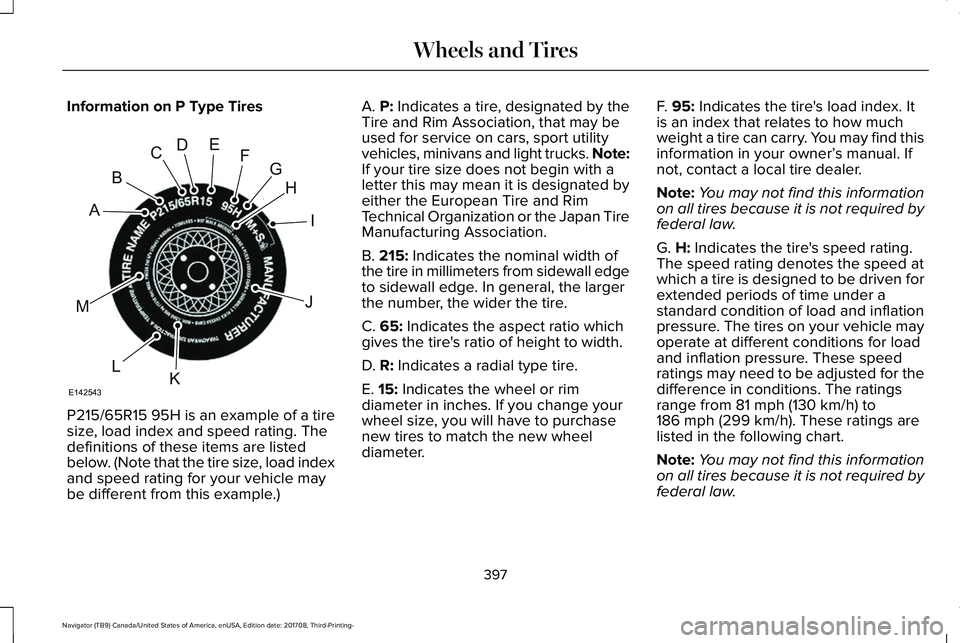
Information on P Type Tires
P215/65R15 95H is an example of a tiresize, load index and speed rating. Thedefinitions of these items are listedbelow. (Note that the tire size, load indexand speed rating for your vehicle maybe different from this example.)
A. P: Indicates a tire, designated by theTire and Rim Association, that may beused for service on cars, sport utilityvehicles, minivans and light trucks. Note:If your tire size does not begin with aletter this may mean it is designated byeither the European Tire and RimTechnical Organization or the Japan TireManufacturing Association.
B. 215: Indicates the nominal width ofthe tire in millimeters from sidewall edgeto sidewall edge. In general, the largerthe number, the wider the tire.
C. 65: Indicates the aspect ratio whichgives the tire's ratio of height to width.
D. R: Indicates a radial type tire.
E. 15: Indicates the wheel or rim
diameter in inches. If you change yourwheel size, you will have to purchasenew tires to match the new wheeldiameter.
F. 95: Indicates the tire's load index. Itis an index that relates to how muchweight a tire can carry. You may find thisinformation in your owner’s manual. Ifnot, contact a local tire dealer.
Note:You may not find this informationon all tires because it is not required byfederal law.
G. H: Indicates the tire's speed rating.The speed rating denotes the speed atwhich a tire is designed to be driven forextended periods of time under astandard condition of load and inflationpressure. The tires on your vehicle mayoperate at different conditions for loadand inflation pressure. These speedratings may need to be adjusted for thedifference in conditions. The ratings
range from 81 mph (130 km/h) to186 mph (299 km/h). These ratings arelisted in the following chart.
Note:You may not find this informationon all tires because it is not required byfederal law.
397
Navigator (TB9) Canada/United States of America, enUSA, Edition date: 201708, Third-Printing-
Wheels and TiresH
I
J
KL
M
A
B
CDEFG
E142543
Page 420 of 649
WARNING: Always use the jackprovided as original equipment with yourvehicle. If using a jack other than the oneprovided, make sure the jack capacity isadequate for the vehicle weight, includingany vehicle cargo or modifications. If youare unsure if the jack capacity is adequate,contact the authorized dealer.
WARNING: Switch off the runningboards before jacking or placing any objectunder your vehicle. Never place your handbetween the extended running board andyour vehicle. A moving running board maycause injury.
WARNING: Only use the spare wheelcarrier to stow the wheel provided withyour vehicle. Other wheel sizes couldcause the spare wheel carrier to fail if itdoes not fit securely or is too heavy.
1.Park the vehicle on firm, level ground andactivate the hazard flashers.
2. Apply the parking brake, place thetransmission in park (P) and switch theignition off.
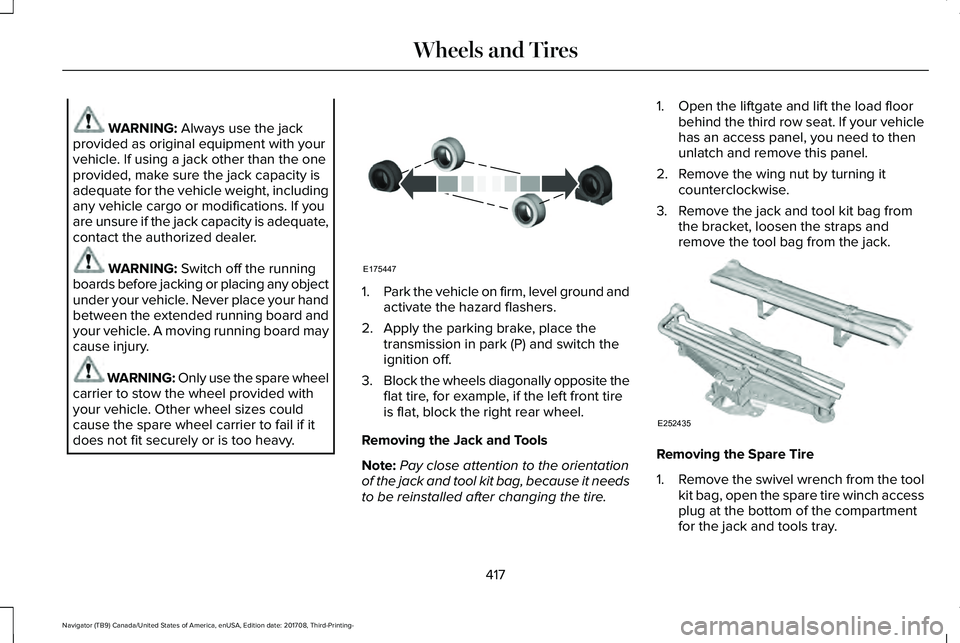
3.Block the wheels diagonally opposite theflat tire, for example, if the left front tireis flat, block the right rear wheel.
Removing the Jack and Tools
Note:Pay close attention to the orientationof the jack and tool kit bag, because it needsto be reinstalled after changing the tire.
1. Open the liftgate and lift the load floorbehind the third row seat. If your vehiclehas an access panel, you need to thenunlatch and remove this panel.
2. Remove the wing nut by turning itcounterclockwise.
3. Remove the jack and tool kit bag fromthe bracket, loosen the straps andremove the tool bag from the jack.
Removing the Spare Tire
1.Remove the swivel wrench from the toolkit bag, open the spare tire winch accessplug at the bottom of the compartmentfor the jack and tools tray.
417
Navigator (TB9) Canada/United States of America, enUSA, Edition date: 201708, Third-Printing-
Wheels and TiresE175447 E252435
Page 427 of 649
VEHICLE IDENTIFICATION
NUMBER
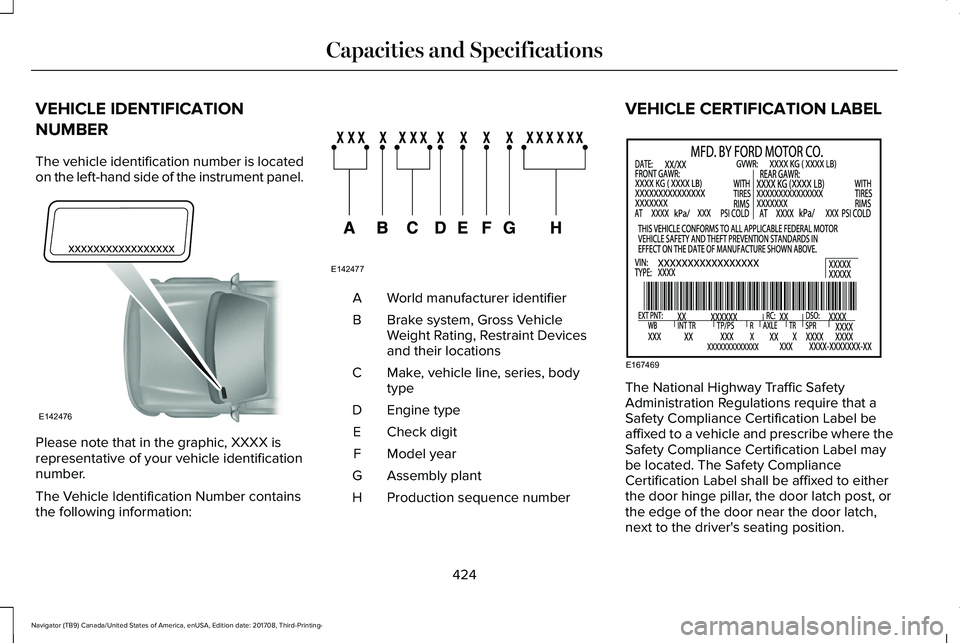
The vehicle identification number is locatedon the left-hand side of the instrument panel.
Please note that in the graphic, XXXX isrepresentative of your vehicle identificationnumber.
The Vehicle Identification Number containsthe following information:
World manufacturer identifierA
Brake system, Gross VehicleWeight Rating, Restraint Devicesand their locations
B
Make, vehicle line, series, bodytypeC
Engine typeD
Check digitE
Model yearF
Assembly plantG
Production sequence numberH
VEHICLE CERTIFICATION LABEL
The National Highway Traffic SafetyAdministration Regulations require that aSafety Compliance Certification Label beaffixed to a vehicle and prescribe where theSafety Compliance Certification Label maybe located. The Safety ComplianceCertification Label shall be affixed to eitherthe door hinge pillar, the door latch post, orthe edge of the door near the door latch,next to the driver's seating position.
424
Navigator (TB9) Canada/United States of America, enUSA, Edition date: 201708, Third-Printing-
Capacities and SpecificationsE142476 E142477 E167469
Page 551 of 649
For maximum vehicle performance, keep thefollowing information in mind when addingaccessories or equipment to your vehicle:
•When adding accessories, equipment,passengers and luggage to your vehicle,do not exceed the total weight capacityof the vehicle or of the front or rear axle(GVWR or GAWR as indicated on theSafety Compliance Certification label). Ask an authorized dealer for specificweight information.
•The Federal CommunicationsCommission (FCC) and Canadian RadioTelecommunications Commission (CRTC)regulate the use of mobilecommunications systems that areequipped with radio transmitters, forexample two-way radios, telephones andtheft alarms. Any such equipmentinstalled in your vehicle should complywith Federal CommunicationsCommission (FCC) and Canadian RadioTelecommunications Commission (CRTC)regulations and should be installed onlyby an authorized dealer.
•Mobile communications systems mayharm the operation of your vehicle,particularly if their manufacturer did notdesign them specifically for automotiveuse.
•If you or an authorized Lincoln dealer addany non-Lincoln electrical or electronicaccessories or components to yourvehicle, you may adversely affect batteryperformance and durability. In addition,you may also adversely affect theperformance of other electrical systemsin the vehicle.
548
Navigator (TB9) Canada/United States of America, enUSA, Edition date: 201708, Third-Printing-
Accessories
Page 644 of 649
Protecting the Environment..........................16PunctureSee: Changing a Road Wheel..........................414
R
Rear Axle........................................................224Rear Parking Aid...........................................238Obstacle Distance Indicator............................238
Rear Passenger Climate Controls.............154Rear Seats........................................................171Adjusting the Second Row Center 20%Seat.....................................................................175Adjusting the Second Row Outermost 40%Seat for Easy Entry...........................................171Folding the Second Row 40% Seat ................171Folding the Second Row Center 20% Seat.............................................................................174Power Easy Entry.................................................173Power Folding Rear Seats.................................175Reclining the Second Row Outermost 40%Seat Backrest...................................................174
Rear Under Floor Storage..........................288Advanced System: Forward Divider, CargoShelf and Rear Barrier (BulkheadPosition)............................................................289Cargo Management System............................288
Rear View Camera.......................................250Camera Guidelines.............................................251Manual Zoom......................................................252Obstacle Distance Indicator............................252Rear Camera Delay............................................252Using the Rear View Camera System...........250
Rear View CameraSee: Rear View Camera...................................250
Rear Window Wiper and Washers..............95Rear Camera Washer...........................................95Rear Window Washer..........................................95Rear Window Wiper.............................................95
Recommended Towing Weights...............310Reduced Engine Performance..................324Refueling........................................................202Refueling System Overview............................202Refueling System Warning...............................204Refueling Your Vehicle......................................203
Remote Control...............................................63Car Finder...............................................................65Intelligent Access Key.........................................63Memory Feature....................................................67Remote Start..........................................................66Replacing the Battery..........................................64Sounding the Panic Alarm..................................65Using the Key Blade.............................................63
Remote Start...................................................157Automatic Settings..............................................157
Repairing Minor Paint Damage.................389Replacement Parts Recommendation........13Collision Repairs.....................................................13Scheduled Maintenance and MechanicalRepairs.................................................................13Warranty on Replacement Parts.........................13
Replacing a Lost Key or RemoteControl............................................................67Reporting Safety Defects (CanadaOnly)...............................................................341Reporting Safety Defects (U.S. Only)......340Roadside Assistance...................................327Vehicles Sold in Canada: Getting RoadsideAssistance.......................................................328Vehicles Sold in Canada: Roadside AssistanceProgram Coverage........................................328Vehicles Sold in Canada: Using RoadsideAssistance.......................................................328Vehicles Sold in the United States: GettingRoadside Assistance.....................................327Vehicles Sold in the United States: UsingRoadside Assistance.....................................327
Roadside Emergencies...............................327Roof Racks and Load Carriers...................291Adjusting the Crossbar.....................................292Maximum Recommended LoadAmounts...........................................................292
641
Navigator (TB9) Canada/United States of America, enUSA, Edition date: 201708, Third-Printing-
Index