audio LINCOLN NAVIGATOR 2018 Workshop Manual
[x] Cancel search | Manufacturer: LINCOLN, Model Year: 2018, Model line: NAVIGATOR, Model: LINCOLN NAVIGATOR 2018Pages: 649, PDF Size: 4.96 MB
Page 500 of 649
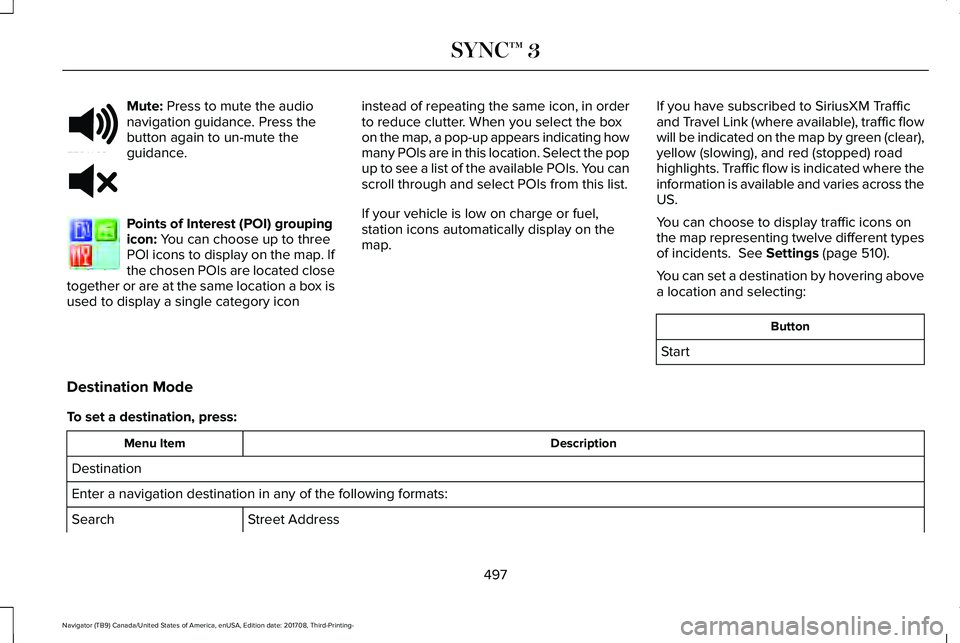
Mute: Press to mute the audionavigation guidance. Press thebutton again to un-mute theguidance.
Points of Interest (POI) groupingicon: You can choose up to threePOI icons to display on the map. Ifthe chosen POIs are located closetogether or are at the same location a box isused to display a single category icon
instead of repeating the same icon, in orderto reduce clutter. When you select the boxon the map, a pop-up appears indicating howmany POIs are in this location. Select the popup to see a list of the available POIs. You canscroll through and select POIs from this list.
If your vehicle is low on charge or fuel,station icons automatically display on themap.
If you have subscribed to SiriusXM Trafficand Travel Link (where available), traffic flowwill be indicated on the map by green (clear),yellow (slowing), and red (stopped) roadhighlights. Traffic flow is indicated where theinformation is available and varies across theUS.
You can choose to display traffic icons onthe map representing twelve different typesof incidents. See Settings (page 510).
You can set a destination by hovering abovea location and selecting:
Button
Start
Destination Mode
To set a destination, press:
DescriptionMenu Item
Destination
Enter a navigation destination in any of the following formats:
Street AddressSearch
497
Navigator (TB9) Canada/United States of America, enUSA, Edition date: 201708, Third-Printing-
SYNC™ 3E251780 E251779 E207754
Page 514 of 649
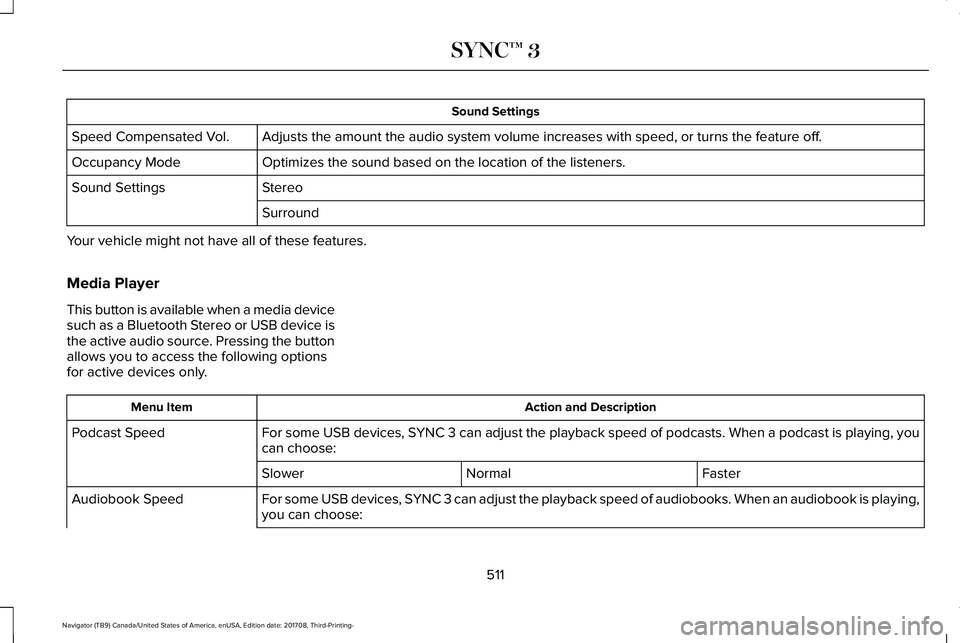
Sound Settings
Adjusts the amount the audio system volume increases with speed, or turns the feature off.Speed Compensated Vol.
Optimizes the sound based on the location of the listeners.Occupancy Mode
StereoSound Settings
Surround
Your vehicle might not have all of these features.
Media Player
This button is available when a media devicesuch as a Bluetooth Stereo or USB device isthe active audio source. Pressing the buttonallows you to access the following optionsfor active devices only.
Action and DescriptionMenu Item
For some USB devices, SYNC 3 can adjust the playback speed of podcasts. When a podcast is playing, youcan choose:Podcast Speed
FasterNormalSlower
For some USB devices, SYNC 3 can adjust the playback speed of audiobooks. When an audiobook is playing,you can choose:Audiobook Speed
511
Navigator (TB9) Canada/United States of America, enUSA, Edition date: 201708, Third-Printing-
SYNC™ 3
Page 520 of 649
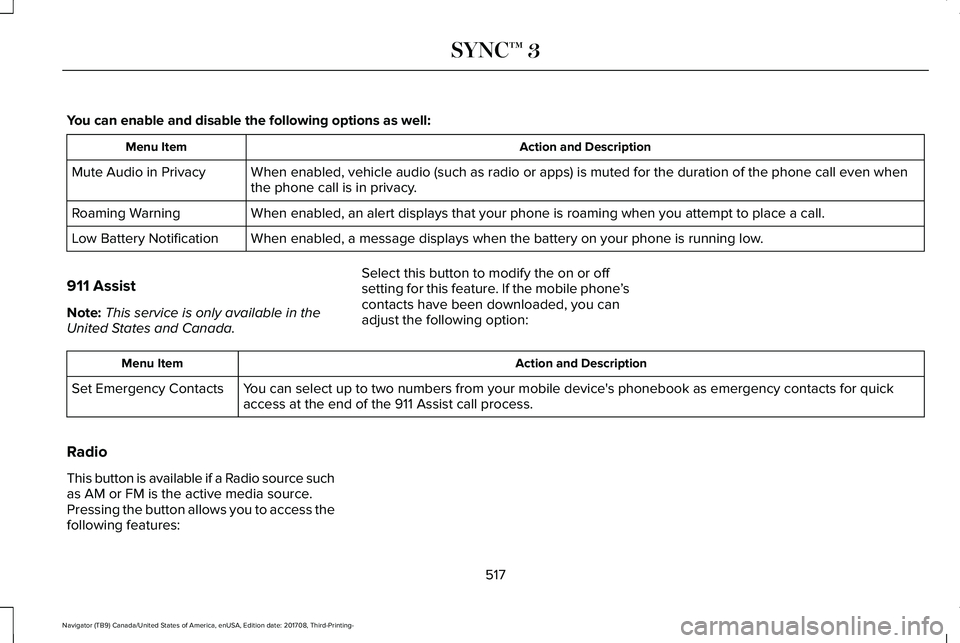
You can enable and disable the following options as well:
Action and DescriptionMenu Item
When enabled, vehicle audio (such as radio or apps) is muted for the duration of the phone call even whenthe phone call is in privacy.Mute Audio in Privacy
When enabled, an alert displays that your phone is roaming when you attempt to place a call.Roaming Warning
When enabled, a message displays when the battery on your phone is running low.Low Battery Notification
911 Assist
Note:This service is only available in theUnited States and Canada.
Select this button to modify the on or offsetting for this feature. If the mobile phone’scontacts have been downloaded, you canadjust the following option:
Action and DescriptionMenu Item
You can select up to two numbers from your mobile device's phonebook as emergency contacts for quickaccess at the end of the 911 Assist call process.Set Emergency Contacts
Radio
This button is available if a Radio source suchas AM or FM is the active media source.Pressing the button allows you to access thefollowing features:
517
Navigator (TB9) Canada/United States of America, enUSA, Edition date: 201708, Third-Printing-
SYNC™ 3
Page 521 of 649
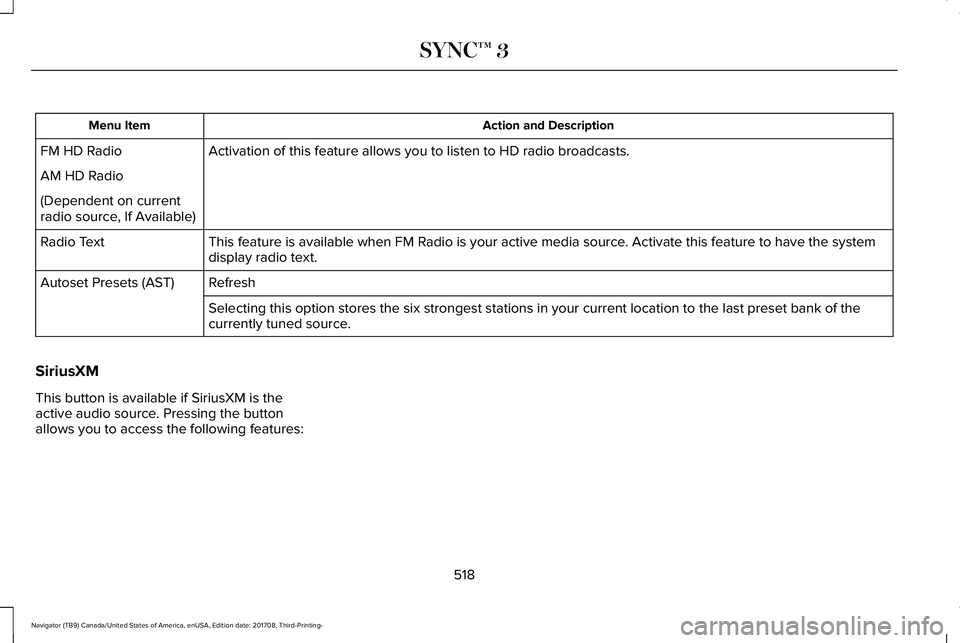
Action and DescriptionMenu Item
Activation of this feature allows you to listen to HD radio broadcasts.FM HD Radio
AM HD Radio
(Dependent on currentradio source, If Available)
This feature is available when FM Radio is your active media source. Activate this feature to have the systemdisplay radio text.Radio Text
RefreshAutoset Presets (AST)
Selecting this option stores the six strongest stations in your current location to the last preset bank of thecurrently tuned source.
SiriusXM
This button is available if SiriusXM is theactive audio source. Pressing the buttonallows you to access the following features:
518
Navigator (TB9) Canada/United States of America, enUSA, Edition date: 201708, Third-Printing-
SYNC™ 3
Page 533 of 649
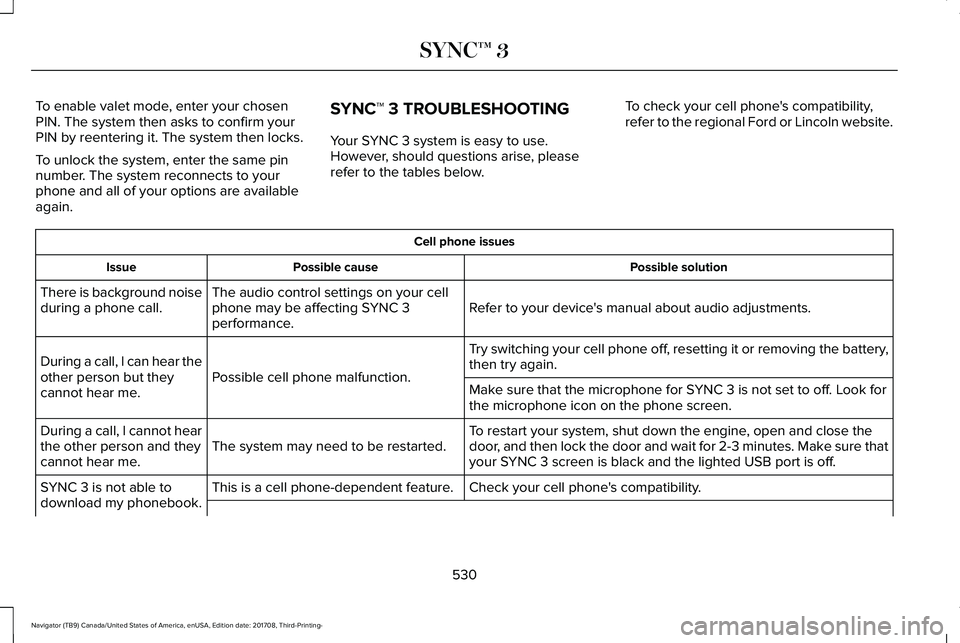
To enable valet mode, enter your chosenPIN. The system then asks to confirm yourPIN by reentering it. The system then locks.
To unlock the system, enter the same pinnumber. The system reconnects to yourphone and all of your options are availableagain.
SYNC™ 3 TROUBLESHOOTING
Your SYNC 3 system is easy to use.However, should questions arise, pleaserefer to the tables below.
To check your cell phone's compatibility,refer to the regional Ford or Lincoln website.
Cell phone issues
Possible solutionPossible causeIssue
Refer to your device's manual about audio adjustments.The audio control settings on your cellphone may be affecting SYNC 3performance.
There is background noiseduring a phone call.
Try switching your cell phone off, resetting it or removing the battery,then try again.Possible cell phone malfunction.During a call, I can hear theother person but theycannot hear me.Make sure that the microphone for SYNC 3 is not set to off. Look forthe microphone icon on the phone screen.
To restart your system, shut down the engine, open and close thedoor, and then lock the door and wait for 2-3 minutes. Make sure thatyour SYNC 3 screen is black and the lighted USB port is off.The system may need to be restarted.During a call, I cannot hearthe other person and theycannot hear me.
Check your cell phone's compatibility.This is a cell phone-dependent feature.SYNC 3 is not able todownload my phonebook.
530
Navigator (TB9) Canada/United States of America, enUSA, Edition date: 201708, Third-Printing-
SYNC™ 3
Page 537 of 649
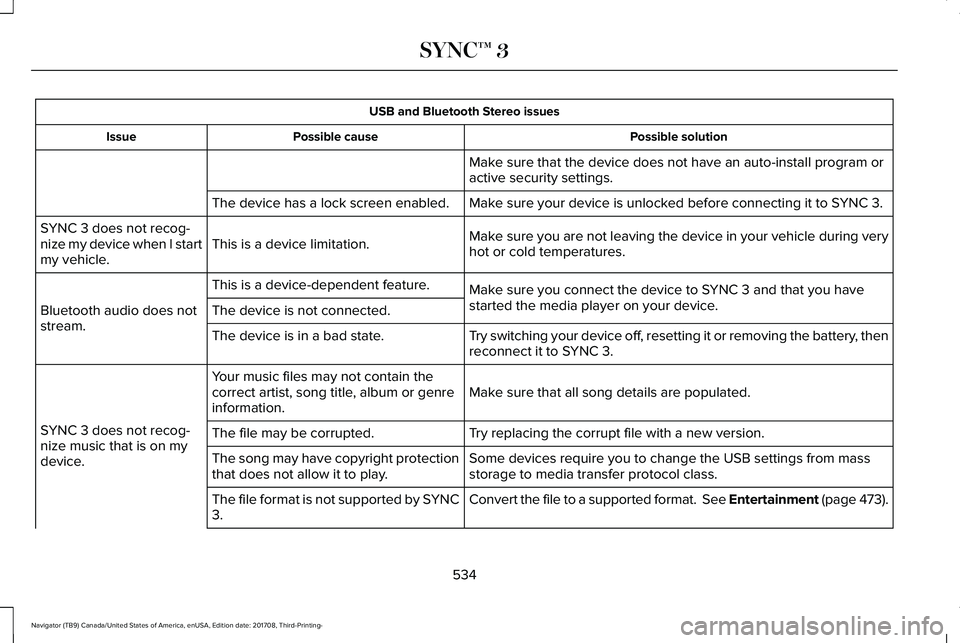
USB and Bluetooth Stereo issues
Possible solutionPossible causeIssue
Make sure that the device does not have an auto-install program oractive security settings.
Make sure your device is unlocked before connecting it to SYNC 3.The device has a lock screen enabled.
Make sure you are not leaving the device in your vehicle during veryhot or cold temperatures.This is a device limitation.SYNC 3 does not recog-nize my device when I startmy vehicle.
Make sure you connect the device to SYNC 3 and that you havestarted the media player on your device.
This is a device-dependent feature.
Bluetooth audio does notstream.The device is not connected.
Try switching your device off, resetting it or removing the battery, thenreconnect it to SYNC 3.The device is in a bad state.
Make sure that all song details are populated.Your music files may not contain thecorrect artist, song title, album or genreinformation.
SYNC 3 does not recog-nize music that is on mydevice.
Try replacing the corrupt file with a new version.The file may be corrupted.
Some devices require you to change the USB settings from massstorage to media transfer protocol class.The song may have copyright protectionthat does not allow it to play.
Convert the file to a supported format. See Entertainment (page 473).The file format is not supported by SYNC3.
534
Navigator (TB9) Canada/United States of America, enUSA, Edition date: 201708, Third-Printing-
SYNC™ 3
Page 543 of 649
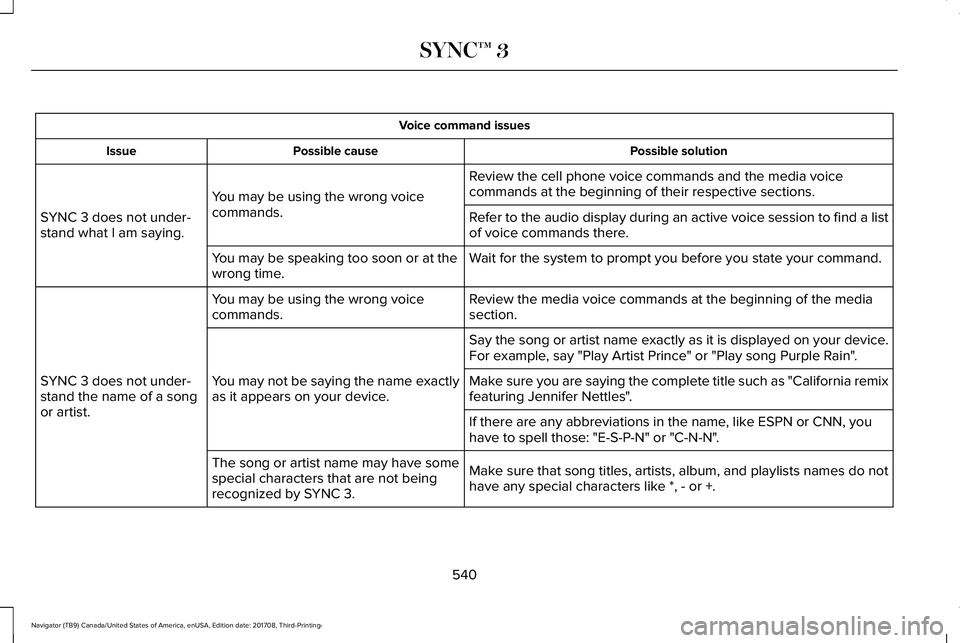
Voice command issues
Possible solutionPossible causeIssue
Review the cell phone voice commands and the media voicecommands at the beginning of their respective sections.You may be using the wrong voicecommands.SYNC 3 does not under-stand what I am saying.Refer to the audio display during an active voice session to find a listof voice commands there.
Wait for the system to prompt you before you state your command.You may be speaking too soon or at thewrong time.
Review the media voice commands at the beginning of the mediasection.You may be using the wrong voicecommands.
SYNC 3 does not under-stand the name of a songor artist.
Say the song or artist name exactly as it is displayed on your device.For example, say "Play Artist Prince" or "Play song Purple Rain".
You may not be saying the name exactlyas it appears on your device.Make sure you are saying the complete title such as "California remixfeaturing Jennifer Nettles".
If there are any abbreviations in the name, like ESPN or CNN, youhave to spell those: "E-S-P-N" or "C-N-N".
Make sure that song titles, artists, album, and playlists names do nothave any special characters like *, - or +.
The song or artist name may have somespecial characters that are not beingrecognized by SYNC 3.
540
Navigator (TB9) Canada/United States of America, enUSA, Edition date: 201708, Third-Printing-
SYNC™ 3
Page 548 of 649
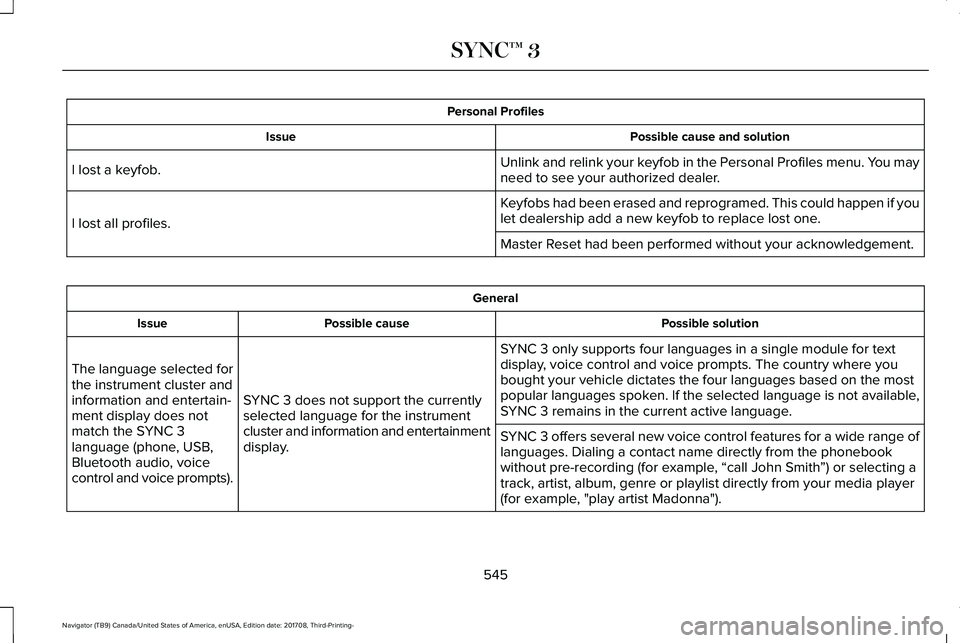
Personal Profiles
Possible cause and solutionIssue
Unlink and relink your keyfob in the Personal Profiles menu. You mayneed to see your authorized dealer.I lost a keyfob.
Keyfobs had been erased and reprogramed. This could happen if youlet dealership add a new keyfob to replace lost one.I lost all profiles.
Master Reset had been performed without your acknowledgement.
General
Possible solutionPossible causeIssue
SYNC 3 only supports four languages in a single module for textdisplay, voice control and voice prompts. The country where youbought your vehicle dictates the four languages based on the mostpopular languages spoken. If the selected language is not available,SYNC 3 remains in the current active language.SYNC 3 does not support the currentlyselected language for the instrumentcluster and information and entertainmentdisplay.
The language selected forthe instrument cluster andinformation and entertain-ment display does notmatch the SYNC 3language (phone, USB,Bluetooth audio, voicecontrol and voice prompts).
SYNC 3 offers several new voice control features for a wide range oflanguages. Dialing a contact name directly from the phonebookwithout pre-recording (for example, “call John Smith”) or selecting atrack, artist, album, genre or playlist directly from your media player(for example, "play artist Madonna").
545
Navigator (TB9) Canada/United States of America, enUSA, Edition date: 201708, Third-Printing-
SYNC™ 3
Page 595 of 649
•Links to Third Party Sites: TheSOFTWARE may provide you with theability to link to third party sites. The thirdparty sites are not under the control ofFORD MOTOR COMPANY, its affiliatesand/or its designated agent. NeitherFORD MOTOR COMPANY nor itsaffiliates nor its designated agent areresponsible for (I) the contents of anythird party sites, any links contained inthird party sites, or any changes orupdates to third party sites, or (ii)webcasting or any other form oftransmission received from any thirdparty sites. If the SOFTWARE provideslinks to third party sites, those links areprovided to you only as a convenience,and the inclusion of any link does notimply an endorsement of the third partysite by FORD MOTOR COMPANY, itsaffiliates and/or its designated agent.
•Obligation to Drive Responsibly: Yourecognize your obligation to driveresponsibly and keep attention on theroad. You will read and abide with theDEVICES operating instructionsparticularly as they pertain to safety andyou agree to assume any risk associated
with the use of the DEVICES.
UPGRADES AND RECOVERY MEDIA: If theSOFTWARE is provided by FORD MOTORCOMPANY separate from the DEVICES onmedia such as a ROM chip, CD ROM disk(s)or via web download or other means, and islabeled "For Upgrade Purposes Only" or "ForRecovery Purposes Only" you may install one(1) copy of such SOFTWARE onto theDEVICES as a replacement copy for theexisting SOFTWARE, and use it inaccordance with this EULA, including anyadditional EULA terms accompanying theupgrade SOFTWARE.
INTELLECTUAL PROPERTY RIGHTS: Alltitle and intellectual property rights in and tothe SOFTWARE (including but not limited toany images, photographs, animations, video,audio, music, text and "applets" incorporatedinto the SOFTWARE), the accompanyingprinted materials, and any copies of theSOFTWARE, are owned by FORD MOTORCOMPANY, or its affiliates or suppliers. TheSOFTWARE is licensed, not sold. You maynot copy the printed materials accompanyingthe SOFTWARE. All title and intellectualproperty rights in and to the content which
may be accessed through use of theSOFTWARE is the property of the respectivecontent owner and may be protected byapplicable copyright or other intellectualproperty laws and treaties. This EULA grantsyou no rights to use such content outside itsintended use. All rights not specificallygranted under this EULA are reserved byFORD MOTOR COMPANY, its affiliates, andthird party software and service providersand suppliers. Use of any on-line serviceswhich may be accessed through theSOFTWARE may be governed by therespective terms of use relating to suchservices. If this SOFTWARE containsdocumentation that is provided only inelectronic form, you may print one copy ofsuch electronic documentation.
592
Navigator (TB9) Canada/United States of America, enUSA, Edition date: 201708, Third-Printing-
Appendices
Page 603 of 649
(b) use your own personal judgment whiledriving. If you feel that a route suggested bythe TeleNav Software instructs you toperform an unsafe or illegal maneuver,places you in an unsafe situation, or directsyou into an area that you consider to beunsafe, do not follow such instructions;
(c) do not input destinations, or otherwisemanipulate the TeleNav Software, unlessyour vehicle is stationary and parked;
(d) do not use the TeleNav Software for anyillegal, unauthorized, unintended, unsafe,hazardous, or unlawful purposes, or in anymanner inconsistent with this Agreement;
(e) arrange all GPS and wireless devices andcables necessary for use of the TeleNavSoftware in a secure manner in your vehicleso that they will not interfere with yourdriving and will not prevent the operation ofany safety device (such as an airbag).
You agree to indemnify and hold TeleNavharmless against all claims resulting from anydangerous or otherwise inappropriate useof the TeleNav Software in any movingvehicle, including as a result of your failureto comply with the directions above.
2. Account Information
You agree: (a) when registering the TeleNavSoftware, to provide TeleNav with true,accurate, current, and complete informationabout yourself, and (b) to inform TeleNavpromptly of any changes to such information,and to keep it true, accurate, current andcomplete.
3. Software License
•Subject to your compliance with theterms of this Agreement, TeleNav herebygrants to you a personal, non-exclusive,non-transferable license (except asexpressly permitted below in connectionwith your permanent transfer of theTeleNav Software license), without theright to sublicense, to use the TeleNavSoftware (in object code form only) inorder to access and use the TeleNavSoftware. This license shall terminateupon any termination or expiration of thisAgreement. You agree that you will usethe TeleNav Software only for yourpersonal business or leisure purposes,and not to provide commercial navigationservices to other parties.
3.1 License Limitations
•(a) reverse engineer, decompile,disassemble, translate, modify, alter orotherwise change the TeleNav Softwareor any part thereof; (b) attempt to derivethe source code, audio library orstructure of the TeleNav Software withoutthe prior express written consent ofTeleNav; (c) remove from the TeleNavSoftware, or alter, any of TeleNav's or itssuppliers' trademarks, trade names,logos, patent or copyright notices, orother notices or markings; (d) distribute,sublicense or otherwise transfer theTeleNav Software to others, except aspart of your permanent transfer of theTeleNav Software; or (e) use the TeleNavSoftware in any manner that
I. infringes the intellectual property orproprietary rights, rights of publicity orprivacy or other rights of any party,
ii. violates any law, statute, ordinance orregulation, including but not limited to lawsand regulations related to spamming, privacy,consumer and child protection, obscenity ordefamation, or
600
Navigator (TB9) Canada/United States of America, enUSA, Edition date: 201708, Third-Printing-
Appendices