reset LINCOLN NAVIGATOR 2018 Workshop Manual
[x] Cancel search | Manufacturer: LINCOLN, Model Year: 2018, Model line: NAVIGATOR, Model: LINCOLN NAVIGATOR 2018Pages: 649, PDF Size: 4.96 MB
Page 535 of 649
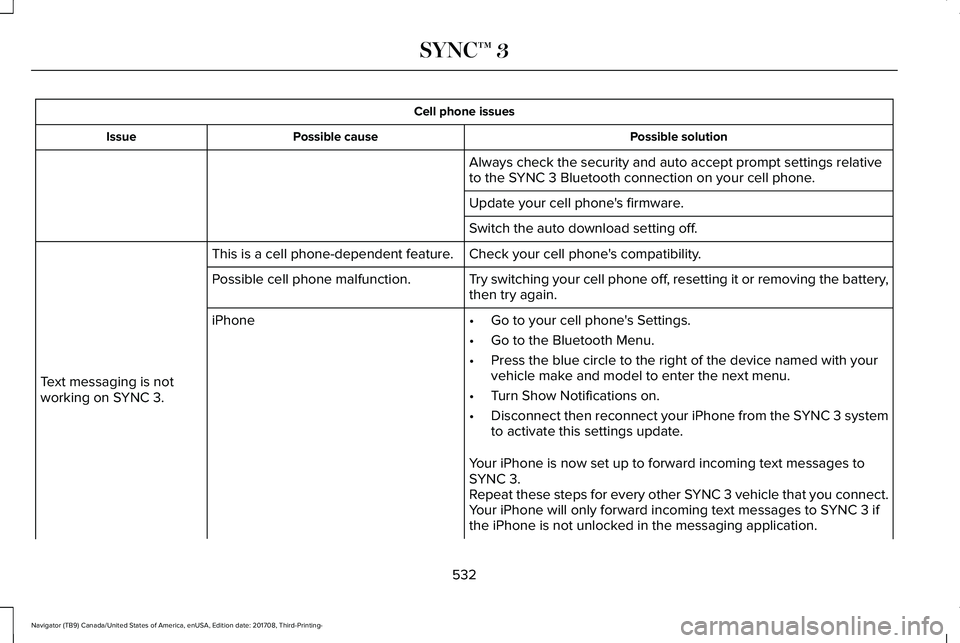
Cell phone issues
Possible solutionPossible causeIssue
Always check the security and auto accept prompt settings relativeto the SYNC 3 Bluetooth connection on your cell phone.
Update your cell phone's firmware.
Switch the auto download setting off.
Check your cell phone's compatibility.This is a cell phone-dependent feature.
Text messaging is notworking on SYNC 3.
Try switching your cell phone off, resetting it or removing the battery,then try again.Possible cell phone malfunction.
iPhone•Go to your cell phone's Settings.
•Go to the Bluetooth Menu.
•Press the blue circle to the right of the device named with yourvehicle make and model to enter the next menu.
•Turn Show Notifications on.
•Disconnect then reconnect your iPhone from the SYNC 3 systemto activate this settings update.
Your iPhone is now set up to forward incoming text messages toSYNC 3.Repeat these steps for every other SYNC 3 vehicle that you connect.Your iPhone will only forward incoming text messages to SYNC 3 ifthe iPhone is not unlocked in the messaging application.
532
Navigator (TB9) Canada/United States of America, enUSA, Edition date: 201708, Third-Printing-
SYNC™ 3
Page 536 of 649
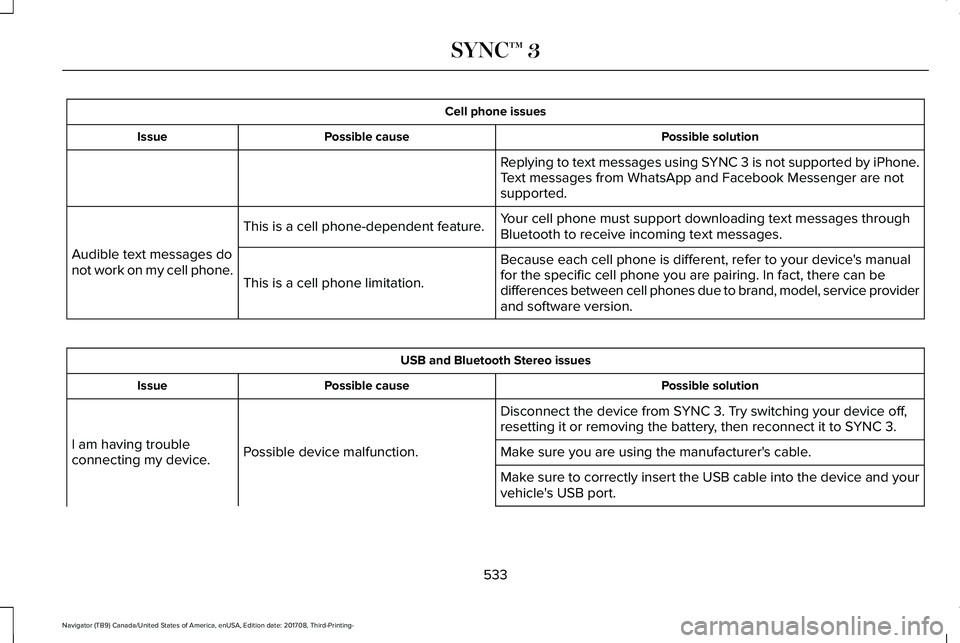
Cell phone issues
Possible solutionPossible causeIssue
Replying to text messages using SYNC 3 is not supported by iPhone.Text messages from WhatsApp and Facebook Messenger are notsupported.
Your cell phone must support downloading text messages throughBluetooth to receive incoming text messages.This is a cell phone-dependent feature.
Audible text messages donot work on my cell phone.Because each cell phone is different, refer to your device's manualfor the specific cell phone you are pairing. In fact, there can bedifferences between cell phones due to brand, model, service providerand software version.
This is a cell phone limitation.
USB and Bluetooth Stereo issues
Possible solutionPossible causeIssue
Disconnect the device from SYNC 3. Try switching your device off,resetting it or removing the battery, then reconnect it to SYNC 3.
Possible device malfunction.I am having troubleconnecting my device.Make sure you are using the manufacturer's cable.
Make sure to correctly insert the USB cable into the device and yourvehicle's USB port.
533
Navigator (TB9) Canada/United States of America, enUSA, Edition date: 201708, Third-Printing-
SYNC™ 3
Page 537 of 649
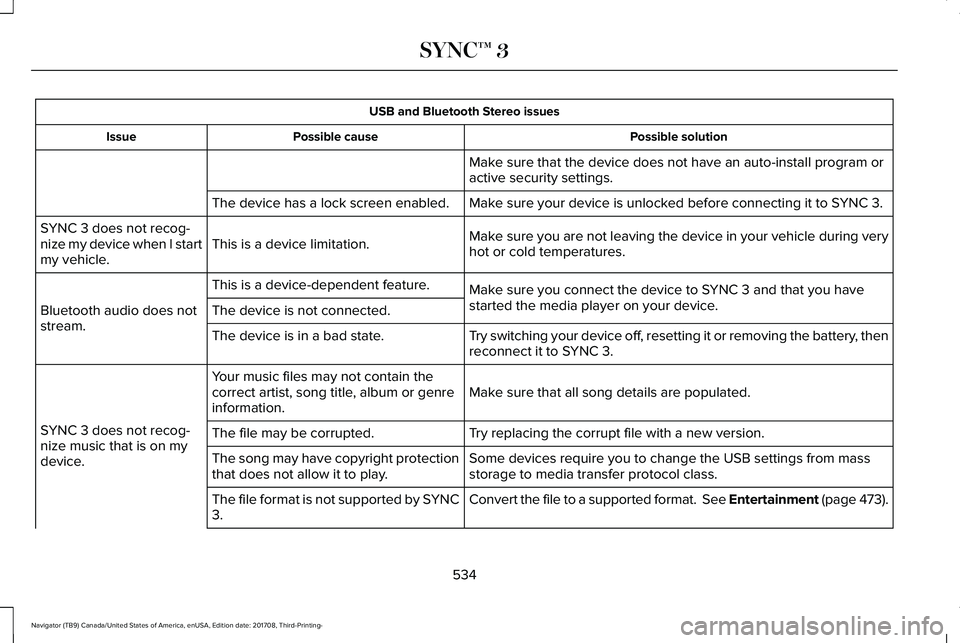
USB and Bluetooth Stereo issues
Possible solutionPossible causeIssue
Make sure that the device does not have an auto-install program oractive security settings.
Make sure your device is unlocked before connecting it to SYNC 3.The device has a lock screen enabled.
Make sure you are not leaving the device in your vehicle during veryhot or cold temperatures.This is a device limitation.SYNC 3 does not recog-nize my device when I startmy vehicle.
Make sure you connect the device to SYNC 3 and that you havestarted the media player on your device.
This is a device-dependent feature.
Bluetooth audio does notstream.The device is not connected.
Try switching your device off, resetting it or removing the battery, thenreconnect it to SYNC 3.The device is in a bad state.
Make sure that all song details are populated.Your music files may not contain thecorrect artist, song title, album or genreinformation.
SYNC 3 does not recog-nize music that is on mydevice.
Try replacing the corrupt file with a new version.The file may be corrupted.
Some devices require you to change the USB settings from massstorage to media transfer protocol class.The song may have copyright protectionthat does not allow it to play.
Convert the file to a supported format. See Entertainment (page 473).The file format is not supported by SYNC3.
534
Navigator (TB9) Canada/United States of America, enUSA, Edition date: 201708, Third-Printing-
SYNC™ 3
Page 538 of 649
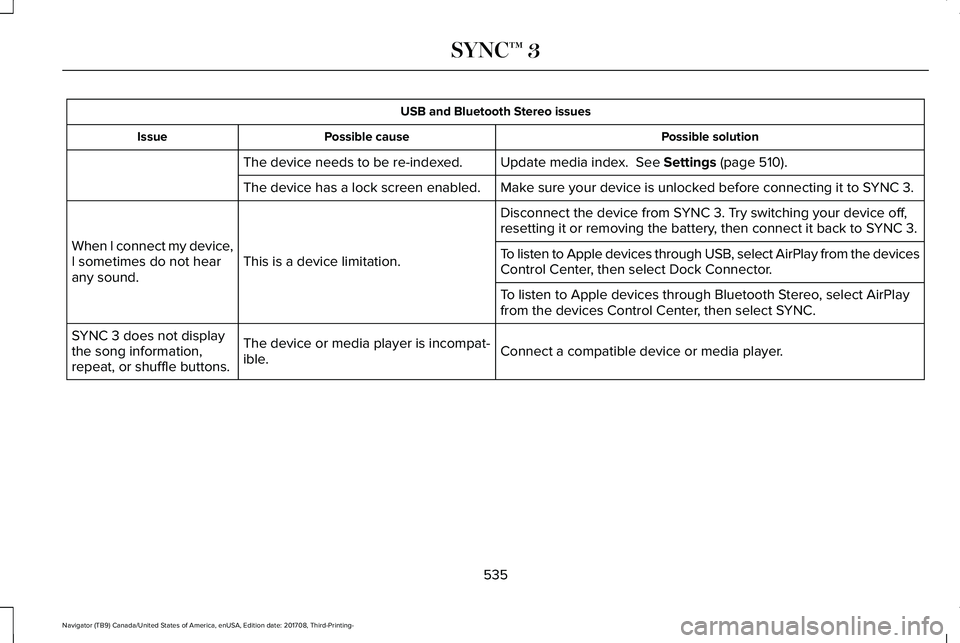
USB and Bluetooth Stereo issues
Possible solutionPossible causeIssue
Update media index. See Settings (page 510).The device needs to be re-indexed.
Make sure your device is unlocked before connecting it to SYNC 3.The device has a lock screen enabled.
Disconnect the device from SYNC 3. Try switching your device off,resetting it or removing the battery, then connect it back to SYNC 3.
This is a device limitation.When I connect my device,I sometimes do not hearany sound.
To listen to Apple devices through USB, select AirPlay from the devicesControl Center, then select Dock Connector.
To listen to Apple devices through Bluetooth Stereo, select AirPlayfrom the devices Control Center, then select SYNC.
Connect a compatible device or media player.The device or media player is incompat-ible.
SYNC 3 does not displaythe song information,repeat, or shuffle buttons.
535
Navigator (TB9) Canada/United States of America, enUSA, Edition date: 201708, Third-Printing-
SYNC™ 3
Page 542 of 649
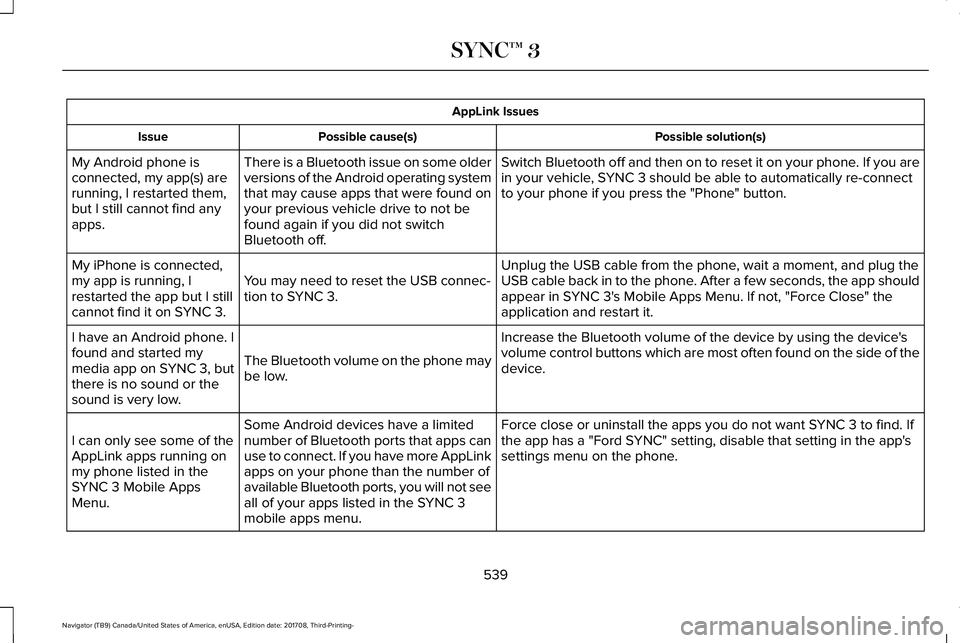
AppLink Issues
Possible solution(s)Possible cause(s)Issue
Switch Bluetooth off and then on to reset it on your phone. If you arein your vehicle, SYNC 3 should be able to automatically re-connectto your phone if you press the "Phone" button.
There is a Bluetooth issue on some olderversions of the Android operating systemthat may cause apps that were found onyour previous vehicle drive to not befound again if you did not switchBluetooth off.
My Android phone isconnected, my app(s) arerunning, I restarted them,but I still cannot find anyapps.
Unplug the USB cable from the phone, wait a moment, and plug theUSB cable back in to the phone. After a few seconds, the app shouldappear in SYNC 3's Mobile Apps Menu. If not, "Force Close" theapplication and restart it.
You may need to reset the USB connec-tion to SYNC 3.
My iPhone is connected,my app is running, Irestarted the app but I stillcannot find it on SYNC 3.
Increase the Bluetooth volume of the device by using the device'svolume control buttons which are most often found on the side of thedevice.The Bluetooth volume on the phone maybe low.
I have an Android phone. Ifound and started mymedia app on SYNC 3, butthere is no sound or thesound is very low.
Force close or uninstall the apps you do not want SYNC 3 to find. Ifthe app has a "Ford SYNC" setting, disable that setting in the app'ssettings menu on the phone.
Some Android devices have a limitednumber of Bluetooth ports that apps canuse to connect. If you have more AppLinkapps on your phone than the number ofavailable Bluetooth ports, you will not seeall of your apps listed in the SYNC 3mobile apps menu.
I can only see some of theAppLink apps running onmy phone listed in theSYNC 3 Mobile AppsMenu.
539
Navigator (TB9) Canada/United States of America, enUSA, Edition date: 201708, Third-Printing-
SYNC™ 3
Page 547 of 649
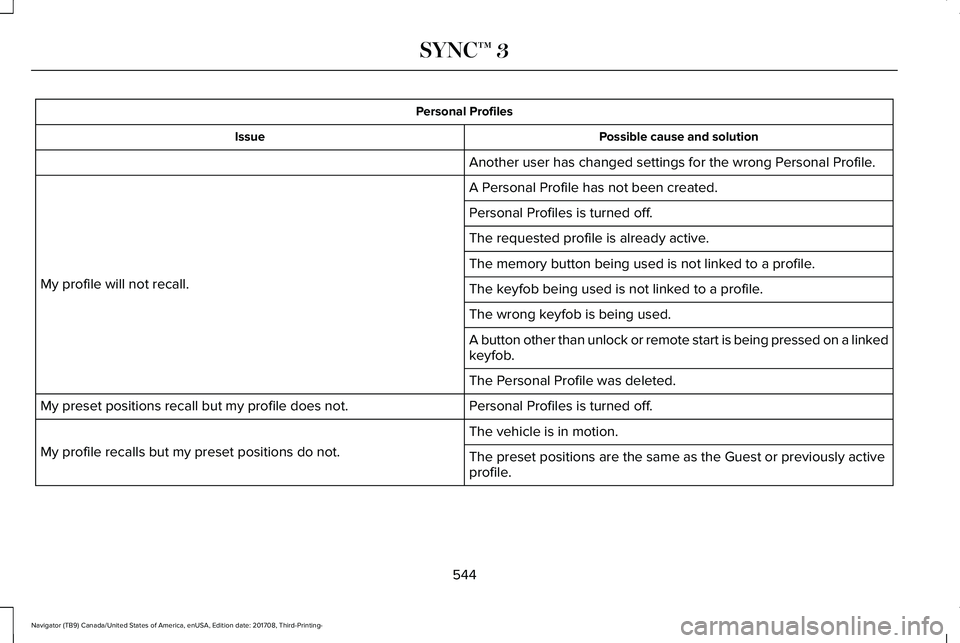
Personal Profiles
Possible cause and solutionIssue
Another user has changed settings for the wrong Personal Profile.
A Personal Profile has not been created.
My profile will not recall.
Personal Profiles is turned off.
The requested profile is already active.
The memory button being used is not linked to a profile.
The keyfob being used is not linked to a profile.
The wrong keyfob is being used.
A button other than unlock or remote start is being pressed on a linkedkeyfob.
The Personal Profile was deleted.
Personal Profiles is turned off.My preset positions recall but my profile does not.
The vehicle is in motion.
My profile recalls but my preset positions do not.The preset positions are the same as the Guest or previously activeprofile.
544
Navigator (TB9) Canada/United States of America, enUSA, Edition date: 201708, Third-Printing-
SYNC™ 3
Page 548 of 649
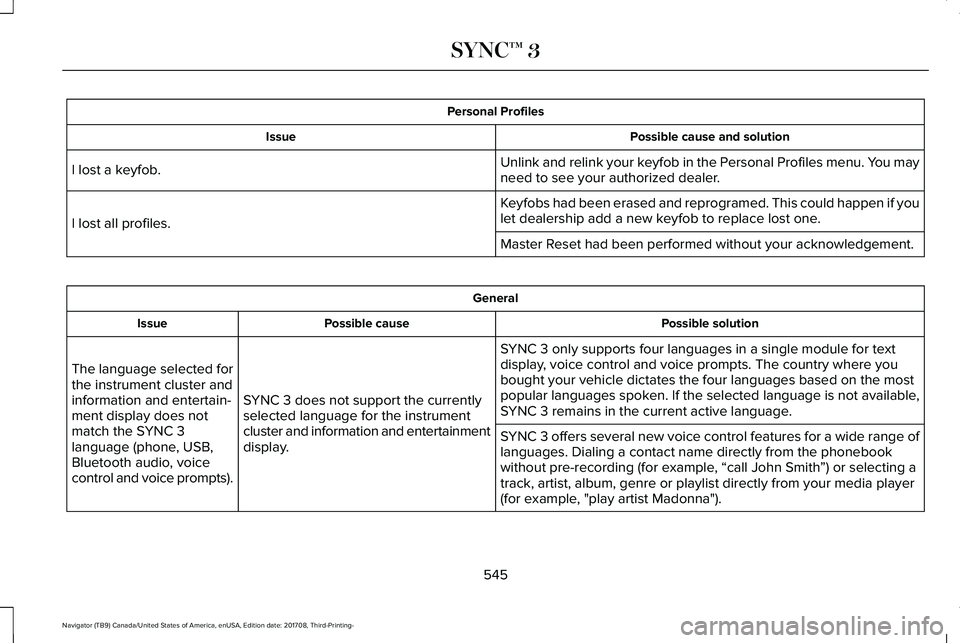
Personal Profiles
Possible cause and solutionIssue
Unlink and relink your keyfob in the Personal Profiles menu. You mayneed to see your authorized dealer.I lost a keyfob.
Keyfobs had been erased and reprogramed. This could happen if youlet dealership add a new keyfob to replace lost one.I lost all profiles.
Master Reset had been performed without your acknowledgement.
General
Possible solutionPossible causeIssue
SYNC 3 only supports four languages in a single module for textdisplay, voice control and voice prompts. The country where youbought your vehicle dictates the four languages based on the mostpopular languages spoken. If the selected language is not available,SYNC 3 remains in the current active language.SYNC 3 does not support the currentlyselected language for the instrumentcluster and information and entertainmentdisplay.
The language selected forthe instrument cluster andinformation and entertain-ment display does notmatch the SYNC 3language (phone, USB,Bluetooth audio, voicecontrol and voice prompts).
SYNC 3 offers several new voice control features for a wide range oflanguages. Dialing a contact name directly from the phonebookwithout pre-recording (for example, “call John Smith”) or selecting atrack, artist, album, genre or playlist directly from your media player(for example, "play artist Madonna").
545
Navigator (TB9) Canada/United States of America, enUSA, Edition date: 201708, Third-Printing-
SYNC™ 3
Page 549 of 649
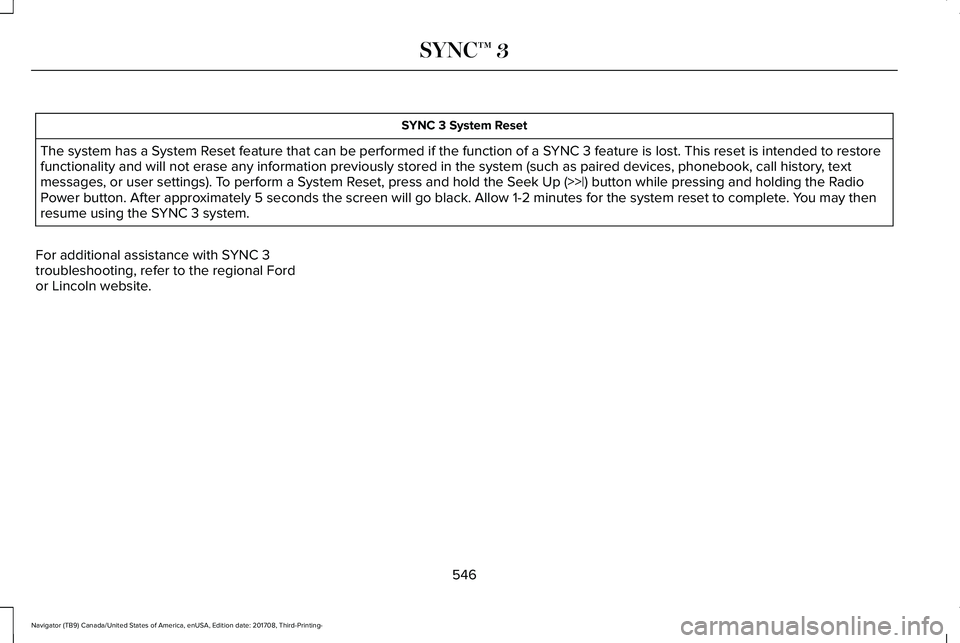
SYNC 3 System Reset
The system has a System Reset feature that can be performed if the function of a SYNC 3 feature is lost. This reset is intended to restorefunctionality and will not erase any information previously stored in the system (such as paired devices, phonebook, call history, textmessages, or user settings). To perform a System Reset, press and hold the Seek Up (>>|) button while pressing and holding the RadioPower button. After approximately 5 seconds the screen will go black. Allow 1-2 minutes for the system reset to complete. You may thenresume using the SYNC 3 system.
For additional assistance with SYNC 3troubleshooting, refer to the regional Fordor Lincoln website.
546
Navigator (TB9) Canada/United States of America, enUSA, Edition date: 201708, Third-Printing-
SYNC™ 3
Page 556 of 649
Your vehicle is equipped with the IntelligentOil-Life Monitor system, which displays amessage in the information display at theproper oil change interval. This interval maybe up to one year or 10,000 mi (16,000 km).
When the oil change message appears inthe information display, it is time for an oilchange. Make sure you perform the oilchange within two weeks or 500 mi (800 km)of the message appearing. Make sure youreset the Intelligent Oil-Life Monitor aftereach oil change. See Oil Change IndicatorReset (page 365).
If your information display resets prematurelyor becomes inoperative, you should performthe oil change interval at six months or5,000 mi (8,000 km) from your last oilchange. Never exceed one year or 10,000 mi(16,000 km) between oil change intervals.
Your vehicle is very sophisticated and builtwith multiple, complex, performance systems.Every manufacturer develops these systemsusing different specifications andperformance features. That is why it isimportant to rely upon your dealership toproperly diagnose and repair your vehicle.
Ford Motor Company has recommendedmaintenance intervals for various parts andcomponent systems based upon engineeringtesting. Ford Motor Company relies upon thistesting to determine the most appropriatemileage for replacement of oils and fluids toprotect your vehicle at the lowest overall costto you and recommends againstmaintenance schedules that deviate fromthe scheduled maintenance information.
We strongly recommend the use of onlygenuine Ford, Motorcraft or Ford-authorizedre-manufactured replacement partsengineered for your vehicle.
Additives and Chemicals
This owner's manual and the Ford WorkshopManual list the recommended additives andchemicals for your vehicle. We do notrecommend using chemicals or additives notapproved by us as part of your vehicle’snormal maintenance. Please consult yourwarranty information.
Oils, Fluids and Flushing
In many cases, fluid discoloration is a normaloperating characteristic and, by itself, doesnot necessarily indicate a concern or that thefluid needs to be changed. However, aqualified expert, such as the factory-trainedtechnicians at your dealership, shouldinspect discolored fluids that also show signsof overheating or foreign materialcontamination immediately.
Make sure to change your vehicle’s oils andfluids at the specified intervals or inconjunction with a repair. Flushing is a viableway to change fluid for many vehiclesub-systems during scheduled maintenance.It is critical that systems are flushed only withnew fluid that is the same as that requiredto fill and operate the system or using aFord-approved flushing chemical.
Owner Checks and Services
Make sure you perform the following basicmaintenance checks and inspections everymonth or at six-month intervals.
553
Navigator (TB9) Canada/United States of America, enUSA, Edition date: 201708, Third-Printing-
Scheduled Maintenance
Page 561 of 649
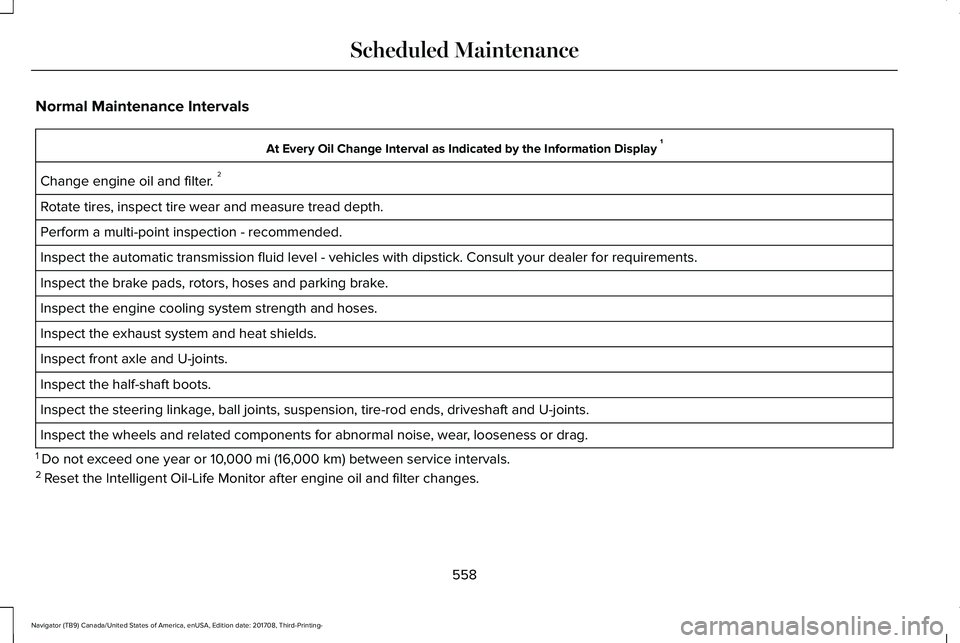
Normal Maintenance Intervals
At Every Oil Change Interval as Indicated by the Information Display 1
Change engine oil and filter. 2
Rotate tires, inspect tire wear and measure tread depth.
Perform a multi-point inspection - recommended.
Inspect the automatic transmission fluid level - vehicles with dipstick. Consult your dealer for requirements.
Inspect the brake pads, rotors, hoses and parking brake.
Inspect the engine cooling system strength and hoses.
Inspect the exhaust system and heat shields.
Inspect front axle and U-joints.
Inspect the half-shaft boots.
Inspect the steering linkage, ball joints, suspension, tire-rod ends, driveshaft and U-joints.
Inspect the wheels and related components for abnormal noise, wear, looseness or drag.
1 Do not exceed one year or 10,000 mi (16,000 km) between service intervals.2 Reset the Intelligent Oil-Life Monitor after engine oil and filter changes.
558
Navigator (TB9) Canada/United States of America, enUSA, Edition date: 201708, Third-Printing-
Scheduled Maintenance