trailer LINCOLN NAVIGATOR 2018 Workshop Manual
[x] Cancel search | Manufacturer: LINCOLN, Model Year: 2018, Model line: NAVIGATOR, Model: LINCOLN NAVIGATOR 2018Pages: 649, PDF Size: 4.96 MB
Page 319 of 649
The controller shows gain setting, output bargraph, and trailer connectivity status in theinformation display. They appear in theinformation display as follows:
•Trailer Brake Controller Gain (withouttrailer connected): Shows the current gainsetting during a given ignition cycle andwhen adjusting the gain. This alsodisplays if you use the manual controllever or make gain adjustments with notrailer connected.
•Trailer Brake Controller Gain Output:Displays when you push your vehicle'sbrake pedal, or upon use of the manualcontrol. Bar indicators illuminate in theinformation display to indicate theamount of power going to the trailerbrakes relative to the brake pedal ormanual control input. One bar indicatesthe least amount of output; six barsindicate maximum output.
•Trailer Connected: Displays when thesystem senses a correct trailer wiringconnection (a trailer with electric trailerbrakes) during a given ignition cycle.
•Trailer Disconnected: Displays,accompanied by a single audible time,when the system senses a trailerconnection and then a disconnection,either intentional or unintentional, duringa given ignition cycle. It also displays if atruck or trailer-wiring fault occurs causingthe trailer to appear disconnected. Thismessage can also display if you use themanual control lever without a trailerconnected. After disconnecting the trailerconnector, press the brake pedal forapproximately five seconds to allow thesystem to detect and update the trailerstatus.
B: Manual control lever: Slide the controllever to the left to turn on the trailer's electricbrakes independent of the tow vehicle's. Seethe following Procedure for adjusting gainsection for instructions on proper use of thisfeature. If you use the manual control whilethe brake is also applied, the greater of thetwo inputs determines the power sent to thetrailer brakes.
•Stop lamps: Using the manual controllever illuminates both the trailer brakelamps and your vehicle brake lampsexcept the center high-mount stop lamp,if you make the proper electricalconnection to the trailer. Pressing yourvehicle brake pedal also illuminates bothtrailer and vehicle brake lamps.
Procedure for Adjusting Gain
Note:Only perform this procedure in atraffic-free environment at speeds ofapproximately 20–25 mph (32–40 km/h).
316
Navigator (TB9) Canada/United States of America, enUSA, Edition date: 201708, Third-Printing-
Towing
Page 320 of 649
The gain setting sets the trailer brakecontroller for the specific towing condition.You should change the setting as towingconditions change. Changes to towingconditions include trailer load, vehicle load,road conditions and weather.
The gain should be set to provide themaximum trailer braking assistance whilemaking sure the trailer wheels do not lockwhen using the brakes. Locked trailer wheelsmay lead to trailer instability.
1.Make sure the trailer brakes are in goodworking condition, functioning normallyand properly adjusted. See your trailerdealer if necessary.
2. Hook up the trailer and make theelectrical connections according to thetrailer manufacturer's instructions.
3.When you plug in a trailer with electric orelectric-over-hydraulic brakes, a messageconfirming connection appears in theinformation display.
4.Use the gain adjustment (+ and -) buttonsto increase or decrease the gain settingto the desired starting point. A gainsetting of 6.0 is a good starting point forheavier loads.
5. In a traffic-free environment, tow thetrailer on a dry, level surface at a speedof 20–25 mph (32–40 km/h) andsqueeze the manual control levercompletely.
6.If the trailer wheels lock up, indicated bysquealing tires, reduce the gain setting.If the trailer wheels turn freely, increasethe gain setting. Repeat Steps 5 and 6until the gain setting is at a point justbelow trailer wheel lock-up. If towing aheavier trailer, trailer wheel lock-up maynot be attainable even with the maximumgain setting of 10.
Explanation of Information Display WarningMessages
Note:An authorized dealer can diagnosethe trailer brake controller to determineexactly which trailer fault has occurred.However, your warranty does not cover thisdiagnosis if the fault is with the trailer.
A message indicating a trailer brake modulefault may display in response to faults sensedby the trailer brake controller, accompaniedby a single tone. If this message appears,contact an authorized dealer as soon aspossible for diagnosis and repair. Thecontroller may still function, but performancemay be degraded.
A message indicating a trailer wiring faultmay display when there is a short circuit onthe electric brake output wire. If this messagedisplays, accompanied by a single tone, withno trailer connected, the problem is with yourvehicle wiring between the trailer brakecontroller and the 7-pin connector at thebumper. If the message only displays with atrailer connected, the problem is with thetrailer wiring. Consult your trailer dealer forassistance. This can be a short to ground(such as a chaffed wire), short to voltage(such as a pulled pin on trailer emergencybreakaway battery) or the trailer brakes maybe drawing too much current.
317
Navigator (TB9) Canada/United States of America, enUSA, Edition date: 201708, Third-Printing-
Towing
Page 321 of 649
Points to Remember
Note:Do not attempt removal of the trailerbrake controller without consulting theWorkshop Manual. Damage to the unit mayresult.
•Adjust gain setting before using thetrailer brake controller for the first time.
•Adjust gain setting, using the procedureabove, whenever road, weather andtrailer or vehicle loading conditionschange from when the gain was initiallyset.
•Only use the manual control lever forproper adjustment of the gain duringtrailer setup. Misuse, such as applicationduring trailer sway, could cause instabilityof trailer or tow vehicle.
•Avoid towing in adverse weatherconditions. The trailer brake controllerdoes not provide anti-lock control of thetrailer wheels. Trailer wheels can lock upon slippery surfaces, resulting in reducedstability of trailer and tow vehicle.
•The trailer brake controller is equippedwith a feature that reduces output atvehicle speeds below 11 mph (18 km/h)so trailer and vehicle braking is not jerkyor harsh. This feature is only availablewhen applying the brakes using yourvehicle's brake pedal, not the controller.
•The controller interacts with the brakecontrol system and powertrain controlsystem of your vehicle to provide thebest performance on different roadconditions.
•Your vehicle's brake system and thetrailer brake system work independentlyof each other. Changing the gain settingon the controller does not affect theoperation of your vehicle's brakeswhether you attach a trailer or not.
•When you switch the engine off, thecontroller output is disabled and thedisplay and module shut down. Thecontroller module and display turn onwhen you switch the ignition on.
•The trailer brake controller is only afactory-installed or dealer-installed item.Lincoln is not responsible for warranty orperformance of the controller due tomisuse or customer installation.
Trailer Lamps
WARNING: Never connect any trailerlamp wiring to the vehicle's tail lamp wiring;this may damage the electrical systemresulting in fire. Contact your authorizeddealer as soon as possible for assistancein proper trailer tow wiring installation.Additional electrical equipment may berequired.
Trailer lamps are required on most towedvehicles. Make sure all running lights, brakelights, turn signals and hazard lights areworking.
318
Navigator (TB9) Canada/United States of America, enUSA, Edition date: 201708, Third-Printing-
Towing
Page 322 of 649
Before Towing a Trailer
Practice turning, stopping and backing up toget the feel of your vehicle-trailercombination before starting on a trip. Whenturning, make wider turns so the trailerwheels clear curbs and other obstacles.
When Towing a Trailer
•Do not drive faster than 70 mph(113 km/h) during the first 500 mi(800 km).
•Do not make full-throttle starts.
•Check your hitch, electrical connectionsand trailer wheel lug nuts thoroughly afteryou have traveled 50 mi (80 km).
•When stopped in congested or heavytraffic during hot weather, place thetransmission in park (P) to aid engine andtransmission cooling and to help A/Cperformance.
•Turn off the speed control when carryingheavy loads or in hilly terrain. The speedcontrol may turn off automatically whenyou are towing on long, steep grades.
•Shift to a lower gear when driving downa long or steep hill. Do not apply thebrakes continuously, as they mayoverheat and become less effective.
•If your transmission has a Grade Assistor Tow/Haul feature, use this featurewhen towing. This provides enginebraking and helps eliminate excessivetransmission shifting for optimum fueleconomy and transmission cooling.
•If your vehicle has AdvanceTrac withRSC, this system may turn on duringtypical cornering maneuvers with aheavily loaded trailer. This is normal.Turning the corner at a slower speedwhile towing may reduce this tendency.
•If your vehicle has Adaptive suspension,you can select NORMAL or SPORT drivecontrol modes for better experiencewhen towing a trailer. See InformationDisplays (page 119).
•If you are towing a trailer frequently inhot weather, hilly conditions, at the grosscombined weight rating (or anycombination of these factors), considerrefilling your rear axle with synthetic gearlubricant (if the axle is not already filledwith it). See Capacities andSpecifications (page 422).
•Allow more distance for stopping with atrailer attached. Anticipate stops andbrake gradually.
•Avoid parking on a grade. However, ifyou must park on a grade:
1. Turn the steering wheel to point yourvehicle tires away from traffic flow.
2. Set your vehicle parking brake.
3. Place the transmission in park (P).
4.Place wheel chocks in the front and backof the trailer wheels.
Note:Chocks are not included with yourvehicle.
319
Navigator (TB9) Canada/United States of America, enUSA, Edition date: 201708, Third-Printing-
Towing
Page 323 of 649
Your vehicle may be equipped with atemporary or conventional spare tire. Atemporary spare tire is different in size(diameter or width), tread-type (All-Seasonor All-Terrain) or is from a differentmanufacturer than the road tires on yourvehicle. Consult information on the tire labelor Safety Compliance label for limitationswhen using.
Launching or Retrieving a Boat orPersonal Watercraft (PWC)
Note:Disconnect the wiring to the trailerbefore backing the trailer into the water.
Note:Reconnect the wiring to the trailerafter removing the trailer from the water.
When backing down a ramp during boatlaunching or retrieval:
•Do not allow the static water level to riseabove the bottom edge of the rearbumper.
•Do not allow waves to break higher than6 in (15 cm) above the bottom edge ofthe rear bumper.
Exceeding these limits may allow water toenter vehicle components:
•Causing internal damage to thecomponents.
•Affecting driveability, emissions, andreliability.
Replace the rear axle lubricant anytime therear axle has been submerged in water.Water may have contaminated the rear axlelubricant, which is not normally checked orchanged unless a leak is suspected or otheraxle repair is required.
TOWING THE VEHICLE ON FOUR
WHEELS
WARNING: If your vehicle has asteering wheel lock make sure the ignitionis in the accessory or on position whenbeing towed.
Recreational Towing
Note:Put your climate control system inrecirculated air mode to prevent exhaustfumes from entering your vehicle. SeeClimate Control (page 151).
Follow these guidelines if you have a needfor recreational towing, such as towing yourvehicle behind a motorhome. Theseguidelines are designed to prevent damageto your transmission.
Two-wheel Drive Vehicles
You cannot tow a two-wheel drive vehiclewith any wheels on the ground as vehicle ortransmission damage may occur. You musttow your vehicle with all four wheels off theground, for example when using acar-hauling trailer.
320
Navigator (TB9) Canada/United States of America, enUSA, Edition date: 201708, Third-Printing-
Towing
Page 324 of 649
Four-wheel Drive Vehicles Without 4x4LOW
If your vehicle does not have 4x4 Low, youcannot tow your vehicle with any wheels onthe ground or vehicle damage may occur.You must tow your vehicle with all fourwheels off the ground, for example whenusing a car-hauling trailer.
Four-wheel Drive Vehicles With 4x4 LOW
You can only tow a vehicle with 4X4 LOWwith all wheels on the ground by placing thetransfer case in its neutral position andengaging the four wheel down towingfeature. Perform the steps outlined in thefollowing section after positioning yourvehicle behind the tow vehicle and properlysecuring them together.
Four-wheel-down Towing
Note:If completed successfully, theinformation display shows Neutral TowEnabled Leave Transmission in Neutral.This indicates that your vehicle is safe to towwith all wheels on the ground.
Note:If you do not see the message in theinformation display, you must perform theprocedure again from the beginning.
Note:Make sure you properly secure yourvehicle to the tow vehicle.
1. Start your vehicle.
2. Confirm that your vehicle is in NORMALmode. See Drive Mode Control (page285).
3. Place your vehicle in stay in neutralmode. See Automatic Transmission(page 210).
4. Switch your vehicle off by pressing theengine START/STOP button once. ATransmission Not in Park messageappears in the information display.
5.Place your vehicle in accessory mode bypressing the start button once withoutpressing the brake pedal.
6. Press and hold the brake pedal.
7. Enable neutral tow through theinformation display by selecting Settingsfrom the menu. See General Information(page 119).
8. Then select Advanced Settings.
9. Then select Vehicle.
10. Then select Neutral Tow.
11. Press and hold the OK button until theinformation display states Neutral TowEnabled Leave Transmission inNeutral.
Note:If completed successfully, theinformation display shows Neutral TowEnabled Leave Transmission in Neutral.This indicates that your vehicle is safe to towwith all wheels on the ground.
Note:If you do not see the message in theinformation display, you must perform theprocedure again from the beginning.
Note:You may hear an audible noise as thetransfer case shifts into neutral, this isnormal.
12. Leave the transmission in neutral (N)and switch the ignition off by pressingthe engine START/STOP button oncewithout pressing the brake pedal. Youdo not need to leave your keys in thevehicle. You can lock and unlock yourvehicle as you normally do.
321
Navigator (TB9) Canada/United States of America, enUSA, Edition date: 201708, Third-Printing-
Towing
Page 330 of 649
ROADSIDE ASSISTANCE
Vehicles Sold in the United States:Getting Roadside Assistance
To fully assist you should you have a vehicleconcern, Lincoln Motor Company offers acomplimentary roadside assistance program. This program is separate from the NewVehicle Limited Warranty.
The service is available:
•Throughout the life of the vehicle fororiginal owners.
•For six years or 70,000 mi (110,000 km)(whichever comes first) for subsequentowners.
Roadside Assistance covers:
•A flat tire change with a good spare(except vehicles supplied with a tireinflation kit).
•Battery jump start.
•Lock-out assistance (key replacementcost is the client's responsibility).
•Fuel delivery — independent servicecontractors, if not prohibited by state,local or municipal law shall deliver up to2 gal (8 L) of gasoline or 5 gal (20 L) ofdiesel fuel to a disabled vehicle.Roadside Assistance limits fuel deliveryservice to two no-charge occurrenceswithin a 12-month period.
•Winch out — available within 100 ft (30 m)of a paved or county maintained road,no recoveries.
•Towing — independent servicecontractors, if not prohibited by state,local or municipal law shall tow Lincolneligible vehicles to the client's selling orpreferred dealer within 100 mi (160 km)of the disablement location or to thenearest Lincoln dealer. If a client requestsa tow to a selling or preferred dealer thatis more than 100 mi (160 km) from thedisablement location, the client isresponsible for any mileage costs inexcess of 100 mi (160 km).
•Roadside Assistance includes up to $200for a towed trailer if the disabled eligiblevehicle requires service at the nearestauthorized dealer. If the towing vehicleis operational but the trailer is not, thenthe trailer does not qualify for anyroadside services.
Vehicles Sold in the United States:Using Roadside Assistance
United States clients who require roadsideassistance, call 1-800-521-4140.
327
Navigator (TB9) Canada/United States of America, enUSA, Edition date: 201708, Third-Printing-
Roadside Emergencies
Page 348 of 649
Protected ComponentFuse RatingFuse
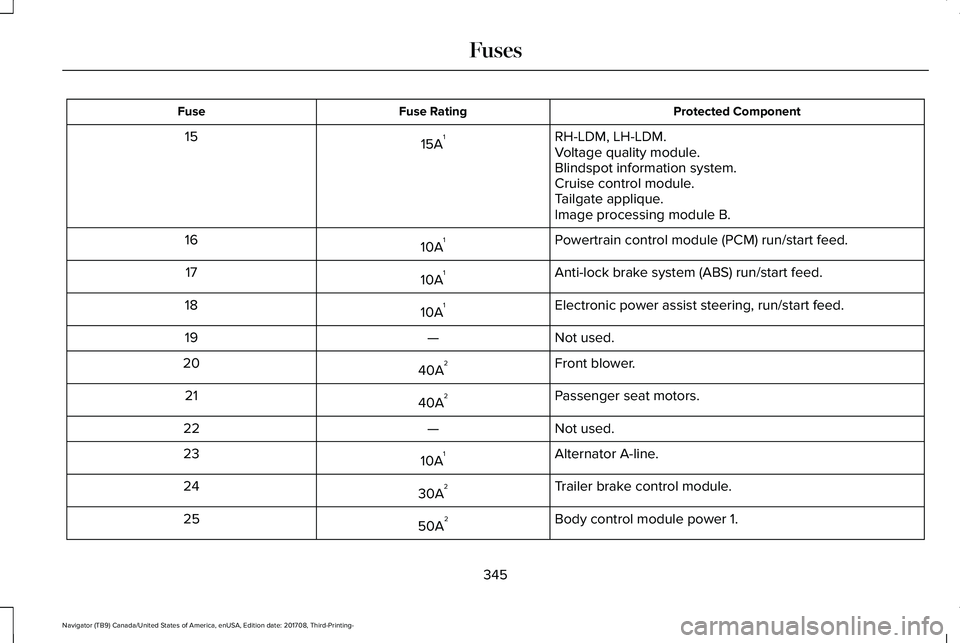
RH-LDM, LH-LDM.15A115Voltage quality module.Blindspot information system.Cruise control module.Tailgate applique.Image processing module B.
Powertrain control module (PCM) run/start feed.10A116
Anti-lock brake system (ABS) run/start feed.10A117
Electronic power assist steering, run/start feed.10A118
Not used.—19
Front blower.40A220
Passenger seat motors.40A221
Not used.—22
Alternator A-line.10A123
Trailer brake control module.30A224
Body control module power 1.50A225
345
Navigator (TB9) Canada/United States of America, enUSA, Edition date: 201708, Third-Printing-
Fuses
Page 349 of 649
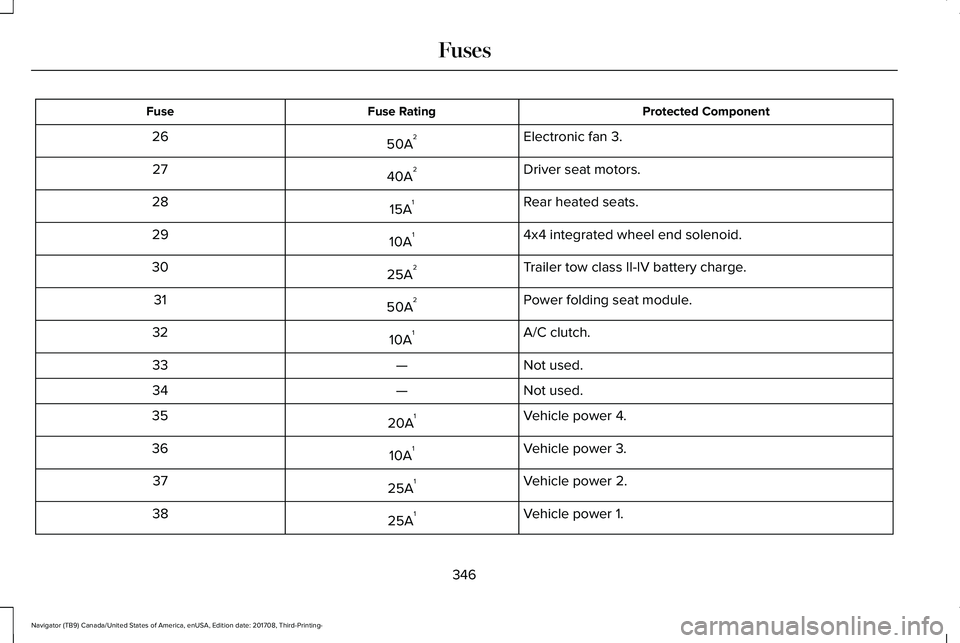
Protected ComponentFuse RatingFuse
Electronic fan 3.50A226
Driver seat motors.40A227
Rear heated seats.15A128
4x4 integrated wheel end solenoid.10A129
Trailer tow class II-IV battery charge.25A230
Power folding seat module.50A231
A/C clutch.10A132
Not used.—33
Not used.—34
Vehicle power 4.20A135
Vehicle power 3.10A136
Vehicle power 2.25A137
Vehicle power 1.25A138
346
Navigator (TB9) Canada/United States of America, enUSA, Edition date: 201708, Third-Printing-
Fuses
Page 350 of 649
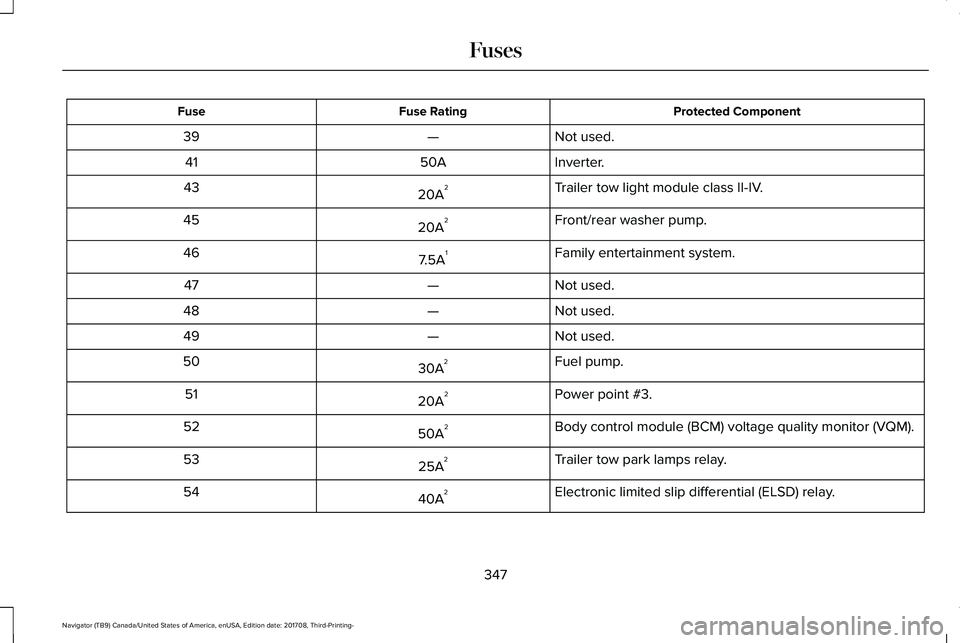
Protected ComponentFuse RatingFuse
Not used.—39
Inverter.50A41
Trailer tow light module class II-IV.20A243
Front/rear washer pump.20A245
Family entertainment system.7.5A146
Not used.—47
Not used.—48
Not used.—49
Fuel pump.30A250
Power point #3.20A251
Body control module (BCM) voltage quality monitor (VQM).50A252
Trailer tow park lamps relay.25A253
Electronic limited slip differential (ELSD) relay.40A254
347
Navigator (TB9) Canada/United States of America, enUSA, Edition date: 201708, Third-Printing-
Fuses