automatic transmission LINCOLN NAVIGATOR 2018 Owners Manual
[x] Cancel search | Manufacturer: LINCOLN, Model Year: 2018, Model line: NAVIGATOR, Model: LINCOLN NAVIGATOR 2018Pages: 649, PDF Size: 4.96 MB
Page 6 of 649
Heated Windows and Mirrors...................156
Cabin Air Filter..............................................156
Remote Start..................................................157
Seats
Sitting in the Correct Position...................158
Head Restraints............................................159
Power Seats...................................................163
Memory Function.........................................167
Rear Seats.......................................................171
Heated Seats.................................................177
Climate Controlled Seats...........................179
Universal Garage Door Opener
Universal Garage Door Opener................181
Auxiliary Power Points
Auxiliary Power Points................................185
Wireless Accessory Charging...................186
Storage Compartments
Center Console............................................189
Overhead Console......................................189
Starting and Stopping the Engine
General Information......................................191
Keyless Starting.............................................191
Starting a Gasoline Engine........................192
Engine Block Heater...................................194
Unique Driving Characteristics
Auto-Start-Stop.............................................196
Fuel and Refueling
Safety Precautions.......................................199
Fuel Quality..................................................200
Fuel Filler Funnel Location.......................200
Running Out of Fuel....................................201
Refueling.......................................................202
Fuel Consumption......................................205
Engine Emission Control
Emission Law...............................................206
Catalytic Converter.....................................207
Transmission
Automatic Transmission.............................210
Four-Wheel Drive
Using Four-Wheel Drive.............................216
Rear Axle
Limited Slip Differential.............................224
Brakes
General Information...................................225
Hints on Driving With Anti-Lock Brakes......................................................................226
Electric Parking Brake................................226
Hill Start Assist.............................................228
Auto Hold......................................................229
Traction Control
Principle of Operation................................232
Using Traction Control...............................232
Stability Control
Principle of Operation................................233
3
Navigator (TB9) Canada/United States of America, enUSA, Edition date: 201708, Third-Printing-
Table of Contents
Page 8 of 649
Reporting Safety Defects (U.S. Only)......340
Reporting Safety Defects (Canada Only).......................................................................341
Fuses
Fuse Specification Chart...........................342
Changing a Fuse.........................................358
Maintenance
General Information.....................................361
Opening and Closing the Hood...............361
Under Hood Overview...............................362
Engine Oil Dipstick.....................................364
Engine Oil Check........................................364
Oil Change Indicator Reset......................365
Engine Coolant Check...............................366
Automatic Transmission Fluid Check......371
Transfer Case Fluid Check.........................371
Brake Fluid Check.......................................372
Washer Fluid Check....................................373
Fuel Filter.......................................................373
Changing the 12V Battery.........................373
Checking the Wiper Blades......................375
Changing the Wiper Blades......................376
Adjusting the Headlamps..........................376
Changing a Bulb..........................................378
Bulb Specification Chart............................378
Changing the Engine Air Filter.................381
Vehicle Care
General Information....................................382
Cleaning Products......................................382
Cleaning the Exterior.................................383
Waxing...........................................................384
Cleaning the Engine...................................385
Cleaning the Windows and Wiper Blades......................................................................385
Cleaning the Interior..................................386
Cleaning the Instrument Panel andInstrument Cluster Lens........................388
Cleaning Leather Seats.............................388
Repairing Minor Paint Damage................389
Cleaning the Wheels..................................389
Vehicle Storage...........................................390
Body Styling Kits...........................................391
Wheels and Tires
General Information...................................392
Tire Care........................................................394
Using Snow Chains....................................408
Tire Pressure Monitoring System...........409
Changing a Road Wheel.............................414
Technical Specifications............................420
Capacities and Specifications
Engine Specifications.................................422
Motorcraft Parts...........................................423
Vehicle Identification Number.................424
Vehicle Certification Label........................424
Transmission Code Designation.............425
Capacities and Specifications..................426
Audio System
General Information....................................434
Audio Unit.....................................................436
Satellite Radio..............................................442
USB Port........................................................445
5
Navigator (TB9) Canada/United States of America, enUSA, Edition date: 201708, Third-Printing-
Table of Contents
Page 21 of 649
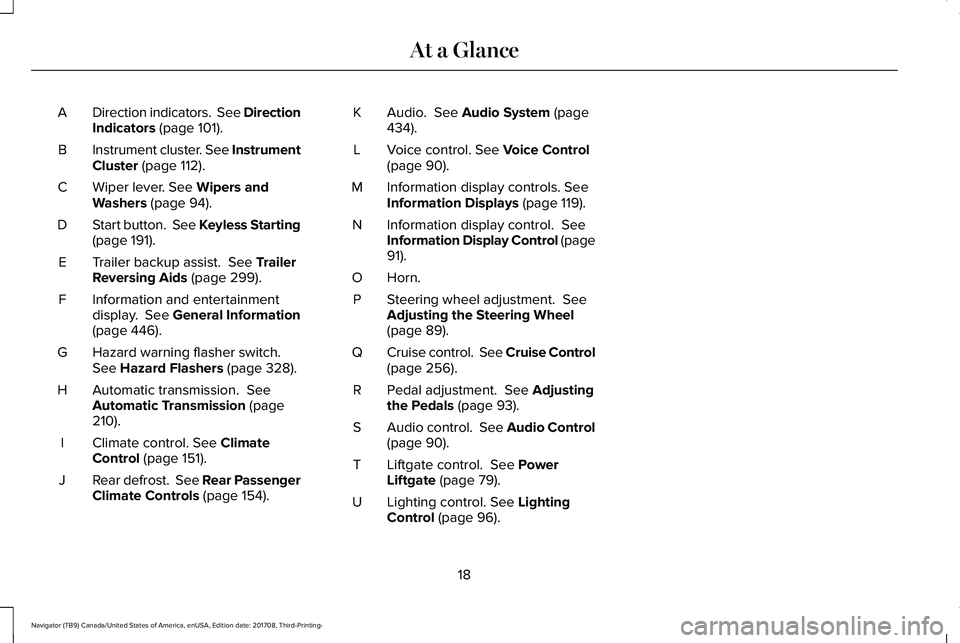
Direction indicators. See DirectionIndicators (page 101).A
Instrument cluster. See InstrumentCluster (page 112).B
Wiper lever. See Wipers andWashers (page 94).C
Start button. See Keyless Starting(page 191).D
Trailer backup assist. See TrailerReversing Aids (page 299).E
Information and entertainmentdisplay. See General Information(page 446).
F
Hazard warning flasher switch.See Hazard Flashers (page 328).G
Automatic transmission. SeeAutomatic Transmission (page210).
H
Climate control. See ClimateControl (page 151).I
Rear defrost. See Rear PassengerClimate Controls (page 154).J
Audio. See Audio System (page434).K
Voice control. See Voice Control(page 90).L
Information display controls. SeeInformation Displays (page 119).M
Information display control. SeeInformation Display Control (page91).
N
Horn.O
Steering wheel adjustment. SeeAdjusting the Steering Wheel(page 89).
P
Cruise control. See Cruise Control(page 256).Q
Pedal adjustment. See Adjustingthe Pedals (page 93).R
Audio control. See Audio Control(page 90).S
Liftgate control. See PowerLiftgate (page 79).T
Lighting control. See LightingControl (page 96).U
18
Navigator (TB9) Canada/United States of America, enUSA, Edition date: 201708, Third-Printing-
At a Glance
Page 69 of 649
Remote Start
WARNING: To avoid exhaust fumes,do not use remote start if your vehicle isparked indoors or in areas that are not wellventilated.
Note:Do not use remote start if your fuellevel is low.
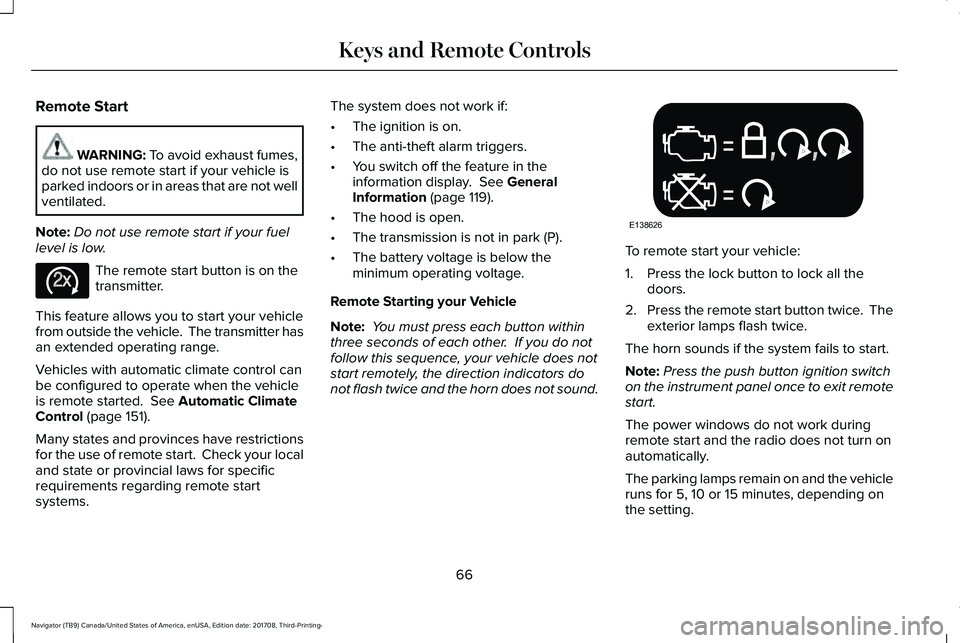
The remote start button is on thetransmitter.
This feature allows you to start your vehiclefrom outside the vehicle. The transmitter hasan extended operating range.
Vehicles with automatic climate control canbe configured to operate when the vehicleis remote started. See Automatic ClimateControl (page 151).
Many states and provinces have restrictionsfor the use of remote start. Check your localand state or provincial laws for specificrequirements regarding remote startsystems.
The system does not work if:
•The ignition is on.
•The anti-theft alarm triggers.
•You switch off the feature in theinformation display. See GeneralInformation (page 119).
•The hood is open.
•The transmission is not in park (P).
•The battery voltage is below theminimum operating voltage.
Remote Starting your Vehicle
Note: You must press each button withinthree seconds of each other. If you do notfollow this sequence, your vehicle does notstart remotely, the direction indicators donot flash twice and the horn does not sound.
To remote start your vehicle:
1. Press the lock button to lock all thedoors.
2.Press the remote start button twice. Theexterior lamps flash twice.
The horn sounds if the system fails to start.
Note:Press the push button ignition switchon the instrument panel once to exit remotestart.
The power windows do not work duringremote start and the radio does not turn onautomatically.
The parking lamps remain on and the vehicleruns for 5, 10 or 15 minutes, depending onthe setting.
66
Navigator (TB9) Canada/United States of America, enUSA, Edition date: 201708, Third-Printing-
Keys and Remote ControlsE138625 E138626
Page 101 of 649
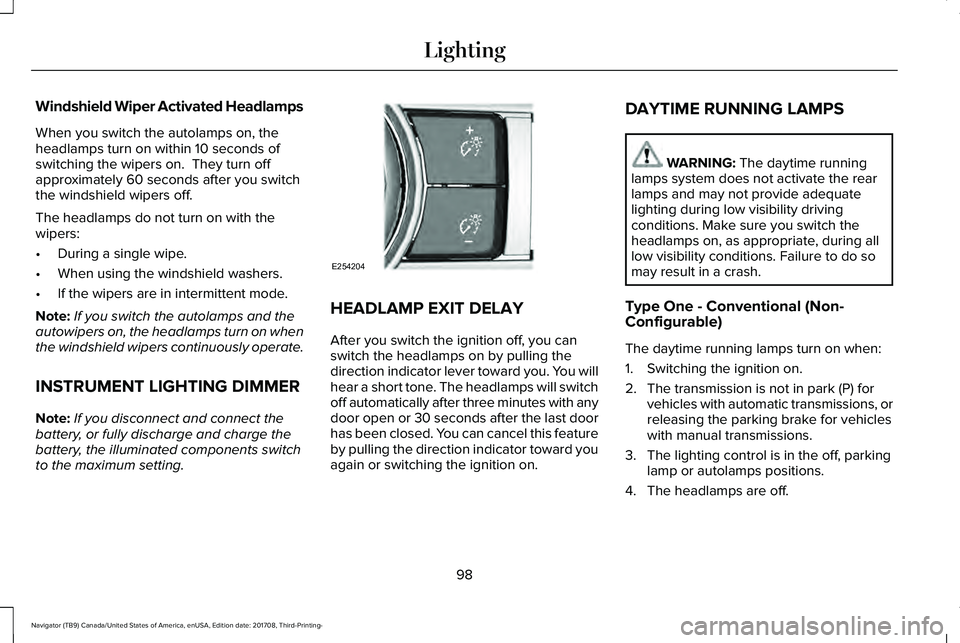
Windshield Wiper Activated Headlamps
When you switch the autolamps on, theheadlamps turn on within 10 seconds ofswitching the wipers on. They turn offapproximately 60 seconds after you switchthe windshield wipers off.
The headlamps do not turn on with thewipers:
•During a single wipe.
•When using the windshield washers.
•If the wipers are in intermittent mode.
Note:If you switch the autolamps and theautowipers on, the headlamps turn on whenthe windshield wipers continuously operate.
INSTRUMENT LIGHTING DIMMER
Note:If you disconnect and connect thebattery, or fully discharge and charge thebattery, the illuminated components switchto the maximum setting.
HEADLAMP EXIT DELAY
After you switch the ignition off, you canswitch the headlamps on by pulling thedirection indicator lever toward you. You willhear a short tone. The headlamps will switchoff automatically after three minutes with anydoor open or 30 seconds after the last doorhas been closed. You can cancel this featureby pulling the direction indicator toward youagain or switching the ignition on.
DAYTIME RUNNING LAMPS
WARNING: The daytime runninglamps system does not activate the rearlamps and may not provide adequatelighting during low visibility drivingconditions. Make sure you switch theheadlamps on, as appropriate, during alllow visibility conditions. Failure to do somay result in a crash.
Type One - Conventional (Non-Configurable)
The daytime running lamps turn on when:
1. Switching the ignition on.
2. The transmission is not in park (P) forvehicles with automatic transmissions, orreleasing the parking brake for vehicleswith manual transmissions.
3. The lighting control is in the off, parkinglamp or autolamps positions.
4. The headlamps are off.
98
Navigator (TB9) Canada/United States of America, enUSA, Edition date: 201708, Third-Printing-
LightingE254204
Page 102 of 649
Type Two - Configurable
Switch the daytime running lamps on or offusing the information display. SeeInformation Displays (page 119).
The daytime running lamps turn on when:
1. The lamps are on in the informationdisplay.
2. Switching the ignition on.
3. The transmission is not in park (P) forvehicles with automatic transmissions, orreleasing the parking brake for vehicleswith manual transmissions.
4. The lighting control is in the autolampsposition.
5. The headlamps are off.
The other lighting control switch positionsdo not turn on the daytime running lamps.
If the daytime running lamps are off in theinformation display, the lamps stay off in allswitch positions.
AUTOMATIC HIGH BEAM
CONTROL (IF EQUIPPED)
WARNING: The system does notrelieve you of your responsibility to drivewith due care and attention. You may needto override the system if it does not turnthe high beams on or off.
The system turns on high beams if it is darkenough and no other traffic is present. If itdetects an approaching vehicle’s headlampsor tail lamps, or street lighting ahead, thesystem turns off high beams before they candistract other road users. Low beams remainon.
Note:The system may not operate properlyif the sensor is blocked. Keep the windshieldfree from obstruction or damage.
Note:The system may not operate properlyin cold or inclement conditions. You canswitch on the high beams by overriding thesystem.
Note:If the system detects a blockage, forexample bird droppings, bug splatter, snowor ice, the system goes into low beam modeuntil you clear the blockage. A message mayappear in the information display if thecamera is blocked.
Note:Using much larger tires or equippingvehicle accessories such as snowplows canmodify your vehicle's ride height anddegrade automatic high beam controlperformance.
A camera sensor, centrally mounted behindthe windshield of your vehicle, continuouslymonitors conditions to turn the high beamson and off.
Once the system is active, the high beamsturn on if:
•The ambient light level is low enough.
•There is no traffic in front of your vehicle.
•The vehicle speed is greater thanapproximately 32 mph (51 km/h).
99
Navigator (TB9) Canada/United States of America, enUSA, Edition date: 201708, Third-Printing-
Lighting
Page 109 of 649
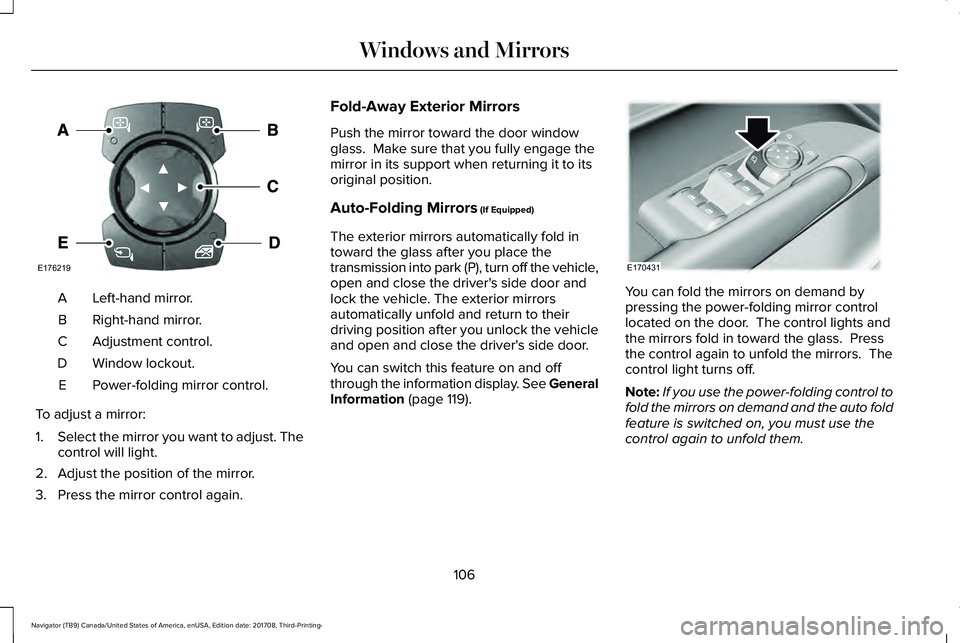
Left-hand mirror.A
Right-hand mirror.B
Adjustment control.C
Window lockout.D
Power-folding mirror control.E
To adjust a mirror:
1.Select the mirror you want to adjust. Thecontrol will light.
2. Adjust the position of the mirror.
3. Press the mirror control again.
Fold-Away Exterior Mirrors
Push the mirror toward the door windowglass. Make sure that you fully engage themirror in its support when returning it to itsoriginal position.
Auto-Folding Mirrors (If Equipped)
The exterior mirrors automatically fold intoward the glass after you place thetransmission into park (P), turn off the vehicle,open and close the driver's side door andlock the vehicle. The exterior mirrorsautomatically unfold and return to theirdriving position after you unlock the vehicleand open and close the driver's side door.
You can switch this feature on and offthrough the information display. See GeneralInformation (page 119).
You can fold the mirrors on demand bypressing the power-folding mirror controllocated on the door. The control lights andthe mirrors fold in toward the glass. Pressthe control again to unfold the mirrors. Thecontrol light turns off.
Note:If you use the power-folding control tofold the mirrors on demand and the auto foldfeature is switched on, you must use thecontrol again to unfold them.
106
Navigator (TB9) Canada/United States of America, enUSA, Edition date: 201708, Third-Printing-
Windows and MirrorsE176219 E170431
Page 127 of 649
INFO/TRIP/FUEL
TIRE PRESSURE
TRAILER INFORMATION
•NO CONTENT - Displays a blank area.
•TRIP 1 - Displays distance traveled,average fuel economy, and time spentfor trip. Press and hold OK to reset.
•TRIP 2 information is the same asTRIP 1.
•FUEL ECONOMY - Displays yourvehicle's average fuel economy. Pressand hold OK to reset.
•SEATBELTS - Displays a graphic of theconnection status of the rear seatbelts.
•TIRE PRESSURE - Displays a graphic ofcurrent vehicle tire pressures.
•TRAILER INFORMATION - Displays thetransmission temperature and trailer gain.
Head Up Display (If Equipped)
See Head Up Display (page 147).
Phone
See General Information (page 446).
Audio
See General Information (page 446).
Navigation (If Equipped)
See General Information (page 446).
INFORMATION MESSAGES
Note: Depending on your vehicle optionsand instrument cluster type, not all of themessages will display or be available. Certain messages may be abbreviated orshortened depending upon which clustertype you have.
Press the OK button to acknowledge andremove some messages from the informationdisplay. Other messages will be removedautomatically after a short time.
Certain messages need to be confirmedbefore you can access the menus.
124
Navigator (TB9) Canada/United States of America, enUSA, Edition date: 201708, Third-Printing-
Information DisplaysE222314
Page 150 of 649
ActionMessage
Displays when the brake pedal needs to be depressed to enable the transmission to shift frompark.Depress Brake to Shift from Park
Displays when Stay in Neutral Mode is active. See Automatic Transmission (page 210).Stay in Neutral Mode Engaged
Displays when the neutral button N needs to be pressed again to enter Stay in Neutral Mode.See Automatic Transmission (page 210).To Stay in Neutral When Exiting VehicleSelect N Again
HEAD UP DISPLAY (IF EQUIPPED)
Head Up Display (HUD)
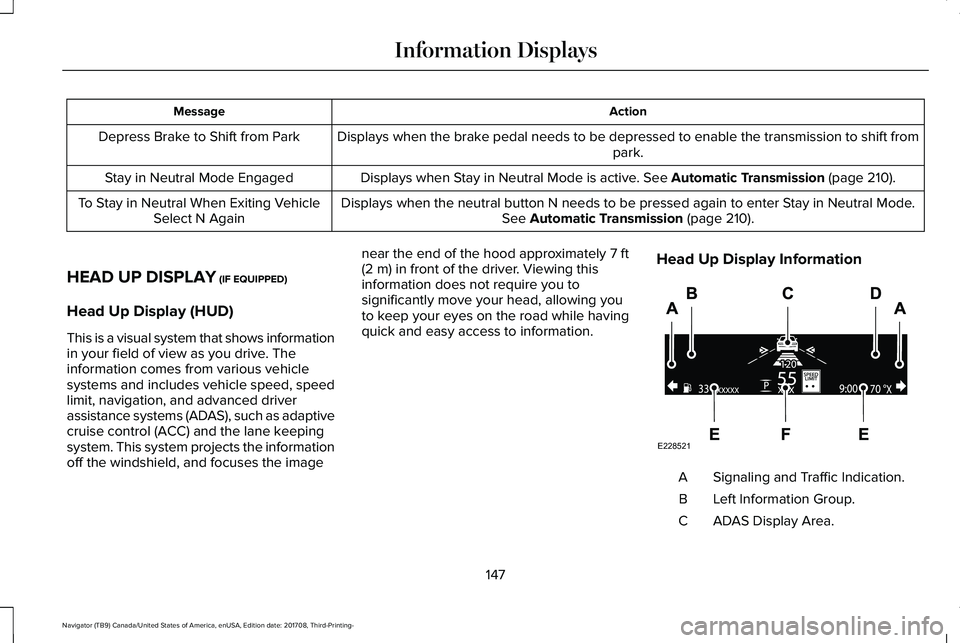
This is a visual system that shows informationin your field of view as you drive. Theinformation comes from various vehiclesystems and includes vehicle speed, speedlimit, navigation, and advanced driverassistance systems (ADAS), such as adaptivecruise control (ACC) and the lane keepingsystem. This system projects the informationoff the windshield, and focuses the image
near the end of the hood approximately 7 ft(2 m) in front of the driver. Viewing thisinformation does not require you tosignificantly move your head, allowing youto keep your eyes on the road while havingquick and easy access to information.
Head Up Display Information
Signaling and Traffic Indication.A
Left Information Group.B
ADAS Display Area.C
147
Navigator (TB9) Canada/United States of America, enUSA, Edition date: 201708, Third-Printing-
Information DisplaysE228521
Page 151 of 649
Navigation Display Area.D
Status Bar.E
Speedometer Display Area.F
Signaling and Traffic Indication
Displays direction indicators, blind spotinformation (if direction indicators are active)and cross traffic alert.
Left Information Group
Displays incoming call information.
ADAS Display Area
Displays ACC and lane keeping systemstatus and warnings.
Navigation Display Area
Displays navigation next turn instructions.
Status Bar
Displays distance to empty (DTE), time andoutside air temperature. Next to DTE, thefuel gauge fill color changes to yellow in lowfuel conditions. You can switch off the statusbar in the HUD settings menu.
Speedometer Display Area
Displays current vehicle speed, speed limit(if available in the map database) and yourtransmission gear selection.
Configuring The Head Up Display
You can control the system's options throughthe information display by using the HUD,OK and arrow buttons on the right-hand sideof your steering wheel. See GeneralInformation (page 119). You can adjust thedisplay according to your height to makeviewing the content easier. You can alsoadjust what content displays and thebrightness of the content. The system'soptions appear in the instrument clusterwhile the updates happen in the HUD.
Note:If HUD On is unchecked, other optionsof the system are hidden.
Note:The HUD menu automatically closesafter a certain period of inactivity.
Note:The HUD image brightnessautomatically adjusts to the brightness ofthe ambient environment. You have theability to adjust the brightness furtheraccording to your preference.
Note:In some instances, sunlight can causesome reflections in and around the HUDimage.
148
Navigator (TB9) Canada/United States of America, enUSA, Edition date: 201708, Third-Printing-
Information Displays