fog LINCOLN NAVIGATOR 2018 Owners Manual
[x] Cancel search | Manufacturer: LINCOLN, Model Year: 2018, Model line: NAVIGATOR, Model: LINCOLN NAVIGATOR 2018Pages: 649, PDF Size: 4.96 MB
Page 5 of 649
Liftgate
Power Liftgate.................................................79
Security
Passive Anti-Theft System...........................83
Anti-Theft Alarm - Vehicles With: InteriorSensor..........................................................85
Anti-Theft Alarm - Vehicles With: Anti-TheftAlarm System.............................................86
Power Running Boards
Using Power Running Boards .....................87
Steering Wheel
Adjusting the Steering Wheel....................89
Audio Control.................................................90
Voice Control..................................................90
Cruise Control................................................90
Information Display Control.........................91
Heated Steering Wheel...............................92
Pedals
Adjusting the Pedals.....................................93
Wipers and Washers
Autowipers......................................................94
Windshield Washers.....................................95
Rear Window Wiper and Washers............95
Lighting
General Information......................................96
Lighting Control.............................................96
Autolamps........................................................97
Instrument Lighting Dimmer.......................98
Headlamp Exit Delay....................................98
Daytime Running Lamps..............................98
Automatic High Beam Control...................99
Front Fog Lamps..........................................100
Adaptive Headlamps..................................100
Direction Indicators......................................101
Welcome Lighting.........................................101
Interior Lamps...............................................102
Ambient Lighting..........................................103
Windows and Mirrors
Power Windows............................................104
Global Opening and Closing....................105
Exterior Mirrors.............................................105
Interior Mirror.................................................107
Childminder Mirror.......................................108
Toll Reader.....................................................108
Sun Visors......................................................109
Moonroof........................................................109
Liftgate Window............................................110
Instrument Cluster
Gauges.............................................................112
Warning Lamps and Indicators..................113
Audible Warnings and Indicators..............118
Information Displays
General Information......................................119
Information Messages................................124
Head Up Display...........................................147
Climate Control
Automatic Climate Control.........................151
Hints on Controlling the Interior Climate.......................................................................153
Rear Passenger Climate Controls............154
2
Navigator (TB9) Canada/United States of America, enUSA, Edition date: 201708, Third-Printing-
Table of Contents
Page 11 of 649
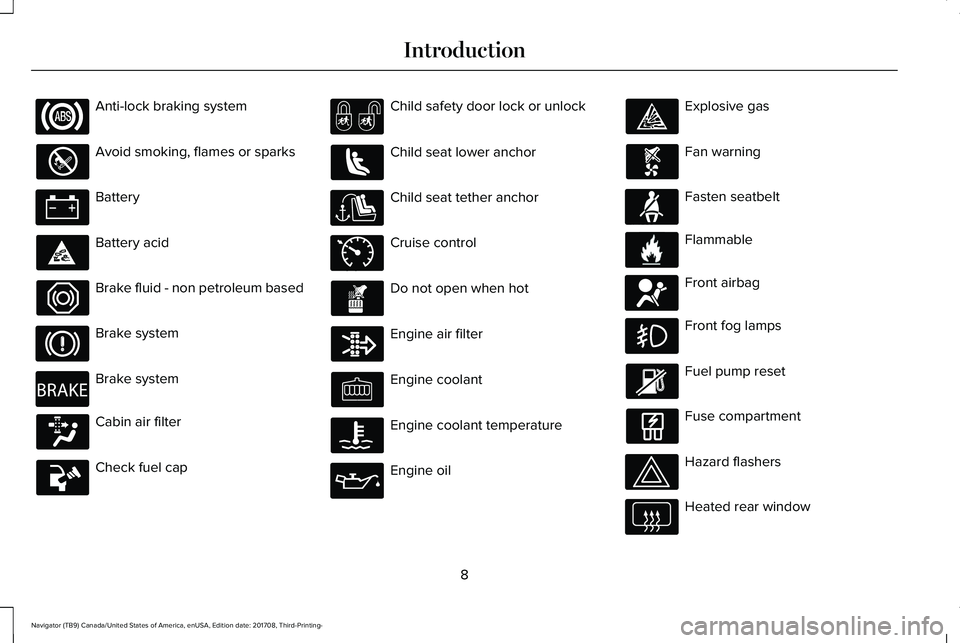
Anti-lock braking system
Avoid smoking, flames or sparks
Battery
Battery acid
Brake fluid - non petroleum based
Brake system
Brake system
Cabin air filter
Check fuel cap
Child safety door lock or unlock
Child seat lower anchor
Child seat tether anchor
Cruise control
Do not open when hot
Engine air filter
Engine coolant
Engine coolant temperature
Engine oil
Explosive gas
Fan warning
Fasten seatbelt
Flammable
Front airbag
Front fog lamps
Fuel pump reset
Fuse compartment
Hazard flashers
Heated rear window
8
Navigator (TB9) Canada/United States of America, enUSA, Edition date: 201708, Third-Printing-
Introduction E270480 E71340 E71880 E231160 E67017
Page 100 of 649
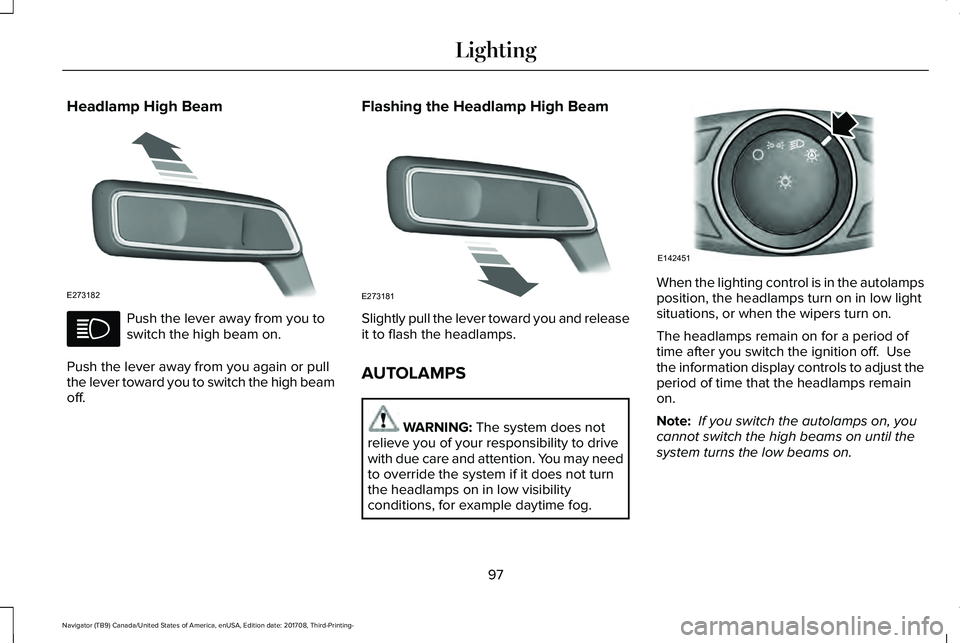
Headlamp High Beam
Push the lever away from you toswitch the high beam on.
Push the lever away from you again or pullthe lever toward you to switch the high beamoff.
Flashing the Headlamp High Beam
Slightly pull the lever toward you and releaseit to flash the headlamps.
AUTOLAMPS
WARNING: The system does notrelieve you of your responsibility to drivewith due care and attention. You may needto override the system if it does not turnthe headlamps on in low visibilityconditions, for example daytime fog.
When the lighting control is in the autolampsposition, the headlamps turn on in low lightsituations, or when the wipers turn on.
The headlamps remain on for a period oftime after you switch the ignition off. Usethe information display controls to adjust theperiod of time that the headlamps remainon.
Note: If you switch the autolamps on, youcannot switch the high beams on until thesystem turns the low beams on.
97
Navigator (TB9) Canada/United States of America, enUSA, Edition date: 201708, Third-Printing-
LightingE273182 E273181 E142451
Page 103 of 649
The high beams turn off if:
•The ambient light level is high enoughthat high beams are not required.
•The system detects an approachingvehicle's headlamps or tail lamps.
•The vehicle speed falls belowapproximately 27 mph (44 km/h).
•The system detects severe rain, snow orfog.
•The camera is blocked.
Switching the System On and Off
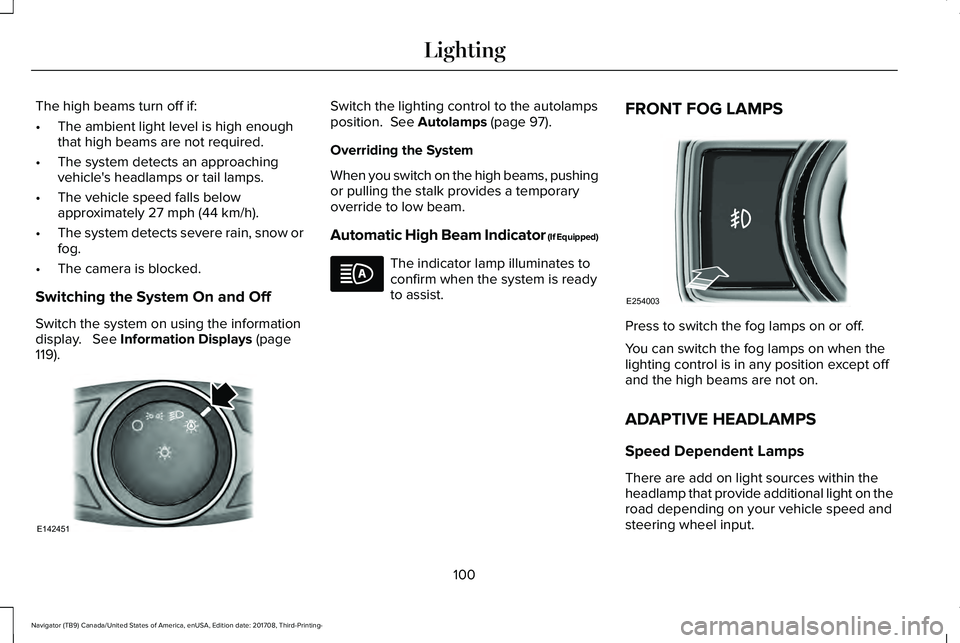
Switch the system on using the informationdisplay. See Information Displays (page119).
Switch the lighting control to the autolampsposition. See Autolamps (page 97).
Overriding the System
When you switch on the high beams, pushingor pulling the stalk provides a temporaryoverride to low beam.
Automatic High Beam Indicator (If Equipped)
The indicator lamp illuminates toconfirm when the system is readyto assist.
FRONT FOG LAMPS
Press to switch the fog lamps on or off.
You can switch the fog lamps on when thelighting control is in any position except offand the high beams are not on.
ADAPTIVE HEADLAMPS
Speed Dependent Lamps
There are add on light sources within theheadlamp that provide additional light on theroad depending on your vehicle speed andsteering wheel input.
100
Navigator (TB9) Canada/United States of America, enUSA, Edition date: 201708, Third-Printing-
LightingE142451 E254003
Page 155 of 649
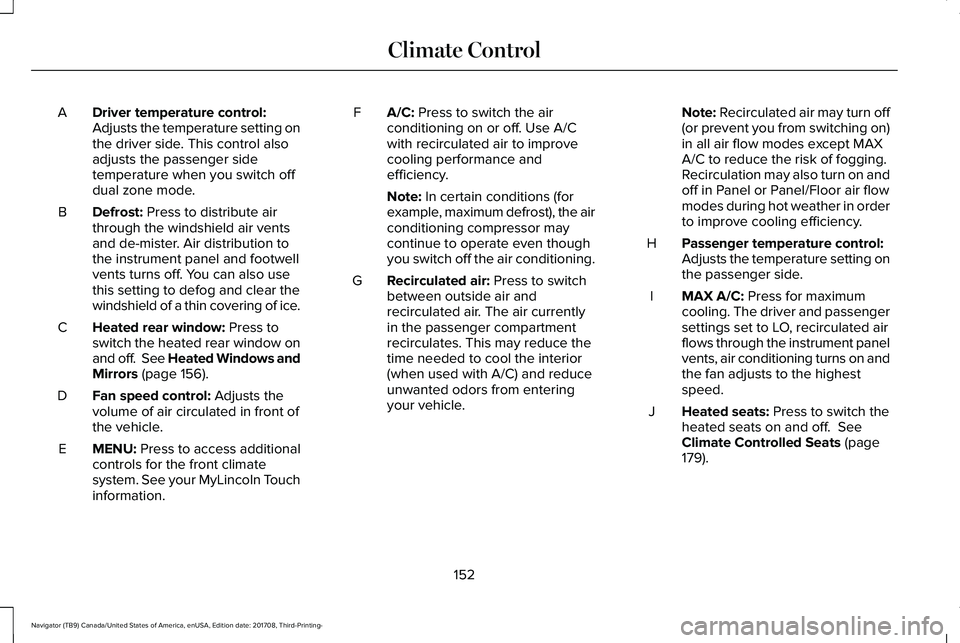
Driver temperature control:Adjusts the temperature setting onthe driver side. This control alsoadjusts the passenger sidetemperature when you switch offdual zone mode.
A
Defrost: Press to distribute airthrough the windshield air ventsand de-mister. Air distribution tothe instrument panel and footwellvents turns off. You can also usethis setting to defog and clear thewindshield of a thin covering of ice.
B
Heated rear window: Press toswitch the heated rear window onand off. See Heated Windows andMirrors (page 156).
C
Fan speed control: Adjusts thevolume of air circulated in front ofthe vehicle.
D
MENU: Press to access additionalcontrols for the front climatesystem. See your MyLincoln Touchinformation.
E
A/C: Press to switch the airconditioning on or off. Use A/Cwith recirculated air to improvecooling performance andefficiency.
F
Note: In certain conditions (forexample, maximum defrost), the airconditioning compressor maycontinue to operate even thoughyou switch off the air conditioning.
Recirculated air: Press to switchbetween outside air andrecirculated air. The air currentlyin the passenger compartmentrecirculates. This may reduce thetime needed to cool the interior(when used with A/C) and reduceunwanted odors from enteringyour vehicle.
G
Note: Recirculated air may turn off(or prevent you from switching on)in all air flow modes except MAXA/C to reduce the risk of fogging.Recirculation may also turn on andoff in Panel or Panel/Floor air flowmodes during hot weather in orderto improve cooling efficiency.
Passenger temperature control:Adjusts the temperature setting onthe passenger side.
H
MAX A/C: Press for maximumcooling. The driver and passengersettings set to LO, recirculated airflows through the instrument panelvents, air conditioning turns on andthe fan adjusts to the highestspeed.
I
Heated seats: Press to switch theheated seats on and off. SeeClimate Controlled Seats (page179).
J
152
Navigator (TB9) Canada/United States of America, enUSA, Edition date: 201708, Third-Printing-
Climate Control
Page 156 of 649
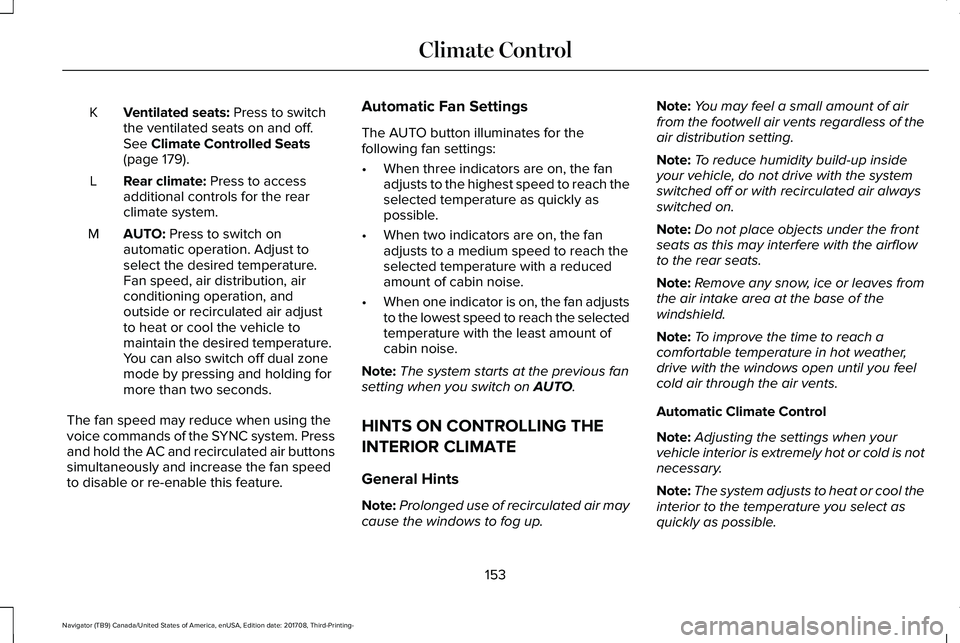
Ventilated seats: Press to switchthe ventilated seats on and off.See Climate Controlled Seats(page 179).
K
Rear climate: Press to accessadditional controls for the rearclimate system.
L
AUTO: Press to switch onautomatic operation. Adjust toselect the desired temperature.Fan speed, air distribution, airconditioning operation, andoutside or recirculated air adjustto heat or cool the vehicle tomaintain the desired temperature.You can also switch off dual zonemode by pressing and holding formore than two seconds.
M
The fan speed may reduce when using thevoice commands of the SYNC system. Pressand hold the AC and recirculated air buttonssimultaneously and increase the fan speedto disable or re-enable this feature.
Automatic Fan Settings
The AUTO button illuminates for thefollowing fan settings:
•When three indicators are on, the fanadjusts to the highest speed to reach theselected temperature as quickly aspossible.
•When two indicators are on, the fanadjusts to a medium speed to reach theselected temperature with a reducedamount of cabin noise.
•When one indicator is on, the fan adjuststo the lowest speed to reach the selectedtemperature with the least amount ofcabin noise.
Note:The system starts at the previous fansetting when you switch on AUTO.
HINTS ON CONTROLLING THE
INTERIOR CLIMATE
General Hints
Note:Prolonged use of recirculated air maycause the windows to fog up.
Note:You may feel a small amount of airfrom the footwell air vents regardless of theair distribution setting.
Note:To reduce humidity build-up insideyour vehicle, do not drive with the systemswitched off or with recirculated air alwaysswitched on.
Note:Do not place objects under the frontseats as this may interfere with the airflowto the rear seats.
Note:Remove any snow, ice or leaves fromthe air intake area at the base of thewindshield.
Note:To improve the time to reach acomfortable temperature in hot weather,drive with the windows open until you feelcold air through the air vents.
Automatic Climate Control
Note:Adjusting the settings when yourvehicle interior is extremely hot or cold is notnecessary.
Note:The system adjusts to heat or cool theinterior to the temperature you select asquickly as possible.
153
Navigator (TB9) Canada/United States of America, enUSA, Edition date: 201708, Third-Printing-
Climate Control
Page 157 of 649
Note:For the system to function efficiently,the instrument panel and side air ventsshould be fully open.
Note:If you select AUTO during cold outsidetemperatures, the system directs air flow tothe windshield and side window air vents. Inaddition, the blower motor may run at aslower speed until the engine warms up.
Note:If you select AUTO during hottemperatures and the inside of the vehicleis hot, the system uses recirculated air tomaximize interior cooling. Blower motorspeed may also reduce until the air cools.
Quickly Heating the Interior
1. Press and release AUTO.
2. Adjust the temperature function to thesetting you prefer.
Recommended Settings for Heating
1. Press and release AUTO.
2. Adjust the temperature function to thesetting you prefer. Use 72°F (22°C) as astarting point, then adjust the setting asnecessary.
Quickly Cooling the Interior
1. Press and release MAX A/C.
Recommended Settings for Cooling
1. Press and release AUTO.
2. Adjust the temperature function to thesetting you prefer. Use 72°F (22°C) as astarting point, then adjust the setting asnecessary.
Defogging the Side Windows in ColdWeather
1. Press and release defrost.
2. Adjust the temperature control to thesetting you prefer. Use 72°F (22°C) as astarting point, then adjust the setting asnecessary.
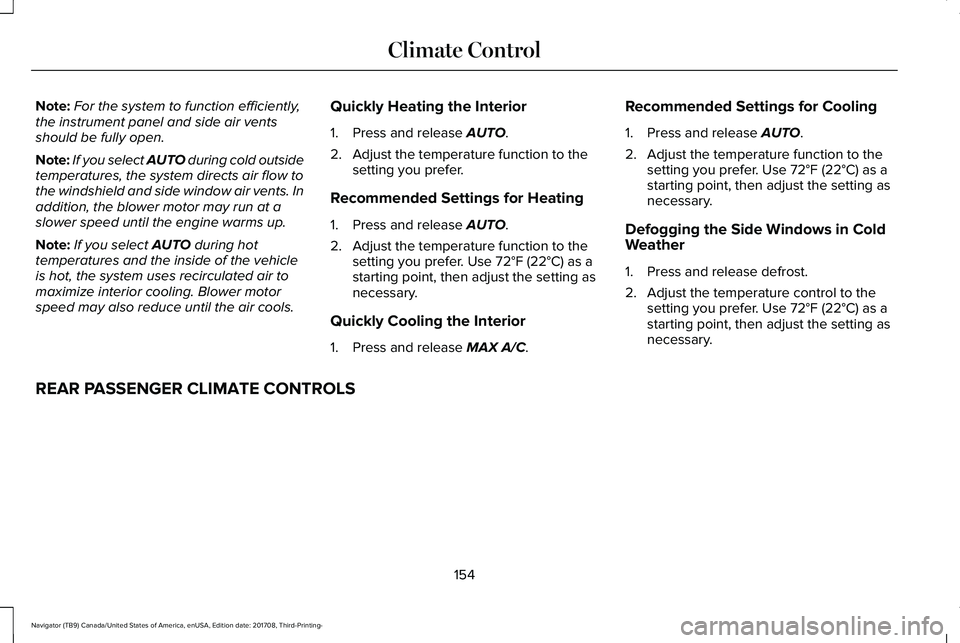
REAR PASSENGER CLIMATE CONTROLS
154
Navigator (TB9) Canada/United States of America, enUSA, Edition date: 201708, Third-Printing-
Climate Control
Page 159 of 649
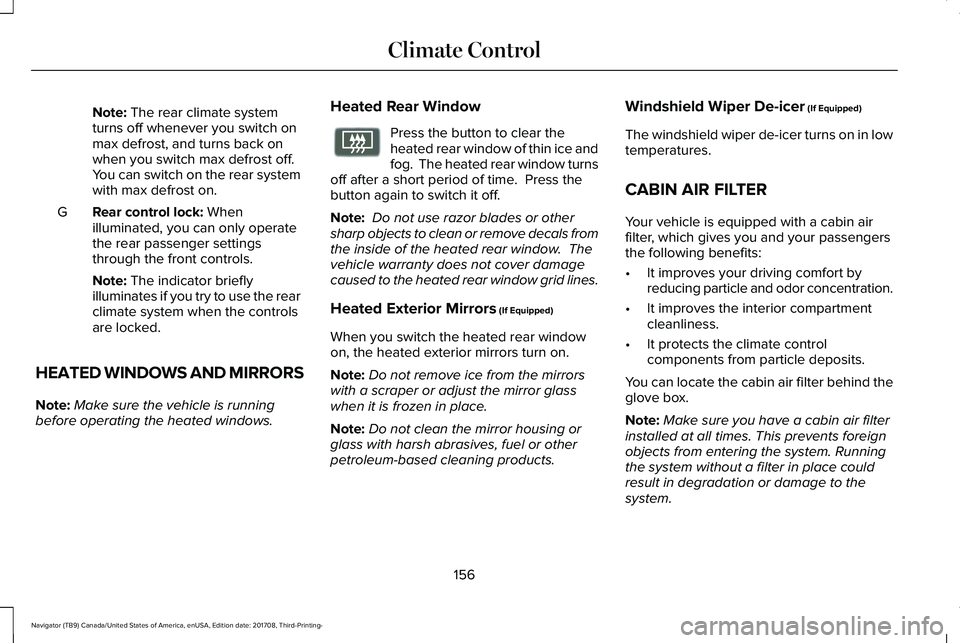
Note: The rear climate systemturns off whenever you switch onmax defrost, and turns back onwhen you switch max defrost off.You can switch on the rear systemwith max defrost on.
Rear control lock: Whenilluminated, you can only operatethe rear passenger settingsthrough the front controls.
G
Note: The indicator brieflyilluminates if you try to use the rearclimate system when the controlsare locked.
HEATED WINDOWS AND MIRRORS
Note:Make sure the vehicle is runningbefore operating the heated windows.
Heated Rear Window
Press the button to clear theheated rear window of thin ice andfog. The heated rear window turnsoff after a short period of time. Press thebutton again to switch it off.
Note: Do not use razor blades or othersharp objects to clean or remove decals fromthe inside of the heated rear window. Thevehicle warranty does not cover damagecaused to the heated rear window grid lines.
Heated Exterior Mirrors (If Equipped)
When you switch the heated rear windowon, the heated exterior mirrors turn on.
Note:Do not remove ice from the mirrorswith a scraper or adjust the mirror glasswhen it is frozen in place.
Note:Do not clean the mirror housing orglass with harsh abrasives, fuel or otherpetroleum-based cleaning products.
Windshield Wiper De-icer (If Equipped)
The windshield wiper de-icer turns on in lowtemperatures.
CABIN AIR FILTER
Your vehicle is equipped with a cabin airfilter, which gives you and your passengersthe following benefits:
•It improves your driving comfort byreducing particle and odor concentration.
•It improves the interior compartmentcleanliness.
•It protects the climate controlcomponents from particle deposits.
You can locate the cabin air filter behind theglove box.
Note:Make sure you have a cabin air filterinstalled at all times. This prevents foreignobjects from entering the system. Runningthe system without a filter in place couldresult in degradation or damage to thesystem.
156
Navigator (TB9) Canada/United States of America, enUSA, Edition date: 201708, Third-Printing-
Climate ControlE72507
Page 200 of 649
•Elevation is below about 11,000 ft(3,350 m).
•Ambient temperature is moderate.
•If equipped with selectable drive modesand when you select Normal, Conserve,Slippery.
•The trailer is not connected.
•Tow haul mode not engaged.
•You have not selected Manual mode.
The green Auto-Start-Stopindicator light on the instrumentcluster will illuminates to indicatewhen the automatic engine stop occurs.
If the instrument cluster isequipped with a greyAuto-Start-Stop indicator light, itilluminates when automatic engine stop isnot available due to one of the above notedconditions not being met.
Automatic Engine Restart
Any of the following conditions results in anautomatic restart of the engine:
•You have removed your foot from thebrake pedal.
•You press the accelerator pedal.
•You press the accelerator and the brakepedal at the same time.
•The driver seatbelt becomes unfastenedor the driver door is ajar.
•Your vehicle is moving.
•The interior compartment does not meetcustomer comfort when air conditioningor heat is on.
•Fogging of the windows could occur andthe air conditioning is on.
•The battery is not within optimaloperating conditions.
•You have exceeded the maximum engineoff time.
•When you press the Auto-Start-Stopbutton with the engine automaticallystopped.
•The front defroster is turned to the Maxsetting.
•When you shift into park (P) the enginewill restart.
Any of the following conditions may result inan automatic restart of the engine:
•You have increased the blower fan speedor changed the climate controltemperature.
•You have an electrical accessory turnedon or plugged in.
Note:You may notice that the climate seatfan fluctuates during an automatic restart.
197
Navigator (TB9) Canada/United States of America, enUSA, Edition date: 201708, Third-Printing-
Unique Driving Characteristics E146361
Page 245 of 649
WARNING: Active park assist doesnot apply the brakes under anycircumstances.
WARNING: You are responsible forcontrolling your vehicle at all times. Thesystem is designed to be an aid and doesnot relieve you of your responsibility todrive with due care and attention. Failureto follow this instruction could result in theloss of control of your vehicle, personalinjury or death.
Active park assist is a multi-step process andmay require you to shift the transmissionmultiple times. Follow the onscreeninstructions until the parking maneuver iscomplete.
If you are uncomfortable with the proximityto any vehicle or object, you may choose tooverride the system by grabbing the steeringwheel, or by taking full control of your vehicleafter pressing the active park assist button.
Keep your hands, hair, clothing and anyloose items clear of the steering wheel whenusing active park assist.
The sensors are on the front and rearbumpers.
Note:Keep the sensors free from snow, iceand large accumulations of dirt.
Note:Do not cover up the sensors.
Note:Do not clean the sensors with sharpobjects.
Note:The sensors may not detect objectswith surfaces that absorb ultrasonic waves.The sensors may falsely detect objects dueto ultrasonic interference caused bymotorcycle exhausts, truck air brakes orhorns, for example.
Note:If you change any tires, the systemmust recalibrate and may not correctlyoperate for a short time.
The system may not correctly operate in anyof the following conditions:
•You use a spare tire or a tire that issignificantly worn more than the othertires.
•One or more tires are incorrectly inflated.
•You try to park on a tight curve.
•Something passes between the frontbumper and the parking space. Forexample, a pedestrian or cyclist.
•The edge of the neighboring parkedvehicle is high off the ground. Forexample, a bus, tow truck or flatbedtruck.
•The weather conditions are poor. Forexample, during heavy rain, snow, fog,high humidity and high temperatures.
Do not use the system if:
•You have attached an add-on accessoryclose to the sensors on the front or rearof your vehicle. For example, a bike rackor trailer.
•You have attached an overhangingobject to the roof. For example, asurfboard.
•The front bumper, rear bumper or theside sensors are damaged.
•The correct tire size is not in use on yourvehicle. For example, a mini-spare tire.
242
Navigator (TB9) Canada/United States of America, enUSA, Edition date: 201708, Third-Printing-
Parking Aids