Fuel LINCOLN NAVIGATOR 2019 User Guide
[x] Cancel search | Manufacturer: LINCOLN, Model Year: 2019, Model line: NAVIGATOR, Model: LINCOLN NAVIGATOR 2019Pages: 645, PDF Size: 5.02 MB
Page 127 of 645
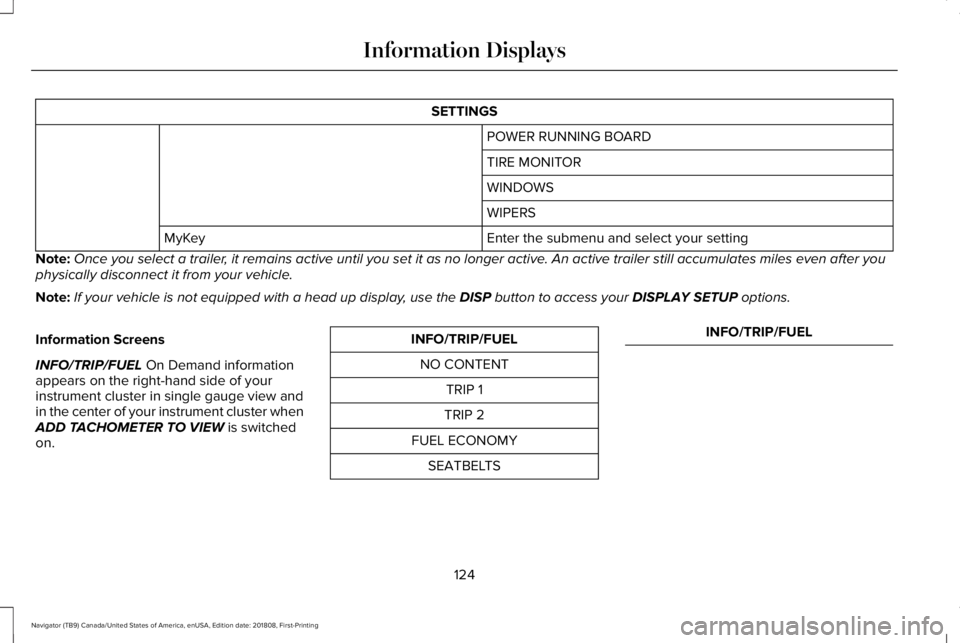
SETTINGS
POWER RUNNING BOARD
TIRE MONITOR
WINDOWS
WIPERS
Enter the submenu and select your settingMyKey
Note:Once you select a trailer, it remains active until you set it as no longer active. An active trailer still accumulates miles even after youphysically disconnect it from your vehicle.
Note:If your vehicle is not equipped with a head up display, use the DISP button to access your DISPLAY SETUP options.
Information Screens
INFO/TRIP/FUEL On Demand informationappears on the right-hand side of yourinstrument cluster in single gauge view andin the center of your instrument cluster whenADD TACHOMETER TO VIEW is switchedon.
INFO/TRIP/FUEL
NO CONTENT
TRIP 1
TRIP 2
FUEL ECONOMY
SEATBELTS
INFO/TRIP/FUEL
124
Navigator (TB9) Canada/United States of America, enUSA, Edition date: 201808, First-Printing
Information Displays
Page 128 of 645
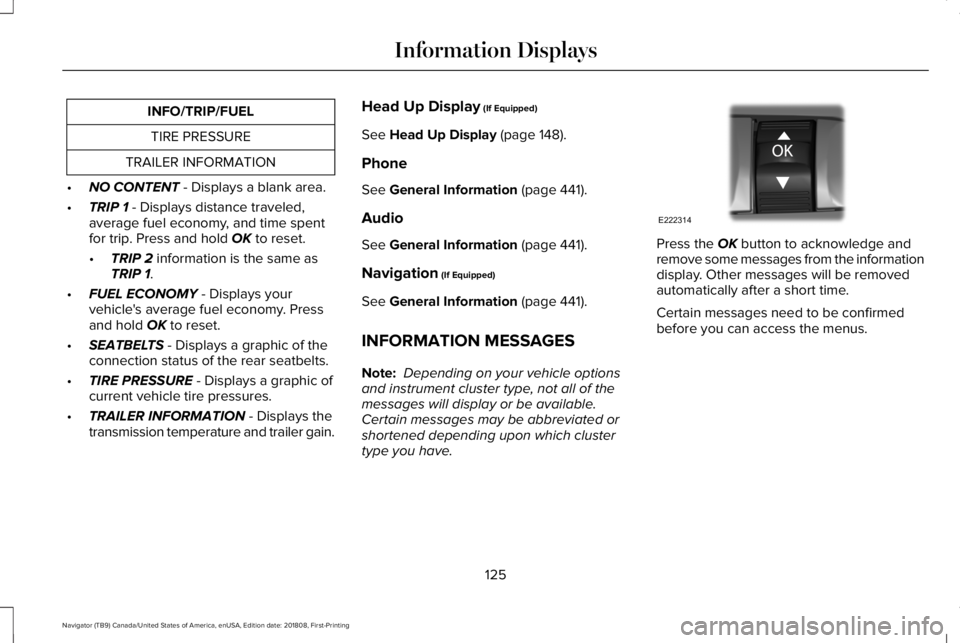
INFO/TRIP/FUEL
TIRE PRESSURE
TRAILER INFORMATION
•NO CONTENT - Displays a blank area.
•TRIP 1 - Displays distance traveled,average fuel economy, and time spentfor trip. Press and hold OK to reset.
•TRIP 2 information is the same asTRIP 1.
•FUEL ECONOMY - Displays yourvehicle's average fuel economy. Pressand hold OK to reset.
•SEATBELTS - Displays a graphic of theconnection status of the rear seatbelts.
•TIRE PRESSURE - Displays a graphic ofcurrent vehicle tire pressures.
•TRAILER INFORMATION - Displays thetransmission temperature and trailer gain.
Head Up Display (If Equipped)
See Head Up Display (page 148).
Phone
See General Information (page 441).
Audio
See General Information (page 441).
Navigation (If Equipped)
See General Information (page 441).
INFORMATION MESSAGES
Note: Depending on your vehicle optionsand instrument cluster type, not all of themessages will display or be available. Certain messages may be abbreviated orshortened depending upon which clustertype you have.
Press the OK button to acknowledge andremove some messages from the informationdisplay. Other messages will be removedautomatically after a short time.
Certain messages need to be confirmedbefore you can access the menus.
125
Navigator (TB9) Canada/United States of America, enUSA, Edition date: 201808, First-Printing
Information DisplaysE222314
Page 130 of 645
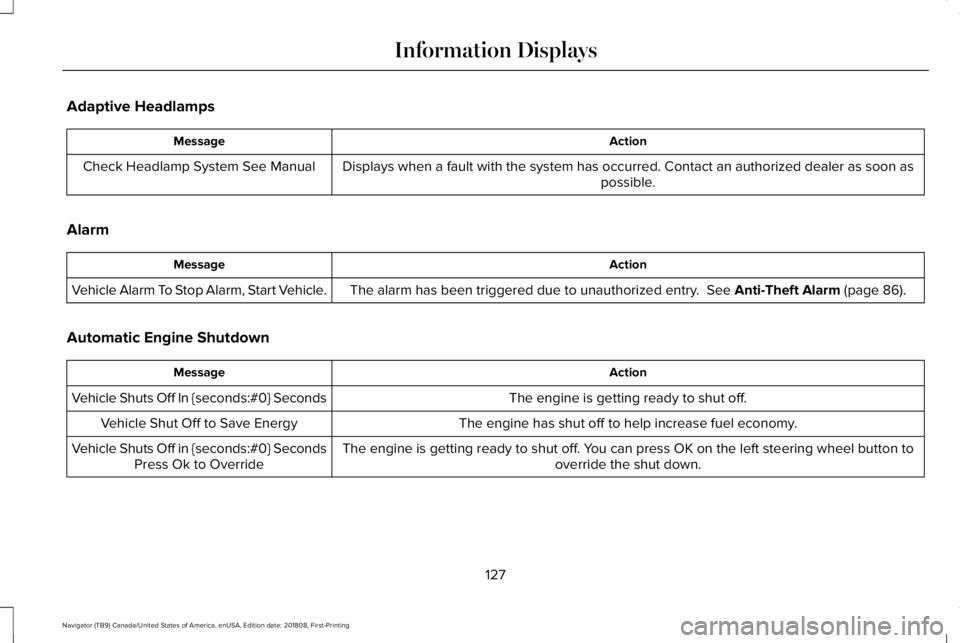
Adaptive Headlamps
ActionMessage
Displays when a fault with the system has occurred. Contact an authorized dealer as soon aspossible.Check Headlamp System See Manual
Alarm
ActionMessage
The alarm has been triggered due to unauthorized entry. See Anti-Theft Alarm (page 86).Vehicle Alarm To Stop Alarm, Start Vehicle.
Automatic Engine Shutdown
ActionMessage
The engine is getting ready to shut off.Vehicle Shuts Off In {seconds:#0} Seconds
The engine has shut off to help increase fuel economy.Vehicle Shut Off to Save Energy
The engine is getting ready to shut off. You can press OK on the left steering wheel button tooverride the shut down.Vehicle Shuts Off in {seconds:#0} SecondsPress Ok to Override
127
Navigator (TB9) Canada/United States of America, enUSA, Edition date: 201808, First-Printing
Information Displays
Page 136 of 645
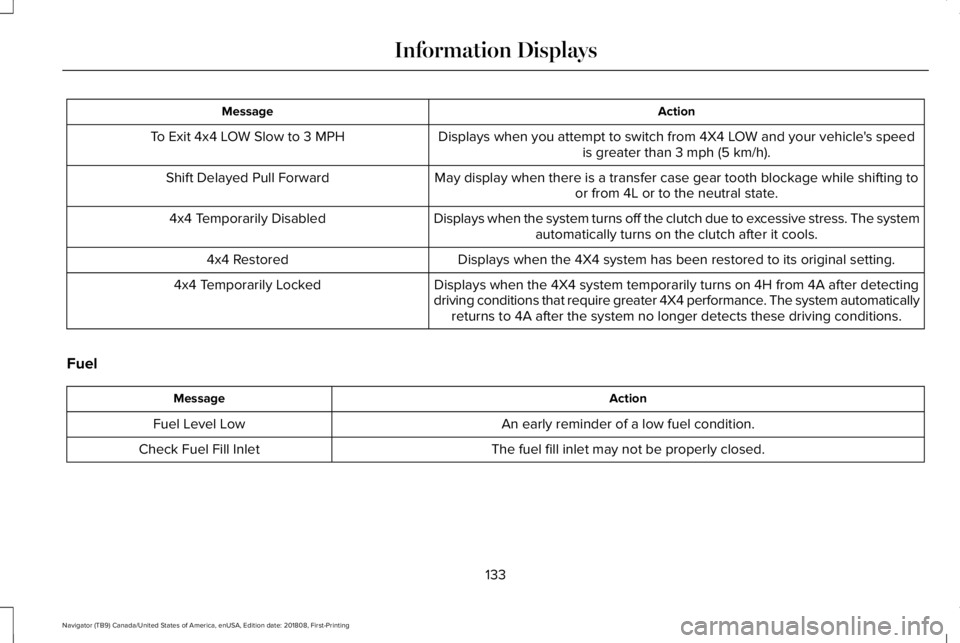
ActionMessage
Displays when you attempt to switch from 4X4 LOW and your vehicle's speedis greater than 3 mph (5 km/h).To Exit 4x4 LOW Slow to 3 MPH
May display when there is a transfer case gear tooth blockage while shifting toor from 4L or to the neutral state.Shift Delayed Pull Forward
Displays when the system turns off the clutch due to excessive stress. The systemautomatically turns on the clutch after it cools.4x4 Temporarily Disabled
Displays when the 4X4 system has been restored to its original setting.4x4 Restored
Displays when the 4X4 system temporarily turns on 4H from 4A after detectingdriving conditions that require greater 4X4 performance. The system automaticallyreturns to 4A after the system no longer detects these driving conditions.
4x4 Temporarily Locked
Fuel
ActionMessage
An early reminder of a low fuel condition.Fuel Level Low
The fuel fill inlet may not be properly closed.Check Fuel Fill Inlet
133
Navigator (TB9) Canada/United States of America, enUSA, Edition date: 201808, First-Printing
Information Displays
Page 152 of 645
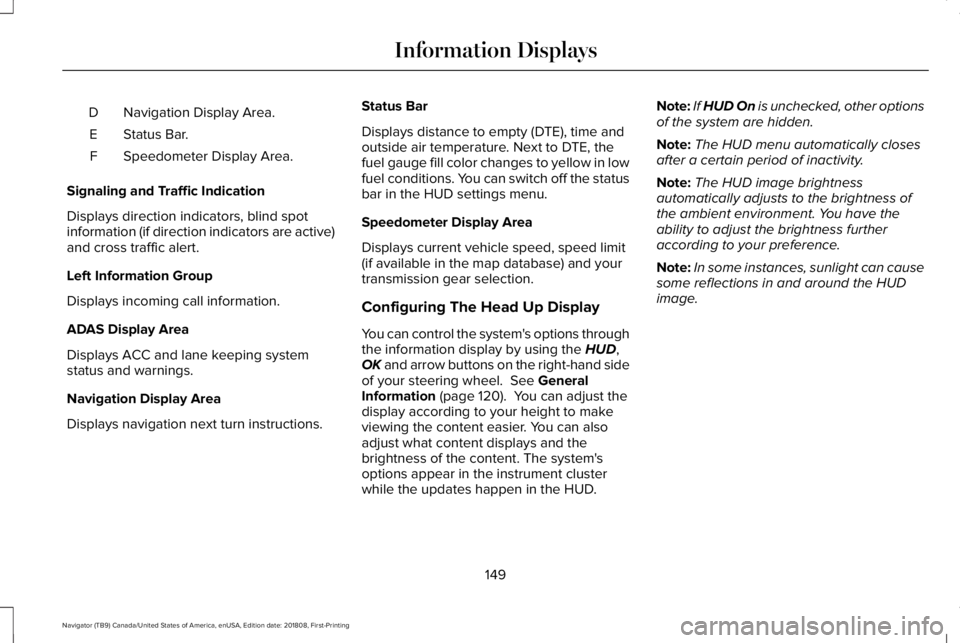
Navigation Display Area.D
Status Bar.E
Speedometer Display Area.F
Signaling and Traffic Indication
Displays direction indicators, blind spotinformation (if direction indicators are active)and cross traffic alert.
Left Information Group
Displays incoming call information.
ADAS Display Area
Displays ACC and lane keeping systemstatus and warnings.
Navigation Display Area
Displays navigation next turn instructions.
Status Bar
Displays distance to empty (DTE), time andoutside air temperature. Next to DTE, thefuel gauge fill color changes to yellow in lowfuel conditions. You can switch off the statusbar in the HUD settings menu.
Speedometer Display Area
Displays current vehicle speed, speed limit(if available in the map database) and yourtransmission gear selection.
Configuring The Head Up Display
You can control the system's options throughthe information display by using the HUD,OK and arrow buttons on the right-hand sideof your steering wheel. See GeneralInformation (page 120). You can adjust thedisplay according to your height to makeviewing the content easier. You can alsoadjust what content displays and thebrightness of the content. The system'soptions appear in the instrument clusterwhile the updates happen in the HUD.
Note:If HUD On is unchecked, other optionsof the system are hidden.
Note:The HUD menu automatically closesafter a certain period of inactivity.
Note:The HUD image brightnessautomatically adjusts to the brightness ofthe ambient environment. You have theability to adjust the brightness furtheraccording to your preference.
Note:In some instances, sunlight can causesome reflections in and around the HUDimage.
149
Navigator (TB9) Canada/United States of America, enUSA, Edition date: 201808, First-Printing
Information Displays
Page 159 of 645
Switching the Rear Climate Control Onand Off
Press and release the button.
Switching the Rear Heated Seats Onand Off
Press and release the button tocycle through the various heatsettings and off.
See Heated Seats (page 177).
HEATED WINDSHIELD (IF EQUIPPED)
Windshield Wiper De-Icer
The windshield wiper de-icer turns on in lowtemperatures.
HEATED REAR WINDOW
Press the button to clear the rearwindow of thin ice and fog. Theheated rear window turns off aftera short period of time.
Note:Make sure the engine is on beforeoperating the heated windows.
Note: Do not use razor blades or othersharp objects to clean or remove decals fromthe inside of the heated rear window. Thevehicle Warranty may not cover damagecaused to the heated rear window grid lines.
HEATED EXTERIOR MIRRORS
When you switch the heated rear windowon, the heated exterior mirrors turn on.
Note:Do not remove ice from the mirrorswith a scraper or adjust the mirror glasswhen it is frozen in place.
Note:Do not clean the mirror housing orglass with harsh abrasives, fuel or otherpetroleum-based cleaning products. Thevehicle warranty may not cover damagecaused to the mirror housing or glass.
CABIN AIR FILTER
Your vehicle is equipped with a cabin airfilter, which gives you and your passengersthe following benefits:
•It improves your driving comfort byreducing particle concentration.
•It improves the interior compartmentcleanliness.
•It protects the climate controlcomponents from particle deposits.
You can locate the cabin air filter behind theglove box.
Note:Make sure you have a cabin air filterinstalled at all times. This prevents foreignobjects from entering the system. Runningthe system without a filter in place couldresult in degradation or damage to thesystem.
156
Navigator (TB9) Canada/United States of America, enUSA, Edition date: 201808, First-Printing
Climate Control
Page 196 of 645
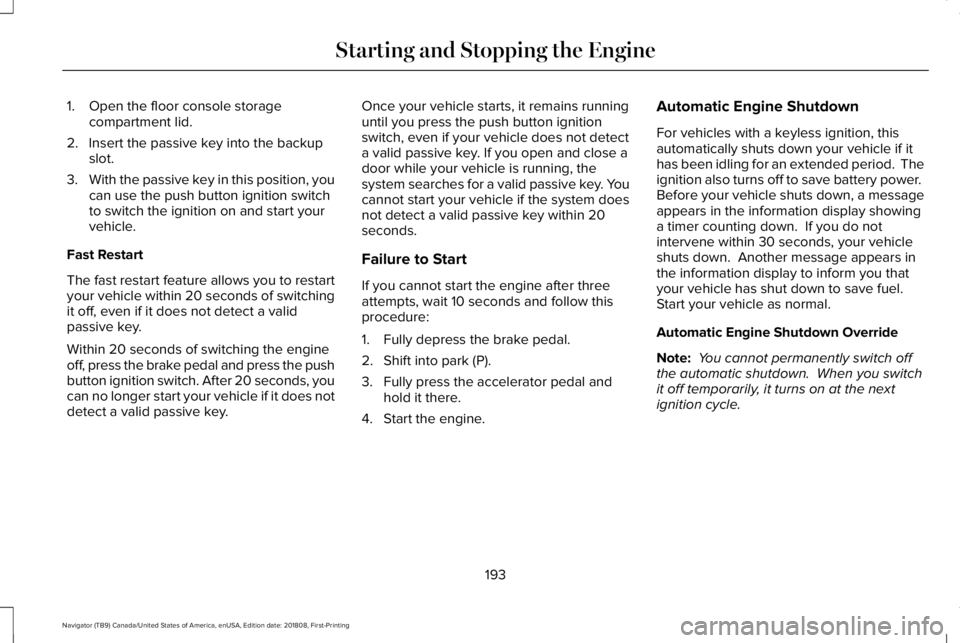
1. Open the floor console storagecompartment lid.
2. Insert the passive key into the backupslot.
3.With the passive key in this position, youcan use the push button ignition switchto switch the ignition on and start yourvehicle.
Fast Restart
The fast restart feature allows you to restartyour vehicle within 20 seconds of switchingit off, even if it does not detect a validpassive key.
Within 20 seconds of switching the engineoff, press the brake pedal and press the pushbutton ignition switch. After 20 seconds, youcan no longer start your vehicle if it does notdetect a valid passive key.
Once your vehicle starts, it remains runninguntil you press the push button ignitionswitch, even if your vehicle does not detecta valid passive key. If you open and close adoor while your vehicle is running, thesystem searches for a valid passive key. Youcannot start your vehicle if the system doesnot detect a valid passive key within 20seconds.
Failure to Start
If you cannot start the engine after threeattempts, wait 10 seconds and follow thisprocedure:
1. Fully depress the brake pedal.
2. Shift into park (P).
3. Fully press the accelerator pedal andhold it there.
4. Start the engine.
Automatic Engine Shutdown
For vehicles with a keyless ignition, thisautomatically shuts down your vehicle if ithas been idling for an extended period. Theignition also turns off to save battery power. Before your vehicle shuts down, a messageappears in the information display showinga timer counting down. If you do notintervene within 30 seconds, your vehicleshuts down. Another message appears inthe information display to inform you thatyour vehicle has shut down to save fuel. Start your vehicle as normal.
Automatic Engine Shutdown Override
Note: You cannot permanently switch offthe automatic shutdown. When you switchit off temporarily, it turns on at the nextignition cycle.
193
Navigator (TB9) Canada/United States of America, enUSA, Edition date: 201808, First-Printing
Starting and Stopping the Engine
Page 199 of 645
AUTO-START-STOP
The system helps reduce fuel consumptionby automatically stopping and restarting theengine when your vehicle has stopped. Theengine restarts automatically when yourelease the brake pedal.
In some situations, your vehicle may restartautomatically, for example:
•To maintain interior comfort.
•To recharge the battery.
Note:Power assist steering turns off whenthe engine is off.
Note:If your vehicle is flex fuel capable,Auto-Start-Stop is inhibited for a short timeafter a refuel event when the system isverifying the fuel type being used.
WARNING: Always fully apply theparking brake. Make sure you shift intopark (P) for vehicles with an automatictransmission. Switch the ignition off andremove the key whenever you leave yourvehicle.
WARNING: Before opening the hoodor performing any maintenance, fully applythe parking brake, shift into park (P) orneutral (N) and switch the ignition off.
WARNING: Always switch the ignitionoff before leaving the vehicle. If the ignitionis switched on an automatic restart mayoccur at any time.
WARNING: The system may requirethe engine to automatically restart whenthe auto-start-stop indicator illuminatesgreen or flashes amber. Failure to followthis instruction could result in personalinjury.
The Auto-Start-Stop system status isavailable at a glance within the informationdisplay. See Information Displays (page120).
Enabling Auto-Start-Stop
The system automatically enables every timeyou start your vehicle if:
•You do not press the Auto-Start-Stopbutton (not illuminated).
•Your vehicle exceeds an initial speed of3 mph (5 km/h) after you have initiallystarted your vehicle.
•You have stopped your vehicle.
•Your foot is on the brake pedal.
•The transmission is in drive.
•Not in Excite mode (enable by pressingthe Auto-Start-Stop button).
•The driver door is closed.
•There is adequate brake vacuum.
•The interior compartment has cooled orwarmed to an acceptable level.
•The front windshield defroster is off.
•You have not turned the steering wheelrapidly or you do not have it at a sharpangle.
•The vehicle is not on a steep road grade.
•The battery is within optimal operatingconditions, (with the battery state ofcharge and temperature in range).
•The engine coolant is at operatingtemperature.
196
Navigator (TB9) Canada/United States of America, enUSA, Edition date: 201808, First-Printing
Unique Driving Characteristics
Page 202 of 645
SAFETY PRECAUTIONS
WARNING: Do not overfill the fueltank. The pressure in an overfilled tankmay cause leakage and lead to fuel sprayand fire.
WARNING: The fuel system may beunder pressure. If you hear a hissing soundnear the fuel filler inlet, do not refuel untilthe sound stops. Otherwise, fuel may sprayout, which could cause serious personalinjury.
WARNING: Fuels can cause seriousinjury or death if misused or mishandled.
WARNING: Fuel may containbenzene, which is a cancer-causing agent.
WARNING: When refueling alwaysshut the engine off and never allow sparksor open flames near the fuel tank fillervalve. Never smoke or use a cell phonewhile refueling. Fuel vapor is extremelyhazardous under certain conditions. Avoidinhaling excess fumes.
Follow these guidelines when refueling:
•Extinguish all smoking materials and anyopen flames before refueling yourvehicle.
•Always switch the engine off beforerefueling.
•Automotive fuels can be harmful or fatalif swallowed. Fuel is highly toxic and ifswallowed can cause death or permanentinjury. If fuel is swallowed immediatelycall a physician, even if no symptoms areimmediately apparent. The toxic effectsof fuel may not be apparent for hours.
•Avoid inhaling fuel vapors. Inhaling fuelvapor can lead to eye and respiratorytract irritation. In severe cases, excessiveor prolonged breathing of fuel vapor cancause serious illness and permanentinjury.
•Avoid getting fuel in your eyes. If yousplash fuel in your eyes, immediatelyremove contact lenses (if worn), flush withwater for 15 minutes and seek medicalattention. Failure to seek proper medicalattention could lead to permanent injury.
•Fuels can be harmful if absorbed throughthe skin. If you splash fuel on your skin,clothing or both, promptly removecontaminated clothing and thoroughlywash your skin with soap and water.Repeated or prolonged skin contactcauses skin irritation.
•Be particularly careful if you are takingAntabuse or other forms of Disulfiram forthe treatment of alcoholism. Breathingfuel vapors could cause an adversereaction, serious personal injury orsickness. Immediately call a physician ifyou experience any adverse reactions.
199
Navigator (TB9) Canada/United States of America, enUSA, Edition date: 201808, First-Printing
Fuel and Refueling
Page 203 of 645
FUEL QUALITY
Choosing the Right Fuel
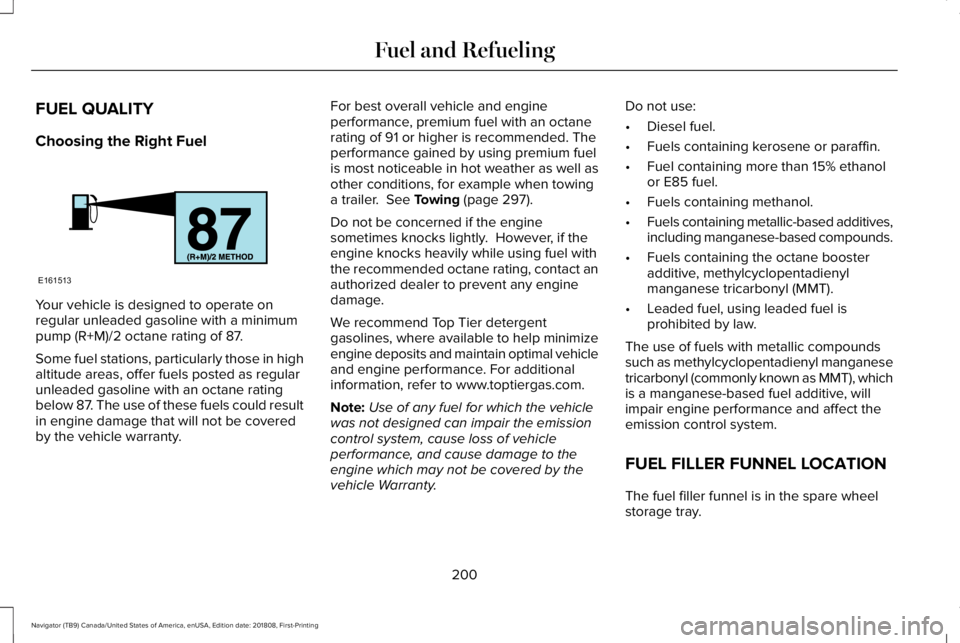
Your vehicle is designed to operate onregular unleaded gasoline with a minimumpump (R+M)/2 octane rating of 87.
Some fuel stations, particularly those in highaltitude areas, offer fuels posted as regularunleaded gasoline with an octane ratingbelow 87. The use of these fuels could resultin engine damage that will not be coveredby the vehicle warranty.
For best overall vehicle and engineperformance, premium fuel with an octanerating of 91 or higher is recommended. Theperformance gained by using premium fuelis most noticeable in hot weather as well asother conditions, for example when towinga trailer. See Towing (page 297).
Do not be concerned if the enginesometimes knocks lightly. However, if theengine knocks heavily while using fuel withthe recommended octane rating, contact anauthorized dealer to prevent any enginedamage.
We recommend Top Tier detergentgasolines, where available to help minimizeengine deposits and maintain optimal vehicleand engine performance. For additionalinformation, refer to www.toptiergas.com.
Note:Use of any fuel for which the vehiclewas not designed can impair the emissioncontrol system, cause loss of vehicleperformance, and cause damage to theengine which may not be covered by thevehicle Warranty.
Do not use:
•Diesel fuel.
•Fuels containing kerosene or paraffin.
•Fuel containing more than 15% ethanolor E85 fuel.
•Fuels containing methanol.
•Fuels containing metallic-based additives,including manganese-based compounds.
•Fuels containing the octane boosteradditive, methylcyclopentadienylmanganese tricarbonyl (MMT).
•Leaded fuel, using leaded fuel isprohibited by law.
The use of fuels with metallic compoundssuch as methylcyclopentadienyl manganesetricarbonyl (commonly known as MMT), whichis a manganese-based fuel additive, willimpair engine performance and affect theemission control system.
FUEL FILLER FUNNEL LOCATION
The fuel filler funnel is in the spare wheelstorage tray.
200
Navigator (TB9) Canada/United States of America, enUSA, Edition date: 201808, First-Printing
Fuel and RefuelingE161513