alarm LINCOLN NAVIGATOR 2019 User Guide
[x] Cancel search | Manufacturer: LINCOLN, Model Year: 2019, Model line: NAVIGATOR, Model: LINCOLN NAVIGATOR 2019Pages: 645, PDF Size: 5.02 MB
Page 90 of 645
USING POWER RUNNING BOARDS
WARNING: In extreme climates,excessive ice buildup may occur, causingthe running boards not to deploy. Makesure that the running boards havedeployed, and have finished moving beforeattempting to step on them. The runningboards will resume normal function oncethe blockage is cleared.
WARNING: Switch off the runningboards before jacking or placing any objectunder your vehicle. Never place your handbetween the extended running board andyour vehicle. A moving running board maycause injury.
Note:Do not use the running boards, frontand rear hinge assemblies, running boardmotors, or the running board underbodymounts to lift your vehicle when jacking.Always use proper jacking points.
Note:The running boards may operate moreslowly in cool temperatures.
Note:The running board mechanism maytrap debris such as mud, dirt, snow, ice andsalt. This may cause unwanted noise. If thishappens, manually set the running boardsto the deployed position. Then, wash thesystem, in particular the front and rear hingearms, with a high-pressure car wash wand.
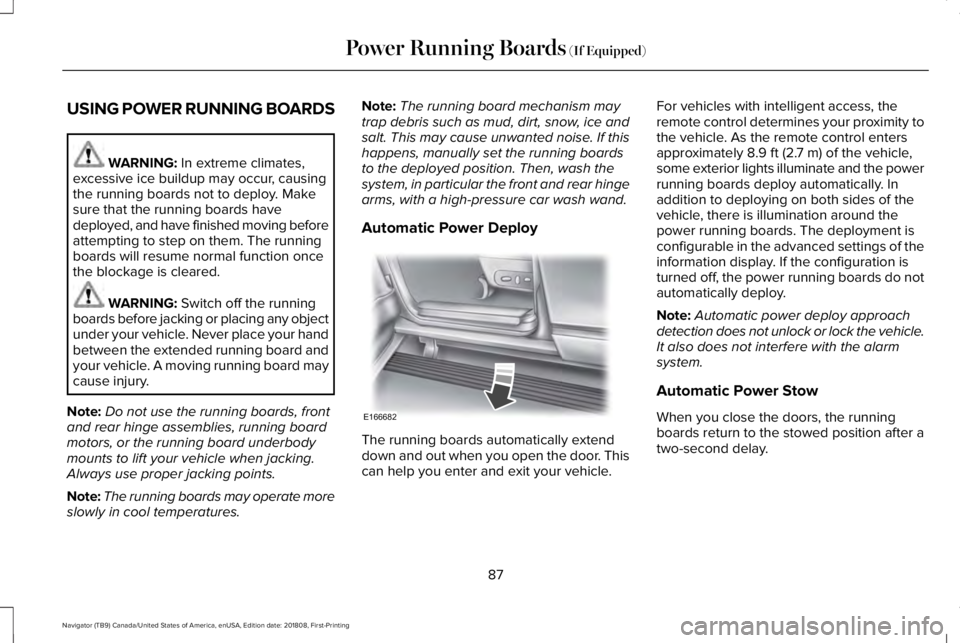
Automatic Power Deploy
The running boards automatically extenddown and out when you open the door. Thiscan help you enter and exit your vehicle.
For vehicles with intelligent access, theremote control determines your proximity tothe vehicle. As the remote control entersapproximately 8.9 ft (2.7 m) of the vehicle,some exterior lights illuminate and the powerrunning boards deploy automatically. Inaddition to deploying on both sides of thevehicle, there is illumination around thepower running boards. The deployment isconfigurable in the advanced settings of theinformation display. If the configuration isturned off, the power running boards do notautomatically deploy.
Note:Automatic power deploy approachdetection does not unlock or lock the vehicle.It also does not interfere with the alarmsystem.
Automatic Power Stow
When you close the doors, the runningboards return to the stowed position after atwo-second delay.
87
Navigator (TB9) Canada/United States of America, enUSA, Edition date: 201808, First-Printing
Power Running Boards (If Equipped)E166682
Page 126 of 645
SETTINGS
DRIVER ALERT
Enter the submenu and select your settingLANE KEEPING SYSTEM
PRE-COLLISION
Enter the submenu and select your settingTRAILER STATUSTOWING
TRAILER OPTIONS
CONNECTION CHECKLIST
ALARMVEHICLEADVANCEDSETTINGSAUTO ENGINE OFF
EASY ENTRY/EXIT
LIGHTING
LOCKS
MIRRORS
NEUTRAL TOW
OIL LIFE RESET
POWER LIFTGATE
REMOTE START
123
Navigator (TB9) Canada/United States of America, enUSA, Edition date: 201808, First-Printing
Information Displays
Page 130 of 645
Adaptive Headlamps
ActionMessage
Displays when a fault with the system has occurred. Contact an authorized dealer as soon aspossible.Check Headlamp System See Manual
Alarm
ActionMessage
The alarm has been triggered due to unauthorized entry. See Anti-Theft Alarm (page 86).Vehicle Alarm To Stop Alarm, Start Vehicle.
Automatic Engine Shutdown
ActionMessage
The engine is getting ready to shut off.Vehicle Shuts Off In {seconds:#0} Seconds
The engine has shut off to help increase fuel economy.Vehicle Shut Off to Save Energy
The engine is getting ready to shut off. You can press OK on the left steering wheel button tooverride the shut down.Vehicle Shuts Off in {seconds:#0} SecondsPress Ok to Override
127
Navigator (TB9) Canada/United States of America, enUSA, Edition date: 201808, First-Printing
Information Displays
Page 239 of 645
PRINCIPLE OF OPERATION
WARNING: To help avoid personalinjury, always use caution when in reverse(R) and when using the sensing system.
WARNING: The system may notdetect objects with surfaces that absorbreflection. Always drive with due care andattention. Failure to take care may resultin a crash.
WARNING: Traffic control systems,inclement weather, air brakes, externalmotors and fans may affect the correctoperation of the sensing system.This maycause reduced performance or false alerts.
WARNING: The system may notdetect small or moving objects, particularlythose close to the ground.
Note:Certain add-on devices installedaround the bumper or fascia may createfalse beeps. For example, large trailerhitches, bike or surfboard racks, license platebrackets, bumper covers or any other devicethat may block the normal detection zoneof the system.
Note:Keep the sensors, located on thebumper or fascia, free from snow, ice andlarge accumulations of dirt. If the sensorsare covered, the system’s accuracy can beaffected. Do not clean the sensors with sharpobjects.
Note:If your vehicle sustains damage to thebumper or fascia, leaving it misaligned orbent, the sensing zone may be alteredcausing inaccurate measurement ofobstacles or false alarms. See yourauthorized technician.
Note:When a trailer is connected to yourvehicle, the rear parking aid may detect thetrailer and therefore provide warnings.Disable the rear parking aid when a traileris connected to prevent these warnings.
Note:The sensing system cannot be turnedoff when a MyKey is present. See Principleof Operation (page 67).
We recommend that you take some time toget to know the system and its limitations byreading this section.
The sensing system warns the driver ofobstacles within a certain range of yourvehicle. The system automatically turns oneach time you switch the ignition on.
When receiving a detection warning, theradio volume reduces to a predeterminedlevel. After the warning goes away, the radiovolume returns to the previous level.
You can turn the system on or offby pressing the parking aid button.If your vehicle does not have aparking aid button, the system can beswitched off through the information displaymenu or from the pop-up message thatappears once you shift the transmission intoreverse (R). See General Information (page120).
236
Navigator (TB9) Canada/United States of America, enUSA, Edition date: 201808, First-Printing
Parking AidsE139213
Page 263 of 645
The system may apply the brakes to slowthe vehicle to the new set speed. The setspeed displays continuously in theinformation display when the system isactive.
Canceling the Set Speed
Press and release the button or tapthe brake pedal.
The set speed does not erase.
Resuming the Set Speed
Press and release the button.
Your vehicle speed returns to the previouslyset speed and gap setting. The set speeddisplays continuously in the informationdisplay when the system is active.
Note:Only use resume if you are aware ofthe set speed and intend to return to it.
Automatic Cancellation
Automatic cancellation can also occur when:
•The tires lose traction.
•You apply the parking brake.
Park Brake Application
Automatic parking brake application andcancellation occurs if:
•You unbuckle the seatbelt and open thedoor after you stop the vehicle.
•You hold the vehicle at a stopcontinuously for more than three minutes.
Hilly Condition Usage
You should select a lower gear when thesystem is active in situations such asprolonged downhill driving on steep grades,for example in mountainous areas. Thesystem needs additional engine braking inthese situations to reduce the load on thevehicle’s regular brake system to prevent itfrom overheating.
Note:An audible alarm sounds and thesystem shuts down if it applies brakes for anextended period of time. This allows thebrakes to cool. The system functionsnormally again after the brakes cool.
Switching Adaptive Cruise Control Off
Press and release the button whenthe system is in standby mode, orswitch the ignition off.
Note:You erase the set speed and gapsetting when you switch the system off.
Detection Issues
WARNING: On rare occasions,detection issues can occur due to the roadinfrastructures, for example bridges,tunnels and safety barriers. In these cases,the system may brake late orunexpectedly. At all times, you areresponsible for controlling your vehicle,supervising the system and intervening, ifrequired.
WARNING: If the systemmalfunctions, have your vehicle checkedas soon as possible.
260
Navigator (TB9) Canada/United States of America, enUSA, Edition date: 201808, First-Printing
Cruise Control E265299 E265297
Page 546 of 645
For maximum vehicle performance, keep thefollowing information in mind when addingaccessories or equipment to your vehicle:
•When adding accessories, equipment,passengers and luggage to your vehicle,do not exceed the total weight capacityof the vehicle or of the front or rear axle(GVWR or GAWR as indicated on theSafety Compliance Certification label). Ask an authorized dealer for specificweight information.
•The Federal CommunicationsCommission (FCC) and Canadian RadioTelecommunications Commission (CRTC)regulate the use of mobilecommunications systems that areequipped with radio transmitters, forexample two-way radios, telephones andtheft alarms. Any such equipmentinstalled in your vehicle should complywith Federal CommunicationsCommission (FCC) and Canadian RadioTelecommunications Commission (CRTC)regulations and should be installed onlyby an authorized dealer.
•Mobile communications systems mayharm the operation of your vehicle,particularly if their manufacturer did notdesign them specifically for automotiveuse.
•If you or an authorized Lincoln dealer addany non-Lincoln electrical or electronicaccessories or components to yourvehicle, you may adversely affect batteryperformance and durability. In addition,you may also adversely affect theperformance of other electrical systemsin the vehicle.
543
Navigator (TB9) Canada/United States of America, enUSA, Edition date: 201808, First-Printing
Accessories
Page 632 of 645
3
360 Degree Camera...................................252Advanced Camera Views................................252Camera Views.....................................................252Front Camera......................................................253Keep Out Zone....................................................253Side Camera........................................................253
4
4WDSee: Four-Wheel Drive.......................................216
A
A/CSee: Climate Control..........................................152
About This Manual............................................7ABSSee: Brakes..........................................................225
ABS driving hintsSee: Hints on Driving With Anti-LockBrakes...............................................................226
Accessories...................................................542Exterior Style.......................................................542Interior Style.........................................................542Lifestyle.................................................................542
Peace of Mind.....................................................542
AccessoriesSee: Replacement Parts Recommendation.....12
ACCSee: Using Adaptive Cruise Control.............256
Active Park Assist.........................................240Using Active Park Assist...................................242
Adaptive Headlamps.....................................101Speed Dependent Lamps..................................101
Adjusting the Headlamps...........................374Horizontal Aim Adjustment..............................376Vertical Aim Adjustment....................................374
Adjusting the Pedals......................................93Adjusting the Steering Wheel.....................89End of Travel Position..........................................89Memory Feature....................................................89
AFSSee: Adaptive Headlamps.................................101
Airbag Disposal...............................................60Air ConditioningSee: Climate Control..........................................152
Air FilterSee: Changing the Engine Air Filter..............376
AlarmSee: Anti-Theft Alarm - Vehicles With: Anti-TheftAlarm System....................................................86See: Anti-Theft Alarm - Vehicles With: InteriorSensor.................................................................85
Ambient Lighting...........................................104Adjusting the Brightness...................................104Changing the Color............................................104Switching Ambient Lighting Off.......................104Switching Ambient Lighting On.......................104
Anti-Theft Alarm - Vehicles With: Anti-TheftAlarm System................................................86Arming the Alarm..................................................86Disarming the Alarm............................................86
Anti-Theft Alarm - Vehicles With: InteriorSensor.............................................................85Alarm Settings.......................................................85Alarm System.........................................................85Arming the Alarm..................................................85Ask on Exit..............................................................85Disarming the Alarm............................................86Triggering the Alarm............................................85
Appendices....................................................579Apps.................................................................501.................................................................................501SiriusXM Traffic and Travel Link.....................502
At a Glance........................................................16Audible Warnings and Indicators...............119Headlamps On Warning Chime........................119Keyless Warning Alert.........................................119Parking Brake On Warning Chime...................119
Audio Control..................................................90Seek, Next or Previous.......................................90
629
Navigator (TB9) Canada/United States of America, enUSA, Edition date: 201808, First-Printing
Index
Page 637 of 645
Getting the Services You Need................333Away From Home...............................................333
Global Opening and Closing......................106Closing the Windows.........................................106Opening the Windows.......................................106
H
Hazard Flashers............................................327Headlamp AdjustingSee: Adjusting the Headlamps.......................374
Headlamp Exit Delay.....................................99Headlamp Leveling........................................101HeadrestSee: Head Restraints..........................................159
Head Restraints.............................................159Adjusting the Head Restraint...........................159Front Seat Manual Head Restraints................159
Head Up Display...........................................148Configuring The Head Up Display..................149Head Up Display (HUD).....................................148Head Up Display Information...........................148Maintaining Your Head Up Display..................151
Heated Exterior Mirrors...............................156Heated Rear Window...................................156Heated Seats..................................................177Front Seats............................................................177Rear Seats.............................................................178
Heated Steering Wheel................................92Heated Windshield.......................................156Windshield Wiper De-Icer.................................156
HeatingSee: Climate Control..........................................152
Hill Descent Control....................................235Principle of Operation.......................................235
Hill Start Assist..............................................228Switching the System On and Off..................228Using Hill Start Assist........................................228
Hints on Controlling the InteriorClimate..........................................................154Defogging the Side Windows in ColdWeather.............................................................154General Hints........................................................154Quickly Cooling the Interior..............................154Quickly Heating the Interior.............................154Recommended Settings for Cooling..............154Recommended Settings for Heating..............154
Hints on Driving With Anti-LockBrakes..........................................................226Home Screen................................................456Hood LockSee: Opening and Closing the Hood............359
I
In California (U.S. Only)...............................334
Information Display Control..........................91Information Displays.....................................120General Information............................................120
Information Messages.................................125Active Park............................................................126Adaptive Cruise Control....................................126Adaptive Headlamps..........................................127Alarm.......................................................................127Automatic Engine Shutdown............................127Battery and Charging System..........................128Blind Spot Information and Cross Traffic AlertSystem...............................................................129Doors and Locks..................................................130Driver Alert............................................................130Drivetrain................................................................131Four-Wheel Drive................................................132Fuel.........................................................................133Hill Start Assist.....................................................134Keys and Intelligent Access..............................134Lane Keeping System........................................135Maintenance.........................................................136MyKey.....................................................................137Off Road.................................................................138Park Aid..................................................................138Park Brake.............................................................139Power Steering....................................................140Pre-Collision Assist..............................................141Pro Trailer Backup Assist™..................................141
634
Navigator (TB9) Canada/United States of America, enUSA, Edition date: 201808, First-Printing
Index
Page 641 of 645
Remote Control...............................................62Car Finder...............................................................64Intelligent Access Key.........................................62Memory Feature....................................................66Remote Start..........................................................65Replacing the Battery..........................................63Sounding the Panic Alarm..................................64Using the Key Blade............................................62
Remote Start...................................................157Automatic Settings..............................................157Heated and Cooled Features...........................157Last Settings.........................................................157
Repairing Minor Paint Damage.................385Replacement Parts Recommendation........12Collision Repairs.....................................................13Scheduled Maintenance and MechanicalRepairs.................................................................12Warranty on Replacement Parts.........................13
Replacing a Lost Key or RemoteControl............................................................66Reporting Safety Defects (CanadaOnly)..............................................................340Reporting Safety Defects (U.S. Only).......339Roadside Assistance...................................326Vehicles Sold in Canada: Getting RoadsideAssistance........................................................327Vehicles Sold in the United States: GettingRoadside Assistance.....................................326
Vehicles Sold in the United States: UsingRoadside Assistance.....................................326
Roadside Emergencies...............................326Roof Racks and Load Carriers..................290Adjusting the Crossbar......................................291Maximum Recommended LoadAmounts............................................................291
Running-InSee: Breaking-In.................................................323
Running Out of Fuel.....................................201Adding Fuel From a Portable FuelContainer..........................................................201Filling a Portable Fuel Container.....................201
S
Safety Canopy™...............................................57Safety Precautions........................................199Satellite Radio...............................................436Satellite Radio Electronic Serial Number(ESN)..................................................................438Satellite Radio Reception Factors..................437SiriusXM Satellite Radio Service.....................437Troubleshooting..................................................438
Scheduled Maintenance Record..............558Scheduled Maintenance.............................547Seatbelt Extension.........................................48Seatbelt Height Adjustment.........................45
Seatbelt Reminder..........................................46Seatbelt Status.......................................................47
Seatbelts...........................................................39Principle of Operation..........................................39
Seatbelt Warning Lamp and IndicatorChime..............................................................45Conditions of operation......................................46
Seats.................................................................158Security..............................................................83Settings...........................................................504911 Assist................................................................512Ambient Lighting.................................................521Bluetooth..............................................................507Clock.....................................................................506Display...................................................................523General..................................................................518Media Player........................................................505Mobile Apps..........................................................517Navigation.............................................................514Phone....................................................................507Radio.......................................................................513SiriusXM.................................................................514Sound....................................................................504Valet Mode...........................................................524Vehicle...................................................................521Voice Control.......................................................523Wi-Fi & Hotspot....................................................519
Side Airbags.....................................................56
638
Navigator (TB9) Canada/United States of America, enUSA, Edition date: 201808, First-Printing
Index