hood open LINCOLN NAVIGATOR 2019 User Guide
[x] Cancel search | Manufacturer: LINCOLN, Model Year: 2019, Model line: NAVIGATOR, Model: LINCOLN NAVIGATOR 2019Pages: 645, PDF Size: 5.02 MB
Page 362 of 645
GENERAL INFORMATION
Have your vehicle serviced regularly to helpmaintain its roadworthiness and resale value.There is a large network of authorizeddealers that are there to help you with theirprofessional servicing expertise. We believethat their specially trained technicians arebest qualified to service your vehicle properlyand expertly. They are supported by a widerange of highly specialized tools developedspecifically for servicing your vehicle.
If your vehicle requires professional service,an authorized dealer can provide thenecessary parts and service. Check yourwarranty information to find out which partsand services are covered.
Use only recommended fuels, lubricants,fluids and service parts conforming tospecifications. Motorcraft® parts aredesigned and built to provide the bestperformance in your vehicle.
Precautions
•Do not work on a hot engine.
•Make sure that nothing gets caught inmoving parts.
•Do not work on a vehicle with the enginerunning in an enclosed space, unless youare sure you have enough ventilation.
•Keep all open flames and other burningmaterial (such as cigarettes) away fromthe battery and all fuel related parts.
Working with the Engine Off
1. Set the parking brake and shift thetransmission to park (P).
2. Switch off the engine.
3. Block the wheels.
Working with the Engine On
WARNING: To reduce the risk ofvehicle damage and personal burn injuries,do not start your engine with the aircleaner removed and do not remove itwhile the engine is running.
1. Set the parking brake and shift thetransmission to park (P).
2. Block the wheels.
OPENING AND CLOSING THE
HOOD
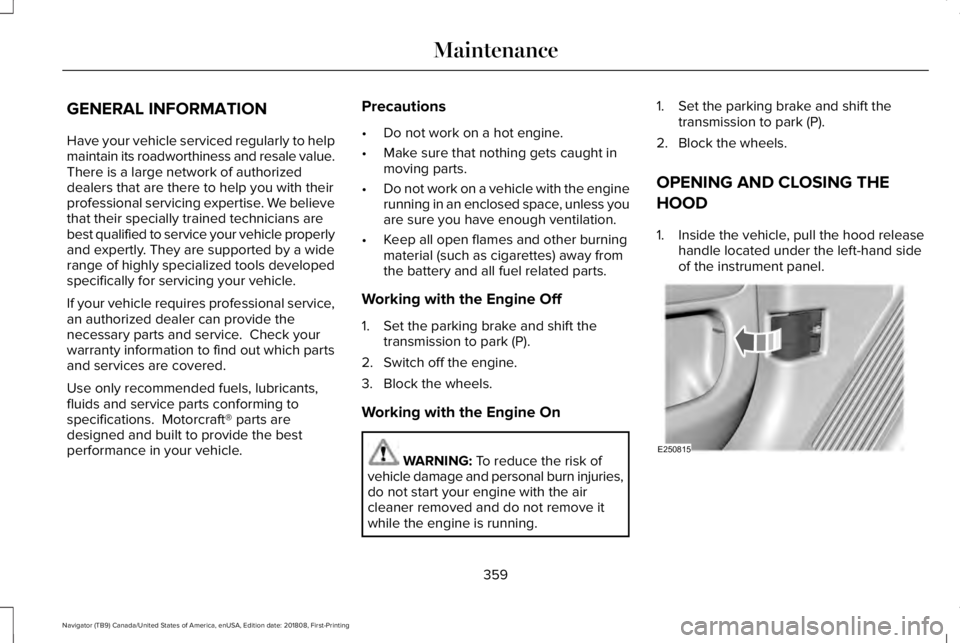
1. Inside the vehicle, pull the hood releasehandle located under the left-hand sideof the instrument panel.
359
Navigator (TB9) Canada/United States of America, enUSA, Edition date: 201808, First-Printing
MaintenanceE250815
Page 363 of 645
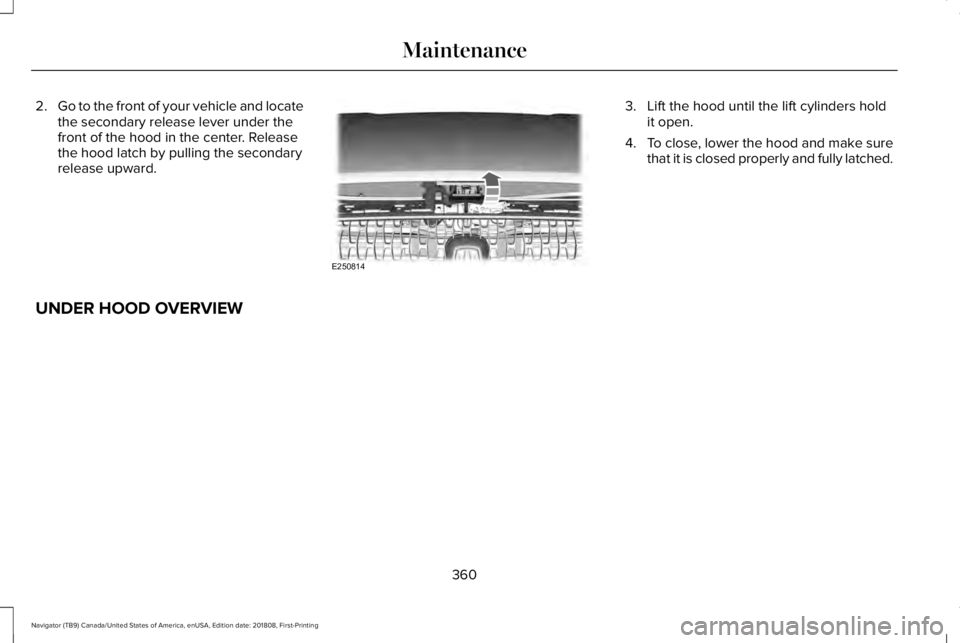
2.Go to the front of your vehicle and locatethe secondary release lever under thefront of the hood in the center. Releasethe hood latch by pulling the secondaryrelease upward.
3. Lift the hood until the lift cylinders holdit open.
4.To close, lower the hood and make surethat it is closed properly and fully latched.
UNDER HOOD OVERVIEW
360
Navigator (TB9) Canada/United States of America, enUSA, Edition date: 201808, First-Printing
MaintenanceE250814
Page 365 of 645
Windshield washer fluid reservoir.See Washer Fluid Check (page371).
A.
Power distribution box. SeeChanging a Fuse (page 357).B.
Battery. See Changing the 12VBattery (page 371).C.
Engine oil filler cap. See EngineOil Check (page 362).D.
Engine oil dipstick. See Engine OilDipstick (page 362).E.
Brake fluid reservoir. See BrakeFluid Check (page 370).F.
Air filter. See Changing the EngineAir Filter (page 376).G.
Engine coolant reservoir. SeeEngine Coolant Check (page 364).H.
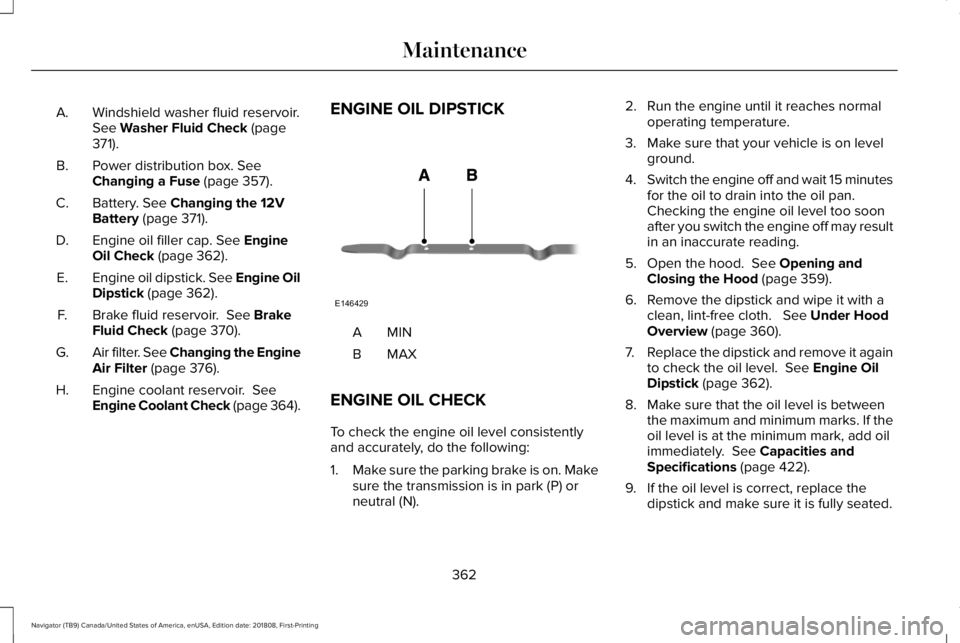
ENGINE OIL DIPSTICK
MINA
MAXB
ENGINE OIL CHECK
To check the engine oil level consistentlyand accurately, do the following:
1.Make sure the parking brake is on. Makesure the transmission is in park (P) orneutral (N).
2. Run the engine until it reaches normaloperating temperature.
3. Make sure that your vehicle is on levelground.
4.Switch the engine off and wait 15 minutesfor the oil to drain into the oil pan. Checking the engine oil level too soonafter you switch the engine off may resultin an inaccurate reading.
5. Open the hood. See Opening andClosing the Hood (page 359).
6. Remove the dipstick and wipe it with aclean, lint-free cloth. See Under HoodOverview (page 360).
7.Replace the dipstick and remove it againto check the oil level. See Engine OilDipstick (page 362).
8. Make sure that the oil level is betweenthe maximum and minimum marks. If theoil level is at the minimum mark, add oilimmediately. See Capacities andSpecifications (page 422).
9. If the oil level is correct, replace thedipstick and make sure it is fully seated.
362
Navigator (TB9) Canada/United States of America, enUSA, Edition date: 201808, First-Printing
MaintenanceE146429
Page 366 of 645
Note:Do not remove the dipstick when theengine is running.
Note: If the oil level is between themaximum and minimum marks, the oil levelis acceptable. Do not add oil.
Note:The oil consumption of new enginesreaches its normal level after approximately3,000 mi (5,000 km).
Adding Engine Oil
WARNING: Do not remove the fillercap when the engine is running.
Do not use supplemental engine oil additivesbecause they are unnecessary and couldlead to engine damage that may not becovered by the vehicle Warranty.
Only use oils certified for gasoline enginesby the American Petroleum Institute (API). An oil with this trademark symbol conformsto the current engine and emission systemprotection standards and fuel economyrequirements of the International LubricantsSpecification Advisory Committee (ILSAC).
To top up the engine oil level do thefollowing:
1. Clean the area surrounding the engineoil filler cap before you remove it.
2. Remove the engine oil filler cap. SeeUnder Hood Overview (page 360). Turnit counterclockwise and remove it.
3. Add engine oil that meets ourspecifications. See Capacities andSpecifications (page 422). You may haveto use a funnel to pour the engine oil intothe opening.
4. Recheck the oil level.
5. If the oil level is correct, replace thedipstick and make sure it is fully seated.
6. Replace the engine oil filler cap. Turn itclockwise until you feel a strongresistance.
Note: Do not add oil further than themaximum mark. Oil levels above themaximum mark may cause engine damage.
Note:Make sure you install the oil filler capcorrectly.
Note:Soak up any spillage with anabsorbent cloth immediately.
OIL CHANGE INDICATOR RESET
Use the information display controls on thesteering wheel to reset the oil changeindicator.
363
Navigator (TB9) Canada/United States of America, enUSA, Edition date: 201808, First-Printing
MaintenanceE142732
Page 378 of 645
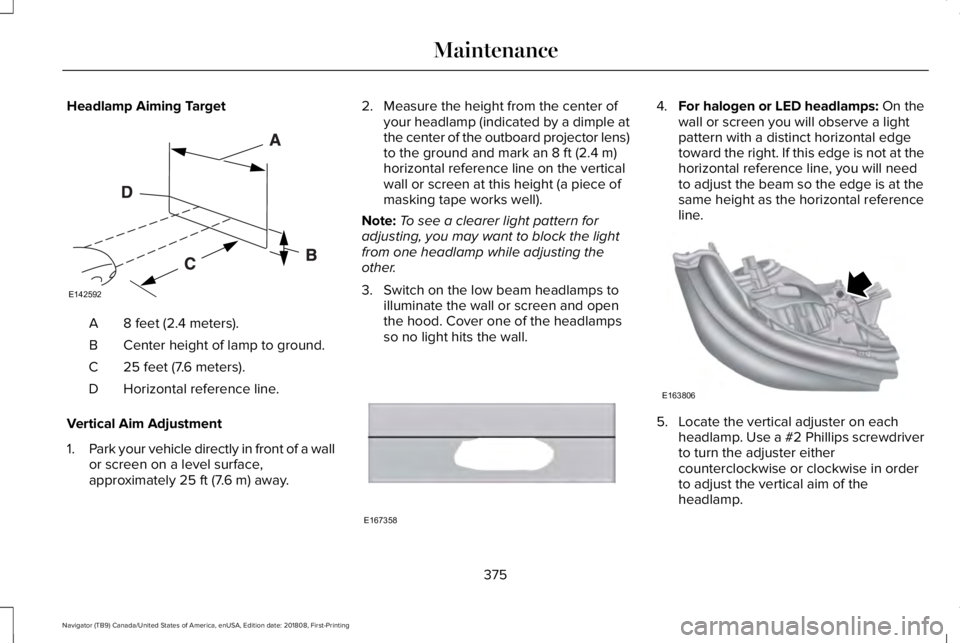
Headlamp Aiming Target
8 feet (2.4 meters).A
Center height of lamp to ground.B
25 feet (7.6 meters).C
Horizontal reference line.D
Vertical Aim Adjustment
1.Park your vehicle directly in front of a wallor screen on a level surface,approximately 25 ft (7.6 m) away.
2. Measure the height from the center ofyour headlamp (indicated by a dimple atthe center of the outboard projector lens)to the ground and mark an 8 ft (2.4 m)horizontal reference line on the verticalwall or screen at this height (a piece ofmasking tape works well).
Note:To see a clearer light pattern foradjusting, you may want to block the lightfrom one headlamp while adjusting theother.
3. Switch on the low beam headlamps toilluminate the wall or screen and openthe hood. Cover one of the headlampsso no light hits the wall.
4.For halogen or LED headlamps: On thewall or screen you will observe a lightpattern with a distinct horizontal edgetoward the right. If this edge is not at thehorizontal reference line, you will needto adjust the beam so the edge is at thesame height as the horizontal referenceline.
5. Locate the vertical adjuster on eachheadlamp. Use a #2 Phillips screwdriverto turn the adjuster eithercounterclockwise or clockwise in orderto adjust the vertical aim of theheadlamp.
375
Navigator (TB9) Canada/United States of America, enUSA, Edition date: 201808, First-Printing
MaintenanceE142592 E167358 E163806
Page 633 of 645
Audio System................................................432General Information...........................................432
Audio Unit.......................................................434Adjusting the Volume........................................434Changing Radio Stations..................................434Ejecting the CD...................................................435Inserting a CD......................................................435Locking the Rear Audio Controls...................435Rear Passenger Audio......................................435Selecting the Audio Modes.............................435Switching the Audio Unit On and Off............435Using Seek, Fast Forward and Reverse.......435
Auto Hold.......................................................229Using Auto Hold.................................................230
Autolamps.........................................................98Windshield Wiper Activated Headlamps........99
Automatic Climate Control.........................152Accessing Rear Climate Controls...................152Accessing the Climate Control Menu............152Setting the Blower Motor Speed....................152Setting the Temperature...................................152Switching Auto Mode On and Off...................152Switching Defrost On and Off..........................153Switching Maximum Air Conditioning On andOff.......................................................................153Switching Recirculated Air On and Off..........153Switching the Air Conditioning On andOff.......................................................................153
Switching the Heated Seats On and Off.......153Switching the Ventilated Seats On andOff.......................................................................153
Automatic High Beam Control...................100Automatic High Beam Indicator.......................101Switching the System On and Off....................101
Automatic Transmission..............................210Automatic Transmission AdaptiveLearning............................................................215Brake-Shift Interlock Override.........................214If Your Vehicle Gets Stuck In Mud orSnow..................................................................215SelectShift™ Automatic Transmission.............213Understanding the Shift Positions of yourAutomatic Transmission................................210
Automatic Transmission FluidCheck...........................................................369Auto-Start-Stop..............................................196Disabling Auto-Start-Stop..................................198Enabling Auto-Start-Stop...................................196
Autowipers.......................................................94Autowipers Settings.............................................94Low Temperature Wipe Inhibit..........................94
Auxiliary Power Points.................................185110 Volt AC Power Point.....................................18512 Volt DC Power Point......................................185USB Port and Power Point Locations.............185
B
BatterySee: Changing the 12V Battery........................371
Blind Spot Information System..................271..................................................................................271Blind Spot Information System with TrailerTow....................................................................272Switching the System On and Off..................275System Errors......................................................275Using the Blind Spot InformationSystem...............................................................271
BLISSee: Blind Spot Information System...............271
Body Styling Kits...........................................387Bonnet LockSee: Opening and Closing the Hood............359
Booster Seats..................................................33Types of Booster Seats.......................................33
Brake Fluid Check........................................370Brakes.............................................................225General Information...........................................225
Breaking-In.....................................................323Bulb Specification Chart.............................429
C
Cabin Air Filter...............................................156
630
Navigator (TB9) Canada/United States of America, enUSA, Edition date: 201808, First-Printing
Index
Page 637 of 645
Getting the Services You Need................333Away From Home...............................................333
Global Opening and Closing......................106Closing the Windows.........................................106Opening the Windows.......................................106
H
Hazard Flashers............................................327Headlamp AdjustingSee: Adjusting the Headlamps.......................374
Headlamp Exit Delay.....................................99Headlamp Leveling........................................101HeadrestSee: Head Restraints..........................................159
Head Restraints.............................................159Adjusting the Head Restraint...........................159Front Seat Manual Head Restraints................159
Head Up Display...........................................148Configuring The Head Up Display..................149Head Up Display (HUD).....................................148Head Up Display Information...........................148Maintaining Your Head Up Display..................151
Heated Exterior Mirrors...............................156Heated Rear Window...................................156Heated Seats..................................................177Front Seats............................................................177Rear Seats.............................................................178
Heated Steering Wheel................................92Heated Windshield.......................................156Windshield Wiper De-Icer.................................156
HeatingSee: Climate Control..........................................152
Hill Descent Control....................................235Principle of Operation.......................................235
Hill Start Assist..............................................228Switching the System On and Off..................228Using Hill Start Assist........................................228
Hints on Controlling the InteriorClimate..........................................................154Defogging the Side Windows in ColdWeather.............................................................154General Hints........................................................154Quickly Cooling the Interior..............................154Quickly Heating the Interior.............................154Recommended Settings for Cooling..............154Recommended Settings for Heating..............154
Hints on Driving With Anti-LockBrakes..........................................................226Home Screen................................................456Hood LockSee: Opening and Closing the Hood............359
I
In California (U.S. Only)...............................334
Information Display Control..........................91Information Displays.....................................120General Information............................................120
Information Messages.................................125Active Park............................................................126Adaptive Cruise Control....................................126Adaptive Headlamps..........................................127Alarm.......................................................................127Automatic Engine Shutdown............................127Battery and Charging System..........................128Blind Spot Information and Cross Traffic AlertSystem...............................................................129Doors and Locks..................................................130Driver Alert............................................................130Drivetrain................................................................131Four-Wheel Drive................................................132Fuel.........................................................................133Hill Start Assist.....................................................134Keys and Intelligent Access..............................134Lane Keeping System........................................135Maintenance.........................................................136MyKey.....................................................................137Off Road.................................................................138Park Aid..................................................................138Park Brake.............................................................139Power Steering....................................................140Pre-Collision Assist..............................................141Pro Trailer Backup Assist™..................................141
634
Navigator (TB9) Canada/United States of America, enUSA, Edition date: 201808, First-Printing
Index
Page 639 of 645
Battery Saver..........................................................76Illuminated Entry....................................................76Illuminated Exit......................................................76Locking and Unlocking the Doors with theKey Blade............................................................75Power Door Locks................................................72Remote Control.....................................................72Smart Unlocks for Intelligent AccessKeys......................................................................75
Lug NutsSee: Changing a Road Wheel..........................410
M
Maintenance..................................................359General Information...........................................359
Media Hub......................................................440Memory Function...........................................167Driver Seat Memory............................................167Easy Entry and Exit Feature..............................168Passenger Seat Memory...................................168Personal Profiles..................................................169Saving a PreSet Position...................................167
Message CenterSee: Information Displays.................................120
MirrorsSee: Windows and Mirrors................................105
Mobile Communications Equipment...........14
Moonroof..........................................................110Bounce-Back..........................................................111Opening and Closing the Moonroof................111
Motorcraft Parts.............................................419MyKey — Troubleshooting............................70MyKey™..............................................................67Principle of Operation..........................................67
N
Navigation......................................................490cityseeker.............................................................499Destination Mode................................................491Map Mode............................................................490Navigation Map Updates.................................500Navigation Menu................................................496SiriusXM Traffic and Travel Link.....................500SYNC AppLink....................................................499Waypoints.............................................................498
Normal Scheduled Maintenance..............551Intelligent Oil-Life Monitor................................551Normal Maintenance Intervals........................553
O
Oil Change Indicator Reset........................363Oil CheckSee: Engine Oil Check......................................362
Opening and Closing the Hood...............359Ordering Additional Owner'sLiterature......................................................339Obtaining a French Owner’s Manual............339
Overhead Console.......................................189
P
Parking Aids...................................................236Principle of Operation.......................................236
Passive Anti-Theft System............................83SecuriLock™............................................................83
PATSSee: Passive Anti-Theft System........................83
Pedals................................................................93Perchlorate........................................................12Personal Safety System™..............................50How Does the Personal Safety SystemWork?..................................................................50
Phone..............................................................482During a Phone Call...........................................487Making Calls........................................................486Pairing Your Cell Phone for the FirstTime...................................................................483Phone Menu........................................................483Receiving Calls....................................................487Smartphone Connectivity.................................489Text Messaging...................................................488
636
Navigator (TB9) Canada/United States of America, enUSA, Edition date: 201808, First-Printing
Index
Page 643 of 645
Using Pro Trailer Backup Assist.....................302
Trailer Sway Control....................................308Transfer Case Fluid Check.........................369Transmission Code Designation...............421Transmission...................................................210Transporting the Vehicle.............................331Type Approvals..............................................615Radio Frequency Certification for Keys andRemote Controls............................................627Radio Frequency Certifications for Blind SpotInformation System.......................................625Radio Frequency Certifications for BodyControl Module...............................................627Radio Frequency Certifications for CruiseControl Module...............................................627Radio Frequency Certifications for Mid RangeRadar..................................................................619Radio Frequency Certifications for PassiveAnti-Theft System..........................................620Radio Frequency Certifications for RadioTransceiver Module.......................................623Radio Frequency Certifications for SYNC3..........................................................................627Radio Frequency Certifications for TirePressure Monitoring Sensor(s)....................615Radio Frequency Certifications for WirelessCharging..........................................................626
Radio Frequency Statement for AudioUnit....................................................................628
U
Under Hood Overview................................360Unique Driving Characteristics..................196Universal Garage Door Opener.................181HomeLink Wireless Control System................181
USB Port.........................................................439Using Adaptive Cruise Control.................256Automatic Cancellation....................................260Blocked Sensor..................................................262Canceling the Set Speed.................................260Changing the Set Speed..................................259Detection Issues.................................................260Following a Vehicle...........................................258Following a Vehicle to a CompleteStop...................................................................258Hilly Condition Usage.......................................260Overriding the Set Speed................................259Park Brake Application.....................................260Resuming the Set Speed.................................260Setting the Adaptive Cruise Speed...............257Setting the Adaptive Cruise Speed When YourVehicle is Stationary......................................257Setting the Gap Distance.................................258Switching Adaptive Cruise Control Off........260
Switching Adaptive Cruise Control On.........257Switching to Normal Cruise Control..............263System Not Available........................................262
Using Cruise Control...................................255Canceling the Set Speed.................................256Changing the Set Speed..................................255Resuming the Set Speed.................................256Setting the Cruise Speed.................................255Switching Cruise Control Off...........................256Switching Cruise Control On...........................255
Using Four-Wheel Drive..............................2164X4 Indicator Lights............................................2164X4 Modes............................................................216Driving Off-Road With Truck and UtilityVehicles.............................................................219How Your Vehicle Differs From OtherVehicles.............................................................218Operating 4WD Vehicles With Spare orMismatched Tires...........................................218
Using Hill Descent Control........................235Hill Descent Modes...........................................235
Using MyKey With Remote StartSystems..........................................................70Using Power Running Boards......................87Automatic Power Deploy....................................87Automatic Power Stow........................................87Bounce-back..........................................................88Enabling and Disabling.......................................88
640
Navigator (TB9) Canada/United States of America, enUSA, Edition date: 201808, First-Printing
Index