key battery LINCOLN NAVIGATOR 2019 User Guide
[x] Cancel search | Manufacturer: LINCOLN, Model Year: 2019, Model line: NAVIGATOR, Model: LINCOLN NAVIGATOR 2019Pages: 645, PDF Size: 5.02 MB
Page 195 of 645
Press the push button ignition switch oncewithout your foot on the brake pedal. It is onthe instrument panel near the steering wheel.All electrical circuits and accessories areoperational and the warning lamps andindicators illuminate.
Press the push button ignition switch againwithout your foot on the brake pedal toswitch the ignition off.
STARTING A GASOLINE ENGINE
When you start the engine, the idle speedincreases.
This helps to warm up the engine. If theengine idle speed does not slow downautomatically, have your vehicle checked byan authorized dealer.
Note: You can crank the engine for a totalof 60 seconds without the engine startingbefore the starting system temporarilydisables. The 60 seconds does not have tobe all at once. For example, if you crank theengine three times for 20 seconds each time,without the engine starting, you reached the60-second time limit. You cannot attemptto start the engine for at least 15 minutes. After 15 minutes, you are limited to a15-second engine cranking time. You needto wait 60 minutes before you can crank theengine for 60 seconds again.
Before starting your vehicle, check thefollowing:
•Make sure all occupants have fastenedtheir seatbelts.
•Make sure the headlamps and electricalaccessories are off.
•Make sure the parking brake is on.
•Make sure the transmission is in park (P).
Note:Do not touch the accelerator pedal.
Note:You must have your intelligent accesskey in your vehicle to shift the transmissionout of park (P).
1. Fully depress the brake pedal.
2. Press the push button ignition switch.
The system does not function if:
•The passive key frequencies are jammed.
•The key battery has no charge.
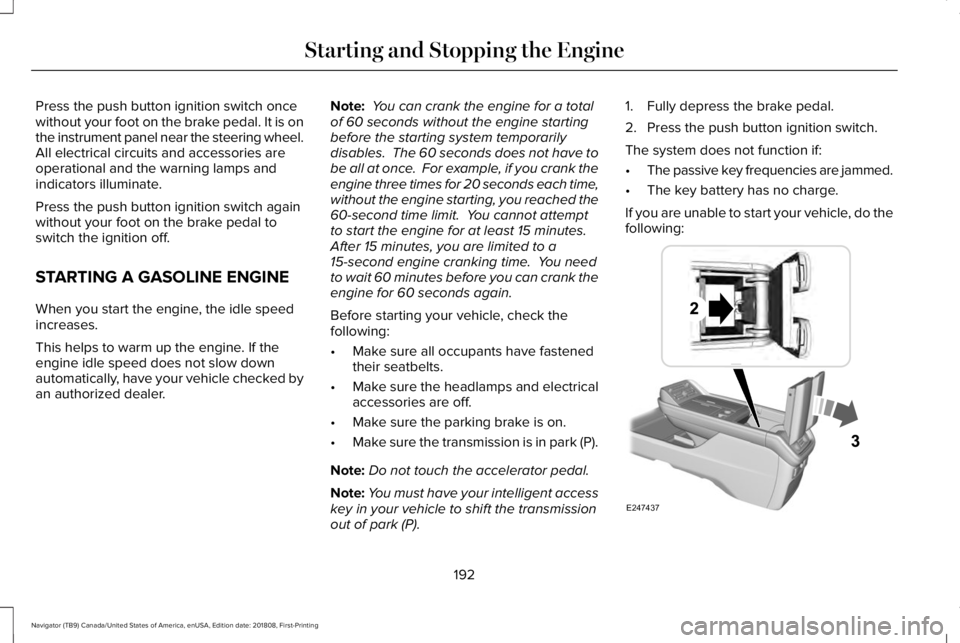
If you are unable to start your vehicle, do thefollowing:
192
Navigator (TB9) Canada/United States of America, enUSA, Edition date: 201808, First-Printing
Starting and Stopping the EngineE247437
Page 196 of 645
1. Open the floor console storagecompartment lid.
2. Insert the passive key into the backupslot.
3.With the passive key in this position, youcan use the push button ignition switchto switch the ignition on and start yourvehicle.
Fast Restart
The fast restart feature allows you to restartyour vehicle within 20 seconds of switchingit off, even if it does not detect a validpassive key.
Within 20 seconds of switching the engineoff, press the brake pedal and press the pushbutton ignition switch. After 20 seconds, youcan no longer start your vehicle if it does notdetect a valid passive key.
Once your vehicle starts, it remains runninguntil you press the push button ignitionswitch, even if your vehicle does not detecta valid passive key. If you open and close adoor while your vehicle is running, thesystem searches for a valid passive key. Youcannot start your vehicle if the system doesnot detect a valid passive key within 20seconds.
Failure to Start
If you cannot start the engine after threeattempts, wait 10 seconds and follow thisprocedure:
1. Fully depress the brake pedal.
2. Shift into park (P).
3. Fully press the accelerator pedal andhold it there.
4. Start the engine.
Automatic Engine Shutdown
For vehicles with a keyless ignition, thisautomatically shuts down your vehicle if ithas been idling for an extended period. Theignition also turns off to save battery power. Before your vehicle shuts down, a messageappears in the information display showinga timer counting down. If you do notintervene within 30 seconds, your vehicleshuts down. Another message appears inthe information display to inform you thatyour vehicle has shut down to save fuel. Start your vehicle as normal.
Automatic Engine Shutdown Override
Note: You cannot permanently switch offthe automatic shutdown. When you switchit off temporarily, it turns on at the nextignition cycle.
193
Navigator (TB9) Canada/United States of America, enUSA, Edition date: 201808, First-Printing
Starting and Stopping the Engine
Page 199 of 645
AUTO-START-STOP
The system helps reduce fuel consumptionby automatically stopping and restarting theengine when your vehicle has stopped. Theengine restarts automatically when yourelease the brake pedal.
In some situations, your vehicle may restartautomatically, for example:
•To maintain interior comfort.
•To recharge the battery.
Note:Power assist steering turns off whenthe engine is off.
Note:If your vehicle is flex fuel capable,Auto-Start-Stop is inhibited for a short timeafter a refuel event when the system isverifying the fuel type being used.
WARNING: Always fully apply theparking brake. Make sure you shift intopark (P) for vehicles with an automatictransmission. Switch the ignition off andremove the key whenever you leave yourvehicle.
WARNING: Before opening the hoodor performing any maintenance, fully applythe parking brake, shift into park (P) orneutral (N) and switch the ignition off.
WARNING: Always switch the ignitionoff before leaving the vehicle. If the ignitionis switched on an automatic restart mayoccur at any time.
WARNING: The system may requirethe engine to automatically restart whenthe auto-start-stop indicator illuminatesgreen or flashes amber. Failure to followthis instruction could result in personalinjury.
The Auto-Start-Stop system status isavailable at a glance within the informationdisplay. See Information Displays (page120).
Enabling Auto-Start-Stop
The system automatically enables every timeyou start your vehicle if:
•You do not press the Auto-Start-Stopbutton (not illuminated).
•Your vehicle exceeds an initial speed of3 mph (5 km/h) after you have initiallystarted your vehicle.
•You have stopped your vehicle.
•Your foot is on the brake pedal.
•The transmission is in drive.
•Not in Excite mode (enable by pressingthe Auto-Start-Stop button).
•The driver door is closed.
•There is adequate brake vacuum.
•The interior compartment has cooled orwarmed to an acceptable level.
•The front windshield defroster is off.
•You have not turned the steering wheelrapidly or you do not have it at a sharpangle.
•The vehicle is not on a steep road grade.
•The battery is within optimal operatingconditions, (with the battery state ofcharge and temperature in range).
•The engine coolant is at operatingtemperature.
196
Navigator (TB9) Canada/United States of America, enUSA, Edition date: 201808, First-Printing
Unique Driving Characteristics
Page 212 of 645
If the service engine soon indicator remainson, have your vehicle serviced at the firstavailable opportunity. Although somemalfunctions detected by the OBD-II may nothave symptoms that are apparent, continueddriving with the service engine soon indicatoron can result in increased emissions, lowerfuel economy, reduced engine andtransmission smoothness and lead to morecostly repairs.
Readiness for Inspection andMaintenance (I/M) Testing
Some state and provincial and localgovernments may haveInspection/Maintenance (I/M) programs toinspect the emission control equipment onyour vehicle. Failure to pass this inspectioncould prevent you from getting a vehicleregistration.
If the service engine soon indicatoris on or the bulb does not work,your vehicle may need service.See On-Board Diagnostics.
Your vehicle may not pass the I/M test if theservice engine soon indicator is on or notworking properly (bulb is burned out), or ifthe OBD-II system has determined that someof the emission control systems have notbeen properly checked. In this case, thevehicle is not ready for I/M testing.
If the vehicle’s engine or transmission hasjust been serviced, or the battery hasrecently run down or been replaced, theOBD-II system may indicate that the vehicleis not ready for I/M testing. To determine ifthe vehicle is ready for I/M testing, turn theignition key to the on position for 15 secondswithout cranking the engine. If the serviceengine soon indicator blinks eight times, itmeans that the vehicle is not ready for I/Mtesting; if the service engine soon indicatorstays on solid, it means that your vehicle isready for I/M testing.
The OBD-II system checks the emissioncontrol system during normal driving. Acomplete check may take several days.
If the vehicle is not ready for I/M testing, youcan perform the following driving cycleconsisting of mixed city and highway driving:
1. 15 minutes of steady driving on anexpressway or highway followed by 20minutes of stop-and-go driving with atleast four 30-second idle periods.
2.Allow your vehicle to sit for at least eighthours with the ignition off. Then, start thevehicle and complete the above drivingcycle. The vehicle must warm up to itsnormal operating temperature. Oncestarted, do not turn off the vehicle untilthe above driving cycle is complete.
If the vehicle is still not ready for I/M testing,you need to repeat the above driving cycle.
209
Navigator (TB9) Canada/United States of America, enUSA, Edition date: 201808, First-Printing
Engine Emission Control
Page 215 of 645
Note:This only functions if your 12-voltbattery has power and the starter can spinthe engine. If vehicle battery voltage is notsufficient, an external 12-volt power sourcesuch as jumper cables, battery charger orjump pack may be required for this featureto function.
Note:Once in this mode, sufficient batteryvoltage must be maintained or your vehiclereturns to park.
WARNING: When doing thisprocedure, you need to take thetransmission out of park (P) which meansyour vehicle can roll freely. To avoidunwanted vehicle movement, always fullyapply the parking brake prior to doing thisprocedure. Use wheels chocks ifappropriate.
1. Do not press the brake pedal. Press theSTART/STOP button.
2. Fully press down on the brake pedal.Keep the brakes applied through step 7.
3. Press the accelerator pedal to the floorand hold through step 7.
4. Press the neutral (N) button on thetransmission selector.
5. Press the neutral (N) button again toenter Stay in Neutral mode.
6. Press and release the push to startbutton, the transmission needs aminimum of 2 seconds to exit park.
7. When neutral (N) is displayed, the brakeand accelerator pedals can be released.
To exit Stay in Neutral mode, select adifferent gear.
A message appears in your informationdisplay screen when your vehicle hasentered Stay in Neutral mode.
Drive (D)
Drive (D) is the normal driving position forthe best fuel economy. The overdrivefunction allows automatic upshifts anddownshifts through gears one through ten.
Adaptive Tow/Haul Mode
WARNING: Do not use tow/haulwhen the road surface is slippery. Failureto follow this instruction could result in theloss of control of your vehicle.
Adaptive tow/haul has two modes, automaticthat is enabled by default and off.
To turn adaptive tow/haul off or on, use theinformation display controls. See GeneralInformation (page 120). The indicator lightilluminates in the instrument cluster.
Key adaptive tow/haul features:
•The system remains in the same mode,even after a key cycle.
•Is only available in normal drive modes(Normal 2H and Normal 4A).
The adaptive tow/haul feature improvestransmission operation when towing a traileror a heavy load. All transmission gear rangesare available when using adaptive tow/haul.
For information on towing. See Towing (page297).
212
Navigator (TB9) Canada/United States of America, enUSA, Edition date: 201808, First-Printing
Transmission
Page 329 of 645
ROADSIDE ASSISTANCE
Vehicles Sold in the United States:Getting Roadside Assistance
To fully assist you should you have a vehicleconcern, Lincoln Motor Company offers acomplimentary roadside assistance program.This program is separate from the NewVehicle Limited Warranty.
The service is available:
•Throughout the life of the vehicle fororiginal owners.
•For six years or 70,000 mi (110,000 km)(whichever comes first) for subsequentowners.
Roadside Assistance covers:
•A flat tire change with a good spare(except vehicles supplied with a tireinflation kit).
•Battery jump start.
•Lock-out assistance (key replacementcost is the client's responsibility).
•Fuel delivery — independent servicecontractors, if not prohibited by state,local or municipal law shall deliver up to2 gal (8 L) of gasoline or 5 gal (20 L) ofdiesel fuel to a disabled vehicle.Roadside Assistance limits fuel deliveryservice to two no-charge occurrenceswithin a 12-month period.
•Winch out — available within 100 ft (30 m)of a paved or county maintained road,no recoveries.
•Towing — independent servicecontractors, if not prohibited by state,local or municipal law shall tow Lincolneligible vehicles to the client's selling orpreferred dealer within 100 mi (160 km)of the disablement location or to thenearest Lincoln dealer. If a client requestsa tow to a selling or preferred dealer thatis more than 100 mi (160 km) from thedisablement location, the client isresponsible for any mileage costs inexcess of 100 mi (160 km).
•Roadside Assistance includes up to $200for a towed trailer if the disabled eligiblevehicle requires service at the nearestauthorized dealer. If the towing vehicleis operational but the trailer is not, thenthe trailer does not qualify for anyroadside services.
Vehicles Sold in the United States:Using Roadside Assistance
United States clients who require roadsideassistance, call 1-800-521-4140.
326
Navigator (TB9) Canada/United States of America, enUSA, Edition date: 201808, First-Printing
Roadside Emergencies
Page 330 of 645
If you need to arrange roadside assistancefor yourself, Lincoln Motor Companyreimburses a reasonable amount for towingto the nearest Lincoln dealership within100 mi (160 km). To obtain reimbursementinformation, United States clients, call1-800-521-4140. Clients need to submit theiroriginal receipts.
Vehicles Sold in Canada: GettingRoadside Assistance
To fully assist you should you have a vehicleconcern, Lincoln Motor Company of Canada,Limited offers a complimentary roadsideassistance program. This program is eligiblewithin Canada or the continental UnitedStates.
The service is available 24 hours a day,seven days a week.
This program is separate from the NewVehicle Limited Warranty, but the coverageis concurrent with the powertrain coverageperiod of your vehicle. Canadian roadsidecoverage and benefits may differ from theU.S. coverage.
If you require more information, please callus in Canada at 1-800-387-9333, or visit ourwebsite at www.lincolncanada.com.
HAZARD FLASHERS
Note:The hazard flashers operate when theignition is in any position, or if the key is notin the ignition. If used when the vehicle is notrunning, the battery loses charge. As a result,there may be insufficient power to restartyour vehicle.
The flasher control is on theinstrument panel. Use your hazardflashers when your vehicle iscreating a safety hazard for other motorists.
•Press the flasher control and all front andrear direction indicators flash.
•Press the button again to switch them off.
FUEL SHUTOFF
WARNING: If your vehicle has beeninvolved in a crash, have the fuel systemchecked. Failure to follow this instructioncould result in fire, personal injury or death.
Note: When you try to restart your vehicleafter a fuel shutoff, the vehicle makes surethat various systems are safe to restart. Once the vehicle determines the systemsare safe, then the vehicle allows you torestart.
Note: In the event that your vehicle doesnot restart after your third attempt, contacta qualified technician.
The fuel pump shutoff stops the flow of fuelto the engine in the event of a moderate tosevere crash. Not every impact causes ashutoff.
Should your vehicle shut off after a crash,you may restart your vehicle.
327
Navigator (TB9) Canada/United States of America, enUSA, Edition date: 201808, First-Printing
Roadside Emergencies
Page 490 of 645
To call a number in your contacts, select:
Action and DescriptionMenu Item
You can then select thename of the contact youwant to call. Any numbersstored for that contactdisplay along with anystored contact photos. Youcan then select the numberthat you want to call. Thesystem begins the call.
Contacts
To call a number from your recent calls,select:
Action and DescriptionMenu Item
You can then select an entrythat you want to call. Thesystem begins the call.
Recent CallList
To call a number that is not stored in yourphone, select:
Action and DescriptionMenu Item
Action and DescriptionMenu Item
Select the digits of thenumber you wish to call.PhoneKeypad
The system begins the call.Call
Pressing the backspace button deletes thelast digit you typed.
Receiving Calls
During an incoming call, an audible tonesounds. Caller information appears in thedisplay if it is available.
To accept the call, select:
Menu Item
Accept
Note:You can also accept the call bypressing the phone button on the steeringwheel.
To reject the call, select:
Menu Item
Reject
Note:You can also reject the call bypressing the phone button on the steeringwheel.
Ignore the call by doing nothing. SYNC 3logs it as a missed call.
During a Phone Call
During a phone call, the contacts name andnumber display on the screen along with thecall duration.
The phone status items are also visible:
•Signal Strength.
•Battery.
You can select any of the following duringan active phone call:
487
Navigator (TB9) Canada/United States of America, enUSA, Edition date: 201808, First-Printing
SYNC™ 3
Page 634 of 645
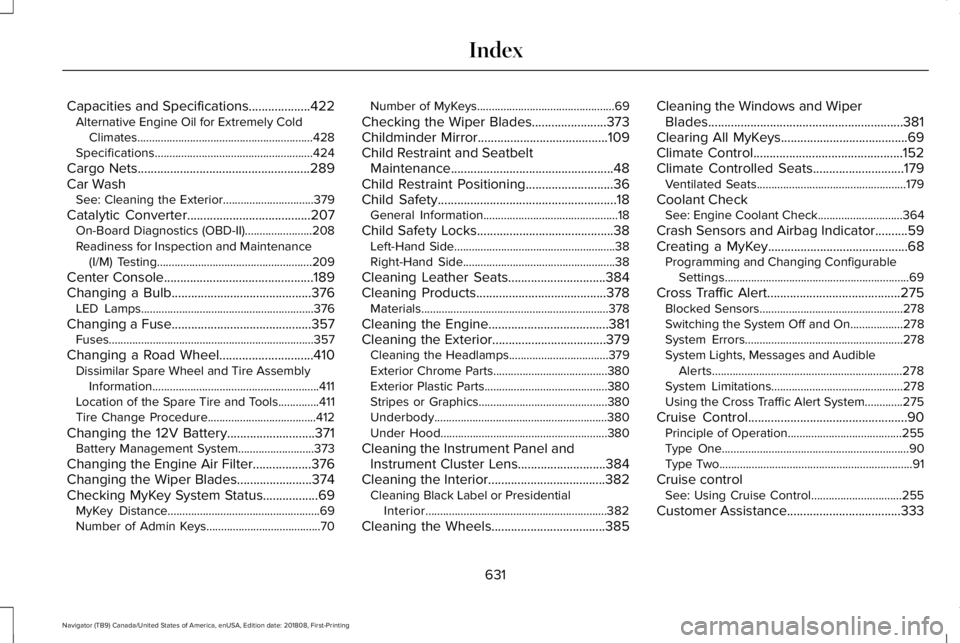
Capacities and Specifications...................422Alternative Engine Oil for Extremely ColdClimates............................................................428Specifications......................................................424
Cargo Nets.....................................................289Car WashSee: Cleaning the Exterior...............................379
Catalytic Converter......................................207On-Board Diagnostics (OBD-II).......................208Readiness for Inspection and Maintenance(I/M) Testing.....................................................209
Center Console..............................................189Changing a Bulb...........................................376LED Lamps...........................................................376
Changing a Fuse...........................................357Fuses......................................................................357
Changing a Road Wheel.............................410Dissimilar Spare Wheel and Tire AssemblyInformation.........................................................411Location of the Spare Tire and Tools..............411Tire Change Procedure.....................................412
Changing the 12V Battery...........................371Battery Management System..........................373
Changing the Engine Air Filter..................376Changing the Wiper Blades.......................374Checking MyKey System Status.................69MyKey Distance....................................................69Number of Admin Keys.......................................70
Number of MyKeys...............................................69
Checking the Wiper Blades.......................373Childminder Mirror........................................109Child Restraint and SeatbeltMaintenance..................................................48Child Restraint Positioning...........................36Child Safety.......................................................18General Information..............................................18
Child Safety Locks..........................................38Left-Hand Side.......................................................38Right-Hand Side....................................................38
Cleaning Leather Seats..............................384Cleaning Products........................................378Materials................................................................378
Cleaning the Engine.....................................381Cleaning the Exterior...................................379Cleaning the Headlamps..................................379Exterior Chrome Parts.......................................380Exterior Plastic Parts..........................................380Stripes or Graphics............................................380Underbody...........................................................380Under Hood.........................................................380
Cleaning the Instrument Panel andInstrument Cluster Lens...........................384Cleaning the Interior....................................382Cleaning Black Label or PresidentialInterior..............................................................382
Cleaning the Wheels...................................385
Cleaning the Windows and WiperBlades............................................................381Clearing All MyKeys.......................................69Climate Control..............................................152Climate Controlled Seats............................179Ventilated Seats...................................................179
Coolant CheckSee: Engine Coolant Check.............................364
Crash Sensors and Airbag Indicator..........59Creating a MyKey...........................................68Programming and Changing ConfigurableSettings...............................................................69
Cross Traffic Alert.........................................275Blocked Sensors.................................................278Switching the System Off and On..................278System Errors......................................................278System Lights, Messages and AudibleAlerts.................................................................278System Limitations.............................................278Using the Cross Traffic Alert System.............275
Cruise Control.................................................90Principle of Operation.......................................255Type One................................................................90Type Two..................................................................91
Cruise controlSee: Using Cruise Control...............................255
Customer Assistance...................................333
631
Navigator (TB9) Canada/United States of America, enUSA, Edition date: 201808, First-Printing
Index
Page 637 of 645
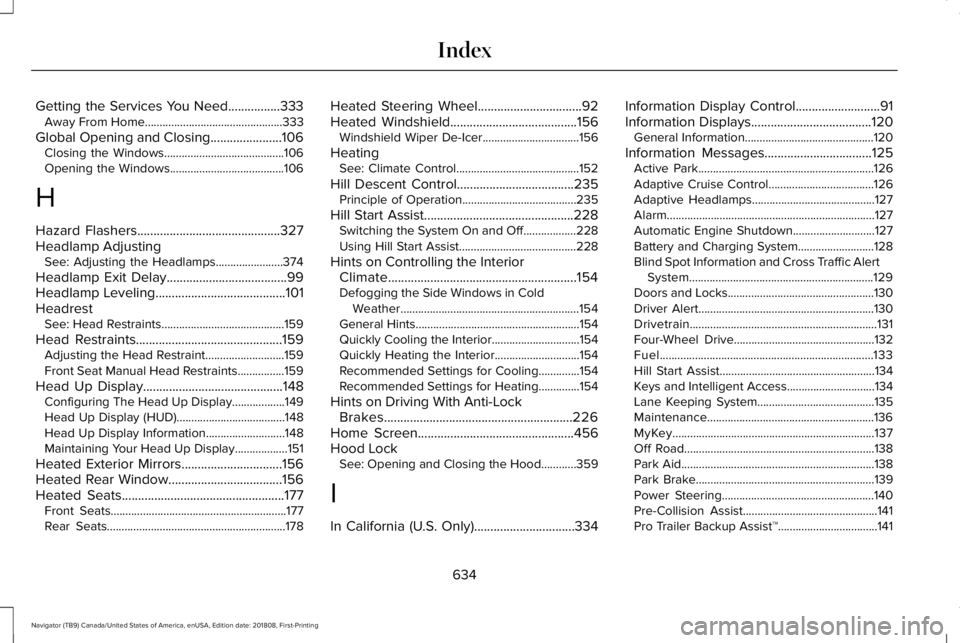
Getting the Services You Need................333Away From Home...............................................333
Global Opening and Closing......................106Closing the Windows.........................................106Opening the Windows.......................................106
H
Hazard Flashers............................................327Headlamp AdjustingSee: Adjusting the Headlamps.......................374
Headlamp Exit Delay.....................................99Headlamp Leveling........................................101HeadrestSee: Head Restraints..........................................159
Head Restraints.............................................159Adjusting the Head Restraint...........................159Front Seat Manual Head Restraints................159
Head Up Display...........................................148Configuring The Head Up Display..................149Head Up Display (HUD).....................................148Head Up Display Information...........................148Maintaining Your Head Up Display..................151
Heated Exterior Mirrors...............................156Heated Rear Window...................................156Heated Seats..................................................177Front Seats............................................................177Rear Seats.............................................................178
Heated Steering Wheel................................92Heated Windshield.......................................156Windshield Wiper De-Icer.................................156
HeatingSee: Climate Control..........................................152
Hill Descent Control....................................235Principle of Operation.......................................235
Hill Start Assist..............................................228Switching the System On and Off..................228Using Hill Start Assist........................................228
Hints on Controlling the InteriorClimate..........................................................154Defogging the Side Windows in ColdWeather.............................................................154General Hints........................................................154Quickly Cooling the Interior..............................154Quickly Heating the Interior.............................154Recommended Settings for Cooling..............154Recommended Settings for Heating..............154
Hints on Driving With Anti-LockBrakes..........................................................226Home Screen................................................456Hood LockSee: Opening and Closing the Hood............359
I
In California (U.S. Only)...............................334
Information Display Control..........................91Information Displays.....................................120General Information............................................120
Information Messages.................................125Active Park............................................................126Adaptive Cruise Control....................................126Adaptive Headlamps..........................................127Alarm.......................................................................127Automatic Engine Shutdown............................127Battery and Charging System..........................128Blind Spot Information and Cross Traffic AlertSystem...............................................................129Doors and Locks..................................................130Driver Alert............................................................130Drivetrain................................................................131Four-Wheel Drive................................................132Fuel.........................................................................133Hill Start Assist.....................................................134Keys and Intelligent Access..............................134Lane Keeping System........................................135Maintenance.........................................................136MyKey.....................................................................137Off Road.................................................................138Park Aid..................................................................138Park Brake.............................................................139Power Steering....................................................140Pre-Collision Assist..............................................141Pro Trailer Backup Assist™..................................141
634
Navigator (TB9) Canada/United States of America, enUSA, Edition date: 201808, First-Printing
Index