engine LINCOLN NAVIGATOR 2019 Owner's Manual
[x] Cancel search | Manufacturer: LINCOLN, Model Year: 2019, Model line: NAVIGATOR, Model: LINCOLN NAVIGATOR 2019Pages: 645, PDF Size: 5.02 MB
Page 133 of 645
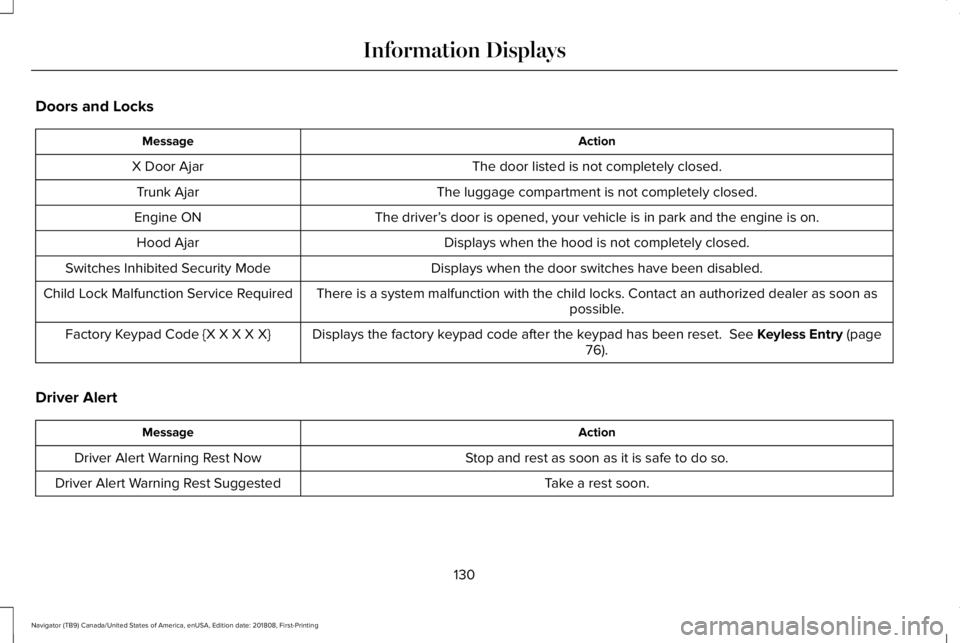
Doors and Locks
ActionMessage
The door listed is not completely closed.X Door Ajar
The luggage compartment is not completely closed.Trunk Ajar
The driver’s door is opened, your vehicle is in park and the engine is on.Engine ON
Displays when the hood is not completely closed.Hood Ajar
Displays when the door switches have been disabled.Switches Inhibited Security Mode
There is a system malfunction with the child locks. Contact an authorized dealer as soon aspossible.Child Lock Malfunction Service Required
Displays the factory keypad code after the keypad has been reset. See Keyless Entry (page76).Factory Keypad Code {X X X X X}
Driver Alert
ActionMessage
Stop and rest as soon as it is safe to do so.Driver Alert Warning Rest Now
Take a rest soon.Driver Alert Warning Rest Suggested
130
Navigator (TB9) Canada/United States of America, enUSA, Edition date: 201808, First-Printing
Information Displays
Page 137 of 645
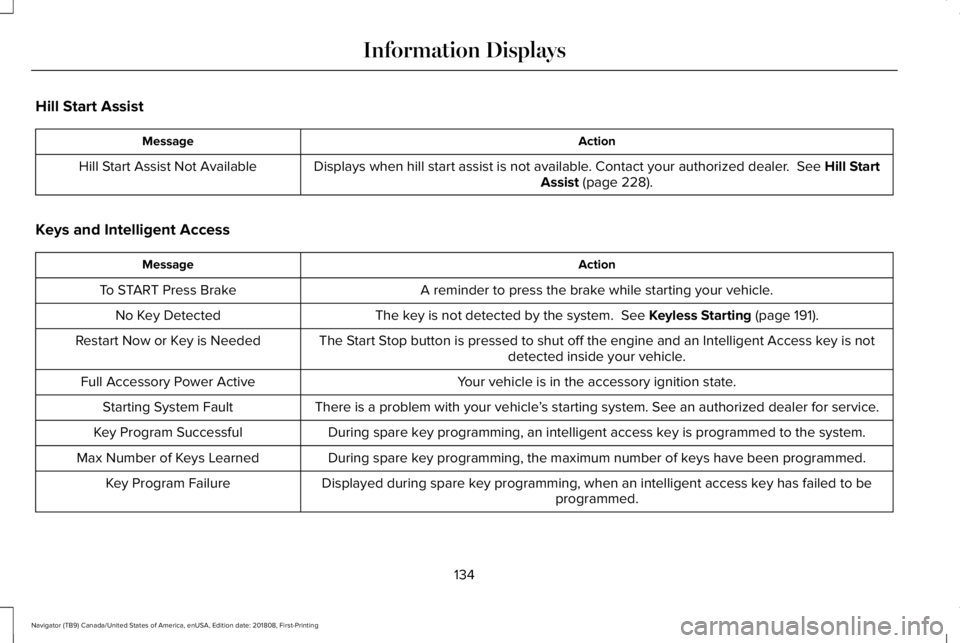
Hill Start Assist
ActionMessage
Displays when hill start assist is not available. Contact your authorized dealer. See Hill StartAssist (page 228).Hill Start Assist Not Available
Keys and Intelligent Access
ActionMessage
A reminder to press the brake while starting your vehicle.To START Press Brake
The key is not detected by the system. See Keyless Starting (page 191).No Key Detected
The Start Stop button is pressed to shut off the engine and an Intelligent Access key is notdetected inside your vehicle.Restart Now or Key is Needed
Your vehicle is in the accessory ignition state.Full Accessory Power Active
There is a problem with your vehicle’s starting system. See an authorized dealer for service.Starting System Fault
During spare key programming, an intelligent access key is programmed to the system.Key Program Successful
During spare key programming, the maximum number of keys have been programmed.Max Number of Keys Learned
Displayed during spare key programming, when an intelligent access key has failed to beprogrammed.Key Program Failure
134
Navigator (TB9) Canada/United States of America, enUSA, Edition date: 201808, First-Printing
Information Displays
Page 139 of 645
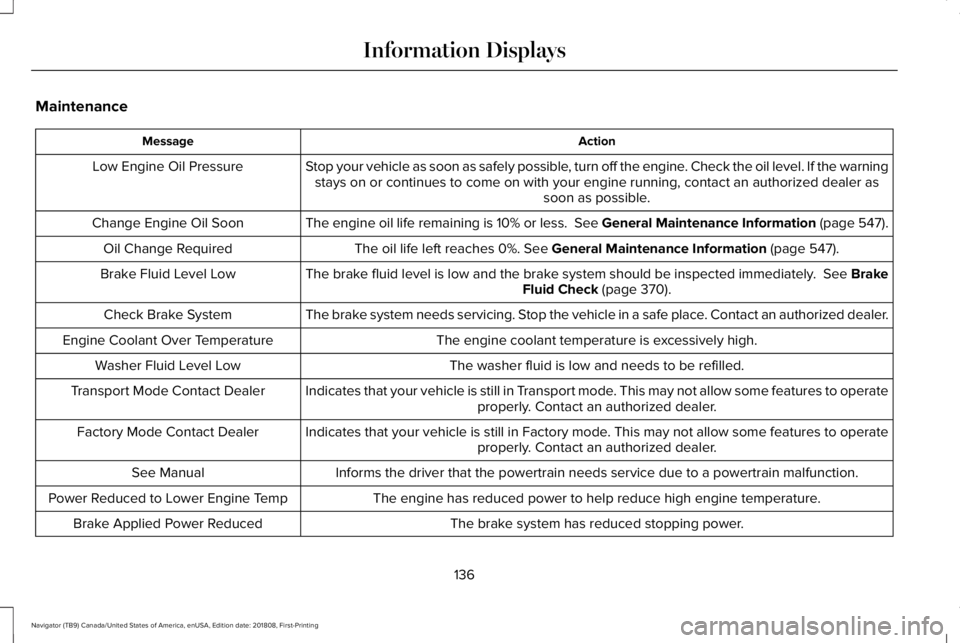
Maintenance
ActionMessage
Stop your vehicle as soon as safely possible, turn off the engine. Check the oil level. If the warningstays on or continues to come on with your engine running, contact an authorized dealer assoon as possible.
Low Engine Oil Pressure
The engine oil life remaining is 10% or less. See General Maintenance Information (page 547).Change Engine Oil Soon
The oil life left reaches 0%. See General Maintenance Information (page 547).Oil Change Required
The brake fluid level is low and the brake system should be inspected immediately. See BrakeFluid Check (page 370).Brake Fluid Level Low
The brake system needs servicing. Stop the vehicle in a safe place. Contact an authorized dealer.Check Brake System
The engine coolant temperature is excessively high.Engine Coolant Over Temperature
The washer fluid is low and needs to be refilled.Washer Fluid Level Low
Indicates that your vehicle is still in Transport mode. This may not allow some features to operateproperly. Contact an authorized dealer.Transport Mode Contact Dealer
Indicates that your vehicle is still in Factory mode. This may not allow some features to operateproperly. Contact an authorized dealer.Factory Mode Contact Dealer
Informs the driver that the powertrain needs service due to a powertrain malfunction.See Manual
The engine has reduced power to help reduce high engine temperature.Power Reduced to Lower Engine Temp
The brake system has reduced stopping power.Brake Applied Power Reduced
136
Navigator (TB9) Canada/United States of America, enUSA, Edition date: 201808, First-Printing
Information Displays
Page 142 of 645
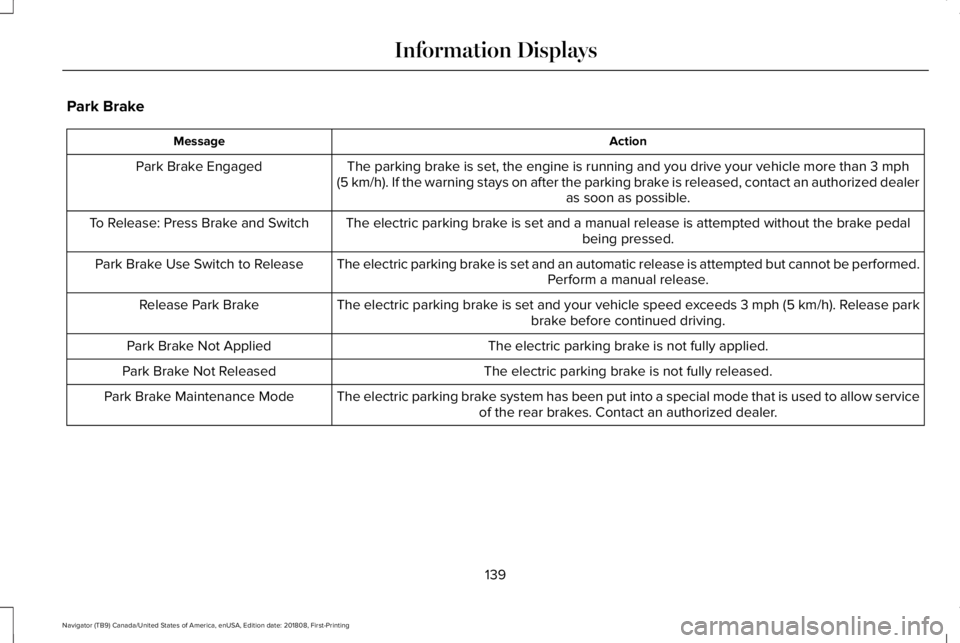
Park Brake
ActionMessage
The parking brake is set, the engine is running and you drive your vehicle more than 3 mph(5 km/h). If the warning stays on after the parking brake is released, contact an authorized dealeras soon as possible.
Park Brake Engaged
The electric parking brake is set and a manual release is attempted without the brake pedalbeing pressed.To Release: Press Brake and Switch
The electric parking brake is set and an automatic release is attempted but cannot be performed.Perform a manual release.Park Brake Use Switch to Release
The electric parking brake is set and your vehicle speed exceeds 3 mph (5 km/h). Release parkbrake before continued driving.Release Park Brake
The electric parking brake is not fully applied.Park Brake Not Applied
The electric parking brake is not fully released.Park Brake Not Released
The electric parking brake system has been put into a special mode that is used to allow serviceof the rear brakes. Contact an authorized dealer.Park Brake Maintenance Mode
139
Navigator (TB9) Canada/United States of America, enUSA, Edition date: 201808, First-Printing
Information Displays
Page 147 of 645
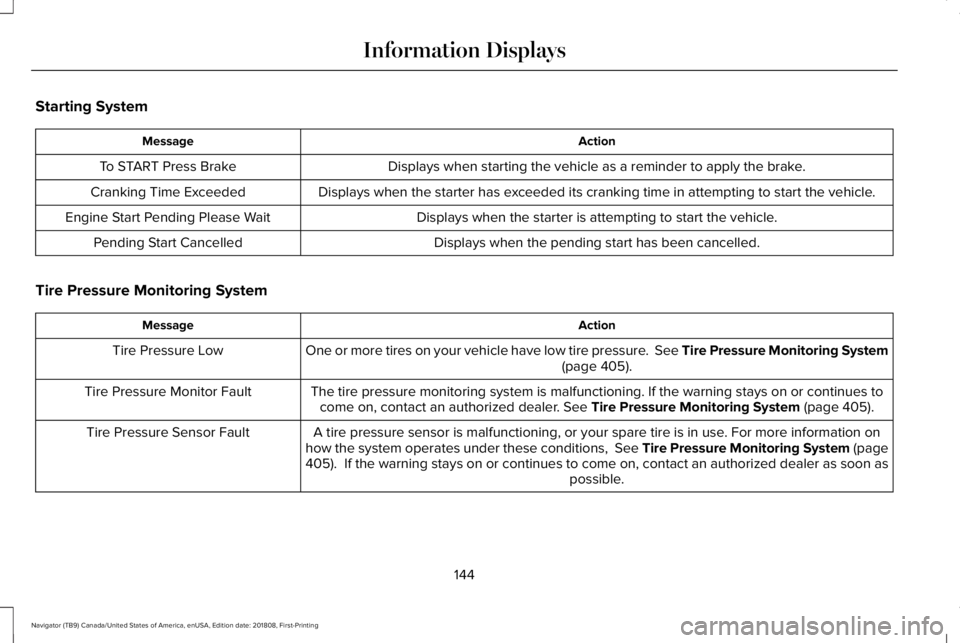
Starting System
ActionMessage
Displays when starting the vehicle as a reminder to apply the brake.To START Press Brake
Displays when the starter has exceeded its cranking time in attempting to start the vehicle.Cranking Time Exceeded
Displays when the starter is attempting to start the vehicle.Engine Start Pending Please Wait
Displays when the pending start has been cancelled.Pending Start Cancelled
Tire Pressure Monitoring System
ActionMessage
One or more tires on your vehicle have low tire pressure. See Tire Pressure Monitoring System(page 405).Tire Pressure Low
The tire pressure monitoring system is malfunctioning. If the warning stays on or continues tocome on, contact an authorized dealer. See Tire Pressure Monitoring System (page 405).Tire Pressure Monitor Fault
A tire pressure sensor is malfunctioning, or your spare tire is in use. For more information onhow the system operates under these conditions, See Tire Pressure Monitoring System (page405). If the warning stays on or continues to come on, contact an authorized dealer as soon aspossible.
Tire Pressure Sensor Fault
144
Navigator (TB9) Canada/United States of America, enUSA, Edition date: 201808, First-Printing
Information Displays
Page 149 of 645
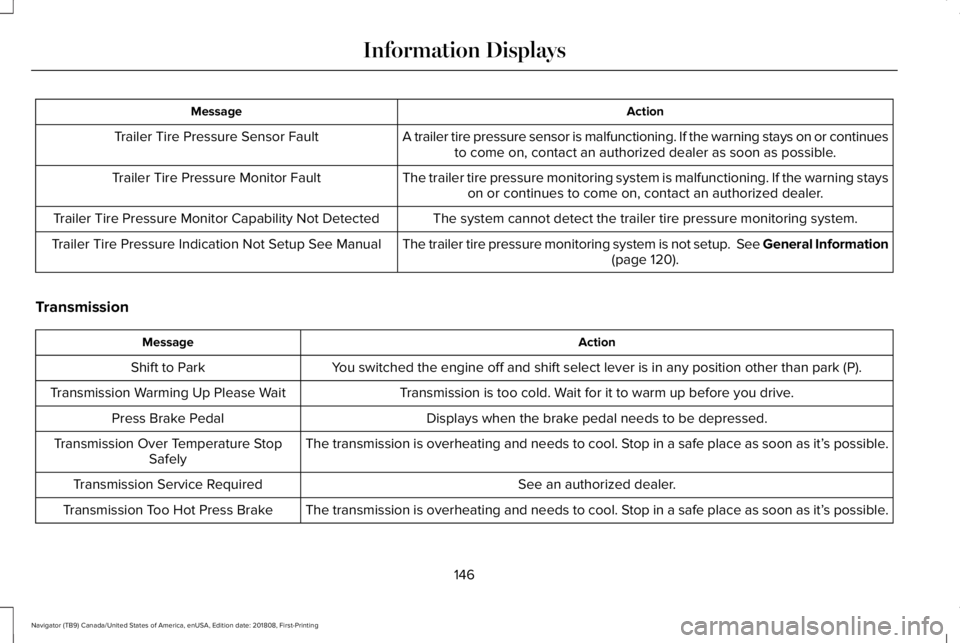
ActionMessage
A trailer tire pressure sensor is malfunctioning. If the warning stays on or continuesto come on, contact an authorized dealer as soon as possible.Trailer Tire Pressure Sensor Fault
The trailer tire pressure monitoring system is malfunctioning. If the warning stayson or continues to come on, contact an authorized dealer.Trailer Tire Pressure Monitor Fault
The system cannot detect the trailer tire pressure monitoring system.Trailer Tire Pressure Monitor Capability Not Detected
The trailer tire pressure monitoring system is not setup. See General Information(page 120).Trailer Tire Pressure Indication Not Setup See Manual
Transmission
ActionMessage
You switched the engine off and shift select lever is in any position other than park (P).Shift to Park
Transmission is too cold. Wait for it to warm up before you drive.Transmission Warming Up Please Wait
Displays when the brake pedal needs to be depressed.Press Brake Pedal
The transmission is overheating and needs to cool. Stop in a safe place as soon as it’s possible.Transmission Over Temperature StopSafely
See an authorized dealer.Transmission Service Required
The transmission is overheating and needs to cool. Stop in a safe place as soon as it’s possible.Transmission Too Hot Press Brake
146
Navigator (TB9) Canada/United States of America, enUSA, Edition date: 201808, First-Printing
Information Displays
Page 157 of 645
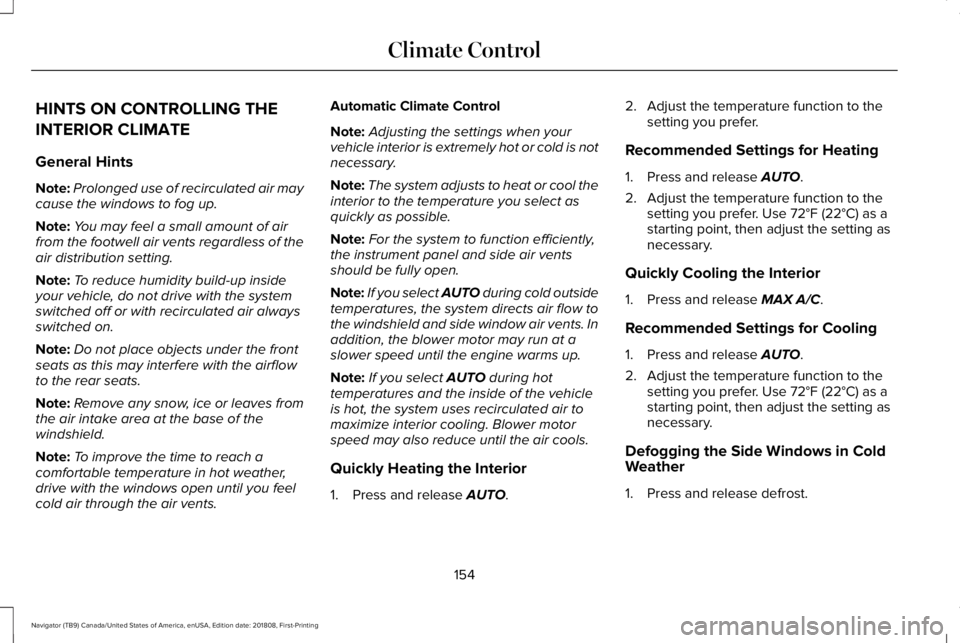
HINTS ON CONTROLLING THE
INTERIOR CLIMATE
General Hints
Note:Prolonged use of recirculated air maycause the windows to fog up.
Note:You may feel a small amount of airfrom the footwell air vents regardless of theair distribution setting.
Note:To reduce humidity build-up insideyour vehicle, do not drive with the systemswitched off or with recirculated air alwaysswitched on.
Note:Do not place objects under the frontseats as this may interfere with the airflowto the rear seats.
Note:Remove any snow, ice or leaves fromthe air intake area at the base of thewindshield.
Note:To improve the time to reach acomfortable temperature in hot weather,drive with the windows open until you feelcold air through the air vents.
Automatic Climate Control
Note:Adjusting the settings when yourvehicle interior is extremely hot or cold is notnecessary.
Note:The system adjusts to heat or cool theinterior to the temperature you select asquickly as possible.
Note:For the system to function efficiently,the instrument panel and side air ventsshould be fully open.
Note:If you select AUTO during cold outsidetemperatures, the system directs air flow tothe windshield and side window air vents. Inaddition, the blower motor may run at aslower speed until the engine warms up.
Note:If you select AUTO during hottemperatures and the inside of the vehicleis hot, the system uses recirculated air tomaximize interior cooling. Blower motorspeed may also reduce until the air cools.
Quickly Heating the Interior
1. Press and release AUTO.
2. Adjust the temperature function to thesetting you prefer.
Recommended Settings for Heating
1. Press and release AUTO.
2. Adjust the temperature function to thesetting you prefer. Use 72°F (22°C) as astarting point, then adjust the setting asnecessary.
Quickly Cooling the Interior
1. Press and release MAX A/C.
Recommended Settings for Cooling
1. Press and release AUTO.
2. Adjust the temperature function to thesetting you prefer. Use 72°F (22°C) as astarting point, then adjust the setting asnecessary.
Defogging the Side Windows in ColdWeather
1. Press and release defrost.
154
Navigator (TB9) Canada/United States of America, enUSA, Edition date: 201808, First-Printing
Climate Control
Page 159 of 645
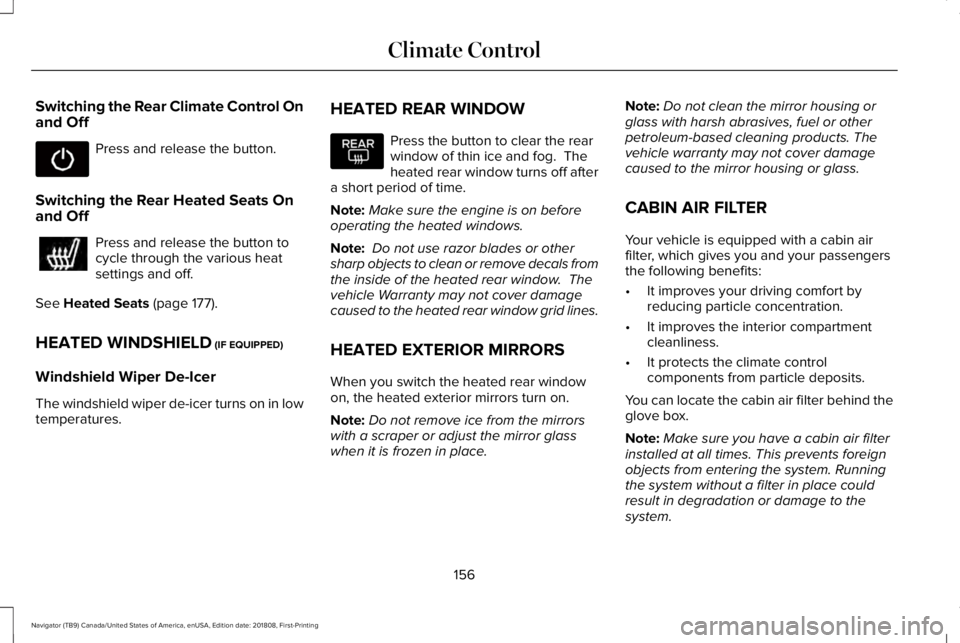
Switching the Rear Climate Control Onand Off
Press and release the button.
Switching the Rear Heated Seats Onand Off
Press and release the button tocycle through the various heatsettings and off.
See Heated Seats (page 177).
HEATED WINDSHIELD (IF EQUIPPED)
Windshield Wiper De-Icer
The windshield wiper de-icer turns on in lowtemperatures.
HEATED REAR WINDOW
Press the button to clear the rearwindow of thin ice and fog. Theheated rear window turns off aftera short period of time.
Note:Make sure the engine is on beforeoperating the heated windows.
Note: Do not use razor blades or othersharp objects to clean or remove decals fromthe inside of the heated rear window. Thevehicle Warranty may not cover damagecaused to the heated rear window grid lines.
HEATED EXTERIOR MIRRORS
When you switch the heated rear windowon, the heated exterior mirrors turn on.
Note:Do not remove ice from the mirrorswith a scraper or adjust the mirror glasswhen it is frozen in place.
Note:Do not clean the mirror housing orglass with harsh abrasives, fuel or otherpetroleum-based cleaning products. Thevehicle warranty may not cover damagecaused to the mirror housing or glass.
CABIN AIR FILTER
Your vehicle is equipped with a cabin airfilter, which gives you and your passengersthe following benefits:
•It improves your driving comfort byreducing particle concentration.
•It improves the interior compartmentcleanliness.
•It protects the climate controlcomponents from particle deposits.
You can locate the cabin air filter behind theglove box.
Note:Make sure you have a cabin air filterinstalled at all times. This prevents foreignobjects from entering the system. Runningthe system without a filter in place couldresult in degradation or damage to thesystem.
156
Navigator (TB9) Canada/United States of America, enUSA, Edition date: 201808, First-Printing
Climate Control
Page 168 of 645
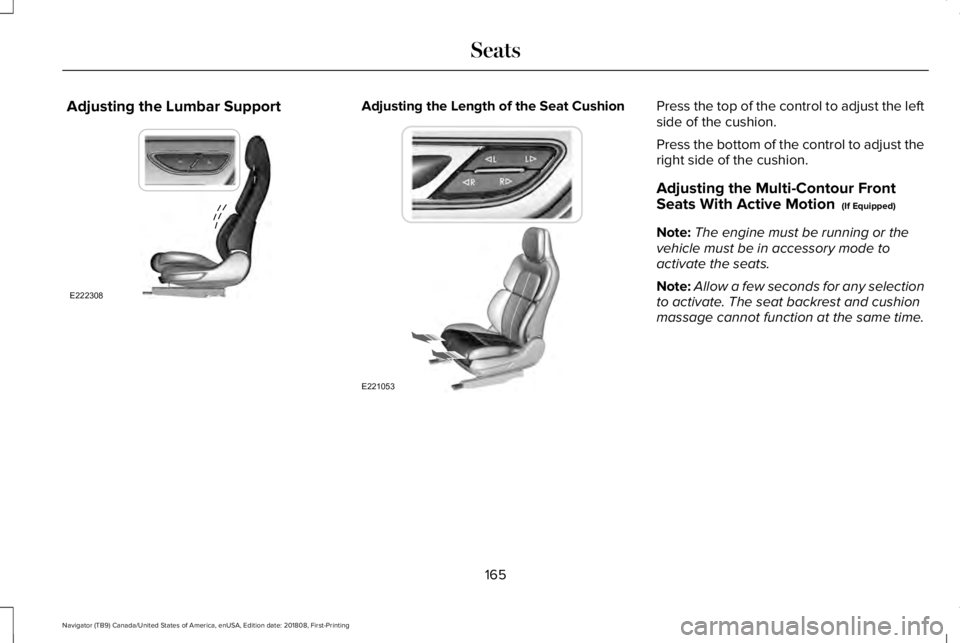
Adjusting the Lumbar SupportAdjusting the Length of the Seat CushionPress the top of the control to adjust the leftside of the cushion.
Press the bottom of the control to adjust theright side of the cushion.
Adjusting the Multi-Contour FrontSeats With Active Motion (If Equipped)
Note:The engine must be running or thevehicle must be in accessory mode toactivate the seats.
Note:Allow a few seconds for any selectionto activate. The seat backrest and cushionmassage cannot function at the same time.
165
Navigator (TB9) Canada/United States of America, enUSA, Edition date: 201808, First-Printing
SeatsE222308 E221053
Page 181 of 645
Do not do the following:
•Place heavy objects on the seat.
•Operate the heated seat if water or anyother liquid spills on the seat. Allow theseat to dry thoroughly.
•Operate the heated seats unless theengine is running. Doing so can causethe battery to lose charge.
Press the heated seat symbol to cyclethrough the various heat settings and off.More indicator lights indicate warmersettings.
Rear Seats
WARNING: Persons who are unableto feel pain to the skin because ofadvanced age, chronic illness, diabetes,spinal cord injury, medication, alcohol use,exhaustion, or other physical conditions,must exercise care when using the seatheater. The seat heater may cause burnseven at low temperatures, especially ifused for long periods of time. Do not placeanything on the seat that insulates againstheat, such as a blanket or cushion,because this may cause the seat heater tooverheat. Do not puncture the seat withpins, needles, or other pointed objectsbecause this may damage the heatingelement which may cause the seat heaterto overheat. An overheated seat maycause serious personal injury.
Do not do the following:
•Place heavy objects on the seat.
•Operate the seat heater if water or anyother liquid is spilled on the seat. Allowthe seat to dry thoroughly.
•Operate the heated seats unless theengine is running. Doing so can causethe battery to lose charge.
The rear seat heat controls are located onthe rear of the center console.
Press the heated seat symbol to cyclethrough the various heat settings and off.More indicator lights indicate warmersettings.
178
Navigator (TB9) Canada/United States of America, enUSA, Edition date: 201808, First-Printing
SeatsE146322 E146322