power steering LINCOLN NAVIGATOR 2019 Owner's Manual
[x] Cancel search | Manufacturer: LINCOLN, Model Year: 2019, Model line: NAVIGATOR, Model: LINCOLN NAVIGATOR 2019Pages: 645, PDF Size: 5.02 MB
Page 407 of 645
Note:Your vehicle may be equippedwith a dissimilar spare wheel and tireassembly. A dissimilar spare wheel andtire assembly is defined as a sparewheel and tire assembly that is differentin brand, size or appearance from theroad tires and wheels. If you have adissimilar spare wheel and tire assemblyit is intended for temporary use only andshould not be used in a tire rotation.
Note:After having your tires rotated,inflation pressure must be checked andadjusted to the vehicle requirements.
Rotating your tires at the recommendedinterval (as indicated in the ScheduledMaintenance chapter) will help your tireswear more evenly, providing better tireperformance and longer tire life.
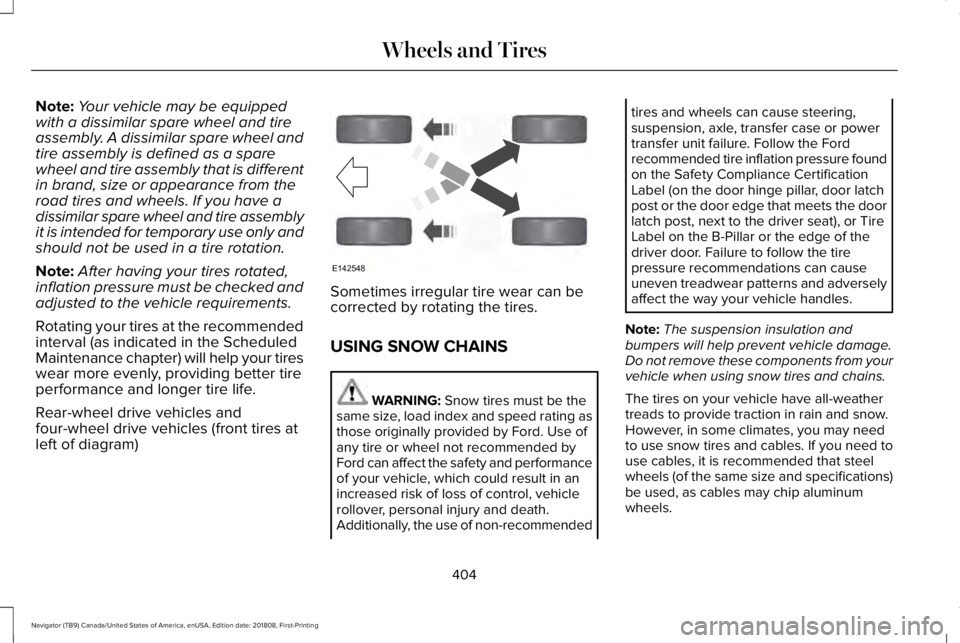
Rear-wheel drive vehicles andfour-wheel drive vehicles (front tires atleft of diagram)
Sometimes irregular tire wear can becorrected by rotating the tires.
USING SNOW CHAINS
WARNING: Snow tires must be thesame size, load index and speed rating asthose originally provided by Ford. Use ofany tire or wheel not recommended byFord can affect the safety and performanceof your vehicle, which could result in anincreased risk of loss of control, vehiclerollover, personal injury and death.Additionally, the use of non-recommended
tires and wheels can cause steering,suspension, axle, transfer case or powertransfer unit failure. Follow the Fordrecommended tire inflation pressure foundon the Safety Compliance CertificationLabel (on the door hinge pillar, door latchpost or the door edge that meets the doorlatch post, next to the driver seat), or TireLabel on the B-Pillar or the edge of thedriver door. Failure to follow the tirepressure recommendations can causeuneven treadwear patterns and adverselyaffect the way your vehicle handles.
Note:The suspension insulation andbumpers will help prevent vehicle damage.Do not remove these components from yourvehicle when using snow tires and chains.
The tires on your vehicle have all-weathertreads to provide traction in rain and snow.However, in some climates, you may needto use snow tires and cables. If you need touse cables, it is recommended that steelwheels (of the same size and specifications)be used, as cables may chip aluminumwheels.
404
Navigator (TB9) Canada/United States of America, enUSA, Edition date: 201808, First-Printing
Wheels and TiresE142548
Page 452 of 645
Note:If your vehicle is not equipped withnavigation, compass appears in the displayinstead of navigation. If you press the rightarrow to go into the compass menu, you cansee the compass graphic. The compassdisplays the direction in which the vehicle istraveling, not true direction (for example, ifthe vehicle is traveling west, the middle ofthe compass graphic displays west; northdisplays to the left of west though its truedirection is to the right of west).
Using the Controls on the SteeringWheel
Depending on your vehicle and optionpackage, you can use different controls onyour steering wheel to interact with thetouchscreen system in different ways.
VOL: Control the volume of audio output.
Mute: Mute the audio output.
Voice: Press to start a voice session. Pressagain to stop the voice prompt andimmediately begin speaking. Press and holdto end a voice session.
SEEK NEXT:
•While in radio mode, press to seekbetween memory presets.
•While in USB, Bluetooth Audio or CDmode, press to seek between songs orpress and hold to fast seek.
SEEK PREVIOUS:
•While in radio mode, press to seekbetween memory presets.
•While in USB, Bluetooth Audio or CDmode, press to seek between songs orpress and hold to fast seek.
PHONE ACCEPT: Press to answer a call orswitch between calls.
PHONE REJECT: Press to end a call or rejectan incoming call.
Note:On some models, SEEK NEXT may becombined with PHONE REJECT and SEEKPREVIOUS may be combined with PHONEACCEPT.
M: Touch the control repeatedly to switchbetween media sources (modes).
See Steering Wheel (page 89).
Using Your Bezel Controls
Depending on your vehicle and optionpackage, you may also have these controlson your instrument panel:
•Power: Switch the audio system on andoff.
•VOL: Control the volume of playingaudio.
•Seek and Tune: Use as you normallywould in audio modes.
•Eject: Eject a CD from the audio system.
•SOURCE or MEDIA: Press repeatedly toadvance through available media modes.
•SOUND: Press to access the Soundmenu where you can adjust sound andother audio settings.
•1-6: Press and hold to store or press toselect an AM, FM or SIRIUS memorypreset. See Audio System (page 432).
449
Navigator (TB9) Canada/United States of America, enUSA, Edition date: 201808, First-Printing
SYNC™ 3
Page 454 of 645
To make sure that 911 Assist works correctly:
•SYNC must be powered and workingproperly at the time of the incident andthroughout feature activation and use.
•The 911 Assist feature must be set onbefore the incident.
•You must pair and connect a Bluetoothenabled and compatible cell phone toSYNC.
•A connected Bluetooth enabled phonemust have the ability to make andmaintain an outgoing call at the time ofthe incident.
•A connected Bluetooth enabled phonemust have adequate network coverage,battery power and signal strength.
•The vehicle must have battery power andbe located in the U.S., Canada or in aterritory in which 911 is the emergencynumber.
In the Event of a Crash
Not all crashes will deploy an airbag oractivate the fuel pump shut-off (the triggersfor 911 Assist). If a connected cell phonesustains damage or loses its connection toSYNC during a crash, SYNC will search forand try to connect to a previously paired cellphone; SYNC will then attempt to call theemergency services.
Before making the call:
•SYNC provides a short window of time(about 10 seconds) to cancel the call. Ifyou fail to cancel the call, SYNC attemptsto dial 911.
•SYNC says the following, or a similarmessage: "SYNC will attempt to call 911,to cancel the call, press Cancel on yourscreen or press and hold the phonebutton on your steering wheel."
If you do not cancel the call, and SYNCmakes a successful call, a pre-recordedmessage plays for the 911 operator, and thenthe occupant(s) in your vehicle is able to talkwith the operator. Be prepared to provideyour name, phone number and locationimmediately, because not all 911 systems arecapable of receiving this informationelectronically.
911 Assist May Not Work If
•Your cellular phone or 911 Assisthardware sustains damage in a crash.
•The vehicle's battery or the SYNC systemhas no power.
•The phone(s) thrown from your vehicleare the ones paired and connected tothe system.
911 Assist Privacy Notice
When you switch on 911 Assist, it maydisclose to emergency services that yourvehicle has been in a crash involving thedeployment of an airbag or activation of thefuel pump shut-off. Certain versions orupdates to 911 Assist may also be capable
451
Navigator (TB9) Canada/United States of America, enUSA, Edition date: 201808, First-Printing
SYNC™ 3
Page 637 of 645
Getting the Services You Need................333Away From Home...............................................333
Global Opening and Closing......................106Closing the Windows.........................................106Opening the Windows.......................................106
H
Hazard Flashers............................................327Headlamp AdjustingSee: Adjusting the Headlamps.......................374
Headlamp Exit Delay.....................................99Headlamp Leveling........................................101HeadrestSee: Head Restraints..........................................159
Head Restraints.............................................159Adjusting the Head Restraint...........................159Front Seat Manual Head Restraints................159
Head Up Display...........................................148Configuring The Head Up Display..................149Head Up Display (HUD).....................................148Head Up Display Information...........................148Maintaining Your Head Up Display..................151
Heated Exterior Mirrors...............................156Heated Rear Window...................................156Heated Seats..................................................177Front Seats............................................................177Rear Seats.............................................................178
Heated Steering Wheel................................92Heated Windshield.......................................156Windshield Wiper De-Icer.................................156
HeatingSee: Climate Control..........................................152
Hill Descent Control....................................235Principle of Operation.......................................235
Hill Start Assist..............................................228Switching the System On and Off..................228Using Hill Start Assist........................................228
Hints on Controlling the InteriorClimate..........................................................154Defogging the Side Windows in ColdWeather.............................................................154General Hints........................................................154Quickly Cooling the Interior..............................154Quickly Heating the Interior.............................154Recommended Settings for Cooling..............154Recommended Settings for Heating..............154
Hints on Driving With Anti-LockBrakes..........................................................226Home Screen................................................456Hood LockSee: Opening and Closing the Hood............359
I
In California (U.S. Only)...............................334
Information Display Control..........................91Information Displays.....................................120General Information............................................120
Information Messages.................................125Active Park............................................................126Adaptive Cruise Control....................................126Adaptive Headlamps..........................................127Alarm.......................................................................127Automatic Engine Shutdown............................127Battery and Charging System..........................128Blind Spot Information and Cross Traffic AlertSystem...............................................................129Doors and Locks..................................................130Driver Alert............................................................130Drivetrain................................................................131Four-Wheel Drive................................................132Fuel.........................................................................133Hill Start Assist.....................................................134Keys and Intelligent Access..............................134Lane Keeping System........................................135Maintenance.........................................................136MyKey.....................................................................137Off Road.................................................................138Park Aid..................................................................138Park Brake.............................................................139Power Steering....................................................140Pre-Collision Assist..............................................141Pro Trailer Backup Assist™..................................141
634
Navigator (TB9) Canada/United States of America, enUSA, Edition date: 201808, First-Printing
Index
Page 642 of 645
Side Sensing System..................................239Obstacle Distance Indicator............................239
Sitting in the Correct Position....................158Snow ChainsSee: Using Snow Chains..................................404
Spare WheelSee: Changing a Road Wheel..........................410
Special Notices.................................................13New Vehicle Limited Warranty...........................13On Board Diagnostics Data LinkConnector............................................................13Special Instructions...............................................13
Special Operating Conditions ScheduledMaintenance...............................................555Exceptions............................................................558
Speed ControlSee: Cruise Control...........................................255
Stability Control............................................232Principle of Operation.......................................232
Starting a Gasoline Engine.........................192Automatic Engine Shutdown............................193Failure to Start......................................................193Guarding Against Exhaust Fumes...................194Important Ventilating Information...................194Stopping the Engine When Your Vehicle isMoving...............................................................194Stopping the Engine When Your Vehicle isStationary..........................................................194
Starting and Stopping the Engine..............191General Information.............................................191
Steering...........................................................279Electric Power Steering.....................................279
Steering Wheel................................................89Storage Compartments...............................189SunroofSee: Moonroof......................................................110
Sun Visors........................................................110Illuminated Vanity Mirror....................................110
Supplementary Restraints System..............51Principle of Operation..........................................51
Symbols Glossary..............................................7SYNC™ 3...........................................................441General Information............................................441
SYNC™ 3 Troubleshooting..........................524
T
Technical SpecificationsSee: Capacities and Specifications................418
The Better Business Bureau (BBB) AutoLine Program (U.S. Only)..........................335Tire Care.........................................................390Glossary of Tire Terminology...........................391Information About Uniform Tire QualityGrading.............................................................390
Information Contained on the TireSidewall............................................................392Temperature A B C..............................................391Traction AA A B C................................................391Treadwear.............................................................391
Tire Pressure Monitoring System............405Changing Tires With a Tire PressureMonitoring System.........................................407Understanding Your Tire Pressure MonitoringSystem .............................................................407
TiresSee: Wheels and Tires......................................388
Toll Reader......................................................109Installing the Toll Reader...................................109
Towing a Trailer.............................................297Load Placement..................................................297
Towing Points.................................................331Towing the Vehicle on Four Wheels........319Four-wheel-down Towing................................320Recreational Towing...........................................319
Towing.............................................................297Traction Control.............................................231Principle of Operation........................................231
Trailer Reversing Aids.................................298Principle of Operation.......................................298Pro Trailer Backup Assist™...............................298Setting Up Pro Trailer Backup Assist............299Troubleshooting..................................................303
639
Navigator (TB9) Canada/United States of America, enUSA, Edition date: 201808, First-Printing
Index