air condition LINCOLN NAVIGATOR 2019 Owner's Guide
[x] Cancel search | Manufacturer: LINCOLN, Model Year: 2019, Model line: NAVIGATOR, Model: LINCOLN NAVIGATOR 2019Pages: 645, PDF Size: 5.02 MB
Page 371 of 645
Your vehicle has limited engine power whenin the fail-safe mode, drive your vehicle withcaution. Your vehicle does not maintainhigh-speed operation and the engine mayoperate poorly.
Remember that the engine is capable ofautomatically shutting down to preventengine damage. In this situation:
1. Pull off the road as soon as safelypossible and switch the engine off.
2. If you are a member of a roadsideassistance program, we recommend thatyou contact your roadside assistanceservice provider.
3.If this is not possible, wait a short periodfor the engine to cool.
4. Check the coolant level. If the coolantlevel is at or below the minimum mark,add prediluted coolant immediately.
5.When the engine temperature cools, youcan re-start the engine. Have your vehiclechecked as soon as possible to minimizeengine damage.
Note:Driving your vehicle without repairincreases the chance of engine damage.
Engine Coolant TemperatureManagement (If Equipped)
WARNING: To reduce the risk ofcrash and injury, be prepared that thevehicle speed may reduce and the vehiclemay not be able to accelerate with fullpower until the coolant temperaturereduces.
If you tow a trailer with your vehicle, theengine may temporarily reach a highertemperature during severe operatingconditions, for example ascending a long orsteep grade in high ambient temperatures.
At this time, you may notice the coolanttemperature gauge moves toward the redzone and a message may appear in theinformation display.
You may notice a reduction in vehicle speedcaused by reduced engine power in orderto manage the engine coolant temperature. Your vehicle may enter this mode if certainhigh-temperature and high-load conditionstake place. The amount of speed reductiondepends on vehicle loading, grade andambient temperature. If this occurs, there isno need to stop your vehicle. You cancontinue to drive.
The air conditioning may automatically turnon and off during severe operatingconditions to protect the engine fromoverheating. When the coolant temperaturedecreases to the normal operatingtemperature, the air conditioning turns on.
If the coolant temperature gauge moves fullyinto the red zone, or if the coolanttemperature warning or service engine soonmessages appear in your information display,do the following:
1.Stop your vehicle as soon as it is safe todo so. Fully apply the parking brake, shiftinto park (P) or neutral (N).
368
Navigator (TB9) Canada/United States of America, enUSA, Edition date: 201808, First-Printing
Maintenance
Page 388 of 645
For routine cleaning, wipe the surface witha soft, damp cloth and a mild soap and watersolution. Dry the area with a clean, soft cloth.
For cleaning and removing stains such asdye transfer, use Motorcraft Premium Leatherand Vinyl Cleaner or a commercially availableleather cleaning product for automotiveinteriors.
Note:Test any cleaner or stain remover onan inconspicuous area.
You should:
•Remove dust and loose dirt with avacuum cleaner.
•Clean and treat spills and stains as soonas possible.
Do not use the following products as thesemay damage the leather:
•Oil and petroleum or silicone-basedleather conditioners.
•Household cleaners.
•Alcohol solutions.
•Solvents or cleaners intended specificallyfor rubber, vinyl and plastics.
REPAIRING MINOR PAINT
DAMAGE
Authorized dealers have touch-up paint tomatch your vehicle’s color. Your vehicle colorcode is printed on a sticker on the front,left-hand side door jamb. Take your colorcode to your authorized dealer to make sureyou get the correct color.
Before repairing minor paint damage, use acleaner such as Motorcraft Bug and TarRemover to remove particles such as birddroppings, tree sap, insect deposits, tarspots, road salt and industrial fallout.
Always read the instructions before usingcleaning products.
CLEANING THE WHEELS
1. Regularly clean them with a wheelcleaner. We recommend that you use anapproved wheel cleaner if available.
2. Remove dirt and brake dust with asponge.
3. Remove tar and grease with a bug andtar remover. We recommend that you usean approved bug and tar remover ifavailable.
4. Thoroughly rinse the wheels with waterafter cleaning.
If you intend on parking your vehicle for anextended period after cleaning the wheelswith a wheel cleaner, drive your vehicle fora few minutes before doing so. This reducesthe risk of corrosion of the brake discs, brakepads and linings.
Do not clean the wheels when they are hot.
Note: Some car washes could damagewheel rims and covers.
Note: Using non-recommended cleaners,harsh cleaning products, chrome wheelcleaners or abrasive materials coulddamage wheel rims and covers.
385
Navigator (TB9) Canada/United States of America, enUSA, Edition date: 201808, First-Printing
Vehicle Care
Page 394 of 645
Treadwear
The treadwear grade is a comparativerating based on the wear rate of the tirewhen tested under controlled conditionson a specified government test course.For example, a tire graded 150 wouldwear one and one-half (1 ½) times as wellon the government course as a tiregraded 100. The relative performanceof tires depends upon the actualconditions of their use, however, andmay depart significantly from the normdue to variations in driving habits,service practices, and differences inroad characteristics and climate.
Traction AA A B C
WARNING: The traction gradeassigned to this tire is based onstraight-ahead braking traction tests,and does not include acceleration,cornering, hydroplaning or peaktraction characteristics.
The traction grades, from highest tolowest are AA, A, B, and C. The gradesrepresent the tire’s ability to stop on wetpavement as measured under controlledconditions on specified government testsurfaces of asphalt and concrete. A tiremarked C may have poor tractionperformance.
Temperature A B C
WARNING: The temperaturegrade for this tire is established for atire that is properly inflated and notoverloaded. Excessive speed,underinflation, or excessive loading,either separately or in combination,can cause heat buildup and possibletire failure.
The temperature grades are A (thehighest), B and C, representing the tire’sresistance to the generation of heat andits ability to dissipate heat when testedunder controlled conditions on aspecified indoor laboratory test wheel.Sustained high temperature can cause
the material of the tire to degenerateand reduce tire life, and excessivetemperature can lead to sudden tirefailure. The grade C corresponds to alevel of performance which allpassenger car tires must meet under theFederal Motor Vehicle Safety StandardNo. 139. Grades B and A representhigher levels of performance on thelaboratory test wheel than the minimumrequired by law.
Glossary of Tire Terminology
*Tire label: A label showing the originalequipment tire sizes, recommendedinflation pressure and the maximumweight the vehicle can carry.
*Tire Identification Number (TIN): A
number on the sidewall of each tireproviding information about the tirebrand and manufacturing plant, tire sizeand date of manufacture. Also referredto as DOT code.
*Inflation pressure: A measure of theamount of air in a tire.
391
Navigator (TB9) Canada/United States of America, enUSA, Edition date: 201808, First-Printing
Wheels and Tires
Page 401 of 645
and internal damage to the tire. It alsomay result in unnecessary tire stress,irregular wear, loss of vehicle controland accidents. A tire can lose up tohalf of its air pressure and not appearto be flat!
Always inflate your tires to the ourrecommended inflation pressure evenif it is less than the maximum inflationpressure information found on the tire.Our recommended tire inflation pressureis found on the Safety ComplianceCertification Label or Tire Label (affixedto either the door hinge pillar, door-latchpost, or the door edge that meets thedoor-latch post, next to the driver'sseating position), or Tire Label locatedon the B-pillar or the edge of the driver's
door. Failure to follow the tire pressurerecommendations can cause uneventreadwear patterns and adversely affectthe way your vehicle handles.
Note:Do not reduce tire pressure tochange the ride characteristics of thevehicle. If you do not maintain theinflation pressure at the levels specifiedby us, your vehicle may experience acondition known as shimmy. Shimmy isa severe vibration and oscillation in thesteering wheel after the vehicle travelsover a bump or dip in the road that doesnot dampen out by itself. Shimmy mayresult from significant under-inflation ofthe tires, improper tires (load range, size,or type), or vehicle modifications suchas lift-kits. In the event that your vehicleexperiences shimmy, you should slowlyreduce speed by either lifting off theaccelerator pedal or lightly applying thebrakes. The shimmy will cease as thevehicle speed decreases.
Maximum Inflation Pressure is the tiremanufacturer's maximum permissiblepressure and the pressure at which themaximum load can be carried by the tire.This pressure is normally higher than themanufacturer’s recommended coldinflation pressure which can be foundon the Safety Compliance Certification
Label (affixed to either the door hingepillar, door-latch post, or the door edgethat meets the door-latch post, next tothe driver's seating position), or TireLabel located on the B-pillar or the edgeof the driver's door. The cold inflationpressure should never be set lower thanthe recommended pressure on theSafety Compliance Certification Labelor Tire Label.
When weather temperature changesoccur, tire inflation pressures alsochange. A 10°F (6°C) temperature dropcan cause a corresponding drop of 1 psi(7 kPa) in inflation pressure. Check yourtire pressures frequently and adjustthem to the proper pressure which canbe found on the Safety ComplianceCertification Label or Tire Label.
To check the pressure in your tire(s):
1. Make sure the tires are cool, meaningthey are not hot from driving even amile.
398
Navigator (TB9) Canada/United States of America, enUSA, Edition date: 201808, First-Printing
Wheels and Tires
Page 425 of 645
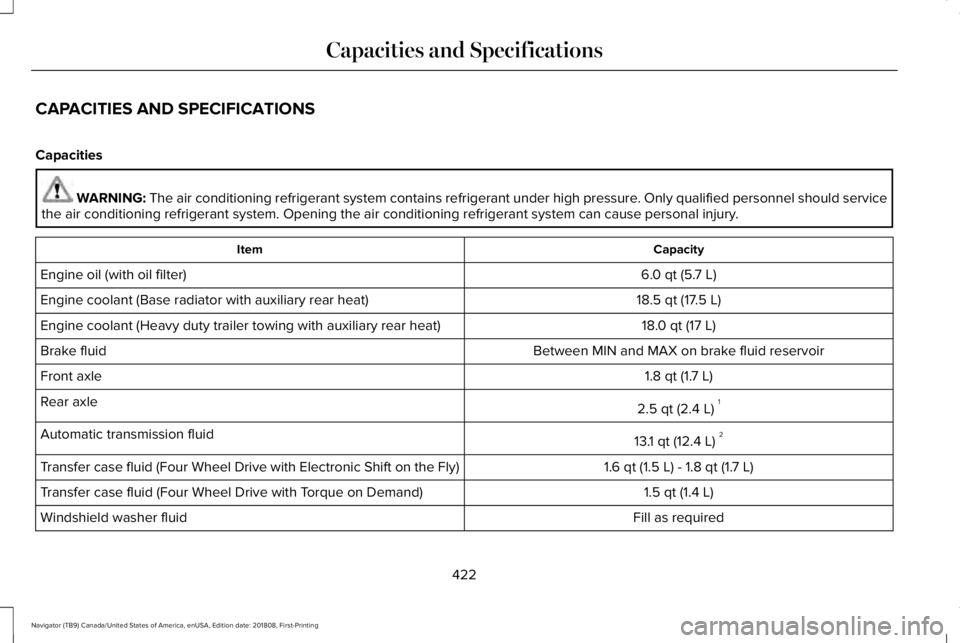
CAPACITIES AND SPECIFICATIONS
Capacities
WARNING: The air conditioning refrigerant system contains refrigerant under high pressure. Only qualified personnel should servicethe air conditioning refrigerant system. Opening the air conditioning refrigerant system can cause personal injury.
CapacityItem
6.0 qt (5.7 L)Engine oil (with oil filter)
18.5 qt (17.5 L)Engine coolant (Base radiator with auxiliary rear heat)
18.0 qt (17 L)Engine coolant (Heavy duty trailer towing with auxiliary rear heat)
Between MIN and MAX on brake fluid reservoirBrake fluid
1.8 qt (1.7 L)Front axle
2.5 qt (2.4 L)1Rear axle
13.1 qt (12.4 L)2Automatic transmission fluid
1.6 qt (1.5 L) - 1.8 qt (1.7 L)Transfer case fluid (Four Wheel Drive with Electronic Shift on the Fly)
1.5 qt (1.4 L)Transfer case fluid (Four Wheel Drive with Torque on Demand)
Fill as requiredWindshield washer fluid
422
Navigator (TB9) Canada/United States of America, enUSA, Edition date: 201808, First-Printing
Capacities and Specifications
Page 455 of 645
of electronically or verbally disclosing to 911operators your vehicle location or otherdetails about your vehicle or crash to assist911 operators to provide the most appropriateemergency services. If you do not want todisclose this information, do not switch thefeature on.
Safety Information
WARNING: Driving while distractedcan result in loss of vehicle control, crashand injury. We strongly recommend thatyou use extreme caution when using anydevice that may take your focus off theroad. Your primary responsibility is the safeoperation of your vehicle. We recommendagainst the use of any hand-held devicewhile driving and encourage the use ofvoice-operated systems when possible.Make sure you are aware of all applicablelocal laws that may affect the use ofelectronic devices while driving.
•Do not attempt to service or repair thesystem. Have an authorized dealercheck your vehicle.
•Do not operate playing devices if thepower cords or cables are broken, splitor damaged. Place cords and cables outof the way, so they do not interfere withthe operation of pedals, seats,compartments or safe driving abilities.
•Do not leave playing devices in yourvehicle during extreme conditions as itcould cause them damage. See yourdevice's user guide for furtherinformation.
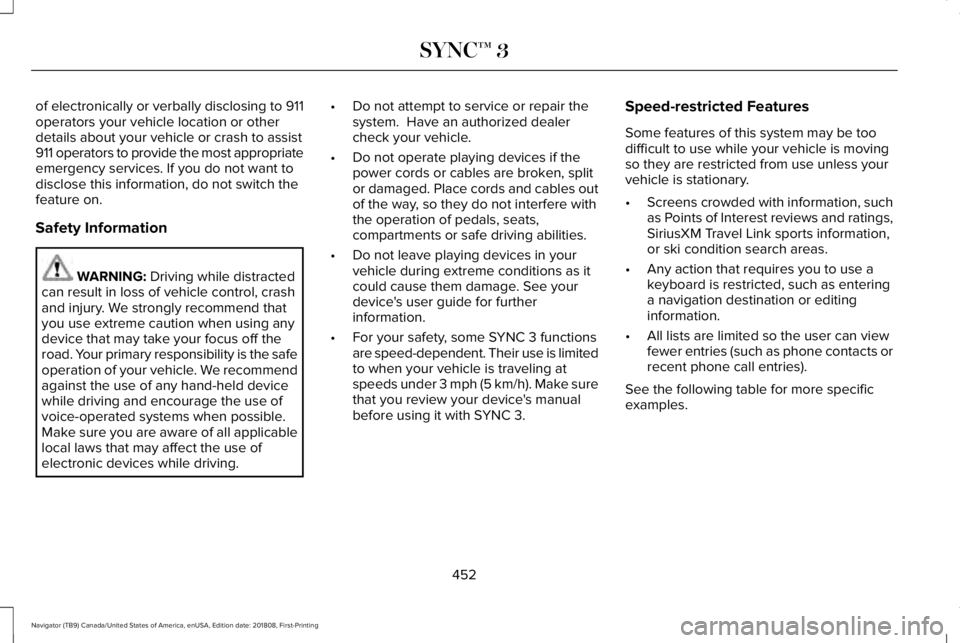
•For your safety, some SYNC 3 functionsare speed-dependent. Their use is limitedto when your vehicle is traveling atspeeds under 3 mph (5 km/h). Make surethat you review your device's manualbefore using it with SYNC 3.
Speed-restricted Features
Some features of this system may be toodifficult to use while your vehicle is movingso they are restricted from use unless yourvehicle is stationary.
•Screens crowded with information, suchas Points of Interest reviews and ratings,SiriusXM Travel Link sports information,or ski condition search areas.
•Any action that requires you to use akeyboard is restricted, such as enteringa navigation destination or editinginformation.
•All lists are limited so the user can viewfewer entries (such as phone contacts orrecent phone call entries).
See the following table for more specificexamples.
452
Navigator (TB9) Canada/United States of America, enUSA, Edition date: 201808, First-Printing
SYNC™ 3
Page 553 of 645
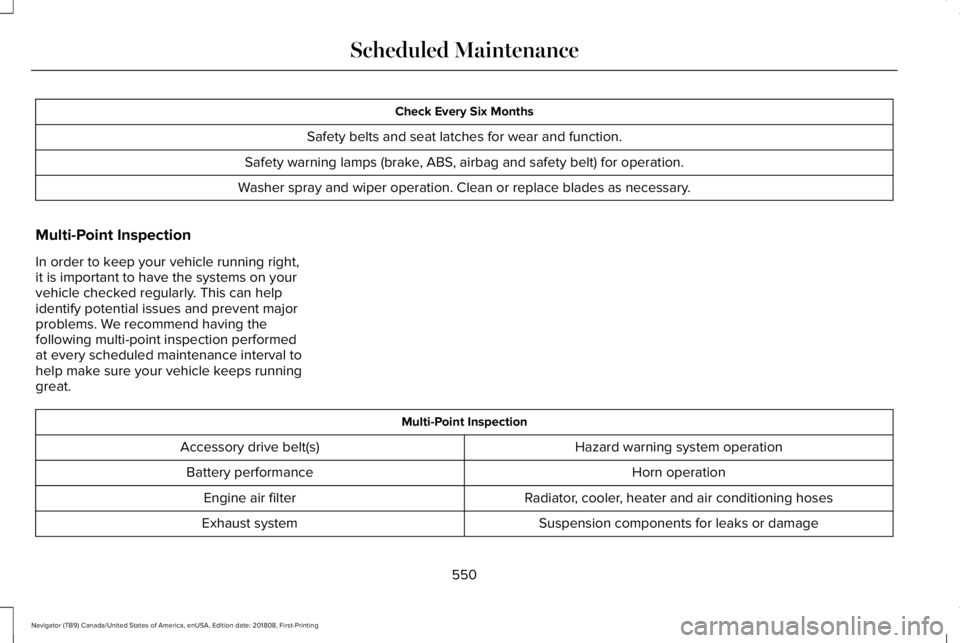
Check Every Six Months
Safety belts and seat latches for wear and function.
Safety warning lamps (brake, ABS, airbag and safety belt) for operation.
Washer spray and wiper operation. Clean or replace blades as necessary.
Multi-Point Inspection
In order to keep your vehicle running right,it is important to have the systems on yourvehicle checked regularly. This can helpidentify potential issues and prevent majorproblems. We recommend having thefollowing multi-point inspection performedat every scheduled maintenance interval tohelp make sure your vehicle keeps runninggreat.
Multi-Point Inspection
Hazard warning system operationAccessory drive belt(s)
Horn operationBattery performance
Radiator, cooler, heater and air conditioning hosesEngine air filter
Suspension components for leaks or damageExhaust system
550
Navigator (TB9) Canada/United States of America, enUSA, Edition date: 201808, First-Printing
Scheduled Maintenance
Page 558 of 645
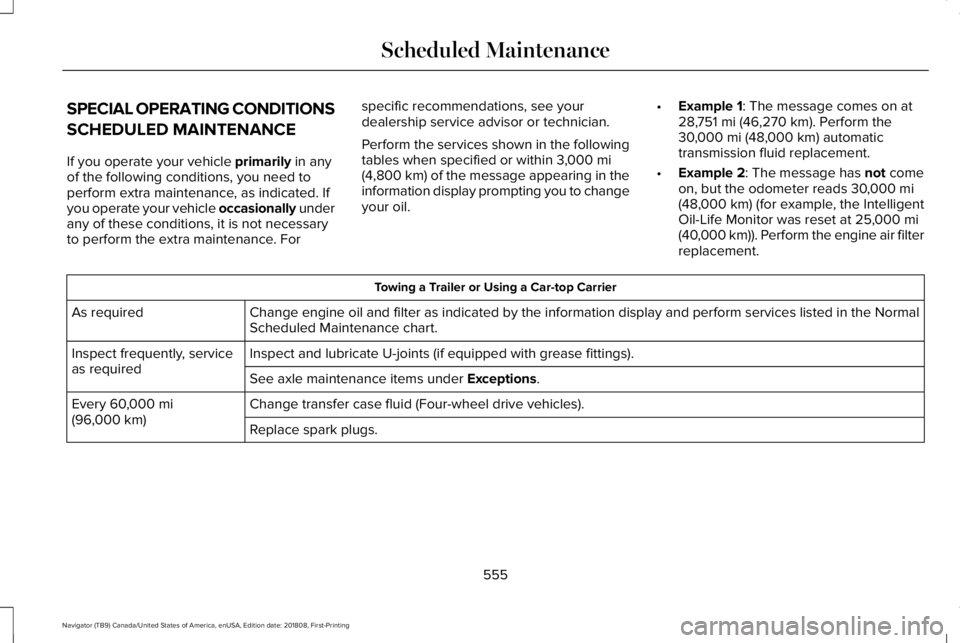
SPECIAL OPERATING CONDITIONS
SCHEDULED MAINTENANCE
If you operate your vehicle primarily in anyof the following conditions, you need toperform extra maintenance, as indicated. Ifyou operate your vehicle occasionally underany of these conditions, it is not necessaryto perform the extra maintenance. For
specific recommendations, see yourdealership service advisor or technician.
Perform the services shown in the followingtables when specified or within 3,000 mi(4,800 km) of the message appearing in theinformation display prompting you to changeyour oil.
•Example 1: The message comes on at28,751 mi (46,270 km). Perform the30,000 mi (48,000 km) automatictransmission fluid replacement.
•Example 2: The message has not comeon, but the odometer reads 30,000 mi(48,000 km) (for example, the IntelligentOil-Life Monitor was reset at 25,000 mi(40,000 km)). Perform the engine air filterreplacement.
Towing a Trailer or Using a Car-top Carrier
Change engine oil and filter as indicated by the information display and perform services listed in the NormalScheduled Maintenance chart.As required
Inspect and lubricate U-joints (if equipped with grease fittings).Inspect frequently, serviceas requiredSee axle maintenance items under Exceptions.
Change transfer case fluid (Four-wheel drive vehicles).Every 60,000 mi(96,000 km)Replace spark plugs.
555
Navigator (TB9) Canada/United States of America, enUSA, Edition date: 201808, First-Printing
Scheduled Maintenance
Page 559 of 645
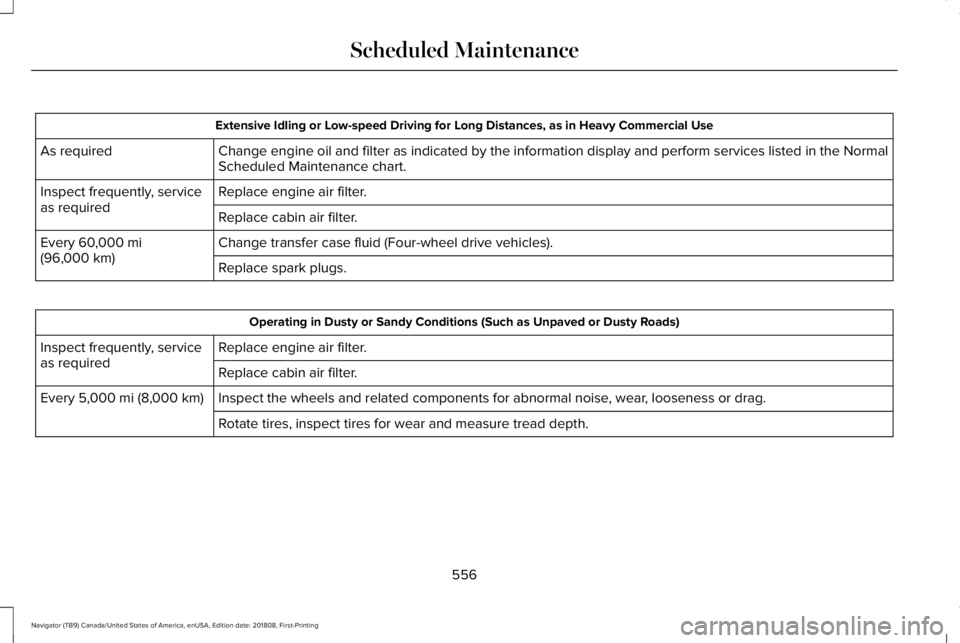
Extensive Idling or Low-speed Driving for Long Distances, as in Heavy Commercial Use
Change engine oil and filter as indicated by the information display and perform services listed in the NormalScheduled Maintenance chart.As required
Replace engine air filter.Inspect frequently, serviceas requiredReplace cabin air filter.
Change transfer case fluid (Four-wheel drive vehicles).Every 60,000 mi(96,000 km)Replace spark plugs.
Operating in Dusty or Sandy Conditions (Such as Unpaved or Dusty Roads)
Replace engine air filter.Inspect frequently, serviceas requiredReplace cabin air filter.
Inspect the wheels and related components for abnormal noise, wear, looseness or drag.Every 5,000 mi (8,000 km)
Rotate tires, inspect tires for wear and measure tread depth.
556
Navigator (TB9) Canada/United States of America, enUSA, Edition date: 201808, First-Printing
Scheduled Maintenance
Page 560 of 645
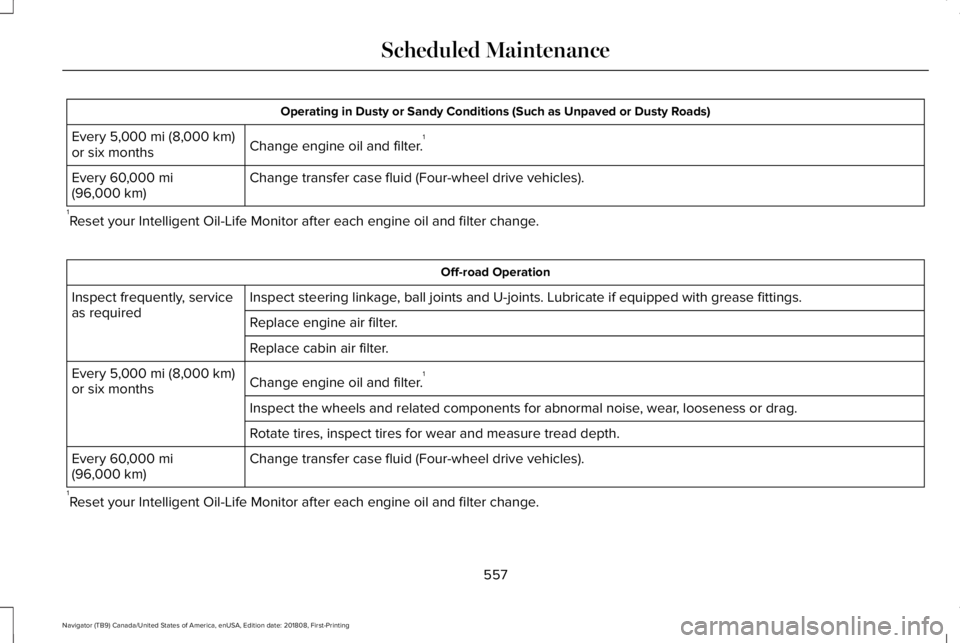
Operating in Dusty or Sandy Conditions (Such as Unpaved or Dusty Roads)
Change engine oil and filter.1Every 5,000 mi (8,000 km)or six months
Change transfer case fluid (Four-wheel drive vehicles).Every 60,000 mi(96,000 km)
1Reset your Intelligent Oil-Life Monitor after each engine oil and filter change.
Off-road Operation
Inspect steering linkage, ball joints and U-joints. Lubricate if equipped with grease fittings.Inspect frequently, serviceas requiredReplace engine air filter.
Replace cabin air filter.
Change engine oil and filter.1Every 5,000 mi (8,000 km)or six months
Inspect the wheels and related components for abnormal noise, wear, looseness or drag.
Rotate tires, inspect tires for wear and measure tread depth.
Change transfer case fluid (Four-wheel drive vehicles).Every 60,000 mi(96,000 km)
1Reset your Intelligent Oil-Life Monitor after each engine oil and filter change.
557
Navigator (TB9) Canada/United States of America, enUSA, Edition date: 201808, First-Printing
Scheduled Maintenance