warning light LINCOLN NAVIGATOR 2019 Repair Manual
[x] Cancel search | Manufacturer: LINCOLN, Model Year: 2019, Model line: NAVIGATOR, Model: LINCOLN NAVIGATOR 2019Pages: 645, PDF Size: 5.02 MB
Page 400 of 645
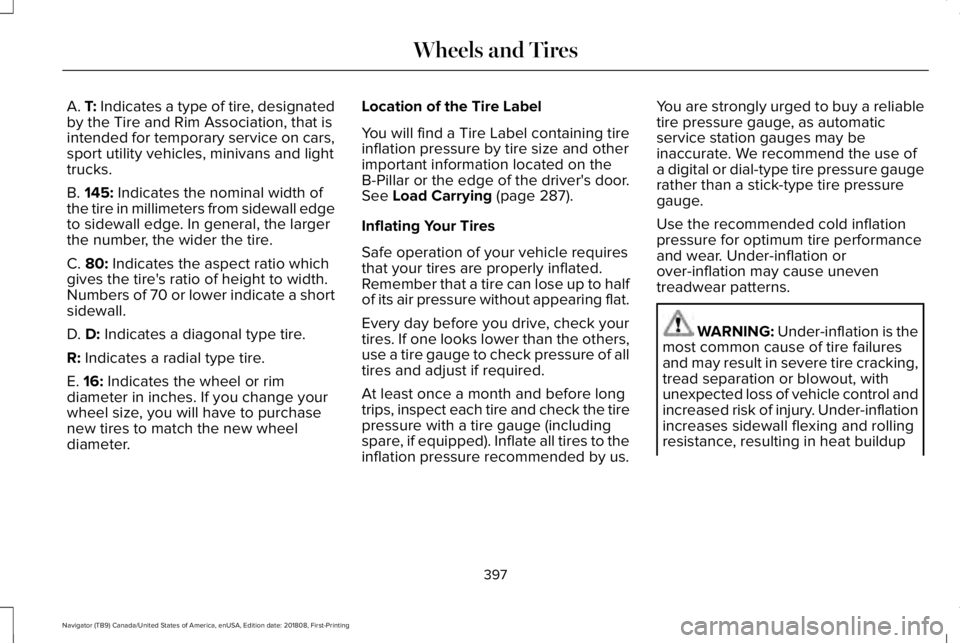
A. T: Indicates a type of tire, designatedby the Tire and Rim Association, that isintended for temporary service on cars,sport utility vehicles, minivans and lighttrucks.
B. 145: Indicates the nominal width ofthe tire in millimeters from sidewall edgeto sidewall edge. In general, the largerthe number, the wider the tire.
C. 80: Indicates the aspect ratio whichgives the tire's ratio of height to width.Numbers of 70 or lower indicate a shortsidewall.
D. D: Indicates a diagonal type tire.
R: Indicates a radial type tire.
E. 16: Indicates the wheel or rimdiameter in inches. If you change your
wheel size, you will have to purchasenew tires to match the new wheeldiameter.
Location of the Tire Label
You will find a Tire Label containing tireinflation pressure by tire size and otherimportant information located on theB-Pillar or the edge of the driver's door.See Load Carrying (page 287).
Inflating Your Tires
Safe operation of your vehicle requiresthat your tires are properly inflated.Remember that a tire can lose up to halfof its air pressure without appearing flat.
Every day before you drive, check yourtires. If one looks lower than the others,use a tire gauge to check pressure of alltires and adjust if required.
At least once a month and before long
trips, inspect each tire and check the tirepressure with a tire gauge (includingspare, if equipped). Inflate all tires to theinflation pressure recommended by us.
You are strongly urged to buy a reliabletire pressure gauge, as automaticservice station gauges may beinaccurate. We recommend the use ofa digital or dial-type tire pressure gaugerather than a stick-type tire pressuregauge.
Use the recommended cold inflationpressure for optimum tire performanceand wear. Under-inflation orover-inflation may cause uneventreadwear patterns.
WARNING: Under-inflation is themost common cause of tire failuresand may result in severe tire cracking,tread separation or blowout, withunexpected loss of vehicle control andincreased risk of injury. Under-inflationincreases sidewall flexing and rollingresistance, resulting in heat buildup
397
Navigator (TB9) Canada/United States of America, enUSA, Edition date: 201808, First-Printing
Wheels and Tires
Page 410 of 645
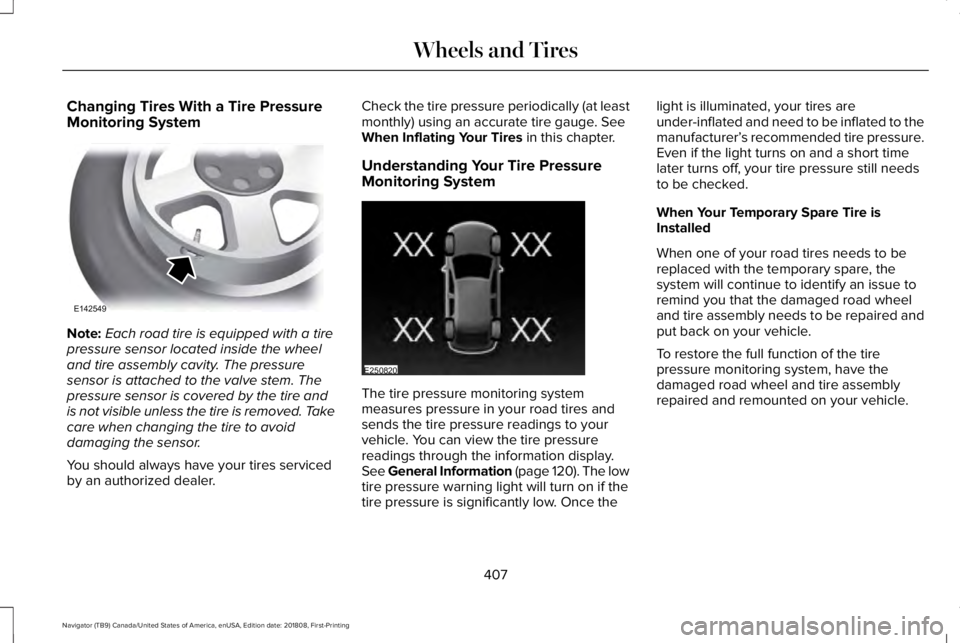
Changing Tires With a Tire PressureMonitoring System
Note:Each road tire is equipped with a tirepressure sensor located inside the wheeland tire assembly cavity. The pressuresensor is attached to the valve stem. Thepressure sensor is covered by the tire andis not visible unless the tire is removed. Takecare when changing the tire to avoiddamaging the sensor.
You should always have your tires servicedby an authorized dealer.
Check the tire pressure periodically (at leastmonthly) using an accurate tire gauge. SeeWhen Inflating Your Tires in this chapter.
Understanding Your Tire PressureMonitoring System
The tire pressure monitoring systemmeasures pressure in your road tires andsends the tire pressure readings to yourvehicle. You can view the tire pressurereadings through the information display.See General Information (page 120). The lowtire pressure warning light will turn on if thetire pressure is significantly low. Once the
light is illuminated, your tires areunder-inflated and need to be inflated to themanufacturer’s recommended tire pressure.Even if the light turns on and a short timelater turns off, your tire pressure still needsto be checked.
When Your Temporary Spare Tire isInstalled
When one of your road tires needs to bereplaced with the temporary spare, thesystem will continue to identify an issue toremind you that the damaged road wheeland tire assembly needs to be repaired andput back on your vehicle.
To restore the full function of the tirepressure monitoring system, have thedamaged road wheel and tire assemblyrepaired and remounted on your vehicle.
407
Navigator (TB9) Canada/United States of America, enUSA, Edition date: 201808, First-Printing
Wheels and TiresE142549 E250820
Page 412 of 645
Customer action requiredPossible causeLow tire pressure warning light
Make sure tires are at the proper pressure. See Inflating your tiresin this chapter. After inflating your tires to the manufacturer’srecommended pressure as shown on the Tire Label (located onthe edge of driver’s door or the B-Pillar), the vehicle must be drivenfor at least two minutes over 20 mph (32 km/h) before the lightturns off.
Tire(s) under-inflated
Solid warning lightRepair the damaged road wheel and tire assembly and reinstallit on the vehicle to restore system function. For a description onhow the system functions, see When Your Temporary Spare Tireis Installed in this section.
Spare tire in use
If the tires are properly inflated and the spare tire is not in use butthe light remains on, contact your authorized dealer as soon aspossible.TPMS malfunction
Repair the damaged road wheel and tire assembly and reinstallit on the vehicle to restore system function. For a description onhow the system functions, see When Your Temporary Spare Tireis Installed in this section.
Spare tire in use
Flashing warning light
If the tires are properly inflated and the spare tire is not in use butthe light remains on, contact your authorized dealer as soon aspossible.TPMS malfunction
409
Navigator (TB9) Canada/United States of America, enUSA, Edition date: 201808, First-Printing
Wheels and Tires
Page 413 of 645
When Inflating Your Tires
WARNING: Do not use the tirepressure displayed in the informationdisplay as a tire pressure gauge. Failure tofollow this instruction could result inpersonal injury or death.
When putting air into your tires (such as at agas station or in your garage), the tirepressure monitoring system may not respondimmediately to the air added to your tires.
It may take up to two minutes of driving over20 mph (32 km/h) for the light to turn off afteryou have filled your tires to therecommended inflation pressure.
How Temperature Affects Your TirePressure
The tire pressure monitoring system monitorstire pressure in each pneumatic tire. Whiledriving in a normal manner, a typicalpassenger tire inflation pressure mayincrease about 2–4 psi (14–28 kPa) from acold start situation. If the vehicle is stationaryovernight with the outside temperature
significantly lower than the daytimetemperature, the tire pressure may decreaseabout 3 psi (21 kPa) for a drop of 30°F (17°C)in ambient temperature. This lower pressurevalue may be detected by the tire pressuremonitoring system as being significantlylower than the recommended inflationpressure and activate the system warninglight for low tire pressure. If the low tirepressure warning light is on, visually checkeach tire to verify that no tire is flat. If one ormore tires are flat, repair as necessary.Check the air pressure in the road tires. Ifany tire is under-inflated, carefully drive thevehicle to the nearest location where air canbe added to the tires. Inflate all the tires tothe recommended inflation pressure.
CHANGING A ROAD WHEEL
WARNING: If the tire pressuremonitor sensor becomes damaged it maynot function.
Note:You should only use tire sealants inroadside emergencies as they may causedamage to the tire pressure monitoringsystem sensor.
Note:The tire pressure monitoring systemindicator light illuminates when the sparetire is in use. To restore the full function ofthe monitoring system, all road wheelsequipped with tire pressure monitoringsensors must be mounted on this vehicle.
If you get a flat tire when driving, do notapply the brake heavily. Instead, graduallydecrease your speed. Hold the steeringwheel firmly and slowly move to a safe placeon the side of the road.
Have a flat serviced by an authorized dealerin order to prevent damage to the systemsensors. See Tire Pressure MonitoringSystem (page 405). Replace the spare tirewith a road tire as soon as possible. Duringrepairing or replacing of the flat tire, havethe authorized dealer inspect the systemsensor for damage.
410
Navigator (TB9) Canada/United States of America, enUSA, Edition date: 201808, First-Printing
Wheels and Tires
Page 417 of 645
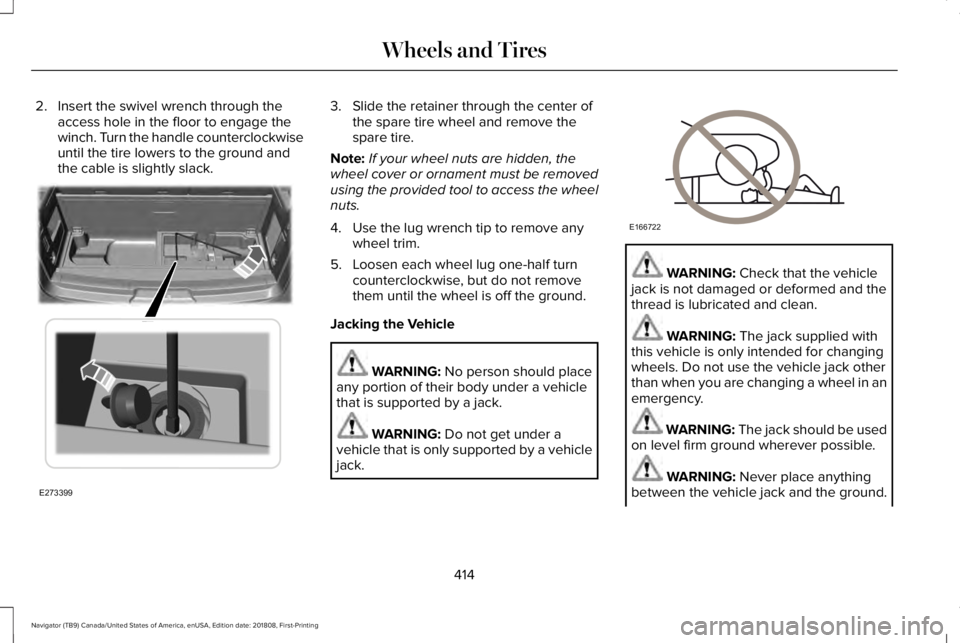
2. Insert the swivel wrench through theaccess hole in the floor to engage thewinch. Turn the handle counterclockwiseuntil the tire lowers to the ground andthe cable is slightly slack.
3. Slide the retainer through the center ofthe spare tire wheel and remove thespare tire.
Note:If your wheel nuts are hidden, thewheel cover or ornament must be removedusing the provided tool to access the wheelnuts.
4. Use the lug wrench tip to remove anywheel trim.
5. Loosen each wheel lug one-half turncounterclockwise, but do not removethem until the wheel is off the ground.
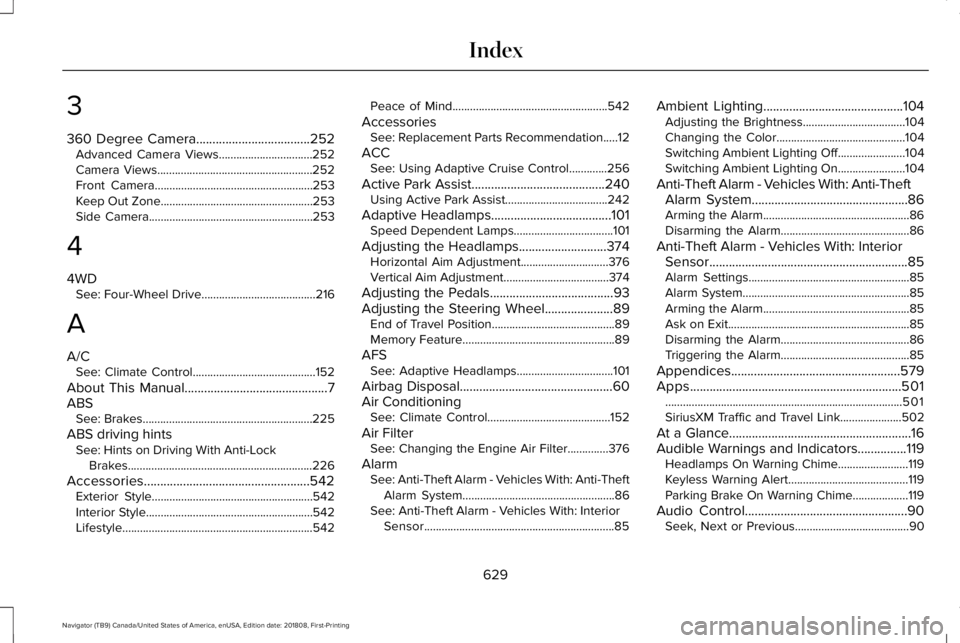
Jacking the Vehicle
WARNING: No person should placeany portion of their body under a vehiclethat is supported by a jack.
WARNING: Do not get under avehicle that is only supported by a vehiclejack.
WARNING: Check that the vehiclejack is not damaged or deformed and thethread is lubricated and clean.
WARNING: The jack supplied withthis vehicle is only intended for changingwheels. Do not use the vehicle jack otherthan when you are changing a wheel in anemergency.
WARNING: The jack should be usedon level firm ground wherever possible.
WARNING: Never place anythingbetween the vehicle jack and the ground.
414
Navigator (TB9) Canada/United States of America, enUSA, Edition date: 201808, First-Printing
Wheels and TiresE273399 E166722
Page 632 of 645
3
360 Degree Camera...................................252Advanced Camera Views................................252Camera Views.....................................................252Front Camera......................................................253Keep Out Zone....................................................253Side Camera........................................................253
4
4WDSee: Four-Wheel Drive.......................................216
A
A/CSee: Climate Control..........................................152
About This Manual............................................7ABSSee: Brakes..........................................................225
ABS driving hintsSee: Hints on Driving With Anti-LockBrakes...............................................................226
Accessories...................................................542Exterior Style.......................................................542Interior Style.........................................................542Lifestyle.................................................................542
Peace of Mind.....................................................542
AccessoriesSee: Replacement Parts Recommendation.....12
ACCSee: Using Adaptive Cruise Control.............256
Active Park Assist.........................................240Using Active Park Assist...................................242
Adaptive Headlamps.....................................101Speed Dependent Lamps..................................101
Adjusting the Headlamps...........................374Horizontal Aim Adjustment..............................376Vertical Aim Adjustment....................................374
Adjusting the Pedals......................................93Adjusting the Steering Wheel.....................89End of Travel Position..........................................89Memory Feature....................................................89
AFSSee: Adaptive Headlamps.................................101
Airbag Disposal...............................................60Air ConditioningSee: Climate Control..........................................152
Air FilterSee: Changing the Engine Air Filter..............376
AlarmSee: Anti-Theft Alarm - Vehicles With: Anti-TheftAlarm System....................................................86See: Anti-Theft Alarm - Vehicles With: InteriorSensor.................................................................85
Ambient Lighting...........................................104Adjusting the Brightness...................................104Changing the Color............................................104Switching Ambient Lighting Off.......................104Switching Ambient Lighting On.......................104
Anti-Theft Alarm - Vehicles With: Anti-TheftAlarm System................................................86Arming the Alarm..................................................86Disarming the Alarm............................................86
Anti-Theft Alarm - Vehicles With: InteriorSensor.............................................................85Alarm Settings.......................................................85Alarm System.........................................................85Arming the Alarm..................................................85Ask on Exit..............................................................85Disarming the Alarm............................................86Triggering the Alarm............................................85
Appendices....................................................579Apps.................................................................501.................................................................................501SiriusXM Traffic and Travel Link.....................502
At a Glance........................................................16Audible Warnings and Indicators...............119Headlamps On Warning Chime........................119Keyless Warning Alert.........................................119Parking Brake On Warning Chime...................119
Audio Control..................................................90Seek, Next or Previous.......................................90
629
Navigator (TB9) Canada/United States of America, enUSA, Edition date: 201808, First-Printing
Index
Page 641 of 645
Remote Control...............................................62Car Finder...............................................................64Intelligent Access Key.........................................62Memory Feature....................................................66Remote Start..........................................................65Replacing the Battery..........................................63Sounding the Panic Alarm..................................64Using the Key Blade............................................62
Remote Start...................................................157Automatic Settings..............................................157Heated and Cooled Features...........................157Last Settings.........................................................157
Repairing Minor Paint Damage.................385Replacement Parts Recommendation........12Collision Repairs.....................................................13Scheduled Maintenance and MechanicalRepairs.................................................................12Warranty on Replacement Parts.........................13
Replacing a Lost Key or RemoteControl............................................................66Reporting Safety Defects (CanadaOnly)..............................................................340Reporting Safety Defects (U.S. Only).......339Roadside Assistance...................................326Vehicles Sold in Canada: Getting RoadsideAssistance........................................................327Vehicles Sold in the United States: GettingRoadside Assistance.....................................326
Vehicles Sold in the United States: UsingRoadside Assistance.....................................326
Roadside Emergencies...............................326Roof Racks and Load Carriers..................290Adjusting the Crossbar......................................291Maximum Recommended LoadAmounts............................................................291
Running-InSee: Breaking-In.................................................323
Running Out of Fuel.....................................201Adding Fuel From a Portable FuelContainer..........................................................201Filling a Portable Fuel Container.....................201
S
Safety Canopy™...............................................57Safety Precautions........................................199Satellite Radio...............................................436Satellite Radio Electronic Serial Number(ESN)..................................................................438Satellite Radio Reception Factors..................437SiriusXM Satellite Radio Service.....................437Troubleshooting..................................................438
Scheduled Maintenance Record..............558Scheduled Maintenance.............................547Seatbelt Extension.........................................48Seatbelt Height Adjustment.........................45
Seatbelt Reminder..........................................46Seatbelt Status.......................................................47
Seatbelts...........................................................39Principle of Operation..........................................39
Seatbelt Warning Lamp and IndicatorChime..............................................................45Conditions of operation......................................46
Seats.................................................................158Security..............................................................83Settings...........................................................504911 Assist................................................................512Ambient Lighting.................................................521Bluetooth..............................................................507Clock.....................................................................506Display...................................................................523General..................................................................518Media Player........................................................505Mobile Apps..........................................................517Navigation.............................................................514Phone....................................................................507Radio.......................................................................513SiriusXM.................................................................514Sound....................................................................504Valet Mode...........................................................524Vehicle...................................................................521Voice Control.......................................................523Wi-Fi & Hotspot....................................................519
Side Airbags.....................................................56
638
Navigator (TB9) Canada/United States of America, enUSA, Edition date: 201808, First-Printing
Index
Page 644 of 645
Manual Power Deploy.........................................88
Using Snow Chains......................................404Using Stability Control................................233Stability Control and Traction Control with RollStability Control™ (RSC™)...............................233
Using Traction Control.................................231Switching the System On and Off...................231System Indicator Lights and Messages.........231
Using Voice Recognition............................458Audio Voice Commands...................................460Climate Voice Commands.................................461Mobile App Voice Commands........................466Navigation Voice Commands..........................464Phone Voice Commands...................................461SiriusXM Traffic and Travel Link VoiceCommands......................................................466Voice Settings Commands...............................467
Utilizing the Mediation/Arbitration Program(Canada Only).............................................336
V
Vehicle Care..................................................378General Information...........................................378
Vehicle Certification Label.........................420Vehicle Identification Number..................420Vehicle Storage............................................386Battery...................................................................387
Body.......................................................................386Brakes....................................................................387Cooling system....................................................387Engine...................................................................386Fuel system..........................................................386General.................................................................386Miscellaneous......................................................387Removing Vehicle From Storage....................387Tires.......................................................................387
VentilationSee: Climate Control..........................................152
VINSee: Vehicle Identification Number...............420
Voice Control...................................................90
W
Warning Lamps and Indicators...................114Adaptive Cruise Control Indicator...................115Anti-Lock Brake System Warning Lamp.........115Auto Hold Active..................................................115Auto Hold Unavailable........................................115Automatic Headlamp High BeamIndicator.............................................................115Auto-Start-Stop Indicator....................................115Battery.....................................................................115Blind Spot Monitor...............................................115Brake System Warning Lamp............................116
Cruise Control Indicator.....................................116Direction Indicator................................................116Door Ajar................................................................116Electric Park Brake...............................................116Electronic Limited Slip Differential...................116Engine Coolant Temperature WarningLamp...................................................................116Engine Oil...............................................................117Fasten Rear Seatbelt...........................................117Fasten Seatbelt Warning Lamp.........................117Four-Wheel Drive Indicators..............................117Front Airbag...........................................................117Headlamp High Beam Indicator.......................117Hill Descent............................................................117Hood Ajar................................................................117Liftgate Ajar............................................................117Low Beam Malfunction Warning Lamp...........118Low Fuel Level Warning Lamp..........................117Low Tire Pressure Warning Lamp....................118Low Washer Fluid Level Warning Lamp.........118Parking Lamps.......................................................118Powertrain Fault....................................................118Service Engine Soon...........................................118Stability Control and Traction ControlIndicator.............................................................118Stability Control and Traction Control OffWarning Lamp...................................................119Tow Haul Indicator...............................................119
641
Navigator (TB9) Canada/United States of America, enUSA, Edition date: 201808, First-Printing
Index