light LINCOLN NAVIGATOR 2019 Manual Online
[x] Cancel search | Manufacturer: LINCOLN, Model Year: 2019, Model line: NAVIGATOR, Model: LINCOLN NAVIGATOR 2019Pages: 645, PDF Size: 5.02 MB
Page 309 of 645
The system is not available:
•The system relies on many sub-systemsin your vehicle to operate correctly. Ifthose sub-systems are not operatingcorrectly the system may not beavailable.
•Low battery voltage is a condition whichwill prevent the system from operating.Please make sure the battery is correctlycharged if the system is not available.
•You may need to drive your vehiclestraight forward above 25 mph (40 km/h)before the system is available again.
•If the message still displays take yourvehicle to an authorized dealer forservice.
Sticker lost:
•If the system cannot initially find thesticker, it may be necessary for you tochange the lighting conditions by movingthe vehicle and trailer or waiting untilconditions change.
•Check for the following if you receive thelost sticker message while using thesystem.
•Stop your vehicle as soon as themessage displays.
•Make sure the sticker is visible and thepattern is discernable in the rear viewcamera image.
•Clean the sticker and camera to makesure they are unobstructed.
•Clean the lens with a soft, lint-free clothand water.
•Clean the sticker with isopropyl rubbingalcohol sprayed directly onto the sticker,and then wipe clean with a soft cloth.
•Remove any items that may be blockingthe view of the sticker. Depending onyour trailer configuration and anyequipment mounted to your trailer it ispossible for the sticker to be blockedfrom view of the camera as it rotates onthe hitch ball but not be blocked duringsetup. Remove the obstruction ifpossible. It will be necessary to removethe sticker from it’s current location if theobstruction cannot be cleared and placea new sticker that will be visible to thecamera in all positions of the trailerbehind your vehicle.
•Placing the sticker on a surface angledaway from the vehicle reducesperformance. Use a drawbar thatpositions the trailer level to the groundwhen attached to vehicle. This typicallyprovides a level surface to mount thesticker. Place the sticker on a bracket orother object when no level surface isavailable.
•Make sure the entire sticker is on a flatsurface that is completely visible to thecamera. Do not fold the sticker over anedge on the trailer frame. This candegrade performance.
•Shadows on the sticker may effecttracking performance under somelighting conditions. Moving the sticker toanother location within the allowedplacement area may improveperformance. Use the change stickeroption in your Towing menu if you movethe sticker.
306
Navigator (TB9) Canada/United States of America, enUSA, Edition date: 201808, First-Printing
Towing
Page 312 of 645
This feature applies your vehicle brakes atindividual wheels and, if necessary, reducesengine power. If the trailer begins to sway,the stability control light flashes and themessage TRAILER SWAY REDUCE SPEEDappears in the information display. The firstthing to do is slow your vehicle down, thenpull safely to the side of the road and checkfor proper tongue load and trailer loaddistribution. See Load Carrying (page 287).
RECOMMENDED TOWING
WEIGHTS
Note:Do not exceed the trailer weightfor your vehicle configuration listed inthe chart below.
Note:Make sure to take intoconsideration trailer frontal area. Do notexceed 36.5 feet² (3.39 meters²) if yourvehicle is equipped with the standardtowing package, or 60 feet² (5.57meters²) if your vehicle is equipped withthe optional heavy duty package.
Note:Exceeding this limitation maysignificantly reduce the performance ofyour towing vehicle. Selecting a trailerwith a low aerodynamic drag androunded front design helps optimizeperformance and fuel economy.
Note:For high altitude operation,reduce the gross combined weight by2% per 1,000 ft (300 m) starting at the1,000 ft (300 m) elevation point.
Note:Certain states require electrictrailer brakes for trailers over a specifiedweight. Be sure to check stateregulations for this specified weight. Themaximum trailer weights listed may belimited to this specified weight, as thevehicle’s electrical system may notinclude the wiring connector needed to
activate electric trailer brakes.
Your vehicle may tow a trailer providedthe maximum trailer weight is less thanor equal to the maximum trailer weightlisted for your vehicle configuration onthe following chart.
To calculate the maximum loaded trailerweight for your vehicle:
1.Start with the gross combined weightrating for your vehicle model andaxle ratio. See the following chart.
2.Subtract all of the following that
apply to your vehicle:
•Vehicle curb weight.
•Hitch hardware weight, such as adraw bar, ball, locks or weightdistributing.
•Driver weight.
•Passenger weight.
•Payload, cargo and luggageweight.
•Aftermarket equipment weight.
3. This equals the maximum loadedtrailer weight for this combination.
Note:The trailer tongue load figuresinto the payload for your vehicle.Reduce the total payload by the finaltrailer tongue weight.
309
Navigator (TB9) Canada/United States of America, enUSA, Edition date: 201808, First-Printing
Towing
Page 314 of 645
ESSENTIAL TOWING CHECKS
Follow these guidelines for safe towing:
•Do not tow a trailer until you drive yourvehicle at least 1,000 mi (1,600 km).
•Consult your local motor vehicle laws fortowing a trailer.
•See any instructions that come withtowing accessories for the properinstallation and adjustment specifications.
•Service your vehicle more frequently ifyou tow a trailer. See ScheduledMaintenance (page 547).
•If you use a rental trailer, follow theinstructions the rental agency gives you.
You can find information on loadspecification terms found on the tire labeland Safety Compliance label as well asinstructions on calculating your vehicle's loadin the Load Carrying chapter. See Load Limit(page 292).
Remember to account for the trailer tongueweight as part of your vehicle load whencalculating the total vehicle weight.
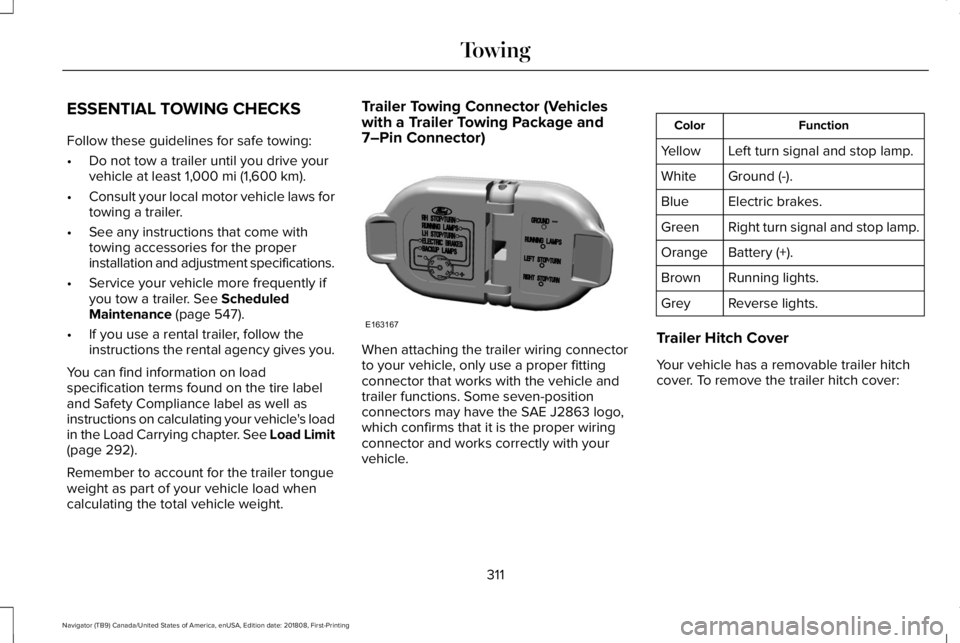
Trailer Towing Connector (Vehicleswith a Trailer Towing Package and7–Pin Connector)
When attaching the trailer wiring connectorto your vehicle, only use a proper fittingconnector that works with the vehicle andtrailer functions. Some seven-positionconnectors may have the SAE J2863 logo,which confirms that it is the proper wiringconnector and works correctly with yourvehicle.
FunctionColor
Left turn signal and stop lamp.Yellow
Ground (-).White
Electric brakes.Blue
Right turn signal and stop lamp.Green
Battery (+).Orange
Running lights.Brown
Reverse lights.Grey
Trailer Hitch Cover
Your vehicle has a removable trailer hitchcover. To remove the trailer hitch cover:
311
Navigator (TB9) Canada/United States of America, enUSA, Edition date: 201808, First-Printing
TowingE163167
Page 316 of 645
Maximum Tongue WeightMaximum Trailer WeightMode
600 lb (272 kg)6,000 lb (2,722 kg)Weight carrying
900 lb (408 kg)9,000 lb (4,082 kg)Weight distributing
Note:These are hitch ratings only. Actualvehicle ratings are dependent on engine,transmission and axle combinations.
Weight-distributing Hitch
WARNING: Do not adjust the springbars so that your vehicle's rear bumper ishigher than before attaching the trailer.Doing so will defeat the function of theweight-distributing hitch, which may causeunpredictable handling, and could resultin serious personal injury.
When hooking-up a trailer using aweight-distributing hitch, always use thefollowing procedure:
1. Park the loaded vehicle, without thetrailer, on a level surface.
2. Measure the height to the top of yourvehicle's front wheel opening on thefender. This is H1.
3. Attach the loaded trailer to your vehiclewithout the weight-distributing barsconnected.
4. Measure the height to the top of yourvehicle's front wheel opening on thefender a second time. This is H2.
5. Install and adjust the tension in theweight-distributing bars so that the heightof your vehicle's front wheel opening onthe fender is approximately half the waydown from H2, toward H1.
6. Check that the trailer is level or slightlynose down toward your vehicle. If not,adjust the ball height accordingly andrepeat Steps 2-6.
When the trailer is level or slightly nose downtoward the vehicle:
•Lock the bar tension adjuster in place.
•Check that the trailer tongue securelyattaches and locks onto the hitch.
•Install safety chains, lighting and trailerbrake controls as required by law or thetrailer manufacturer.
Safety Chains
Note:Do not attach safety chains to thebumper. Always connect the safety chainsto the frame or hook retainers of your trailerhitch.
Install trailer safety chains to the trailer hitchas recommended by the manufacturer. Crossthe chains under the trailer tongue and allowenough slack for turning tight corners. Donot allow the chains to drag on the ground.
313
Navigator (TB9) Canada/United States of America, enUSA, Edition date: 201808, First-Printing
Towing
Page 320 of 645
Points to Remember
Note:Do not attempt removal of the trailerbrake controller without consulting theWorkshop Manual. Damage to the unit mayresult.
•Adjust gain setting before using thetrailer brake controller for the first time.
•Adjust gain setting, using the procedureabove, whenever road, weather andtrailer or vehicle loading conditionschange from when the gain was initiallyset.
•Only use the manual control lever forproper adjustment of the gain duringtrailer setup. Misuse, such as applicationduring trailer sway, could cause instabilityof trailer or tow vehicle.
•Avoid towing in adverse weatherconditions. The trailer brake controllerdoes not provide anti-lock control of thetrailer wheels. Trailer wheels can lock upon slippery surfaces, resulting in reducedstability of trailer and tow vehicle.
•The trailer brake controller is equippedwith a feature that reduces output atvehicle speeds below 11 mph (18 km/h)so trailer and vehicle braking is not jerkyor harsh. This feature is only availablewhen applying the brakes using yourvehicle's brake pedal, not the controller.
•The controller interacts with the brakecontrol system and powertrain controlsystem of your vehicle to provide thebest performance on different roadconditions.
•Your vehicle's brake system and thetrailer brake system work independentlyof each other. Changing the gain settingon the controller does not affect theoperation of your vehicle's brakeswhether you attach a trailer or not.
•When you switch the engine off, thecontroller output is disabled and thedisplay and module shut down. Thecontroller module and display turn onwhen you switch the ignition on.
•The trailer brake controller is only afactory-installed or dealer-installed item.Lincoln is not responsible for warranty orperformance of the controller due tomisuse or customer installation.
Trailer Lamps
WARNING: Never connect any trailerlamp wiring to the vehicle's tail lamp wiring;this may damage the electrical systemresulting in fire. Contact your authorizeddealer as soon as possible for assistancein proper trailer tow wiring installation.Additional electrical equipment may berequired.
Trailer lamps are required on most towedvehicles. Make sure all running lights, brakelights, turn signals and hazard lights areworking.
317
Navigator (TB9) Canada/United States of America, enUSA, Edition date: 201808, First-Printing
Towing
Page 324 of 645
WARNING: Do not disconnect thebattery during recreational towing. Itprevents the transfer case from shiftingproperly and may cause the vehicle to roll,even if the transmission is in park (P).
WARNING: Shifting the transfer caseto its neutral position for recreationaltowing may cause the vehicle to roll, evenif the transmission is in park (P). It mayinjure the driver and others. Make sure youpress the foot brake and the vehicle is ina secure, safe position when you shift toneutral (N).
Note:Failing to put the transfer case in itsneutral position can damage vehiclecomponents.
Note:You can check four-wheel-downtowing status at any time by opening thedriver's door or turning the ignition to theaccessory or on position. A messageappears in the information display confirmingyour vehicle is in neutral tow.
To exit four-wheel-down towing and returnthe transfer case to its 2H position:
1. With your vehicle still properly securedto the tow vehicle, press the brake pedaland start the engine.
2. Switch your vehicle off by pressing theengine START/STOP button once.
3.Place your vehicle in accessory mode bypressing the start button once withoutpressing the brake pedal.
4. Press the brake pedal.
5.Place the transmission back into park (P).
6. Release the brake pedal.
Note:If completed successfully, theinformation display shows 2H and NeutralTow Disabled.
Note:If the indicator light and message donot display, you must perform the procedureagain from the beginning.
Note:You may hear an audible noise as thetransfer case shifts out of its neutral position,this is normal.
Note:If Shift Delayed Pull Forward displaysin the instrument cluster, transfer case geartooth blockage is present. See theinstructions following this section.
7.Apply the parking brake, then disconnectyour vehicle from the tow vehicle.
8. Release the parking brake, start theengine, and shift the transmission intodrive (D) to make sure the transfer caseis out of the neutral tow position.
9.If the transfer case does not successfullyshift out of neutral (N), set the parkingbrake until you can have your vehicleserviced.
Resolving the Shift Delayed Pull Forwardor To Exit 4x4 LOW Shift to N Message
If the instrument cluster displays thesemessages, perform the following:
1. Press and hold the brake pedal.
2.Put the transmission into neutral (N), thenstart the engine.
3. With the engine running, shift thetransmission into drive (D) and let thevehicle roll forward, up to 3 ft (1 m). Youmay hear an audible noise as the transfercase shifts out of its neutral position. Thisis normal.
321
Navigator (TB9) Canada/United States of America, enUSA, Edition date: 201808, First-Printing
Towing
Page 327 of 645
There are also some things you may want toavoid doing because they reduce your fueleconomy:
•Avoid sudden or hard accelerations.
•Avoid revving the engine before turningoff the car.
•Avoid long idle periods.
•Do not warm up your vehicle on coldmornings.
•Reduce the use of air conditioning andheat.
•Avoid using speed control in hilly terrain.
•Do not rest your foot on the brake pedalwhile driving.
•Avoid carrying unnecessary weight.
•Avoid adding particular accessories toyour vehicle (e.g. bug deflectors,rollbars/light bars, running boards, skiracks).
•Avoid driving with the wheels out ofalignment.
DRIVING THROUGH WATER
WARNING: Do not drive throughflowing or deep water as you may losecontrol of your vehicle.
Note:Driving through standing water cancause vehicle damage.
Note:Engine damage can occur if waterenters the air filter.
Before driving through standing water, checkthe depth. Never drive through water that ishigher than the bottom of the wheel hubs.
When driving through standing water, drivevery slowly and do not stop your vehicle.Your brake performance and traction maybe limited. After driving through water andas soon as it is safe to do so:
•Lightly press the brake pedal to dry thebrakes and to check that they work.
•Check that the horn works.
•Check that the exterior lights work.
•Turn the steering wheel to check that thesteering power assist works.
FLOOR MATS
WARNING: Use a floor mat designedto fit the footwell of your vehicle that doesnot obstruct the pedal area. Failure tofollow this instruction could result in theloss of control of your vehicle, personalinjury or death.
WARNING: Pedals that cannot movefreely can cause loss of vehicle control andincrease the risk of serious personal injury.
324
Navigator (TB9) Canada/United States of America, enUSA, Edition date: 201808, First-Printing
Driving HintsE176913
Page 331 of 645
1. Press START/STOP to switch off yourvehicle.
2.Press the brake pedal and START/STOPto switch on your vehicle.
3. Remove your foot from the brake pedaland press START/STOP to switch offyour vehicle.
4. You can attempt to start the vehicle bypressing the brake pedal andSTART/STOP, or press START/STOPwithout pressing the brake pedal.
JUMP STARTING THE VEHICLE
WARNING: Batteries normallyproduce explosive gases which can causepersonal injury. Therefore, do not allowflames, sparks or lighted substances tocome near the battery. When working nearthe battery, always shield your face andprotect your eyes. Always provide correctventilation.
WARNING: Keep batteries out ofreach of children. Batteries contain sulfuricacid. Avoid contact with skin, eyes orclothing. Shield your eyes when workingnear the battery to protect against possiblesplashing of acid solution. In case of acidcontact with skin or eyes, flush immediatelywith water for a minimum of 15 minutes andget prompt medical attention. If acid isswallowed, call a physician immediately.
WARNING: Use only adequatelysized cables with insulated clamps.
Note:To avoid reverse polarity connections,make sure that you correctly identify thepositive (+) and negative (-) terminals on boththe disabled and booster vehicles beforeconnecting the cables. Stay clear of movingparts.
Preparing Your Vehicle
Do not attempt to push-start your automatictransmission vehicle.
Note:Attempting to push-start a vehicle withan automatic transmission may causetransmission damage.
Note:Use only a 12-volt supply to start yourvehicle.
Note:Do not disconnect the battery of thedisabled vehicle as this could damage thevehicle electrical system.
Park the booster vehicle close to the hoodof the disabled vehicle, making sure the twovehicles do not touch.
Connecting the Jumper Cables
WARNING: Do not use fuel lines,engine valve covers, windshield wiperarms, the intake manifold, or hood latch asground points.
WARNING: Do not connect the endof the second cable to the negative (-)terminal of the battery to be jumped. Aspark may cause an explosion of the gasesthat surround the battery.
328
Navigator (TB9) Canada/United States of America, enUSA, Edition date: 201808, First-Printing
Roadside Emergencies
Page 349 of 645
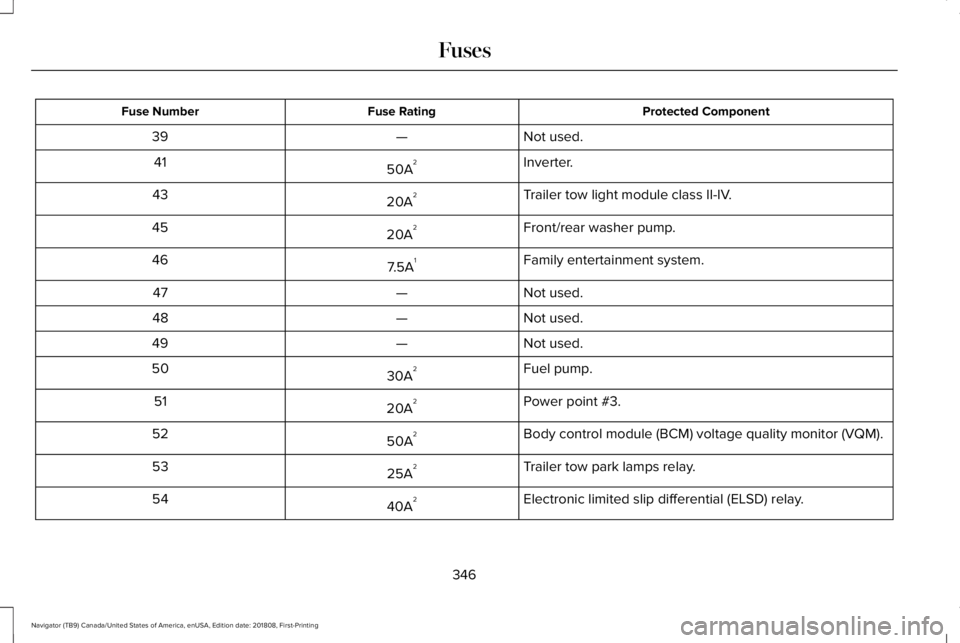
Protected ComponentFuse RatingFuse Number
Not used.—39
Inverter.50A241
Trailer tow light module class II-IV.20A243
Front/rear washer pump.20A245
Family entertainment system.7.5A146
Not used.—47
Not used.—48
Not used.—49
Fuel pump.30A250
Power point #3.20A251
Body control module (BCM) voltage quality monitor (VQM).50A252
Trailer tow park lamps relay.25A253
Electronic limited slip differential (ELSD) relay.40A254
346
Navigator (TB9) Canada/United States of America, enUSA, Edition date: 201808, First-Printing
Fuses
Page 350 of 645
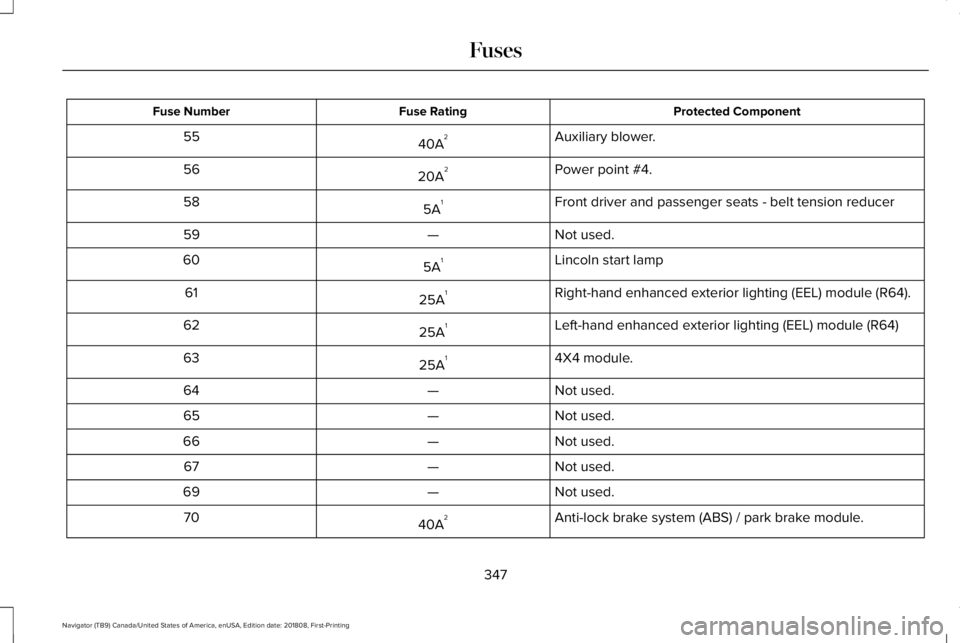
Protected ComponentFuse RatingFuse Number
Auxiliary blower.40A255
Power point #4.20A256
Front driver and passenger seats - belt tension reducer5A158
Not used.—59
Lincoln start lamp5A160
Right-hand enhanced exterior lighting (EEL) module (R64).25A161
Left-hand enhanced exterior lighting (EEL) module (R64)25A162
4X4 module.25A163
Not used.—64
Not used.—65
Not used.—66
Not used.—67
Not used.—69
Anti-lock brake system (ABS) / park brake module.40A270
347
Navigator (TB9) Canada/United States of America, enUSA, Edition date: 201808, First-Printing
Fuses