Fuel light LINCOLN NAVIGATOR 2020 User Guide
[x] Cancel search | Manufacturer: LINCOLN, Model Year: 2020, Model line: NAVIGATOR, Model: LINCOLN NAVIGATOR 2020Pages: 622, PDF Size: 6.47 MB
Page 326 of 622
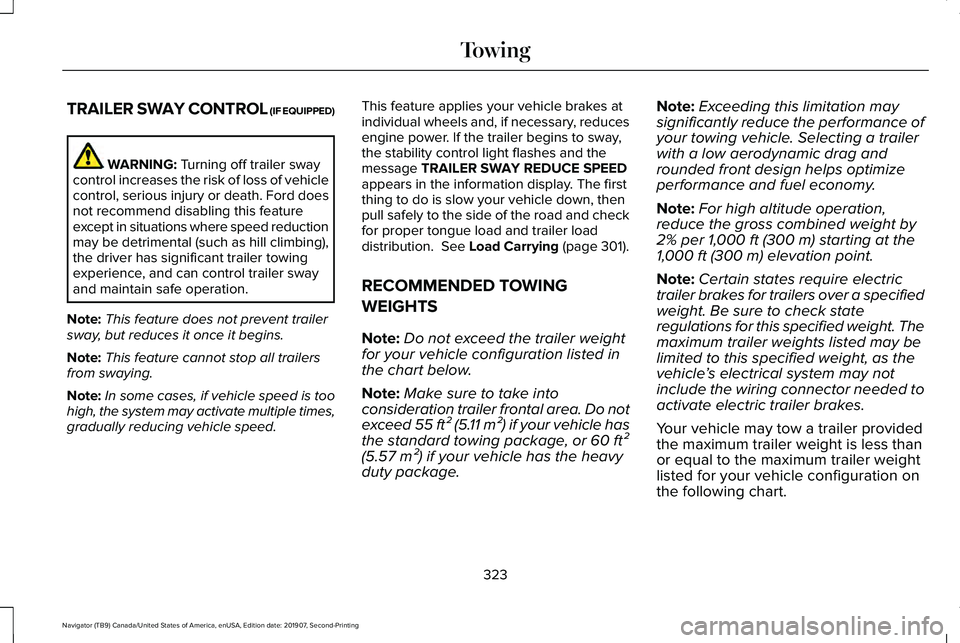
TRAILER SWAY CONTROL (IF EQUIPPED)
WARNING: Turning off trailer sway
control increases the risk of loss of vehicle
control, serious injury or death. Ford does
not recommend disabling this feature
except in situations where speed reduction
may be detrimental (such as hill climbing),
the driver has significant trailer towing
experience, and can control trailer sway
and maintain safe operation.
Note: This feature does not prevent trailer
sway, but reduces it once it begins.
Note: This feature cannot stop all trailers
from swaying.
Note: In some cases, if vehicle speed is too
high, the system may activate multiple times,
gradually reducing vehicle speed. This feature applies your vehicle brakes at
individual wheels and, if necessary, reduces
engine power. If the trailer begins to sway,
the stability control light flashes and the
message TRAILER SWAY REDUCE SPEED
appears in the information display. The first
thing to do is slow your vehicle down, then
pull safely to the side of the road and check
for proper tongue load and trailer load
distribution.
See Load Carrying (page 301).
RECOMMENDED TOWING
WEIGHTS
Note: Do not exceed the trailer weight
for your vehicle configuration listed in
the chart below.
Note: Make sure to take into
consideration trailer frontal area. Do not
exceed 55 ft² (5.11 m²) if your vehicle has
the standard towing package, or 60 ft²
(5.57 m²) if your vehicle has the heavy
duty package. Note:
Exceeding this limitation may
significantly reduce the performance of
your towing vehicle. Selecting a trailer
with a low aerodynamic drag and
rounded front design helps optimize
performance and fuel economy.
Note: For high altitude operation,
reduce the gross combined weight by
2% per 1,000 ft (300 m) starting at the
1,000 ft (300 m) elevation point.
Note: Certain states require electric
trailer brakes for trailers over a specified
weight. Be sure to check state
regulations for this specified weight. The
maximum trailer weights listed may be
limited to this specified weight, as the
vehicle ’s electrical system may not
include the wiring connector needed to
activate electric trailer brakes.
Your vehicle may tow a trailer provided
the maximum trailer weight is less than
or equal to the maximum trailer weight
listed for your vehicle configuration on
the following chart.
323
Navigator (TB9) Canada/United States of America, enUSA, Edition date: 201907, Second-Printing Towing
Page 345 of 622
The fuel pump shutoff stops the flow of fuel
to the engine in the event of a moderate to
severe crash. Not every impact causes a
shutoff.
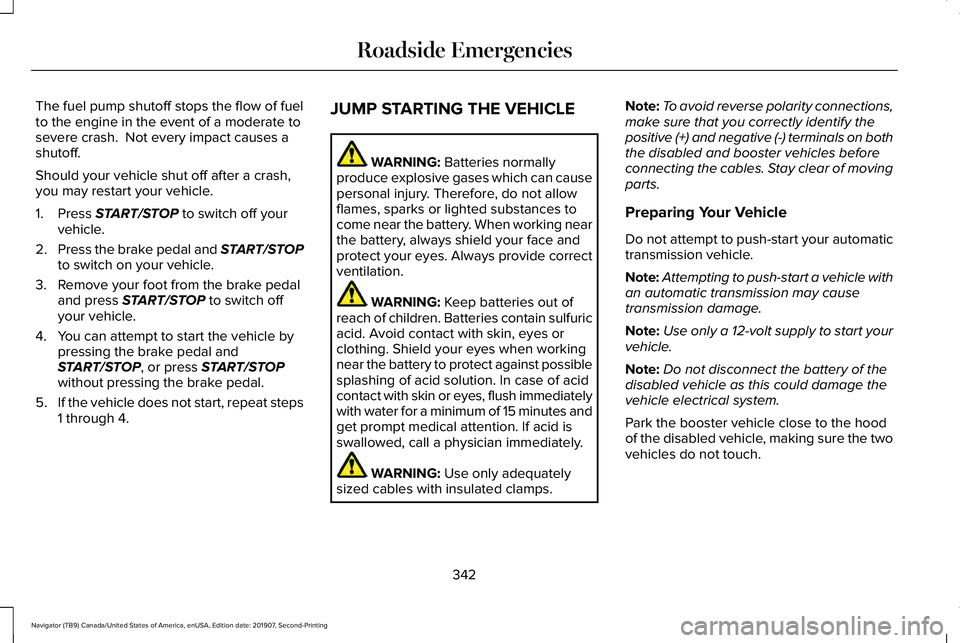
Should your vehicle shut off after a crash,
you may restart your vehicle.
1. Press START/STOP to switch off your
vehicle.
2. Press the brake pedal and
START/STOP
to switch on your vehicle.
3. Remove your foot from the brake pedal and press
START/STOP to switch off
your vehicle.
4. You can attempt to start the vehicle by pressing the brake pedal and
START/STOP
, or press START/STOP
without pressing the brake pedal.
5. If the vehicle does not start, repeat steps
1 through 4. JUMP STARTING THE VEHICLE WARNING:
Batteries normally
produce explosive gases which can cause
personal injury. Therefore, do not allow
flames, sparks or lighted substances to
come near the battery. When working near
the battery, always shield your face and
protect your eyes. Always provide correct
ventilation. WARNING:
Keep batteries out of
reach of children. Batteries contain sulfuric
acid. Avoid contact with skin, eyes or
clothing. Shield your eyes when working
near the battery to protect against possible
splashing of acid solution. In case of acid
contact with skin or eyes, flush immediately
with water for a minimum of 15 minutes and
get prompt medical attention. If acid is
swallowed, call a physician immediately. WARNING:
Use only adequately
sized cables with insulated clamps. Note:
To avoid reverse polarity connections,
make sure that you correctly identify the
positive (+) and negative (-) terminals on both
the disabled and booster vehicles before
connecting the cables. Stay clear of moving
parts.
Preparing Your Vehicle
Do not attempt to push-start your automatic
transmission vehicle.
Note: Attempting to push-start a vehicle with
an automatic transmission may cause
transmission damage.
Note: Use only a 12-volt supply to start your
vehicle.
Note: Do not disconnect the battery of the
disabled vehicle as this could damage the
vehicle electrical system.
Park the booster vehicle close to the hood
of the disabled vehicle, making sure the two
vehicles do not touch.
342
Navigator (TB9) Canada/United States of America, enUSA, Edition date: 201907, Second-Printing Roadside Emergencies
Page 364 of 622
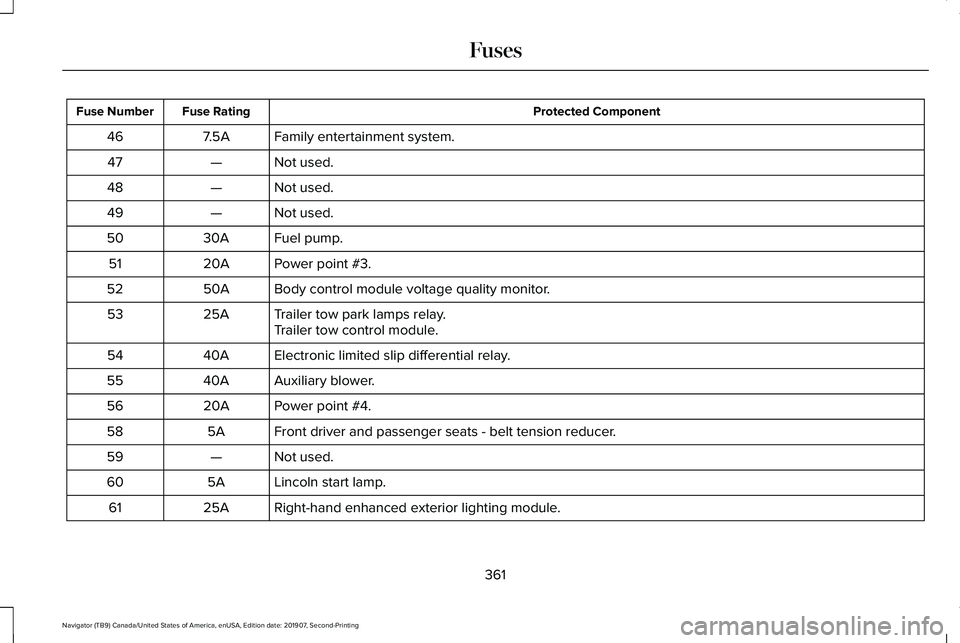
Protected Component
Fuse Rating
Fuse Number
Family entertainment system.
7.5A
46
Not used.
—
47
Not used.
—
48
Not used.
—
49
Fuel pump.
30A
50
Power point #3.
20A
51
Body control module voltage quality monitor.
50A
52
Trailer tow park lamps relay.
25A
53
Trailer tow control module.
Electronic limited slip differential relay.
40A
54
Auxiliary blower.
40A
55
Power point #4.
20A
56
Front driver and passenger seats - belt tension reducer.
5A
58
Not used.
—
59
Lincoln start lamp.
5A
60
Right-hand enhanced exterior lighting module.
25A
61
361
Navigator (TB9) Canada/United States of America, enUSA, Edition date: 201907, Second-Printing Fuses
Page 397 of 622
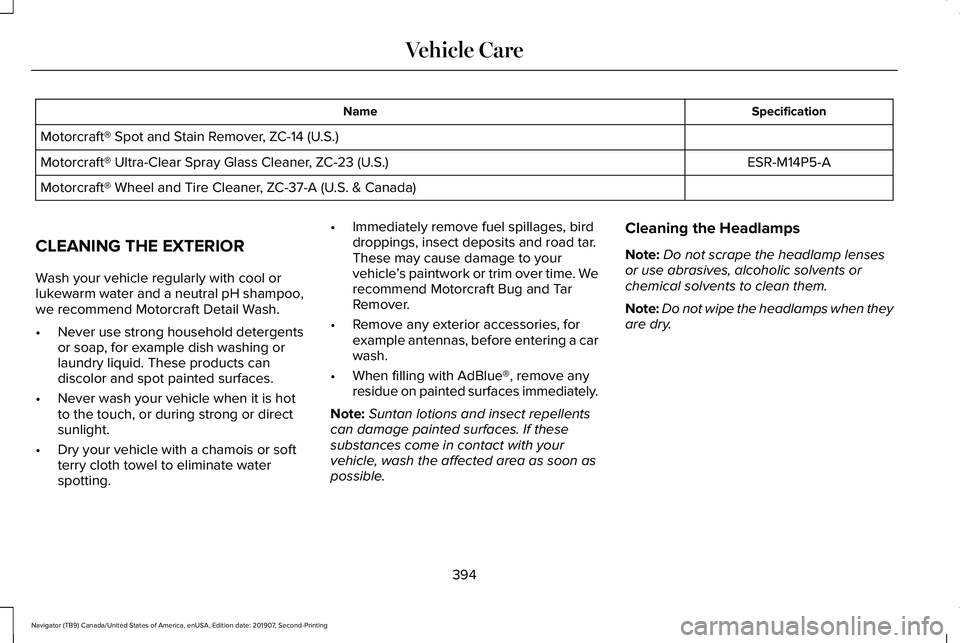
Specification
Name
Motorcraft® Spot and Stain Remover, ZC-14 (U.S.) ESR-M14P5-A
Motorcraft® Ultra-Clear Spray Glass Cleaner, ZC-23 (U.S.)
Motorcraft® Wheel and Tire Cleaner, ZC-37-A (U.S. & Canada)
CLEANING THE EXTERIOR
Wash your vehicle regularly with cool or
lukewarm water and a neutral pH shampoo,
we recommend Motorcraft Detail Wash.
• Never use strong household detergents
or soap, for example dish washing or
laundry liquid. These products can
discolor and spot painted surfaces.
• Never wash your vehicle when it is hot
to the touch, or during strong or direct
sunlight.
• Dry your vehicle with a chamois or soft
terry cloth towel to eliminate water
spotting. •
Immediately remove fuel spillages, bird
droppings, insect deposits and road tar.
These may cause damage to your
vehicle ’s paintwork or trim over time. We
recommend Motorcraft Bug and Tar
Remover.
• Remove any exterior accessories, for
example antennas, before entering a car
wash.
• When filling with AdBlue®, remove any
residue on painted surfaces immediately.
Note: Suntan lotions and insect repellents
can damage painted surfaces. If these
substances come in contact with your
vehicle, wash the affected area as soon as
possible. Cleaning the Headlamps
Note:
Do not scrape the headlamp lenses
or use abrasives, alcoholic solvents or
chemical solvents to clean them.
Note: Do not wipe the headlamps when they
are dry.
394
Navigator (TB9) Canada/United States of America, enUSA, Edition date: 201907, Second-Printing Vehicle Care
Page 542 of 622
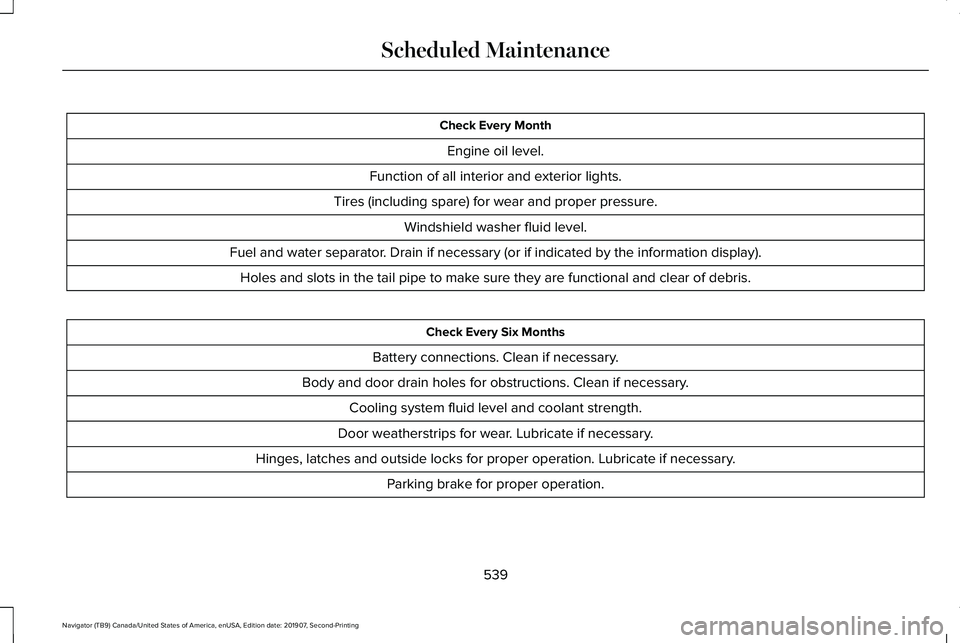
Check Every Month
Engine oil level.
Function of all interior and exterior lights.
Tires (including spare) for wear and proper pressure. Windshield washer fluid level.
Fuel and water separator. Drain if necessary (or if indicated by the information display). Holes and slots in the tail pipe to make sure they are functional and clear of debris. Check Every Six Months
Battery connections. Clean if necessary.
Body and door drain holes for obstructions. Clean if necessary. Cooling system fluid level and coolant strength.
Door weatherstrips for wear. Lubricate if necessary.
Hinges, latches and outside locks for proper operation. Lubricate if necessary. Parking brake for proper operation.
539
Navigator (TB9) Canada/United States of America, enUSA, Edition date: 201907, Second-Printing Scheduled Maintenance
Page 615 of 622
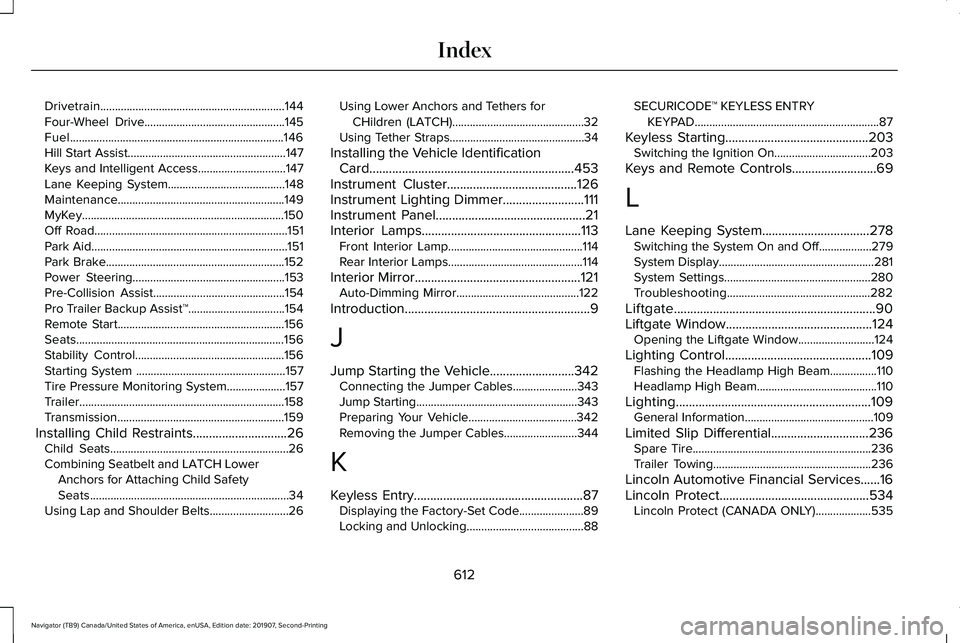
Drivetrain...............................................................144
Four-Wheel Drive................................................145
Fuel........................................................................\
.146
Hill Start Assist......................................................147
Keys and Intelligent Access..............................147
Lane Keeping System........................................148
Maintenance.........................................................149
MyKey.....................................................................150
Off Road..................................................................151
Park Aid...................................................................151
Park Brake.............................................................152
Power Steering....................................................153
Pre-Collision Assist.............................................154
Pro Trailer Backup Assist™.................................154
Remote Start.........................................................156
Seats.......................................................................156
Stability Control...................................................156
Starting System ...................................................157
Tire Pressure Monitoring System....................157
Trailer......................................................................158
Transmission.........................................................159
Installing Child Restraints.............................26 Child Seats.............................................................26
Combining Seatbelt and LATCH Lower
Anchors for Attaching Child Safety
Seats....................................................................34
Using Lap and Shoulder Belts...........................26 Using Lower Anchors and Tethers for
CHildren (LATCH).............................................32
Using Tether Straps..............................................34
Installing the Vehicle Identification Card...............................................................453
Instrument Cluster........................................126
Instrument Lighting Dimmer.........................111
Instrument Panel
..............................................21
Interior Lamps.................................................113
Front Interior Lamp..............................................114
Rear Interior Lamps..............................................114
Interior Mirror...................................................121 Auto-Dimming Mirror..........................................122
Introduction.........................................................9
J
Jump Starting the Vehicle..........................342 Connecting the Jumper Cables......................
343
Jump Starting.......................................................343
Preparing Your Vehicle.....................................342
Removing the Jumper Cables.........................
344
K
Keyless Entry....................................................87 Displaying the Factory-Set Code......................89
Locking and Unlocking........................................88 SECURICODE™ KEYLESS ENTRY
KEYPAD...............................................................87
Keyless Starting
............................................203
Switching the Ignition On.................................203
Keys and Remote Controls
..........................69
L
Lane Keeping System.................................278 Switching the System On and Off..................279
System Display.....................................................281
System Settings..................................................280
Troubleshooting.................................................282
Liftgate..............................................................90
Liftgate Window.............................................124 Opening the Liftgate Window..........................124
Lighting Control.............................................109 Flashing the Headlamp High Beam................110
Headlamp High Beam.........................................110
Lighting............................................................109 General Information............................................109
Limited Slip Differential..............................236 Spare Tire.............................................................236
Trailer Towing......................................................236
Lincoln Automotive Financial Services......16
Lincoln Protect..............................................534 Lincoln Protect (CANADA ONLY)...................535
612
Navigator (TB9) Canada/United States of America, enUSA, Edition date: 201907, Second-Printing Index
Page 621 of 622
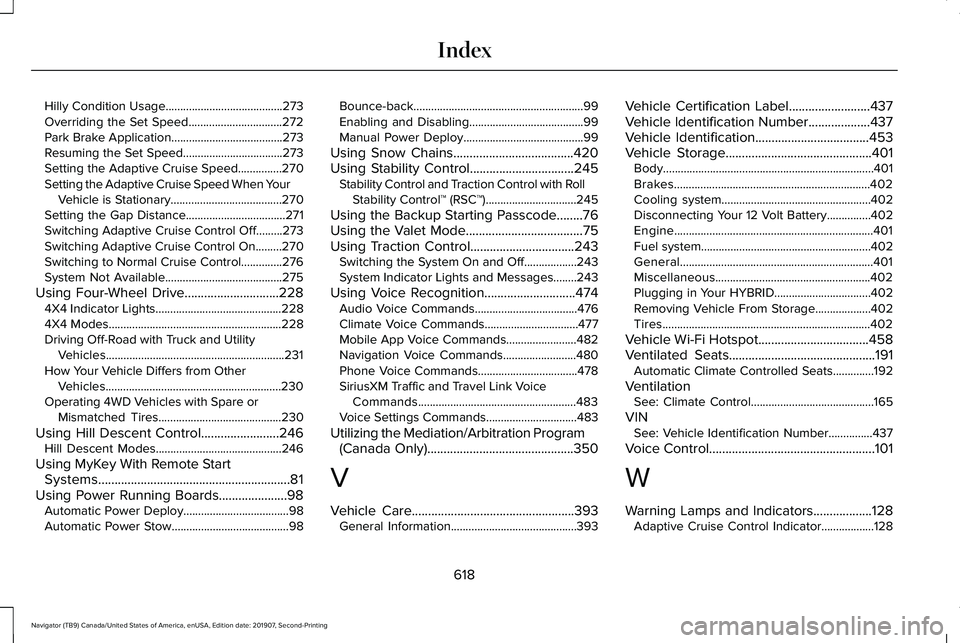
Hilly Condition Usage........................................273
Overriding the Set Speed................................272
Park Brake Application......................................273
Resuming the Set Speed..................................273
Setting the Adaptive Cruise Speed...............270
Setting the Adaptive Cruise Speed When Your
Vehicle is Stationary......................................270
Setting the Gap Distance..................................271
Switching Adaptive Cruise Control Off.........273
Switching Adaptive Cruise Control On.........270
Switching to Normal Cruise Control..............276
System Not Available........................................275
Using Four-Wheel Drive.............................228 4X4 Indicator Lights ...........................................228
4X4 Modes...........................................................228
Driving Off-Road with Truck and Utility Vehicles.............................................................231
How Your Vehicle Differs from Other Vehicles............................................................230
Operating 4WD Vehicles with Spare or Mismatched Tires..........................................230
Using Hill Descent Control........................246 Hill Descent Modes...........................................246
Using MyKey With Remote Start Systems...........................................................81
Using Power Running Boards.....................98 Automatic Power Deploy....................................98
Automatic Power Stow........................................98 Bounce-back..........................................................99
Enabling and Disabling.......................................99
Manual Power Deploy.........................................99
Using Snow Chains.....................................420
Using Stability Control................................245 Stability Control and Traction Control with Roll
Stability Control™ (RSC™)...............................245
Using the Backup Starting Passcode........76
Using the Valet Mode....................................75
Using Traction Control................................243 Switching the System On and Off..................243
System Indicator Lights and Messages........243
Using Voice Recognition
............................474
Audio Voice Commands...................................476
Climate Voice Commands................................477
Mobile App Voice Commands........................482
Navigation Voice Commands.........................480
Phone Voice Commands..................................478
SiriusXM Traffic and Travel Link Voice
Commands......................................................483
Voice Settings Commands...............................483
Utilizing the Mediation/Arbitration Program (Canada Only)
.............................................350
V
Vehicle Care
..................................................393
General Information...........................................393 Vehicle Certification Label.........................437
Vehicle Identification Number
...................437
Vehicle Identification...................................453
Vehicle Storage.............................................401 Body........................................................................\
401
Brakes...................................................................402
Cooling system...................................................402
Disconnecting Your 12 Volt Battery...............402
Engine....................................................................401
Fuel system..........................................................402
General..................................................................401
Miscellaneous.....................................................402
Plugging in Your HYBRID.................................
402
Removing Vehicle From Storage...................402
Tires.......................................................................402
Vehicle Wi-Fi Hotspot
..................................458
Ventilated Seats.............................................191 Automatic Climate Controlled Seats..............192
Ventilation See: Climate Control..........................................165
VIN See: Vehicle Identification Number...............437
Voice Control
...................................................101
W
Warning Lamps and Indicators..................128 Adaptive Cruise Control Indicator..................128
618
Navigator (TB9) Canada/United States of America, enUSA, Edition date: 201907, Second-Printing Index
Page 622 of 622
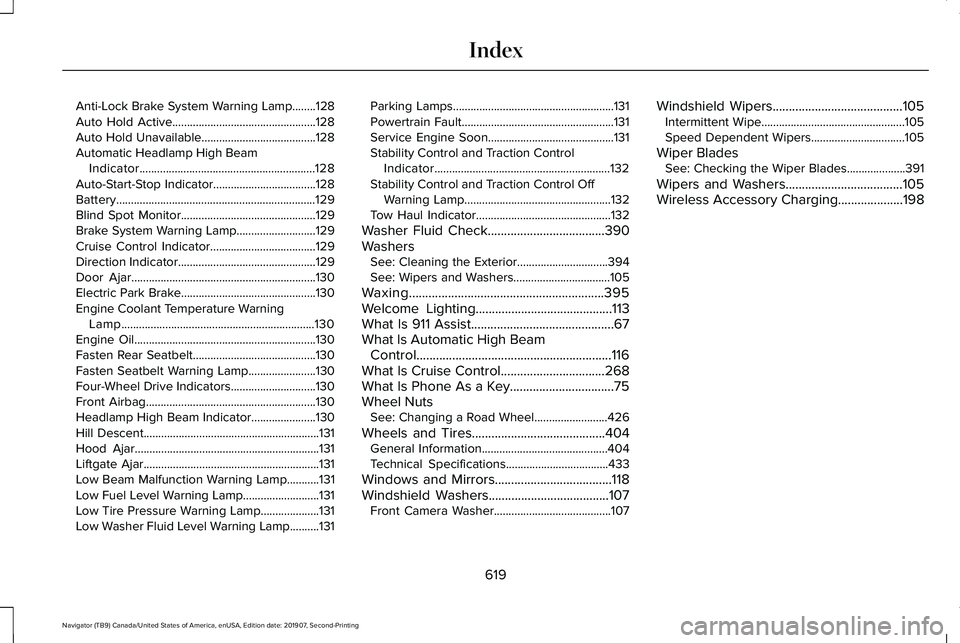
Anti-Lock Brake System Warning Lamp........128
Auto Hold Active.................................................128
Auto Hold Unavailable.......................................128
Automatic Headlamp High Beam Indicator............................................................128
Auto-Start-Stop Indicator...................................128
Battery....................................................................129
Blind Spot Monitor..............................................129
Brake System Warning Lamp...........................129
Cruise Control Indicator....................................129
Direction Indicator...............................................129
Door Ajar...............................................................130
Electric Park Brake..............................................130
Engine Coolant Temperature Warning Lamp..................................................................130
Engine Oil..............................................................130
Fasten Rear Seatbelt..........................................130
Fasten Seatbelt Warning Lamp.......................
130
Four-Wheel Drive Indicators.............................130
Front Airbag..........................................................130
Headlamp High Beam Indicator......................
130
Hill Descent............................................................131
Hood Ajar...............................................................131
Liftgate Ajar............................................................131
Low Beam Malfunction Warning Lamp...........
131
Low Fuel Level Warning Lamp..........................131
Low Tire Pressure Warning Lamp....................131
Low Washer Fluid Level Warning Lamp..........131 Parking Lamps.......................................................131
Powertrain Fault....................................................131
Service Engine Soon...........................................131
Stability Control and Traction Control
Indicator............................................................132
Stability Control and Traction Control Off Warning Lamp..................................................132
Tow Haul Indicator..............................................132
Washer Fluid Check....................................390
Washers See: Cleaning the Exterior...............................394
See: Wipers and Washers.................................105
Waxing............................................................395
Welcome Lighting..........................................113
What Is 911 Assist............................................67
What Is Automatic High Beam Control............................................................116
What Is Cruise Control................................268
What Is Phone As a Key................................75
Wheel Nuts See: Changing a Road Wheel.........................
426
Wheels and Tires.........................................404 General Information...........................................404
Technical Specifications...................................433
Windows and Mirrors....................................118
Windshield Washers.....................................107 Front Camera Washer........................................107 Windshield Wipers
........................................105
Intermittent Wipe.................................................105
Speed Dependent Wipers................................105
Wiper Blades See: Checking the Wiper Blades....................391
Wipers and Washers....................................105
Wireless Accessory Charging....................198
619
Navigator (TB9) Canada/United States of America, enUSA, Edition date: 201907, Second-Printing Index