child lock LINCOLN NAVIGATOR 2020 User Guide
[x] Cancel search | Manufacturer: LINCOLN, Model Year: 2020, Model line: NAVIGATOR, Model: LINCOLN NAVIGATOR 2020Pages: 622, PDF Size: 6.47 MB
Page 48 of 622
PRINCIPLE OF OPERATION
WARNING: Always drive and ride
with your seatback upright and the lap belt
snug and low across the hips. WARNING:
Children must always be
properly restrained. WARNING:
Never let a passenger
hold a child on his or her lap while the
vehicle is moving. The passenger cannot
protect the child from injury in a crash. WARNING:
All occupants of your
vehicle, including the driver, should always
properly wear their seatbelts, even when
an airbag supplemental restraint system is
provided. Failure to properly wear your
seatbelt could seriously increase the risk
of injury or death. WARNING: It is extremely dangerous
to ride in a cargo area, inside or outside of
a vehicle. In a crash, people riding in these
areas are more likely to be seriously
injured or killed. Do not allow people to
ride in any area of your vehicle that is not
equipped with seats and seatbelts. Make
sure everyone in your vehicle is in a seat
and properly using a seatbelt. Failure to
follow this warning could result in serious
personal injury or death. WARNING:
In a rollover crash, an
unbelted person is significantly more likely
to die than a person wearing a seatbelt. WARNING:
Each seating position in
your vehicle has a specific seatbelt
assembly made up of one buckle and one
tongue designed to be used as a pair. Use
the shoulder belt on the outside shoulder
only. Never wear the shoulder belt under
the arm. Never use a single seatbelt for
more than one person. WARNING:
Even with advanced
restraints systems, properly restrain
children 12 and under in a rear seating
position. Failure to follow this could
seriously increase the risk of injury or
death. WARNING:
Seatbelts and seats may
be hot in a vehicle that is in the sunshine.
The hot seatbelts or seats may burn a small
child. Check seat covers and buckles
before you place a child anywhere near
them.
All seating positions in your vehicle have lap
and shoulder seatbelts. All occupants of the
vehicle should always properly wear their
seatbelts, even when an airbag supplemental
restraint system is provided.
The seatbelt system consists of:
• Lap and shoulder seatbelts.
• Shoulder seatbelt with automatic locking
mode, (except driver seatbelt and rear
inflatable seatbelt).
45
Navigator (TB9) Canada/United States of America, enUSA, Edition date: 201907, Second-Printing Seatbelts
Page 52 of 622
length of webbing back toward the stowed
position. For rear seatbelts, recline the rear
seat backrest or push the seat backrest
cushion away from the seatbelt. Feed a small
length of webbing back toward the stowed
position.
Automatic Locking Mode
In this mode, the shoulder belt automatically
pre-locks. The belt still retracts to remove
any slack in the shoulder belt. The automatic
locking mode is not available on the driver
seatbelt.
When to Use the Automatic Locking Mode
Use this mode when you install a child safety
seat, except a booster, in the passenger front
or rear seating positions. Properly restrain
children 12 years old and under in a rear
seating position whenever possible. See
Seatbelts (page 45).
How to Use the Automatic Locking Mode
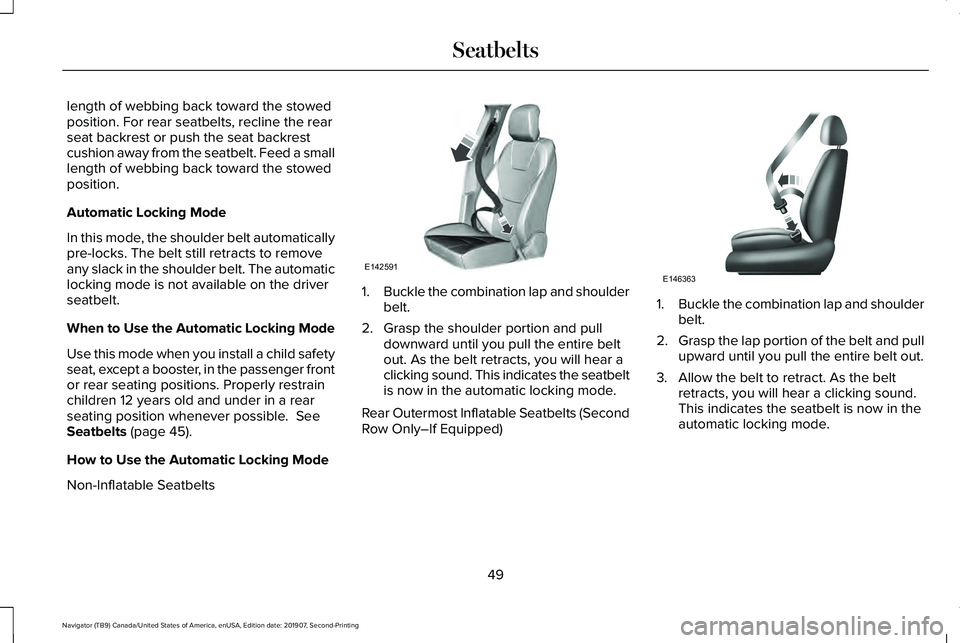
Non-Inflatable Seatbelts 1.
Buckle the combination lap and shoulder
belt.
2. Grasp the shoulder portion and pull downward until you pull the entire belt
out. As the belt retracts, you will hear a
clicking sound. This indicates the seatbelt
is now in the automatic locking mode.
Rear Outermost Inflatable Seatbelts (Second
Row Only–If Equipped) 1.
Buckle the combination lap and shoulder
belt.
2. Grasp the lap portion of the belt and pull
upward until you pull the entire belt out.
3. Allow the belt to retract. As the belt retracts, you will hear a clicking sound.
This indicates the seatbelt is now in the
automatic locking mode.
49
Navigator (TB9) Canada/United States of America, enUSA, Edition date: 201907, Second-Printing SeatbeltsE142591 E146363
Page 53 of 622
How to Disengage the Automatic Locking
Mode
Unbuckle the combination lap and shoulder
belt and allow it to retract completely to
disengage the automatic locking mode and
activate the vehicle sensitive (emergency)
locking mode.
Rear Inflatable Seatbelt (If Equipped)
WARNING: Do not attempt to service,
repair, or modify the supplementary
restraint system or associated components.
Failure to follow this instruction could result
in personal injury or death.
The rear inflatable seatbelts are in the
shoulder portion of the seatbelts of the
second-row outermost seating positions. Note:
The rear inflatable seatbelts are
compatible with most infant and child safety
car seats and belt positioning booster seats
when you properly install them. This is
because they are designed to fill with a
cooled gas at a lower pressure and at a
slower rate than traditional airbags. After
inflation, the shoulder portion of the seatbelt
remains cool to the touch.
The rear inflatable seatbelt consists of the
following:
• An inflatable bag in the shoulder seatbelt
webbing.
• Lap seatbelt webbing with automatic
locking mode.
• The same warning light, electronic
control and diagnostic unit as used for
the front seatbelts.
• Impact sensors in various parts of the
vehicle. How does the rear inflatable seatbelt
system work? WARNING:
If a supplementary
restraint system component has deployed,
it will not function again. Have the system
and associated components inspected as
soon as possible. Failure to follow this
instruction could result in personal injury
or death.
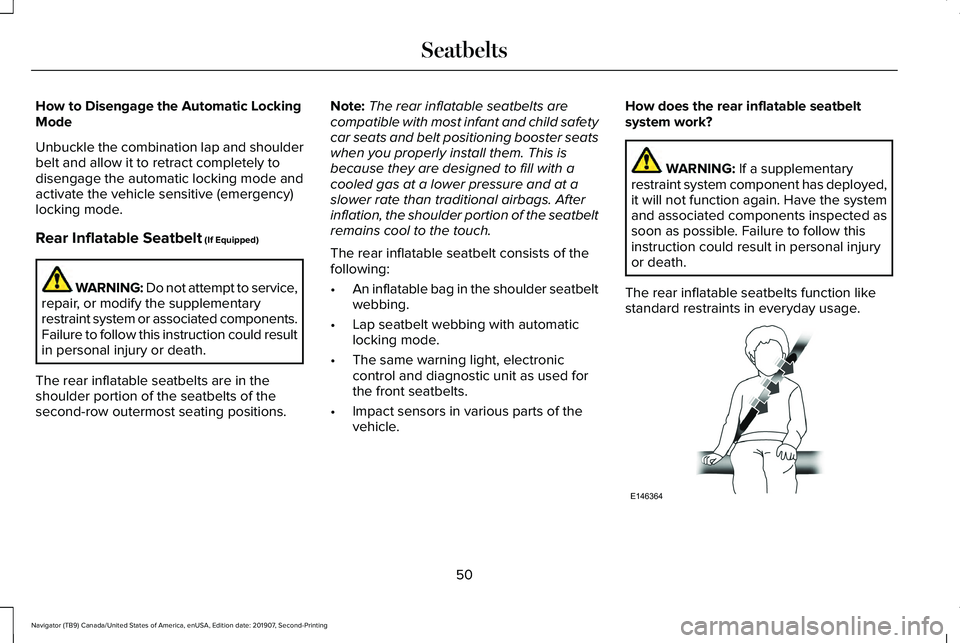
The rear inflatable seatbelts function like
standard restraints in everyday usage. 50
Navigator (TB9) Canada/United States of America, enUSA, Edition date: 201907, Second-Printing SeatbeltsE146364
Page 74 of 622
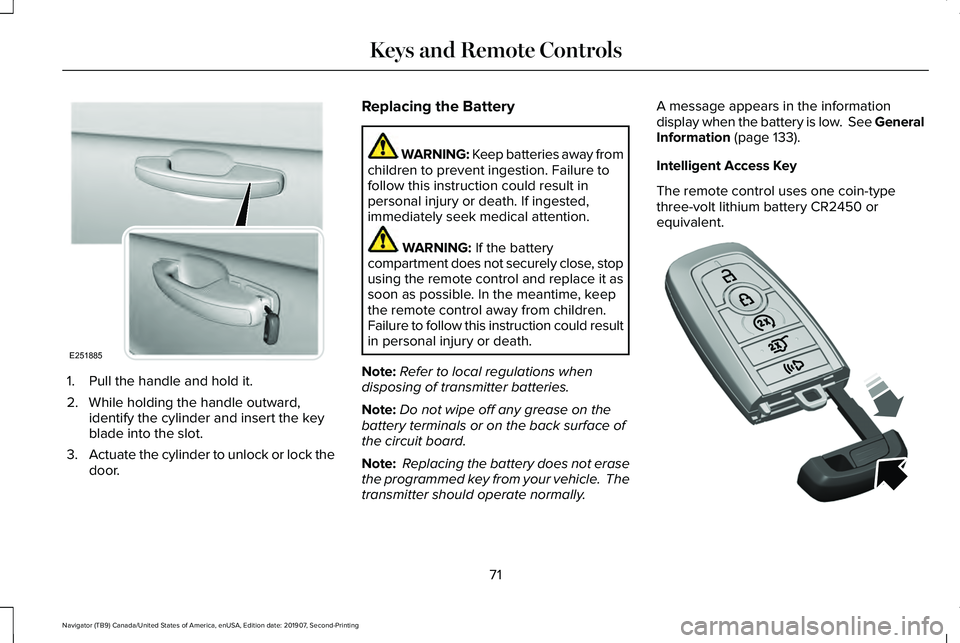
1. Pull the handle and hold it.
2. While holding the handle outward,
identify the cylinder and insert the key
blade into the slot.
3. Actuate the cylinder to unlock or lock the
door. Replacing the Battery WARNING: Keep batteries away from
children to prevent ingestion. Failure to
follow this instruction could result in
personal injury or death. If ingested,
immediately seek medical attention. WARNING: If the battery
compartment does not securely close, stop
using the remote control and replace it as
soon as possible. In the meantime, keep
the remote control away from children.
Failure to follow this instruction could result
in personal injury or death.
Note: Refer to local regulations when
disposing of transmitter batteries.
Note: Do not wipe off any grease on the
battery terminals or on the back surface of
the circuit board.
Note: Replacing the battery does not erase
the programmed key from your vehicle. The
transmitter should operate normally. A message appears in the information
display when the battery is low. See General
Information
(page 133).
Intelligent Access Key
The remote control uses one coin-type
three-volt lithium battery CR2450 or
equivalent. 71
Navigator (TB9) Canada/United States of America, enUSA, Edition date: 201907, Second-Printing Keys and Remote ControlsE251885 E305199
Page 122 of 622
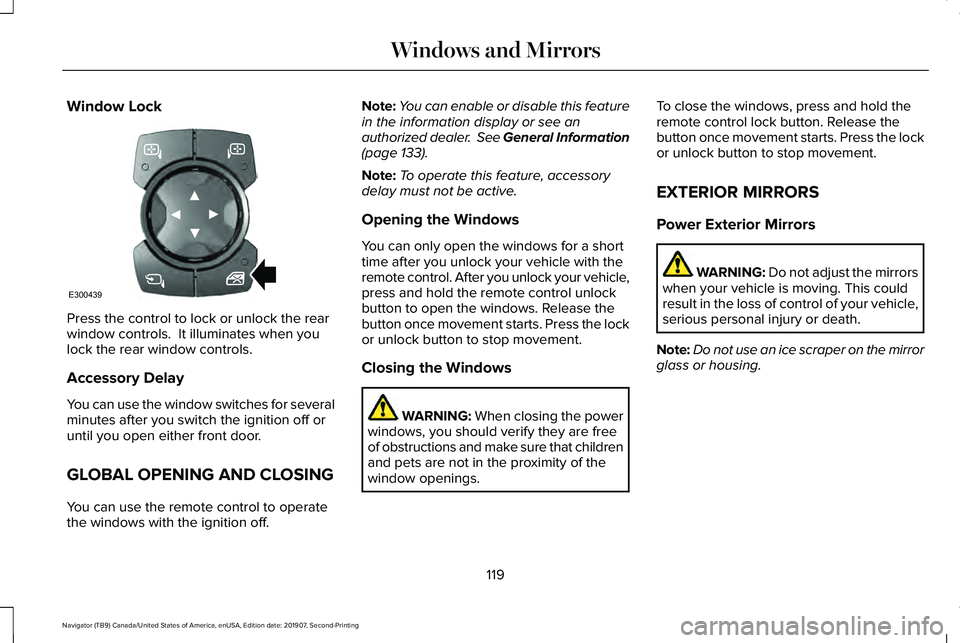
Window Lock
Press the control to lock or unlock the rear
window controls. It illuminates when you
lock the rear window controls.
Accessory Delay
You can use the window switches for several
minutes after you switch the ignition off or
until you open either front door.
GLOBAL OPENING AND CLOSING
You can use the remote control to operate
the windows with the ignition off. Note:
You can enable or disable this feature
in the information display or see an
authorized dealer. See General Information
(page 133).
Note: To operate this feature, accessory
delay must not be active.
Opening the Windows
You can only open the windows for a short
time after you unlock your vehicle with the
remote control. After you unlock your vehicle,
press and hold the remote control unlock
button to open the windows. Release the
button once movement starts. Press the lock
or unlock button to stop movement.
Closing the Windows WARNING:
When closing the power
windows, you should verify they are free
of obstructions and make sure that children
and pets are not in the proximity of the
window openings. To close the windows, press and hold the
remote control lock button. Release the
button once movement starts. Press the lock
or unlock button to stop movement.
EXTERIOR MIRRORS
Power Exterior Mirrors
WARNING: Do not adjust the mirrors
when your vehicle is moving. This could
result in the loss of control of your vehicle,
serious personal injury or death.
Note: Do not use an ice scraper on the mirror
glass or housing.
119
Navigator (TB9) Canada/United States of America, enUSA, Edition date: 201907, Second-Printing Windows and MirrorsE300439
Page 125 of 622
Auto-Dimming Mirror
Note:
Do not block the sensors on the front
and back of the mirror. A rear center
passenger or raised rear center head
restraint may also block light from reaching
the sensor.
The mirror dims to reduce the effect of bright
light from behind. It returns to normal when
the bright light from behind is no longer
present or if you shift into reverse (R).
CHILDMINDER MIRROR
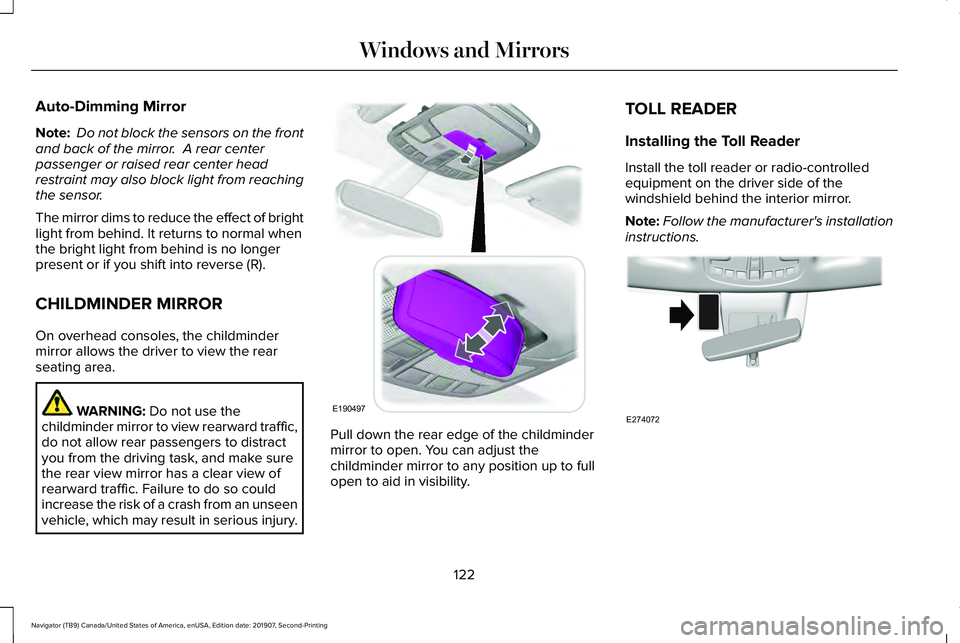
On overhead consoles, the childminder
mirror allows the driver to view the rear
seating area. WARNING: Do not use the
childminder mirror to view rearward traffic,
do not allow rear passengers to distract
you from the driving task, and make sure
the rear view mirror has a clear view of
rearward traffic. Failure to do so could
increase the risk of a crash from an unseen
vehicle, which may result in serious injury. Pull down the rear edge of the childminder
mirror to open. You can adjust the
childminder mirror to any position up to full
open to aid in visibility.TOLL READER
Installing the Toll Reader
Install the toll reader or radio-controlled
equipment on the driver side of the
windshield behind the interior mirror.
Note:
Follow the manufacturer's installation
instructions. 122
Navigator (TB9) Canada/United States of America, enUSA, Edition date: 201907, Second-Printing Windows and MirrorsE190497 E274072
Page 146 of 622
Doors and Locks
Action
Message
The door listed is not completely closed.
X Door Ajar
The luggage compartment is not completely closed.
Trunk Ajar
The driver’s door is opened, your vehicle is in park and the engine is on.
Engine ON
Displays when the hood is not completely closed.
Hood Ajar
Displays when the door switches have been disabled.
Switches Inhibited Security Mode
There is a system malfunction with the child locks. Contact an authorize\
d dealer as soon as possible.
Child Lock Malfunction Service Required
Displays the factory keypad code after the keypad has been reset. See Keyless Entry (page
87).
Factory Keypad Code {X X X X X}
Driver Alert Action
Message
Stop and rest as soon as it is safe to do so.
Driver Alert Warning Rest Now
Take a rest soon.
Driver Alert Warning Rest Suggested
143
Navigator (TB9) Canada/United States of America, enUSA, Edition date: 201907, Second-Printing Information Displays
Page 191 of 622
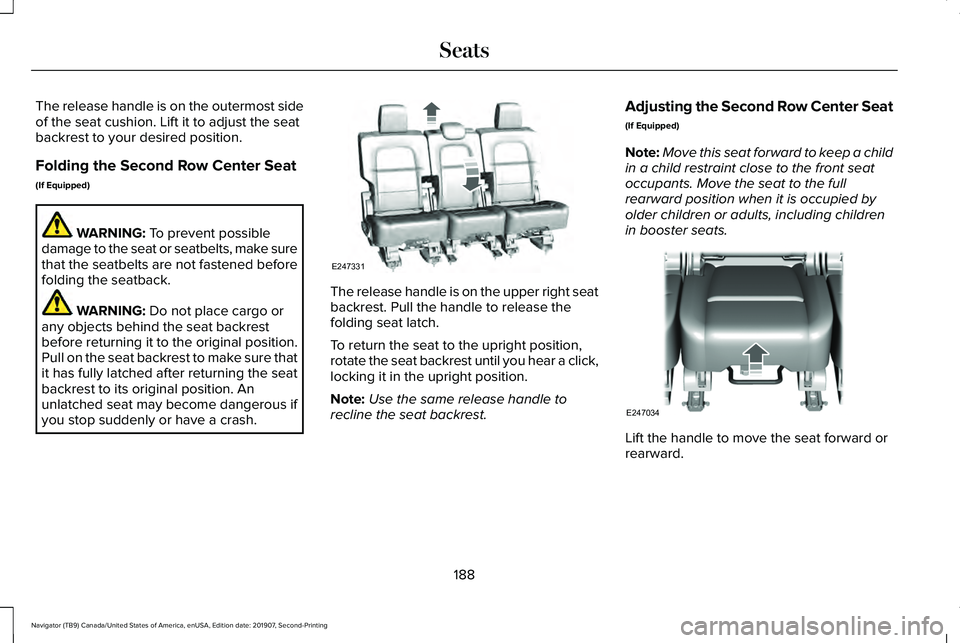
The release handle is on the outermost side
of the seat cushion. Lift it to adjust the seat
backrest to your desired position.
Folding the Second Row Center Seat
(If Equipped)
WARNING: To prevent possible
damage to the seat or seatbelts, make sure
that the seatbelts are not fastened before
folding the seatback. WARNING:
Do not place cargo or
any objects behind the seat backrest
before returning it to the original position.
Pull on the seat backrest to make sure that
it has fully latched after returning the seat
backrest to its original position. An
unlatched seat may become dangerous if
you stop suddenly or have a crash. The release handle is on the upper right seat
backrest. Pull the handle to release the
folding seat latch.
To return the seat to the upright position,
rotate the seat backrest until you hear a click,
locking it in the upright position.
Note:
Use the same release handle to
recline the seat backrest. Adjusting the Second Row Center Seat
(If Equipped)
Note:
Move this seat forward to keep a child
in a child restraint close to the front seat
occupants. Move the seat to the full
rearward position when it is occupied by
older children or adults, including children
in booster seats. Lift the handle to move the seat forward or
rearward.
188
Navigator (TB9) Canada/United States of America, enUSA, Edition date: 201907, Second-Printing SeatsE247331 E247034
Page 193 of 622
Folds the second-row bench
center seat or both second-row
captain chair seats.
E
Folds the right-hand second-row
seat.
F
To return the second-row seat backrest to
the original position, rotate the seat backrest
up until it latches in the upright position. The
seat backrest clicks when it is locked into
position.
To return the third-row seat backrest to the
original position, press the corresponding
control again.
If the power rear seat is disabled after 10
minutes, you can enable the seat by:
• Opening any door.
• Pressing the unlock button on the key
fob.
• Pressing any keyless entry keypad
button.
• Switching the ignition on. Folding Down the Rear Seats to the Load
Floor WARNING: To prevent possible
damage to the seat or seatbelts, make sure
that the seatbelts are not fastened before
folding the seatback. WARNING:
Do not place cargo or
any objects behind the seatback before
returning it to the original position.
The third-row seats have obstacle detection
that prevents the seats from folding or
returning if they are obstructed.
Reclining the Third Row Power Seats WARNING:
Do not recline a rear seat
on which a child restraint is installed.
Failure to follow this instruction could
reduce the effectiveness of the child
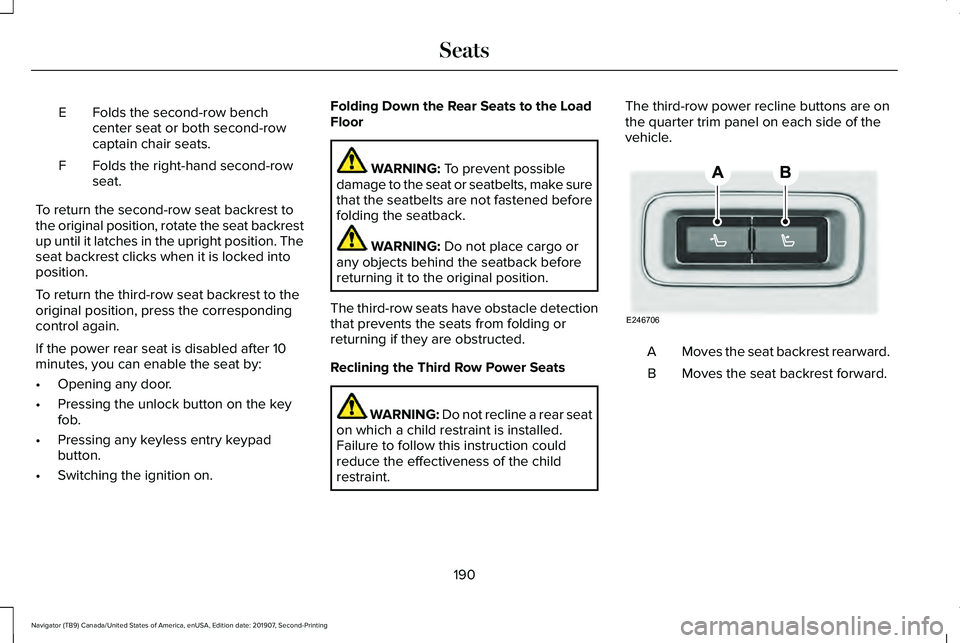
restraint. The third-row power recline buttons are on
the quarter trim panel on each side of the
vehicle.
Moves the seat backrest rearward.
A
Moves the seat backrest forward.
B
190
Navigator (TB9) Canada/United States of America, enUSA, Edition date: 201907, Second-Printing SeatsE246706
Page 610 of 622
C
Cabin Air Filter.................................................171
Canceling the Set Speed...........................269
Capacities and Specifications...................439
Air Conditioning System...................................439
Alternative Engine Oil for Extremely Cold Climates............................................................443
Automatic Transmission....................................440
Engine Coolant.....................................................441
Engine Oil.............................................................442
Front Axle.............................................................447
Fuel Tank..............................................................445
Grease...................................................................445
Hydraulic Brake System...................................445
Locks......................................................................446
Rear Axle..............................................................448
Transfer Case.......................................................447
Washer Reservoir...............................................449
Cargo Nets
.....................................................303
Car Wash See: Cleaning the Exterior...............................394
Catalytic Converter
.......................................219
On-Board Diagnostics (OBD-II).......................220
Readiness for Inspection and Maintenance
(I/M) Testing......................................................221
Center Console
.............................................201 Changing a Bulb
...........................................392
LED Lamps...........................................................392
Changing a Fuse
..........................................370
Fuses.....................................................................370
Changing a Road Wheel............................426 Dissimilar Spare Wheel and Tire Assembly
Information.......................................................427
Location of the Spare Tire and Tools............427
Tire Change Procedure....................................428
Changing the 12V Battery..........................387 Battery Management System..........................388
Changing the Engine Air Filter..................379
Changing the Vehicle Wi-Fi Hotspot Name or Password
................................................458
Changing the Wiper Blades.......................391
Checking MyKey System Status.................80 MyKey Distance....................................................80
Number of Admin Keys........................................81
Number of MyKeys................................................81
Checking the Wiper Blades........................391
Childminder Mirror........................................122
Child Restraint and Seatbelt Maintenance..................................................54
Child Restraint Positioning
...........................42
Child Safety......................................................24
General Information.............................................24
Child Safety Locks
..........................................44
Left-Hand Side.......................................................44 Right-Hand Side....................................................44
Cleaning Leather Seats..............................400
Cleaning Products
........................................393
Materials...............................................................393
Cleaning the Engine
....................................396
Cleaning the Exterior...................................394
Cleaning the Headlamps..................................394
Exterior Chrome Parts.......................................395
Exterior Plastic Parts..........................................395
Stripes or Graphics............................................395
Underbody...........................................................395
Under Hood.........................................................395
Cleaning the Instrument Panel and Instrument Cluster Lens...........................399
Cleaning the Interior....................................397 Cleaning Black Label or Presidential
Interior...............................................................397
Cleaning the Wheels...................................400
Cleaning the Windows and Wiper Blades...........................................................396
Clearing All MyKeys.......................................80
Climate............................................................497 Accessing Rear Climate Controls..................500
Accessing the Climate Control Menu...........
497
Directing the Airflow..........................................497
Rear Climate Control Lock Indicator.............500
Setting the Blower Motor Speed....................498
Setting the Temperature...................................498
607
Navigator (TB9) Canada/United States of America, enUSA, Edition date: 201907, Second-Printing Index