height LINCOLN NAVIGATOR 2020 Owner's Manual
[x] Cancel search | Manufacturer: LINCOLN, Model Year: 2020, Model line: NAVIGATOR, Model: LINCOLN NAVIGATOR 2020Pages: 622, PDF Size: 6.47 MB
Page 419 of 622
Improper or inadequate vehicle
maintenance can cause tires to wear
abnormally. Inspect all your tires,
including the spare, frequently, and
replace them if one or more of the
following conditions exist:
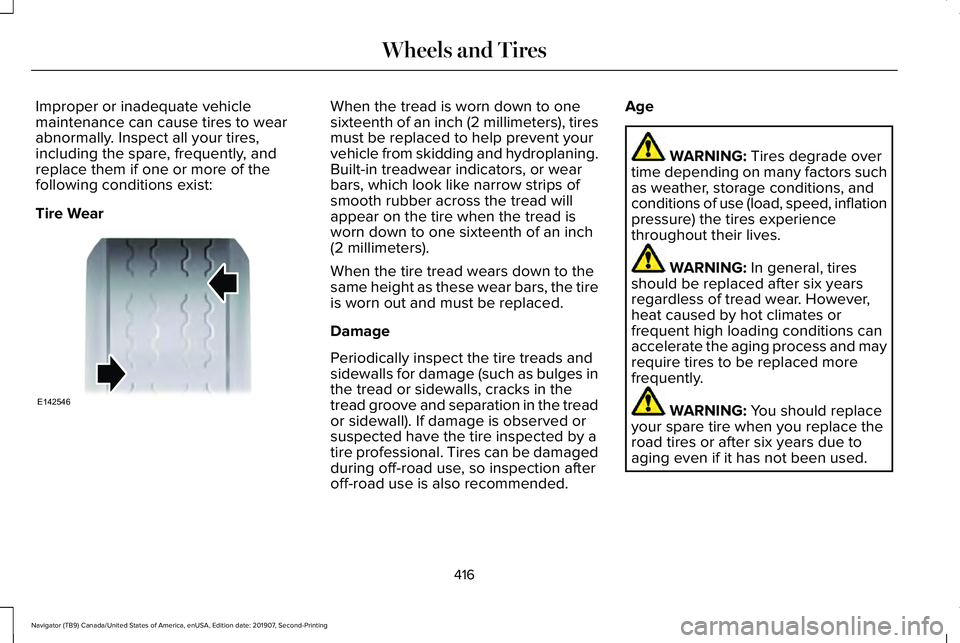
Tire Wear When the tread is worn down to one
sixteenth of an inch (2 millimeters), tires
must be replaced to help prevent your
vehicle from skidding and hydroplaning.
Built-in treadwear indicators, or wear
bars, which look like narrow strips of
smooth rubber across the tread will
appear on the tire when the tread is
worn down to one sixteenth of an inch
(2 millimeters).
When the tire tread wears down to the
same height as these wear bars, the tire
is worn out and must be replaced.
Damage
Periodically inspect the tire treads and
sidewalls for damage (such as bulges in
the tread or sidewalls, cracks in the
tread groove and separation in the tread
or sidewall). If damage is observed or
suspected have the tire inspected by a
tire professional. Tires can be damaged
during off-road use, so inspection after
off-road use is also recommended.
Age WARNING: Tires degrade over
time depending on many factors such
as weather, storage conditions, and
conditions of use (load, speed, inflation
pressure) the tires experience
throughout their lives. WARNING:
In general, tires
should be replaced after six years
regardless of tread wear. However,
heat caused by hot climates or
frequent high loading conditions can
accelerate the aging process and may
require tires to be replaced more
frequently. WARNING:
You should replace
your spare tire when you replace the
road tires or after six years due to
aging even if it has not been used.
416
Navigator (TB9) Canada/United States of America, enUSA, Edition date: 201907, Second-Printing Wheels and TiresE142546
Page 617 of 622
Passive Anti-Theft System............................94
SecuriLock™............................................................94
PATS See: Passive Anti-Theft System........................94
Perchlorate........................................................16
Personal Safety System ™..............................56
How Does the Personal Safety System
Work?..................................................................56
Phone as a Key Limitations
..........................75
Phone as a Key................................................75 Phone as a Key – Troubleshooting..................76
Phone as a Key – Troubleshooting............76 Phone as a Key – Frequently Asked
Questions...........................................................76
Phone..............................................................500 Android Auto.......................................................502
Apple CarPlay.....................................................502
Pairing Your Cell Phone for the First
Time..................................................................500
Text Messaging....................................................501
Using Your Cell Phone.......................................501
Post-Crash Alert System
.............................344
Power Door Locks See: Locking and Unlocking..............................
83
Power Liftgate
.................................................90
Obstacle Detection..............................................92
Opening and Closing the Liftgate....................90
Setting the Liftgate Open Height.....................92 Stopping the Liftgate Movement.......................91
Switching the Power Liftgate On or Off..........92
Using the Hands-Free Liftgate..........................92
Power Running Boards
.................................98
Power Seats....................................................177 Adjusting the Lumbar Support.........................
179
Adjusting the Multi-Contour Front Seats With Active Motion ..................................................179
Power Windows..............................................118 Accessory Delay...................................................119
Bounce-Back.........................................................118
One-Touch Down.................................................118
One-Touch Up.......................................................118
Window Lock.........................................................119
Pre-Collision Assist......................................294 Adjusting the Pre-Collision Assist
Settings............................................................296
Blocked Sensors................................................296
Distance Indication and Alert..........................295
Using the Pre-Collision Assist System..........294
Programming Your Phone.............................75
Protecting the Environment.........................20
Puncture See: Changing a Road Wheel.........................
426
R
Rear Axle
........................................................236 Rear Parking Aid...........................................248
Object Distance Indicator................................249
Rear Passenger Climate Controls.............168 Directing Air to the Rear Console Air
Vents..................................................................168
Directing Air to the Rear Footwell Air Vents..................................................................169
Rear Climate Control Lock Indicator..............
169
Setting the Rear Blower Motor Speed...........169
Setting the Rear Temperature..........................169
Switching Rear Auto Mode On........................169
Switching the Rear Climate Control On and Off.......................................................................170
Switching the Rear Heated Seats On and Off.......................................................................170
Switching the Rear Ventilated Seats On and Off.......................................................................170
Rear Seats
.......................................................185
Adjusting the Manual Second Row Outermost
Seats for Easy Entry.......................................185
Adjusting the Power Second Row Outermost Seats for Easy Entry.......................................186
Adjusting the Second Row Center Seat........188
Adjusting the Second Row Outermost Seats for Easy Exit......................................................187
Folding the Power Rear Seats.........................189
Folding the Second Row Center Seat ..........188
614
Navigator (TB9) Canada/United States of America, enUSA, Edition date: 201907, Second-Printing Index
Page 618 of 622

Folding the Second Row Outermost Seats
........................................................................\
.....185
Reclining the Second Row Outermost Seat Backrest.............................................................187
Rear Under Floor Storage...........................301 Advanced System: Forward Divider, Cargo
Shelf and Rear Barrier (Bulkhead
Position)............................................................302
Cargo Management System.............................301
Rear View Camera........................................261 Camera Guidelines............................................263
Manual Zoom......................................................264
Obstacle Distance Indicator............................264
Rear Camera Delay............................................264
Using the Rear View Camera System...........262
Rear View Camera See: Rear View Camera.....................................261
Rear Window Wiper and Washers............107 Rear Window Washer.........................................108
Rear Window Wiper............................................107
Recommended Towing Weights...............323
Reduced Engine Performance
..................337
Refueling..........................................................214
Refueling System Overview.............................214
Refueling System Warning................................216
Refueling Your Vehicle.......................................215
Remote Control
...............................................69
Car Finder...............................................................72 Intelligent Access Key.........................................69
Memory Feature....................................................74
Remote Start...........................................................73
Replacing the Battery............................................71
Sounding the Panic Alarm..................................72
Using the Key Blade.............................................70
Remote Start
....................................................171
Automatic Settings...............................................171
Heated and Cooled Features............................171
Last Settings...........................................................171
Repairing Minor Paint Damage................400
Replacement Parts Recommendation
........17
Collision Repairs.....................................................17
Scheduled Maintenance and Mechanical
Repairs..................................................................17
Warranty on Replacement Parts.........................17
Replacing a Lost Key or Remote Control.............................................................74
Reporting Safety Defects (Canada Only)..............................................................354
Reporting Safety Defects (U.S. Only)
.......354
Resuming the Set Speed...........................269
Roadside Assistance...................................340 Vehicles Sold in Canada: Getting Roadside
Assistance.........................................................341
Vehicles sold in the United States: Getting Roadside Assistance.....................................
340 Vehicles Sold in the United States: Using
Roadside Assistance.....................................
340
Roadside Emergencies
...............................340
Roof Racks and Load Carriers..................304 Adjusting the Crossbar.....................................
305
Maximum Recommended Load Amounts...........................................................305
Running-In See: Breaking-In.................................................338
Running Out of Fuel.....................................213 Adding Fuel From a Portable Fuel
Container..........................................................213
Filling a Portable Fuel Container.....................213
S
Safety Canopy™...............................................63
Safety Precautions.........................................211
Satellite Radio
................................................467
Satellite Radio Electronic Serial Number
(ESN)..................................................................468
Satellite Radio Reception Factors..................467
SiriusXM Satellite Radio Service....................468
Troubleshooting..................................................469
Scheduled Maintenance Record..............549
Scheduled Maintenance.............................537
Seatbelt Extensions
.......................................55
Seatbelt Height Adjustment.........................51
615
Navigator (TB9) Canada/United States of America, enUSA, Edition date: 201907, Second-Printing Index