tires LINCOLN NAVIGATOR 2020 Workshop Manual
[x] Cancel search | Manufacturer: LINCOLN, Model Year: 2020, Model line: NAVIGATOR, Model: LINCOLN NAVIGATOR 2020Pages: 622, PDF Size: 6.47 MB
Page 434 of 622
WARNING: It is recommended that
the wheels of the vehicle be chocked, and
that no person should remain in a vehicle
that is being jacked. WARNING:
Failure to follow these
guidelines could result in an increased risk
of loss of vehicle control, injury or death.
Note: The jack does not require
maintenance or additional lubrication over
the service life of your vehicle.
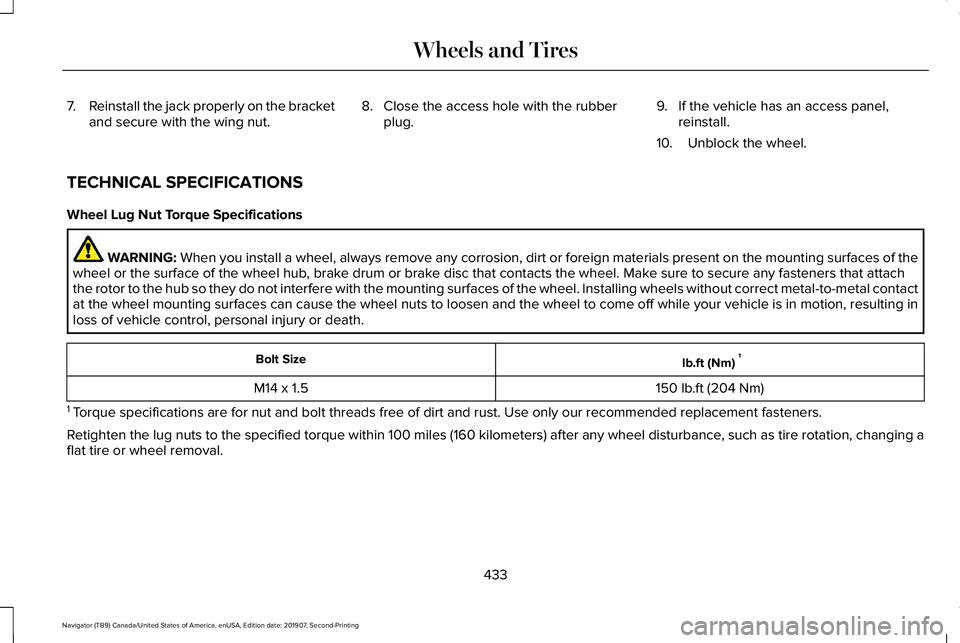
Note: Both the front and rear jacking points
are on the frame rails. The correct locations
on the frame rails are marked with an arrow
punched into the frame rail. Jack at the
specified locations to avoid damaging your
vehicle.
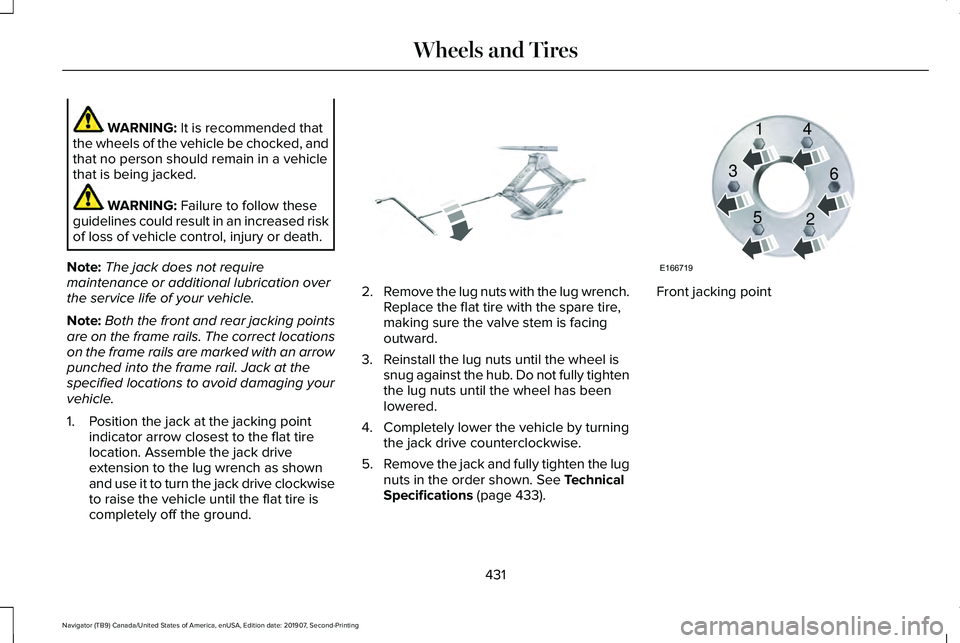
1. Position the jack at the jacking point indicator arrow closest to the flat tire
location. Assemble the jack drive
extension to the lug wrench as shown
and use it to turn the jack drive clockwise
to raise the vehicle until the flat tire is
completely off the ground. 2.
Remove the lug nuts with the lug wrench.
Replace the flat tire with the spare tire,
making sure the valve stem is facing
outward.
3. Reinstall the lug nuts until the wheel is snug against the hub. Do not fully tighten
the lug nuts until the wheel has been
lowered.
4. Completely lower the vehicle by turning the jack drive counterclockwise.
5. Remove the jack and fully tighten the lug
nuts in the order shown.
See Technical
Specifications (page 433). Front jacking point
431
Navigator (TB9) Canada/United States of America, enUSA, Edition date: 201907, Second-Printing Wheels and TiresE325278 E166719
1
3
5 4
6
2
Page 435 of 622
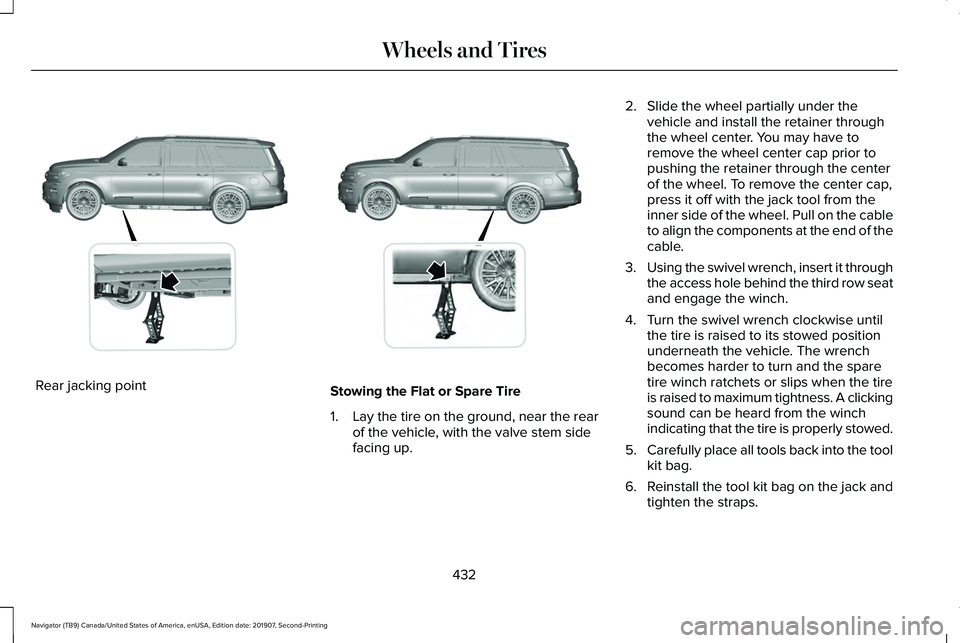
Rear jacking point
Stowing the Flat or Spare Tire
1.
Lay the tire on the ground, near the rear
of the vehicle, with the valve stem side
facing up. 2. Slide the wheel partially under the
vehicle and install the retainer through
the wheel center. You may have to
remove the wheel center cap prior to
pushing the retainer through the center
of the wheel. To remove the center cap,
press it off with the jack tool from the
inner side of the wheel. Pull on the cable
to align the components at the end of the
cable.
3. Using the swivel wrench, insert it through
the access hole behind the third row seat
and engage the winch.
4. Turn the swivel wrench clockwise until the tire is raised to its stowed position
underneath the vehicle. The wrench
becomes harder to turn and the spare
tire winch ratchets or slips when the tire
is raised to maximum tightness. A clicking
sound can be heard from the winch
indicating that the tire is properly stowed.
5. Carefully place all tools back into the tool
kit bag.
6. Reinstall the tool kit bag on the jack and
tighten the straps.
432
Navigator (TB9) Canada/United States of America, enUSA, Edition date: 201907, Second-Printing Wheels and TiresE325274 E325281
Page 436 of 622
7.
Reinstall the jack properly on the bracket
and secure with the wing nut. 8. Close the access hole with the rubber
plug. 9. If the vehicle has an access panel,
reinstall.
10. Unblock the wheel.
TECHNICAL SPECIFICATIONS
Wheel Lug Nut Torque Specifications WARNING: When you install a wheel, always remove any corrosion, dirt or foreign m\
aterials present on the mounting surfaces of the
wheel or the surface of the wheel hub, brake drum or brake disc that contacts the wheel. Make sure to secure any fasteners that attach
the rotor to the hub so they do not interfere with the mounting surfaces\
of the wheel. Installing wheels without correct metal-to-metal contact
at the wheel mounting surfaces can cause the wheel nuts to loosen and th\
e wheel to come off while your vehicle is in motion, resulting in
loss of vehicle control, personal injury or death. lb.ft (Nm)
1
Bolt Size
150 lb.ft (204 Nm)
M14 x 1.5
1 Torque specifications are for nut and bolt threads free of dirt and rust.\
Use only our recommended replacement fasteners.
Retighten the lug nuts to the specified torque within 100 miles (160 kil\
ometers) after any wheel disturbance, such as tire rotation, changing a
flat tire or wheel removal.
433
Navigator (TB9) Canada/United States of America, enUSA, Edition date: 201907, Second-Printing Wheels and Tires
Page 437 of 622
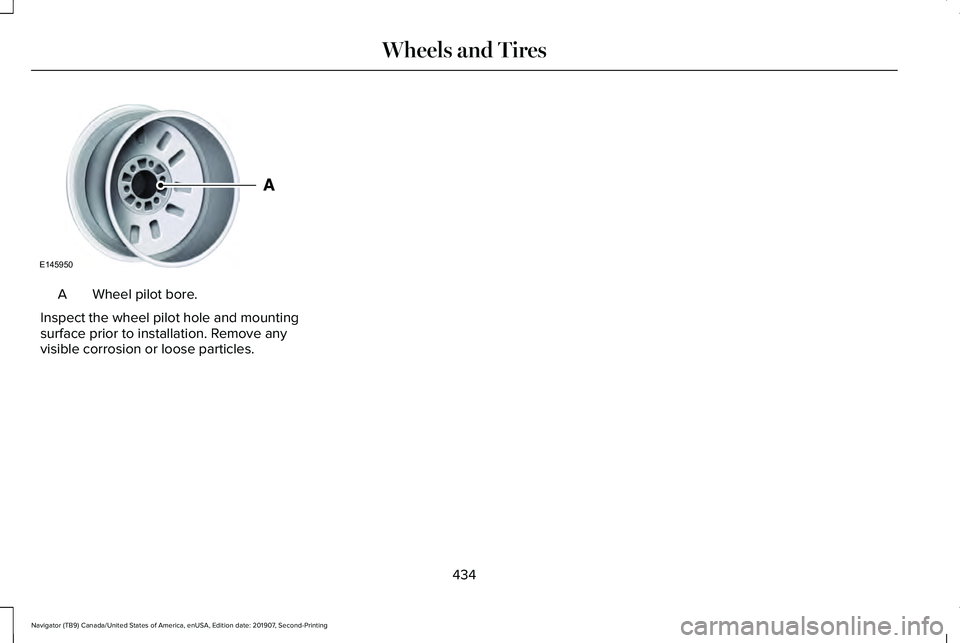
Wheel pilot bore.
A
Inspect the wheel pilot hole and mounting
surface prior to installation. Remove any
visible corrosion or loose particles.
434
Navigator (TB9) Canada/United States of America, enUSA, Edition date: 201907, Second-Printing Wheels and TiresE145950
Page 542 of 622
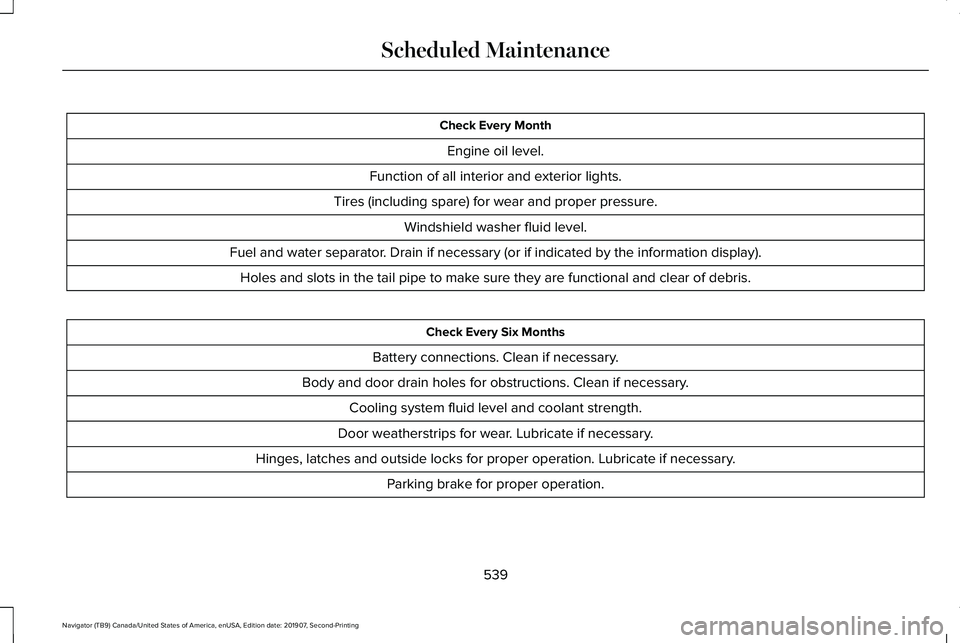
Check Every Month
Engine oil level.
Function of all interior and exterior lights.
Tires (including spare) for wear and proper pressure. Windshield washer fluid level.
Fuel and water separator. Drain if necessary (or if indicated by the information display). Holes and slots in the tail pipe to make sure they are functional and clear of debris. Check Every Six Months
Battery connections. Clean if necessary.
Body and door drain holes for obstructions. Clean if necessary. Cooling system fluid level and coolant strength.
Door weatherstrips for wear. Lubricate if necessary.
Hinges, latches and outside locks for proper operation. Lubricate if necessary. Parking brake for proper operation.
539
Navigator (TB9) Canada/United States of America, enUSA, Edition date: 201907, Second-Printing Scheduled Maintenance
Page 544 of 622
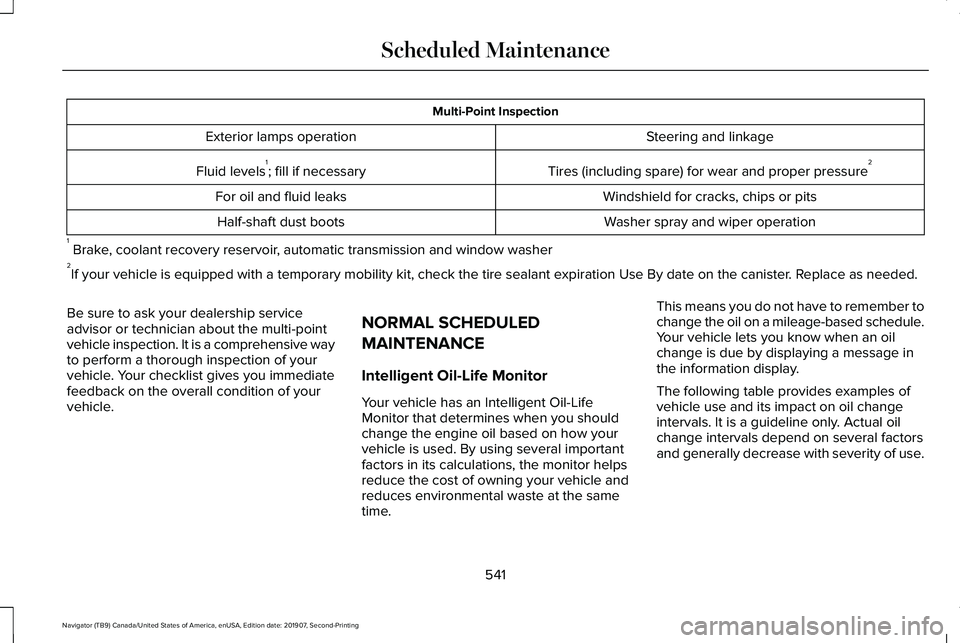
Multi-Point Inspection
Steering and linkage
Exterior lamps operation
Tires (including spare) for wear and proper pressure2
Fluid levels 1
; fill if necessary
Windshield for cracks, chips or pits
For oil and fluid leaks
Washer spray and wiper operation
Half-shaft dust boots
1 Brake, coolant recovery reservoir, automatic transmission and window washer
2 If your vehicle is equipped with a temporary mobility kit, check the tir\
e sealant expiration Use By date on the canister. Replace as needed.
Be sure to ask your dealership service
advisor or technician about the multi-point
vehicle inspection. It is a comprehensive way
to perform a thorough inspection of your
vehicle. Your checklist gives you immediate
feedback on the overall condition of your
vehicle. NORMAL SCHEDULED
MAINTENANCE
Intelligent Oil-Life Monitor
Your vehicle has an Intelligent Oil-Life
Monitor that determines when you should
change the engine oil based on how your
vehicle is used. By using several important
factors in its calculations, the monitor helps
reduce the cost of owning your vehicle and
reduces environmental waste at the same
time.This means you do not have to remember to
change the oil on a mileage-based schedule.
Your vehicle lets you know when an oil
change is due by displaying a message in
the information display.
The following table provides examples of
vehicle use and its impact on oil change
intervals. It is a guideline only. Actual oil
change intervals depend on several factors
and generally decrease with severity of use.
541
Navigator (TB9) Canada/United States of America, enUSA, Edition date: 201907, Second-Printing Scheduled Maintenance
Page 546 of 622
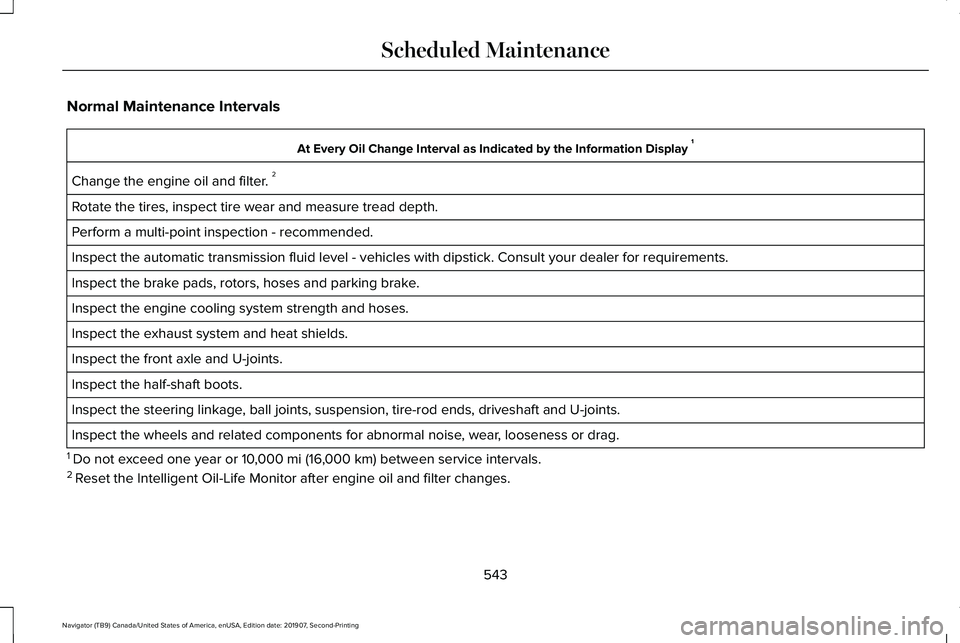
Normal Maintenance Intervals
At Every Oil Change Interval as Indicated by the Information Display
1
Change the engine oil and filter. 2
Rotate the tires, inspect tire wear and measure tread depth.
Perform a multi-point inspection - recommended.
Inspect the automatic transmission fluid level - vehicles with dipstick.\
Consult your dealer for requirements.
Inspect the brake pads, rotors, hoses and parking brake.
Inspect the engine cooling system strength and hoses.
Inspect the exhaust system and heat shields.
Inspect the front axle and U-joints.
Inspect the half-shaft boots.
Inspect the steering linkage, ball joints, suspension, tire-rod ends, driveshaft and U-joints.
Inspect the wheels and related components for abnormal noise, wear, looseness or drag.
1 Do not exceed one year or 10,000 mi (16,000 km) between service intervals.
2 Reset the Intelligent Oil-Life Monitor after engine oil and filter change\
s.
543
Navigator (TB9) Canada/United States of America, enUSA, Edition date: 201907, Second-Printing Scheduled Maintenance
Page 550 of 622
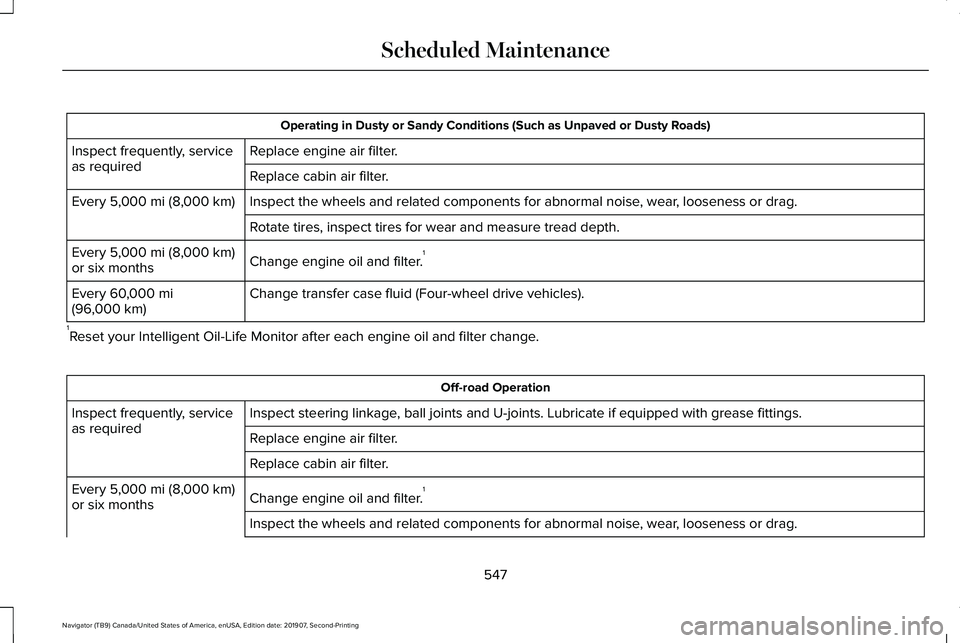
Operating in Dusty or Sandy Conditions (Such as Unpaved or Dusty Roads)
Replace engine air filter.
Inspect frequently, service
as required
Replace cabin air filter.
Inspect the wheels and related components for abnormal noise, wear, looseness or drag.
Every 5,000 mi (8,000 km)
Rotate tires, inspect tires for wear and measure tread depth.
Change engine oil and filter. 1
Every
5,000 mi (8,000 km)
or six months
Change transfer case fluid (Four-wheel drive vehicles).
Every
60,000 mi
(96,000 km)
1 Reset your Intelligent Oil-Life Monitor after each engine oil and filter \
change. Off-road Operation
Inspect steering linkage, ball joints and U-joints. Lubricate if equipped with grease fittings.
Inspect frequently, service
as required
Replace engine air filter.
Replace cabin air filter.
Change engine oil and filter.1
Every
5,000 mi (8,000 km)
or six months
Inspect the wheels and related components for abnormal noise, wear, looseness or drag.
547
Navigator (TB9) Canada/United States of America, enUSA, Edition date: 201907, Second-Printing Scheduled Maintenance
Page 551 of 622
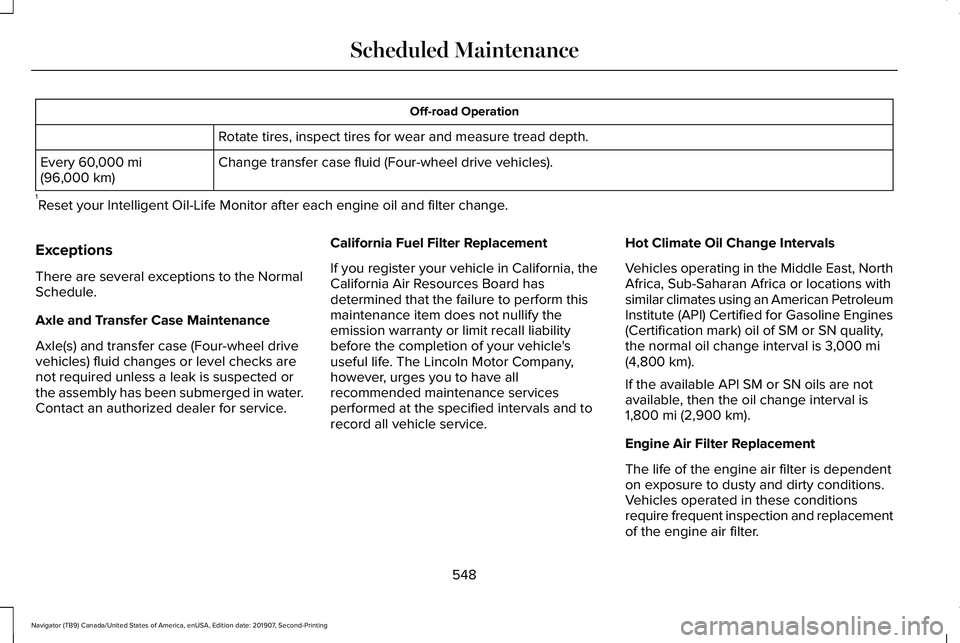
Off-road Operation
Rotate tires, inspect tires for wear and measure tread depth.
Change transfer case fluid (Four-wheel drive vehicles).
Every 60,000 mi
(96,000 km)
1 Reset your Intelligent Oil-Life Monitor after each engine oil and filter \
change.
Exceptions
There are several exceptions to the Normal
Schedule.
Axle and Transfer Case Maintenance
Axle(s) and transfer case (Four-wheel drive
vehicles) fluid changes or level checks are
not required unless a leak is suspected or
the assembly has been submerged in water.
Contact an authorized dealer for service. California Fuel Filter Replacement
If you register your vehicle in California, the
California Air Resources Board has
determined that the failure to perform this
maintenance item does not nullify the
emission warranty or limit recall liability
before the completion of your vehicle's
useful life. The Lincoln Motor Company,
however, urges you to have all
recommended maintenance services
performed at the specified intervals and to
record all vehicle service.Hot Climate Oil Change Intervals
Vehicles operating in the Middle East, North
Africa, Sub-Saharan Africa or locations with
similar climates using an American Petroleum
Institute (API) Certified for Gasoline Engines
(Certification mark) oil of SM or SN quality,
the normal oil change interval is
3,000 mi
(4,800 km).
If the available API SM or SN oils are not
available, then the oil change interval is
1,800 mi (2,900 km)
.
Engine Air Filter Replacement
The life of the engine air filter is dependent
on exposure to dusty and dirty conditions.
Vehicles operated in these conditions
require frequent inspection and replacement
of the engine air filter.
548
Navigator (TB9) Canada/United States of America, enUSA, Edition date: 201907, Second-Printing Scheduled Maintenance
Page 620 of 622
Switching Automatic High Beam Control
On and Off.....................................................116
Activating the Automatic High Beam Control................................................................116
Switching Cruise Control On and Off..................................................................268
Switching Cruise Control Off...........................268
Switching Cruise Control On...........................268
Symbols Glossary..............................................9
SYNC™ 3
..........................................................472
General Information...........................................472
SYNC™ 3 Troubleshooting...........................515 Additional Information and Assistance..........531
Apps......................................................................525
Navigation............................................................524
Personal Profiles.................................................529
Phone.....................................................................521
Resetting the System.........................................531
USB and Bluetooth Audio.................................517
Voice Recognition...............................................515
Wi-Fi Connectivity..............................................527
T
Technical Specifications See: Capacities and Specifications...............435
The Better Business Bureau (BBB) Auto Line Program (U.S. Only)
..........................349 Tire Care
.........................................................406
Glossary of Tire Terminology..........................407
Information About Uniform Tire Quality
Grading.............................................................406
Information Contained on the Tire Sidewall............................................................408
Temperature A B C.............................................407
Traction AA A B C...............................................407
Treadwear.............................................................407
Tire Pressure Monitoring System..............421 Changing Tires With a Tire Pressure
Monitoring System.........................................423
Understanding Your Tire Pressure Monitoring System .............................................................423
Tires See: Wheels and Tires......................................404
Toll Reader......................................................122 Installing the Toll Reader...................................122
Towing a Trailer
...............................................311
Load Placement....................................................311
Towing Points - 4WD...................................345
Towing the Vehicle on Four Wheels........334 Four-wheel-down Towing.................................335
Recreational Towing..........................................334
Towing...............................................................311
Traction Control
............................................243
Principle of Operation.......................................243 Trailer Reversing Aids
..................................312
Principle of Operation........................................312
Pro Trailer Backup Assist™.................................312
Setting Up Pro Trailer Backup Assist..............313
Troubleshooting...................................................318
Using Pro Trailer Backup Assist.......................
316
Trailer Sway Control....................................323
Transfer Case Fluid Check.........................385
Transmission Code Designation
..............438
Transmission..................................................222
Transporting the Vehicle
............................345
U
Under Hood Overview
................................375
Unique Driving Characteristics.................208
Universal Garage Door Opener................193 HomeLink Wireless Control System...............193
USB Port.........................................................470 Locating the USB Ports......................................471
Using Adaptive Cruise Control.................269 Automatic Cancellation.....................................273
Blocked Sensor...................................................275
Canceling the Set Speed..................................
273
Changing the Set Speed..................................272
Detection Issues.................................................273
Following a Vehicle.............................................271
Following a Vehicle to a Complete Stop.......271
617
Navigator (TB9) Canada/United States of America, enUSA, Edition date: 201907, Second-Printing Index