parking brake LINCOLN NAVIGATOR 2020 Owners Manual
[x] Cancel search | Manufacturer: LINCOLN, Model Year: 2020, Model line: NAVIGATOR, Model: LINCOLN NAVIGATOR 2020Pages: 622, PDF Size: 6.47 MB
Page 7 of 622
Refueling
........................................................214
Fuel Consumption ........................................
217
Engine Emission Control
Emission Law .................................................
218
Catalytic Converter ......................................
219
Transmission
Automatic Transmission ............................
222
Four-Wheel Drive
Using Four-Wheel Drive ............................
228
Rear Axle
Limited Slip Differential .............................
236
Brakes
General Information ....................................
237
Hints on Driving With Anti-Lock Brakes ......................................................................
238
Electric Parking Brake ................................
238
Hill Start Assist .............................................
240
Auto Hold .......................................................
241Traction Control
Principle of Operation
................................
243
Using Traction Control ...............................
243
Stability Control
Principle of Operation ................................
244
Using Stability Control ...............................
245
Hill Descent Control
Principle of Operation ................................
246
Using Hill Descent Control .......................
246
Parking Aids
Principle of Operation ................................
247
Rear Parking Aid ..........................................
248
Front Parking Aid ........................................
250
Side Sensing System .................................
252
Active Park Assist ........................................
253
Rear View Camera .......................................
261
360 Degree Camera ..................................
264
Cruise Control
What Is Cruise Control ...............................
268Switching Cruise Control On and Off
.....
268
Setting the Cruise Control Speed ..........
268
Canceling the Set Speed ..........................
269
Resuming the Set Speed ..........................
269
Cruise Control Indicators ..........................
269
Using Adaptive Cruise Control ................
269
Driving Aids
Driver Alert ....................................................
277
Lane Keeping System ................................
278
Blind Spot Information System ................
284
Cross Traffic Alert ........................................
288
Steering .........................................................
293
Pre-Collision Assist .....................................
294
Drive Mode Control ....................................
299
Load Carrying
Rear Under Floor Storage ..........................
301
Cargo Nets ....................................................
303
Roof Racks and Load Carriers .................
304
Load Limit ......................................................
305
4
Navigator (TB9) Canada/United States of America, enUSA, Edition date: 201907, Second-Printing Table of Contents
Page 14 of 622
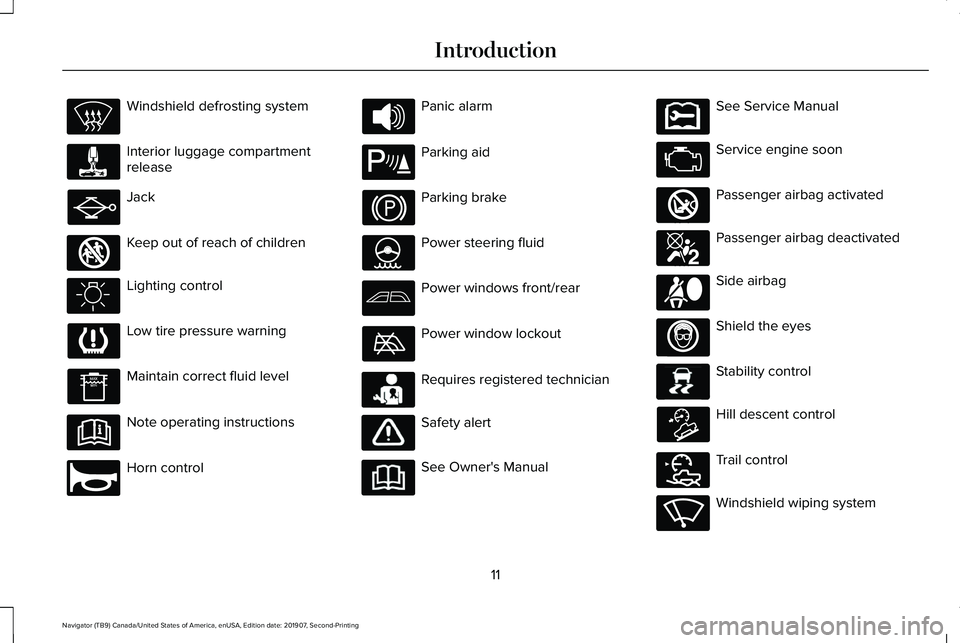
Windshield defrosting system
Interior luggage compartment
release
Jack
Keep out of reach of children
Lighting control
Low tire pressure warning
Maintain correct fluid level
Note operating instructions
Horn control Panic alarm
Parking aid
Parking brake
Power steering fluid
Power windows front/rear
Power window lockout
Requires registered technician
Safety alert
See Owner's Manual See Service Manual
Service engine soon
Passenger airbag activated
Passenger airbag deactivated
Side airbag
Shield the eyes
Stability control
Hill descent control
Trail control
Windshield wiping system
11
Navigator (TB9) Canada/United States of America, enUSA, Edition date: 201907, Second-Printing Introduction E161353 E270945 E139213 E231159 E231158 E270849 E270850 E167012 E138639 E163957 E272858 E270969
Page 57 of 622
Note:
The driver and front passenger
warnings switch on and off independently.
When you perform this procedure for one
seating position, do not buckle the other
position as this terminates the process.
Read Steps 1 - 4 before starting the
procedure.
Make sure that:
• You set the parking brake.
• The transmission is in park (P).
• The ignition is off.
• You close all vehicle doors.
• You unbuckle the driver and front
passenger seatbelts.
1. Switch the ignition on. Do not start the engine.
2. Wait until the seatbelt warning lamp turns
off (about one minute). After Step 2, wait
an additional five seconds before
proceeding with Step 3. Once you start
Step 3, you must complete the procedure
within 60 seconds. 3.
For the seating position you are switching
off, buckle then unbuckle the seatbelt
three times at a moderate speed, ending
in the unbuckled state. After Step 3, the
seatbelt warning lamp turns on.
4. When the seatbelt warning lamp is on, buckle then unbuckle the seatbelt. After
Step 4, the seatbelt warning lamp flashes
for confirmation.
• This switches the feature off if it is
currently on.
• This switches the feature on if it is
currently off.
CHILD RESTRAINT AND SEATBELT
MAINTENANCE
Inspect the vehicle seatbelts and child safety
seat systems periodically to make sure they
work properly and are not damaged. Inspect
the vehicle and child restraint seatbelts to
make sure there are no nicks, tears or cuts.
Replace if necessary. All vehicle seatbelt
assemblies, including retractors, buckles,
front seatbelt buckle assemblies, buckle
support assemblies (slide bar-if equipped), shoulder belt height adjusters (if equipped),
shoulder belt guide on seat backrest (if
equipped), child safety seat LATCH and
tether anchors, and attaching hardware,
should be inspected after a crash. Read the
child restraint manufacturer's instructions for
additional inspection and maintenance
information specific to the child restraint.
We recommend that all seatbelt assemblies
in use in vehicles involved in a crash be
replaced. However, if the crash was minor
and an authorized dealer finds that the belts
do not show damage and continue to
operate properly, they do not need to be
replaced. Seatbelt assemblies not in use
during a crash should also be inspected and
replaced if either damage or improper
operation is noted.
Properly care for seatbelts. See Vehicle
Care (page 393).
54
Navigator (TB9) Canada/United States of America, enUSA, Edition date: 201907, Second-Printing Seatbelts
Page 114 of 622
Note:
If you switch the autolamps and the
autowipers on, the headlamps turn on when
the windshield wipers continuously operate.
INSTRUMENT LIGHTING DIMMER
The instrument lighting dimmer buttons are
on the lighting control. Repeatedly press one of the
buttons to adjust the brightness.
HEADLAMP EXIT DELAY
After you switch the ignition off, you can
switch the headlamps on by pulling the
direction indicator lever toward you. You will
hear a short tone. The headlamps will switch
off automatically after three minutes with any
door open or 30 seconds after the last door
has been closed. You can cancel this feature
by pulling the direction indicator toward you
again or switching the ignition on. DAYTIME RUNNING LAMPS -
VEHICLES WITH: CONFIGURABLE
DAYTIME RUNNING LAMPS WARNING: The daytime running
lamps system does not activate the rear
lamps and may not provide adequate
lighting during low visibility driving
conditions. Make sure you switch the
headlamps on, as appropriate, during all
low visibility conditions. Failure to do so
may result in a crash.
Switch the daytime running lamps on or off
using the information display.
See General
Information (page 133).
The daytime running lamps turn on when:
1. The lamps are on in the information display.
2. You switch the ignition on.
3. The transmission is not in park (P) for vehicles with automatic transmissions or
you release the parking brake for
vehicles with manual transmissions. 4. The lighting control is in the autolamps
position.
5. The headlamps are off.
The other lighting control switch positions
do not turn on the daytime running lamps.
If the daytime running lamps are off in the
information display, the lamps stay off in all
switch positions.
DAYTIME RUNNING LAMPS -
VEHICLES WITH: DAYTIME
RUNNING LAMPS (DRL) WARNING: The daytime running
lamps system does not activate the rear
lamps and may not provide adequate
lighting during low visibility driving
conditions. Make sure you switch the
headlamps on, as appropriate, during all
low visibility conditions. Failure to do so
may result in a crash.
The system turns the lamps on in daylight
conditions.
111
Navigator (TB9) Canada/United States of America, enUSA, Edition date: 201907, Second-Printing LightingE291299 E291298
Page 132 of 622
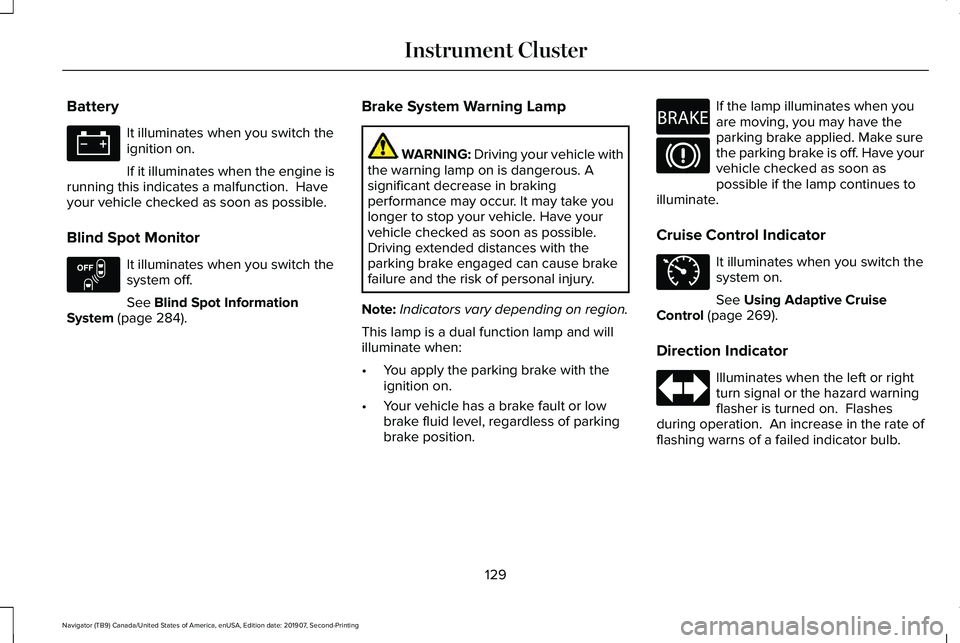
Battery
It illuminates when you switch the
ignition on.
If it illuminates when the engine is
running this indicates a malfunction. Have
your vehicle checked as soon as possible.
Blind Spot Monitor It illuminates when you switch the
system off.
See Blind Spot Information
System (page 284). Brake System Warning Lamp WARNING:
Driving your vehicle with
the warning lamp on is dangerous. A
significant decrease in braking
performance may occur. It may take you
longer to stop your vehicle. Have your
vehicle checked as soon as possible.
Driving extended distances with the
parking brake engaged can cause brake
failure and the risk of personal injury.
Note: Indicators vary depending on region.
This lamp is a dual function lamp and will
illuminate when:
• You apply the parking brake with the
ignition on.
• Your vehicle has a brake fault or low
brake fluid level, regardless of parking
brake position. If the lamp illuminates when you
are moving, you may have the
parking brake applied. Make sure
the parking brake is off. Have your
vehicle checked as soon as
possible if the lamp continues to
illuminate.
Cruise Control Indicator It illuminates when you switch the
system on.
See
Using Adaptive Cruise
Control (page 269).
Direction Indicator Illuminates when the left or right
turn signal or the hazard warning
flasher is turned on. Flashes
during operation. An increase in the rate of
flashing warns of a failed indicator bulb.
129
Navigator (TB9) Canada/United States of America, enUSA, Edition date: 201907, Second-Printing Instrument Cluster E151262 E270480 E71340
Page 133 of 622
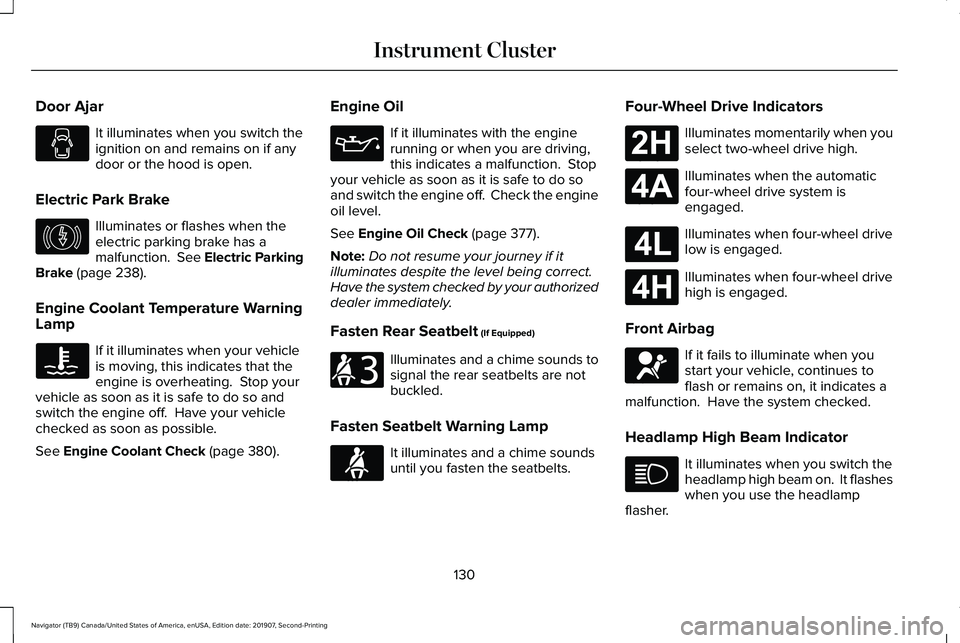
Door Ajar
It illuminates when you switch the
ignition on and remains on if any
door or the hood is open.
Electric Park Brake Illuminates or flashes when the
electric parking brake has a
malfunction. See Electric Parking
Brake (page 238).
Engine Coolant Temperature Warning
Lamp If it illuminates when your vehicle
is moving, this indicates that the
engine is overheating. Stop your
vehicle as soon as it is safe to do so and
switch the engine off. Have your vehicle
checked as soon as possible.
See
Engine Coolant Check (page 380). Engine Oil If it illuminates with the engine
running or when you are driving,
this indicates a malfunction. Stop
your vehicle as soon as it is safe to do so
and switch the engine off. Check the engine
oil level.
See
Engine Oil Check (page 377).
Note: Do not resume your journey if it
illuminates despite the level being correct.
Have the system checked by your authorized
dealer immediately.
Fasten Rear Seatbelt
(If Equipped) Illuminates and a chime sounds to
signal the rear seatbelts are not
buckled.
Fasten Seatbelt Warning Lamp It illuminates and a chime sounds
until you fasten the seatbelts.Four-Wheel Drive Indicators Illuminates momentarily when you
select two-wheel drive high.
Illuminates when the automatic
four-wheel drive system is
engaged.
Illuminates when four-wheel drive
low is engaged.
Illuminates when four-wheel drive
high is engaged.
Front Airbag If it fails to illuminate when you
start your vehicle, continues to
flash or remains on, it indicates a
malfunction. Have the system checked.
Headlamp High Beam Indicator It illuminates when you switch the
headlamp high beam on. It flashes
when you use the headlamp
flasher.
130
Navigator (TB9) Canada/United States of America, enUSA, Edition date: 201907, Second-Printing Instrument Cluster E146190 E206718 E71880 E181778 E181781 E181780 E181779 E67017
Page 135 of 622
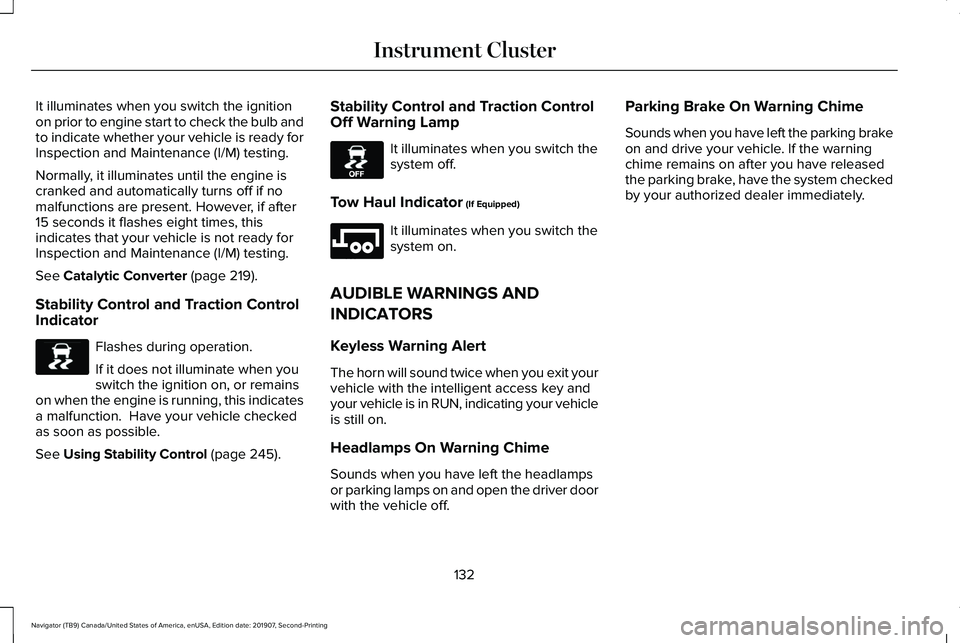
It illuminates when you switch the ignition
on prior to engine start to check the bulb and
to indicate whether your vehicle is ready for
Inspection and Maintenance (I/M) testing.
Normally, it illuminates until the engine is
cranked and automatically turns off if no
malfunctions are present. However, if after
15 seconds it flashes eight times, this
indicates that your vehicle is not ready for
Inspection and Maintenance (I/M) testing.
See Catalytic Converter (page 219).
Stability Control and Traction Control
Indicator Flashes during operation.
If it does not illuminate when you
switch the ignition on, or remains
on when the engine is running, this indicates
a malfunction. Have your vehicle checked
as soon as possible.
See
Using Stability Control (page 245). Stability Control and Traction Control
Off Warning Lamp It illuminates when you switch the
system off.
Tow Haul Indicator
(If Equipped) It illuminates when you switch the
system on.
AUDIBLE WARNINGS AND
INDICATORS
Keyless Warning Alert
The horn will sound twice when you exit your
vehicle with the intelligent access key and
your vehicle is in RUN, indicating your vehicle
is still on.
Headlamps On Warning Chime
Sounds when you have left the headlamps
or parking lamps on and open the driver door
with the vehicle off. Parking Brake On Warning Chime
Sounds when you have left the parking brake
on and drive your vehicle. If the warning
chime remains on after you have released
the parking brake, have the system checked
by your authorized dealer immediately.
132
Navigator (TB9) Canada/United States of America, enUSA, Edition date: 201907, Second-Printing Instrument ClusterE138639 E130458 E246592
Page 155 of 622
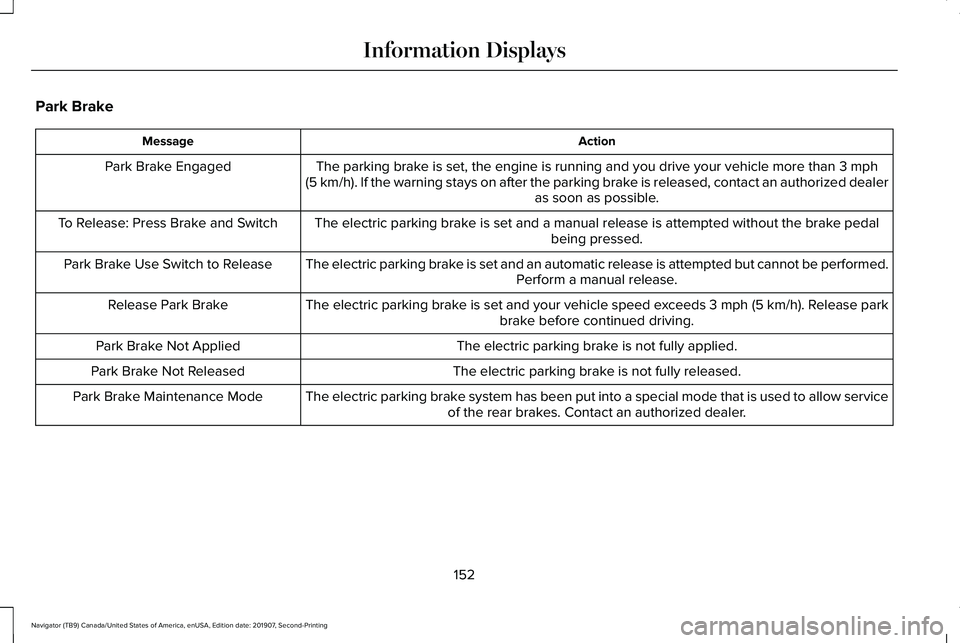
Park Brake
Action
Message
The parking brake is set, the engine is running and you drive your vehicle more than 3 mph
(5 km/h). If the warning stays on after the parking brake is released, contact an authorized dealer as soon as possible.
Park Brake Engaged
The electric parking brake is set and a manual release is attempted without the brake pedal being pressed.
To Release: Press Brake and Switch
The electric parking brake is set and an automatic release is attempted but cannot be performed.Perform a manual release.
Park Brake Use Switch to Release
The electric parking brake is set and your vehicle speed exceeds 3 mph (5 km/h)
. Release park
brake before continued driving.
Release Park Brake
The electric parking brake is not fully applied.
Park Brake Not Applied
The electric parking brake is not fully released.
Park Brake Not Released
The electric parking brake system has been put into a special mode that is used to allow serviceof the rear brakes. Contact an authorized dealer.
Park Brake Maintenance Mode
152
Navigator (TB9) Canada/United States of America, enUSA, Edition date: 201907, Second-Printing Information Displays
Page 156 of 622
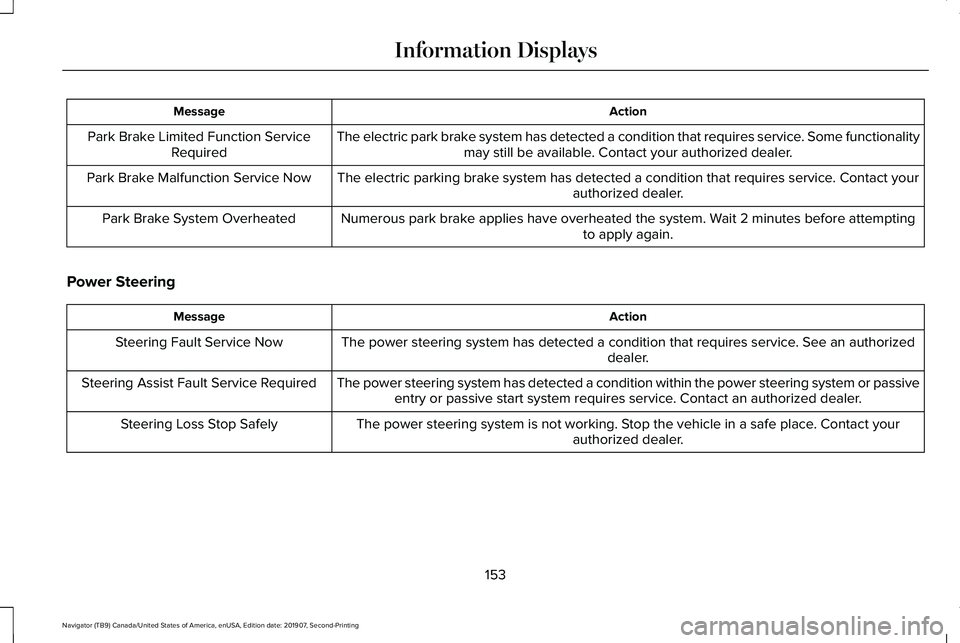
Action
Message
The electric park brake system has detected a condition that requires service. Some functionalitymay still be available. Contact your authorized dealer.
Park Brake Limited Function Service
Required
The electric parking brake system has detected a condition that requires service. Contact your authorized dealer.
Park Brake Malfunction Service Now
Numerous park brake applies have overheated the system. Wait 2 minutes before attemptingto apply again.
Park Brake System Overheated
Power Steering Action
Message
The power steering system has detected a condition that requires service\
. See an authorized dealer.
Steering Fault Service Now
The power steering system has detected a condition within the power stee\
ring system or passiveentry or passive start system requires service. Contact an authorized dealer.
Steering Assist Fault Service Required
The power steering system is not working. Stop the vehicle in a safe place. Contact yourauthorized dealer.
Steering Loss Stop Safely
153
Navigator (TB9) Canada/United States of America, enUSA, Edition date: 201907, Second-Printing Information Displays
Page 204 of 622
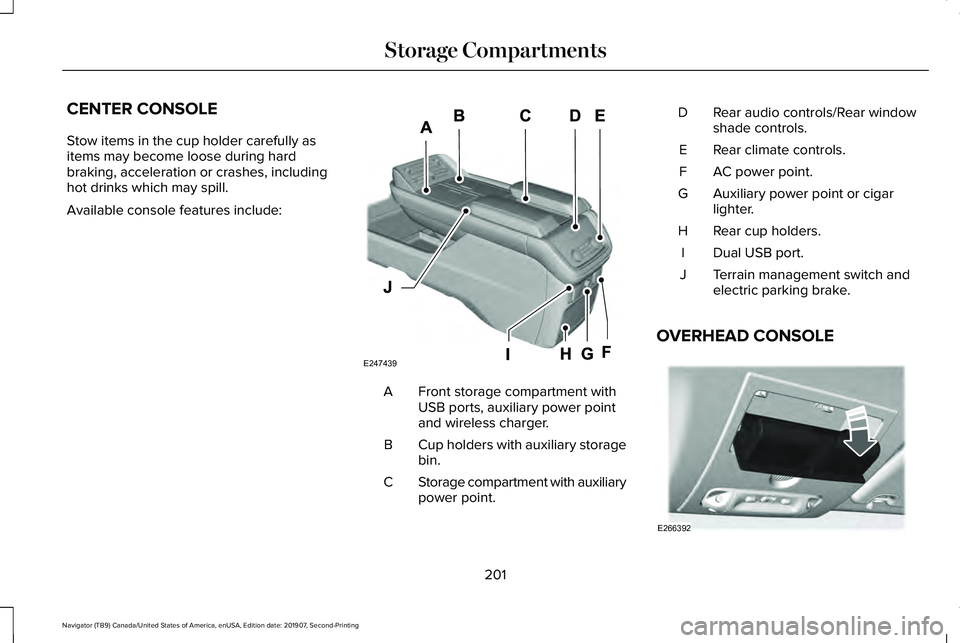
CENTER CONSOLE
Stow items in the cup holder carefully as
items may become loose during hard
braking, acceleration or crashes, including
hot drinks which may spill.
Available console features include:
Front storage compartment with
USB ports, auxiliary power point
and wireless charger.
A
Cup holders with auxiliary storage
bin.
B
Storage compartment with auxiliary
power point.
C Rear audio controls/Rear window
shade controls.
D
Rear climate controls.
E
AC power point.
F
Auxiliary power point or cigar
lighter.
G
Rear cup holders.
H
Dual USB port.
I
Terrain management switch and
electric parking brake.
J
OVERHEAD CONSOLE 201
Navigator (TB9) Canada/United States of America, enUSA, Edition date: 201907, Second-Printing Storage CompartmentsE247439 E266392