automatic transmission LINCOLN NAVIGATOR 2021 Owner's Guide
[x] Cancel search | Manufacturer: LINCOLN, Model Year: 2021, Model line: NAVIGATOR, Model: LINCOLN NAVIGATOR 2021Pages: 639, PDF Size: 6.09 MB
Page 444 of 639
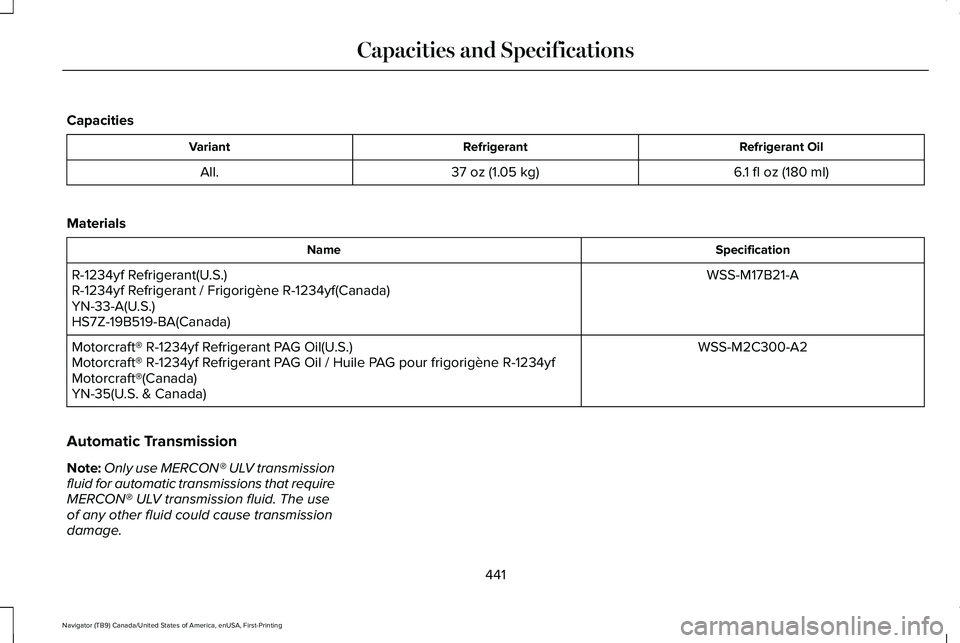
Capacities
Refrigerant Oil
Refrigerant
Variant
6.1 fl oz (180 ml)
37 oz (1.05 kg)
All.
Materials Specification
Name
WSS-M17B21-A
R-1234yf Refrigerant(U.S.)
R-1234yf Refrigerant / Frigorigène R-1234yf(Canada)
YN-33-A(U.S.)
HS7Z-19B519-BA(Canada)
WSS-M2C300-A2
Motorcraft® R-1234yf Refrigerant PAG Oil(U.S.)
Motorcraft® R-1234yf Refrigerant PAG Oil / Huile PAG pour frigorigène R-1234yf
Motorcraft®(Canada)
YN-35(U.S. & Canada)
Automatic Transmission
Note: Only use MERCON® ULV transmission
fluid for automatic transmissions that require
MERCON® ULV transmission fluid. The use
of any other fluid could cause transmission
damage.
441
Navigator (TB9) Canada/United States of America, enUSA, First-Printing Capacities and Specifications
Page 445 of 639
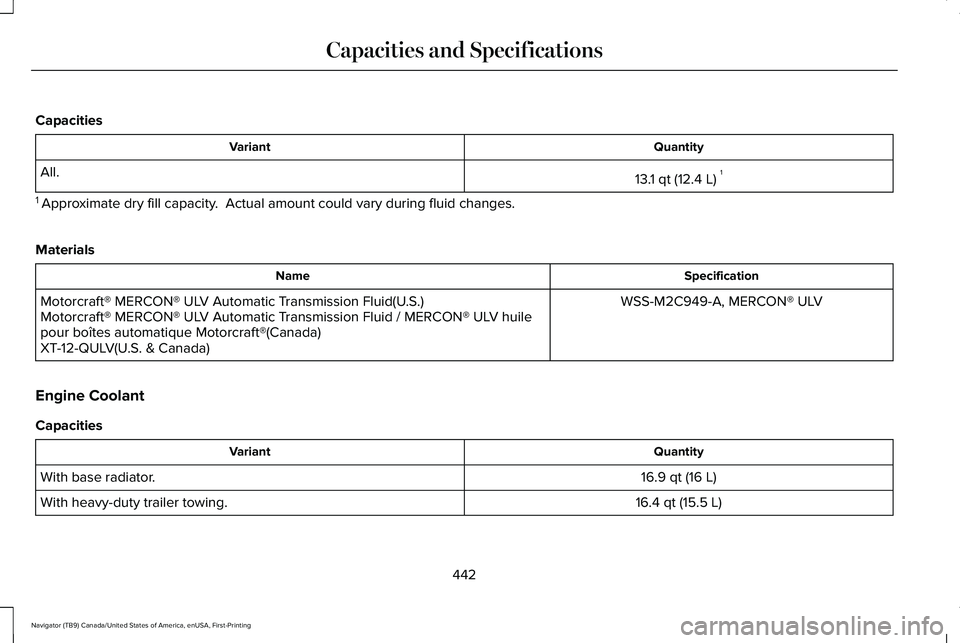
Capacities
Quantity
Variant
13.1 qt (12.4 L)1
All.
1 Approximate dry fill capacity. Actual amount could vary during fluid changes.
Materials Specification
Name
WSS-M2C949-A, MERCON® ULV
Motorcraft® MERCON® ULV Automatic Transmission Fluid(U.S.)
Motorcraft® MERCON® ULV Automatic Transmission Fluid / MERCON® ULV huile
pour boîtes automatique Motorcraft®(Canada)
XT-12-QULV(U.S. & Canada)
Engine Coolant
Capacities Quantity
Variant
16.9 qt (16 L)
With base radiator.
16.4 qt (15.5 L)
With heavy-duty trailer towing.
442
Navigator (TB9) Canada/United States of America, enUSA, First-Printing Capacities and Specifications
Page 451 of 639
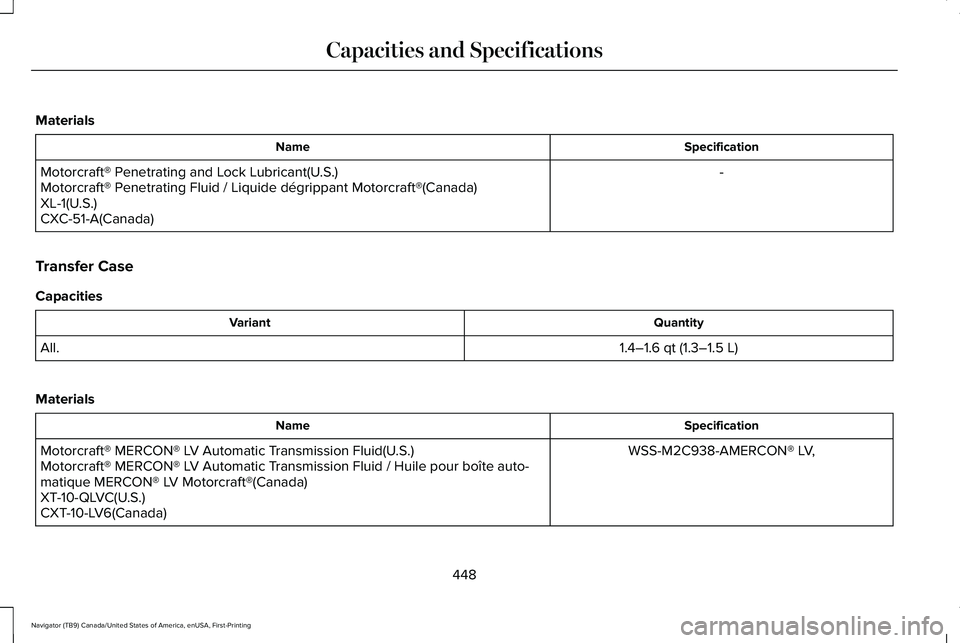
Materials
Specification
Name
-
Motorcraft® Penetrating and Lock Lubricant(U.S.)
Motorcraft® Penetrating Fluid / Liquide dégrippant Motorcraft®(Canada)
XL-1(U.S.)
CXC-51-A(Canada)
Transfer Case
Capacities Quantity
Variant
1.4–1.6 qt (1.3–1.5 L)
All.
Materials Specification
Name
WSS-M2C938-AMERCON® LV,
Motorcraft® MERCON® LV Automatic Transmission Fluid(U.S.)
Motorcraft® MERCON® LV Automatic Transmission Fluid / Huile pour boîte auto-
matique MERCON® LV Motorcraft®(Canada)
XT-10-QLVC(U.S.)
CXT-10-LV6(Canada)
448
Navigator (TB9) Canada/United States of America, enUSA, First-Printing Capacities and Specifications
Page 546 of 639
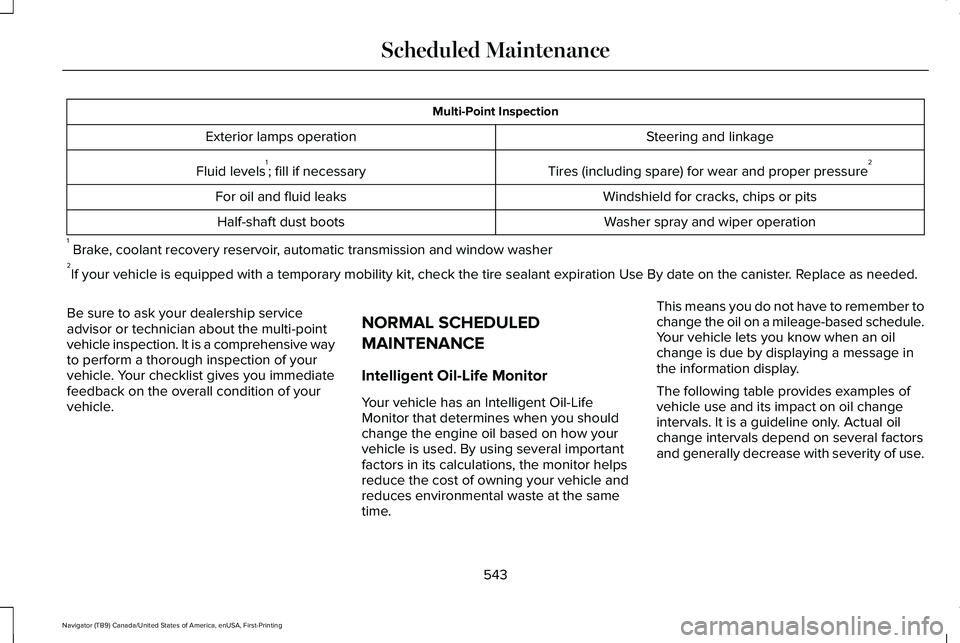
Multi-Point Inspection
Steering and linkage
Exterior lamps operation
Tires (including spare) for wear and proper pressure2
Fluid levels 1
; fill if necessary
Windshield for cracks, chips or pits
For oil and fluid leaks
Washer spray and wiper operation
Half-shaft dust boots
1 Brake, coolant recovery reservoir, automatic transmission and window washer
2 If your vehicle is equipped with a temporary mobility kit, check the tir\
e sealant expiration Use By date on the canister. Replace as needed.
Be sure to ask your dealership service
advisor or technician about the multi-point
vehicle inspection. It is a comprehensive way
to perform a thorough inspection of your
vehicle. Your checklist gives you immediate
feedback on the overall condition of your
vehicle. NORMAL SCHEDULED
MAINTENANCE
Intelligent Oil-Life Monitor
Your vehicle has an Intelligent Oil-Life
Monitor that determines when you should
change the engine oil based on how your
vehicle is used. By using several important
factors in its calculations, the monitor helps
reduce the cost of owning your vehicle and
reduces environmental waste at the same
time.This means you do not have to remember to
change the oil on a mileage-based schedule.
Your vehicle lets you know when an oil
change is due by displaying a message in
the information display.
The following table provides examples of
vehicle use and its impact on oil change
intervals. It is a guideline only. Actual oil
change intervals depend on several factors
and generally decrease with severity of use.
543
Navigator (TB9) Canada/United States of America, enUSA, First-Printing Scheduled Maintenance
Page 548 of 639
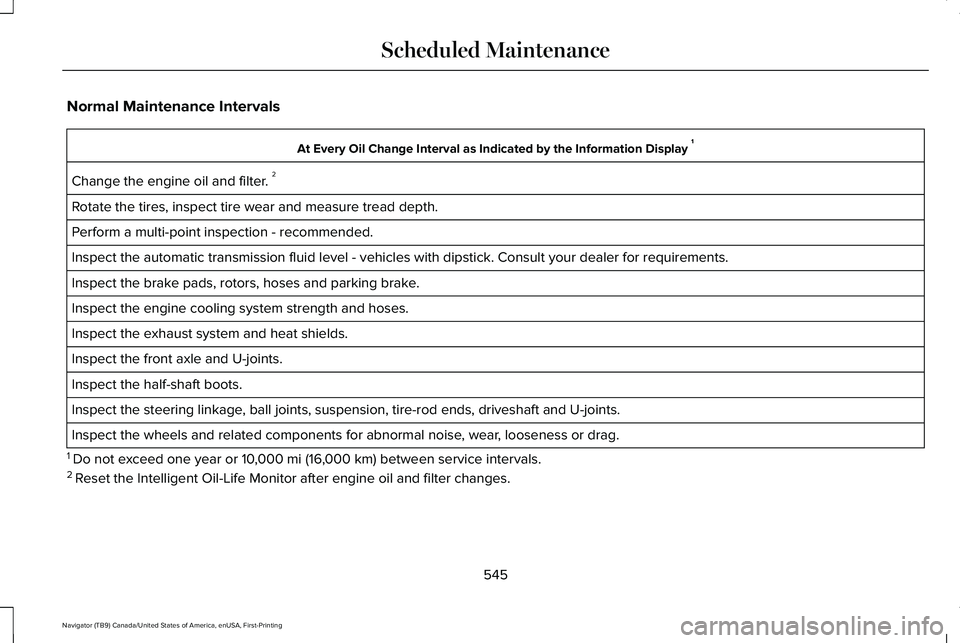
Normal Maintenance Intervals
At Every Oil Change Interval as Indicated by the Information Display
1
Change the engine oil and filter. 2
Rotate the tires, inspect tire wear and measure tread depth.
Perform a multi-point inspection - recommended.
Inspect the automatic transmission fluid level - vehicles with dipstick.\
Consult your dealer for requirements.
Inspect the brake pads, rotors, hoses and parking brake.
Inspect the engine cooling system strength and hoses.
Inspect the exhaust system and heat shields.
Inspect the front axle and U-joints.
Inspect the half-shaft boots.
Inspect the steering linkage, ball joints, suspension, tire-rod ends, driveshaft and U-joints.
Inspect the wheels and related components for abnormal noise, wear, looseness or drag.
1 Do not exceed one year or 10,000 mi (16,000 km) between service intervals.
2 Reset the Intelligent Oil-Life Monitor after engine oil and filter change\
s.
545
Navigator (TB9) Canada/United States of America, enUSA, First-Printing Scheduled Maintenance
Page 549 of 639
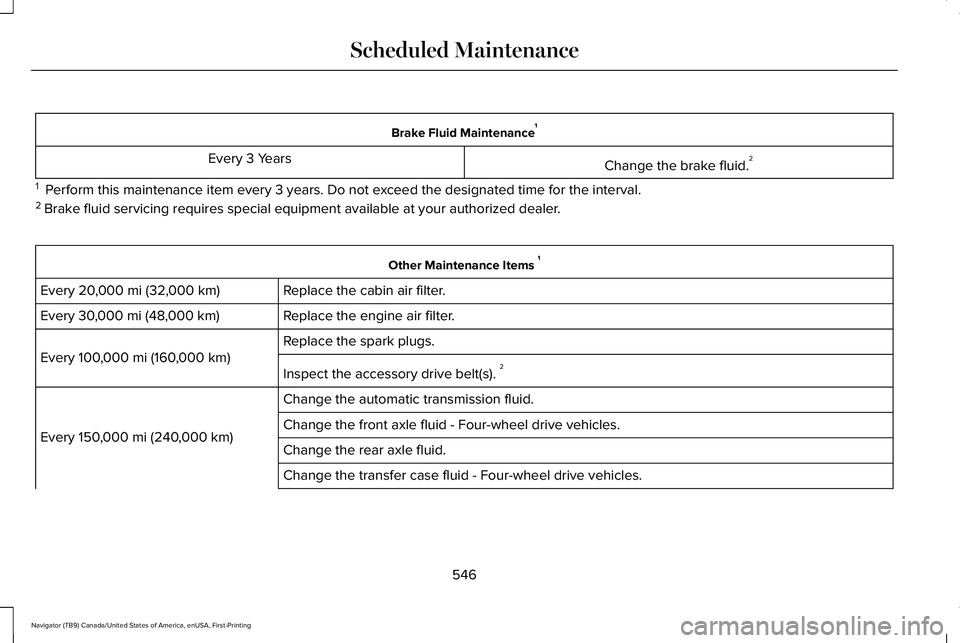
Brake Fluid Maintenance
1
Change the brake fluid. 2
Every 3 Years
1 Perform this maintenance item every 3 years. Do not exceed the designated time for the interval.
2 Brake fluid servicing requires special equipment available at your authorize\
d dealer. Other Maintenance Items
1
Replace the cabin air filter.
Every 20,000 mi (32,000 km)
Replace the engine air filter.
Every
30,000 mi (48,000 km)
Replace the spark plugs.
Every
100,000 mi (160,000 km)
Inspect the accessory drive belt(s). 2
Change the automatic transmission fluid.
Every
150,000 mi (240,000 km) Change the front axle fluid - Four-wheel drive vehicles.
Change the rear axle fluid.
Change the transfer case fluid - Four-wheel drive vehicles.
546
Navigator (TB9) Canada/United States of America, enUSA, First-Printing Scheduled Maintenance
Page 550 of 639
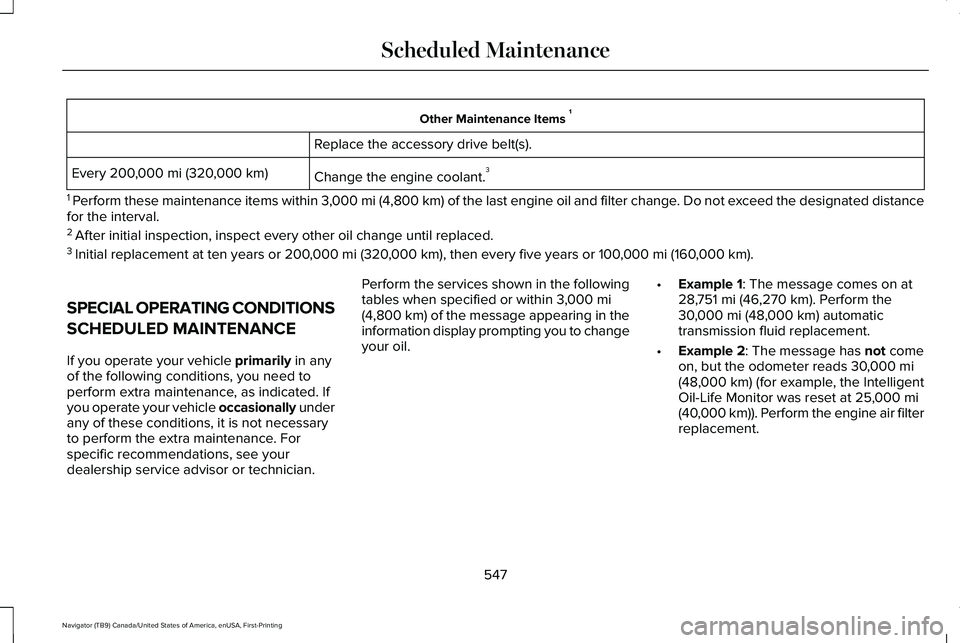
Other Maintenance Items
1
Replace the accessory drive belt(s).
Change the engine coolant. 3
Every 200,000 mi (320,000 km)
1 Perform these maintenance items within 3,000 mi (4,800 km) of the last engine oil and filter change. Do not exceed the designated distance
for the interval.
2 After initial inspection, inspect every other oil change until replaced.\
3 Initial replacement at ten years or 200,000 mi (320,000 km), then every five years or 100,000 mi (160,000 km).
SPECIAL OPERATING CONDITIONS
SCHEDULED MAINTENANCE
If you operate your vehicle
primarily in any
of the following conditions, you need to
perform extra maintenance, as indicated. If
you operate your vehicle occasionally under
any of these conditions, it is not necessary
to perform the extra maintenance. For
specific recommendations, see your
dealership service advisor or technician. Perform the services shown in the following
tables when specified or within
3,000 mi
(4,800 km) of the message appearing in the
information display prompting you to change
your oil. •
Example 1: The message comes on at
28,751 mi (46,270 km). Perform the
30,000 mi (48,000 km) automatic
transmission fluid replacement.
• Example 2
: The message has not come
on, but the odometer reads 30,000 mi
(48,000 km) (for example, the Intelligent
Oil-Life Monitor was reset at 25,000 mi
(40,000 km)). Perform the engine air filter
replacement.
547
Navigator (TB9) Canada/United States of America, enUSA, First-Printing Scheduled Maintenance
Page 625 of 639
Audio Unit......................................................462
Adjusting the Volume........................................462
Changing Radio Stations..................................462
Locking the Rear Audio Controls...................463
Rear Passenger Audio Controls - Vehicles with: Second Row Center Console...........464
Rear Seat Audio Controls - Vehicles without: Second Row Center Console.....................463
Selecting the Audio Modes.............................463
Switching the Audio Unit On and Off............
463
Using Seek, Fast Forward and Reverse.......463
Auto Hold
.......................................................245
Using Auto Hold.................................................246
Autolamps.........................................................111 Windshield Wiper Activated Headlamps........111
Automatic Climate Control.........................166 Accessing Rear Climate Controls...................166
Accessing the Climate Control Menu............166
Setting the Blower Motor Speed....................
166
Setting the Temperature...................................166
Switching Auto Mode On and Off...................166
Switching Defrost On and Off..........................167
Switching Maximum Air Conditioning On and Off.......................................................................168
Switching Recirculated Air On and Off..........168
Switching the Air Conditioning On and Off.......................................................................167
Switching the Heated Seats On and Off.......168 Switching the Ventilated Seats On and
Off.......................................................................168
Automatic High Beam Control....................117
Automatic High Beam Control Indicators.......................................................118
Automatic Transmission
..............................227
Automatic Transmission Adaptive
Learning...........................................................232
Brake-Shift Interlock Override.........................
231
If Your Vehicle Gets Stuck in Mud or Snow.................................................................232
SelectShift™ Automatic Transmission............230
Understanding the Shift Positions of your Automatic Transmission...............................227
Automatic Transmission Fluid Check............................................................388
Auto-Start-Stop..............................................212 Disabling Auto-Start-Stop..................................214
Enabling Auto-Start-Stop...................................212
Autowipers......................................................107 Autowipers Settings............................................107
B
Battery See: Changing the 12V Battery......................390
Blind Spot Information System.................288 ........................................................................\
........288 Blind Spot Information System with Trailer
Tow....................................................................289
Switching the System On and Off..................292
System Errors......................................................292
Using the Blind Spot Information System..............................................................288
BLIS See: Blind Spot Information System..............288
Body Styling Kits...........................................406
Bonnet Lock See: Opening and Closing the Hood............377
Booster Seats..................................................39 Types of Booster Seats.......................................39
Brake Fluid Check........................................389 Brake Fluid Service Interval.............................390
Brakes..............................................................241 General Information............................................241
Breaking-In.....................................................342
Bulb Specification Chart..............................451
C
Canceling the Set Speed
...........................273
Capacities and Specifications...................440 Air Conditioning System...................................440
Alternative Engine Oil for Extremely Cold
Climates............................................................444
Automatic Transmission.....................................441
622
Navigator (TB9) Canada/United States of America, enUSA, First-Printing Index
Page 637 of 639
Towing the Vehicle on Four Wheels........338
Four-wheel-down Towing.................................339
Recreational Towing..........................................338
Towing..............................................................315
Traction Control............................................247 Principle of Operation.......................................247
Trailer Reversing Aids..................................316
Principle of Operation........................................316
Pro Trailer Backup Assist™.................................316
Setting Up Pro Trailer Backup Assist..............317
Troubleshooting ..................................................322
Using Pro Trailer Backup Assist.....................320
Trailer Sway Control
.....................................327
Transfer Case Fluid Check.........................388
Transmission..................................................227
Transporting the Vehicle
............................349
U
Under Hood Overview................................379
Unique Driving Characteristics
..................212
Universal Garage Door Opener................197 HomeLink Wireless Control System...............197
USB Port...........................................................471 Locating the USB Ports.....................................472
Using Adaptive Cruise Control
.................273
Automatic Cancellation.....................................277
Blocked Sensor...................................................279 Canceling the Set Speed..................................277
Changing the Set Speed..................................276
Detection Issues.................................................277
Following a Vehicle............................................275
Following a Vehicle to a Complete
Stop...................................................................275
Hilly Condition Usage........................................277
Overriding the Set Speed................................276
Park Brake Application......................................277
Resuming the Set Speed..................................277
Setting the Adaptive Cruise Speed...............274
Setting the Adaptive Cruise Speed When Your Vehicle is Stationary......................................274
Setting the Gap Distance.................................275
Switching Adaptive Cruise Control Off.........277
Switching Adaptive Cruise Control On.........274
Switching to Normal Cruise Control..............280
System Not Available........................................279
Using Four-Wheel Drive
.............................233
4X4 Indicator Lights...........................................233
4X4 Modes...........................................................233
Driving Off-Road with Truck and Utility
Vehicles............................................................236
How Your Vehicle Differs from Other Vehicles............................................................235
Operating Four-Wheel Drive Vehicles with Spare or Mismatched Tires.........................235 Using Hill Descent Control........................250
Hill Descent Modes...........................................250
Using MyKey With Remote Start Systems..........................................................82
Using Power Running Boards.....................99 Automatic Power Deploy....................................99
Automatic Power Stow........................................99
Bounce-back........................................................100
Enabling and Disabling......................................100
Manual Power Deploy.......................................100
Using Snow Chains
......................................423
Using Stability Control................................249 Stability Control and Traction Control with Roll
Stability Control™ (RSC™)...............................249
Using the Backup Start Passcode..............76 System Lockout.....................................................77
Using the Valet Mode....................................76
Using Traction Control................................247 Switching the System On and Off..................247
System Indicator Lights and Messages........247
Using Voice Recognition............................475 Audio Voice Commands...................................477
Climate Voice Commands................................
478
Mobile App Voice Commands........................484
Navigation Voice Commands...........................481
Phone Voice Commands..................................
479
SiriusXM Traffic and Travel Link Voice Commands......................................................484
634
Navigator (TB9) Canada/United States of America, enUSA, First-Printing Index