weight LINCOLN NAVIGATOR 2021 Owner's Guide
[x] Cancel search | Manufacturer: LINCOLN, Model Year: 2021, Model line: NAVIGATOR, Model: LINCOLN NAVIGATOR 2021Pages: 639, PDF Size: 6.09 MB
Page 352 of 639
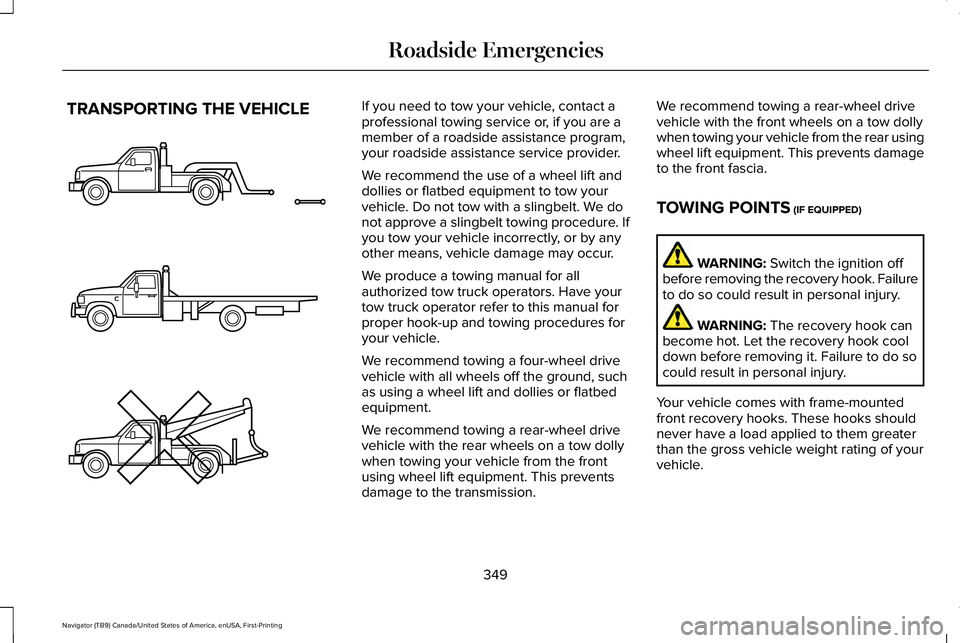
TRANSPORTING THE VEHICLE If you need to tow your vehicle, contact a
professional towing service or, if you are a
member of a roadside assistance program,
your roadside assistance service provider.
We recommend the use of a wheel lift and
dollies or flatbed equipment to tow your
vehicle. Do not tow with a slingbelt. We do
not approve a slingbelt towing procedure. If
you tow your vehicle incorrectly, or by any
other means, vehicle damage may occur.
We produce a towing manual for all
authorized tow truck operators. Have your
tow truck operator refer to this manual for
proper hook-up and towing procedures for
your vehicle.
We recommend towing a four-wheel drive
vehicle with all wheels off the ground, such
as using a wheel lift and dollies or flatbed
equipment.
We recommend towing a rear-wheel drive
vehicle with the rear wheels on a tow dolly
when towing your vehicle from the front
using wheel lift equipment. This prevents
damage to the transmission.
We recommend towing a rear-wheel drive
vehicle with the front wheels on a tow dolly
when towing your vehicle from the rear using
wheel lift equipment. This prevents damage
to the front fascia.
TOWING POINTS (IF EQUIPPED)
WARNING:
Switch the ignition off
before removing the recovery hook. Failure
to do so could result in personal injury. WARNING:
The recovery hook can
become hot. Let the recovery hook cool
down before removing it. Failure to do so
could result in personal injury.
Your vehicle comes with frame-mounted
front recovery hooks. These hooks should
never have a load applied to them greater
than the gross vehicle weight rating of your
vehicle.
349
Navigator (TB9) Canada/United States of America, enUSA, First-Printing Roadside EmergenciesE143886
Page 353 of 639
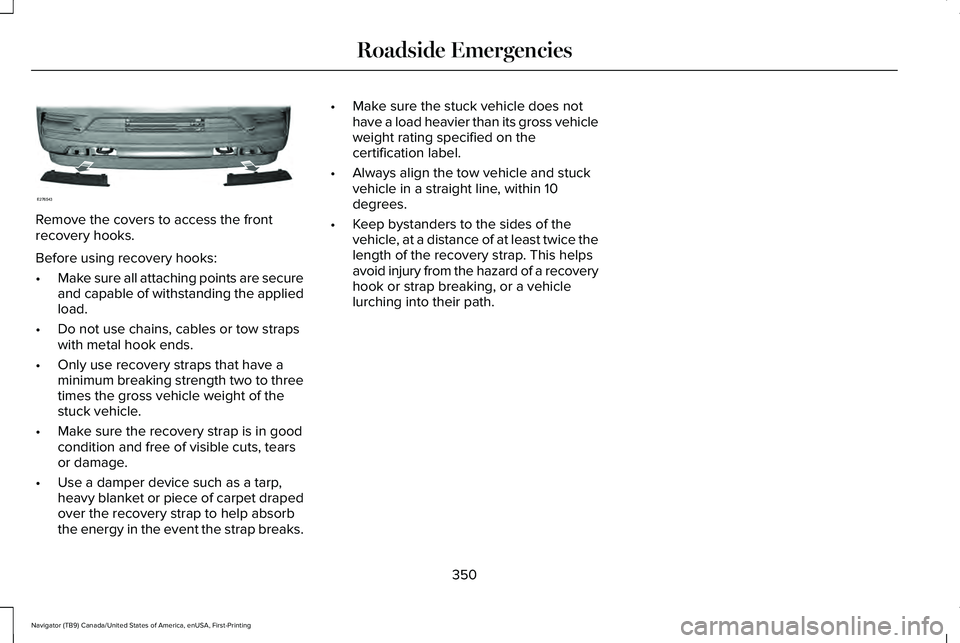
Remove the covers to access the front
recovery hooks.
Before using recovery hooks:
•
Make sure all attaching points are secure
and capable of withstanding the applied
load.
• Do not use chains, cables or tow straps
with metal hook ends.
• Only use recovery straps that have a
minimum breaking strength two to three
times the gross vehicle weight of the
stuck vehicle.
• Make sure the recovery strap is in good
condition and free of visible cuts, tears
or damage.
• Use a damper device such as a tarp,
heavy blanket or piece of carpet draped
over the recovery strap to help absorb
the energy in the event the strap breaks. •
Make sure the stuck vehicle does not
have a load heavier than its gross vehicle
weight rating specified on the
certification label.
• Always align the tow vehicle and stuck
vehicle in a straight line, within 10
degrees.
• Keep bystanders to the sides of the
vehicle, at a distance of at least twice the
length of the recovery strap. This helps
avoid injury from the hazard of a recovery
hook or strap breaking, or a vehicle
lurching into their path.
350
Navigator (TB9) Canada/United States of America, enUSA, First-Printing Roadside EmergenciesE276543
Page 413 of 639
Treadwear
The treadwear grade is a comparative
rating based on the wear rate of the tire
when tested under controlled conditions
on a specified government test course.
For example, a tire graded 150 would
wear one and one-half (1 ½) times as well
on the government course as a tire
graded 100. The relative performance
of tires depends upon the actual
conditions of their use, however, and
may depart significantly from the norm
due to variations in driving habits,
service practices, and differences in
road characteristics and climate.
Traction AA A B C
WARNING: The traction grade
assigned to this tire is based on
straight-ahead braking traction tests,
and does not include acceleration,
cornering, hydroplaning or peak
traction characteristics. The traction grades, from highest to
lowest are AA, A, B, and C. The grades
represent the tire
’s ability to stop on wet
pavement as measured under controlled
conditions on specified government test
surfaces of asphalt and concrete. A tire
marked C may have poor traction
performance.
Temperature A B C WARNING:
The temperature
grade for this tire is established for a
tire that is properly inflated and not
overloaded. Excessive speed,
underinflation, or excessive loading,
either separately or in combination,
can cause heat buildup and possible
tire failure.
The temperature grades are A (the
highest), B and C, representing the tire ’s
resistance to the generation of heat and
its ability to dissipate heat when tested
under controlled conditions on a
specified indoor laboratory test wheel.
Sustained high temperature can cause the material of the tire to degenerate
and reduce tire life, and excessive
temperature can lead to sudden tire
failure. The grade C corresponds to a
level of performance which all
passenger car tires must meet under the
Federal Motor Vehicle Safety Standard
No. 139. Grades B and A represent
higher levels of performance on the
laboratory test wheel than the minimum
required by law.
Glossary of Tire Terminology
*
Tire label: A label showing the original
equipment tire sizes, recommended
inflation pressure and the maximum
weight the vehicle can carry.
*
Tire Identification Number (TIN): A
number on the sidewall of each tire
providing information about the tire
brand and manufacturing plant, tire size
and date of manufacture. Also referred
to as DOT code.
*
Inflation pressure: A measure of the
amount of air in a tire.
410
Navigator (TB9) Canada/United States of America, enUSA, First-Printing Wheels and Tires
Page 415 of 639
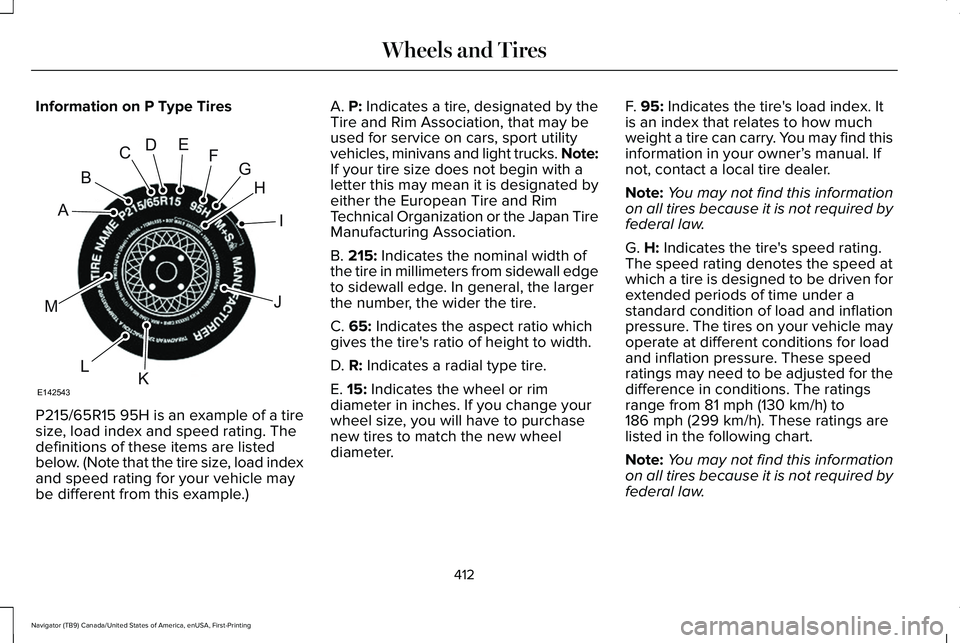
Information on P Type Tires
P215/65R15 95H is an example of a tire
size, load index and speed rating. The
definitions of these items are listed
below. (Note that the tire size, load index
and speed rating for your vehicle may
be different from this example.) A. P: Indicates a tire, designated by the
Tire and Rim Association, that may be
used for service on cars, sport utility
vehicles, minivans and light trucks.
Note:
If your tire size does not begin with a
letter this may mean it is designated by
either the European Tire and Rim
Technical Organization or the Japan Tire
Manufacturing Association.
B.
215: Indicates the nominal width of
the tire in millimeters from sidewall edge
to sidewall edge. In general, the larger
the number, the wider the tire.
C.
65: Indicates the aspect ratio which
gives the tire's ratio of height to width.
D.
R: Indicates a radial type tire.
E.
15: Indicates the wheel or rim
diameter in inches. If you change your
wheel size, you will have to purchase
new tires to match the new wheel
diameter. F.
95: Indicates the tire's load index. It
is an index that relates to how much
weight a tire can carry. You may find this
information in your owner’ s manual. If
not, contact a local tire dealer.
Note: You may not find this information
on all tires because it is not required by
federal law.
G.
H: Indicates the tire's speed rating.
The speed rating denotes the speed at
which a tire is designed to be driven for
extended periods of time under a
standard condition of load and inflation
pressure. The tires on your vehicle may
operate at different conditions for load
and inflation pressure. These speed
ratings may need to be adjusted for the
difference in conditions. The ratings
range from
81 mph (130 km/h) to
186 mph (299 km/h). These ratings are
listed in the following chart.
Note: You may not find this information
on all tires because it is not required by
federal law.
412
Navigator (TB9) Canada/United States of America, enUSA, First-Printing Wheels and TiresH
I
J
KL
M
A
B
CDEFG
E142543
Page 434 of 639
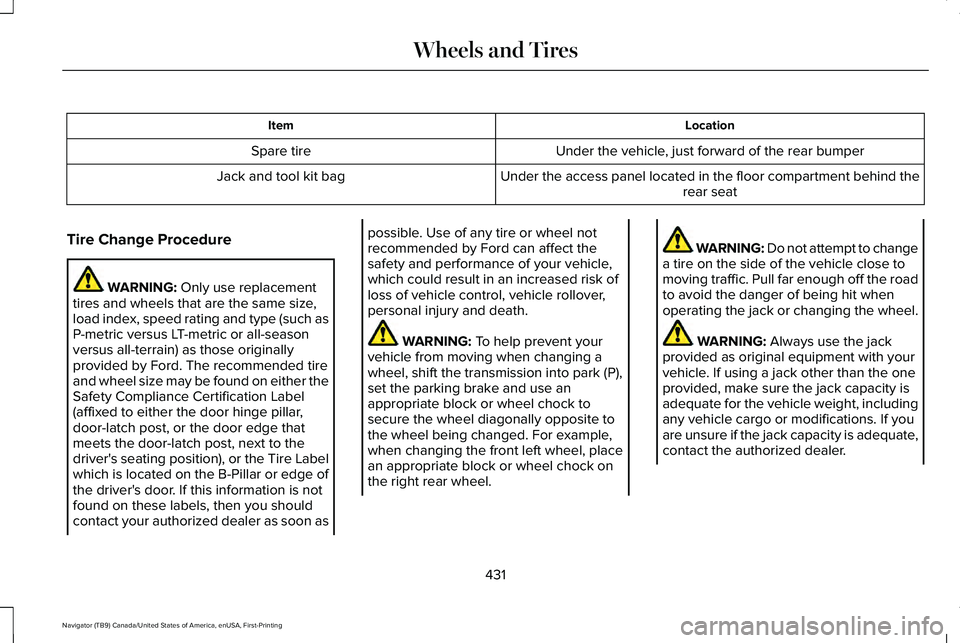
Location
Item
Under the vehicle, just forward of the rear bumper
Spare tire
Under the access panel located in the floor compartment behind therear seat
Jack and tool kit bag
Tire Change Procedure WARNING: Only use replacement
tires and wheels that are the same size,
load index, speed rating and type (such as
P-metric versus LT-metric or all-season
versus all-terrain) as those originally
provided by Ford. The recommended tire
and wheel size may be found on either the
Safety Compliance Certification Label
(affixed to either the door hinge pillar,
door-latch post, or the door edge that
meets the door-latch post, next to the
driver's seating position), or the Tire Label
which is located on the B-Pillar or edge of
the driver's door. If this information is not
found on these labels, then you should
contact your authorized dealer as soon as possible. Use of any tire or wheel not
recommended by Ford can affect the
safety and performance of your vehicle,
which could result in an increased risk of
loss of vehicle control, vehicle rollover,
personal injury and death.
WARNING:
To help prevent your
vehicle from moving when changing a
wheel, shift the transmission into park (P),
set the parking brake and use an
appropriate block or wheel chock to
secure the wheel diagonally opposite to
the wheel being changed. For example,
when changing the front left wheel, place
an appropriate block or wheel chock on
the right rear wheel. WARNING: Do not attempt to change
a tire on the side of the vehicle close to
moving traffic. Pull far enough off the road
to avoid the danger of being hit when
operating the jack or changing the wheel. WARNING: Always use the jack
provided as original equipment with your
vehicle. If using a jack other than the one
provided, make sure the jack capacity is
adequate for the vehicle weight, including
any vehicle cargo or modifications. If you
are unsure if the jack capacity is adequate,
contact the authorized dealer.
431
Navigator (TB9) Canada/United States of America, enUSA, First-Printing Wheels and Tires
Page 443 of 639
VEHICLE IDENTIFICATION
NUMBER
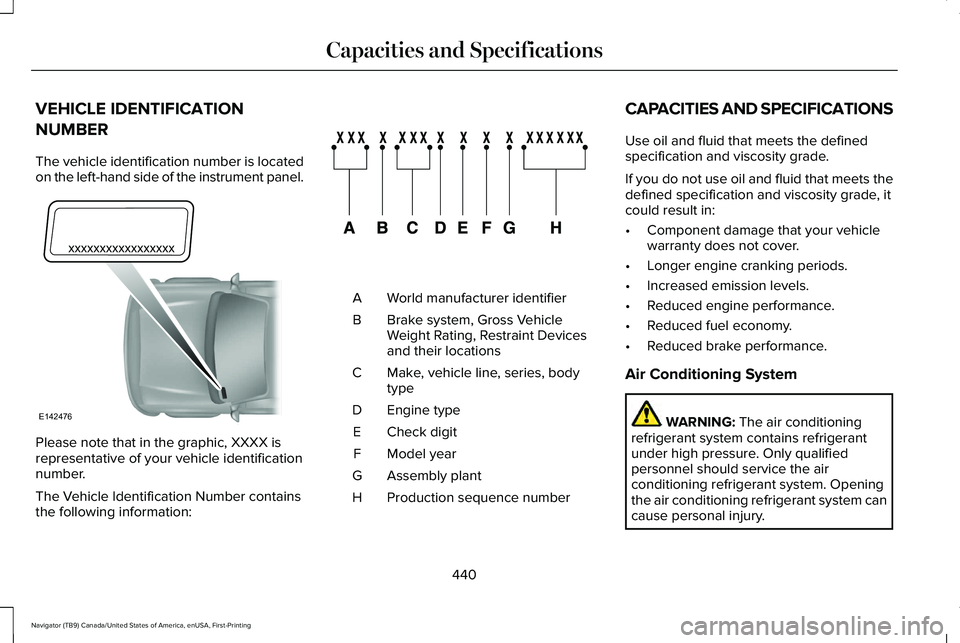
The vehicle identification number is located
on the left-hand side of the instrument panel.
Please note that in the graphic, XXXX is
representative of your vehicle identification
number.
The Vehicle Identification Number contains
the following information: World manufacturer identifier
A
Brake system, Gross Vehicle
Weight Rating, Restraint Devices
and their locations
B
Make, vehicle line, series, body
type
C
Engine type
D
Check digit
E
Model year
F
Assembly plant
G
Production sequence number
H CAPACITIES AND SPECIFICATIONS
Use oil and fluid that meets the defined
specification and viscosity grade.
If you do not use oil and fluid that meets the
defined specification and viscosity grade, it
could result in:
•
Component damage that your vehicle
warranty does not cover.
• Longer engine cranking periods.
• Increased emission levels.
• Reduced engine performance.
• Reduced fuel economy.
• Reduced brake performance.
Air Conditioning System WARNING: The air conditioning
refrigerant system contains refrigerant
under high pressure. Only qualified
personnel should service the air
conditioning refrigerant system. Opening
the air conditioning refrigerant system can
cause personal injury.
440
Navigator (TB9) Canada/United States of America, enUSA, First-Printing Capacities and SpecificationsE142476 E142477
Page 537 of 639
For a complete listing of the accessories that
are available for your vehicle, please contact
your authorized dealer or visit the online
store website:
Web Address (United States)
www.Accessories.Lincoln.com Web Address (Canada)
www.LincolnCanada.com
We will repair or replace any properly
authorized dealer-installed Lincoln Original
Accessory found to be defective in
factory-supplied materials or workmanship
during the warranty period, as well as any
component damaged by the defective
accessories.
We will warrant your Lincoln Original
Accessory through the warranty that provides
the greatest benefit:
• 24 months, unlimited mileage.
• The remainder of your new vehicle
limited warranty. *Lincoln Licensed Accessory. The accessory
manufacturer designs, develops and
therefore warrants Lincoln Licensed
Accessories, and does not design or test
these accessories to Lincoln Motor Company
engineering requirements. Contact an
authorized Lincoln dealer for the accessory
manufacturer's limited warranty details and
request a copy of the Lincoln Licensed
Accessories product limited warranty from
the accessory manufacturer.
For maximum vehicle performance, keep the
following information in mind when adding
accessories or equipment to your vehicle:
•
When adding accessories, equipment,
passengers and luggage to your vehicle,
do not exceed the total weight capacity
of the vehicle or of the front or rear axle
(GVWR or GAWR as indicated on the
Safety Compliance Certification label).
Ask an authorized dealer for specific
weight information.
• The Federal Communications
Commission (FCC) and Canadian Radio
Telecommunications Commission (CRTC)
regulate the use of mobile
communications systems that have radio
transmitters, for example two-way radios,
telephones and theft alarms. Any such
equipment installed in your vehicle
should comply with Federal
Communications Commission (FCC) and
Canadian Radio Telecommunications
Commission (CRTC) regulations and
should only be installed by an authorized
dealer.
534
Navigator (TB9) Canada/United States of America, enUSA, First-Printing Accessories
Page 634 of 639
Rear Parking Aid...........................................252
Object Distance Indicator................................253
Rear Passenger Climate Controls.............169 Directing Air to the Rear Console Air
Vents..................................................................169
Directing Air to the Rear Footwell Air Vents..................................................................170
Rear Climate Control Lock Indicator..............170
Setting the Rear Blower Motor Speed...........170
Setting the Rear Temperature..........................170
Switching Rear Auto Mode On........................
170
Switching the Rear Climate Control On and Off........................................................................\
171
Switching the Rear Heated Seats On and Off........................................................................\
171
Switching the Rear Ventilated Seats On and Off........................................................................\
171
Rear Seats
.......................................................187
Adjusting the Manual Second Row Outermost
Seats for Easy Entry.......................................187
Adjusting the Power Second Row Outermost Seats for Easy Entry.......................................188
Adjusting the Second Row Center Seat.......190
Adjusting the Second Row Outermost Seats for Easy Exit......................................................189
Folding the Power Rear Seats..........................191
Folding the Second Row Center Seat ..........190 Folding the Second Row Outermost Seats
........................................................................\
.....187
Reclining the Second Row Outermost Seat Backrest............................................................189
Rear Under Floor Storage..........................305 Advanced System: Forward Divider, Cargo
Shelf and Rear Barrier (Bulkhead
Position)............................................................306
Cargo Management System............................305
Rear View Camera.......................................266 Camera Guidelines............................................267
Manual Zoom......................................................268
Obstacle Distance Indicator............................
268
Rear Camera Delay............................................268
Using the Rear View Camera System...........
266
Rear View Camera See: Rear View Camera...................................266
Rear Window Wiper and Washers............108 Rear Window Washer.........................................109
Rear Window Wiper............................................108
Recommended Towing Weights...............327
Reduced Engine Performance
...................341
Refueling.........................................................218 Refueling System Overview.............................218
Refueling System Warning...............................220
Refueling Your Vehicle.......................................219
Remote Control
...............................................69
Car Finder...............................................................72 Intelligent Access Key.........................................69
Memory Feature....................................................74
Remote Start...........................................................73
Replacing the Battery............................................71
Sounding the Panic Alarm..................................72
Using the Key Blade.............................................70
Remote Start
....................................................171
Automatic Settings..............................................172
Heated and Cooled Features...........................172
Last Settings.........................................................172
Repairing Minor Paint Damage.................403
Replacement Parts Recommendation
........17
Collision Repairs.....................................................17
Scheduled Maintenance and Mechanical
Repairs..................................................................17
Warranty on Replacement Parts.........................17
Replacing a Lost Key or Remote Control.............................................................74
Replacing the Cabin Air Filter.....................173
Reporting Safety Defects (Canada Only)..............................................................358
Reporting Safety Defects (U.S. Only)......358
Resuming the Set Speed
............................273
Roadside Assistance...................................344
Vehicles Sold in Canada: Getting Roadside
Assistance........................................................345
Vehicles sold in the United States: Getting Roadside Assistance.....................................344
631
Navigator (TB9) Canada/United States of America, enUSA, First-Printing Index