transmission LINCOLN NAVIGATOR 2021 Service Manual
[x] Cancel search | Manufacturer: LINCOLN, Model Year: 2021, Model line: NAVIGATOR, Model: LINCOLN NAVIGATOR 2021Pages: 639, PDF Size: 6.09 MB
Page 249 of 639
Note:
The system remembers the last setting
when you start your vehicle.
Note: When in reverse (R), Auto Hold does
not function.
When the system is off, your vehicle behaves
the same as a vehicle without Auto Hold.
There is an indicator lamp in the instrument
cluster that has two modes, active and
unavailable: The auto hold active indicator
illuminates in the information
display when the system holds
your vehicle stationary. When in active mode,
press the brake pedal and the Auto Hold
button to switch the system off. The auto hold unavailable indicator
illuminates in the information
display when the system is on but
unavailable to hold your vehicle (for example,
during Active Park Assist, Stay in Neutral
Mode, or when you do not fasten your
seatbelt or close the door). Note:
Make sure you switch off Auto Hold
or use the Stay in Neutral mode before you
enter a car wash. See Automatic
Transmission (page 227).
Using Auto Hold
1. Use the brakes to bring your vehicle to a complete stop. The auto hold active
indicator illuminates in the information
display.
2. Release the brake pedal. The system holds your vehicle at a standstill. The
auto hold active indicator remains
illuminated in the information display.
3. When you press the accelerator pedal, the system releases the brakes and you
will be able to drive off. Once you drive
off, the auto hold active indicator no
longer illuminates in the information
display.
Note: The auto-start-stop system (if
equipped) may stop the engine when you
press the brake pedal. If this occurs, it
restarts once you press the accelerator
pedal. Auto Hold still holds your vehicle at
a standstill with the engine off.
246
Navigator (TB9) Canada/United States of America, enUSA, First-Printing BrakesE197933 E197934
Page 252 of 639
Electronic Stability Control
The system enhances your vehicle
’s ability
to prevent skids or lateral slides by applying
brakes to one or more of the wheels
individually and, if necessary, reducing
engine power.
Roll Stability Control
The system enhances your vehicle ’s ability
to prevent rollovers by detecting your
vehicle ’s roll motion and the rate at which it
changes by applying the brakes to one or
more wheels individually.
Traction Control
The system enhances your vehicle ’s ability
to maintain traction of the wheels by
detecting and controlling wheel spin. See
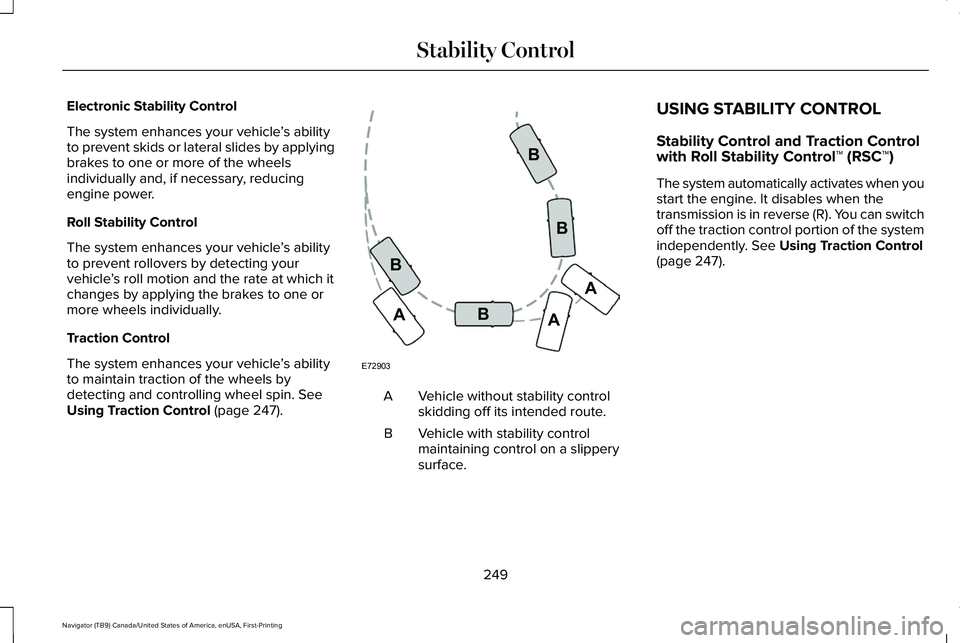
Using Traction Control (page 247). Vehicle without stability control
skidding off its intended route.
A
Vehicle with stability control
maintaining control on a slippery
surface.
B USING STABILITY CONTROL
Stability Control and Traction Control
with Roll Stability Control™ (RSC™)
The system automatically activates when you
start the engine. It disables when the
transmission is in reverse (R). You can switch
off the traction control portion of the system
independently.
See Using Traction Control
(page 247).
249
Navigator (TB9) Canada/United States of America, enUSA, First-Printing Stability ControlE72903A
AA
B
BB
B
Page 254 of 639
PRINCIPLE OF OPERATION
WARNING: To help avoid personal
injury, always use caution when in reverse
(R) and when using the sensing system. WARNING:
The system may not
detect objects with surfaces that absorb
reflection. Always drive with due care and
attention. Failure to take care may result
in a crash. WARNING:
Traffic control systems,
inclement weather, air brakes, external
motors and fans may affect the correct
operation of the sensing system.This may
cause reduced performance or false alerts. WARNING:
The system may not
detect small or moving objects, particularly
those close to the ground. Note:
Certain add-on devices installed
around the bumper or fascia may create
false beeps. For example, large trailer
hitches, bike or surfboard racks, license plate
brackets, bumper covers or any other device
that may block the normal detection zone
of the system.
Note: Keep the sensors, located on the
bumper or fascia, free from snow, ice and
large accumulations of dirt. If the sensors
are covered, the system’ s accuracy can be
affected. Do not clean the sensors with sharp
objects.
Note: If your vehicle sustains damage to the
bumper or fascia, leaving it misaligned or
bent, the sensing zone may be altered
causing inaccurate measurement of
obstacles or false alarms. See your
authorized technician.
Note: When a trailer is connected to your
vehicle, the rear parking aid may detect the
trailer and therefore provide warnings.
Disable the rear parking aid when a trailer
is connected to prevent these warnings. Note:
The sensing system cannot be turned
off when a MyKey is present. See Principle
of Operation
(page 79).
We recommend that you take some time to
get to know the system and its limitations by
reading this section.
The sensing system warns the driver of
obstacles within a certain range of your
vehicle. The system automatically turns on
each time you switch the ignition on.
When receiving a detection warning, the
radio volume reduces to a predetermined
level. After the warning goes away, the radio
volume returns to the previous level. You can turn the system on or off
by pressing the parking aid button.
If your vehicle does not have a
parking aid button, the system can be
switched off through the information display
menu or from the pop-up message that
appears once you shift the transmission into
reverse (R).
See General Information (page
134).
251
Navigator (TB9) Canada/United States of America, enUSA, First-Printing Parking AidsE139213
Page 255 of 639
If a fault is present in the system, a warning
message appears in the information display
and does not allow you to switch the system
on. See Information Messages (page 139).
If a sensor is blocked and cannot function,
the system becomes disabled and a warning
message appears in the information display.
The system returns to a normal state once
the blockage is cleared.
REAR PARKING AID WARNING:
The system may not
detect objects with surfaces that absorb
reflection. Always drive with due care and
attention. Failure to take care may result
in a crash. WARNING:
The system may not
detect small or moving objects, particularly
those close to the ground. WARNING:
To help avoid personal
injury, always use caution when in reverse
(R) and when using the sensing system. WARNING:
The parking aid system
can only assist you to detect objects when
your vehicle is moving at parking speeds.
To help avoid personal injury you must
take care when using the parking aid
system.
Note: Keep the sensors free from snow, ice
and large accumulations of dirt.
Note: Do not cover up the sensors.
Note: Do not clean the sensors with sharp
objects.
Note: If your vehicle sustains damage
leaving the sensors misaligned, this may
cause inaccurate measurements or false
alerts.
Note: Some accessories, for example large
trailer hitches or bike or surfboard racks can
cause reduced performance or false alerts.
The sensors are on the rear bumper. The sensors are active when the
transmission is in reverse (R) and the vehicle
speed is less than 3 mph (5 km/h). When the
parking aid system sounds a tone, the audio
system may reduce the set volume.
A warning tone sounds when your vehicle
approaches an object. As your vehicle
moves closer to an object, the rate of the
tone increases. The warning tone
continuously sounds when an object is 12 in
(30 cm)
or less from the center of the rear
bumper.
Note: There is a decreased coverage area
at the outer corners.
252
Navigator (TB9) Canada/United States of America, enUSA, First-Printing Parking Aids
Page 257 of 639
When you shift into reverse (R), the system
provides audible warnings and visual
indication when your vehicle is moving and
the detected object is moving toward your
vehicle. When you stop your vehicle, the
audible warnings stop after two seconds.
Visual indication remains on when the
transmission is in reverse (R).
FRONT PARKING AID
WARNING: The system may not
detect objects with surfaces that absorb
reflection. Always drive with due care and
attention. Failure to take care may result
in a crash. WARNING:
The system may not
detect small or moving objects, particularly
those close to the ground. WARNING:
To help avoid personal
injury, always use caution when in reverse
(R) and when using the sensing system. WARNING:
The parking aid system
can only assist you to detect objects when
your vehicle is moving at parking speeds.
To help avoid personal injury you must
take care when using the parking aid
system.
Note: Keep the sensors free from snow, ice
and large accumulations of dirt.
Note: Do not cover up the sensors.
Note: Do not clean the sensors with sharp
objects.
Note: If your vehicle sustains damage
leaving the sensors misaligned, this may
cause inaccurate measurements or false
alerts.
Note: Some accessories, for example large
trailer hitches or bike or surfboard racks can
cause reduced performance or false alerts.
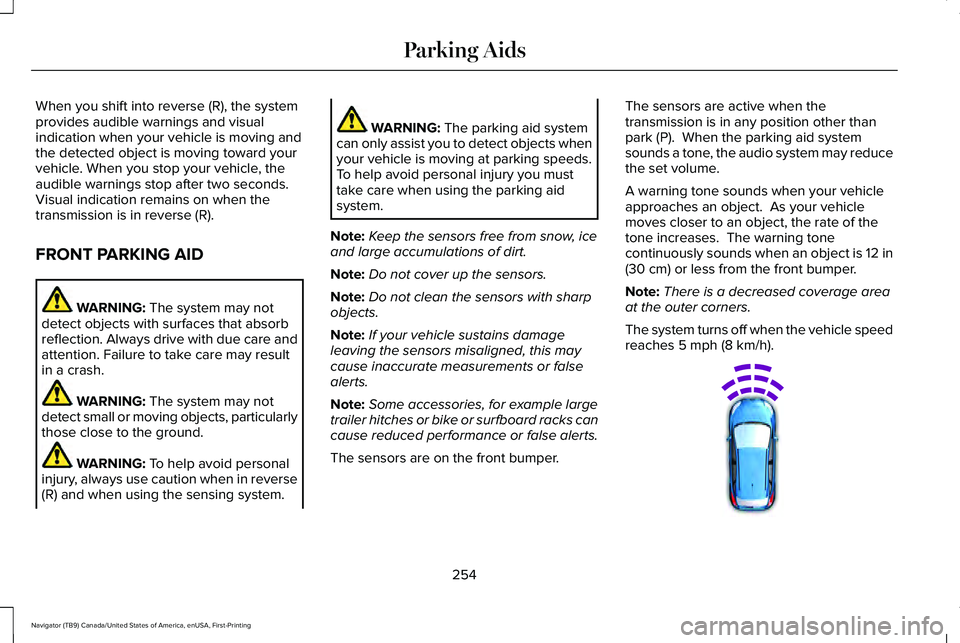
The sensors are on the front bumper. The sensors are active when the
transmission is in any position other than
park (P). When the parking aid system
sounds a tone, the audio system may reduce
the set volume.
A warning tone sounds when your vehicle
approaches an object. As your vehicle
moves closer to an object, the rate of the
tone increases. The warning tone
continuously sounds when an object is 12 in
(30 cm)
or less from the front bumper.
Note: There is a decreased coverage area
at the outer corners.
The system turns off when the vehicle speed
reaches
5 mph (8 km/h). 254
Navigator (TB9) Canada/United States of America, enUSA, First-Printing Parking AidsE187330
Page 258 of 639
The sensor coverage area is up to 28 in
(70 cm) from the center of the bumper.
If the transmission is in reverse (R), the
system detects objects when your vehicle is
moving at low speed or an object is moving
toward your vehicle, for example another
vehicle at low speed. When you stop your
vehicle, the audible warning turns off after
two seconds.
If the transmission is in any forward gear, the
system provides audible warnings when your
vehicle is moving and an object is within the
detection area. When you stop your vehicle,
the audible warning turns off after two
seconds and the visual warning turns off after
four seconds.
If the system detects a fault, a warning
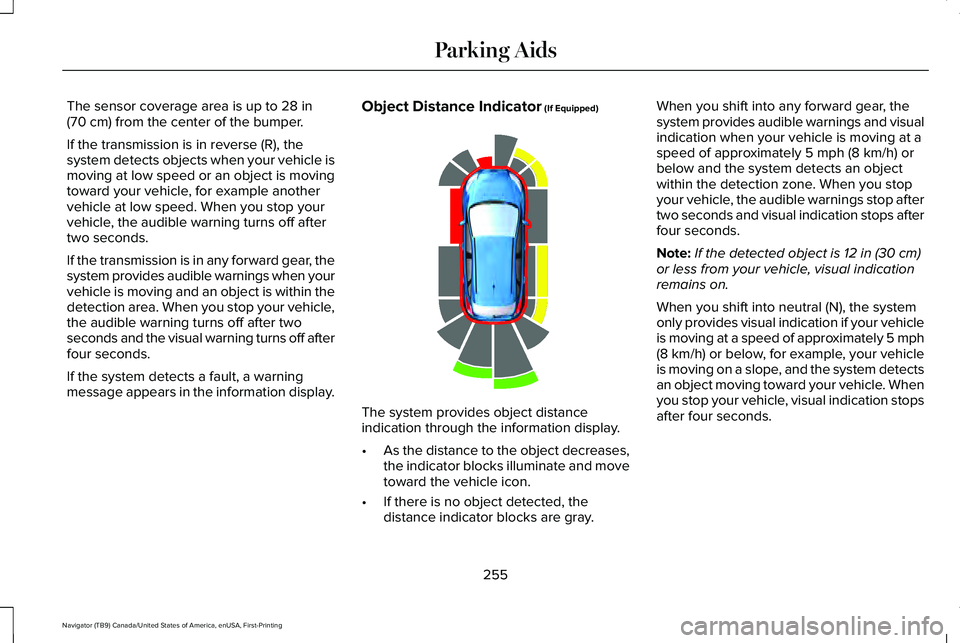
message appears in the information display. Object Distance Indicator (If Equipped)
The system provides object distance
indication through the information display.
•
As the distance to the object decreases,
the indicator blocks illuminate and move
toward the vehicle icon.
• If there is no object detected, the
distance indicator blocks are gray. When you shift into any forward gear, the
system provides audible warnings and visual
indication when your vehicle is moving at a
speed of approximately
5 mph (8 km/h) or
below and the system detects an object
within the detection zone. When you stop
your vehicle, the audible warnings stop after
two seconds and visual indication stops after
four seconds.
Note: If the detected object is
12 in (30 cm)
or less from your vehicle, visual indication
remains on.
When you shift into neutral (N), the system
only provides visual indication if your vehicle
is moving at a speed of approximately 5 mph
(8 km/h)
or below, for example, your vehicle
is moving on a slope, and the system detects
an object moving toward your vehicle. When
you stop your vehicle, visual indication stops
after four seconds.
255
Navigator (TB9) Canada/United States of America, enUSA, First-Printing Parking AidsE190459
Page 261 of 639
If the system is not available, the side
distance indicator blocks do not display.
ACTIVE PARK ASSIST
WARNING: You must remain in your
vehicle when the system turns on. At all
times, you are responsible for controlling
your vehicle, supervising the system and
intervening, if required. Failure to take care
may result in the loss of control of your
vehicle, serious personal injury or death. WARNING: The sensors may not
detect objects in heavy rain or other
conditions that cause interference. WARNING:
Active park assist does
not apply the brakes under any
circumstances. WARNING:
You are responsible for
controlling your vehicle at all times. The
system is designed to be an aid and does
not relieve you of your responsibility to
drive with due care and attention. Failure
to follow this instruction could result in the
loss of control of your vehicle, personal
injury or death.
Active park assist is a multi-step process and
may require you to shift the transmission
multiple times. Follow the onscreen
instructions until the parking maneuver is
complete.
If you are uncomfortable with the proximity
to any vehicle or object, you may choose to
override the system by grabbing the steering
wheel, or by taking full control of your vehicle
after pressing the active park assist button.
Keep your hands, hair, clothing and any
loose items clear of the steering wheel when
using active park assist.
The sensors are on the front and rear
bumpers. Note:
Keep the sensors free from snow, ice
and large accumulations of dirt.
Note: Do not cover up the sensors.
Note: Do not clean the sensors with sharp
objects.
Note: The sensors may not detect objects
with surfaces that absorb ultrasonic waves.
The sensors may falsely detect objects due
to ultrasonic interference caused by
motorcycle exhausts, truck air brakes or
horns, for example.
Note: If you change any tires, the system
must recalibrate and may not correctly
operate for a short time.
The system may not correctly operate in any
of the following conditions:
• You use a spare tire or a tire that is
significantly worn more than the other
tires.
• One or more tires are incorrectly inflated.
• You try to park on a tight curve.
• Something passes between the front
bumper and the parking space. For
example, a pedestrian or cyclist.
258
Navigator (TB9) Canada/United States of America, enUSA, First-Printing Parking Aids
Page 267 of 639
Note:
You are responsible for controlling
your vehicle and making sure the path is
clear prior to pulling into traffic.
Troubleshooting Possible Cause
Symptom
You may have switched the traction control off.
The system does not search for a parking space.
The transmission is in reverse (R). Your vehicle must be moving forward to be able to
detect a parking space.
The sensors may be blocked. For example, snow, ice or dirt buildup. Blocked sensors
can affect how the system functions.
The system does not offer a parking space.
There is not enough room in the parking space for your vehicle to safely\
park.
There is not enough space for the parking maneuver on the opposite side \
of the parking
space.
The parking space is more than 5 ft (1.5 m) or less than 2 ft (0.5 m) away.
The vehicle speed is greater than 22 mph (35 km/h) for parallel parkin\
g or greater than
19 mph (30 km/h)
for perpendicular parking.
You recently disconnected or replaced the battery. After you reconnect the battery you
must drive your vehicle on a straight road for a short period of time.
Your vehicle is rolling in the opposite direction of the current transmis\
sion position. For
example, rolling forward when in reverse (R).
The system does not correctly position your vehicle
in a parking space.
264
Navigator (TB9) Canada/United States of America, enUSA, First-Printing Parking Aids
Page 269 of 639
REAR VIEW CAMERA
WARNING: The rear view camera
system is a reverse aid supplement device
that still requires the driver to use it in
conjunction with the interior and exterior
mirrors for maximum coverage. WARNING:
Objects that are close to
either corner of the bumper or under the
bumper, might not be seen on the screen
due to the limited coverage of the camera
system. WARNING:
Reverse your vehicle
slowly. Failure to follow this instruction
could result in the loss of control of your
vehicle, personal injury or death. WARNING:
Use caution when the
rear cargo door is ajar. If the rear cargo
door is ajar, the camera will be out of
position and the video image may be
incorrect. All guidelines disappear when
the rear cargo door is ajar. Failure to follow
this instruction could result in personal
injury. WARNING:
Use caution when turning
camera features on or off when the
transmission is not in park (P). Make sure
your vehicle is not moving.
The rear view camera system provides a
video image of the area behind your vehicle.
During operation, lines appear in the display
which represent your vehicle ’s path and
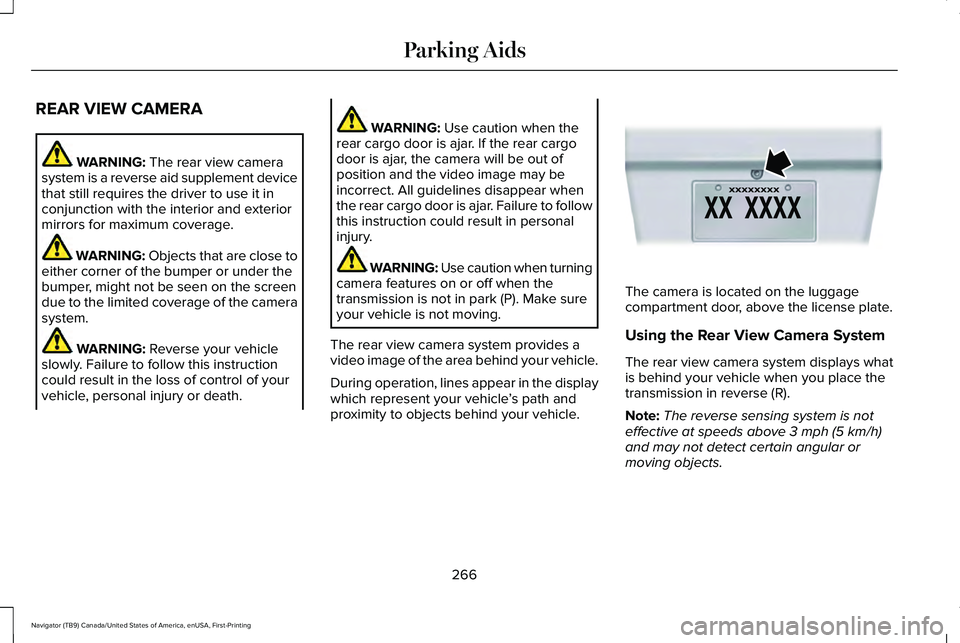
proximity to objects behind your vehicle. The camera is located on the luggage
compartment door, above the license plate.
Using the Rear View Camera System
The rear view camera system displays what
is behind your vehicle when you place the
transmission in reverse (R).
Note:
The reverse sensing system is not
effective at speeds above
3 mph (5 km/h)
and may not detect certain angular or
moving objects.
266
Navigator (TB9) Canada/United States of America, enUSA, First-Printing Parking AidsE142435
Page 270 of 639
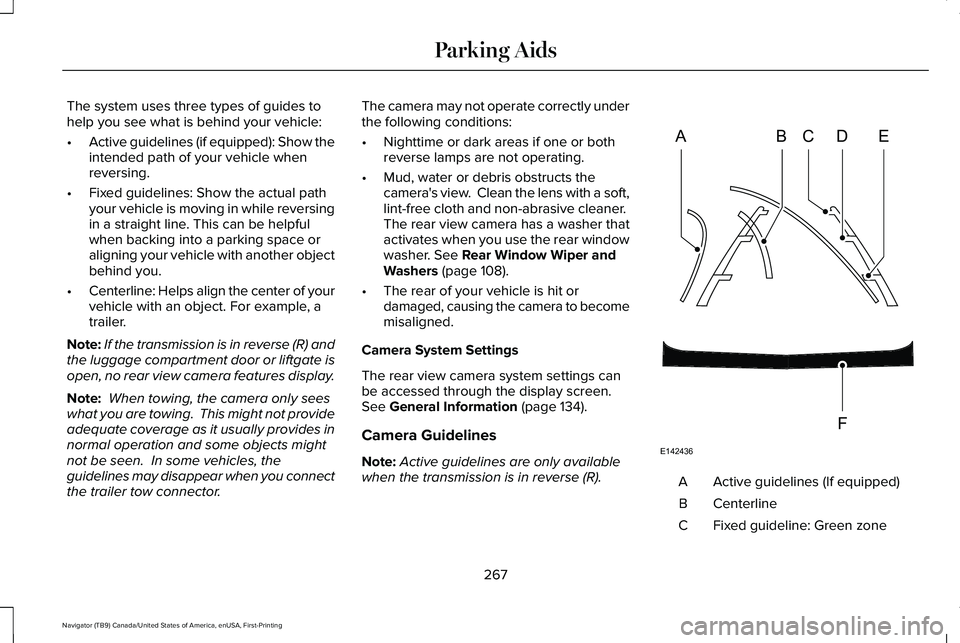
The system uses three types of guides to
help you see what is behind your vehicle:
•
Active guidelines (if equipped): Show the
intended path of your vehicle when
reversing.
• Fixed guidelines: Show the actual path
your vehicle is moving in while reversing
in a straight line. This can be helpful
when backing into a parking space or
aligning your vehicle with another object
behind you.
• Centerline: Helps align the center of your
vehicle with an object. For example, a
trailer.
Note: If the transmission is in reverse (R) and
the luggage compartment door or liftgate is
open, no rear view camera features display.
Note: When towing, the camera only sees
what you are towing. This might not provide
adequate coverage as it usually provides in
normal operation and some objects might
not be seen. In some vehicles, the
guidelines may disappear when you connect
the trailer tow connector. The camera may not operate correctly under
the following conditions:
•
Nighttime or dark areas if one or both
reverse lamps are not operating.
• Mud, water or debris obstructs the
camera's view. Clean the lens with a soft,
lint-free cloth and non-abrasive cleaner.
The rear view camera has a washer that
activates when you use the rear window
washer. See Rear Window Wiper and
Washers (page 108).
• The rear of your vehicle is hit or
damaged, causing the camera to become
misaligned.
Camera System Settings
The rear view camera system settings can
be accessed through the display screen.
See
General Information (page 134).
Camera Guidelines
Note: Active guidelines are only available
when the transmission is in reverse (R). Active guidelines (If equipped)
A
Centerline
B
Fixed guideline: Green zone
C
267
Navigator (TB9) Canada/United States of America, enUSA, First-Printing Parking AidsABCD
F
E
E142436