warning light LINCOLN NAVIGATOR 2021 Workshop Manual
[x] Cancel search | Manufacturer: LINCOLN, Model Year: 2021, Model line: NAVIGATOR, Model: LINCOLN NAVIGATOR 2021Pages: 639, PDF Size: 6.09 MB
Page 343 of 639
WARNING: Shifting the transfer case
to its neutral position for recreational
towing may cause the vehicle to roll, even
if the transmission is in park (P). It may
injure the driver and others. Make sure you
press the foot brake and the vehicle is in
a secure, safe position when you shift to
neutral (N).
Note: Failing to put the transfer case in its
neutral position can damage vehicle
components.
Note: You can check four-wheel-down
towing status at any time by opening the
driver's door or turning the ignition to the
accessory or on position. A message
appears in the information display confirming
your vehicle is in neutral tow.
To exit four-wheel-down towing and return
the transfer case to its
2H position:
1. With your vehicle still properly secured to the tow vehicle, press the brake pedal
and start the engine.
2. Switch your vehicle off by pressing the engine
START/STOP button once. 3.
Place your vehicle in accessory mode by
pressing the start button once without
pressing the brake pedal.
4. Press the brake pedal.
5. Place the transmission back into park (P).
6. Release the brake pedal.
Note: If completed successfully, the
information display shows
2H and Neutral
Tow Disabled.
Note: If the indicator light and message do
not display, you must perform the procedure
again from the beginning.
Note: You may hear an audible noise as the
transfer case shifts out of its neutral position,
this is normal.
Note: If Shift Delayed Pull Forward displays
in the instrument cluster, transfer case gear
tooth blockage is present. See the
instructions following this section.
7. Apply the parking brake, then disconnect
your vehicle from the tow vehicle. 8. Release the parking brake, start the
engine, and shift the transmission into
drive (D) to make sure the transfer case
is out of the neutral tow position.
9. If the transfer case does not successfully
shift out of neutral (N), set the parking
brake until you can have your vehicle
serviced.
Resolving the Shift Delayed Pull Forward
or To Exit 4x4 LOW Shift to N Message
If the instrument cluster displays these
messages, perform the following:
1. Press and hold the brake pedal.
2. Put the transmission into neutral (N), then
start the engine.
3. With the engine running, shift the transmission into drive (D) and let the
vehicle roll forward, up to
3 ft (1 m). You
may hear an audible noise as the transfer
case shifts out of its neutral position. This
is normal.
4. Make sure the instrument cluster displays
Neutral Tow Disabled
.
340
Navigator (TB9) Canada/United States of America, enUSA, First-Printing Towing
Page 345 of 639
•
Do not rest your foot on the brake pedal
while driving.
• Avoid carrying unnecessary weight.
• Avoid adding particular accessories to
your vehicle (e.g. bug deflectors,
rollbars/light bars, running boards, ski
racks).
• Avoid driving with the wheels out of
alignment.
BREAKING-IN
You need to break in new tires for
approximately 300 mi (480 km). During this
time, your vehicle may exhibit some unusual
driving characteristics.
DRIVING THROUGH WATER WARNING:
Do not drive through
flowing or deep water as you may lose
control of your vehicle. Note:
Driving through standing water can
cause vehicle damage.
Note: Engine damage can occur if water
enters the air filter.
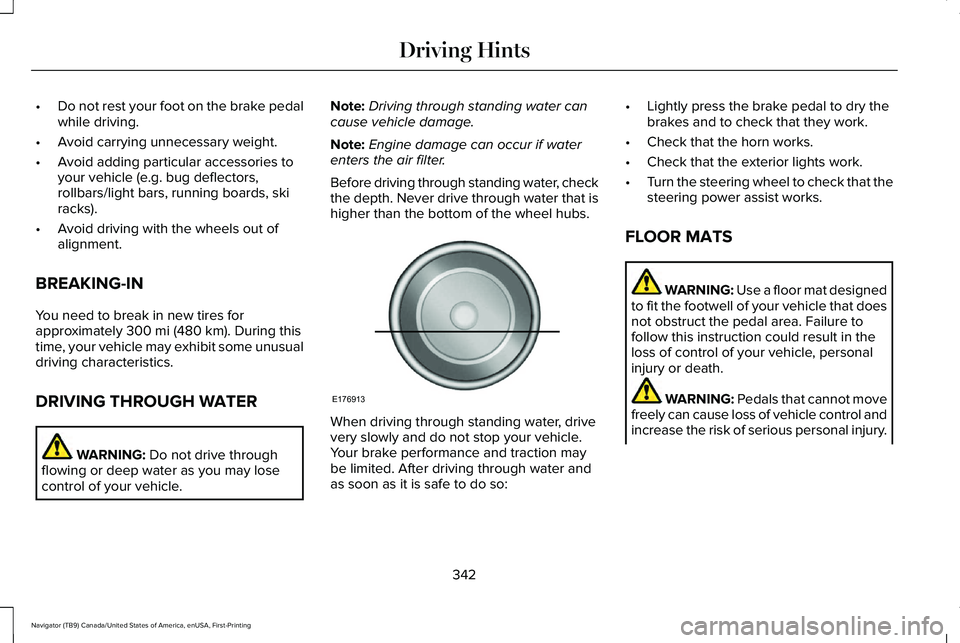
Before driving through standing water, check
the depth. Never drive through water that is
higher than the bottom of the wheel hubs. When driving through standing water, drive
very slowly and do not stop your vehicle.
Your brake performance and traction may
be limited. After driving through water and
as soon as it is safe to do so:•
Lightly press the brake pedal to dry the
brakes and to check that they work.
• Check that the horn works.
• Check that the exterior lights work.
• Turn the steering wheel to check that the
steering power assist works.
FLOOR MATS WARNING:
Use a floor mat designed
to fit the footwell of your vehicle that does
not obstruct the pedal area. Failure to
follow this instruction could result in the
loss of control of your vehicle, personal
injury or death. WARNING:
Pedals that cannot move
freely can cause loss of vehicle control and
increase the risk of serious personal injury.
342
Navigator (TB9) Canada/United States of America, enUSA, First-Printing Driving HintsE176913
Page 349 of 639
The fuel pump shutoff stops the flow of fuel
to the engine in the event of a moderate to
severe crash. Not every impact causes a
shutoff.
Should your vehicle shut off after a crash,
you may restart your vehicle.
1. Press START/STOP to switch off your
vehicle.
2. Press the brake pedal and
START/STOP
to switch on your vehicle.
3. Remove your foot from the brake pedal and press
START/STOP to switch off
your vehicle.
4. You can attempt to start the vehicle by pressing the brake pedal and
START/STOP
, or press START/STOP
without pressing the brake pedal.
5. If the vehicle does not start, repeat steps
1 through 4. JUMP STARTING THE VEHICLE WARNING:
Batteries normally
produce explosive gases which can cause
personal injury. Therefore, do not allow
flames, sparks or lighted substances to
come near the battery. When working near
the battery, always shield your face and
protect your eyes. Always provide correct
ventilation. WARNING:
Keep batteries out of
reach of children. Batteries contain sulfuric
acid. Avoid contact with skin, eyes or
clothing. Shield your eyes when working
near the battery to protect against possible
splashing of acid solution. In case of acid
contact with skin or eyes, flush immediately
with water for a minimum of 15 minutes and
get prompt medical attention. If acid is
swallowed, call a physician immediately. WARNING:
Use only adequately
sized cables with insulated clamps. Note:
To avoid reverse polarity connections,
make sure that you correctly identify the
positive (+) and negative (-) terminals on both
the disabled and booster vehicles before
connecting the cables. Stay clear of moving
parts.
Preparing Your Vehicle
Do not attempt to push-start your automatic
transmission vehicle.
Note: Attempting to push-start a vehicle with
an automatic transmission may cause
transmission damage.
Note: Use only a 12-volt supply to start your
vehicle.
Note: Do not disconnect the battery of the
disabled vehicle as this could damage the
vehicle electrical system.
Park the booster vehicle close to the hood
of the disabled vehicle, making sure the two
vehicles do not touch.
346
Navigator (TB9) Canada/United States of America, enUSA, First-Printing Roadside Emergencies
Page 385 of 639
From the main menu scroll to:
Action and description
Message
Press the right arrow button,
then from this menu scroll to
the following message.
Settings
Press the right arrow button,
then from this menu scroll to
the following message.
Vehicle
Press the right arrow button,
then from this menu scroll to
the following message.
Oil Life
Press and hold the OK button
until the instrument cluster
displays the following
message.
Hold OK to
Reset
Reset Successful
When the oil change indicator
resets the instrument cluster
displays 100%.
Remaining Life
{00}% Action and description
Message
If the instrument cluster
displays one of the following
messages, repeat the
process.
Not Reset
Reset Cancelled
CHANGING THE ENGINE AIR
FILTER WARNING: To reduce the risk of
vehicle damage and personal burn injuries,
do not start your engine with the air
cleaner removed and do not remove it
while the engine is running.
Note: Failure to use the correct air filter
element may result in severe engine
damage. Resulting component damage may
not be covered by the vehicle Warranty. When changing the air filter element, use
only the air filter element listed.
See
Motorcraft Parts (page 439).
Change the air filter element at the correct
interval. See Scheduled Maintenance (page
543
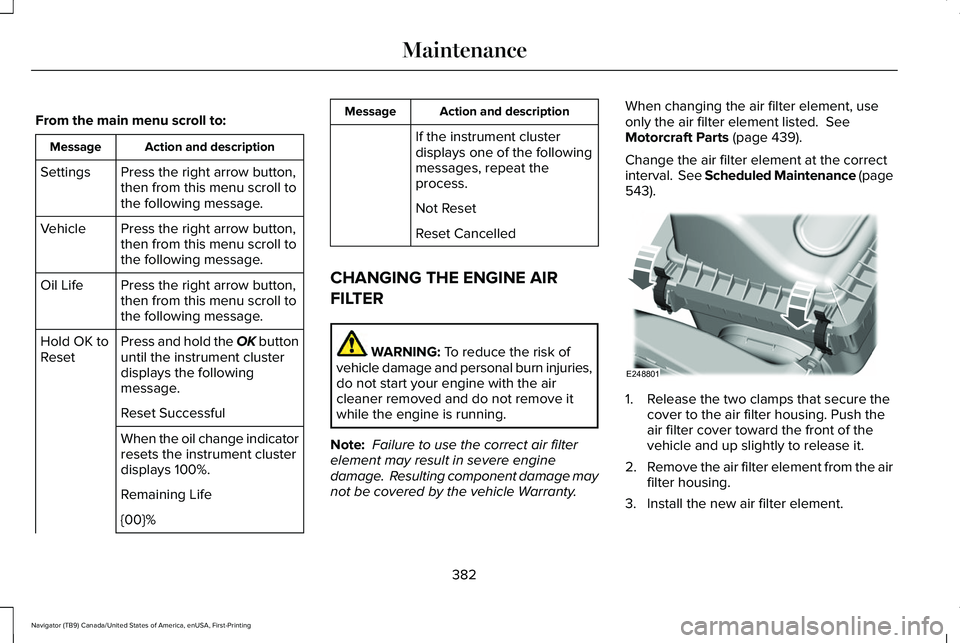
). 1. Release the two clamps that secure the
cover to the air filter housing. Push the
air filter cover toward the front of the
vehicle and up slightly to release it.
2. Remove the air filter element from the air
filter housing.
3. Install the new air filter element.
382
Navigator (TB9) Canada/United States of America, enUSA, First-Printing MaintenanceE248801
Page 386 of 639
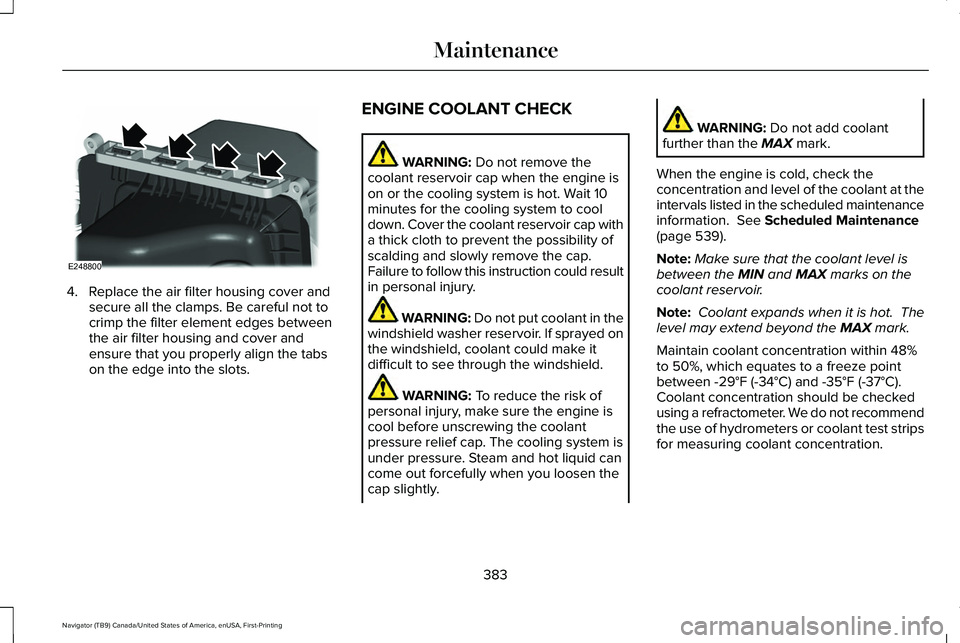
4. Replace the air filter housing cover and
secure all the clamps. Be careful not to
crimp the filter element edges between
the air filter housing and cover and
ensure that you properly align the tabs
on the edge into the slots. ENGINE COOLANT CHECK WARNING: Do not remove the
coolant reservoir cap when the engine is
on or the cooling system is hot. Wait 10
minutes for the cooling system to cool
down. Cover the coolant reservoir cap with
a thick cloth to prevent the possibility of
scalding and slowly remove the cap.
Failure to follow this instruction could result
in personal injury. WARNING: Do not put coolant in the
windshield washer reservoir. If sprayed on
the windshield, coolant could make it
difficult to see through the windshield. WARNING:
To reduce the risk of
personal injury, make sure the engine is
cool before unscrewing the coolant
pressure relief cap. The cooling system is
under pressure. Steam and hot liquid can
come out forcefully when you loosen the
cap slightly. WARNING:
Do not add coolant
further than the MAX mark.
When the engine is cold, check the
concentration and level of the coolant at the
intervals listed in the scheduled maintenance
information.
See Scheduled Maintenance
(page 539).
Note: Make sure that the coolant level is
between the
MIN and MAX marks on the
coolant reservoir.
Note: Coolant expands when it is hot. The
level may extend beyond the
MAX mark.
Maintain coolant concentration within 48%
to 50%, which equates to a freeze point
between
-29°F (-34°C) and -35°F (-37°C).
Coolant concentration should be checked
using a refractometer. We do not recommend
the use of hydrometers or coolant test strips
for measuring coolant concentration.
383
Navigator (TB9) Canada/United States of America, enUSA, First-Printing MaintenanceE248800
Page 393 of 639
Note:
If the brake fluid level is below the MIN
mark or above the MAX mark, have your
vehicle checked as soon as possible.
Note: To avoid fluid contamination, the
reservoir cap must remain in place and fully
tight, unless you are adding fluid.
Only use fluid that meets our specifications.
See
Capacities and Specifications (page
440).
Brake Fluid Service Interval
Brake fluid absorbs water over time which
degrades the effectiveness of the brake fluid.
Change the brake fluid at the specified
intervals to prevent degraded braking
performance.
For detailed interval information, see
Scheduled Maintenance in your Owner's
Manual or your local maintenance guide.
POWER STEERING FLUID CHECK
Your vehicle is equipped with an electric
power steering (EPS) system. There is no
fluid reservoir to check or fill. CHANGING THE 12V BATTERY WARNING:
Batteries normally
produce explosive gases which can cause
personal injury. Therefore, do not allow
flames, sparks or lighted substances to
come near the battery. When working near
the battery, always shield your face and
protect your eyes. Always provide correct
ventilation. WARNING:
When lifting a
plastic-cased battery, excessive pressure
on the end walls could cause acid to flow
through the vent caps, resulting in personal
injury and damage to the vehicle or battery.
Lift the battery with a battery carrier or with
your hands on opposite corners. WARNING:
Keep batteries out of
reach of children. Batteries contain sulfuric
acid. Avoid contact with skin, eyes or
clothing. Shield your eyes when working
near the battery to protect against possible
splashing of acid solution. In case of acid
contact with skin or eyes, flush immediately
with water for a minimum of 15 minutes and
get prompt medical attention. If acid is
swallowed, call a physician immediately. WARNING:
Battery posts, terminals
and related accessories contain lead and
lead compounds, chemicals known to the
State of California to cause cancer and
reproductive harm. Wash your hands after
handling
.
390
Navigator (TB9) Canada/United States of America, enUSA, First-Printing Maintenance
Page 403 of 639
Note:
Do not use razor blades or other
sharp objects to clean or remove decals from
the inside of the heated rear window. The
vehicle warranty does not cover damage
caused to the heated rear window grid lines.
CLEANING THE INTERIOR WARNING: Do not use cleaning
solvents, bleach or dye on the vehicle's
seatbelts, as these actions may weaken
the belt webbing. WARNING:
On vehicles equipped
with seat-mounted airbags, do not use
chemical solvents or strong detergents.
Such products could contaminate the side
airbag system and affect performance of
the side airbag in a crash. Note:
Follow the same procedure for
cleaning leather seats when cleaning leather
interior.
See Cleaning Leather Seats (page
403).
Note: Do not use household cleaning
products or glass cleaners, which can stain
and discolor the fabric and affect the flame
retardant abilities of the seat materials.
For fabric, carpets, cloth seats, safety belts
and seats equipped with side airbags:
• Remove dust and loose dirt with a
vacuum cleaner.
• Remove light stains and soil with
Motorcraft® Professional Strength Carpet
& Upholstery Cleaner.
For grease or tar stains:
• Spot clean the area with Motorcraft® Spot
and Stain Remover. In Canada, use
Motorcraft® Multi-Purpose Cleaner.
• If a ring forms on the fabric after spot
cleaning, clean the entire area
immediately, but do not oversaturate or
the ring will set. Cleaning Black Label or Presidential
Interior
(If Equipped)
Note: Alcantara microfiber cloth fabric is
made of polyester microfiber with
micro-porous polyurethane. Using
commercially available fabric cleaners can
cause permanent damage.
Note: Do not use commercially available
leather and vinyl cleaning products on
Alcantara microfiber cloth fabric.
Note: Lincoln Black Label or Presidential
vehicles may have Alcantara microfiber cloth
fabric on the seats, headliner, floor mats and
door panels.
Depending on the type of stain, use water,
lemon juice or pure ethyl alcohol when
cleaning. For cleaning Alcantara microfiber
cloth, refer to the following chart:
400
Navigator (TB9) Canada/United States of America, enUSA, First-Printing Vehicle Care
Page 419 of 639
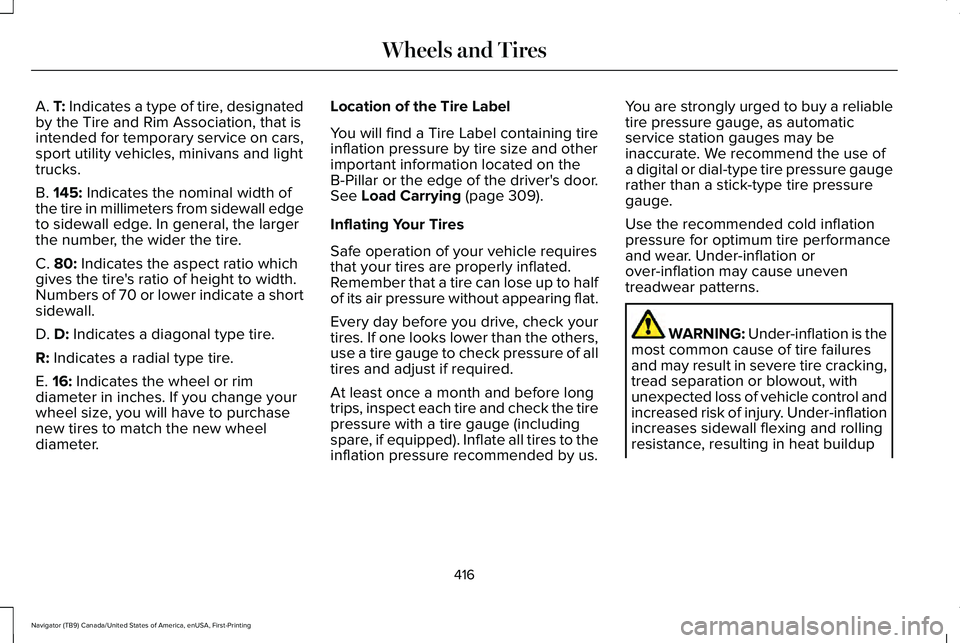
A. T: Indicates a type of tire, designated
by the Tire and Rim Association, that is
intended for temporary service on cars,
sport utility vehicles, minivans and light
trucks.
B.
145: Indicates the nominal width of
the tire in millimeters from sidewall edge
to sidewall edge. In general, the larger
the number, the wider the tire.
C.
80: Indicates the aspect ratio which
gives the tire's ratio of height to width.
Numbers of 70 or lower indicate a short
sidewall.
D.
D: Indicates a diagonal type tire.
R:
Indicates a radial type tire.
E.
16: Indicates the wheel or rim
diameter in inches. If you change your
wheel size, you will have to purchase
new tires to match the new wheel
diameter. Location of the Tire Label
You will find a Tire Label containing tire
inflation pressure by tire size and other
important information located on the
B-Pillar or the edge of the driver's door.
See
Load Carrying (page 309).
Inflating Your Tires
Safe operation of your vehicle requires
that your tires are properly inflated.
Remember that a tire can lose up to half
of its air pressure without appearing flat.
Every day before you drive, check your
tires. If one looks lower than the others,
use a tire gauge to check pressure of all
tires and adjust if required.
At least once a month and before long
trips, inspect each tire and check the tire
pressure with a tire gauge (including
spare, if equipped). Inflate all tires to the
inflation pressure recommended by us. You are strongly urged to buy a reliable
tire pressure gauge, as automatic
service station gauges may be
inaccurate. We recommend the use of
a digital or dial-type tire pressure gauge
rather than a stick-type tire pressure
gauge.
Use the recommended cold inflation
pressure for optimum tire performance
and wear. Under-inflation or
over-inflation may cause uneven
treadwear patterns.
WARNING: Under-inflation is the
most common cause of tire failures
and may result in severe tire cracking,
tread separation or blowout, with
unexpected loss of vehicle control and
increased risk of injury. Under-inflation
increases sidewall flexing and rolling
resistance, resulting in heat buildup
416
Navigator (TB9) Canada/United States of America, enUSA, First-Printing Wheels and Tires
Page 429 of 639
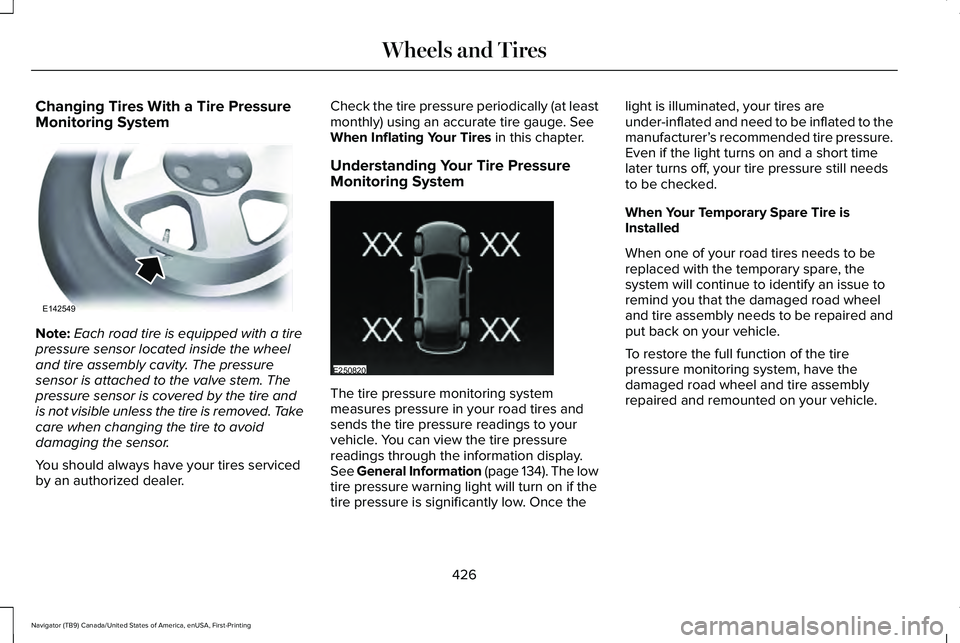
Changing Tires With a Tire Pressure
Monitoring System
Note:
Each road tire is equipped with a tire
pressure sensor located inside the wheel
and tire assembly cavity. The pressure
sensor is attached to the valve stem. The
pressure sensor is covered by the tire and
is not visible unless the tire is removed. Take
care when changing the tire to avoid
damaging the sensor.
You should always have your tires serviced
by an authorized dealer. Check the tire pressure periodically (at least
monthly) using an accurate tire gauge. See
When Inflating Your Tires in this chapter.
Understanding Your Tire Pressure
Monitoring System The tire pressure monitoring system
measures pressure in your road tires and
sends the tire pressure readings to your
vehicle. You can view the tire pressure
readings through the information display.
See General Information (page 134). The low
tire pressure warning light will turn on if the
tire pressure is significantly low. Once thelight is illuminated, your tires are
under-inflated and need to be inflated to the
manufacturer’
s recommended tire pressure.
Even if the light turns on and a short time
later turns off, your tire pressure still needs
to be checked.
When Your Temporary Spare Tire is
Installed
When one of your road tires needs to be
replaced with the temporary spare, the
system will continue to identify an issue to
remind you that the damaged road wheel
and tire assembly needs to be repaired and
put back on your vehicle.
To restore the full function of the tire
pressure monitoring system, have the
damaged road wheel and tire assembly
repaired and remounted on your vehicle.
426
Navigator (TB9) Canada/United States of America, enUSA, First-Printing Wheels and TiresE142549 E250820
Page 431 of 639
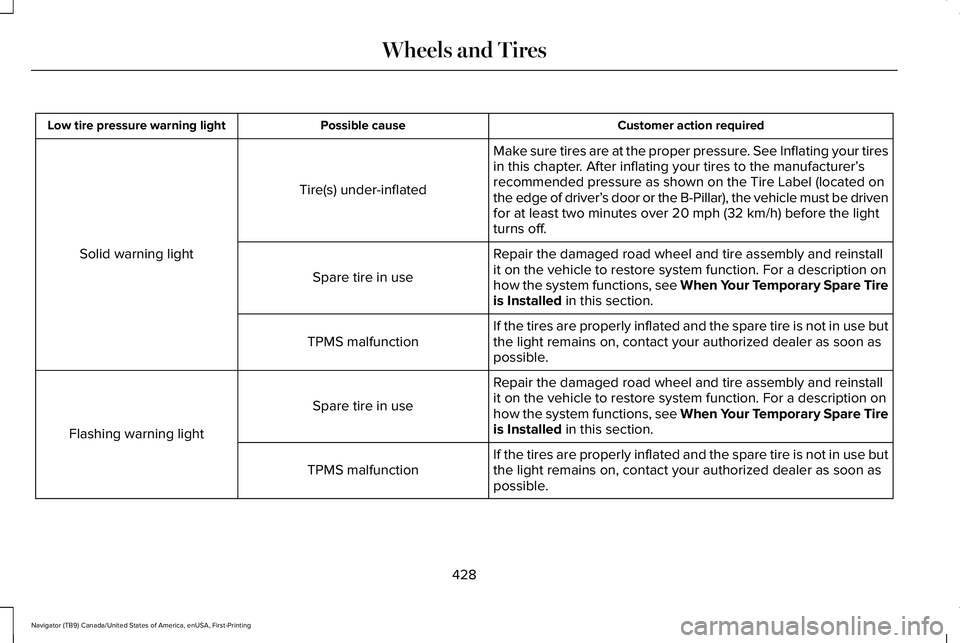
Customer action required
Possible cause
Low tire pressure warning light
Make sure tires are at the proper pressure. See Inflating your tires
in this chapter. After inflating your tires to the manufacturer’s
recommended pressure as shown on the Tire Label (located on
the edge of driver’ s door or the B-Pillar), the vehicle must be driven
for at least two minutes over 20 mph (32 km/h) before the light
turns off.
Tire(s) under-inflated
Solid warning light Repair the damaged road wheel and tire assembly and reinstall
it on the vehicle to restore system function. For a description on
how the system functions, see When Your Temporary Spare Tire
is Installed
in this section.
Spare tire in use
If the tires are properly inflated and the spare tire is not in use but
the light remains on, contact your authorized dealer as soon as
possible.
TPMS malfunction
Repair the damaged road wheel and tire assembly and reinstall
it on the vehicle to restore system function. For a description on
how the system functions, see When Your Temporary Spare Tire
is Installed
in this section.
Spare tire in use
Flashing warning light If the tires are properly inflated and the spare tire is not in use but
the light remains on, contact your authorized dealer as soon as
possible.
TPMS malfunction
428
Navigator (TB9) Canada/United States of America, enUSA, First-Printing Wheels and Tires