oil dipstick LINCOLN NAVIGATOR 2021 Owners Manual
[x] Cancel search | Manufacturer: LINCOLN, Model Year: 2021, Model line: NAVIGATOR, Model: LINCOLN NAVIGATOR 2021Pages: 639, PDF Size: 6.09 MB
Page 9 of 639
Reporting Safety Defects (Canada Only)
......................................................................358
Fuses
Fuse Specification Chart ...........................
360
Changing a Fuse ..........................................
374
Maintenance
General Information ....................................
377
Opening and Closing the Hood ...............
377
Under Hood Overview ...............................
379
Engine Oil Dipstick .....................................
380
Engine Oil Check ........................................
380
Oil Change Indicator Reset .......................
381
Changing the Engine Air Filter ................
382
Engine Coolant Check ...............................
383
Automatic Transmission Fluid Check ......
388
Transfer Case Fluid Check .......................
388
Brake Fluid Check ......................................
389
Power Steering Fluid Check ....................
390
Changing the 12V Battery .........................
390
Adjusting the Headlamps .........................
392
Washer Fluid Check ...................................
394Fuel Filter
.......................................................
394
Checking the Wiper Blades ......................
394
Changing the Wiper Blades .....................
394
Changing a Bulb ..........................................
395
Vehicle Care
General Information ...................................
396
Cleaning Products ......................................
396
Cleaning the Exterior ..................................
397
Waxing ...........................................................
398
Cleaning the Engine ...................................
399
Cleaning the Windows and Wiper Blades ......................................................................
399
Cleaning the Interior ..................................
400
Cleaning the Instrument Panel and Instrument Cluster Lens ........................
402
Cleaning Leather Seats .............................
403
Repairing Minor Paint Damage ................
403
Cleaning the Wheels ..................................
403
Vehicle Storage ...........................................
404
Body Styling Kits .........................................
406Wheels and Tires
General Information
....................................
407
Tire Care ........................................................
409
Using Snow Chains .....................................
423
Tire Pressure Monitoring System ............
424
Changing a Road Wheel ...........................
429
Technical Specifications ............................
436
Capacities and Specifications
Engine Specifications .................................
438
Motorcraft Parts ...........................................
439
Vehicle Identification Number .................
440
Capacities and Specifications ..................
440
Bulb Specification Chart .............................
451
Vehicle Identification
Installing the Vehicle Identification Card ......................................................................
454
Connected Vehicle
Connected Vehicle Requirements ..........
455
Connected Vehicle Limitations ................
455
6
Navigator (TB9) Canada/United States of America, enUSA, First-Printing Table of Contents
Page 382 of 639
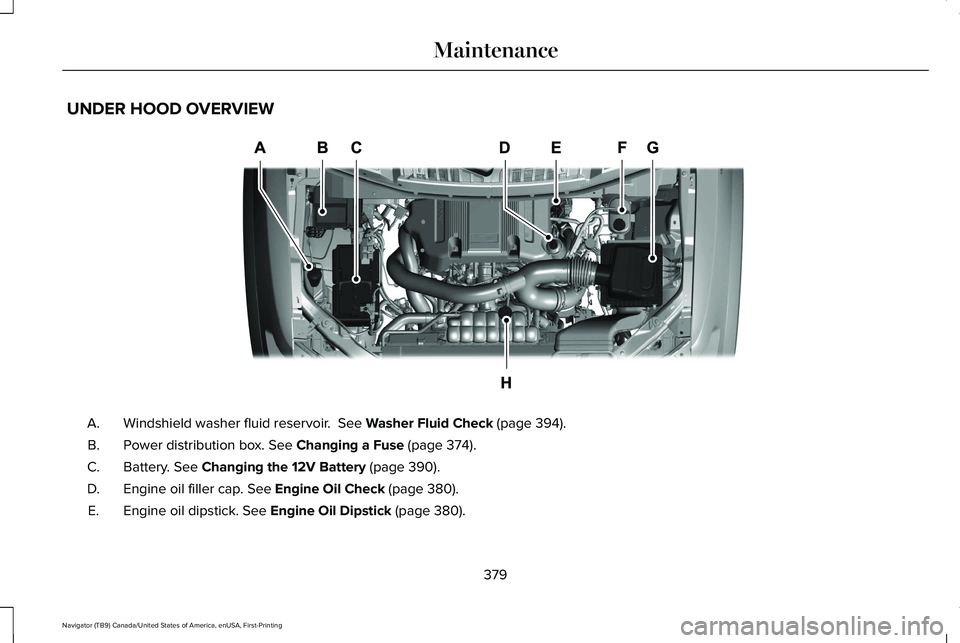
UNDER HOOD OVERVIEW
Windshield washer fluid reservoir. See Washer Fluid Check (page 394).
A.
Power distribution box.
See Changing a Fuse (page 374).
B.
Battery.
See Changing the 12V Battery (page 390).
C.
Engine oil filler cap.
See Engine Oil Check (page 380).
D.
Engine oil dipstick.
See Engine Oil Dipstick (page 380).
E.
379
Navigator (TB9) Canada/United States of America, enUSA, First-Printing MaintenanceE258054
Page 383 of 639
Brake fluid reservoir. See Brake Fluid Check (page 389).
F.
Air filter.
See Changing the Engine Air Filter (page 382).
G.
Engine coolant reservoir.
See Engine Coolant Check (page 383).
H.
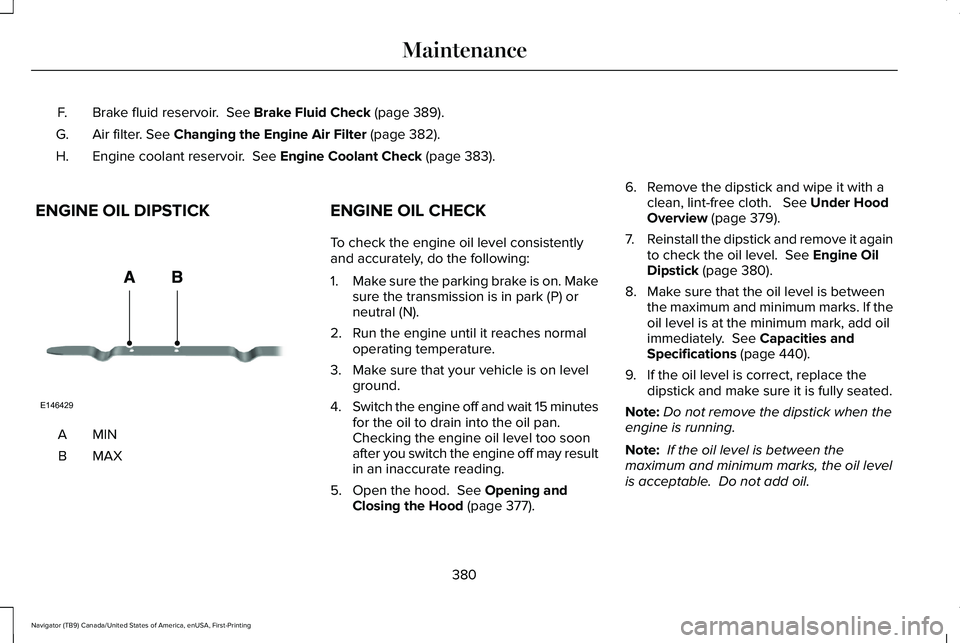
ENGINE OIL DIPSTICK MINA
MAXB ENGINE OIL CHECK
To check the engine oil level consistently
and accurately, do the following:
1.
Make sure the parking brake is on. Make
sure the transmission is in park (P) or
neutral (N).
2. Run the engine until it reaches normal operating temperature.
3. Make sure that your vehicle is on level ground.
4. Switch the engine off and wait 15 minutes
for the oil to drain into the oil pan.
Checking the engine oil level too soon
after you switch the engine off may result
in an inaccurate reading.
5. Open the hood.
See Opening and
Closing the Hood (page 377). 6. Remove the dipstick and wipe it with a
clean, lint-free cloth.
See Under Hood
Overview (page 379).
7. Reinstall the dipstick and remove it again
to check the oil level.
See Engine Oil
Dipstick (page 380).
8. Make sure that the oil level is between the maximum and minimum marks. If the
oil level is at the minimum mark, add oil
immediately.
See Capacities and
Specifications (page 440).
9. If the oil level is correct, replace the dipstick and make sure it is fully seated.
Note: Do not remove the dipstick when the
engine is running.
Note: If the oil level is between the
maximum and minimum marks, the oil level
is acceptable. Do not add oil.
380
Navigator (TB9) Canada/United States of America, enUSA, First-Printing MaintenanceE146429
Page 384 of 639
Note:
The oil consumption of new engines
reaches its normal level after approximately
3,000 mi (5,000 km).
Adding Engine Oil WARNING:
Do not remove the filler
cap when the engine is running.
Do not use supplemental engine oil additives
because they are unnecessary and could
lead to engine damage that may not be
covered by the vehicle Warranty. Only use oils certified for gasoline engines
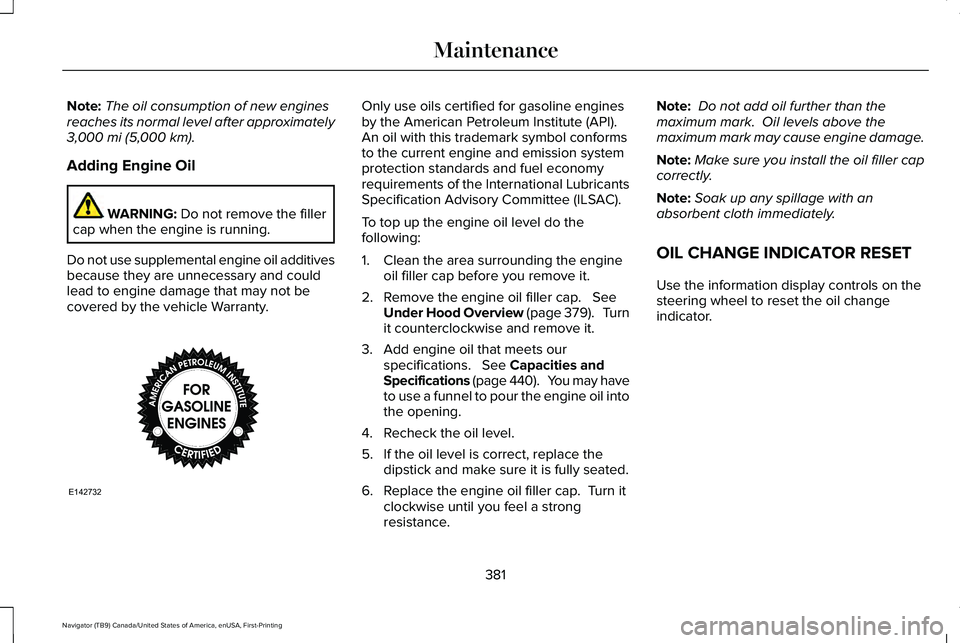
by the American Petroleum Institute (API).
An oil with this trademark symbol conforms
to the current engine and emission system
protection standards and fuel economy
requirements of the International Lubricants
Specification Advisory Committee (ILSAC).
To top up the engine oil level do the
following:
1. Clean the area surrounding the engine
oil filler cap before you remove it.
2. Remove the engine oil filler cap.
See
Under Hood Overview (page 379). Turn
it counterclockwise and remove it.
3. Add engine oil that meets our specifications.
See Capacities and
Specifications (page 440). You may have
to use a funnel to pour the engine oil into
the opening.
4. Recheck the oil level.
5. If the oil level is correct, replace the dipstick and make sure it is fully seated.
6. Replace the engine oil filler cap. Turn it clockwise until you feel a strong
resistance. Note:
Do not add oil further than the
maximum mark. Oil levels above the
maximum mark may cause engine damage.
Note: Make sure you install the oil filler cap
correctly.
Note: Soak up any spillage with an
absorbent cloth immediately.
OIL CHANGE INDICATOR RESET
Use the information display controls on the
steering wheel to reset the oil change
indicator.
381
Navigator (TB9) Canada/United States of America, enUSA, First-Printing MaintenanceE142732
Page 548 of 639
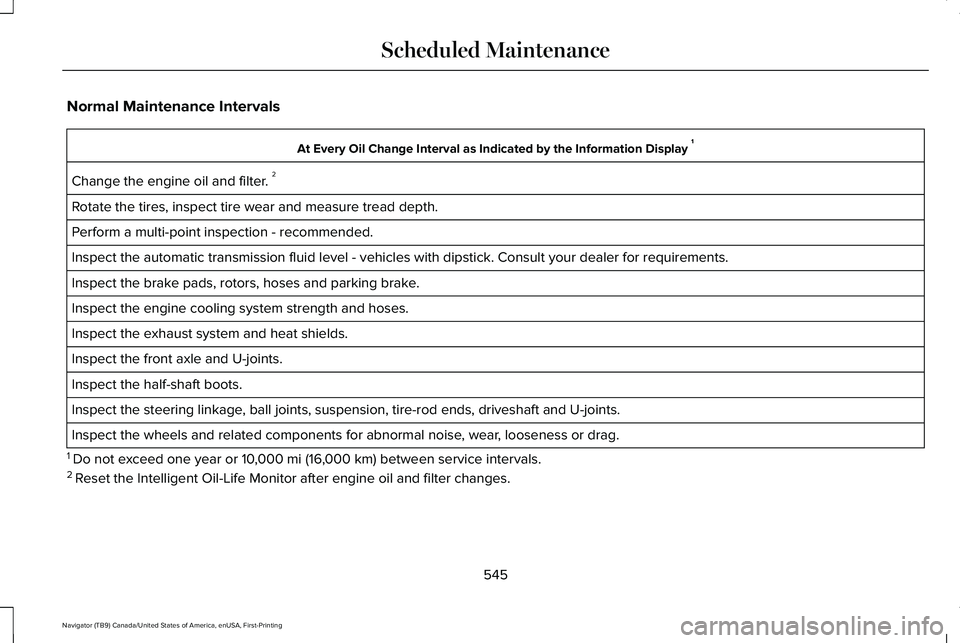
Normal Maintenance Intervals
At Every Oil Change Interval as Indicated by the Information Display
1
Change the engine oil and filter. 2
Rotate the tires, inspect tire wear and measure tread depth.
Perform a multi-point inspection - recommended.
Inspect the automatic transmission fluid level - vehicles with dipstick.\
Consult your dealer for requirements.
Inspect the brake pads, rotors, hoses and parking brake.
Inspect the engine cooling system strength and hoses.
Inspect the exhaust system and heat shields.
Inspect the front axle and U-joints.
Inspect the half-shaft boots.
Inspect the steering linkage, ball joints, suspension, tire-rod ends, driveshaft and U-joints.
Inspect the wheels and related components for abnormal noise, wear, looseness or drag.
1 Do not exceed one year or 10,000 mi (16,000 km) between service intervals.
2 Reset the Intelligent Oil-Life Monitor after engine oil and filter change\
s.
545
Navigator (TB9) Canada/United States of America, enUSA, First-Printing Scheduled Maintenance
Page 628 of 639
Vehicles With SYNC..............................................15
Daytime Running Lamps - Vehicles With: Configurable Daytime Running
Lamps.............................................................112
Daytime Running Lamps - Vehicles With: Daytime Running Lamps (DRL)................112
Declaration of Conformity - Vehicles With: SYNC 3
.........................................................620
Radio Frequency Statement...........................620
Digital Radio
..................................................465
HD Radio Reception and Station
Troubleshooting.............................................466
Direction Indicators
........................................114
Lane Change.........................................................114
Doors and Locks.............................................84
Drive Mode Control.....................................303 Lincoln Drive Modes..........................................303
Driver Alert
......................................................281
Using Driver Alert...............................................282
Driver and Passenger Airbags....................58 Children and Airbags...........................................59
Proper Driver and Front Passenger Seating
Adjustment.........................................................59
Driving Aids....................................................281
Driving Hints...................................................341
Driving Through Water................................342 DRL
See: Daytime Running Lamps - Vehicles With:
Configurable Daytime Running Lamps......112
See: Daytime Running Lamps - Vehicles With: Daytime Running Lamps (DRL).....................112
E
Economical Driving
.......................................341
Electric Parking Brake.................................242
Applying the Electric Parking Brake..............242
Automatically Releasing the Electric Parking
Brake.................................................................243
Manually Releasing the Electric Parking Brake.................................................................243
Releasing the Electric Parking Brake if the Vehicle Battery is Running Out of
Charge..............................................................243
Electromagnetic Compatibility..................584
Emergency Call Limitations.........................68
Emergency Call Requirements
....................67
Emission Law.................................................223 Noise Emissions Warranty, Prohibited
Tampering Acts and Maintenance............224
Tampering With a Noise Control System..............................................................223 End User License Agreement...................589
VEHICLE SOFTWARE END USER LICENSE
AGREEMENT (EULA) ....................................589
Engine Block Heater
....................................210
Using the Engine Block Heater........................211
Engine Coolant Check................................383 Adding Coolant...................................................384
Coolant Change..................................................386
Engine Coolant Temperature
Management...................................................387
Fail-Safe Cooling................................................386
Recycled Coolant...............................................385
Severe Climates.................................................385
Engine Emission Control............................223
Engine Immobilizer See: Passive Anti-Theft System........................
95
Engine Oil Check.........................................380 Adding Engine Oil...............................................381
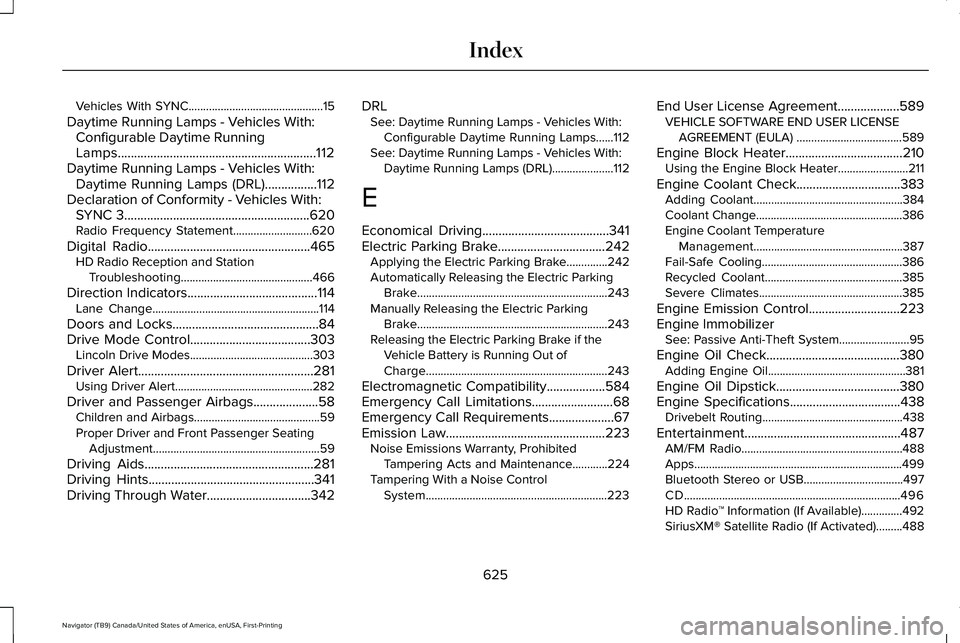
Engine Oil Dipstick......................................380
Engine Specifications
..................................438
Drivebelt Routing................................................438
Entertainment................................................487 AM/FM Radio.......................................................488
Apps.......................................................................499
Bluetooth Stereo or USB..................................497
CD........................................................................\
..496
HD Radio ™ Information (If Available)..............492
SiriusXM® Satellite Radio (If Activated).........488
625
Navigator (TB9) Canada/United States of America, enUSA, First-Printing Index