tire pressure LINCOLN NAVIGATOR 2021 Owners Manual
[x] Cancel search | Manufacturer: LINCOLN, Model Year: 2021, Model line: NAVIGATOR, Model: LINCOLN NAVIGATOR 2021Pages: 639, PDF Size: 6.09 MB
Page 9 of 639
Reporting Safety Defects (Canada Only)
......................................................................358
Fuses
Fuse Specification Chart ...........................
360
Changing a Fuse ..........................................
374
Maintenance
General Information ....................................
377
Opening and Closing the Hood ...............
377
Under Hood Overview ...............................
379
Engine Oil Dipstick .....................................
380
Engine Oil Check ........................................
380
Oil Change Indicator Reset .......................
381
Changing the Engine Air Filter ................
382
Engine Coolant Check ...............................
383
Automatic Transmission Fluid Check ......
388
Transfer Case Fluid Check .......................
388
Brake Fluid Check ......................................
389
Power Steering Fluid Check ....................
390
Changing the 12V Battery .........................
390
Adjusting the Headlamps .........................
392
Washer Fluid Check ...................................
394Fuel Filter
.......................................................
394
Checking the Wiper Blades ......................
394
Changing the Wiper Blades .....................
394
Changing a Bulb ..........................................
395
Vehicle Care
General Information ...................................
396
Cleaning Products ......................................
396
Cleaning the Exterior ..................................
397
Waxing ...........................................................
398
Cleaning the Engine ...................................
399
Cleaning the Windows and Wiper Blades ......................................................................
399
Cleaning the Interior ..................................
400
Cleaning the Instrument Panel and Instrument Cluster Lens ........................
402
Cleaning Leather Seats .............................
403
Repairing Minor Paint Damage ................
403
Cleaning the Wheels ..................................
403
Vehicle Storage ...........................................
404
Body Styling Kits .........................................
406Wheels and Tires
General Information
....................................
407
Tire Care ........................................................
409
Using Snow Chains .....................................
423
Tire Pressure Monitoring System ............
424
Changing a Road Wheel ...........................
429
Technical Specifications ............................
436
Capacities and Specifications
Engine Specifications .................................
438
Motorcraft Parts ...........................................
439
Vehicle Identification Number .................
440
Capacities and Specifications ..................
440
Bulb Specification Chart .............................
451
Vehicle Identification
Installing the Vehicle Identification Card ......................................................................
454
Connected Vehicle
Connected Vehicle Requirements ..........
455
Connected Vehicle Limitations ................
455
6
Navigator (TB9) Canada/United States of America, enUSA, First-Printing Table of Contents
Page 14 of 639
Windshield defrosting system
Interior luggage compartment
release
Jack
Keep out of reach of children
Lighting control
Low tire pressure warning
Maintain correct fluid level
Note operating instructions
Horn control Panic alarm
Parking aid
Parking brake
Power steering fluid
Power windows front/rear
Power window lockout
Requires registered technician
Safety alert
See Owner's Manual See Service Manual
Service engine soon
Passenger airbag activated
Passenger airbag deactivated
Side airbag
Shield the eyes
Stability control
Hill descent control
Trail control
Windshield wiping system
11
Navigator (TB9) Canada/United States of America, enUSA, First-Printing Introduction E161353 E270945 E139213 E231159 E231158 E270849 E270850 E167012 E138639 E163957 E272858 E270969
Page 15 of 639
Windshield wash and wipe
DATA RECORDING WARNING: Do not connect wireless
plug-in devices to the data link connector.
Unauthorized third parties could gain
access to vehicle data and impair the
performance of safety related systems.
Only allow repair facilities that follow our
service and repair instructions to connect
their equipment to the data link connector.
We respect your privacy and are committed
to protecting it. The information contained
in this publication was correct at the time of
going to print but as technology rapidly
changes, we recommend that you visit the
regional Lincoln website for the latest
information. Your vehicle has electronic control units that
have data recording functionality and the
ability to permanently or temporarily store
data. This data could include information on
the condition and status of your vehicle,
vehicle maintenance requirements, events
and malfunctions. The types of data that can
be recorded are described in this section.
Some of the data recorded is stored in event
logs or error logs.
Note:
Error logs are reset following a service
or repair.
Note: We may provide information in
response to requests from law enforcement,
other government authorities and third
parties acting with lawful authority or through
a legal process. Such information could be
used by them in legal proceedings.
Data recorded includes, for example:
• Operating states of system components,
for example, fuel level, tire pressure and
battery charge level.
• Vehicle and component status, for
example, wheel speed, deceleration,
lateral acceleration and seatbelt status. •
Events or errors in essential systems, for
example, headlamps and brakes.
• System responses to driving situations,
for example, airbag deployment and
stability control.
• Environmental conditions, for example,
temperature.
Some of this data, when used in combination
with other information, for example, an
accident report, damage to a vehicle or
eyewitness statements, could be associated
with a specific person.
Service Data
Service data recorders in your vehicle are
capable of collecting and storing diagnostic
information about your vehicle. This
potentially includes information about the
performance or status of various systems
and modules in the vehicle, such as engine,
throttle, steering or brake systems. In order
to properly diagnose and service your
vehicle, Lincoln Motor Company (Lincoln of
Canada, in Canada), and service and repair
facilities may access or share among them
vehicle diagnostic information received
12
Navigator (TB9) Canada/United States of America, enUSA, First-Printing Introduction
Page 135 of 639
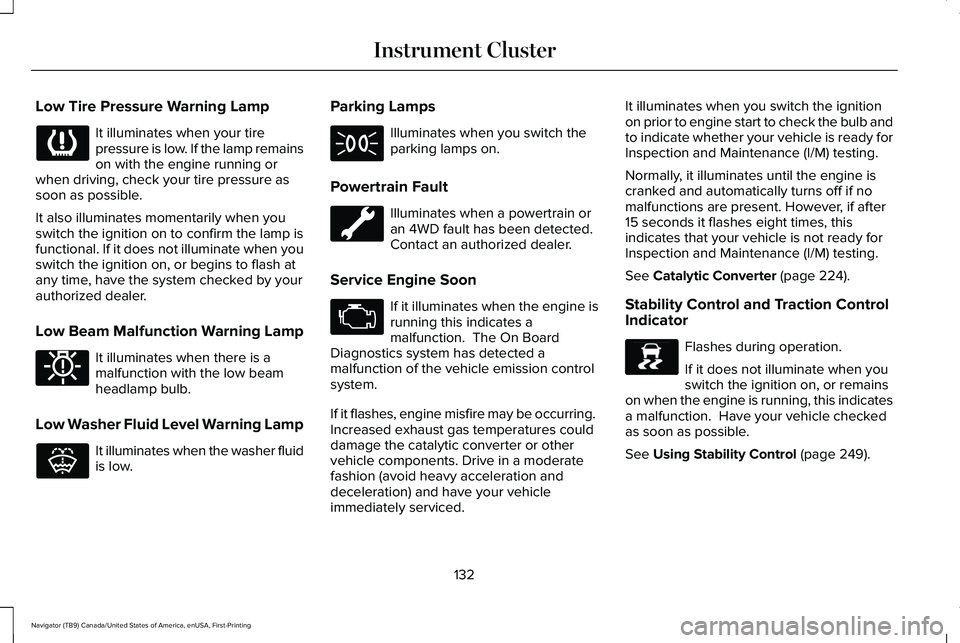
Low Tire Pressure Warning Lamp
It illuminates when your tire
pressure is low. If the lamp remains
on with the engine running or
when driving, check your tire pressure as
soon as possible.
It also illuminates momentarily when you
switch the ignition on to confirm the lamp is
functional. If it does not illuminate when you
switch the ignition on, or begins to flash at
any time, have the system checked by your
authorized dealer.
Low Beam Malfunction Warning Lamp It illuminates when there is a
malfunction with the low beam
headlamp bulb.
Low Washer Fluid Level Warning Lamp It illuminates when the washer fluid
is low. Parking Lamps Illuminates when you switch the
parking lamps on.
Powertrain Fault Illuminates when a powertrain or
an 4WD fault has been detected.
Contact an authorized dealer.
Service Engine Soon If it illuminates when the engine is
running this indicates a
malfunction. The On Board
Diagnostics system has detected a
malfunction of the vehicle emission control
system.
If it flashes, engine misfire may be occurring.
Increased exhaust gas temperatures could
damage the catalytic converter or other
vehicle components. Drive in a moderate
fashion (avoid heavy acceleration and
deceleration) and have your vehicle
immediately serviced. It illuminates when you switch the ignition
on prior to engine start to check the bulb and
to indicate whether your vehicle is ready for
Inspection and Maintenance (I/M) testing.
Normally, it illuminates until the engine is
cranked and automatically turns off if no
malfunctions are present. However, if after
15 seconds it flashes eight times, this
indicates that your vehicle is not ready for
Inspection and Maintenance (I/M) testing.
See Catalytic Converter (page 224).
Stability Control and Traction Control
Indicator Flashes during operation.
If it does not illuminate when you
switch the ignition on, or remains
on when the engine is running, this indicates
a malfunction. Have your vehicle checked
as soon as possible.
See
Using Stability Control (page 249).
132
Navigator (TB9) Canada/United States of America, enUSA, First-Printing Instrument Cluster E181350 E132353 E138639
Page 139 of 639
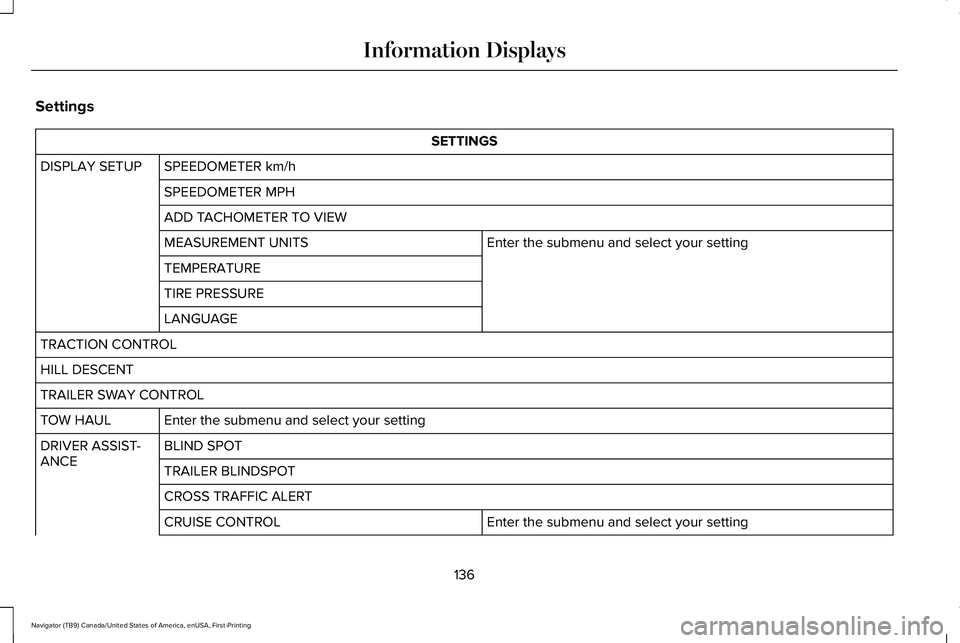
Settings
SETTINGS
SPEEDOMETER km/h
DISPLAY SETUP
SPEEDOMETER MPH
ADD TACHOMETER TO VIEW Enter the submenu and select your setting
MEASUREMENT UNITS
TEMPERATURE
TIRE PRESSURE
LANGUAGE
TRACTION CONTROL
HILL DESCENT
TRAILER SWAY CONTROL Enter the submenu and select your setting
TOW HAUL
BLIND SPOT
DRIVER ASSIST-
ANCE
TRAILER BLINDSPOT
CROSS TRAFFIC ALERT
Enter the submenu and select your setting
CRUISE CONTROL
136
Navigator (TB9) Canada/United States of America, enUSA, First-Printing Information Displays
Page 142 of 639
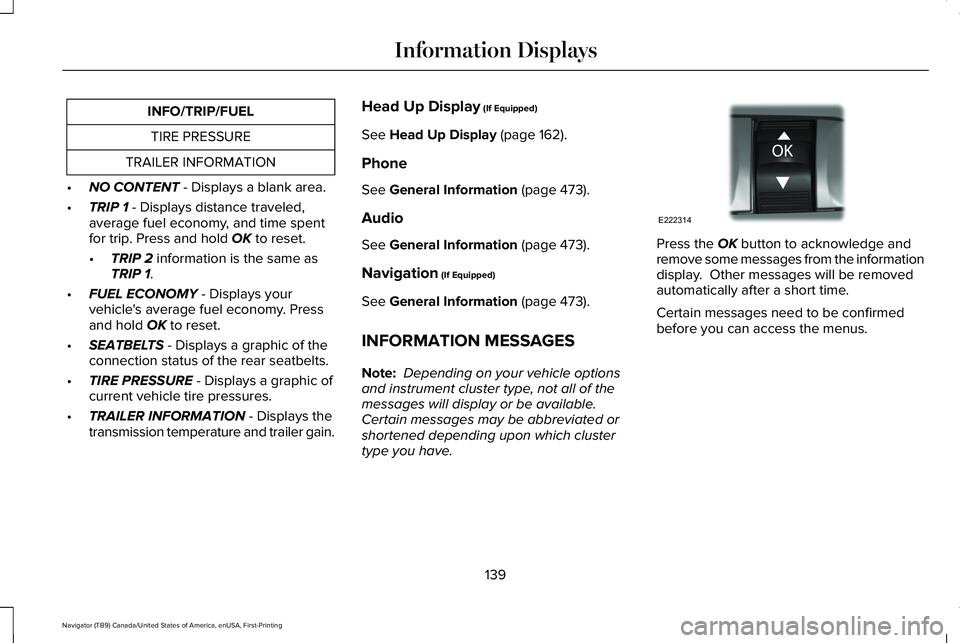
INFO/TRIP/FUEL
TIRE PRESSURE
TRAILER INFORMATION
• NO CONTENT - Displays a blank area.
• TRIP 1
- Displays distance traveled,
average fuel economy, and time spent
for trip. Press and hold
OK to reset.
• TRIP 2
information is the same as
TRIP 1.
• FUEL ECONOMY
- Displays your
vehicle's average fuel economy. Press
and hold
OK to reset.
• SEATBELTS
- Displays a graphic of the
connection status of the rear seatbelts.
• TIRE PRESSURE
- Displays a graphic of
current vehicle tire pressures.
• TRAILER INFORMATION
- Displays the
transmission temperature and trailer gain. Head Up Display
(If Equipped)
See
Head Up Display (page 162).
Phone
See
General Information (page 473).
Audio
See
General Information (page 473).
Navigation
(If Equipped)
See
General Information (page 473).
INFORMATION MESSAGES
Note: Depending on your vehicle options
and instrument cluster type, not all of the
messages will display or be available.
Certain messages may be abbreviated or
shortened depending upon which cluster
type you have. Press the
OK button to acknowledge and
remove some messages from the information
display. Other messages will be removed
automatically after a short time.
Certain messages need to be confirmed
before you can access the menus.
139
Navigator (TB9) Canada/United States of America, enUSA, First-Printing Information DisplaysE222314
Page 161 of 639
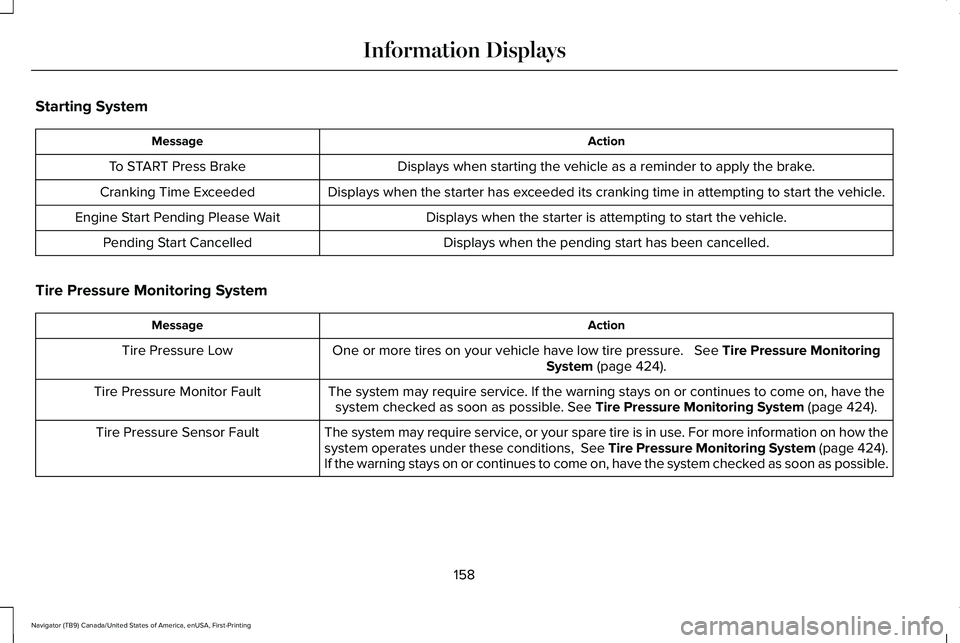
Starting System
Action
Message
Displays when starting the vehicle as a reminder to apply the brake.
To START Press Brake
Displays when the starter has exceeded its cranking time in attempting to start the vehicle.
Cranking Time Exceeded
Displays when the starter is attempting to start the vehicle.
Engine Start Pending Please Wait
Displays when the pending start has been cancelled.
Pending Start Cancelled
Tire Pressure Monitoring System Action
Message
One or more tires on your vehicle have low tire pressure. See Tire Pressure Monitoring
System (page 424).
Tire Pressure Low
The system may require service. If the warning stays on or continues to come on, have thesystem checked as soon as possible.
See Tire Pressure Monitoring System (page 424).
Tire Pressure Monitor Fault
The system may require service, or your spare tire is in use. For more information on how the
system operates under these conditions, See Tire Pressure Monitoring System (page 424).
If the warning stays on or continues to come on, have the system checked as soon as possible.
Tire Pressure Sensor Fault
158
Navigator (TB9) Canada/United States of America, enUSA, First-Printing Information Displays
Page 163 of 639
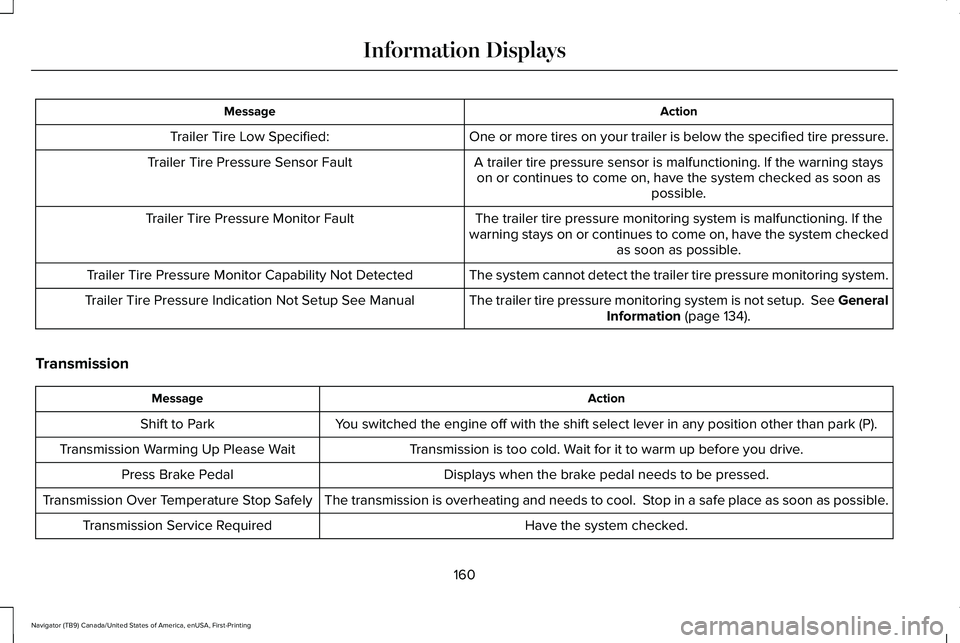
Action
Message
One or more tires on your trailer is below the specified tire pressure.
Trailer Tire Low Specified:
A trailer tire pressure sensor is malfunctioning. If the warning stayson or continues to come on, have the system checked as soon as possible.
Trailer Tire Pressure Sensor Fault
The trailer tire pressure monitoring system is malfunctioning. If the
warning stays on or continues to come on, have the system checked as soon as possible.
Trailer Tire Pressure Monitor Fault
The system cannot detect the trailer tire pressure monitoring system.
Trailer Tire Pressure Monitor Capability Not Detected
The trailer tire pressure monitoring system is not setup. See GeneralInformation (page 134).
Trailer Tire Pressure Indication Not Setup See Manual
Transmission Action
Message
You switched the engine off with the shift select lever in any position o\
ther than park (P).
Shift to Park
Transmission is too cold. Wait for it to warm up before you drive.
Transmission Warming Up Please Wait
Displays when the brake pedal needs to be pressed.
Press Brake Pedal
The transmission is overheating and needs to cool. Stop in a safe place as soon as possible.
Transmission Over Temperature Stop Safely
Have the system checked.
Transmission Service Required
160
Navigator (TB9) Canada/United States of America, enUSA, First-Printing Information Displays
Page 240 of 639
It may be safer to stay on the shoulder of the
road and slow down gradually before
returning to the road. You may lose control
if you do not slow down or if you turn the
steering wheel too sharply or abruptly.
It may be less risky to strike small objects,
such as freeway reflectors, with minor
damage to your vehicle rather than attempt
a sudden return to the road which could
cause your vehicle to slide sideways out of
control or roll over. Remember, your safety
and the safety of others should be your
primary concern.
If Your Vehicle Gets Stuck
WARNING: Do not spin the wheels
at over 34 mph (55 km/h). The tires may
fail and injure a passenger or bystander.
If your vehicle gets stuck in mud or snow it
may be rocked out by shifting between
forward and reverse gears, stopping
between shifts, in a steady pattern. Press
lightly on the accelerator in each gear. Note:
Do not rock your vehicle if the engine
is not at normal operating temperature or
damage to the transmission could occur.
Note: Do not rock your vehicle for more than
a minute or damage to the transmission and
tires may occur or the engine could
overheat.
Emergency Maneuvers
In an unavoidable emergency where a
sudden sharp turn must be made, remember
to avoid over-driving your vehicle, for
example, turn the steering wheel only as
rapidly and as far as required to avoid the
emergency. Excessive steering can result in
loss of vehicle control. Apply smooth
pressure to the accelerator pedal or brake
pedal when changes in vehicle speed are
required. Avoid abrupt steering, acceleration
and braking. This could result in an increased
risk of vehicle roll over, loss of vehicle control
and personal injury. Use all of the available
road surface to bring your vehicle to a safe
direction of travel. In the event of an emergency stop, avoid
skidding the tires and do not attempt any
sharp steering wheel movements.
If your vehicle goes from one type of surface
to another such as from concrete to gravel,
there may be a change in the way your
vehicle responds to a maneuver, for
example, steering, acceleration or braking.
Sand
When driving over sand, try to keep all four
wheels on the most solid area of the trail.
Avoid reducing the tire pressures but shift
to a lower gear and drive steadily through
the terrain. Apply the accelerator slowly and
avoid excessive wheel slip.
Avoid driving at excessive speeds, this
causes vehicle momentum to work against
you and your vehicle could become stuck to
the point that assistance may be required
from another vehicle. Remember, you may
be able to back out the way you came if you
proceed with caution.
237
Navigator (TB9) Canada/United States of America, enUSA, First-Printing Four-Wheel Drive
(If Equipped)
Page 241 of 639
Mud and Water
If you must drive through high water, drive
slowly. Traction or brake capability could be
limited.
When driving through water, determine the
depth and avoid water higher than the
bottom of the hubs. If the ignition system
gets wet, your vehicle may stall.
Once through water, always try the brakes.
Wet brakes do not stop your vehicle as
effectively as dry brakes. Drying can be
improved by applying light pressure to the
brake pedal when slowly moving.
Be cautious of sudden changes in vehicle
speed or direction when you are driving in
mud. Even four-wheel drive vehicles can lose
traction in slick mud. As when you are driving
over sand, apply the accelerator slowly and
avoid spinning your wheels. If the vehicle
does slide, steer in the direction of the slide
until you regain control of the vehicle.
If the transmission, transfer case or front axle
are submerged in water, their fluids should
be checked and changed, if necessary.
If the front or rear axle is submerged in water,
the axle lubricant should be replaced.
After driving through mud, clean off residue
stuck to rotating driveshafts and tires. Excess
mud stuck on tires and rotating driveshafts
causes an imbalance that could damage
drive components.
Note:
Driving through deep water could
damage the vehicle.
Driving on Hilly or Sloping Terrain
Although natural obstacles may make it
necessary to travel diagonally up or down a
hill or steep incline, you should always try to
drive straight up or straight down.
When climbing a steep slope or hill, start in
a lower gear rather than downshifting to a
lower gear from a higher gear once the
ascent has started. This reduces strain on
the engine and the possibility of stalling.
If your vehicle stalls, do not try to turn around
because this could cause vehicle roll over.
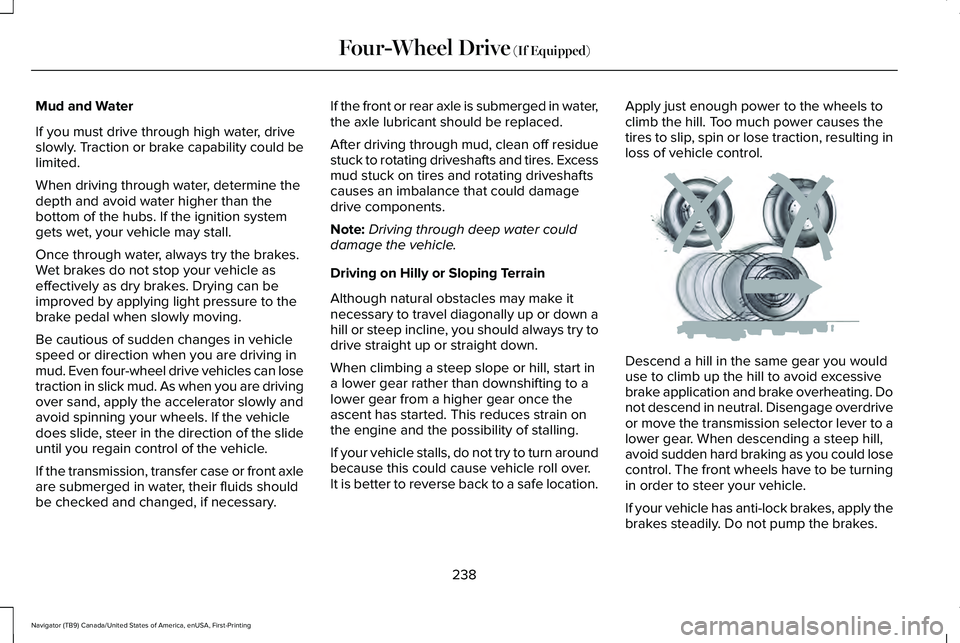
It is better to reverse back to a safe location. Apply just enough power to the wheels to
climb the hill. Too much power causes the
tires to slip, spin or lose traction, resulting in
loss of vehicle control.
Descend a hill in the same gear you would
use to climb up the hill to avoid excessive
brake application and brake overheating. Do
not descend in neutral. Disengage overdrive
or move the transmission selector lever to a
lower gear. When descending a steep hill,
avoid sudden hard braking as you could lose
control. The front wheels have to be turning
in order to steer your vehicle.
If your vehicle has anti-lock brakes, apply the
brakes steadily. Do not pump the brakes.
238
Navigator (TB9) Canada/United States of America, enUSA, First-Printing Four-Wheel Drive (If Equipped)E143949