wheel LINCOLN NAVIGATOR 2022 Owner's Manual
[x] Cancel search | Manufacturer: LINCOLN, Model Year: 2022, Model line: NAVIGATOR, Model: LINCOLN NAVIGATOR 2022Pages: 646, PDF Size: 7.29 MB
Page 160 of 646
Remotely Stopping the Vehicle
Within three seconds, press the
button on the remote control.
Within three seconds, press the
button again.
EXTENDING THE REMOTE START
DURATION
To extend the remote start duration during
remote start, do the following: Press the button on the remote
control.
Within three seconds, press the
button on the remote control.
Within three seconds, press the
button again.
If the duration is set to 15 minutes, the
duration extends by another 15 minutes. This
provides a total of 30 minutes.
Note: Remote start can only be extended
once. Note:
A maximum of two remote starts, or
one remote start with an extension, are
allowed. To reset the restart procedure
switch the vehicle to on, then to off.
REMOTE START REMOTE
CONTROL INDICATORS
Remote Control Feedback
An LED on the remote control provides status
feedback of remote start or stop commands. Status
LED
Remote startsuccessful.
Solid green.
Remote stopsuccessful.
Solid red.
Request failed or
status not received.
Blinking red.
Status incomplete.
Blinking green. REMOTE START SETTINGS
SWITCHING CLIMATE CONTROL LAST
SETTINGS ON AND OFF
1. Using the instrument cluster display
controls on the steering wheel, select
Settings.
2. Select
Vehicle.
3. Select
Remote Start Setup.
4. Select
Climate Control.
5. Select
Auto or Last settings.
Note: If you switch the last settings on, the
system remembers the last used settings.
SWITCHING THE HEATED SEAT
SETTINGS ON AND OFF
1. Using the instrument cluster display controls on the steering wheel, select
Settings
.
2. Select
Vehicle.
3. Select
Remote Start.
4. Select
Seats.
156
2022 Navigator (TB9) Canada/United States of America, enUSA, Edition date: 202109, First-Printing Remote StartE138625 E138623 E138625
Page 161 of 646
5. Select Auto or Off.
Note: If you switch the heated seat settings
on, the heated seats turn on during cold
weather.
Note: You cannot adjust the heated seat
settings when you have remotely started the
engine.
SWITCHING THE HEATED STEERING
WHEEL SETTINGS ON AND OFF
1. Using the instrument cluster display controls on the steering wheel, select
Settings
.
2. Select
Vehicle.
3. Select
Remote Start.
4. Select
Seats and Wheel.
5. Select
Auto or Off.
Note: If you switch the heated steering wheel
settings on, the heated steering wheel turns
on during cold weather.
Note: You cannot adjust the heated steering
wheel settings when you have remotely
started the engine. SETTING THE REMOTE START
DURATION
You can set a duration for the engine to run.
Note:
Wait a few seconds before remotely
starting the engine after the engine stops
running.
1. Using the instrument cluster display controls on the steering wheel, select
Settings
.
2. Select
Vehicle.
3. Select
Remote Start.
4. Select
Duration.
157
2022 Navigator (TB9) Canada/United States of America, enUSA, Edition date: 202109, First-Printing Remote Start
Page 170 of 646
FRONT SEAT PRECAUTIONS
WARNING: Sitting improperly, out of
position or with the seatback reclined too
far can take weight off the seat cushion
and affect the decision of the passenger
sensing system, resulting in serious injury
or death in the event of a crash. Always sit
upright against your seat back, with your
feet on the floor. WARNING: Do not recline the seat
backrest too far as this can cause the
occupant to slide under the seatbelt,
resulting in personal injury in the event of
a crash. WARNING:
Do not place objects
higher than the top of the seat backrest.
Failure to follow this instruction could result
in personal injury or death in the event of
a sudden stop or crash. WARNING:
Do not adjust the driver
seat or seat backrest when your vehicle is
moving. This may result in sudden seat
movement, causing the loss of control of
your vehicle.
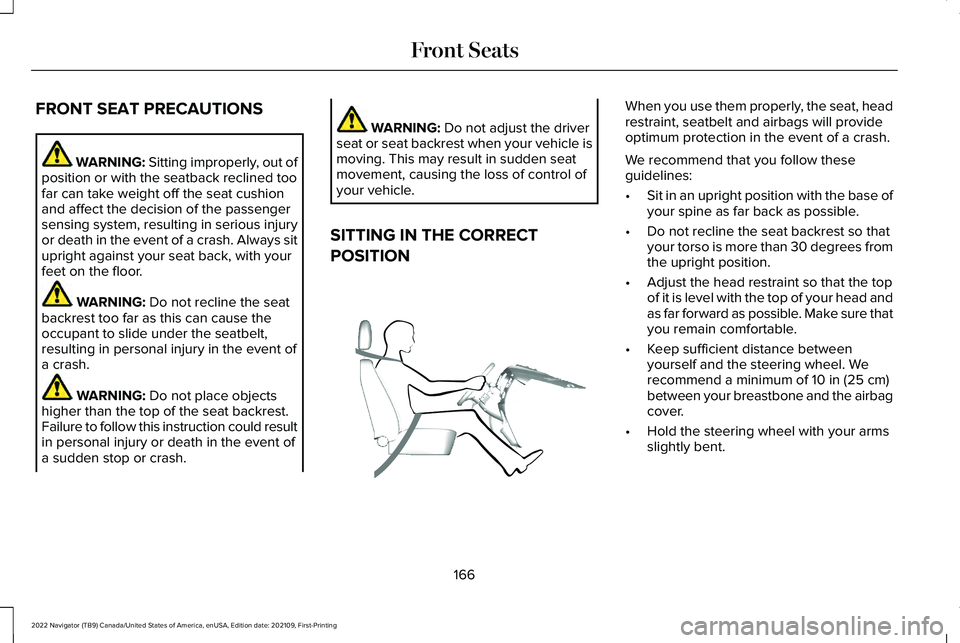
SITTING IN THE CORRECT
POSITION When you use them properly, the seat, head
restraint, seatbelt and airbags will provide
optimum protection in the event of a crash.
We recommend that you follow these
guidelines:
•
Sit in an upright position with the base of
your spine as far back as possible.
• Do not recline the seat backrest so that
your torso is more than 30 degrees from
the upright position.
• Adjust the head restraint so that the top
of it is level with the top of your head and
as far forward as possible. Make sure that
you remain comfortable.
• Keep sufficient distance between
yourself and the steering wheel. We
recommend a minimum of
10 in (25 cm)
between your breastbone and the airbag
cover.
• Hold the steering wheel with your arms
slightly bent.
166
2022 Navigator (TB9) Canada/United States of America, enUSA, Edition date: 202109, First-Printing Front SeatsE68595
Page 183 of 646
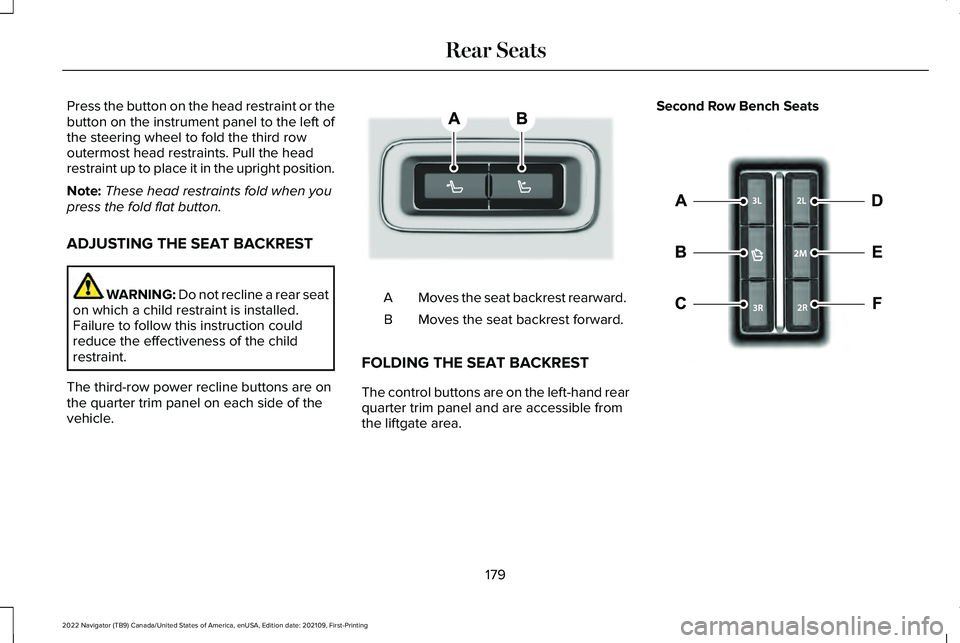
Press the button on the head restraint or the
button on the instrument panel to the left of
the steering wheel to fold the third row
outermost head restraints. Pull the head
restraint up to place it in the upright position.
Note:
These head restraints fold when you
press the fold flat button.
ADJUSTING THE SEAT BACKREST WARNING: Do not recline a rear seat
on which a child restraint is installed.
Failure to follow this instruction could
reduce the effectiveness of the child
restraint.
The third-row power recline buttons are on
the quarter trim panel on each side of the
vehicle. Moves the seat backrest rearward.
A
Moves the seat backrest forward.
B
FOLDING THE SEAT BACKREST
The control buttons are on the left-hand rear
quarter trim panel and are accessible from
the liftgate area. Second Row Bench Seats
179
2022 Navigator (TB9) Canada/United States of America, enUSA, Edition date: 202109, First-Printing Rear SeatsE246706 E257920
Page 208 of 646
HOW DOES AUTOMATIC ENGINE
STOP WORK
Automatic engine stop turns the engine off.
The ignition also turns off in order to save
battery power. Before the engine shuts
down, a message appears in the information
display showing a timer counting down. If
you do not intervene within 30 seconds, the
engine shuts down. Another message
appears in the information display to inform
you that the engine has shut down in order
to save fuel. Start your vehicle as you
normally do.
SWITCHING AUTOMATIC ENGINE
STOP ON AND OFF
1. Press the menu button on the steering
wheel to enter the information display
main menu.
2. Select Settings.
3. Switch
Auto Engine Off on or off.
Note: You cannot permanently switch off
the automatic shutdown. If you switch it off,
it turns on each time you switch the ignition
on. OVERRIDING AUTOMATIC ENGINE
STOP
You can stop the engine shutdown, or reset
the timer, at any point before the 30-second
countdown has expired by doing any of the
following:
•
Pressing the brake pedal or accelerator
pedal.
• Pressing the OK or RESET button during
the countdown.
Note: You cannot permanently switch off
the automatic engine shutdown feature.
When you switch it off temporarily, it turns
on at the next ignition cycle.
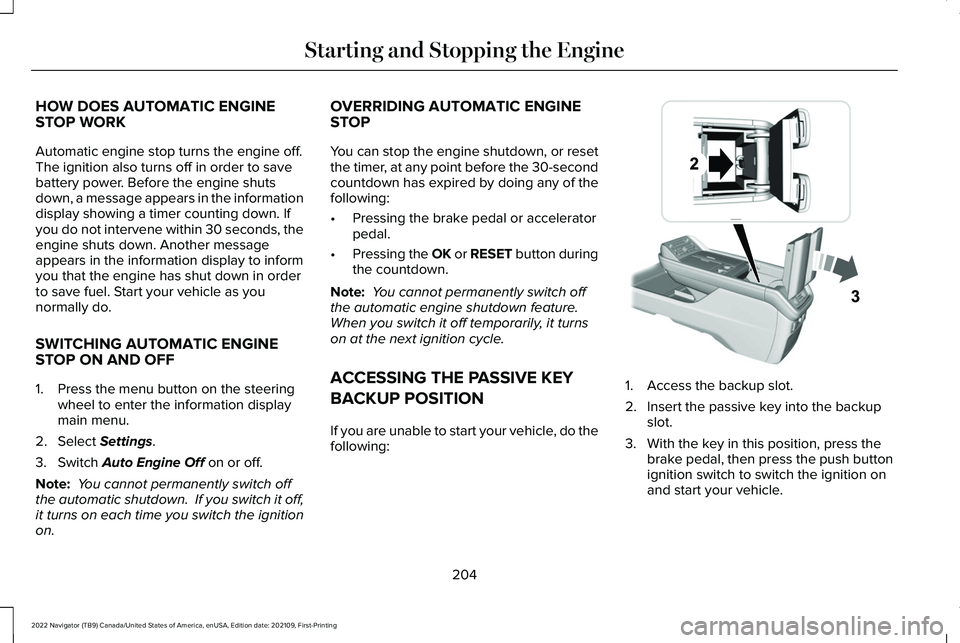
ACCESSING THE PASSIVE KEY
BACKUP POSITION
If you are unable to start your vehicle, do the
following: 1. Access the backup slot.
2. Insert the passive key into the backup
slot.
3. With the key in this position, press the brake pedal, then press the push button
ignition switch to switch the ignition on
and start your vehicle.
204
2022 Navigator (TB9) Canada/United States of America, enUSA, Edition date: 202109, First-Printing Starting and Stopping the EngineE247437
Page 209 of 646
STARTING AND STOPPING THE
ENGINE – TROUBLESHOOTING
STARTING AND STOPPING THE
ENGINE – WARNING LAMPS
Malfunction Indicator Lamp
If it illuminates when the engine is
running, the on-board diagnostics
system is detecting a malfunction
of the vehicle emission control system. If it flashes, engine misfire could be
occurring. Increased exhaust gas
temperatures could damage the catalytic
converter or other vehicle components.
Avoid heavy acceleration and deceleration,
and have your vehicle checked as soon as
possible.
Powertrain Warning Lamp If it illuminates when the engine is
running, this indicates a powertrain
or four-wheel drive fault. If it
flashes when you are driving, immediately
reduce the vehicle speed. Avoid heavy
acceleration and deceleration, and have your
vehicle checked as soon as possible.
If both lamps illuminate when the engine is
running, stop your vehicle as soon as it is
safe to do so. Continuing to drive your
vehicle could cause reduced power or the
engine to stop. Switch the ignition off and
attempt to restart the engine. Have your
vehicle checked as soon as possible.
STARTING AND STOPPING THE ENGINE – INFORMATION MESSAGES Action
Message
Displays if you exceed the starting time limit. You cannot attempt to start the engine for 15 minutes.
If you cannot start the engine after 15 minutes passes, have your vehicl\
e immediately checked.
Cranking Time Exceeded
Displays if you are unable to start your vehicle with a correctly coded \
key. The system has
detected a fault that requires service. Have your vehicle checked as soon as possible.
Starting System Fault
Displays if the system does not detect a valid passive key.
No Key Detected
205
2022 Navigator (TB9) Canada/United States of America, enUSA, Edition date: 202109, First-Printing Starting and Stopping the Engine
Page 223 of 646
AUTOMATIC TRANSMISSION
PRECAUTIONS
WARNING: Apply the parking brake,
shift into park (P), switch the ignition off
and remove the key before you leave your
vehicle. Failure to follow this instruction
could result in personal injury or death. WARNING: When your vehicle is
stationary, keep the brake pedal fully
pressed when shifting gears. Failure to
follow this instruction could result in
personal injury, death or property damage. WARNING:
Do not apply the brake
pedal and accelerator pedal
simultaneously. Applying both pedals
simultaneously for more than a few
seconds will limit engine performance,
which may result in difficulty maintaining
speed in traffic and could lead to serious
injury. AUTOMATIC TRANSMISSION
POSITIONS
PARK (P)
This position locks the driveline and prevents
the wheels from turning. Come to a complete
stop before putting your vehicle into and out
of park (P).
The electric parking brake could apply when
you shift to park (P) without the brake pedal
fully pressed. The electric parking brake
applies when you shift to park (P) on large
slopes. The electric parking brake releases
with the drive away release function or
manually as described in the Releasing the
Electric Parking Brake section. See Electric
Parking Brake (page 236).
Note: A warning tone sounds if you open the
driver door and you have not shifted the
transmission selector to park (P). REVERSE (R) WARNING:
Shift into reverse (R) only
when your vehicle is stationary.
In reverse (R) power is transmitted to the
driven wheels.
NEUTRAL (N) WARNING: In neutral (N) your vehicle
is free to roll.
In neutral (N) power is not transmitted to the
driven wheels.
DRIVE (D)
In drive (D) power is transmitted to the driven
wheels.
219
2022 Navigator (TB9) Canada/United States of America, enUSA, Edition date: 202109, First-Printing Automatic Transmission
Page 227 of 646
HOW DOES FOUR-WHEEL DRIVE
WORK
Using the 1-Speed Automatic Four-
Wheel Drive System
The 1-speed automatic four-wheel drive
system utilizes an electronically controlled
on-demand 1-speed transfer case. This
system monitors various vehicle sensory
inputs to provide an increased level of
performance. This system offers the driver
two-wheel drive high, four-wheel drive auto
and four-wheel drive high as available modes
of operation via the selectable drive mode
switch. When four-wheel drive auto is
selected, the system continuously varies
power to the front wheels for optimum
performance for all on-road conditions. When
four-wheel drive high is selected, the system
provides power to the front and rear wheels
for use in off-road or slippery conditions such
as deep snow, sand or mud. There is further
information on driving in unique driving
conditions. See Driving Hints (page 384).
Using the 2-Speed Automatic Four-
Wheel Drive System
(If Equipped)
The 2-speed automatic four-wheel drive
system utilizes an electronically controlled
on-demand 2-speed transfer case. This
system monitors various vehicle sensory
inputs to provide an increased level of
performance. This system offers the driver
two-wheel drive high, four-wheel drive auto,
four-wheel drive high, and four-wheel drive
low as available modes of operation. When
four-wheel drive auto is selected, the system
continuously varies power to the front wheels
for optimum performance for all on-road
conditions. When either four-wheel drive high
or four-wheel drive low are selected with the
appropriate drive modes , the four-wheel
drive system provides electronically locked
power to the front and rear wheels for use
in off-road or slippery conditions such as
deep snow, sand or mud. Selecting slow
climb also provides additional gearing for
increased torque multiplication for conditions
like deep sand, snow, steep slopes, or pulling heavy objects.
See Slow Climb (page 296).
Additionally, the system is capable of
recreational flat towing by putting the
transfer case into neutral (N).
See
Recreationally Towing Your Vehicle (page
397).
There is further information on driving in
unique driving conditions. See Driving Hints
(page
384).
FOUR-WHEEL DRIVE
PRECAUTIONS WARNING:
Vehicles with a higher
center of gravity (utility and four-wheel
drive vehicles) handle differently than
vehicles with a lower center of gravity
(passenger cars). Avoid sharp turns,
excessive speed and abrupt steering in
these vehicles. Failure to drive cautiously
increases the risk of losing control of your
vehicle, vehicle rollover, personal injury
and death.
223
2022 Navigator (TB9) Canada/United States of America, enUSA, Edition date: 202109, First-Printing Four-Wheel Drive
(If Equipped)
Page 228 of 646
WARNING: Do not become
overconfident in the ability of four-wheel
drive vehicles. Although a four-wheel drive
vehicle may accelerate better than a
two-wheel drive vehicle in low traction
situations, it won't stop any faster than
two-wheel drive vehicles. Always drive at
a safe speed.
Truck and utility vehicles can differ from
some other vehicles. Your vehicle could be
higher to allow it to travel over rough terrain
without getting stuck or damaging
underbody components. The differences that
make your vehicle so versatile also make it
handle differently than an ordinary passenger
car. Always maintain steering wheel control,
especially in rough terrain. Since sudden
changes in terrain can result in abrupt
steering wheel motion, make sure you grip
the steering wheel from the outside. Do not
grip the spokes. Drive cautiously to avoid
vehicle damage from concealed objects such as rocks and stumps. Drive slower in strong
crosswinds which can affect the normal
steering characteristics of your vehicle. Be
extremely careful when driving on pavement
made slippery by loose sand, water, gravel,
snow or ice.
Note:
Do not use four-wheel drive high or
four-wheel drive low mode on dry, hard
surfaced roads. Doing so can produce
excessive noise, increase tire wear and can
damage drive components.
FOUR-WHEEL DRIVE LIMITATIONS
Operating Four-Wheel Drive with a
Spare or Mismatched Tires
(If Equipped)
On four-wheel drive vehicles, the size of the
spare tire can affect the four-wheel drive
system. If there is a significant difference
between the size of the spare tire and the
remaining tires, you could have limited
four-wheel drive functionality. When driving
with the full-size dissimilar spare wheel and
tire assembly, we recommend that you do
not: •
Exceed
50 mph (80 km/h) with a
four-wheel drive mode turned on.
• Use a four-wheel drive mode on dry
pavement.
Driving with the full-size dissimilar spare
wheel and tire assembly can limit four-wheel
drive functionality. You can experience the
following:
• Additional noise from the transfer case
or other drive components.
Use of a dissimilar spare wheel and tire
assembly can lead to impairment of the
following:
• Comfort and noise.
• Winter weather driving capability.
• Wet driving capability.
• Four-wheel drive capability.
Note: Your vehicle could have a front air
dam that can become damaged, due to
reduced ground clearance, when taking your
vehicle off-road. You can remove this air
dam by removing the eight bolts that secure
it.
224
2022 Navigator (TB9) Canada/United States of America, enUSA, Edition date: 202109, First-Printing Four-Wheel Drive
(If Equipped)
Page 229 of 646
Note:
Your vehicle could have side steps
that can become damaged, due to reduced
ground clearance, when taking your vehicle
off-road. Remove side steps before driving
your vehicle off-road.
SELECTING A FOUR-WHEEL DRIVE
MODE
To select a specific four-wheel drive mode
please select one of the desired drive
modes. For additional information. See
Selecting a Drive Mode (page 294).
Note: When shifting to and from four-wheel
drive information display will show shifting
in progress message indicating that the
system is in the process of making a shift.
Note: Do not perform this operation if the
rear wheels are slipping or while applying
the accelerator pedal.
If the system detects a fault, a warning
message appears in the information display.
See
Four-Wheel Drive – Information
Messages (page 229). Note:
Do not use SLIPPERY, DEEP
CONDITIONS or SLOW CLIMB on dry, hard
surfaced roads. Doing so produces
excessive noise, increases tire wear and may
damage drive components. The 4X4 system
in these modes is only intended for
consistently slippery or loose surfaces.
Shifting to or from Slow Climb (4L)
To select or exit SLOW CLIMB (4L):
1. Bring your vehicle to a speed of
3.1 mph
(5 km/h) or less.
2. Place the transmission in neutral (N).
3. Select SLOW CLIMB on the drive mode control switch.
The information display will display a
message indicating a four-wheel drive shift
is in progress. If any of the above shift
conditions are not present, the shift will not
occur and the information display will display
information guiding the driver through the
proper shifting procedures. If there is a
transfer case tooth blockage a message will display in the information display. To alleviate
this condition, place the transmission in a
forward gear, move your vehicle forward
approximately
4.9 ft (1.5 m), and shift the
transmission back to neutral (N) to allow the
transfer case to complete the range shift.
Note: You could hear some noise as the
system shifts or engages which is normal. If
the system detects a fault, a warning
message appears in the information display.
See
Four-Wheel Drive – Information
Messages (page 229).
FOUR-WHEEL DRIVE MODES
TWO-WHEEL DRIVE HIGH
2H turns on when you select NORMAL or
CONSERVE. Two-wheel drive high is for
general on-road driving. Power is sent to the
rear wheels only.
Note: Two-wheel drive high can turn on or
off based on Drive Mode selection See Drive
Mode Control
(page 293).
225
2022 Navigator (TB9) Canada/United States of America, enUSA, Edition date: 202109, First-Printing Four-Wheel Drive
(If Equipped)