engine oil LINCOLN NAVIGATOR 2022 Owners Manual
[x] Cancel search | Manufacturer: LINCOLN, Model Year: 2022, Model line: NAVIGATOR, Model: LINCOLN NAVIGATOR 2022Pages: 646, PDF Size: 7.29 MB
Page 8 of 646
Interior Lamp Function
.................................131
Adjusting the Instrument Panel Lighting Brightness ..................................................
132
Ambient Lighting ..........................................
132
Interior Lighting – Troubleshooting .........
132
Windows
Opening and Closing the Windows ........
133
Global Opening and Closing .....................
133
Window Bounce-Back .................................
134
Locking the Rear Window Controls .........
135
Interior Mirror
Interior Mirror Precautions .........................
136
Auto-Dimming Interior Mirror ....................
136
Exterior Mirrors
Adjusting the Exterior Mirrors ...................
137
Folding the Exterior Mirrors .......................
137
Auto-Dimming Exterior Mirror ...................
138
Moonroof
Opening and Closing the Sun Shade ......
139Opening and Closing the Moonroof
.......
139
Venting the Moonroof .................................
140
Moonroof Bounce-Back .............................
140
Instrument Cluster
Instrument Cluster Overview .....................
141
Tachometer ....................................................
142
Speedometer ................................................
142
Fuel Gauge ....................................................
142
Engine Coolant Temperature Gauge ......
143
Engine Oil Pressure Gauge .......................
143
Transmission Fluid Temperature Gauge .......................................................................
143
What Are the Instrument Cluster Warning Lamps ..........................................................
143
Instrument Cluster Warning Lamps .........
143
What Are the Instrument Cluster Indicators .......................................................................
145
Instrument Cluster Indicators ....................
145
Instrument Cluster Display
Using the Instrument Cluster Display Controls ......................................................
147Instrument Cluster Display Main Menu
.......................................................................
147
Trip Computer ...............................................
148
Customizing the Instrument Cluster Display .......................................................................
149
Personalized Settings
Changing the Language ............................
150
Changing the Measurement Unit ............
150
Changing the Temperature Unit ..............
150
Changing the Tire Pressure Unit .............
150
Head Up Display
What Is the Head Up Display .....................
151
Switching the Head Up Display On and Off ........................................................................\
151
Head Up Display Settings ...........................
151
Head Up Display Indicators .......................
153
Head Up Display – Troubleshooting .......
154
Remote Start
What Is Remote Start ...................................
155
Remote Start Precautions ..........................
155
Remote Start Limitations ............................
155
4
2022 Navigator (TB9) Canada/United States of America, enUSA, Edition date: 202109, First-Printing Table of Contents
Page 17 of 646
Towing Your Vehicle – Troubleshooting
......................................................................400
Fuses
Fuse Precautions .........................................
401
Under Hood Fuse Box ................................
401
Body Control Module Fuse Box ..............
408
Identifying Fuse Types ................................
413
Fuses – Troubleshooting ...........................
413
Maintenance
Maintenance Precautions ..........................
414
Opening and Closing the Hood ...............
414
Under Hood Overview ................................
415
Engine Oil .......................................................
417
Checking the Coolant .................................
418
Engine Air Filter ...........................................
422
Changing the Fuel Filter ............................
423
Changing the 12V Battery .........................
423
Adjusting the Headlamps .........................
426
Exterior Bulbs ...............................................
428
Interior Bulbs ................................................
428
Drive Belt Routing .......................................
428Vehicle Care
Cleaning Products
......................................
429
Cleaning the Exterior .................................
430
Cleaning the Interior ...................................
432
Repairing Minor Paint Damage ................
434
Waxing Your Vehicle ...................................
434
Storing Your Vehicle
Preparing Your Vehicle for Storage ........
435
Removing Your Vehicle From Storage ......................................................................
436
Wheel and Tire Information
Locating the Tire label ...............................
437
Department of Transportation Uniform Tire Quality Grades .........................................
437
Information on the Tire Sidewall .............
438
Glossary of Tire Terminology ...................
443
Tire Replacement Requirements .............
444
Using Snow Chains .....................................
446
Tire Care
Checking the Tire Pressures ....................
449Inflating the Tires
.........................................
449
Inspecting the Tire for Wear .....................
449
Inspecting the Tire for Damage ..............
450
Inspecting the Wheel Valve Stems ..........
451
Tire Rotation ..................................................
451
Tire Pressure Monitoring System
What Is the Tire Pressure Monitoring System .......................................................
453
Tire Pressure Monitoring System Overview ......................................................................
453
Tire Pressure Monitoring System Precautions ...............................................
454
Tire Pressure Monitoring System Limitations ................................................
455
Viewing the Tire Pressures ......................
455
Resetting Tire Pressure Monitoring System ......................................................................
455
Tire Pressure Monitoring System – Troubleshooting ......................................
458
Changing a Road Wheel
Changing a Flat Tire ....................................
461
13
2022 Navigator (TB9) Canada/United States of America, enUSA, Edition date: 202109, First-Printing Table of Contents
Page 18 of 646
Wheel Nuts
...................................................468
Capacities and Specifications
Engine Specifications ................................
469
Motorcraft Parts ...........................................
470
Engine Oil Capacity and Specification .......................................................................
471
Cooling System Capacity and Specification ......................................................................
473
Fuel Tank Capacity ......................................
474
Air Conditioning System Capacity and Specification .............................................
475
Washer Fluid Specification .......................
476
Brake Fluid Specification ...........................
476
Transfer Case Fluid Capacity and Specification .............................................
478
Front Axle Fluid Capacity and Specification ......................................................................
479
Rear Axle Fluid Capacity and Specification ......................................................................
480
Vehicle Identification
Vehicle Identification Number ..................
481Connected Vehicle
What Is a Connected Vehicle
...................
482
Connected Vehicle Requirements ..........
482
Connected Vehicle Limitations ................
482
Connecting the Vehicle to a Mobile Network .....................................................
482
Connecting the Vehicle to a Wi-Fi Network ......................................................................
482
Connected Vehicle – Troubleshooting ......................................................................
483
Vehicle Wi-Fi Hotspot
Creating a Vehicle Wi-Fi Hotspot ............
486
Changing the Vehicle Wi-Fi Hotspot Name or Password .............................................
486
Audio System
Audio System Precautions ........................
488
Identifying the Audio Unit .........................
488
Switching the Audio Unit On and Off .....
488
Selecting the Audio Source .....................
488
Playing or Pausing the Audio Source .....
488
Adjusting the Volume .................................
489
Switching Shuffle Mode On and Off ......
489Switching Repeat Mode On and Off
......
489
Setting a Memory Preset ..........................
489
Muting the Audio .........................................
489
Adjusting the Sound Settings ..................
489
Setting the Clock and Date ......................
490
AM/FM Radio ................................................
490
Switching the Display On and Off ............
491
Digital Radio ..................................................
491
Satellite Radio ..............................................
493
Audio System – Troubleshooting ...........
496
Rear Passenger Audio Controls
Identifying the Rear Passenger Audio Controls .....................................................
500
Switching the Rear Passenger Audio Controls On and Off ..............................
500
Selecting the Audio Source .....................
500
Playing and Pausing the Audio Source ......................................................................
500
Adjusting the Volume ................................
500
Switching Shuffle Mode On and Off ......
500
Switching Repeat Mode On and Off ......
500
Changing the Radio Station .....................
500
14
2022 Navigator (TB9) Canada/United States of America, enUSA, Edition date: 202109, First-Printing Table of Contents
Page 25 of 646
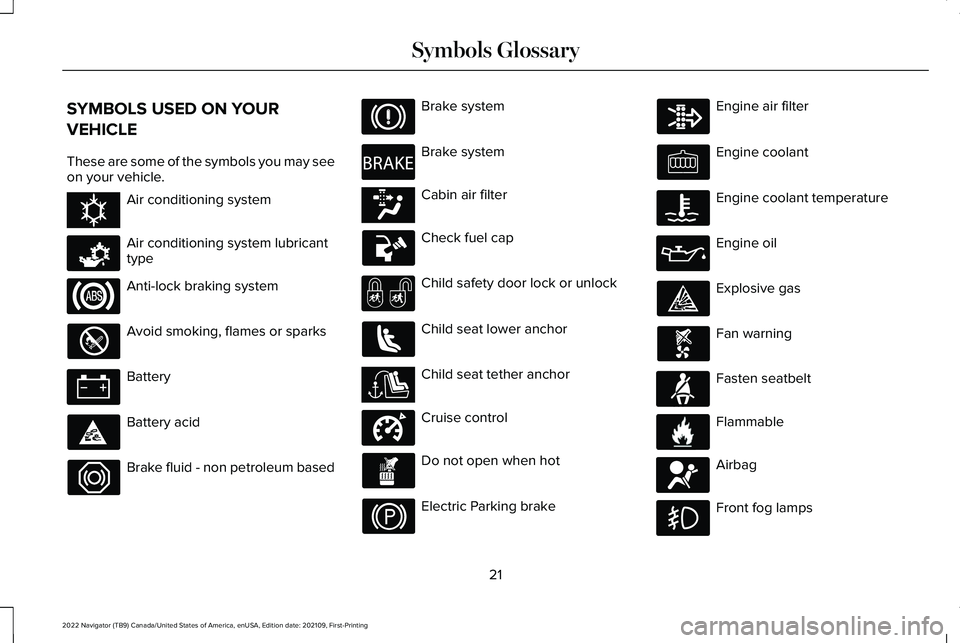
SYMBOLS USED ON YOUR
VEHICLE
These are some of the symbols you may see
on your vehicle.
Air conditioning system
Air conditioning system lubricant
type
Anti-lock braking system
Avoid smoking, flames or sparks
Battery
Battery acid
Brake fluid - non petroleum based Brake system
Brake system
Cabin air filter
Check fuel cap
Child safety door lock or unlock
Child seat lower anchor
Child seat tether anchor
Cruise control
Do not open when hot
Electric Parking brake Engine air filter
Engine coolant
Engine coolant temperature
Engine oil
Explosive gas
Fan warning
Fasten seatbelt
Flammable
Airbag
Front fog lamps
21
2022 Navigator (TB9) Canada/United States of America, enUSA, Edition date: 202109, First-Printing Symbols GlossaryE162384 E231157 E270480 E139223 E141128 E332905 E71880 E231160 E67017
Page 147 of 646
WHAT IS DISTANCE TO EMPTY
Indicates the approximate distance your
vehicle can travel on the fuel remaining in
the tank. Changes in driving pattern can
cause the value to not only decrease but also
increase or stay constant for periods of time.
ENGINE COOLANT TEMPERATURE
GAUGE
Indicates the engine coolant temperature.
ENGINE OIL PRESSURE GAUGE
Indicates the engine oil pressure.
Note:
This is a configurable gauge.
TRANSMISSION FLUID
TEMPERATURE GAUGE
Indicates the transmission fluid temperature. Special operating conditions can cause
higher than normal operating temperatures.
See Special Operating Conditions
Scheduled Maintenance (page 536).
Note: This is a configurable gauge.
WHAT ARE THE INSTRUMENT
CLUSTER WARNING LAMPS
Warning lamps alert you to a vehicle
condition that could become serious. Some
lamps illuminate when you start your vehicle
to make sure they work. If any lamps remain
on after starting your vehicle, refer to the
respective system warning lamp for further
information. INSTRUMENT CLUSTER WARNING
LAMPS
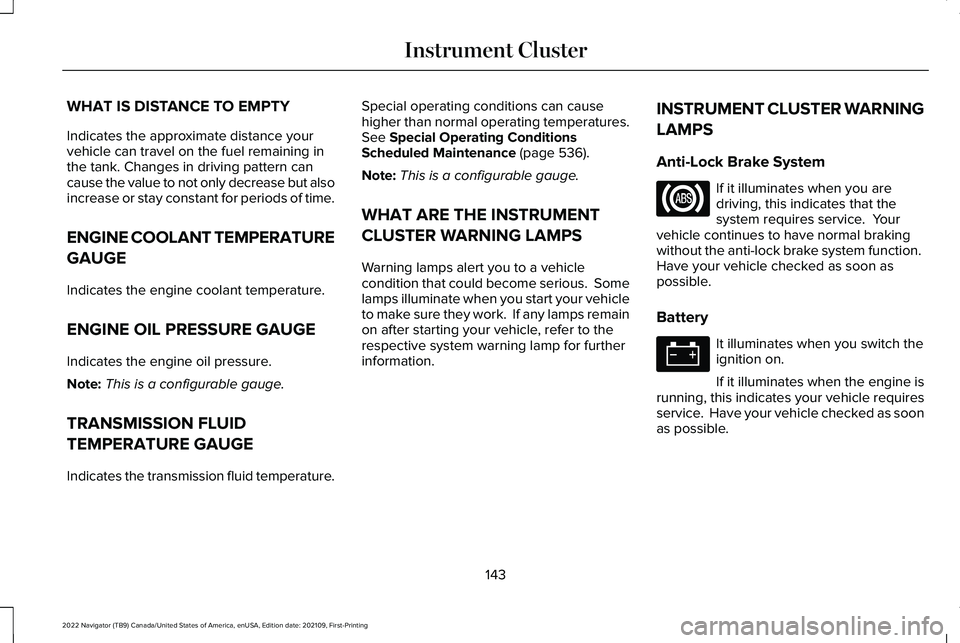
Anti-Lock Brake System If it illuminates when you are
driving, this indicates that the
system requires service. Your
vehicle continues to have normal braking
without the anti-lock brake system function.
Have your vehicle checked as soon as
possible.
Battery It illuminates when you switch the
ignition on.
If it illuminates when the engine is
running, this indicates your vehicle requires
service. Have your vehicle checked as soon
as possible.
143
2022 Navigator (TB9) Canada/United States of America, enUSA, Edition date: 202109, First-Printing Instrument Cluster
Page 149 of 646
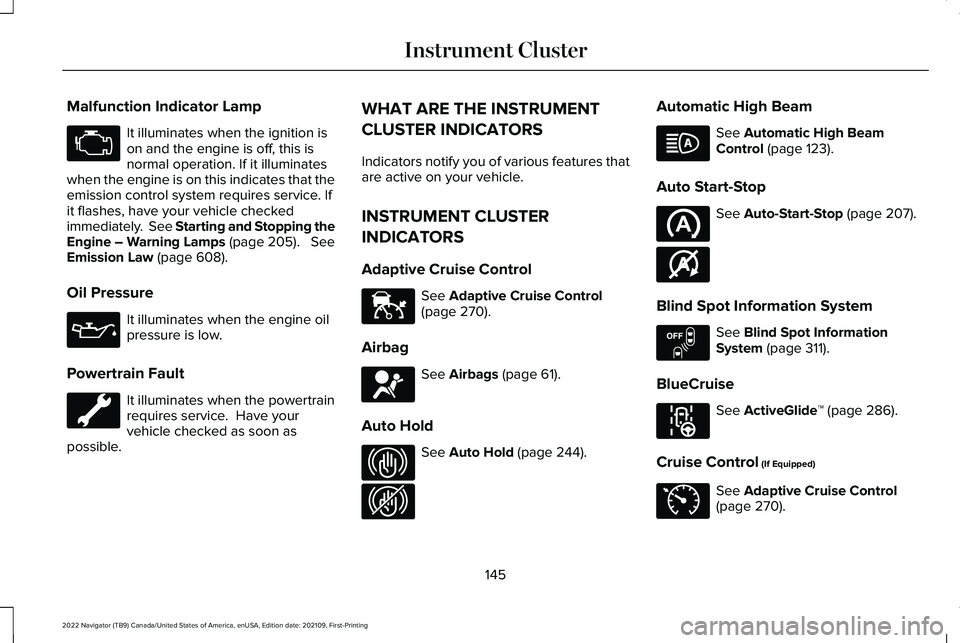
Malfunction Indicator Lamp
It illuminates when the ignition is
on and the engine is off, this is
normal operation. If it illuminates
when the engine is on this indicates that the
emission control system requires service. If
it flashes, have your vehicle checked
immediately. See Starting and Stopping the
Engine – Warning Lamps (page 205). See
Emission Law (page 608).
Oil Pressure It illuminates when the engine oil
pressure is low.
Powertrain Fault It illuminates when the powertrain
requires service. Have your
vehicle checked as soon as
possible. WHAT ARE THE INSTRUMENT
CLUSTER INDICATORS
Indicators notify you of various features that
are active on your vehicle.
INSTRUMENT CLUSTER
INDICATORS
Adaptive Cruise Control
See
Adaptive Cruise Control
(page 270).
Airbag See
Airbags (page 61).
Auto Hold See
Auto Hold (page 244).Automatic High Beam See
Automatic High Beam
Control (page 123).
Auto Start-Stop See
Auto-Start-Stop (page 207).
Blind Spot Information System See
Blind Spot Information
System (page 311).
BlueCruise See
ActiveGlide
™ (page 286).
Cruise Control
(If Equipped) See
Adaptive Cruise Control
(page 270).
145
2022 Navigator (TB9) Canada/United States of America, enUSA, Edition date: 202109, First-Printing Instrument Cluster E144524 E67017 E323448 E323449 E146361 E151262 E297977 E71340
Page 420 of 646
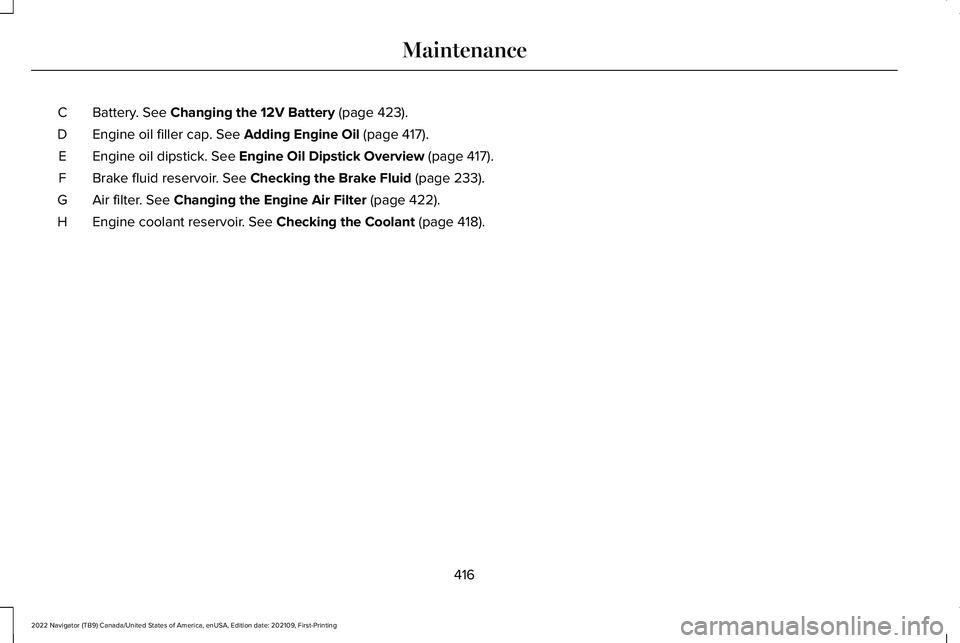
Battery. See Changing the 12V Battery (page 423).
C
Engine oil filler cap.
See Adding Engine Oil (page 417).
D
Engine oil dipstick.
See Engine Oil Dipstick Overview (page 417).
E
Brake fluid reservoir.
See Checking the Brake Fluid (page 233).
F
Air filter.
See Changing the Engine Air Filter (page 422).
G
Engine coolant reservoir.
See Checking the Coolant (page 418).
H
416
2022 Navigator (TB9) Canada/United States of America, enUSA, Edition date: 202109, First-Printing Maintenance
Page 421 of 646
ENGINE OIL
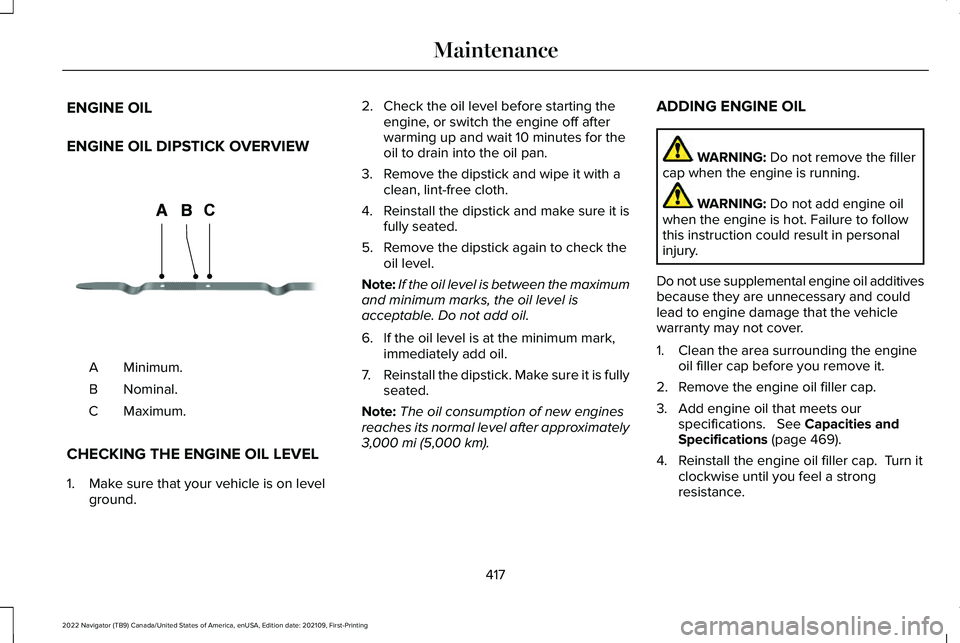
ENGINE OIL DIPSTICK OVERVIEW
Minimum.
A
Nominal.
B
Maximum.
C
CHECKING THE ENGINE OIL LEVEL
1. Make sure that your vehicle is on level ground. 2. Check the oil level before starting the
engine, or switch the engine off after
warming up and wait 10 minutes for the
oil to drain into the oil pan.
3. Remove the dipstick and wipe it with a clean, lint-free cloth.
4. Reinstall the dipstick and make sure it is
fully seated.
5. Remove the dipstick again to check the oil level.
Note: If the oil level is between the maximum
and minimum marks, the oil level is
acceptable. Do not add oil.
6. If the oil level is at the minimum mark, immediately add oil.
7. Reinstall the dipstick. Make sure it is fully
seated.
Note: The oil consumption of new engines
reaches its normal level after approximately
3,000 mi (5,000 km). ADDING ENGINE OIL WARNING:
Do not remove the filler
cap when the engine is running. WARNING:
Do not add engine oil
when the engine is hot. Failure to follow
this instruction could result in personal
injury.
Do not use supplemental engine oil additives
because they are unnecessary and could
lead to engine damage that the vehicle
warranty may not cover.
1. Clean the area surrounding the engine oil filler cap before you remove it.
2. Remove the engine oil filler cap.
3. Add engine oil that meets our specifications.
See Capacities and
Specifications (page 469).
4. Reinstall the engine oil filler cap. Turn it clockwise until you feel a strong
resistance.
417
2022 Navigator (TB9) Canada/United States of America, enUSA, Edition date: 202109, First-Printing MaintenanceCE354437
Page 422 of 646
Note:
Do not add oil further than the
maximum mark. Oil levels above the
maximum mark may cause engine damage.
Note: Immediately soak up any oil spillage
with an absorbent cloth.
RESETTING THE ENGINE OIL CHANGE
REMINDER
Depending on your cluster, there are two
paths to reset the engine oil change
reminder.
Path 1
1. Press the Menu button on the steering wheel to enter the information display
main menu.
2. Select Settings.
3. Select
Vehicle Maintenance.
4. Select
Oil Life.
5. Press and hold the
OK button until the
system reset confirmation appears. Path 2
1. Press the Menu button on the steering
wheel to enter the information display
main menu.
2. Select
Truck Info.
3. Select
Engine Information.
4. Press and hold the
OK button until the
system reset confirmation appears.
ENGINE OIL CAPACITY AND
SPECIFICATION
For filling information, please refer to the
Capacities and Specifications section of your
owner's manual.
See Engine Oil Capacity
and Specification (page 471).
CHECKING THE COOLANT
When the engine is cold, check the
concentration and level of the coolant at the
intervals listed in the scheduled maintenance
information.
See Scheduled Maintenance
(page 528). Note:
Make sure that the coolant level is
between the minimum and maximum marks
on the coolant reservoir.
Note: Coolant expands when it is hot. The
level may extend beyond the
MAX mark.
If the coolant level is at or below the
minimum mark, add prediluted coolant
immediately.
Maintain coolant concentration within 48%
to 50%, which equates to a freeze point
between
-29°F (-34°C) and -35°F (-37°C).
Coolant concentration should be checked
using a refractometer. We do not recommend
the use of hydrometers or coolant test strips
for measuring coolant concentration.
Adding Coolant WARNING:
Keep your hands and
clothing clear of the cooling fan.
418
2022 Navigator (TB9) Canada/United States of America, enUSA, Edition date: 202109, First-Printing Maintenance
Page 435 of 646
CLEANING CHROME, ALUMINIUM OR
STAINLESS STEEL
We recommend that you only use a car
shampoo, a soft cloth and water on bumpers
and other chrome, aluminium or stainless
steel parts.
Note:
For additional information and
assistance, we recommend that you contact
an authorized dealer.
Note: Rinse the area well after cleaning.
Note: Do not use abrasive materials, for
example steel wool or plastic pads, as they
can scratch these surfaces.
Note: Do not use chrome cleaner, metal
cleaner or polish on wheels or wheel covers.
CLEANING WHEELS
Only use a recommended wheel and tire
cleaner to clean the wheels weekly. For
additional information and assistance, we
recommend that you contact an authorized
dealer. 1.
Use a sponge to remove heavy deposits
of dirt and brake dust.
2. Rinse well after cleaning.
Note: Do not apply a cleaning chemical to
warm or hot wheel rims and covers.
If you intend on parking your vehicle for an
extended period after cleaning the wheels
with a wheel cleaner, drive your vehicle for
a few minutes before parking your vehicle.
This reduces the risk of corrosion of the
brake discs, brake pads and linings.
Do not clean the wheels when they are hot.
Note: Some car washes could damage
wheel rims and covers.
Note: Using non-recommended cleaners,
harsh cleaning products, chrome wheel
cleaners or abrasive materials could
damage wheel rims and covers.
CLEANING THE ENGINE
COMPARTMENT
Use a vacuum cleaner to remove debris from
the screen area below windshield. Note:
If you are not familiar with the parts
around the engine do not wash the engine
compartment. Avoid frequent engine
washes.
When washing the engine compartment:
• Never wash or rinse the engine while it
is hot or running.
• Never wash or rinse any ignition coil,
spark plug wire or spark plug well.
• Cover the battery, power distribution box,
and air filter assembly to prevent water
damage.
Note: If your vehicle has an engine cover
remove the cover before application of
shampoo and degreaser.
• Spray an approved engine shampoo and
degreaser on all parts that require
cleaning and rinse with water.
CLEANING STRIPES OR GRAPHICS
It is recommended to wash your vehicle by
hand however, pressure washing may be
used under the following conditions:
431
2022 Navigator (TB9) Canada/United States of America, enUSA, Edition date: 202109, First-Printing Vehicle Care