steering LINCOLN NAVIGATOR 2023 Owners Manual
[x] Cancel search | Manufacturer: LINCOLN, Model Year: 2023, Model line: NAVIGATOR, Model: LINCOLN NAVIGATOR 2023Pages: 660, PDF Size: 14.04 MB
Page 511 of 660
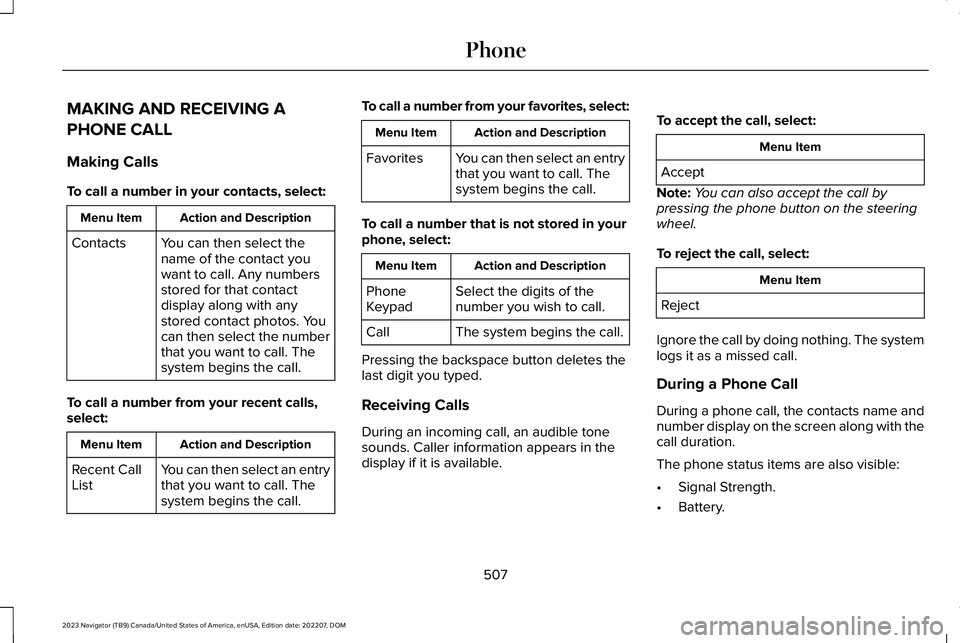
MAKING AND RECEIVING A
PHONE CALL
Making Calls
To call a number in your contacts, select:
Action and DescriptionMenu Item
You can then select thename of the contact youwant to call. Any numbersstored for that contactdisplay along with anystored contact photos. Youcan then select the numberthat you want to call. Thesystem begins the call.
Contacts
To call a number from your recent calls,select:
Action and DescriptionMenu Item
You can then select an entrythat you want to call. Thesystem begins the call.
Recent CallList
To call a number from your favorites, select:
Action and DescriptionMenu Item
You can then select an entrythat you want to call. Thesystem begins the call.
Favorites
To call a number that is not stored in yourphone, select:
Action and DescriptionMenu Item
Select the digits of thenumber you wish to call.PhoneKeypad
The system begins the call.Call
Pressing the backspace button deletes thelast digit you typed.
Receiving Calls
During an incoming call, an audible tonesounds. Caller information appears in thedisplay if it is available.
To accept the call, select:
Menu Item
Accept
Note:You can also accept the call bypressing the phone button on the steeringwheel.
To reject the call, select:
Menu Item
Reject
Ignore the call by doing nothing. The systemlogs it as a missed call.
During a Phone Call
During a phone call, the contacts name andnumber display on the screen along with thecall duration.
The phone status items are also visible:
•Signal Strength.
•Battery.
507
2023 Navigator (TB9) Canada/United States of America, enUSA, Edition date: 202207, DOMPhone
Page 512 of 660
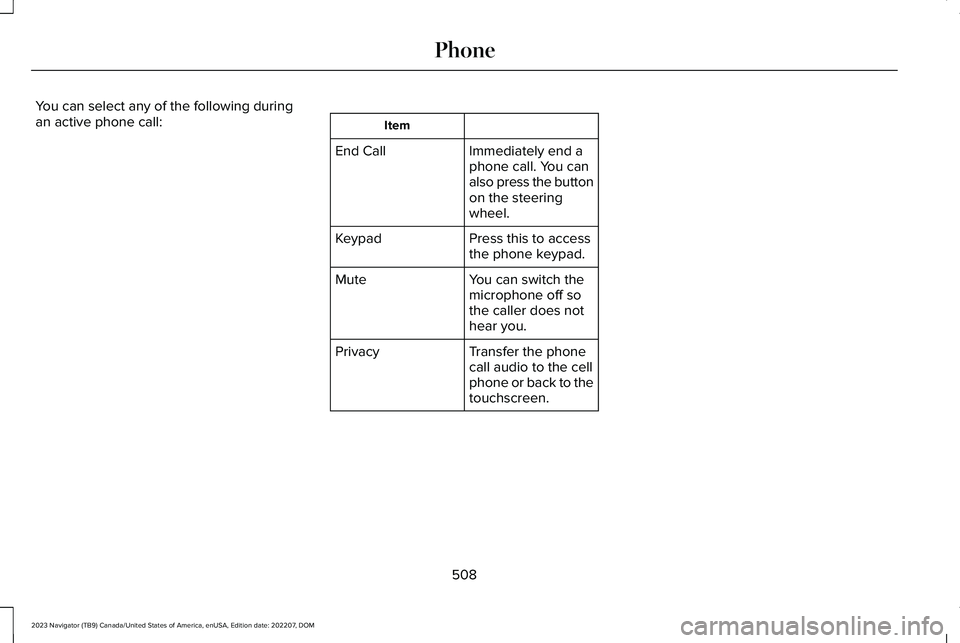
You can select any of the following duringan active phone call:Item
Immediately end aphone call. You canalso press the buttonon the steeringwheel.
End Call
Press this to accessthe phone keypad.Keypad
You can switch themicrophone off sothe caller does nothear you.
Mute
Transfer the phonecall audio to the cellphone or back to thetouchscreen.
Privacy
508
2023 Navigator (TB9) Canada/United States of America, enUSA, Edition date: 202207, DOMPhone
Page 537 of 660
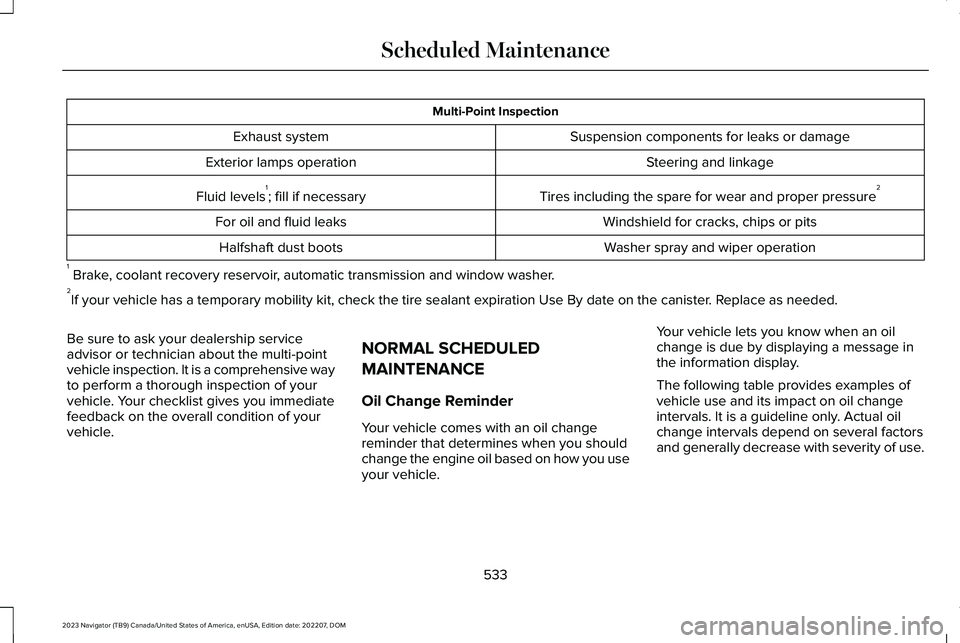
Multi-Point Inspection
Suspension components for leaks or damageExhaust system
Steering and linkageExterior lamps operation
Tires including the spare for wear and proper pressure2Fluid levels1; fill if necessary
Windshield for cracks, chips or pitsFor oil and fluid leaks
Washer spray and wiper operationHalfshaft dust boots
1 Brake, coolant recovery reservoir, automatic transmission and window washer.2If your vehicle has a temporary mobility kit, check the tire sealant expiration Use By date on the canister. Replace as needed.
Be sure to ask your dealership serviceadvisor or technician about the multi-pointvehicle inspection. It is a comprehensive wayto perform a thorough inspection of yourvehicle. Your checklist gives you immediatefeedback on the overall condition of yourvehicle.
NORMAL SCHEDULED
MAINTENANCE
Oil Change Reminder
Your vehicle comes with an oil changereminder that determines when you shouldchange the engine oil based on how you useyour vehicle.
Your vehicle lets you know when an oilchange is due by displaying a message inthe information display.
The following table provides examples ofvehicle use and its impact on oil changeintervals. It is a guideline only. Actual oilchange intervals depend on several factorsand generally decrease with severity of use.
533
2023 Navigator (TB9) Canada/United States of America, enUSA, Edition date: 202207, DOMScheduled Maintenance
Page 539 of 660
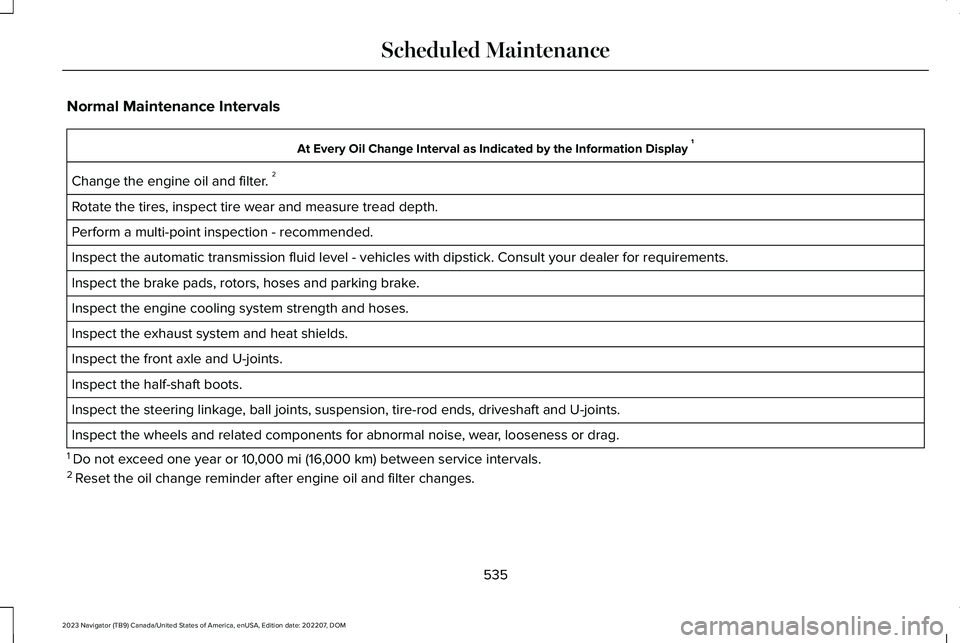
Normal Maintenance Intervals
At Every Oil Change Interval as Indicated by the Information Display 1
Change the engine oil and filter. 2
Rotate the tires, inspect tire wear and measure tread depth.
Perform a multi-point inspection - recommended.
Inspect the automatic transmission fluid level - vehicles with dipstick. Consult your dealer for requirements.
Inspect the brake pads, rotors, hoses and parking brake.
Inspect the engine cooling system strength and hoses.
Inspect the exhaust system and heat shields.
Inspect the front axle and U-joints.
Inspect the half-shaft boots.
Inspect the steering linkage, ball joints, suspension, tire-rod ends, driveshaft and U-joints.
Inspect the wheels and related components for abnormal noise, wear, looseness or drag.
1 Do not exceed one year or 10,000 mi (16,000 km) between service intervals.2 Reset the oil change reminder after engine oil and filter changes.
535
2023 Navigator (TB9) Canada/United States of America, enUSA, Edition date: 202207, DOMScheduled Maintenance
Page 543 of 660
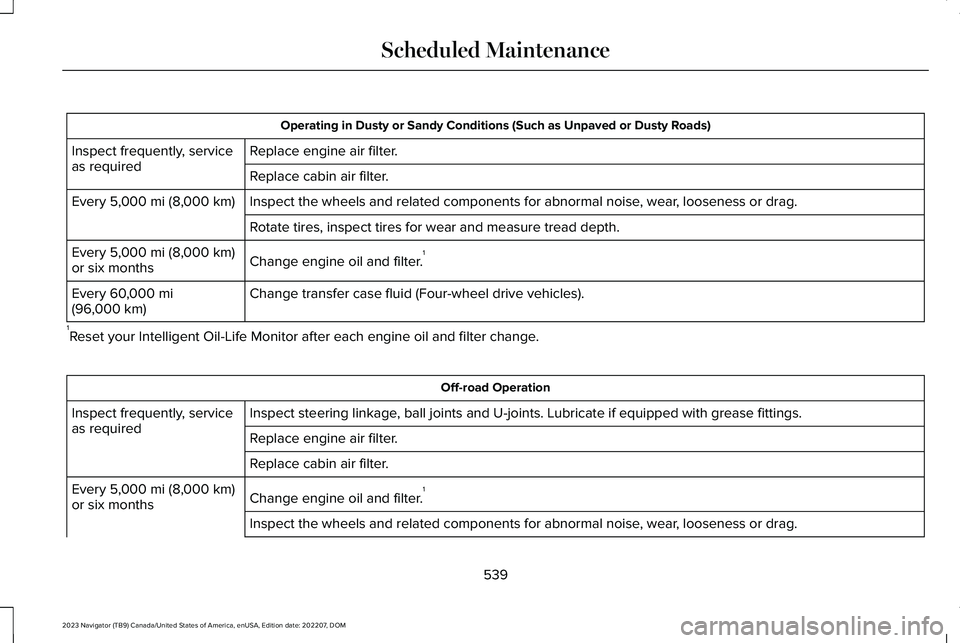
Operating in Dusty or Sandy Conditions (Such as Unpaved or Dusty Roads)
Replace engine air filter.Inspect frequently, serviceas requiredReplace cabin air filter.
Inspect the wheels and related components for abnormal noise, wear, looseness or drag.Every 5,000 mi (8,000 km)
Rotate tires, inspect tires for wear and measure tread depth.
Change engine oil and filter.1Every 5,000 mi (8,000 km)or six months
Change transfer case fluid (Four-wheel drive vehicles).Every 60,000 mi(96,000 km)
1Reset your Intelligent Oil-Life Monitor after each engine oil and filter change.
Off-road Operation
Inspect steering linkage, ball joints and U-joints. Lubricate if equipped with grease fittings.Inspect frequently, serviceas requiredReplace engine air filter.
Replace cabin air filter.
Change engine oil and filter.1Every 5,000 mi (8,000 km)or six months
Inspect the wheels and related components for abnormal noise, wear, looseness or drag.
539
2023 Navigator (TB9) Canada/United States of America, enUSA, Edition date: 202207, DOMScheduled Maintenance
Page 545 of 660
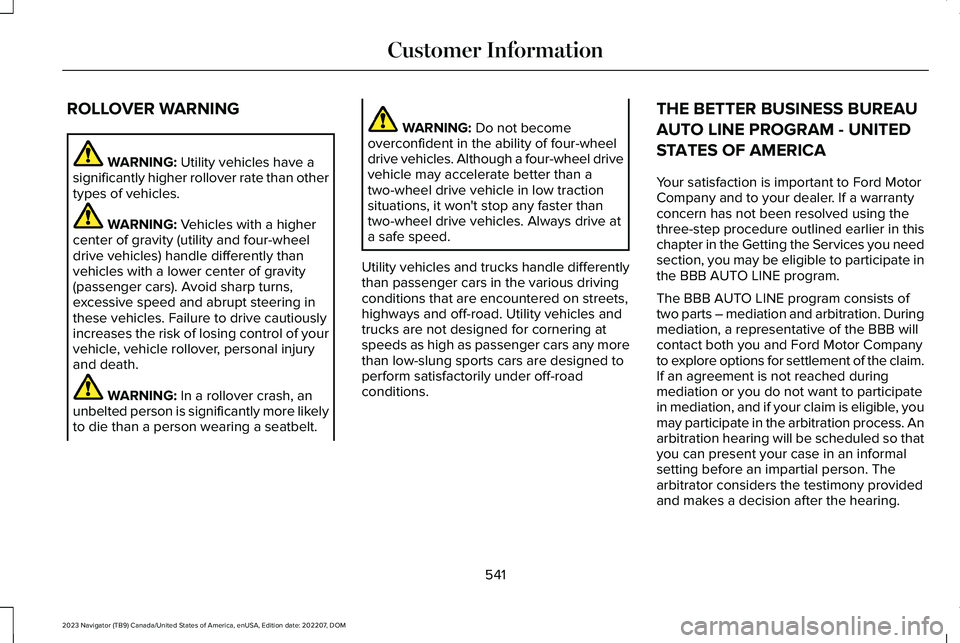
ROLLOVER WARNING
WARNING: Utility vehicles have asignificantly higher rollover rate than othertypes of vehicles.
WARNING: Vehicles with a highercenter of gravity (utility and four-wheeldrive vehicles) handle differently thanvehicles with a lower center of gravity(passenger cars). Avoid sharp turns,excessive speed and abrupt steering inthese vehicles. Failure to drive cautiouslyincreases the risk of losing control of yourvehicle, vehicle rollover, personal injuryand death.
WARNING: In a rollover crash, anunbelted person is significantly more likelyto die than a person wearing a seatbelt.
WARNING: Do not becomeoverconfident in the ability of four-wheeldrive vehicles. Although a four-wheel drivevehicle may accelerate better than atwo-wheel drive vehicle in low tractionsituations, it won't stop any faster thantwo-wheel drive vehicles. Always drive ata safe speed.
Utility vehicles and trucks handle differentlythan passenger cars in the various drivingconditions that are encountered on streets,highways and off-road. Utility vehicles andtrucks are not designed for cornering atspeeds as high as passenger cars any morethan low-slung sports cars are designed toperform satisfactorily under off-roadconditions.
THE BETTER BUSINESS BUREAU
AUTO LINE PROGRAM - UNITED
STATES OF AMERICA
Your satisfaction is important to Ford MotorCompany and to your dealer. If a warrantyconcern has not been resolved using thethree-step procedure outlined earlier in thischapter in the Getting the Services you needsection, you may be eligible to participate inthe BBB AUTO LINE program.
The BBB AUTO LINE program consists oftwo parts – mediation and arbitration. Duringmediation, a representative of the BBB willcontact both you and Ford Motor Companyto explore options for settlement of the claim.If an agreement is not reached duringmediation or you do not want to participatein mediation, and if your claim is eligible, youmay participate in the arbitration process. Anarbitration hearing will be scheduled so thatyou can present your case in an informalsetting before an impartial person. Thearbitrator considers the testimony providedand makes a decision after the hearing.
541
2023 Navigator (TB9) Canada/United States of America, enUSA, Edition date: 202207, DOMCustomer Information
Page 636 of 660
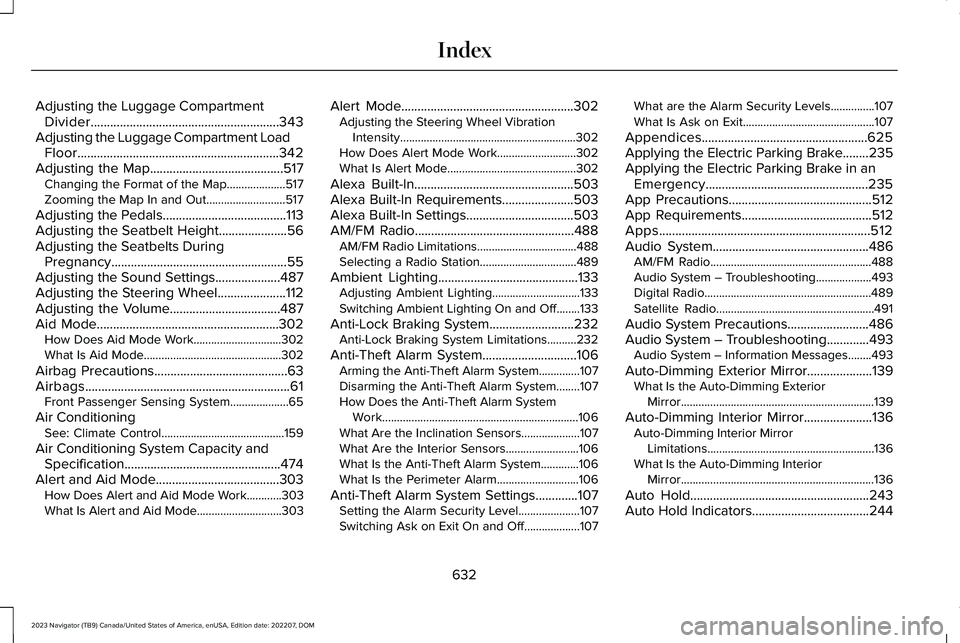
Adjusting the Luggage CompartmentDivider..........................................................343Adjusting the Luggage Compartment LoadFloor..............................................................342Adjusting the Map.........................................517Changing the Format of the Map....................517Zooming the Map In and Out...........................517
Adjusting the Pedals......................................113Adjusting the Seatbelt Height.....................56Adjusting the Seatbelts DuringPregnancy......................................................55Adjusting the Sound Settings....................487Adjusting the Steering Wheel.....................112Adjusting the Volume..................................487Aid Mode........................................................302How Does Aid Mode Work..............................302What Is Aid Mode...............................................302
Airbag Precautions.........................................63Airbags...............................................................61Front Passenger Sensing System....................65
Air ConditioningSee: Climate Control..........................................159
Air Conditioning System Capacity andSpecification................................................474Alert and Aid Mode......................................303How Does Alert and Aid Mode Work............303What Is Alert and Aid Mode.............................303
Alert Mode.....................................................302Adjusting the Steering Wheel VibrationIntensity............................................................302How Does Alert Mode Work...........................302What Is Alert Mode............................................302
Alexa Built-In.................................................503Alexa Built-In Requirements......................503Alexa Built-In Settings.................................503AM/FM Radio.................................................488AM/FM Radio Limitations..................................488Selecting a Radio Station.................................489
Ambient Lighting...........................................133Adjusting Ambient Lighting..............................133Switching Ambient Lighting On and Off........133
Anti-Lock Braking System..........................232Anti-Lock Braking System Limitations..........232
Anti-Theft Alarm System.............................106Arming the Anti-Theft Alarm System..............107Disarming the Anti-Theft Alarm System........107How Does the Anti-Theft Alarm SystemWork...................................................................106What Are the Inclination Sensors....................107What Are the Interior Sensors.........................106What Is the Anti-Theft Alarm System.............106What Is the Perimeter Alarm............................106
Anti-Theft Alarm System Settings.............107Setting the Alarm Security Level.....................107Switching Ask on Exit On and Off...................107
What are the Alarm Security Levels...............107What Is Ask on Exit.............................................107
Appendices...................................................625Applying the Electric Parking Brake........235Applying the Electric Parking Brake in anEmergency..................................................235App Precautions............................................512App Requirements........................................512Apps.................................................................512Audio System................................................486AM/FM Radio.......................................................488Audio System – Troubleshooting...................493Digital Radio.........................................................489Satellite Radio......................................................491
Audio System Precautions.........................486Audio System – Troubleshooting.............493Audio System – Information Messages........493
Auto-Dimming Exterior Mirror....................139What Is the Auto-Dimming ExteriorMirror..................................................................139
Auto-Dimming Interior Mirror.....................136Auto-Dimming Interior MirrorLimitations.........................................................136What Is the Auto-Dimming InteriorMirror..................................................................136
Auto Hold.......................................................243Auto Hold Indicators....................................244
632
2023 Navigator (TB9) Canada/United States of America, enUSA, Edition date: 202207, DOMIndex
Page 641 of 660
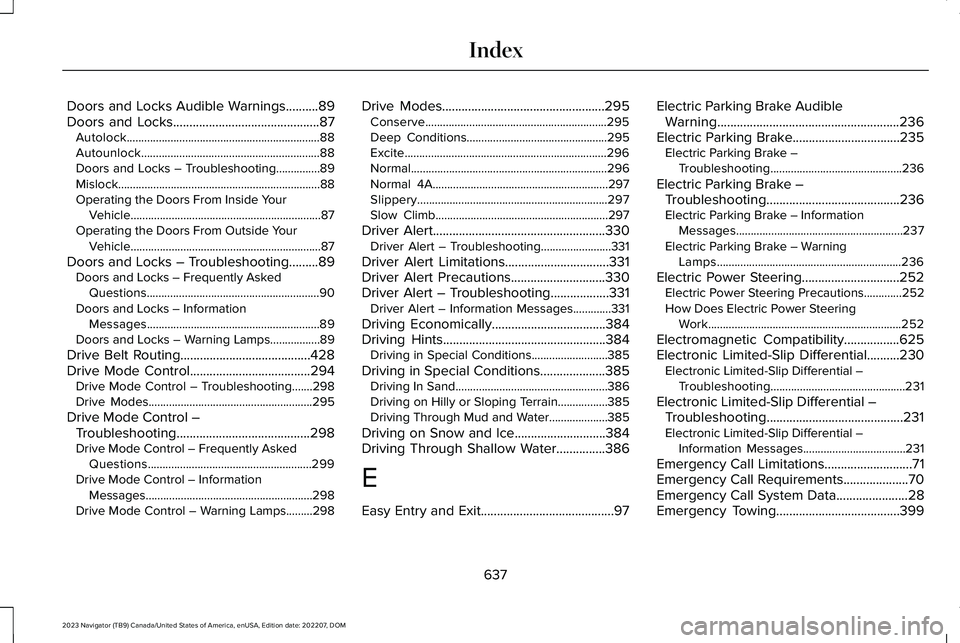
Doors and Locks Audible Warnings..........89Doors and Locks.............................................87Autolock..................................................................88Autounlock.............................................................88Doors and Locks – Troubleshooting...............89Mislock.....................................................................88Operating the Doors From Inside YourVehicle.................................................................87Operating the Doors From Outside YourVehicle.................................................................87
Doors and Locks – Troubleshooting.........89Doors and Locks – Frequently AskedQuestions...........................................................90Doors and Locks – InformationMessages...........................................................89Doors and Locks – Warning Lamps.................89
Drive Belt Routing........................................428Drive Mode Control.....................................294Drive Mode Control – Troubleshooting.......298Drive Modes........................................................295
Drive Mode Control –Troubleshooting.........................................298Drive Mode Control – Frequently AskedQuestions........................................................299Drive Mode Control – InformationMessages.........................................................298Drive Mode Control – Warning Lamps.........298
Drive Modes..................................................295Conserve..............................................................295Deep Conditions................................................295Excite.....................................................................296Normal...................................................................296Normal 4A............................................................297Slippery.................................................................297Slow Climb...........................................................297
Driver Alert.....................................................330Driver Alert – Troubleshooting........................331
Driver Alert Limitations................................331Driver Alert Precautions.............................330Driver Alert – Troubleshooting..................331Driver Alert – Information Messages.............331
Driving Economically...................................384Driving Hints..................................................384Driving in Special Conditions..........................385
Driving in Special Conditions....................385Driving In Sand....................................................386Driving on Hilly or Sloping Terrain.................385Driving Through Mud and Water....................385
Driving on Snow and Ice............................384Driving Through Shallow Water...............386
E
Easy Entry and Exit.........................................97
Electric Parking Brake AudibleWarning........................................................236Electric Parking Brake.................................235Electric Parking Brake –Troubleshooting.............................................236
Electric Parking Brake –Troubleshooting.........................................236Electric Parking Brake – InformationMessages.........................................................237Electric Parking Brake – WarningLamps...............................................................236
Electric Power Steering..............................252Electric Power Steering Precautions.............252How Does Electric Power SteeringWork..................................................................252
Electromagnetic Compatibility.................625Electronic Limited-Slip Differential..........230Electronic Limited-Slip Differential –Troubleshooting..............................................231
Electronic Limited-Slip Differential –Troubleshooting..........................................231Electronic Limited-Slip Differential –Information Messages...................................231
Emergency Call Limitations...........................71Emergency Call Requirements....................70Emergency Call System Data......................28Emergency Towing......................................399
637
2023 Navigator (TB9) Canada/United States of America, enUSA, Edition date: 202207, DOMIndex
Page 642 of 660
Emission Law - United States ofAmerica.........................................................621Enabling Apps on an AndroidDevice...........................................................512Enabling Apps on an iOS Device..............512Enabling or Disabling PersonalProfiles..........................................................515Enabling Remote Start.................................156End User License Agreement....................591Engine Air Filter............................................423Changing the Engine Air Filter........................423
Engine Block Heater...................................203Engine Block Heater Precautions..................203How Does the Engine Block HeaterWork..................................................................203Using the Engine Block Heater......................204
Engine Coolant Temperature Gauge.......144Engine Oil Capacity andSpecification...............................................469Engine Oil........................................................417Adding Engine Oil...............................................417Checking the Engine Oil Level.........................417Engine Oil Capacity and Specification...........418Engine Oil Dipstick Overview...........................417Resetting the Intelligent Oil Life Monitor.......418
Engine Oil Pressure Gauge........................144Engine Specifications..................................467Entering a Parallel Parking Space...........266
Entering a Perpendicular ParkingSpace............................................................266Evasive Steering Assist...............................327Evasive Steering Assist Limitations...............328Switching Evasive Steering Assist On andOff......................................................................328What Is Evasive Steering Assist......................327
Event Data........................................................26Exiting a Parking Space..............................267Export Unique Options...............................622Extending the Remote Start Duration......157Exterior Bulbs................................................428Exterior Bulb Specification Chart...................428
Exterior Lamps...............................................122Exterior Lamp Indicators....................................123Exterior Lamps On Audible Warning..............123Switching the Daytime Running Lamps Onand Off...............................................................122Switching Welcome Lighting On andOff.......................................................................123Using the Front Fog Lamps..............................123Using the Turn Signal Lamps...........................122
Exterior Lighting Control.............................120Exterior Lighting............................................120Adaptive Front Lighting.....................................130Autolamps..............................................................121Automatic High Beam Control.........................124
Automatic High Beam Control –Troubleshooting..............................................127Exterior Lamps.....................................................122Glare Free Lighting.............................................127Glare Free Lighting – Troubleshooting.........130Headlamps............................................................120Headlamps – Troubleshooting.........................121
Exterior Mirrors..............................................138Auto-Dimming Exterior Mirror..........................139
F
Fastening and Unfastening theSeatbelts........................................................53Feature Bar....................................................499Federal Highway AdministrationRegulation....................................................591Flat TireSee: Changing a Flat Tire.................................459
Floor Mats.......................................................387Folding the Exterior Mirrors........................138Foot PedalsSee: Adjusting the Pedals..................................113
Ford Power-UpSee: Software Update Settings......................520See: Vehicle Software Updates.....................520
Four-Wheel Drive.........................................224Four-Wheel Drive Modes.................................226
638
2023 Navigator (TB9) Canada/United States of America, enUSA, Edition date: 202207, DOMIndex
Page 649 of 660
P
Parking Aid Indicators.................................259Parking Aid Precautions.............................255Parking Aids..................................................255Front Parking Aid................................................257Parking Aids – Troubleshooting.....................259Rear Parking Aid.................................................256Side Parking Aid.................................................258
Parking Aids – Troubleshooting...............259Parking Aids – Information Messages..........259
Passive Anti-Theft System..........................106How Does the Passive Anti-Theft SystemWork...................................................................106What Is the Passive Anti-Theft System..........106
Perchlorate....................................................590Performing a System Reset.......................523Personalized Settings...................................151Personal Profiles............................................515Personal Safety System Components......60Personal Safety System™..............................60Phone as a Key Limitations..........................78Phone as a Key................................................78Phone as a Key – Troubleshooting..................80
Phone as a Key – Troubleshooting............80Phone as a Key – Frequently AskedQuestions...........................................................80
Phone Menu..................................................505
Phone..............................................................505Phone Precautions......................................505Playing and Pausing the AudioSource..........................................................497Playing Media Using Bluetooth®................511Playing Media Using the USB Port...........193Playing or Pausing the AudioSource..........................................................486Post-Crash Alert System.............................392How Does the Post-Crash Alert SystemWork..................................................................392Post-Crash Alert System Limitations.............392Switching the Post-Crash Alert SystemOff......................................................................393What Is the Post-Crash Alert System............392
Post Impact Braking.....................................393How Does Post Impact Braking Work...........393Overriding Post Impact Braking......................393Post Impact Braking Indicators.......................393Post Impact Braking Limitations.....................393
Power Outlet Indicators...............................197Power Outlet Limitations.............................196Power Outlet..................................................195Power Outlet Precautions...........................195Power Running Board Precautions...........110Power Running Board Settings..................110
Power Running Boards.................................110Power Running Boards –Troubleshooting................................................111
Power Running Boards –Troubleshooting............................................111Power Running Boards – Frequently AskedQuestions............................................................111
Power Seats....................................................168Adjusting the Head Restraint...........................168Adjusting the Lumbar Support.........................172Adjusting the Seat Backrest..............................171Adjusting the Seat Cushion..............................170Adjusting the Seat Height.................................172Folding the Seat Backrest................................180Head Restraint Components............................168Installing the Head Restraint............................169Moving the Seat Backward andForward.............................................................170Removing the Head Restraint..........................169Unfolding the Seat Backrest.............................181
Pre-Collision Assist Limitations.................322Pre-Collision Assist Precautions................321Pre-Collision Assist.......................................321Automatic Emergency Braking.......................327Distance Alert......................................................327Distance Indication............................................325Evasive Steering Assist.....................................327Pre-Collision Assist – Troubleshooting.........328
645
2023 Navigator (TB9) Canada/United States of America, enUSA, Edition date: 202207, DOMIndex