power steering LINCOLN NAVIGATOR 2023 User Guide
[x] Cancel search | Manufacturer: LINCOLN, Model Year: 2023, Model line: NAVIGATOR, Model: LINCOLN NAVIGATOR 2023Pages: 660, PDF Size: 14.04 MB
Page 388 of 660
COLD WEATHER PRECAUTIONS
The functional operation of somecomponents and systems can be affected attemperatures below approximately -13°F(-25°C).
DRIVING ON SNOW AND ICE
WARNING: If you are driving inslippery conditions that require tire chainsor cables, then it is critical that you drivecautiously. Keep speeds down, allow forlonger stopping distances and avoidaggressive steering to reduce the chancesof a loss of vehicle control which can leadto serious injury or death. If the rear endof your vehicle slides while cornering, steerin the direction of the slide until you regaincontrol of your vehicle.
On ice and snow, you should drive moreslowly than usual. Your vehicle has a fourwheel anti-lock brake system, do not pumpthe brake pedal. See Anti-Lock BrakingSystem Limitations (page 232).
BREAKING-IN
Your vehicle requires a break-in period. Forthe first 1,000 mi (1,600 km), avoid driving athigh speeds, heavy braking, aggressiveshifting or using your vehicle to tow. Duringthis time, your vehicle may exhibit someunusual driving characteristics.
DRIVING ECONOMICALLY
The following helps to improve fuelconsumption:
•Drive smoothly, accelerate gently andanticipate the road ahead to avoid heavybraking.
•Regularly check your tire pressures andmake sure that they are inflated to thecorrect pressure.
•Follow the recommended maintenanceschedule and carry out therecommended checks.
•Plan your journey and check the trafficbefore you set off. It is more efficient tocombine errands into a single tripwhenever possible.
•Avoid idling the engine in cold weatheror for extended periods. Start the engineonly when you are ready to set off.
•Do not carry unnecessary weight in yourvehicle as extra weight wastes fuel.
•Do not add unnecessary accessories tothe exterior of your vehicle, for examplerunning boards. If you use a roof rack,remember to fold it down or remove itwhen not in use.
•Do not shift into neutral when you arebraking or when your vehicle is slowingdown.
•Shut all windows when driving at highspeeds.
•Switch off all electric systems when notin use, for example air conditioning. Makesure that you unplug any accessoriesfrom the auxiliary power points when notin use.
384
2023 Navigator (TB9) Canada/United States of America, enUSA, Edition date: 202207, DOMDriving Hints
Page 389 of 660
DRIVING IN SPECIAL CONDITIONS
DRIVING THROUGH MUD AND WATER
Mud
Be cautious of sudden changes in vehiclespeed or direction when you are driving inmud. Even all-wheel drive and four-wheeldrive vehicles can lose traction in mud. Ifyour vehicle slides, steer in the direction ofthe slide until you regain control of yourvehicle. After driving through mud, clean offresidue stuck to rotating driveshafts and tires.Excess residue can cause an imbalance thatcould damage drive components.
Note:If your vehicle gets stuck in mud, itcould be rocked out by shifting betweenforward and reverse gears, stoppingbetween shifts in a steady pattern. Presslightly on the accelerator in each gear.
Note:Do not rock your vehicle if the engineis not at normal operating temperature, asdamage to the transmission could occur.
Note:Do not rock your vehicle for more thana minute, as damage to the transmissionand tires could occur or the engine couldoverheat.
Water
If you must drive though deep water, driveslowly. The water could limit traction or brakecapability. See Driving Through ShallowWater (page 386).
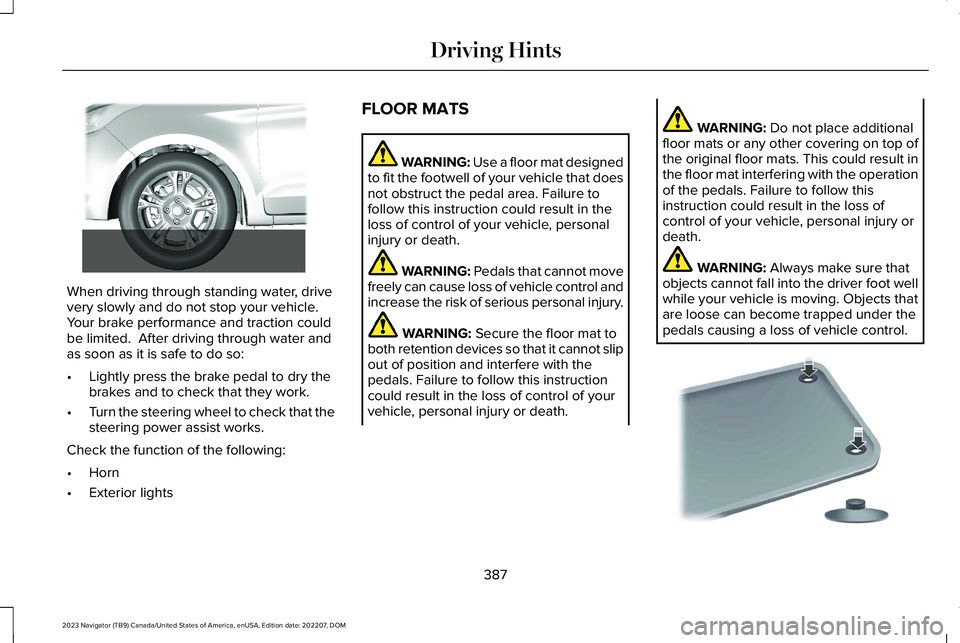
When driving though water, determine thedepth and avoid water higher than the centerof the wheel.
Once through water, always try the brakes.Wet brakes do not stop your vehicle asquickly as dry brakes. Apply light pressureto the brake pedal while slowly moving thevehicle to dry the brakes.
Note:Driving through deep water couldcause damage to the transmission. If thefront or rear axle is submerged in water,have the axle lubricant and power transferunit lubricant checked and changed ifnecessary.
DRIVING ON HILLY OR SLOPINGTERRAIN
WARNING: Extreme care should beused when steering the vehicle in reversedown a slope so as not to cause thevehicle to swerve out of control.
Although natural obstacles could make itnecessary to travel diagonally up or down ahill or steep incline, you should try to drivestraight up or straight down.
Note:Avoid turning on steep slopes or hills.A danger lies in losing traction, slippingsideways and possible vehicle roll over.Whenever driving on a hill, determinebeforehand the route you can use. Do notdrive over the crest of a hill without seeingwhat conditions are on the other side. Donot drive in reverse over a hill without theaid of an observer.
385
2023 Navigator (TB9) Canada/United States of America, enUSA, Edition date: 202207, DOMDriving Hints
Page 390 of 660
Apply just enough power to the wheels toclimb the hill. Too much power causes thetires to slip, spin or lose traction, and youcould lose control of your vehicle. Whendescending a steep hill, do not descend thehill in neutral. Avoid sudden hard braking tokeep the front wheels rolling and to maintainyour vehicle's steering.
Note:Your vehicle has anti-lock brakes,apply the brakes steadily. Do not pump thebrakes.
Note:If your vehicle gets stuck driving onhilly or sloping terrain, it could be rocked outby shifting between forward and reversegears, stopping between shifts in a steadypattern. Press lightly on the accelerator ineach gear.
Note:Do not rock your vehicle if the engineis not at normal operating temperature, asdamage to the transmission could occur.
Note:Do not rock your vehicle for more thana minute, as damage to the transmissionand tires could occur or the engine couldoverheat.
DRIVING IN SAND
When driving over sand, try to keep all fourwheels on the most solid area of the trail. Steadily drive through the terrain. Apply theaccelerator slowly and avoid excessivewheel slip. Do not drive your vehicle in deepsand for an extended period of time. Thiscould overheat the system. A messageappears in the instrument cluster display.
Note:If your vehicle gets stuck driving onhilly or sloping terrain, it could be rocked outby shifting between forward and reversegears, stopping between shifts in a steadypattern. Press lightly on the accelerator ineach gear.
Note:Do not rock your vehicle if the engineis not at normal operating temperature, asdamage to the transmission could occur.
Note:Do not rock your vehicle for more thana minute, as damage to the transmissionand tires could occur or the engine couldoverheat
DRIVING THROUGH SHALLOW
WATER
WARNING: Do not attempt to crossa deep or flowing body of water. Failure tofollow this instruction could result in theloss of control of your vehicle, personalinjury or death.
Note:Driving through standing water cancause vehicle damage.
Note:Engine damage can occur if waterenters the air filter.
Before driving through standing water, checkthe depth. Never drive through water that ishigher than the bottom of the front rockerarea of your vehicle.
386
2023 Navigator (TB9) Canada/United States of America, enUSA, Edition date: 202207, DOMDriving Hints
Page 391 of 660
When driving through standing water, drivevery slowly and do not stop your vehicle. Your brake performance and traction couldbe limited. After driving through water andas soon as it is safe to do so:
•Lightly press the brake pedal to dry thebrakes and to check that they work.
•Turn the steering wheel to check that thesteering power assist works.
Check the function of the following:
•Horn
•Exterior lights
FLOOR MATS
WARNING: Use a floor mat designedto fit the footwell of your vehicle that doesnot obstruct the pedal area. Failure tofollow this instruction could result in theloss of control of your vehicle, personalinjury or death.
WARNING: Pedals that cannot movefreely can cause loss of vehicle control andincrease the risk of serious personal injury.
WARNING: Secure the floor mat toboth retention devices so that it cannot slipout of position and interfere with thepedals. Failure to follow this instructioncould result in the loss of control of yourvehicle, personal injury or death.
WARNING: Do not place additionalfloor mats or any other covering on top ofthe original floor mats. This could result inthe floor mat interfering with the operationof the pedals. Failure to follow thisinstruction could result in the loss ofcontrol of your vehicle, personal injury ordeath.
WARNING: Always make sure thatobjects cannot fall into the driver foot wellwhile your vehicle is moving. Objects thatare loose can become trapped under thepedals causing a loss of vehicle control.
387
2023 Navigator (TB9) Canada/United States of America, enUSA, Edition date: 202207, DOMDriving Hints E266447 E142666
Page 407 of 660
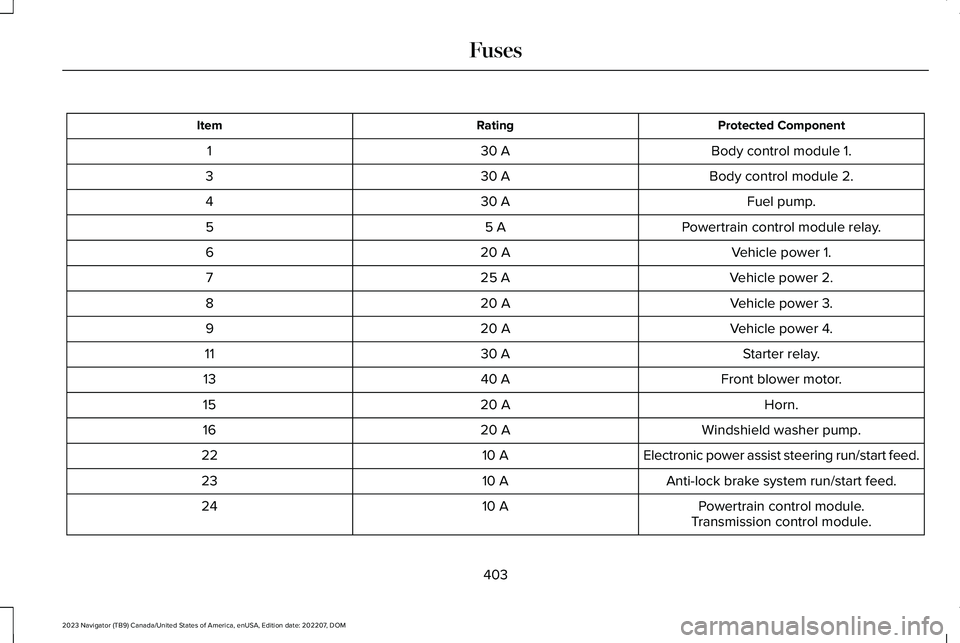
Protected ComponentRatingItem
Body control module 1.30 A1
Body control module 2.30 A3
Fuel pump.30 A4
Powertrain control module relay.5 A5
Vehicle power 1.20 A6
Vehicle power 2.25 A7
Vehicle power 3.20 A8
Vehicle power 4.20 A9
Starter relay.30 A11
Front blower motor.40 A13
Horn.20 A15
Windshield washer pump.20 A16
Electronic power assist steering run/start feed.10 A22
Anti-lock brake system run/start feed.10 A23
Powertrain control module.10 A24Transmission control module.
403
2023 Navigator (TB9) Canada/United States of America, enUSA, Edition date: 202207, DOMFuses
Page 416 of 660
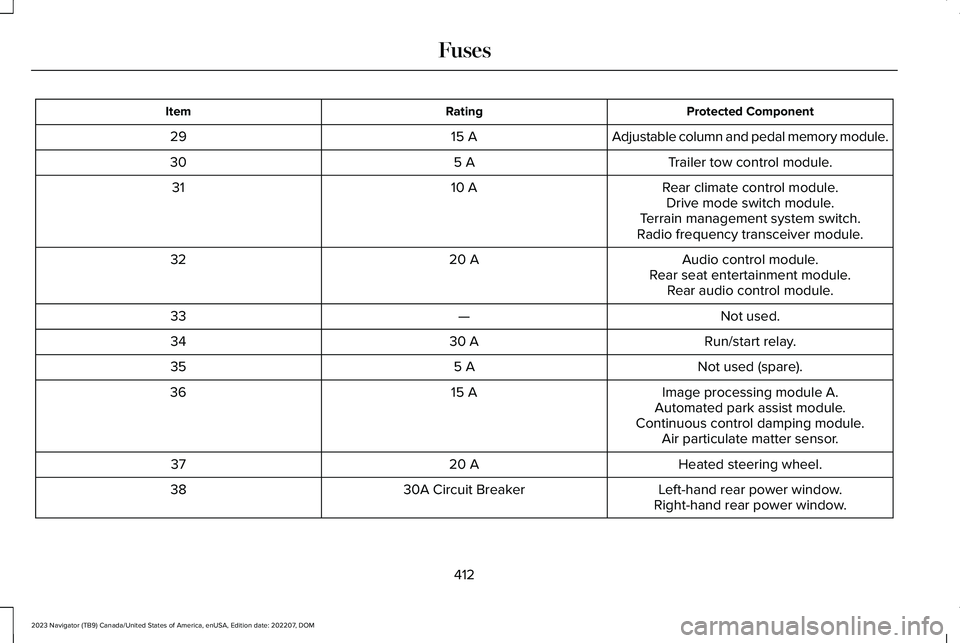
Protected ComponentRatingItem
Adjustable column and pedal memory module.15 A29
Trailer tow control module.5 A30
Rear climate control module.10 A31Drive mode switch module.Terrain management system switch.Radio frequency transceiver module.
Audio control module.20 A32Rear seat entertainment module.Rear audio control module.
Not used.—33
Run/start relay.30 A34
Not used (spare).5 A35
Image processing module A.15 A36Automated park assist module.Continuous control damping module.Air particulate matter sensor.
Heated steering wheel.20 A37
Left-hand rear power window.30A Circuit Breaker38Right-hand rear power window.
412
2023 Navigator (TB9) Canada/United States of America, enUSA, Edition date: 202207, DOMFuses
Page 425 of 660
Fail-Safe Cooling
Fail-safe cooling allows you to temporarilydrive your vehicle before any incrementalcomponent damage occurs. The fail-safedistance depends on ambient temperature,vehicle load and terrain.
How Fail-Safe Cooling Works
WARNING: If you continue to driveyour vehicle when the engine isoverheating, the engine could stop withoutwarning. Failure to follow this instructioncould result in the loss of control of yourvehicle.
If the engine begins to overheat,the coolant temperature gaugemoves toward the red zone:
A warning lamp illuminates and amessage may appear in theinformation display.
If the engine reaches a presetover-temperature condition, the engineautomatically switches to alternating cylinderoperation. Each disabled cylinder acts as anair pump and cools the engine.
When this occurs, your vehicle still operates,however:
•Engine power is limited.
•The air conditioning system turns off.
Continued operation increases the enginetemperature, causing the engine tocompletely shut down. Your steering andbraking effort increases in this situation.
When the engine temperature cools, you canre-start the engine. Have your vehiclechecked as soon as possible to minimizeengine damage.
When Fail-Safe Mode Is Activated
WARNING: Fail-safe mode is for useduring emergencies only. Operate yourvehicle in fail-safe mode only as long asnecessary to bring your vehicle to rest ina safe location and seek immediate repairs.When in fail-safe mode, your vehicle willhave limited power, will not be able tomaintain high-speed operation, and maycompletely shut down without warning,potentially losing engine power, powersteering assist, and power brake assist,which may increase the possibility of acrash resulting in serious injury.
WARNING: Do not remove thecoolant reservoir cap when the engine ison or the cooling system is hot. Wait 10minutes for the cooling system to cooldown. Cover the coolant reservoir cap witha thick cloth to prevent the possibility ofscalding and slowly remove the cap.Failure to follow this instruction could resultin personal injury.
421
2023 Navigator (TB9) Canada/United States of America, enUSA, Edition date: 202207, DOMMaintenanceE103308 E67028
Page 436 of 660
•Do not use water pressure higher than2,000 psi (14,000 kPa).
•Do not use water hotter than 179°F (82°C).
Note:Holding the pressure washer nozzleat an angle to the vehicle's surface maydamage graphics and cause the edges topeel away from the vehicle's surface.
CLEANING CAMERA LENSES ANDSENSORS
We recommend that you only use lukewarmor cold water and a soft cloth to clean thecamera lens and sensors.
Note:Do not pressure wash camera lensand sensors.
CLEANING THE UNDERBODY
Flush the complete underside of your vehiclefrequently. Keep body and door drain holesfree from packed dirt.
Rear suspension components may requireregular cleaning with a power washer or athorough rinse with a strong stream of waterif the vehicle is operated in dusty or muddyenvironments. Rear leaf springs or othersuspension components may emit squeakingor popping noises while operating thevehicle if particles, such as dirt, rocks, orother debris, are present in the components.
CLEANING THE INTERIOR
CLEANING THE INSTRUMENT PANEL
WARNING: Do not use chemicalsolvents or strong detergents whencleaning the steering wheel or instrumentpanel to avoid contamination of the airbagsystem.
We recommend that you only clean theinstrument panel and cluster lens with adamp soft cloth. Dry the area with a clean,soft cloth.
For additional information and assistance,we recommend that you contact anauthorized dealer.
Note:Avoid cleaners or polishes thatincrease the gloss of the upper portion ofthe instrument panel. The dull finish in thisarea helps protect you from undesirablewindshield reflection.
CLEANING PLASTIC
We recommend that you only use a mildsoap and water solution on a soft cloth. Drythe area with a clean, soft cloth.
CLEANING DISPLAYS AND SCREENS
We recommend that you only use amicrofiber cloth in a circular motion to cleanoff the fingerprint or dust.
If dirt or fingerprints are still on the screen,apply a small amount of alcohol to the clothand try to clean it again.
Note:Do not pour or spray alcohol onto thetouchscreen.
432
2023 Navigator (TB9) Canada/United States of America, enUSA, Edition date: 202207, DOMVehicle Care
Page 450 of 660
USING SNOW CHAINS
WARNING: Do not exceed 30 mph(50 km/h). Failure to follow this instructioncould result in the loss of control of yourvehicle, personal injury or death.
WARNING: Do not use snow chainson snow-free roads.
WARNING: Only fit snow chains tospecified tires.
WARNING: If your vehicle is fittedwith wheel trims, remove them beforefitting snow chains.
WARNING: If you choose to installsnow tires on your vehicle, they must bethe same size, construction, and load rangeas the original tires listed on the tireplacard, and they must be installed on allfour wheels. Mixing tires of different sizeor construction on your vehicle canadversely affect your vehicle's handlingand braking, and may lead to loss ofvehicle control.
WARNING: Wheels and tires mustbe the same size, load index and speedrating as those originally fitted on thevehicle. Use of any other tire or wheel canaffect the safety and performance of yourvehicle. Additionally, the use ofnon-recommended tires and wheels cancause steering, suspension, axle, transfercase or power transfer unit failure. Followthe recommended tire inflation pressures
found on the Safety ComplianceCertification label, or the Tire Label on theB-Pillar or the edge of the driver door.Failure to follow this instruction could resultin loss of vehicle control, vehicle rollover,or personal injury or death.
Only use snow chains on rear wheels. Installsnow chains in pairs. Do not useself-tensioning snow chains.
Only use snow chains on the followingspecified tire sizes. Only install chains thatare 15mm or less (SAE Class S chains).
•265/70R17
•275/65R18
We recommend you use steel wheels of thesame size and specification if snow chainsare required because chains may chipaluminum wheels.
Follow these guidelines when using snowtires and traction devices:
446
2023 Navigator (TB9) Canada/United States of America, enUSA, Edition date: 202207, DOMWheel and Tire Information
Page 504 of 660
INFORMATION ON DEMAND
SCREEN
The information on demand screen displayscards on the side of the display and allowsyou to see information from differentfeatures.
Press the button to view the nextcard.
Press the button to view theprevious card.
Press the button to view availablecards.
You can swipe toward the main screen tomove the content into the main screen.
Note:This can only be done with someinformation on demand screens.
REBOOTING THE CENTER DISPLAY
You can reboot the center display using thecontrols on the steering wheel.
1.Simultaneously press and hold the seekforward and audio system power buttonfor 10 seconds.
500
2023 Navigator (TB9) Canada/United States of America, enUSA, Edition date: 202207, DOMCenter Display OverviewE353212 E353211 E353209