trailer LINCOLN NAVIGATOR 2023 Owner's Manual
[x] Cancel search | Manufacturer: LINCOLN, Model Year: 2023, Model line: NAVIGATOR, Model: LINCOLN NAVIGATOR 2023Pages: 660, PDF Size: 14.04 MB
Page 311 of 660
•If a vehicle is approaching in an adjacentlane at a relative speed much higher thanyour vehicle.
•Bad weather conditions are present thatobstruct the sensors.
•Attaching bike or cargo racks couldcause false alerts due to obstruction ofthe sensor.
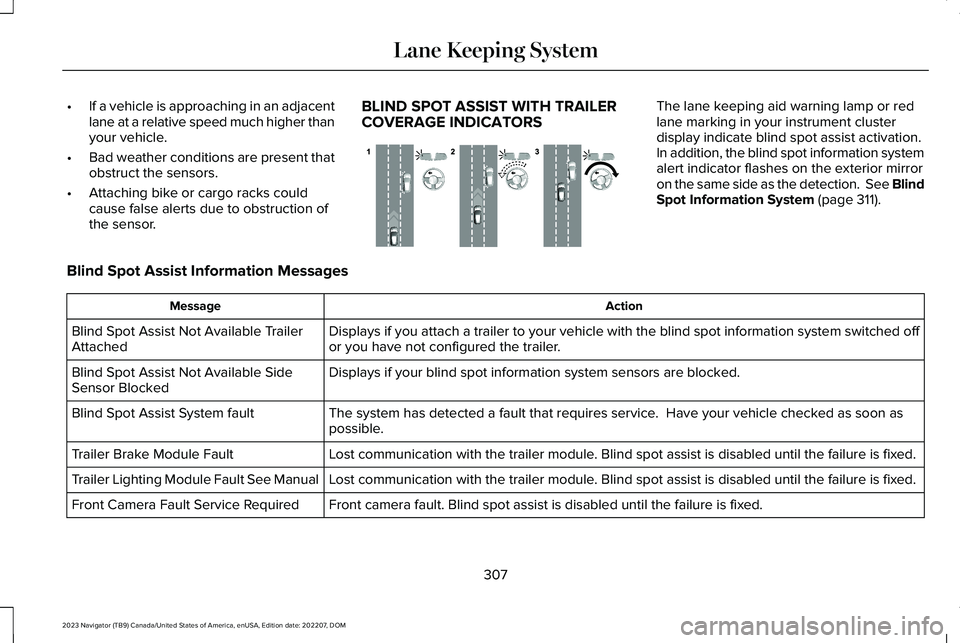
BLIND SPOT ASSIST WITH TRAILERCOVERAGE INDICATORS
The lane keeping aid warning lamp or redlane marking in your instrument clusterdisplay indicate blind spot assist activation.In addition, the blind spot information systemalert indicator flashes on the exterior mirroron the same side as the detection. See BlindSpot Information System (page 311).
Blind Spot Assist Information Messages
ActionMessage
Displays if you attach a trailer to your vehicle with the blind spot information system switched offor you have not configured the trailer.Blind Spot Assist Not Available TrailerAttached
Displays if your blind spot information system sensors are blocked.Blind Spot Assist Not Available SideSensor Blocked
The system has detected a fault that requires service. Have your vehicle checked as soon aspossible.Blind Spot Assist System fault
Lost communication with the trailer module. Blind spot assist is disabled until the failure is fixed.Trailer Brake Module Fault
Lost communication with the trailer module. Blind spot assist is disabled until the failure is fixed.Trailer Lighting Module Fault See Manual
Front camera fault. Blind spot assist is disabled until the failure is fixed.Front Camera Fault Service Required
307
2023 Navigator (TB9) Canada/United States of America, enUSA, Edition date: 202207, DOMLane Keeping SystemE310089
Page 316 of 660
Note:For vehicles without blind spotinformation system with trailer coverage,aftermarket trailer tow modules or tow barsmay interfere with the system. In thissituation it is recommended that you switchthe system off when you attach a trailer. Forvehicles with a trailer tow module and towbar approved by the manufacturer, thesystem automatically turns off when youattach a trailer.
BLIND SPOT INFORMATION
SYSTEM REQUIREMENTS
Blind spot information system turns on whenall the following occur:
•You start your vehicle.
•You shift into drive (D).
•The vehicle speed is greater than 6 mph(10 km/h).
SWITCHING BLIND SPOT
INFORMATION SYSTEM ON AND
OFF
To switch blind spot information system onor off, use the touchscreen:
1.Press Features on the touchscreen.
2.Press Driver Assistance.
3.Press Blind Spot Information System.
4.Switch the feature on or off.
When you switch blind spot informationsystem off, a warning lamp illuminates. Whenyou switch the system on or off, the alertindicators flash twice.
Note:The system remembers the last settingwhen you start your vehicle.
To permanently switch the system off,contact an authorized dealer.
LOCATING THE BLIND SPOT
INFORMATION SYSTEM SENSORS
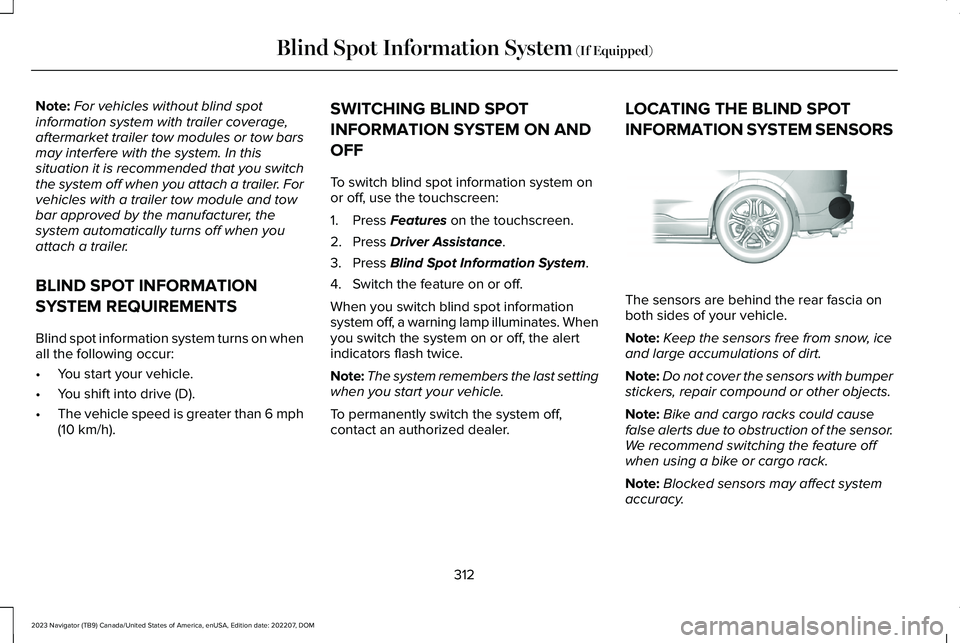
The sensors are behind the rear fascia onboth sides of your vehicle.
Note:Keep the sensors free from snow, iceand large accumulations of dirt.
Note:Do not cover the sensors with bumperstickers, repair compound or other objects.
Note:Bike and cargo racks could causefalse alerts due to obstruction of the sensor.We recommend switching the feature offwhen using a bike or cargo rack.
Note:Blocked sensors may affect systemaccuracy.
312
2023 Navigator (TB9) Canada/United States of America, enUSA, Edition date: 202207, DOMBlind Spot Information System (If Equipped)E205199
Page 317 of 660
If the sensors become blocked, a messageappears in the instrument cluster display.See Blind Spot Information System –Information Messages (page 316). The alertindicators illuminate but the system does notalert you.
BLIND SPOT INFORMATION SYSTEM
WITH TRAILER COVERAGE
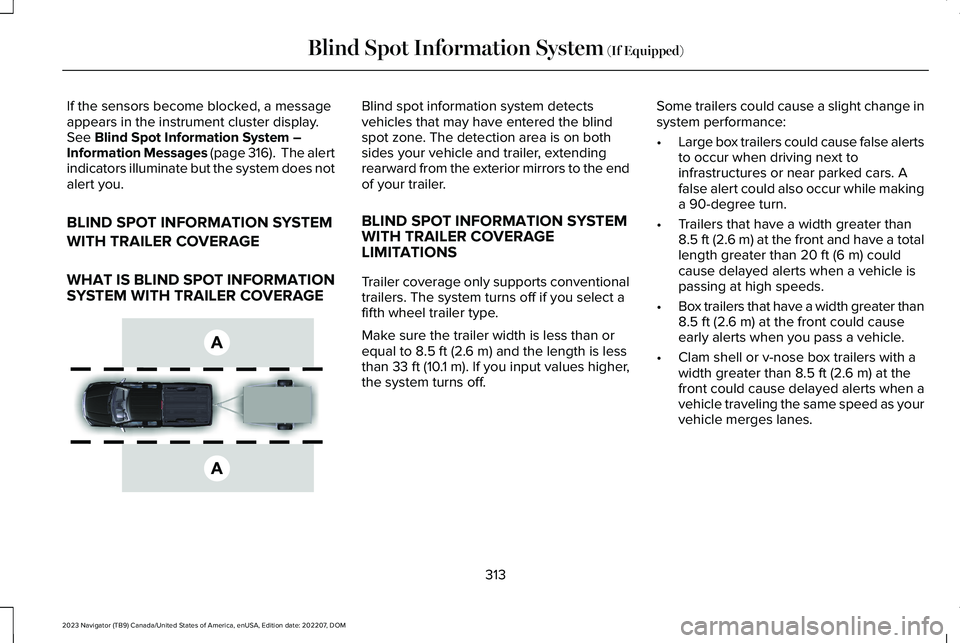
WHAT IS BLIND SPOT INFORMATIONSYSTEM WITH TRAILER COVERAGE
Blind spot information system detectsvehicles that may have entered the blindspot zone. The detection area is on bothsides your vehicle and trailer, extendingrearward from the exterior mirrors to the endof your trailer.
BLIND SPOT INFORMATION SYSTEMWITH TRAILER COVERAGELIMITATIONS
Trailer coverage only supports conventionaltrailers. The system turns off if you select afifth wheel trailer type.
Make sure the trailer width is less than orequal to 8.5 ft (2.6 m) and the length is lessthan 33 ft (10.1 m). If you input values higher,the system turns off.
Some trailers could cause a slight change insystem performance:
•Large box trailers could cause false alertsto occur when driving next toinfrastructures or near parked cars. Afalse alert could also occur while makinga 90-degree turn.
•Trailers that have a width greater than8.5 ft (2.6 m) at the front and have a totallength greater than 20 ft (6 m) couldcause delayed alerts when a vehicle ispassing at high speeds.
•Box trailers that have a width greater than8.5 ft (2.6 m) at the front could causeearly alerts when you pass a vehicle.
•Clam shell or v-nose box trailers with awidth greater than 8.5 ft (2.6 m) at thefront could cause delayed alerts when avehicle traveling the same speed as yourvehicle merges lanes.
313
2023 Navigator (TB9) Canada/United States of America, enUSA, Edition date: 202207, DOMBlind Spot Information System (If Equipped)E225007
Page 318 of 660
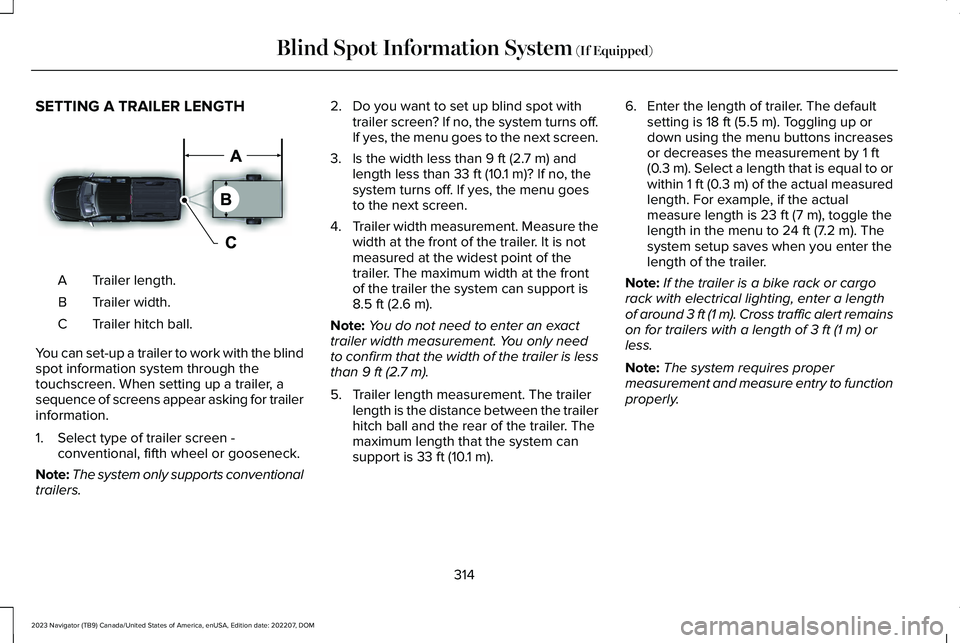
SETTING A TRAILER LENGTH
Trailer length.A
Trailer width.B
Trailer hitch ball.C
You can set-up a trailer to work with the blindspot information system through thetouchscreen. When setting up a trailer, asequence of screens appear asking for trailerinformation.
1.Select type of trailer screen -conventional, fifth wheel or gooseneck.
Note:The system only supports conventionaltrailers.
2.Do you want to set up blind spot withtrailer screen? If no, the system turns off.If yes, the menu goes to the next screen.
3.Is the width less than 9 ft (2.7 m) andlength less than 33 ft (10.1 m)? If no, thesystem turns off. If yes, the menu goesto the next screen.
4.Trailer width measurement. Measure thewidth at the front of the trailer. It is notmeasured at the widest point of thetrailer. The maximum width at the frontof the trailer the system can support is8.5 ft (2.6 m).
Note:You do not need to enter an exacttrailer width measurement. You only needto confirm that the width of the trailer is lessthan 9 ft (2.7 m).
5.Trailer length measurement. The trailerlength is the distance between the trailerhitch ball and the rear of the trailer. Themaximum length that the system cansupport is 33 ft (10.1 m).
6.Enter the length of trailer. The defaultsetting is 18 ft (5.5 m). Toggling up ordown using the menu buttons increasesor decreases the measurement by 1 ft(0.3 m). Select a length that is equal to orwithin 1 ft (0.3 m) of the actual measuredlength. For example, if the actualmeasure length is 23 ft (7 m), toggle thelength in the menu to 24 ft (7.2 m). Thesystem setup saves when you enter thelength of the trailer.
Note:If the trailer is a bike rack or cargorack with electrical lighting, enter a lengthof around 3 ft (1 m). Cross traffic alert remainson for trailers with a length of 3 ft (1 m) orless.
Note:The system requires propermeasurement and measure entry to functionproperly.
314
2023 Navigator (TB9) Canada/United States of America, enUSA, Edition date: 202207, DOMBlind Spot Information System (If Equipped)E225008
Page 319 of 660
SELECTING A TRAILER
When you connect a trailer to your vehicle,the trailer set up menu appears in thetouchscreen. This menu allows you to set upa new trailer or choose from a previously setup trailer. A warning message appears andthe system turns off if you do not choose oradd a new trailer.
Note:The warning message may not appearuntil your vehicle reaches 22 mph (35 km/h).
BLIND SPOT INFORMATION
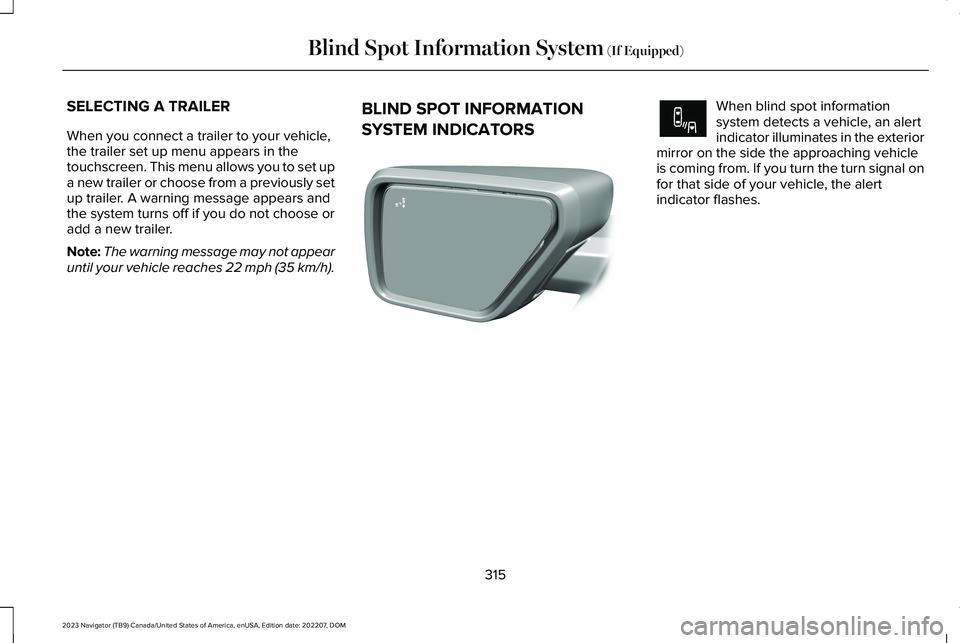
SYSTEM INDICATORS
When blind spot informationsystem detects a vehicle, an alertindicator illuminates in the exteriormirror on the side the approaching vehicleis coming from. If you turn the turn signal onfor that side of your vehicle, the alertindicator flashes.
315
2023 Navigator (TB9) Canada/United States of America, enUSA, Edition date: 202207, DOMBlind Spot Information System (If Equipped)E309137 E249861E249861
Page 320 of 660
BLIND SPOT INFORMATION SYSTEM – TROUBLESHOOTING
BLIND SPOT INFORMATION SYSTEM – INFORMATION MESSAGES
ActionMessage
A fault with the system has occurred. Have your vehicle checked assoon as possible.Blind Spot System Fault
Something is blocking the sensors. Clean the sensors.Blind Spot Not Available Sensor Blocked See Manual
The system automatically turns off and displays this message whenyou connect a trailer to the vehicle that does not have a trailer blindspot system or when you switch the trailer blind spot system offthrough the touchscreen.
Blind Spot Alert Deactivated Trailer Attached
Note:When connecting a trailer, the systemmay detect the trailer and turn the systemOFF. If the system does not turn OFFautomatically, switch the blind spotinformation system OFF manually. Ifequipped with blind spot with trailer tow, youwill be prompted to set up a trailer thatallows the feature to function with that trailer.
316
2023 Navigator (TB9) Canada/United States of America, enUSA, Edition date: 202207, DOMBlind Spot Information System (If Equipped)
Page 322 of 660
CROSS TRAFFIC ALERT
LIMITATIONS
The system may not correctly operate whenany of the following occur:
•Something is blocking the sensors.
•Adjacently parked vehicles or objects areobstructing the sensors.
•Vehicles approach at speeds less than4 mph (6 km/h) or greater than 37 mph(60 km/h).
•Your vehicle speed is greater than 7 mph(12 km/h).
•You reverse out of an angled parkingspace.
Cross Traffic Alert Limitations with aTrailer Attached
The system remains on when you attach atrailer in vehicles with blind spot informationsystem with trailer tow under the followingconditions:
•You connect a trailer.
•The trailer is a bike rack or cargo rackwith a maximum length of 3 ft (1 m).
•You set the trailer length to 3 ft (1 m) inthe instrument cluster display.
Note:The system may not correctly operatewhen towing a trailer. For vehicles with atrailer tow module and tow bar approved bythe manufacturer, the system turns off whenyou attach a trailer. For vehicles with anaftermarket trailer tow module or tow bar,we recommend that you switch the systemoff when you attach a trailer.
SWITCHING CROSS TRAFFIC
ALERT ON AND OFF
To switch cross traffic alert on or off use thetouchscreen.
1.Press Features on the touchscreen.
2.Press Driver Assistance.
3.Switch Cross Traffic Alert on or off.
Note:The system switches on every timeyou switch the ignition on. To permanentlyswitch the system off, contact an authorizeddealer.
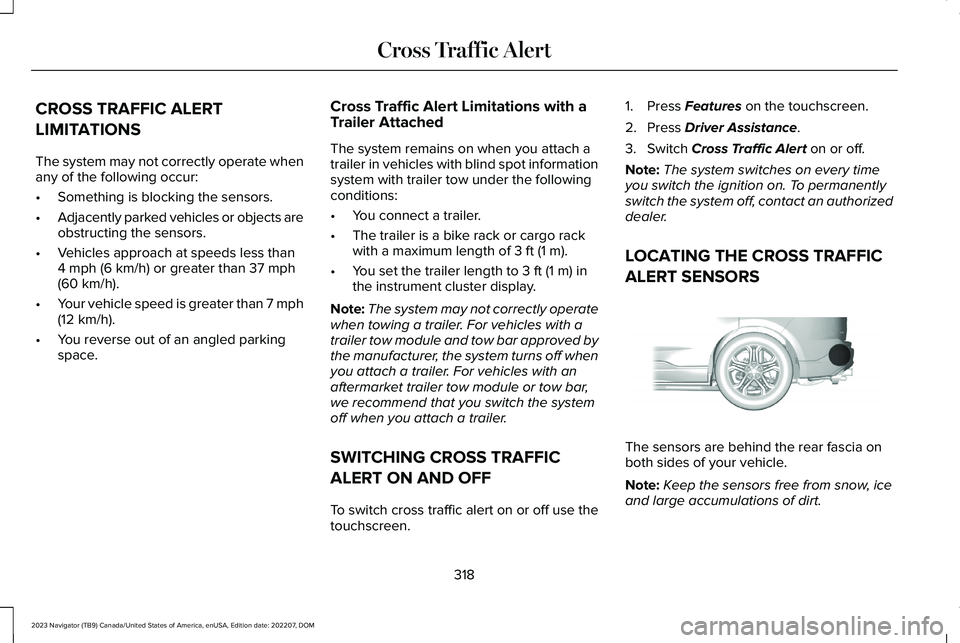
LOCATING THE CROSS TRAFFIC
ALERT SENSORS
The sensors are behind the rear fascia onboth sides of your vehicle.
Note:Keep the sensors free from snow, iceand large accumulations of dirt.
318
2023 Navigator (TB9) Canada/United States of America, enUSA, Edition date: 202207, DOMCross Traffic AlertE205199
Page 324 of 660
CROSS TRAFFIC ALERT – TROUBLESHOOTING
CROSS TRAFFIC ALERT – INFORMATION MESSAGES
ActionMessage
Displays instead of indication arrows when the system detects avehicle. Check for approaching traffic.Cross Traffic Alert
Indicates blocked cross traffic alert system sensors. Clean the sensors.If the message continues to appear, have your vehicle checked assoon as possible.
Cross Traffic Not Available Sensor Blocked See Manual
The system has malfunctioned. Have your vehicle checked as soonas possible.Cross Traffic System Fault
Displays if you attach a trailer to your vehicle.Cross Traffic Alert Deactivated Trailer Attached
Note:When connecting a trailer, the systemmay detect the trailer and turn the systemOFF. If the system does not turn OFFautomatically, switch the cross traffic alertsystem OFF manually.
320
2023 Navigator (TB9) Canada/United States of America, enUSA, Edition date: 202207, DOMCross Traffic Alert
Page 326 of 660
WARNING: The system does notdetect vehicles moving in a differentdirection or animals. Apply the brakeswhen necessary. Failure to follow thisinstruction could result in the loss ofcontrol of your vehicle, personal injury ordeath.
WARNING: The system does notoperate during hard acceleration orsteering. Failure to take care may lead toa crash or personal injury.
WARNING: The system may operatewith reduced function during cold andinclement weather conditions. Snow, ice,rain, spray and fog can adversely affect thesystem. Keep the front camera and radarfree of snow and ice. Failure to follow thisinstruction may result in the loss of controlof your vehicle, serious personal injury ordeath.
WARNING: Take additional care ifyour vehicle is heavily loaded or you aretowing a trailer. These conditions couldresult in reduced performance of thissystem. Failure to follow this instructioncould result in the loss of control of yourvehicle, personal injury or death.
WARNING: The system cannot helpprevent all crashes. Do not rely on thissystem to replace driver judgment and theneed to maintain a safe distance andspeed.
WARNING: System performancecould be reduced in situations where thevehicle camera has limited detectioncapability. These situations include but arenot limited to direct or low sunlight,vehicles at night without tail lights,unconventional vehicle types, pedestriansor cyclists with complex backgrounds,
running pedestrians or fast moving cyclists,partly obscured pedestrians or cyclists,pedestrians or cyclists that the systemcannot distinguish from a group. Failure totake care may result in the loss of controlof your vehicle, personal injury or death.
PRE-COLLISION ASSIST
LIMITATIONS
Pre-collision assist depends on the detectionability of its camera and sensors. Anyobstructions or damage to these areas canlimit detection or prevent the system fromfunctioning. See Locating the Pre-CollisionAssist Sensors (page 324).
The system is active at 3 mph (5 km/h) andabove.
Note:The pre-collision assist systemautomatically disables when you selectfour-wheel drive low or manually disableAdvanceTrac™.
322
2023 Navigator (TB9) Canada/United States of America, enUSA, Edition date: 202207, DOMPre-Collision Assist
Page 340 of 660
LOAD CARRYING PRECAUTIONS
Keep your loaded vehicle weight withinits design rating capability, with orwithout a trailer. Properly loading yourvehicle provides maximum return ofvehicle design performance. Before youload your vehicle, become familiar withthe following terms for determining yourvehicle’s weight rating, with or withouta trailer, from the vehicle’s Tire andLoading Information label or SafetyCompliance Certification label.
WARNING: The appropriateloading capacity of your vehicle canbe limited either by volume capacity(how much space is available) or by
payload capacity (how much weightthe vehicle should carry). Once youhave reached the maximum payloadof your vehicle, do not add morecargo, even if there is space available.Overloading or improperly loadingyour vehicle can contribute to loss ofvehicle control and vehicle rollover.
WARNING: Exceeding the SafetyCompliance Certification label vehicleweight limits can adversely affect theperformance and handling of yourvehicle, cause vehicle damage andcan result in the loss of control of yourvehicle, serious personal injury ordeath.
WARNING: Do not usereplacement tires with lower loadcarrying capacities than the originaltires because they may lower yourvehicle's GVWR and GAWR limitations.Replacement tires with a higher limitthan the original tires do not increasethe GVWR and GAWR limitations.
WARNING: Do not exceed theGVWR or the GAWR specified on thecertification label.
WARNING: Exceeding anyvehicle weight rating can adverselyaffect the performance and handlingof your vehicle, cause vehicle damageand can result in the loss of control ofyour vehicle, serious personal injuryor death.
WARNING: When loading theroof racks, we recommend you evenlydistribute the load, as well as maintaina low center of gravity. Loadedvehicles, with higher centers of gravity,may handle differently than unloadedvehicles. Take extra precautions, suchas slower speeds and increasedstopping distance, when driving aheavily loaded vehicle.
The gross combined weight must neverexceed the Gross Combined WeightRating.
336
2023 Navigator (TB9) Canada/United States of America, enUSA, Edition date: 202207, DOMLoad Carrying