wheel LINCOLN NAVIGATOR 2023 Repair Manual
[x] Cancel search | Manufacturer: LINCOLN, Model Year: 2023, Model line: NAVIGATOR, Model: LINCOLN NAVIGATOR 2023Pages: 660, PDF Size: 14.04 MB
Page 307 of 660
The lane keeping system aids you when anunintentional lane departure occurs. Thesystem provides a small steering input tomove the vehicle towards the center of thelane.
ALERT AND AID MODE
WHAT IS ALERT AND AID MODE
Alert and aid mode uses multiple features tokeep you in your lane. The system firstprovides a small steering input to bring yourvehicle back towards the center of the lane.If your vehicle moves too far out of the centerof the lane the system alerts you withvibration in the steering wheel.
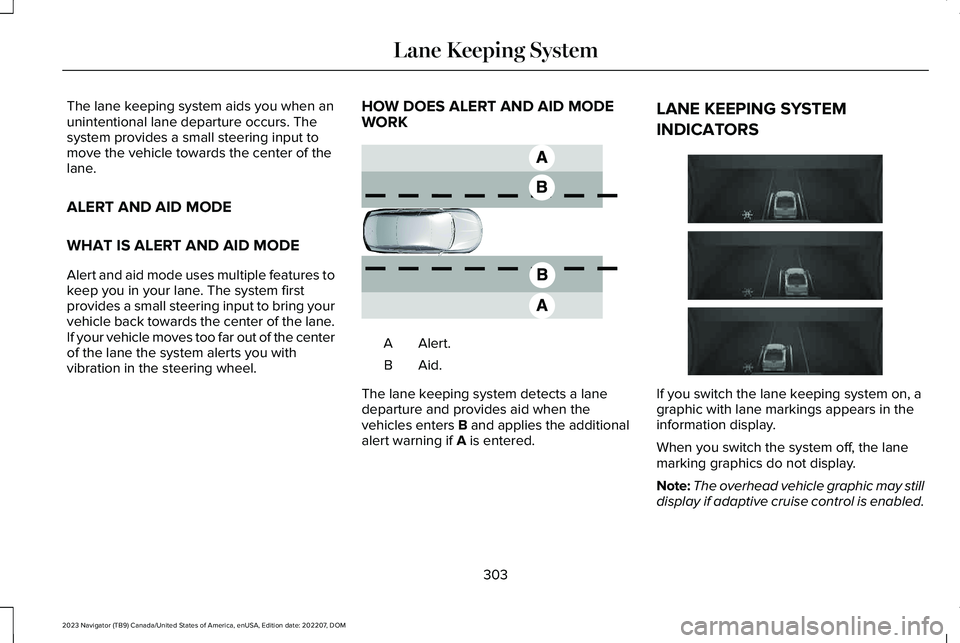
HOW DOES ALERT AND AID MODEWORK
Alert.A
Aid.B
The lane keeping system detects a lanedeparture and provides aid when thevehicles enters B and applies the additionalalert warning if A is entered.
LANE KEEPING SYSTEM
INDICATORS
If you switch the lane keeping system on, agraphic with lane markings appears in theinformation display.
When you switch the system off, the lanemarking graphics do not display.
Note:The overhead vehicle graphic may stilldisplay if adaptive cruise control is enabled.
303
2023 Navigator (TB9) Canada/United States of America, enUSA, Edition date: 202207, DOMLane Keeping SystemE165517 E335296
Page 308 of 660
While the lane keeping system is on, thecolor of the lane markings change to indicatethe system status.
RedYellowGreenGray
Indicates that the system isproviding or has just provided alane keeping alert warning.
Indicates that the system isproviding or has just provided alane keeping aid intervention.
Indicates that the system is avail-able or ready to provide a warningor intervention on the indicatedside.
Indicates that the system istemporarily unavailable to providea warning or intervention on theindicated side.
BLIND SPOT ASSIST
WHAT IS BLIND SPOT ASSIST
Blind spot assist is an extension of the lanekeeping system.
It may help you identify adjacent vehiclesduring a lane change.
Blind spot assist provides a blind spotwarning and steering assistance to helpduring lane changes.
HOW DOES BLIND SPOT ASSISTWORK
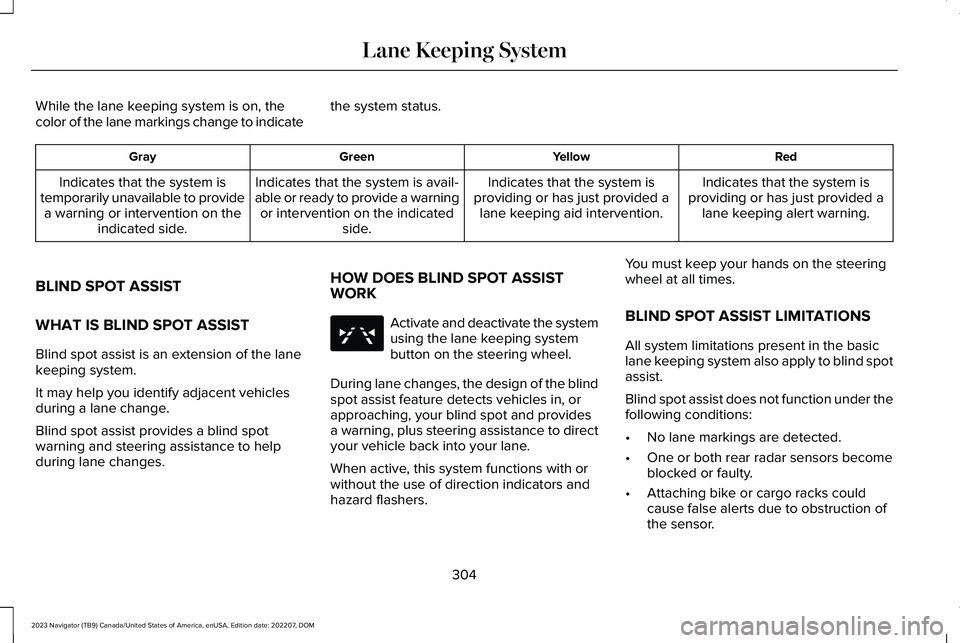
Activate and deactivate the systemusing the lane keeping systembutton on the steering wheel.
During lane changes, the design of the blindspot assist feature detects vehicles in, orapproaching, your blind spot and providesa warning, plus steering assistance to directyour vehicle back into your lane.
When active, this system functions with orwithout the use of direction indicators andhazard flashers.
You must keep your hands on the steeringwheel at all times.
BLIND SPOT ASSIST LIMITATIONS
All system limitations present in the basiclane keeping system also apply to blind spotassist.
Blind spot assist does not function under thefollowing conditions:
•No lane markings are detected.
•One or both rear radar sensors becomeblocked or faulty.
•Attaching bike or cargo racks couldcause false alerts due to obstruction ofthe sensor.
304
2023 Navigator (TB9) Canada/United States of America, enUSA, Edition date: 202207, DOMLane Keeping SystemE334922
Page 310 of 660
The lane keeping aid warning lamp or redlane marking in your instrument clusterdisplay indicate blind spot assist activation.In addition, the blind spot information systemalert indicator flashes on the exterior mirroron the same side as the detection. See BlindSpot Information System (page 311).
BLIND SPOT ASSIST WITH TRAILER
COVERAGE
WHAT IS BLIND SPOT ASSIST WITHTRAILER COVERAGE
Blind spot assist with trailer coverage is anextension of the lane keeping system.
It may help you identify adjacent vehiclesduring a lane change.
Blind spot assist provides a blind spotwarning and steering assistance to helpduring lane changes.
When attaching a trailer, ensure you haveproperly set up the trailer coverage settings.See Blind Spot Information System WithTrailer Coverage (page 313).
HOW DOES BLIND SPOT ASSIST WITHTRAILER COVERAGE WORK
Activate and deactivate the systemusing the lane keeping systembutton on the steering wheel.
During lane changes, the design of the blindspot assist feature detects vehicles in, orapproaching, your blind spot and providesa warning, plus steering assistance to directyour vehicle back into your lane.
If a supported trailer is connected, thefunction is reduced to only detecting vehicleson both sides of your vehicle and trailer,extending rearward from the exterior mirrorsto the end of your trailer. See Blind SpotInformation System With Trailer Coverage(page 313).
When active, this system functions with orwithout the use of direction indicators andhazard flashers.
You must keep your hands on the steeringwheel at all times.
BLIND SPOT ASSIST WITH TRAILERCOVERAGE LIMITATIONS
All system limitations present in the basiclane keeping system also apply to blind spotassist.
Blind spot assist does not function under thefollowing conditions:
•The system does not detect lanemarkings.
•One or both rear radar sensors becomeblocked or faulty.
•You have not configured the attachedtrailer correctly in the trailer tow menusor you attached an unsupported trailer.The system only supports certain trailershapes and dimensions.
Note:Blind spot assist with trailer coveragecould have reduced performance if any ofthe above limitations are present.
Blind spot assist may have difficulty detectinghazards under the following conditions:
306
2023 Navigator (TB9) Canada/United States of America, enUSA, Edition date: 202207, DOMLane Keeping SystemE334922
Page 312 of 660
LANE KEEPING SYSTEM – TROUBLESHOOTING
LANE KEEPING SYSTEM – INFORMATION MESSAGES
ActionMessage
The system has malfunctioned. Have your vehicle checked as soonas possible.Lane Keeping Sys. Malfunction Service Required
The system has detected a condition that has caused the system tobe temporarily unavailable.Front Camera Temporarily Not Available
The system has detected a condition that requires you to clean thewindshield in order for it to operate properly.Front Camera Low Visibility Clean Screen
The system has malfunctioned. Have your vehicle checked as soonas possible.Front Camera Malfunction Service Required
The system requests that you keep your hands on the steering wheel.Keep Hands on Steering Wheel
308
2023 Navigator (TB9) Canada/United States of America, enUSA, Edition date: 202207, DOMLane Keeping System
Page 317 of 660
If the sensors become blocked, a messageappears in the instrument cluster display.See Blind Spot Information System –Information Messages (page 316). The alertindicators illuminate but the system does notalert you.
BLIND SPOT INFORMATION SYSTEM
WITH TRAILER COVERAGE
WHAT IS BLIND SPOT INFORMATIONSYSTEM WITH TRAILER COVERAGE
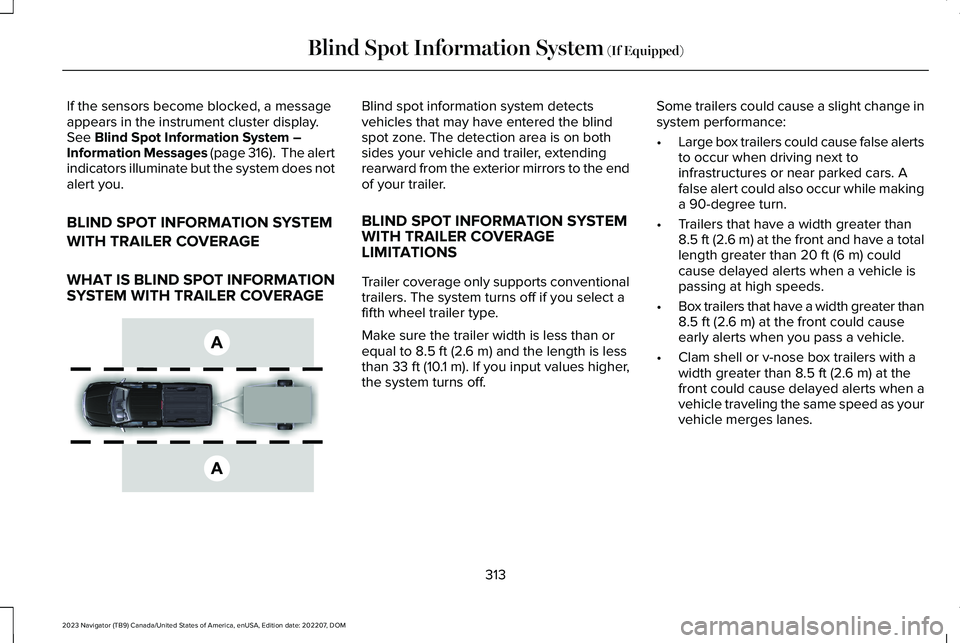
Blind spot information system detectsvehicles that may have entered the blindspot zone. The detection area is on bothsides your vehicle and trailer, extendingrearward from the exterior mirrors to the endof your trailer.
BLIND SPOT INFORMATION SYSTEMWITH TRAILER COVERAGELIMITATIONS
Trailer coverage only supports conventionaltrailers. The system turns off if you select afifth wheel trailer type.
Make sure the trailer width is less than orequal to 8.5 ft (2.6 m) and the length is lessthan 33 ft (10.1 m). If you input values higher,the system turns off.
Some trailers could cause a slight change insystem performance:
•Large box trailers could cause false alertsto occur when driving next toinfrastructures or near parked cars. Afalse alert could also occur while makinga 90-degree turn.
•Trailers that have a width greater than8.5 ft (2.6 m) at the front and have a totallength greater than 20 ft (6 m) couldcause delayed alerts when a vehicle ispassing at high speeds.
•Box trailers that have a width greater than8.5 ft (2.6 m) at the front could causeearly alerts when you pass a vehicle.
•Clam shell or v-nose box trailers with awidth greater than 8.5 ft (2.6 m) at thefront could cause delayed alerts when avehicle traveling the same speed as yourvehicle merges lanes.
313
2023 Navigator (TB9) Canada/United States of America, enUSA, Edition date: 202207, DOMBlind Spot Information System (If Equipped)E225007
Page 318 of 660
SETTING A TRAILER LENGTH
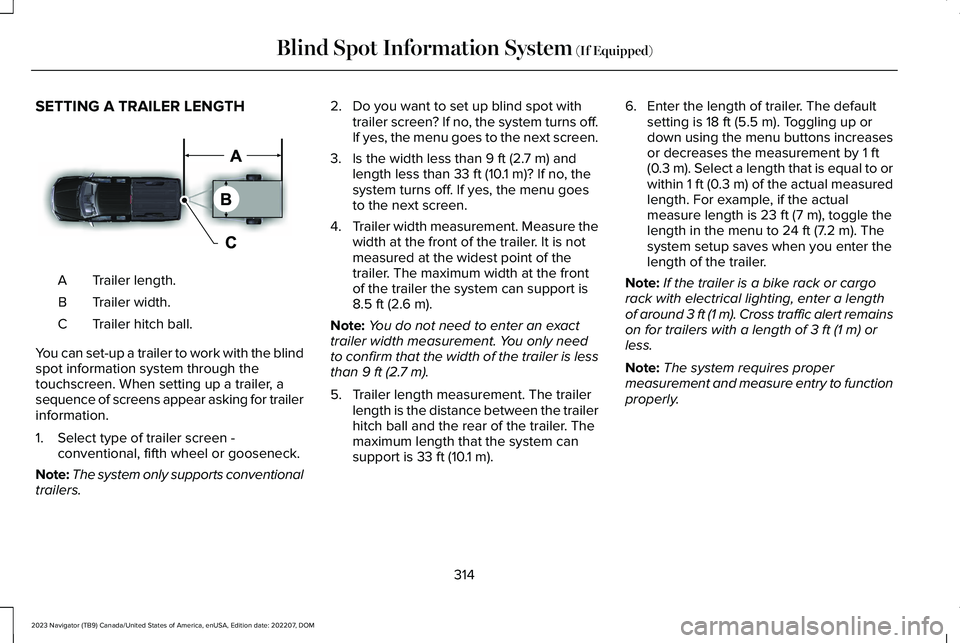
Trailer length.A
Trailer width.B
Trailer hitch ball.C
You can set-up a trailer to work with the blindspot information system through thetouchscreen. When setting up a trailer, asequence of screens appear asking for trailerinformation.
1.Select type of trailer screen -conventional, fifth wheel or gooseneck.
Note:The system only supports conventionaltrailers.
2.Do you want to set up blind spot withtrailer screen? If no, the system turns off.If yes, the menu goes to the next screen.
3.Is the width less than 9 ft (2.7 m) andlength less than 33 ft (10.1 m)? If no, thesystem turns off. If yes, the menu goesto the next screen.
4.Trailer width measurement. Measure thewidth at the front of the trailer. It is notmeasured at the widest point of thetrailer. The maximum width at the frontof the trailer the system can support is8.5 ft (2.6 m).
Note:You do not need to enter an exacttrailer width measurement. You only needto confirm that the width of the trailer is lessthan 9 ft (2.7 m).
5.Trailer length measurement. The trailerlength is the distance between the trailerhitch ball and the rear of the trailer. Themaximum length that the system cansupport is 33 ft (10.1 m).
6.Enter the length of trailer. The defaultsetting is 18 ft (5.5 m). Toggling up ordown using the menu buttons increasesor decreases the measurement by 1 ft(0.3 m). Select a length that is equal to orwithin 1 ft (0.3 m) of the actual measuredlength. For example, if the actualmeasure length is 23 ft (7 m), toggle thelength in the menu to 24 ft (7.2 m). Thesystem setup saves when you enter thelength of the trailer.
Note:If the trailer is a bike rack or cargorack with electrical lighting, enter a lengthof around 3 ft (1 m). Cross traffic alert remainson for trailers with a length of 3 ft (1 m) orless.
Note:The system requires propermeasurement and measure entry to functionproperly.
314
2023 Navigator (TB9) Canada/United States of America, enUSA, Edition date: 202207, DOMBlind Spot Information System (If Equipped)E225008
Page 326 of 660
WARNING: The system does notdetect vehicles moving in a differentdirection or animals. Apply the brakeswhen necessary. Failure to follow thisinstruction could result in the loss ofcontrol of your vehicle, personal injury ordeath.
WARNING: The system does notoperate during hard acceleration orsteering. Failure to take care may lead toa crash or personal injury.
WARNING: The system may operatewith reduced function during cold andinclement weather conditions. Snow, ice,rain, spray and fog can adversely affect thesystem. Keep the front camera and radarfree of snow and ice. Failure to follow thisinstruction may result in the loss of controlof your vehicle, serious personal injury ordeath.
WARNING: Take additional care ifyour vehicle is heavily loaded or you aretowing a trailer. These conditions couldresult in reduced performance of thissystem. Failure to follow this instructioncould result in the loss of control of yourvehicle, personal injury or death.
WARNING: The system cannot helpprevent all crashes. Do not rely on thissystem to replace driver judgment and theneed to maintain a safe distance andspeed.
WARNING: System performancecould be reduced in situations where thevehicle camera has limited detectioncapability. These situations include but arenot limited to direct or low sunlight,vehicles at night without tail lights,unconventional vehicle types, pedestriansor cyclists with complex backgrounds,
running pedestrians or fast moving cyclists,partly obscured pedestrians or cyclists,pedestrians or cyclists that the systemcannot distinguish from a group. Failure totake care may result in the loss of controlof your vehicle, personal injury or death.
PRE-COLLISION ASSIST
LIMITATIONS
Pre-collision assist depends on the detectionability of its camera and sensors. Anyobstructions or damage to these areas canlimit detection or prevent the system fromfunctioning. See Locating the Pre-CollisionAssist Sensors (page 324).
The system is active at 3 mph (5 km/h) andabove.
Note:The pre-collision assist systemautomatically disables when you selectfour-wheel drive low or manually disableAdvanceTrac™.
322
2023 Navigator (TB9) Canada/United States of America, enUSA, Edition date: 202207, DOMPre-Collision Assist
Page 331 of 660
DISTANCE ALERT
WHAT IS DISTANCE ALERT
The system alerts you with a warning lampif the distance to the vehicle ahead is small.
Note:The warning lamp does not illuminateif cruise control or adaptive cruise control isactive.
ADJUSTING THE SENSITIVITY OFDISTANCE ALERT
To adjust the sensitivity of the system, usethe touchscreen:
1.Press Features on the touchscreen.
2.Press Driver Assistance.
3.Press Pre-Collision Assist.
4.Press Alert Sensitivity.
5.Select a setting.
AUTOMATIC EMERGENCY BRAKING
WHAT IS AUTOMATIC EMERGENCYBRAKING
Automatic emergency braking may activateif the system determines that a collision isimminent. The system may help reduceimpact damage to avoid the crashcompletely.
Automatic emergency braking is onlyavailable up to certain speeds. SeePre-Collision Assist Limitations (page 322).
SWITCHING AUTOMATIC EMERGENCYBRAKING ON AND OFF
To switch the system on or off, use thetouchscreen:
1.Press Features on the touchscreen.
2.Press Driver Assistance.
3.Press Pre-Collision Assist.
4.Press Auto Emergency Braking.
5.Switch the feature on or off.
EVASIVE STEERING ASSIST
WHAT IS EVASIVE STEERING ASSIST
If your vehicle is rapidly approaching a roaduser, evasive steering assist helps you steeraround the road user.
After you turn the steering wheel in anattempt to avoid a crash with the road user,the system applies additional steering torqueto help you steer around the road user. Afteryou pass the road user, the system appliessteering torque when you turn the steeringwheel to steer back into the lane. The systemdeactivates after you fully pass the road user.
Note:Road users are defined as pedestriansor bicyclists in your vehicle's path or anotherstationary vehicle in the same lane or avehicle traveling in the same lane in thesame direction as you. See Pre-CollisionAssist Precautions (page 321).
327
2023 Navigator (TB9) Canada/United States of America, enUSA, Edition date: 202207, DOMPre-Collision Assist
Page 332 of 660
EVASIVE STEERING ASSISTLIMITATIONS
Evasive steering assist only activates whenall the following occur:
•Automatic emergency braking andevasive steering assist are on.
•The system detects a road user aheadand starts to apply the brakes.
•You significantly turn the steering wheelto steer around a road user.
Note:Evasive steering assist does notautomatically steer around a road user. Ifyou do not turn the steering wheel, evasivesteering assist does not activate.
Note:Evasive steering assist does notactivate if the distance to the road userahead is too small and the system cannotavoid a crash.
SWITCHING EVASIVE STEERING
ASSIST ON AND OFF
To switch the system on or off, use thetouchscreen:
1.Press Features on the touchscreen.
2.Press Driver Assistance.
3.Press Pre-Collision Assist.
4.Switch Evasive Steering on or off.
Note:If you switch automatic emergencybraking off, evasive steering assist turns off.
Note:Automatic emergency braking andevasive steering assist turn on every timeyou switch the ignition on.
PRE-COLLISION ASSIST –
TROUBLESHOOTING
PRE-COLLISION ASSIST – WARNINGLAMPS
A telltale illuminates in the clusterto indicate if the system is disabledor unavailable.
PRE-COLLISION ASSIST – INFORMATION MESSAGES
ActionMessage
You have a blocked sensor due to bad weather, ice, mud or water infront of the radar sensor. You can typically clean the sensor to resolve.Pre-Collision Assist Not Available Sensor Blocked
A fault with the system has occurred. Have your vehicle checked assoon as possible.Pre-Collision Assist Not Available
328
2023 Navigator (TB9) Canada/United States of America, enUSA, Edition date: 202207, DOMPre-Collision AssistE335612
Page 346 of 660
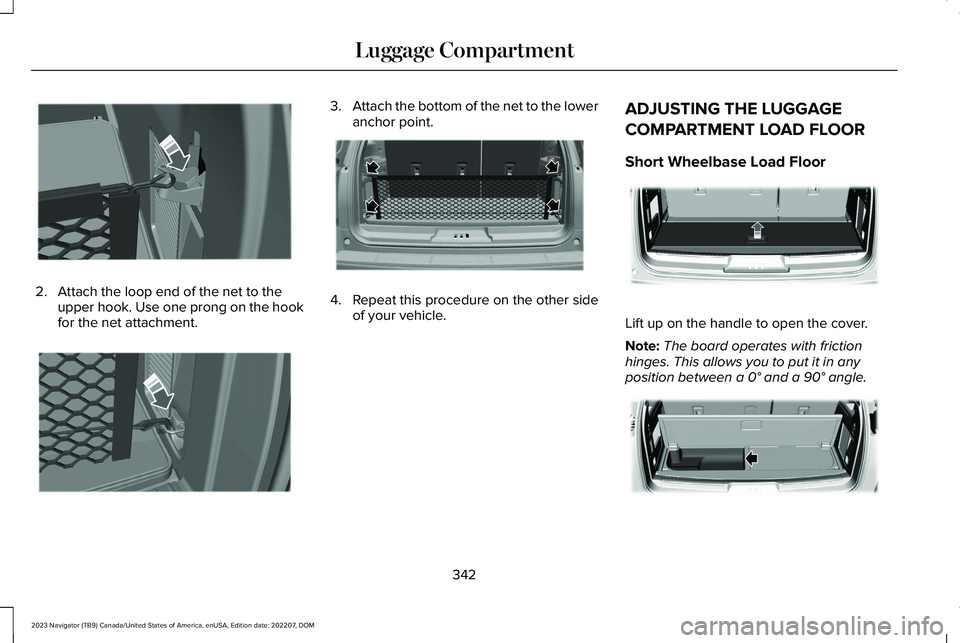
2.Attach the loop end of the net to theupper hook. Use one prong on the hookfor the net attachment.
3.Attach the bottom of the net to the loweranchor point.
4.Repeat this procedure on the other sideof your vehicle.
ADJUSTING THE LUGGAGE
COMPARTMENT LOAD FLOOR
Short Wheelbase Load Floor
Lift up on the handle to open the cover.
Note:The board operates with frictionhinges. This allows you to put it in anyposition between a 0° and a 90° angle.
342
2023 Navigator (TB9) Canada/United States of America, enUSA, Edition date: 202207, DOMLuggage CompartmentE275126 E275125 E275124 E250821 E250823