wheel LINCOLN TOWN CAR 1997 User Guide
[x] Cancel search | Manufacturer: LINCOLN, Model Year: 1997, Model line: TOWN CAR, Model: LINCOLN TOWN CAR 1997Pages: 305, PDF Size: 2.68 MB
Page 73 of 305
69
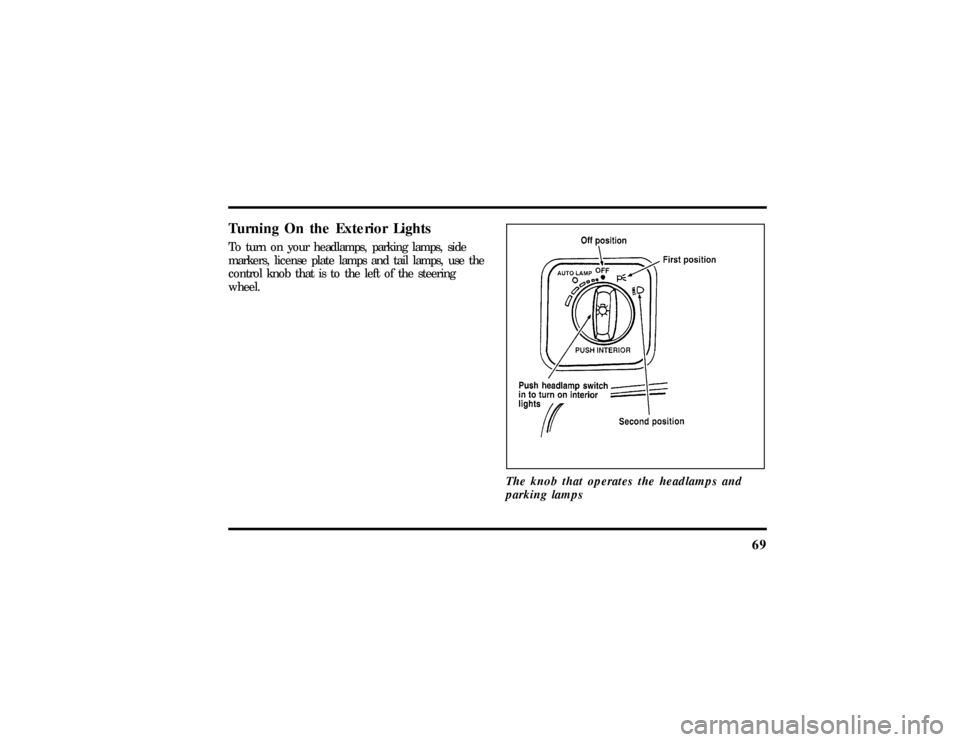
Turning On the Exterior LightsTo turn on your headlamps, parking lamps, side
markers, license plate lamps and tail lamps, use the
control knob that is to the left of the steering
wheel.
The knob that operates the headlamps and
parking lamps
File:05fncft.ex
Update:Mon Jun 17 13:49:49 1996
Page 78 of 305

74NOTE:Your vehicle is also equipped with an
accessory timer. This allows some of your
accessories to remain on for up to 10 minutes after
the ignition is turned to the OFF position. The
accessory timer is cancelled if any door is opened,
the dimmer switch is used, or the ignition is turned
to the ON position.
The automatic transmission gearshift must be in P
(Park) to move the key to the LOCK position.
LOCK locks the steering wheel. It also locks the
gearshift lever.
LOCK is the only position that allows you to
remove the key. The LOCK feature helps to protect
your vehicle from theft.
OFF allows you to shut off the engine and all
accessories without locking the steering wheel, or
the gearshift lever.ON allows you to test your vehicle's warning lights
to make sure they work before you start the engine.
The key returns to the ON position once the engine
is started and remains in this position while the
engine runs.
START cranks the engine. Release the key once the
engine starts so that you do not damage the starter.
The key should return to ON when you release it.
Key SystemThe vehicle is equipped with a master key and valet
key lock system. The master key will actuate doors,
trunk, glove box, ignition and remote trunk release.
The valet key will actuate doors and ignition only.
The valet key is marked ªvaletº.
File:05fncft.ex
Update:Mon Jun 17 13:49:49 1996
Page 83 of 305
79
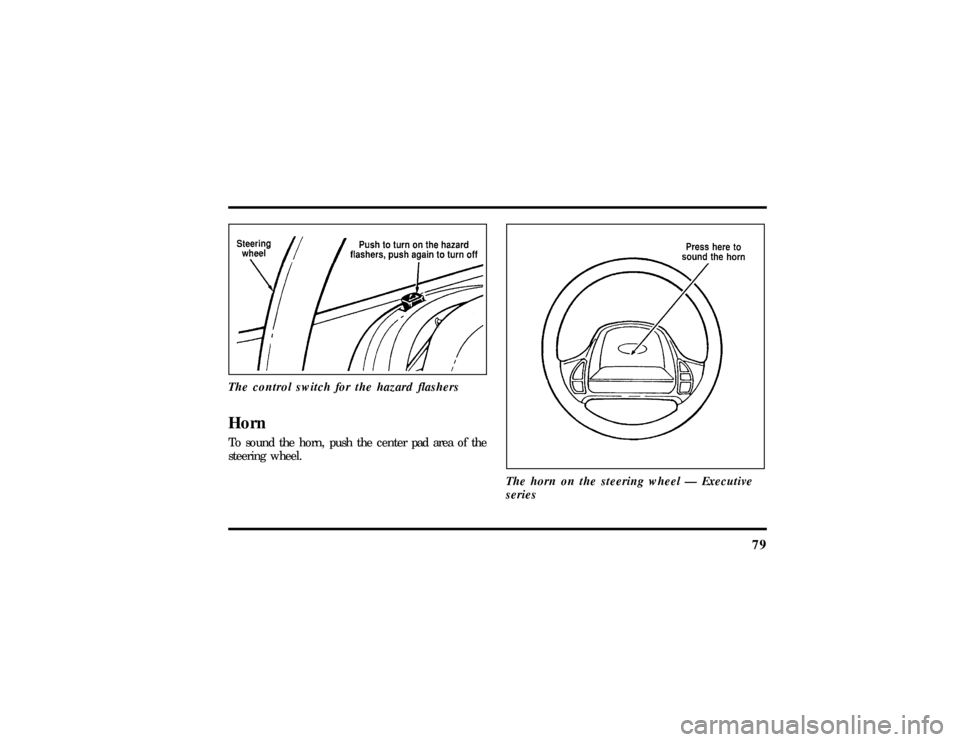
The control switch for the hazard flashersHornTo sound the horn, push the center pad area of the
steering wheel.
The horn on the steering wheel Ð Executive
series
File:05fncft.ex
Update:Mon Jun 17 13:49:49 1996
Page 85 of 305
81
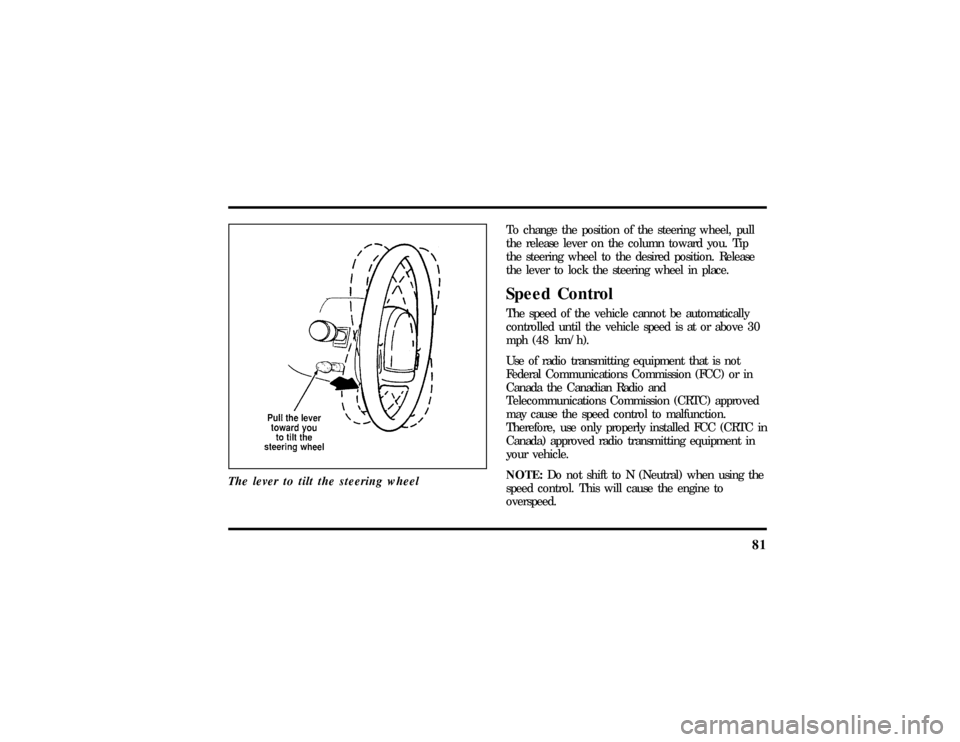
The lever to tilt the steering wheel
To change the position of the steering wheel, pull
the release lever on the column toward you. Tip
the steering wheel to the desired position. Release
the lever to lock the steering wheel in place.Speed ControlThe speed of the vehicle cannot be automatically
controlled until the vehicle speed is at or above 30
mph (48 km/h).
Use of radio transmitting equipment that is not
Federal Communications Commission (FCC) or in
Canada the Canadian Radio and
Telecommunications Commission (CRTC) approved
may cause the speed control to malfunction.
Therefore, use only properly installed FCC (CRTC in
Canada) approved radio transmitting equipment in
your vehicle.
NOTE:Do not shift to N (Neutral) when using the
speed control. This will cause the engine to
overspeed.
File:05fncft.ex
Update:Mon Jun 17 13:49:49 1996
Page 86 of 305
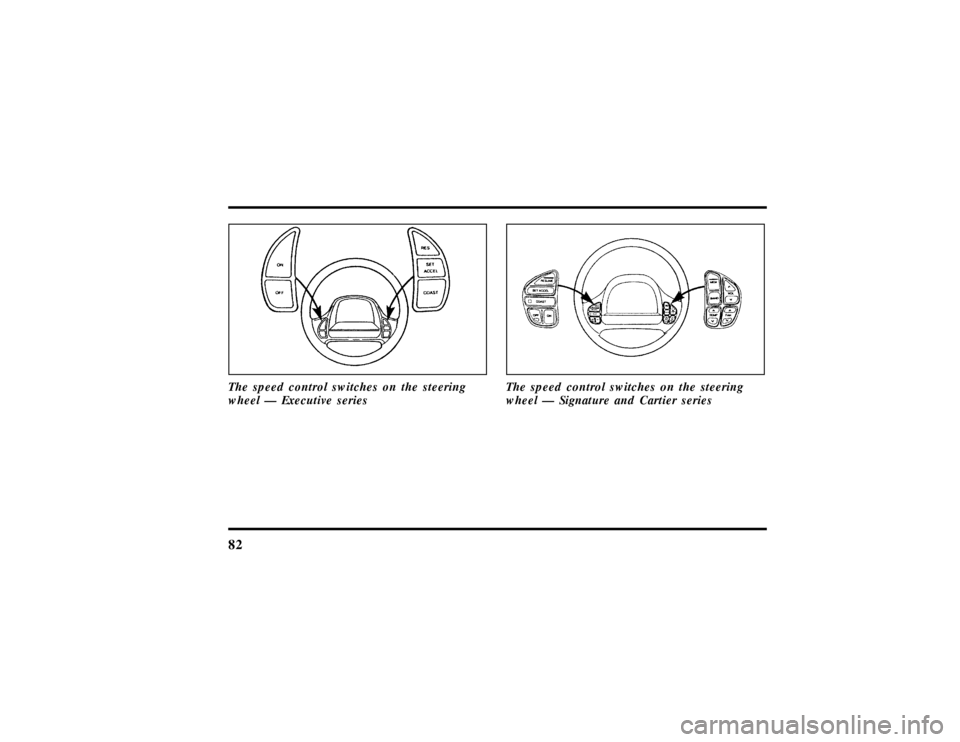
82The speed control switches on the steering
wheel Ð Executive series
The speed control switches on the steering
wheel Ð Signature and Cartier series
File:05fncft.ex
Update:Mon Jun 17 13:49:49 1996
Page 89 of 305
85
Remote Control Buttons
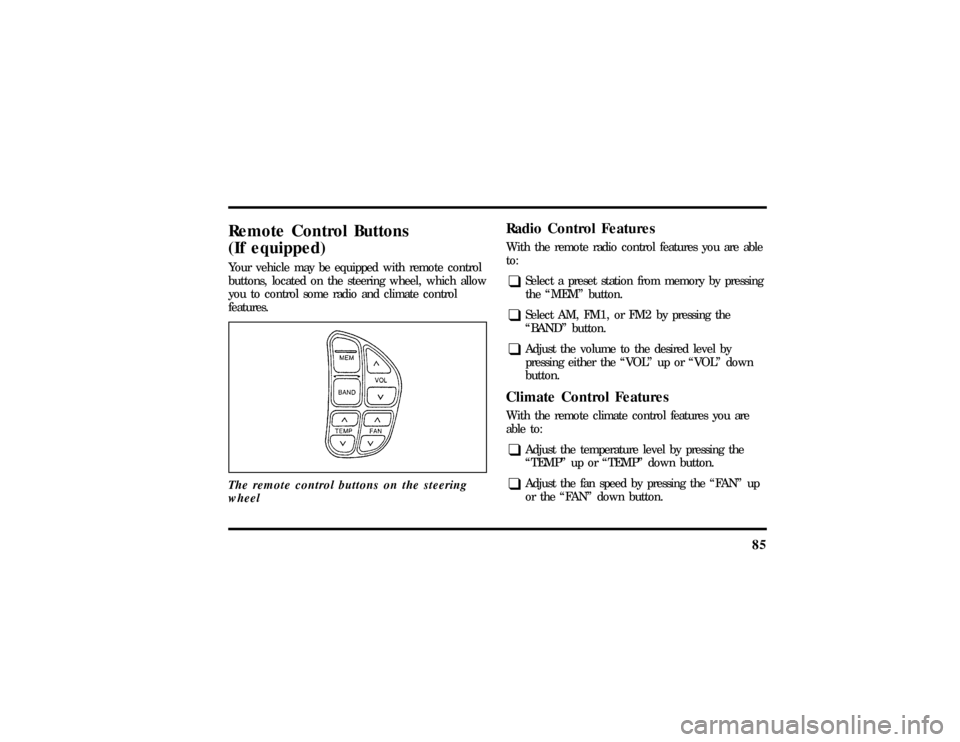
(If equipped)Your vehicle may be equipped with remote control
buttons, located on the steering wheel, which allow
you to control some radio and climate control
features.
The remote control buttons on the steering
wheel
Radio Control FeaturesWith the remote radio control features you are able
to:q
Select a preset station from memory by pressing
the ªMEMº button.
q
Select AM, FM1, or FM2 by pressing the
ªBANDº button.
q
Adjust the volume to the desired level by
pressing either the ªVOLº up or ªVOLº down
button.
Climate Control FeaturesWith the remote climate control features you are
able to:q
Adjust the temperature level by pressing the
ªTEMPº up or ªTEMPº down button.
q
Adjust the fan speed by pressing the ªFANº up
or the ªFANº down button.
File:05fncft.ex
Update:Mon Jun 17 13:49:49 1996
Page 128 of 305

1242. Rotate the thumbwheel from ª0º to ª1º (the
lowest heat level). Allow five minutes for the
heat level to stabilize.
3. If the heat level is not high enough for
comfort, select increased heat levels ª2º
through ª5º (the maximum level). Allow at
least two minutes for the heat level to stabilize
at any new level selected.
4. If the heated seat switch is not turned off (ª0º
on the thumbwheel), the seat will heat up to
the selected temperature level each time the
car is started.
NOTE:Cooling the seat down takes considerably
longer than increasing its heat level.Important Safety Belt InformationThe use of safety belts helps to restrain you and
your passengers in case of a collision. In most states
and in Canada the law requires their use.Safety belts provide best restraint when:
q
the seatback is upright
q
the occupant is sitting upright (not slouched)
q
the lap belt is snug and low on the hips
q
the shoulder belt is snug against the chest
q
the knees are straight forward
To help you remember to fasten your safety belt, a
warning light may come on and a chime may
sound. SeeSafety Belt Warning Light and Chimein
theInstrumentationchapter.
See the following sections in this chapter for
directions on how to properly use these safety belts.
Also seeSafety Restraints for Childrenin this
chapter for special instructions about using safety
belts for children.
File:06fnsst.ex
Update:Fri Jun 21 08:57:53 1996
Page 165 of 305

1623. Make sure that the gearshift is in P (Park) and
the parking brake is set before you turn the
key.
Before you start your vehicle, you should test the
warning lights on the instrument panel to make
sure that they work. Refer to theInstrumentation
chapter.Starting Your EngineTo start your engine:
1. Follow the steps underPreparing to Start Your
Vehicleat the beginning of this section.
2. Turn the ignition key to the ON position.
3. DO NOT depress the accelerator pedal when
starting your engine. DO NOT use the
accelerator while the vehicle is parked.4. Turn the key to the START position (cranking)
until the engine starts. Allow the key to return
to the ON position after the engine has started.
If you have difficulty in turning the key, rotate
the steering wheel slightly because it may be
binding.
For a cold engine:
q
At temperatures10ÊF(-12ÊC) andbelow:If
the engine does not start infifteen (15)
secondson the first try, turn the key to OFF,
wait approximately ten (10) seconds so you do
not flood the engine, then try again.
q
At temperaturesabove10ÊF(-12ÊC):If the
engine does not start infive (5) secondson
the first try, turn the key to OFF, wait
approximately ten (10) seconds so you do not
flood the engine, then try again.
File:08fntot.ex
Update:Mon Jun 17 13:51:45 1996
Page 170 of 305

167
DrivingBrakesApplying the BrakesYour vehicle has anti-lock disc brakes on all four
wheels. They adjust automatically as the brake pads
wear down.
When you press down hard on the brake pedal, the
wheels will not lock and slide. The Anti-lock Brake
System (ABS) automatically starts releasing and
reapplying the front brakes independently and the
rear brakes together whenever your wheels start to
lock. When this happens, you will feel the brake
pedal pulsate. This is an indication that the ABS is
working correctly and is normal.
Do not drive with your foot resting on the brake
pedal; you will wear out the linings and increase
your vehicle's stopping distance. Brake rotor damage
may also eventually occur.NOTE:If you are driving down a long or steep hill,
shift to a lower gear and do not apply your brakes
continuously. If you apply your brakes continuously,
they may overheat and become less effective.
Occasional brake squeal during light to moderate
stops does not affect the function of the brake
system and is normal. However, if the squeal
becomes louder or more frequent, have your brakes
inspected by your dealer or a qualified service
technician.
Ford Motor Company has not found any
detrimental effects of popular mobile radio
transmitting equipment installed on vehicles with
the anti-lock brake system, if the equipment is
installed according to the manufacturer's
instructions. However, if mobile radio transmitting
equipment is installed in your vehicle and, if either
the anti-lock brake system cycles or the ANTI-LOCK
File:09fngft.ex
Update:Mon Jun 17 13:52:03 1996
Page 173 of 305

170Traction Assist
TM
(If equipped)
Your vehicle may be equipped with the optional
Traction Assist
TM
system. This system helps prevent
wheel spin in order to improve tire traction and is
an especially useful feature when you drive in hilly
areas or on slippery, icy or snowy roads.
Traction Assist
TM
works automatically by rapidly
applying and releasing the brakes to prevent one or
both of the rear drive wheels from spinning during
acceleration.
During the Traction Assist
TM
function, which most
often occurs during low speed acceleration on
slippery surfaces, a noise may be heard coming from
the engine compartment. This is normal and may
last for a few seconds during the acceleration of the
vehicle.
In general, this system improves your vehicle's
stability and acceleration performance when road
conditions warrant. Traction Assist
TM
is fully
effective up to approximately 25 mph (40 km/h).At 25 mph (40 km/h) the function begins to taper
off until it no longer operates above 34 mph
(55 km/h).
If the Traction Assis;
TM
system is cycled excessively,
the system will shut down to prevent the rear
brakes from overheating. A cooling down period is
required to prevent damage to the brakes. This time
period varies and depends on brake usage during
the cooling down period. Anti-Lock braking is not
affected and will function normally during the cool
down period.
After the cool down period, the Traction Assist
TM
function is restored.%Rear Air Suspension SystemYour vehicle is equipped with an automatic load
leveling rear air suspension system. This system
maintains the rear vehicle height at a constant level
by automatically adding air or releasing air from the
rear air springs to offset changes in vehicle loads.
File:09fngft.ex
Update:Mon Jun 17 13:52:03 1996