light LINCOLN TOWN CAR 1997 Workshop Manual
[x] Cancel search | Manufacturer: LINCOLN, Model Year: 1997, Model line: TOWN CAR, Model: LINCOLN TOWN CAR 1997Pages: 305, PDF Size: 2.68 MB
Page 171 of 305
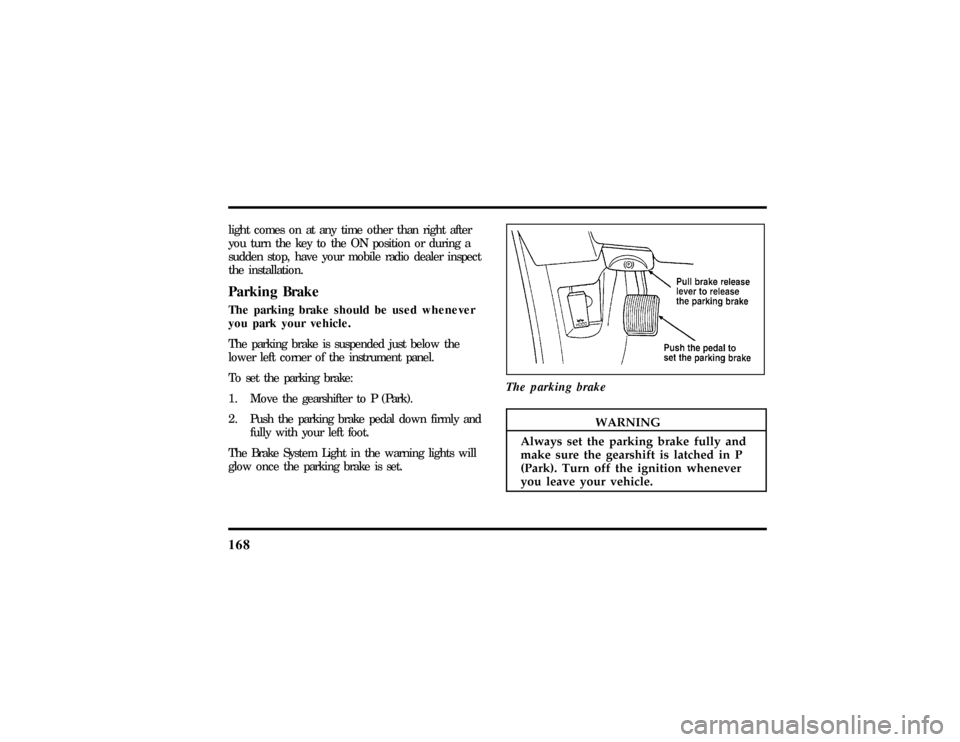
168
lightcome son at an ytim eothe rtha nrigh tafter
WARNING
Alway sse tth eparkin gbrak efull yand
Page 175 of 305
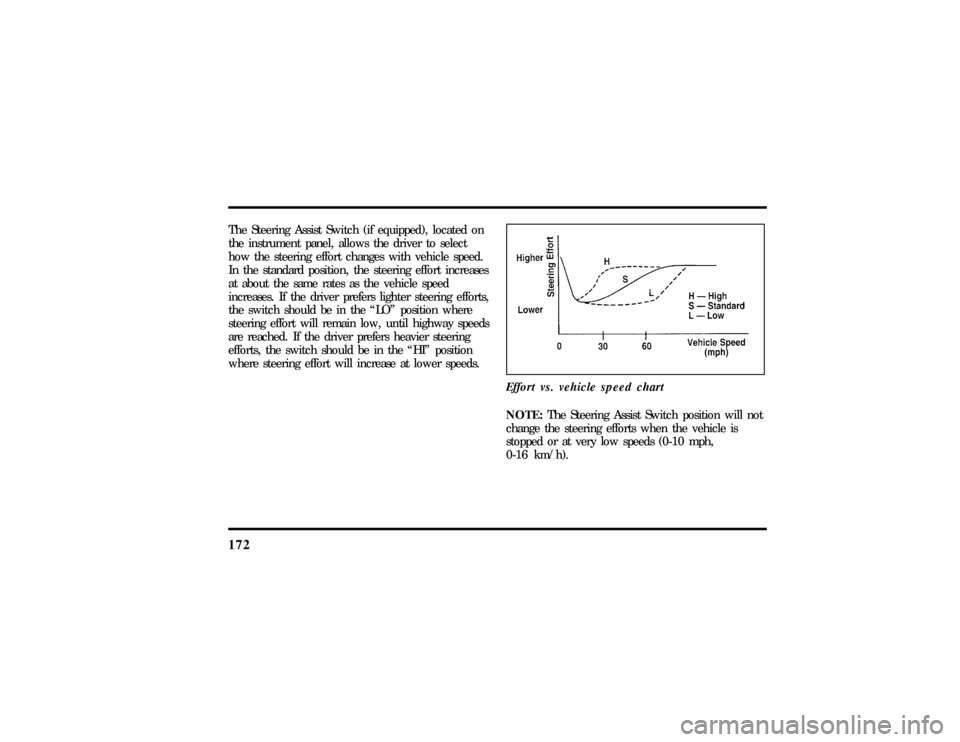
172The Steering Assist Switch (if equipped), located on
the instrument panel, allows the driver to select
how the steering effort changes with vehicle speed.
In the standard position, the steering effort increases
at about the same rates as the vehicle speed
increases. If the driver prefers lighter steering efforts,
the switch should be in the ªLOº position where
steering effort will remain low, until highway speeds
are reached. If the driver prefers heavier steering
efforts, the switch should be in the ªHIº position
where steering effort will increase at lower speeds.
Effort vs. vehicle speed chart
NOTE:The Steering Assist Switch position will not
change the steering efforts when the vehicle is
stopped or at very low speeds (0-10 mph,
0-16 km/h).
File:09fngft.ex
Update:Mon Jun 17 13:52:03 1996
Page 178 of 305

175
R (Reverse)With the gearshift in the R (Reverse) position, the
vehicle will move backward. You should always
come to a complete stop before shifting into or out
of R (Reverse).N (Neutral)With the gearshift in the N (Neutral) position, the
vehicle can be started and is free to roll. Hold the
brake pedal down while in this position.DrivingYour vehicle's gearshift is on the steering column.
The Transmission Control Switch (TCS) is located
on the end of the gearshift lever. The Transmission
Control Indicator Light (OVERDRIVE OFF) is
located on the instrument panel. You can put the
gearshift lever in any of the several positions.
The OVERDRIVE OFF light is off (not illuminated)
during normal vehicle operation. This allows the
transmission to upshift and downshift from 1stthrough 4th gears. When the TCS is pressed, the
Transmission Control Indicator Light will illuminate
(OVERDRIVE OFF) on the instrument panel. When
this OVERDRIVE OFF is illuminated the
transmission will upshift and downshift from 1st
through 3rd gears.
If OVERDRIVE OFF light does not come ªONº
when TCS is depressed or if the light flashes when
you are driving, have your vehicle serviced at the
first opportunity. If this condition persists, damage
could occur to the transmission.
To return the transmission to normal operation (1st
through 4th gear) depress the TCS again. This
switch may be used to cancel overdrive any time
the vehicle is being driven. Each time your vehicle
is started, the overdrive system will automatically be
in the normal overdrive mode and the light will not
be illuminated.
File:09fngft.ex
Update:Mon Jun 17 13:52:03 1996
Page 210 of 305

208Jump-Starting1. Make sure that the jumper cables are not in
the way of moving engine parts, then start the
booster vehicle. Run the engine at a moderate
speed.
2. Let the discharged battery charge for a few
minutes and then start the disabled vehicle. It
may take a couple of tries before the vehicle
starts. If the vehicle does not start after several
attempts, there may be a different problem.
3. When both vehicles are running, let them idle
for a few minutes to charge the discharged
battery.Removing jumper cables1.Always remove the jumper cables in the
reverse order.Remove the negative (s) end
of the jumper cable from the metallic surface
on the engine or frame of the disabled vehicle.2. Remove the negative (s) cable from the
booster battery.
3. Remove the positive (+) cable from the booster
battery.
4. Remove the other end of the positive (+) cable
from the discharged battery.
After the vehicle is started, let it idle for a while to
let the engine ªrelearnº its idle conditions. Drive it
around for a while with all electrical accessories
turned off to let the battery recharge. Driveability
may be deteriorated slightly until all drive modes
are ªrelearned.ºYou may need to use a battery
charger to fully recharge the battery.
If you need to replace your battery, seeBatteryin
theMaintenance and Carechapter.
File:10fnert.ex
Update:Thu Jun 20 15:16:36 1996
Page 213 of 305

211
Maintenance and CareService Made EasyFord has two goals for servicing your vehicle.
1. When we can, we design parts that do not
need to be serviced.
2. We want to make servicing your vehicle as
easy as possible. To help you:q
We highlight do-it-yourself items in yellow in
the engine compartment so that you can find
them easily.
q
When possible, we design parts that can be
replaced without tools.
q
We give you a Maintenance Schedule that
makes tracking routine service for your vehicle
easy. The maintenance schedule is located in
theMaintenance Schedulebooklet.This chapter tells you about the basic parts that you
need to check and service regularly.
If your vehicle needs professional servicing, your
dealership can provide the parts and service
required. Check yourWarranty Information Booklet
to find out which parts and services are covered.
Also see theCustomer Assistancechapter of this
Owner Guide.
Ford Motor Company recommends that the Owner
Maintenance Checks listed in theMaintenance
Schedulebooklet be performed for the proper
operation of your vehicle. In addition to the
conditions listed in theOwner Maintenance
Checklist, be alert for any unusual noise, vibration,
or other indication that your vehicle may need
service. If you do notice something unusual, see
that your vehicle is serviced promptly.
File:11fnmct.ex
Update:Mon Jun 17 13:54:56 1996
Page 221 of 305
219
Checking and Adding Engine OilSince the proper amount of engine oil is important
for safe engine operation, check the oil using the
dipstick each time you put fuel in your vehicle.
Remember the engine must be off, the oil must be
warm and the vehicle must be parked on level
ground.
Checking the engine oil level:
1. Turn the engine off after it has warmed up and
allow a few minutes for the engine oil to drain
back into the oil pan.
2. Set the parking brake, making sure the gearshift
is securely latched in P (Park).
3. Open the hood. Protect yourself from engine
heat.
4. Locate the engine oil dipstick (highlighted in
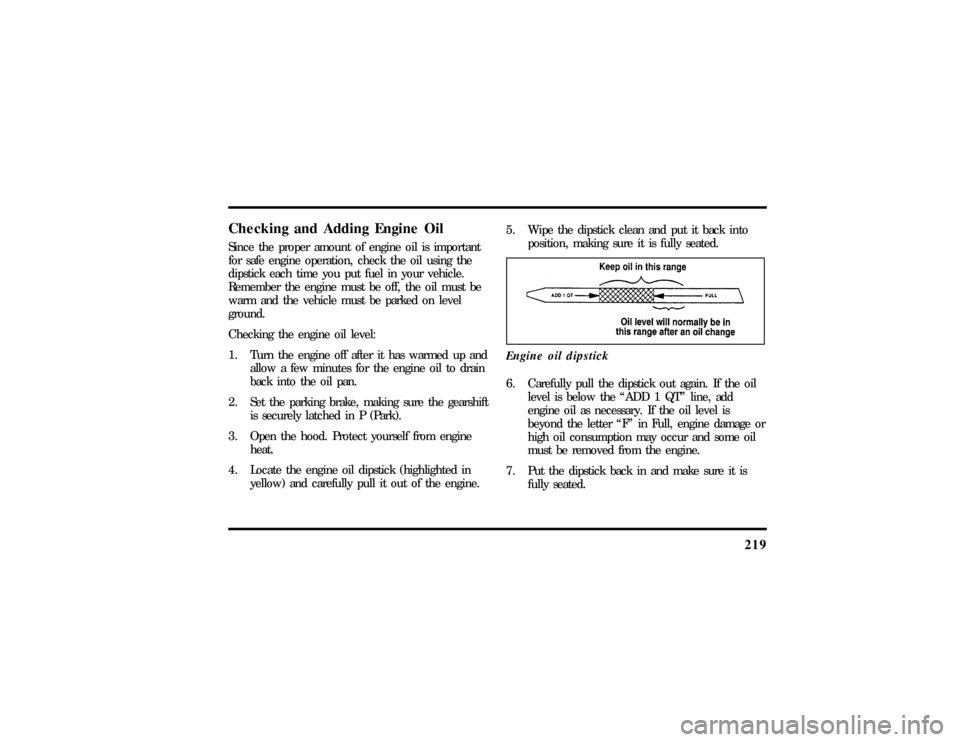
yellow) and carefully pull it out of the engine.5. Wipe the dipstick clean and put it back into
position, making sure it is fully seated.
Engine oil dipstick
6. Carefully pull the dipstick out again. If the oil
level is below the ªADD 1 QTº line, add
engine oil as necessary. If the oil level is
beyond the letter ªFº in Full, engine damage or
high oil consumption may occur and some oil
must be removed from the engine.
7. Put the dipstick back in and make sure it is
fully seated.
File:11fnmct.ex
Update:Mon Jun 17 13:54:56 1996
Page 244 of 305
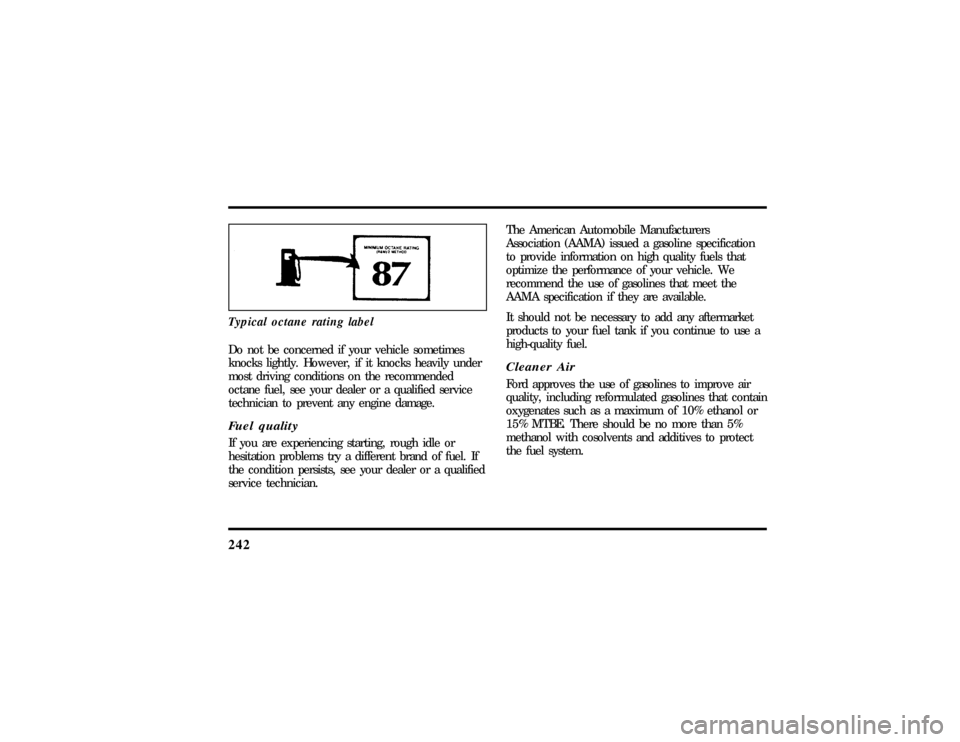
242Typical octane rating labelDo not be concerned if your vehicle sometimes
knocks lightly. However, if it knocks heavily under
most driving conditions on the recommended
octane fuel, see your dealer or a qualified service
technician to prevent any engine damage.Fuel qualityIf you are experiencing starting, rough idle or
hesitation problems try a different brand of fuel. If
the condition persists, see your dealer or a qualified
service technician.The American Automobile Manufacturers
Association (AAMA) issued a gasoline specification
to provide information on high quality fuels that
optimize the performance of your vehicle. We
recommend the use of gasolines that meet the
AAMA specification if they are available.
It should not be necessary to add any aftermarket
products to your fuel tank if you continue to use a
high-quality fuel.
Cleaner AirFord approves the use of gasolines to improve air
quality, including reformulated gasolines that contain
oxygenates such as a maximum of 10% ethanol or
15% MTBE. There should be no more than 5%
methanol with cosolvents and additives to protect
the fuel system.
File:11fnmct.ex
Update:Mon Jun 17 13:54:56 1996
Page 247 of 305

245
q
English: MPG = (total miles)/(gallons used).
q
Metric: L/100K = (liters used) x 100/(total
kilometers)
Comparisons With Environmental
Protection Agency (EPA) and Transport
Canada (TC) Fuel Economy EstimatesEPA fuel economy figures are obtained from
laboratory tests under simulated road conditions and
may not reflect the actual conditions you experience
or your style of driving. The EPA fuel economy
estimate is not a guarantee that you will achieve
the fuel economy shown.
The following decrease fuel economy:q
Lack of regular, scheduled maintenance
q
Rapid acceleration and excessive speed
q
Driving with your foot on the brake
q
Sudden stops
q
Extended engine idling
q
Using speed control in hilly terrain
q
Extended use of the A/C, defroster, rear
window defroster and other accessories
q
Underinflated tires
q
Heavy loads
q
Aftermarket add-ons such as bike, ski or luggage
racks, bug deflectors, etc.
Self-Service PointersIf you choose to do your own fueling, you should
also perform a few simple maintenance routines.
This extra effort will save you additional money and
contribute to the driving efficiency of your vehicle.
The following procedures require only a tire gauge,
a rag, an oil can spout and windshield washer fluid.q
Check the engine oil at every refueling stop
q
Clean the windshield, outside mirrors and
headlights
File:11fnmct.ex
Update:Mon Jun 17 13:54:56 1996
Page 250 of 305

248Information about your vehicle's emission control
system is on the Vehicle Emission Control
Information decal located on or near the engine.
This decal identifies engine displacement and gives
some tune-up specifications.How to Prepare Your Vehicle for
Inspection/Maintenance (I/M) TestingIn some localities it may become a legal
requirement to pass an Inspection/Maintenance
(I/M) test of the On-Board Diagnostic (OBD) II
system. If the vehicle's powertrain system or its
battery has just been serviced, the OBD II system is
reset to a not ready for I/M testing condition. To
prepare for I/M testing, the law specifies that
additional city and highway driving is necessary to
complete the check of the OBD II system.
The driving modes required to reach the ready
condition consist of a minimum of 30 minutes of
city and highway driving as described below:
q
At least twenty minutes driving in stop and go,
city type traffic with at least four idle periods.
q
At least ten minutes of driving on an
expressway or highway.
Before completing the above driving modes, the
engine must be warmed up and at operating
temperature. Once started, the vehicle must not be
turned off during these driving modes.
Lights and Bulb ReplacementIt is a good idea to check the operation of the
following lights frequently:q
headlamps
q
high-mount brakelamp
q
tail lamps
q
brakelamps
q
hazard flasher
File:11fnmct.ex
Update:Mon Jun 17 13:54:56 1996
Page 255 of 305

253
Cleaning Your VehicleWashing and Polishing Your VehicleWash the outside of your vehicle, including the
underside, with a mild detergent.
DO NOT:q
Wash your vehicle with hot water
q
Wash your vehicle while it sits in direct
sunlight
q
Wash your vehicle while the body is hot
Pollen, bird droppings and tree sap can damage the
paint, especially in hot weather. Wash your vehicle
as often as necessary to keep it clean.
Take similar precautions if your vehicle is exposed
to chemical industrial fallout.Paint damage resulting from fallout is not related to
a defect inpaint materials or workmanship and
therefore is not covered by warranty. Ford,
however, believes that continual improvement in
customer satisfaction is a high priority. For this
reason, Ford has authorized its dealers to repair, at
no charge to the owner, the surfaces of new
vehicles damaged by envireonmental fallout within
12 months or 12,000 miles (20,000 km) of
purchase, whichever comes first. Customers may be
required to bring their vehicle in for inspection by a
Ford representative.
Polish your vehicle to remove harmful deposits and
protect the finish.
Cleaning Chrome and Aluminum PartsWash chrome and aluminum parts with a mild
detergent. Do not use steel wool, abrasive cleaners,
fuel, or strong detergents.
File:11fnmct.ex
Update:Mon Jun 17 13:54:56 1996