Seat LINCOLN TOWN CAR 1997 Owners Manual
[x] Cancel search | Manufacturer: LINCOLN, Model Year: 1997, Model line: TOWN CAR, Model: LINCOLN TOWN CAR 1997Pages: 305, PDF Size: 2.68 MB
Page 69 of 305

65
NOTE:The outside temperature reading is most
accurate when the vehicle is moving. Higher
readings may be obtained when the vehicle is not
moving. The readings that you get may not agree
with temperatures given on the radio due to
differences in vehicle and station locations.Operating tipsThe following tips will help you to get the most
satisfaction from your Electronic Automatic
Temperature Control system.q
In humid weather, select DEFVbefore
starting your engine. This will help to prevent
windshield fogging. After a few minutes of
operation, switch to AUTOMATIC or an
override selection of your choice.
q
To prevent humidity buildup inside your
vehicle, always drive with the EATC System
turned on.
q
Do not put objects under the front seats that
interfere with the flow of air to the back seat
area.
q
Remove any snow, ice, or leaves from the air
intake area of your EATC System which could
block the air intake. The intake area is located
at the bottom of the windshield, under the
hood at the passenger side rear corner.
ServiceIf your EATC is not operating as described here,
take it to your dealer to have it checked. System
diagnostics are built in which will allow your dealer
to readily identify problems that might occur.
File:05fncft.ex
Update:Mon Jun 17 13:49:49 1996
Page 103 of 305
99
To operate, briefly press the driver's window switch
to the down position. The window will then open
automatically. To stop automatic operation, briefly
press the switch again to either the up or down
position. More than a quick press of the switch
provides conventional power window operation.
Closing of the power window is conventional
operation only.
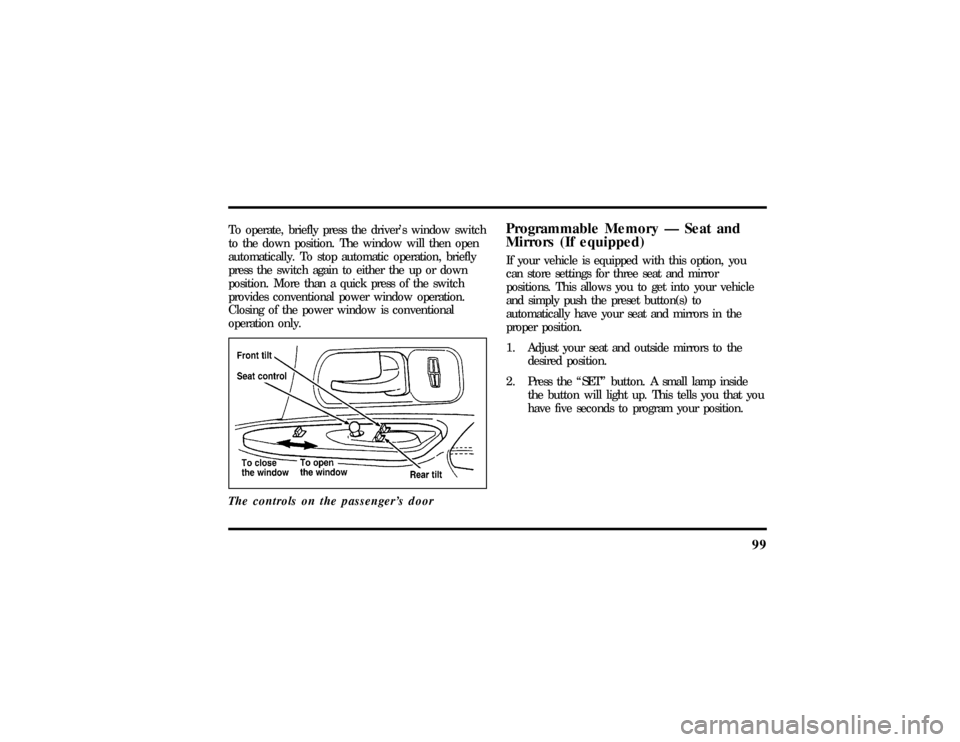
The controls on the passenger's door
Programmable Memory Ð Seat and
Mirrors (If equipped)If your vehicle is equipped with this option, you
can store settings for three seat and mirror
positions. This allows you to get into your vehicle
and simply push the preset button(s) to
automatically have your seat and mirrors in the
proper position.
1. Adjust your seat and outside mirrors to the
desired position.
2. Press the ªSETº button. A small lamp inside
the button will light up. This tells you that you
have five seconds to program your position.
File:05fncft.ex
Update:Mon Jun 17 13:49:49 1996
Page 105 of 305

101
To adjust the side mirrors:
1. Find the control switch in the driver's door
panel.
2. Select the right or left mirror by moving the
selector switch to R or L.
3. Move the mirror switch in the direction you
want to move the mirror.
4. Return the selector switch to the middle
position to keep the mirror in place.
Do not clean the housing or glass of any mirror
with harsh abrasives, fuel or other petroleum-based
cleaning products.Heated Mirror FeatureBoth mirrors are heated whenever the Electric Rear
Window Defroster is turned on. Do not remove ice
from the mirrors with a scraper or you could
damage them. If the outside mirror glass is frozenin place, do not attempt to readjust or move the
mirror glass or damage may result.
Cellular Phone (If equipped)For information about the cellular phone in your
vehicle, refer to theCellular Phone User's Manual
provided with your phone. For further questions
about your Lincoln cellular phone, contact the Ford
Cellular System at 1-800-367-3013(U.S.). In
Canada, please contact your dealer.
NOTE:It is recommended that you fold your
cellular phone antenna down onto the back glass
before entering a car wash.Front Seat Dual Storage ArmrestsSignature and Cartier Series vehicles have front seat
dual storage armrests cassette storage and coin
holder. An optional voice-activated cellular
telephone handrest is available in the passenger
armrest. (Instructions for cellular telephone are
found in a separate manual.)
File:05fncft.ex
Update:Mon Jun 17 13:49:49 1996
Page 112 of 305

108AutolockThe Autolock feature will automatically lock all the
doors when:q
the vehicle's doors are fully closed
q
the ignition key is turned to the ON position
q
someone is sitting in the driver's seat or a
heavy object is placed on it
q
the vehicle is in any forward or reverse gear.
The Autolock feature will repeat when:
q
the ignition key remains in the ON position
q
someone remains sitting in the driver's seat or a
heavy object is on the seat
q
a door is opened and then closed
q
the vehicle is in any forward or reverse gear.If you do not want to use the Autolock feature, it
can be deactivated by using the buttons for the
keyless entry system.
To deactivate the Autolock system:
1. Enter your permanent five-digit entry code (not
the personal code you may have set).
2. Within 5 seconds, press and hold 7/8.
3. Within 5 more seconds, press and release 3/4.
4. Release 7/8.
To reactivate the Autolock feature, simply repeat
the instructions for deactivating the system. The
Autolock feature can be turned on and off using the
instructions above.
File:05fncft.ex
Update:Mon Jun 17 13:49:49 1996
Page 117 of 305

113
Memory Seat and Mirror Featureq
Remote Entry
Pressing the UNLOCK button on the remote
entry key fob unlocks the driver's door and
recalls all of the Memory settings. Two key fobs
are delivered with the vehicle. One is
programmed to always recall Memory 1 and the
other will always recall Memory 2. Memory 1
or 2 is indicated on the back of the key fob.
Memory recall from the remote key fob can be
disabled. This is done by sliding the switch on
the back of the key fob to OFF. Memory can
still be recalled using the keyless entry code or
the Memory 1 or Memory 2 switches.
q
Keyless Entry
Up to four unique keyless entry codes can be
programmed by the customer. Three of the
codes can be assigned to recall Memory 1,
Memory 2, or Memory 3. Each time the
five-digit code is entered on the keypad, the
driver's door will unlock and Memory 1,
Memory 2, or Memory 3 will be recalled.
q
Memory Switches
Pressing either the Memory 1 or Memory 2
switch on the driver's door will also recall the
memory settings as selected.
File:05fncft.ex
Update:Mon Jun 17 13:49:49 1996
Page 121 of 305

117
3. Lock the doors by using the power door lock
switch, pressing the remote entry transmitter
LOCK button or pressing the last two buttons
(7/8, 9/0) of the keyless entry keypad.
The alarm indicator will now glow steadily.
4. Close all doors. The alarm indicator light will
then remain on steadily for approximately 30
more seconds and then go out. When the light
goes out the system is armed.
NOTE:Be sure to close all doors completely. If
not, the alarm indicator light will remain on.
Remember, your anti-theft system is armed only
after the alarm indicator light remains on steadily
for approximately 30 seconds after the last door is
closed, and then goes out.You can also arm the anti-theft system with the
factory installed remote entry system or the keyless
entry system by following this sequence:
1. Remove the key from the ignition.
2. Close all of the doors.
3. Press the remote entry transmitter LOCK
button or press the last two buttons (7/8, 9/0)
of the keyless entry keypad to lock the doors.
The alarm indicator will come on for 30
seconds to show the alarm is arming and then
turn off to show that the alarm has armed.
The anti-theft system is designed to work with the
factory installed remote entry system. It may not
work with other remote entry systems.
NOTE:The anti-theft system will not activate while
someone is sitting in the driver's seat or if there is
a heavy object in the driver's seat.
File:05fncft.ex
Update:Mon Jun 17 13:49:49 1996
Page 123 of 305
119
Seating and Safety RestraintsSeatsHead RestraintsIf you use them properly, head restraints will help
protect your head and neck in a collision.
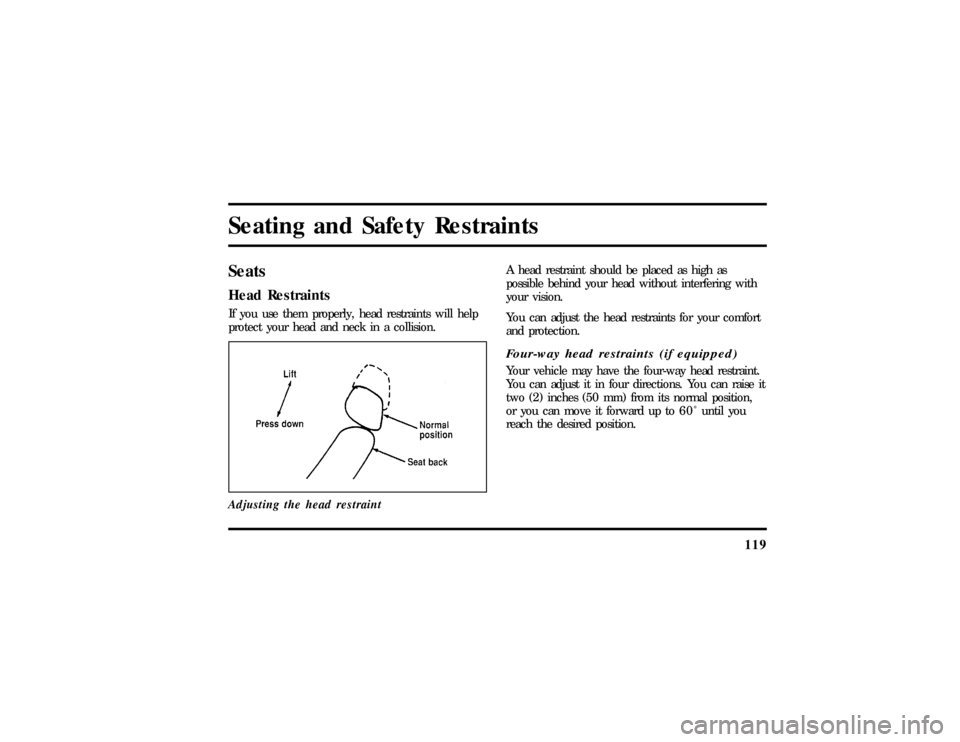
Adjusting the head restraint
A head restraint should be placed as high as
possible behind your head without interfering with
your vision.
You can adjust the head restraints for your comfort
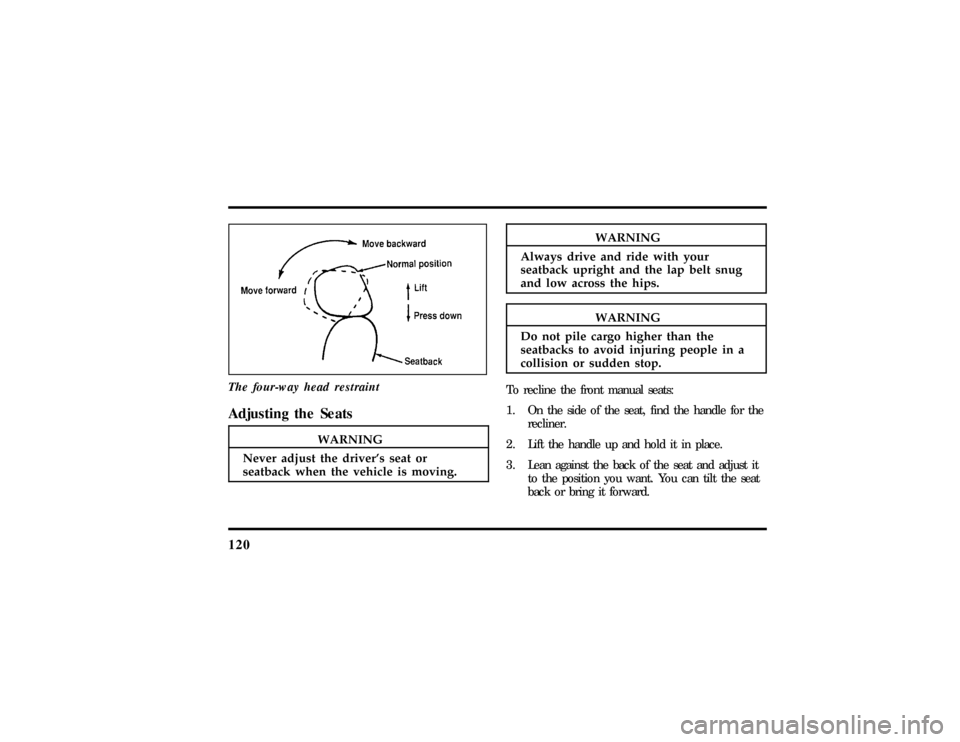
and protection.Four-way head restraints (if equipped)Your vehicle may have the four-way head restraint.
You can adjust it in four directions. You can raise it
two (2) inches (50 mm) from its normal position,
or you can move it forward up to 6 0 Ê until you
reach the desired position.
File:06fnsst.ex
Update:Fri Jun 21 08:57:53 1996
Page 124 of 305
120
Thefour-wa yhea drestraint
Adjustin gth e Seats
WARNING
Neve radjus tth edriver' ssea tor
WARNING
Alway sdriv ean drid ewit hyour
WARNING
Do no tpil ecarg ohighe rtha nthe
Page 125 of 305
121
4. Release the handle to lock the seat in its new
position.
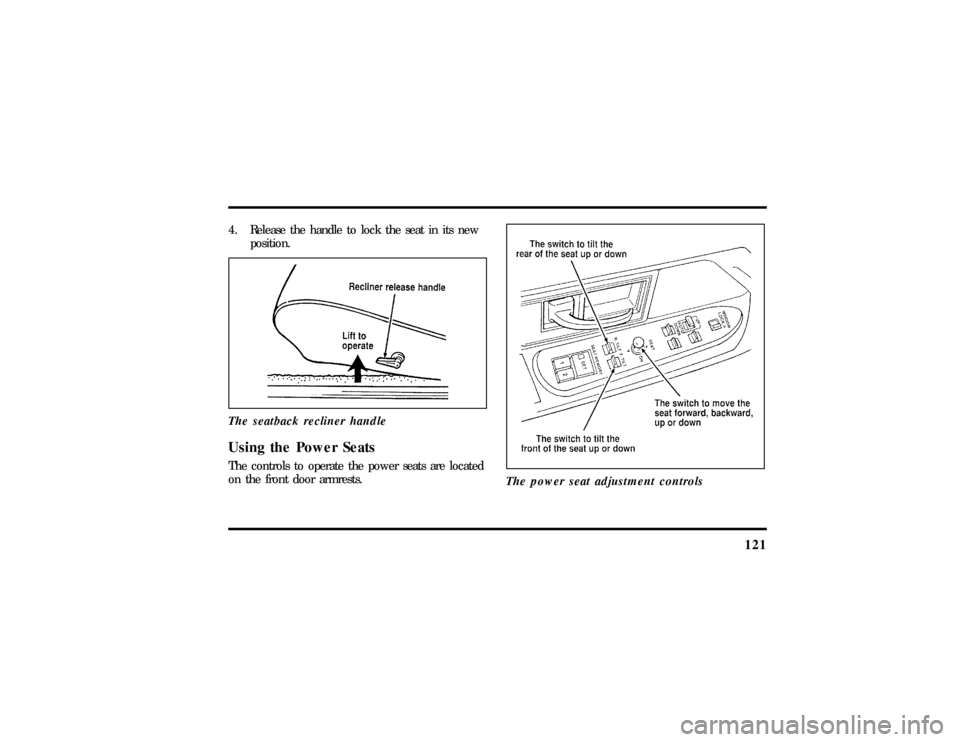
The seatback recliner handleUsing the Power SeatsThe controls to operate the power seats are located
on the front door armrests.
The power seat adjustment controls
File:06fnsst.ex
Update:Fri Jun 21 08:57:53 1996
Page 126 of 305
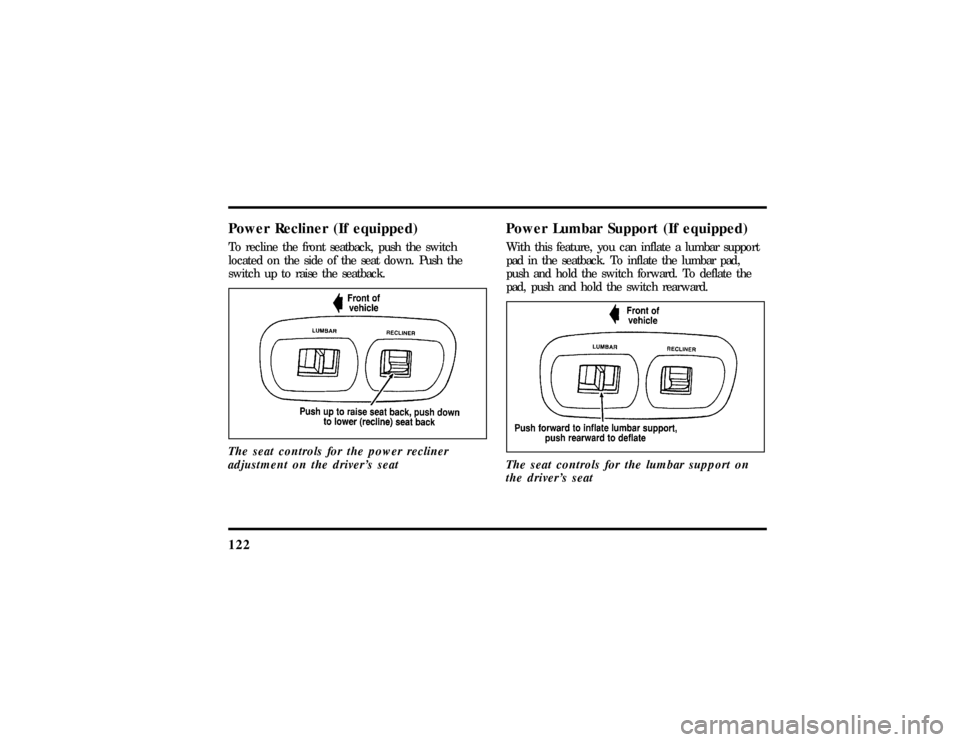
122Power Recliner (If equipped)To recline the front seatback, push the switch
located on the side of the seat down. Push the
switch up to raise the seatback.
The seat controls for the power recliner
adjustment on the driver's seat
Power Lumbar Support (If equipped)With this feature, you can inflate a lumbar support
pad in the seatback. To inflate the lumbar pad,
push and hold the switch forward. To deflate the
pad, push and hold the switch rearward.
The seat controls for the lumbar support on
the driver's seat
File:06fnsst.ex
Update:Fri Jun 21 08:57:53 1996