anti theft LINCOLN TOWN CAR 1997 Owners Manual
[x] Cancel search | Manufacturer: LINCOLN, Model Year: 1997, Model line: TOWN CAR, Model: LINCOLN TOWN CAR 1997Pages: 305, PDF Size: 2.68 MB
Page 111 of 305

107
Unlocking the Doors with the Keyless
Entry SystemYou must unlock the driver's door before you
unlock any of the other doors or trunk. If you let
more than five (5) seconds pass before pressing
numbers, the system shuts down, and you have to
enter the code again. The system has shut down if
the keypad light is out. If the keyless entry system
does not work properly, use the key or
transmitter(s) to lock and unlock the doors or
unlock the trunk.
1. To unlock the driver's door, enter the factory
code or your personal code. All codes have five
(5) numbers. After you press the fifth number,
the driver's door unlocks.
2. To unlock all passenger doors, press the 3/4
button within five (5) seconds of unlocking the
driver's door or trunk, or re-enter the code to
open the driver's door, then press 3/4.3. To unlock the trunk, press the 5/6 button
within five seconds of unlocking the driver's or
passenger's doors, or re-enter the code to open
the driver's door, then press 5/6.
As long as the driver's door has been unlocked first,
you can open the passenger door or the trunk in
any order.
Locking the Doors with the Keyless
Entry SystemAlong with unlocking your doors, you can use the
keyless entry system to lock the doors.
To lock all of the vehicle's doors at the same time,
press 7/8 and 9/0 at the same time. It is not
necessary to first enter the keypad code. This will
also arm your anti-theft system (if equipped).
File:05fncft.ex
Update:Mon Jun 17 13:49:49 1996
Page 114 of 305

110To erase all of the personal entry codes and remote
entry transmitters programmed to a vehicle:
1. Enter the original permanent code.
2. Press 1/2 within five seconds of Step 1.
3. Press and hold 1/2 for two (2) seconds.
All of the vehicle doors will lock and then
unlock to confirm erasure.
Do not set a code that presents the numbers in
sequential order, such as 1/2, 3/4, 5/6, 7/8, 9/0.
Studies show that people who idly press the buttons
usually press a sequential pattern. Also, do not
select a code that uses the same button five times.
Thieves can easily figure out these types of codes.
Arming, disarming and resetting your
anti-theft system from the keyless entry
padThe Keyless Entry system will arm the anti-theft
system when you use the 7/8 and 9/0 keys to lock
the doors, and will disarm or reset a triggered
anti-theft alarm when you enter in the five digit
code to unlock the driver's door.Remote Entry SystemWith the remote entry system, you can lock and
unlock the vehicle doors and open the trunk
without using a key. The buttons for the system are
located on the two hand held transmitters that
came with your vehicle. The remote also has a
personal alarm feature.
The system will work with up to four transmitters.
Your vehicle came with two transmitters. Additional
transmitters can be ordered from your dealer.
File:05fncft.ex
Update:Mon Jun 17 13:49:49 1996
Page 115 of 305

111
The remote entry features only operate with the
transmission in the P (Park) or N (Neutral) position.
Remote entry transmitter
Unlocking the doors and opening the
trunkTo unlock the driver's door, press the UNLOCK
control.
To unlock the other doors, press the UNLOCK
button a second time within five (5) seconds of
unlocking the driver's door.
To open the trunk, press the TRUNK button twice
within five (5) seconds.Locking the doorsTo lock all the doors, press the LOCK button. This
will also arm the anti-theft system (if equipped).
The doors will lock and the horn will chirp to
indicate the vehicle is locked and armed.
File:05fncft.ex
Update:Mon Jun 17 13:49:49 1996
Page 116 of 305

112The door lock Horn Chirp is a programmable
feature. To deactivate the Horn Chirp feature:
1. Enter your permanent five-digit code (not the
user code you may have set).
2. Within five seconds, press and hold the 7/8
button.
3. Within five more seconds, press and release the
1/2 button.
4. Release the 7/8 button.
To reactivate the Horn Chirp feature, simply repeat
the instruction for deactivating the feature.Activating the remote personal alarmIf you wish to activate the remote personal alarm,
press the PANIC control. This will honk the horn
and flash the parking lamps and tail lamps for
approximately two minutes and forty-five seconds.You can turn it OFF by pressing the PANIC control
again or by turning the ignition key to the RUN
position.
Arming and Disarming the Alarm
SystemYour vehicle is equipped with the factory installed
anti-theft system. The remote entry system will
automatically arm it when the doors are locked
with the remote entry LOCK button. The remote
entry UNLOCK button will disarm or reset a
triggered anti-theft alarm.
The remote entry system is designed to work with
the factory installed anti-theft system. It may not
work with other anti-theft systems.
When you use the remote entry UNLOCK, TRUNK
or PANIC buttons, the illuminated entry system
turns on the interior lights for 25 seconds. You can
turn these lights off with the LOCK button or by
turning the ignition to the RUN position.
File:05fncft.ex
Update:Mon Jun 17 13:49:49 1996
Page 120 of 305

116Anti-theft SystemWhen armed, this system helps protect your vehicle
against break-ins or theft by monitoring all doors,
the hood, and the trunk lock cylinder.
When an unauthorized entry occurs, the system
triggers and will:q
flash the headlamps, parking lamps, interior
lamps, and alarm indicator light
q
honk the horn
q
prevent the engine from starting
NOTE:The factory installed Remote Entry System
has a PANIC feature that also chirps the vehicle
horn and flashes the interior/exterior lamps when
the PANIC button on the remote entry transmitter
is pushed.The PANIC alarm and the Anti-Theft
alarm are two separate features.Both the
anti-theft alarm and the PANIC feature can be
active at the same time.To tell the difference between a PANIC alarm and
a triggered Anti-Theft alarm:
q
only the Anti-Theft alarm will cause the alarm
indicator light (located in the center of the
instrument cluster) to flash on and off.
q
only the Anti-Theft alarm will prevent the
engine from starting.
For more information on the PANIC alarm, see
Remote Entry Systemin the Index.
Arming the SystemTo arm the system, do the following four steps in
sequence.
1. Remove the key from the ignition.
2. Open any door. The alarm indicator light will
start flashing to remind you to arm the system.
File:05fncft.ex
Update:Mon Jun 17 13:49:49 1996
Page 121 of 305

117
3. Lock the doors by using the power door lock
switch, pressing the remote entry transmitter
LOCK button or pressing the last two buttons
(7/8, 9/0) of the keyless entry keypad.
The alarm indicator will now glow steadily.
4. Close all doors. The alarm indicator light will
then remain on steadily for approximately 30
more seconds and then go out. When the light
goes out the system is armed.
NOTE:Be sure to close all doors completely. If
not, the alarm indicator light will remain on.
Remember, your anti-theft system is armed only
after the alarm indicator light remains on steadily
for approximately 30 seconds after the last door is
closed, and then goes out.You can also arm the anti-theft system with the
factory installed remote entry system or the keyless
entry system by following this sequence:
1. Remove the key from the ignition.
2. Close all of the doors.
3. Press the remote entry transmitter LOCK
button or press the last two buttons (7/8, 9/0)
of the keyless entry keypad to lock the doors.
The alarm indicator will come on for 30
seconds to show the alarm is arming and then
turn off to show that the alarm has armed.
The anti-theft system is designed to work with the
factory installed remote entry system. It may not
work with other remote entry systems.
NOTE:The anti-theft system will not activate while
someone is sitting in the driver's seat or if there is
a heavy object in the driver's seat.
File:05fncft.ex
Update:Mon Jun 17 13:49:49 1996
Page 122 of 305

118Disarming an Untriggered Anti-Theft
SystemYou can disarm the system by:q
unlocking a front door with the key (turn the
key all the way to the end of travel or the
system will not disarm).
q
using the keyless entry unlock code.
q
using the UNLOCK button of the remote entry
transmitter.
If you armed the system while inside your vehicle,
you can disarm it by turning the ignition to the ON
or ACC position. This allows you to open the door
and exit without triggering the system.
Triggering the Alarm SystemThe armed system will be triggered if:q
any door is opened without disarming the
system (see previous paragraphs), or
q
there is an attempt to remove the trunk lock
cylinder (simply pulling on the lock cylinder will
trigger a switch), or
NOTE:You can open the trunk with your key
without setting off the alarm.
q
the hood is opened.
Disarming a Triggered SystemThe alarm can be disarmed by:q
unlocking a front door with the key
q
using the keyless entry unlock code
q
using the UNLOCK control on the remote entry
transmitter
NOTE:The flashing lights and honking horn will
shut off automatically approximately three minutes
after the system is triggered. It will trigger again if
another intrusion occurs. However, the engine will
not be allowed to start until the system is disarmed.
File:05fncft.ex
Update:Mon Jun 17 13:49:49 1996
Page 204 of 305
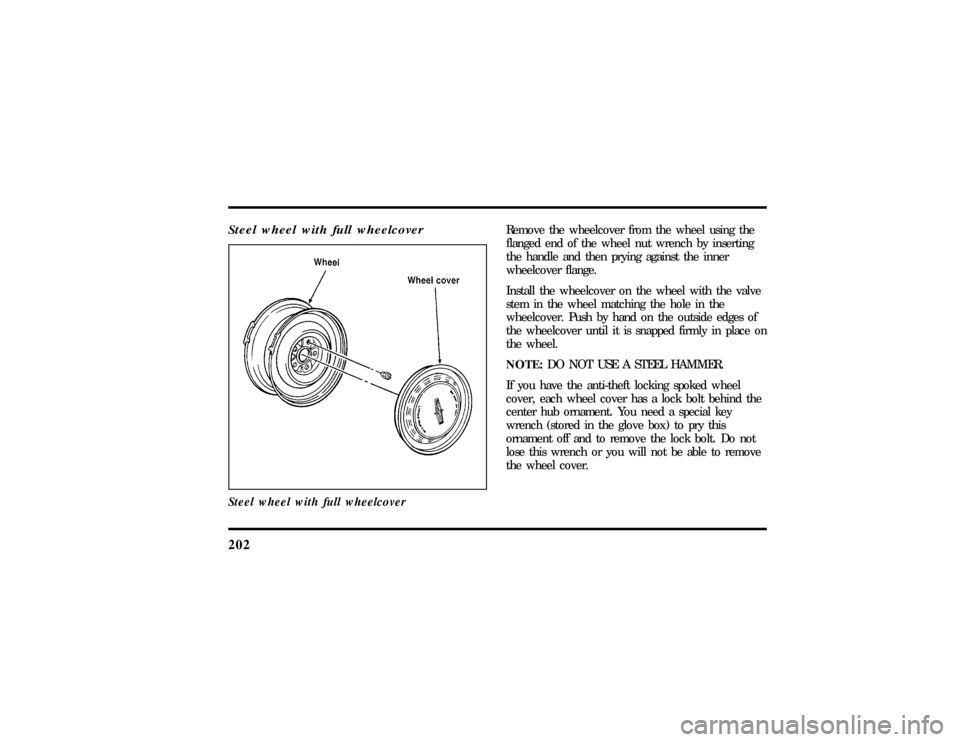
202Steel wheel with full wheelcoverSteel wheel with full wheelcover
Remove the wheelcover from the wheel using the
flanged end of the wheel nut wrench by inserting
the handle and then prying against the inner
wheelcover flange.
Install the wheelcover on the wheel with the valve
stem in the wheel matching the hole in the
wheelcover. Push by hand on the outside edges of
the wheelcover until it is snapped firmly in place on
the wheel.
NOTE:DO NOT USE A STEEL HAMMER.
If you have the anti-theft locking spoked wheel
cover, each wheel cover has a lock bolt behind the
center hub ornament. You need a special key
wrench (stored in the glove box) to pry this
ornament off and to remove the lock bolt. Do not
lose this wrench or you will not be able to remove
the wheel cover.
File:10fnert.ex
Update:Thu Jun 20 15:16:36 1996
Page 205 of 305
203
The key wrench has a registration number attached
to it. Keep the registration number in a safe place.
Complete the registration card and return it to the
manufacturer as soon as you buy the vehicle. To
replace the key wrench, send the I.D. card to the
manufacturer.Anti-Theft Wheel Lug Nuts
(If equipped)If your vehicle has this option, one of the lug nuts
on each wheel locks and must be unlocked with a
special key. The key and registration card are
attached to the lug wrench and stored with the
spare tire. If you lose the key, send the registration
card to the manufacturer (not the dealer) to get a
replacement key.
NOTE:If entire lug wrench/lug nut key assembly
is lost, see your nearest Ford or Lincoln-Mercury
dealer who has access to a master set of keys.
NOTE:DO NOT USE A POWER IMPACT
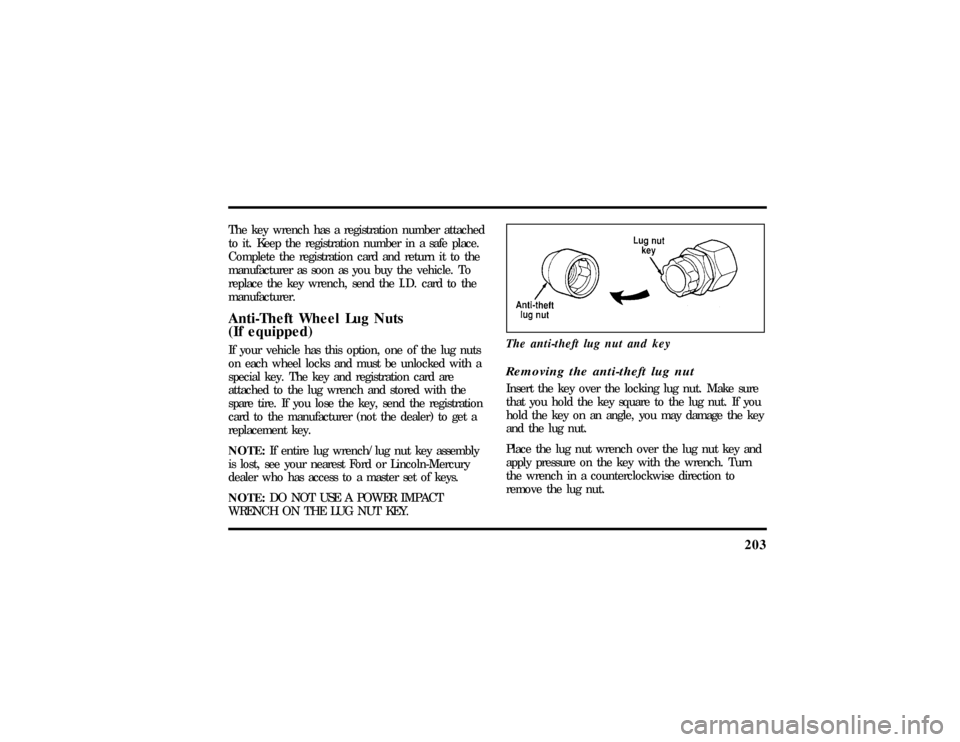
WRENCH ON THE LUG NUT KEY.The anti-theft lug nut and key
Removing the anti-theft lug nutInsert the key over the locking lug nut. Make sure
that you hold the key square to the lug nut. If you
hold the key on an angle, you may damage the key
and the lug nut.
Place the lug nut wrench over the lug nut key and
apply pressure on the key with the wrench. Turn
the wrench in a counterclockwise direction to
remove the lug nut.
File:10fnert.ex
Update:Thu Jun 20 15:16:36 1996
Page 286 of 305

295
Index
A
ABS warning light (see Anti-lock
brake system)............ 11
Accessory position on the ignition.... 73
Accessory power source, power
point outlet............. 73
Accident damage............ 212
Air bag supplemental
restraint system........... 135
and child safety seats......137, 141
description............. 135
driver air bag............ 135
indicator light............ 14
operation.............. 137
passenger air bag........... 135
service and information labels..... 139
tone generator............ 139Air cleaner filter
location............... 216
specifications............ 257
Air conditioning, electronic automatic
temperature control system....... 55
Air suspension, description........ 170
Alarm, activating remote personal..... 112
Aluminum wheels........... 200
Antenna, radio (see Electronic
sound system)............ 40
Antifreeze (see Engine coolant)...... 224
Anti-lock brake system (ABS)
description............. 167
see also Brake............ 167
warning light............ 11
Anti-theft lug nuts and key........ 203
File:fnixt.ex
Update:Mon Jun 17 13:58:01 1996