change wheel LINCOLN TOWN CAR 1997 Owners Manual
[x] Cancel search | Manufacturer: LINCOLN, Model Year: 1997, Model line: TOWN CAR, Model: LINCOLN TOWN CAR 1997Pages: 305, PDF Size: 2.68 MB
Page 47 of 305

42How to eject the tapeTo stop the tape and eject the cassette, press the
ªEJECTº button. The tape will eject only when in
the tape mode. The cassettecannotbe ejected
when the radio is playing an ªAMº or ªFMº
station. The system will revert to radio mode when
the cassette is ejected.How to store the tapePress the ªAMº, ªFM1/FM2º, or the ªBANDº
button located on the Redundant Control switch on
your steering wheel (if equipped) while a tape is
loaded.Using the DolbyHB noise reduction
featureNOTE:Noise reduction system manufactured under
license from Dolby Labs Licensing Corporation.
ªDolbyº and double-D symbol are trademarks of
Dolby Laboratories Licensing Corporation.Push thekbutton to activate. When activated,
the light above thekbutton will be illuminated.
Tape error messagesYour cassette tape player is equipped to diagnose
certain problems you may experience. Error codes
are as follows:
TD E1 Ð Radio tries to change sides of tape 3
times in a 10 second span. Push ªEJECTº and try
another tape. If problem persists, refer problem to
qualified personnel for service.
TD E2 Ð Tape eject failure. Radio tries to eject
tape and it will not eject. Push ªEJECTº to eject
tape. If the tape will not eject, refer problem to
qualified personnel for service.
TD E3 Ð Loading error. Push ªEJECTº to eject
tape. Reload tape. If the same error code appears in
the display, try another tape.
File:04fnast.ex
Update:Thu Jun 20 15:13:21 1996
Page 60 of 305
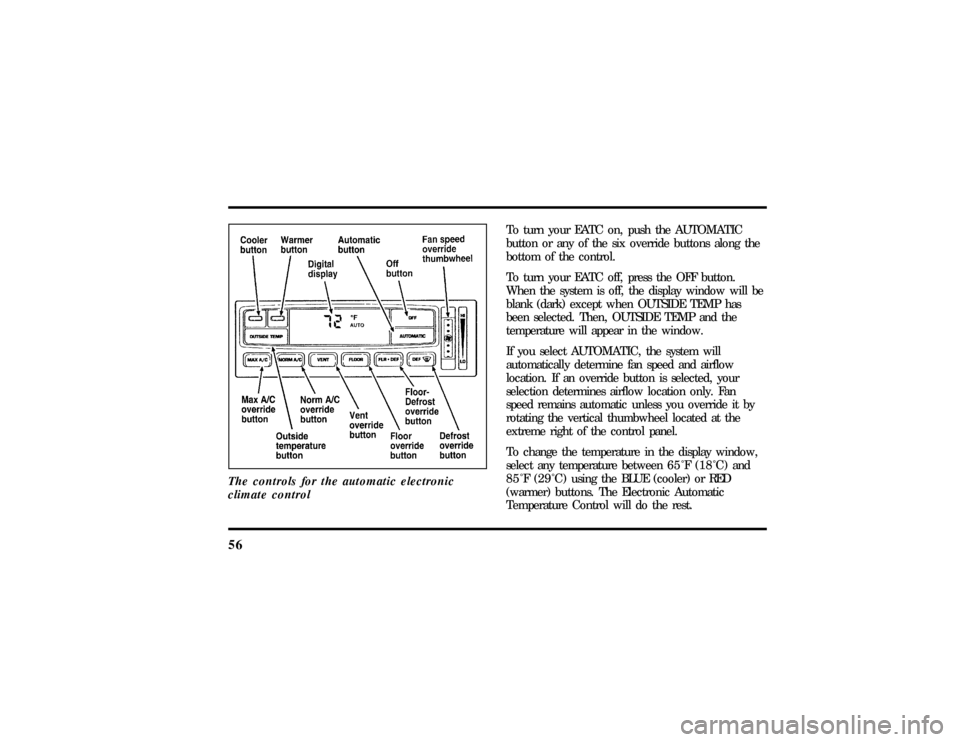
56The controls for the automatic electronic
climate control
To turn your EATC on, push the AUTOMATIC
button or any of the six override buttons along the
bottom of the control.
To turn your EATC off, press the OFF button.
When the system is off, the display window will be
blank (dark) except when OUTSIDE TEMP has
been selected. Then, OUTSIDE TEMP and the
temperature will appear in the window.
If you select AUTOMATIC, the system will
automatically determine fan speed and airflow
location. If an override button is selected, your
selection determines airflow location only. Fan
speed remains automatic unless you override it by
rotating the vertical thumbwheel located at the
extreme right of the control panel.
To change the temperature in the display window,
select any temperature between65ÊF(18ÊC) and
85ÊF(29ÊC)using the BLUE (cooler) or RED
(warmer) buttons. The Electronic Automatic
Temperature Control will do the rest.
File:05fncft.ex
Update:Mon Jun 17 13:49:49 1996
Page 62 of 305

58When in AUTOMATIC and weather conditions
require heat, air will be sent to the floor. But, a
feature is included in your EATC to prevent
blowing cold air to the floor if the engine coolant is
not warm enough to allow heating. For a short
time the fan will be at low speed and air directed
to the windshield. In 3-1/2 minutes or less, the fan
speed will start to increase and the airflow will
change to the floor area.
If unusual conditions exist (i.e., window fogging,
etc.), the six manual override buttons allow you to
select special air discharge locations. A thumbwheel
allows you to adjust the fan speed to suit your
needs.
Temperature selectionThe RED and BLUE buttons at the upper left of the
Control are for temperature selection. The RED
button will increase the set temperature and the
BLUE button will lower the set temperature.
Pressing a button and releasing it will change the
set temperature one degree. Holding either button
in will rapidly change the temperature setting in
one degree increments to either65ÊF(18ÊC)
(BLUE) or85ÊF(29ÊC)(RED).Then, the set
temperature will jump 5 Ê and stop at either60ÊF
(16ÊC)which is maximum cooling or90ÊF(32ÊC)
which is maximum heating.
The average temperature range used is between
68ÊF(20ÊC) and78ÊF(26ÊC).Changing the
temperature setting by several degrees outside this
range or overriding to60ÊF(16ÊC) or90ÊF(32ÊC)
will not speed up the heating or cooling process.
File:05fncft.ex
Update:Mon Jun 17 13:49:49 1996
Page 64 of 305
60
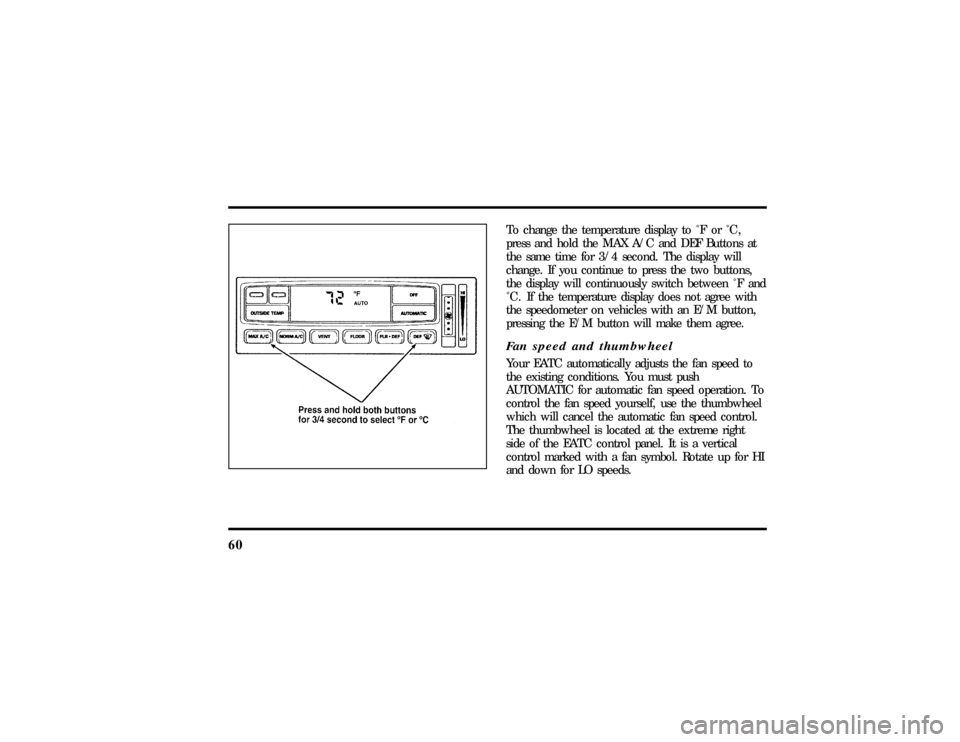
To change the temperature display to Ê F or Ê C ,
press and hold the MAX A/C and DEF Buttons at
the same time for 3/4 second. The display will
change. If you continue to press the two buttons,
the display will continuously switch between Ê F and
Ê C . If the temperature display does not agree with
the speedometer on vehicles with an E/M button,
pressing the E/M button will make them agree.Fan speed and thumbwheelYour EATC automatically adjusts the fan speed to
the existing conditions. You must push
AUTOMATIC for automatic fan speed operation. To
control the fan speed yourself, use the thumbwheel
which will cancel the automatic fan speed control.
The thumbwheel is located at the extreme right
side of the EATC control panel. It is a vertical
control marked with a fan symbol. Rotate up for HI
and down for LO speeds.
File:05fncft.ex
Update:Mon Jun 17 13:49:49 1996
Page 66 of 305

62MAX A/C, etc.), automatic fan control will
continue unless you rotate the fan thumbwheel. To
return to automatic fan control, press the
AUTOMATIC button. The EATC will return to
Automatic operation. If you want to return to any
override function, press the button for that function.
The fan speed will continue to be automatically
controlled.Steering wheel remote control buttonsSome cars have control buttons to the right side of
the center of the steering wheel which allow you to
control some radio and climate control features.
Refer to theSteering Column Controlschapter later
in this owner guide for further information.Manual override buttonsYour EATC has six buttons which allow you to
make special selections. The buttons are located
along the bottom edge of the EATC control and
allow you to determine where the air will be
discharged. Pressing any override button changesthe air discharge location only. It does not affect
the ability of the system to control temperature or
the fan speed. Return to fully Automatic operation
by pushing the AUTOMATIC button.
MAX A/C button
The MAX A/C feature allows for faster cooling
because air is drawn from inside the vehicle. Using
inside air causes the fan to sound louder which is
normal for this selection. The Display window will
change to indicate60ÊF(16ÊC) and MAXA/C. The
fan will run and the airflow will be from the
instrument panel registers. To exit and return to the
previous temperature, push AUTOMATIC or any of
the other five override buttons.
NORM A/C button
When you push this button, you select air
conditioning using outside air. The Display window
will indicate A/C under the selected temperature.
The cooled air will flow from the instrument panel
registers. The fan speed will continue on automatic.
File:05fncft.ex
Update:Mon Jun 17 13:49:49 1996
Page 68 of 305
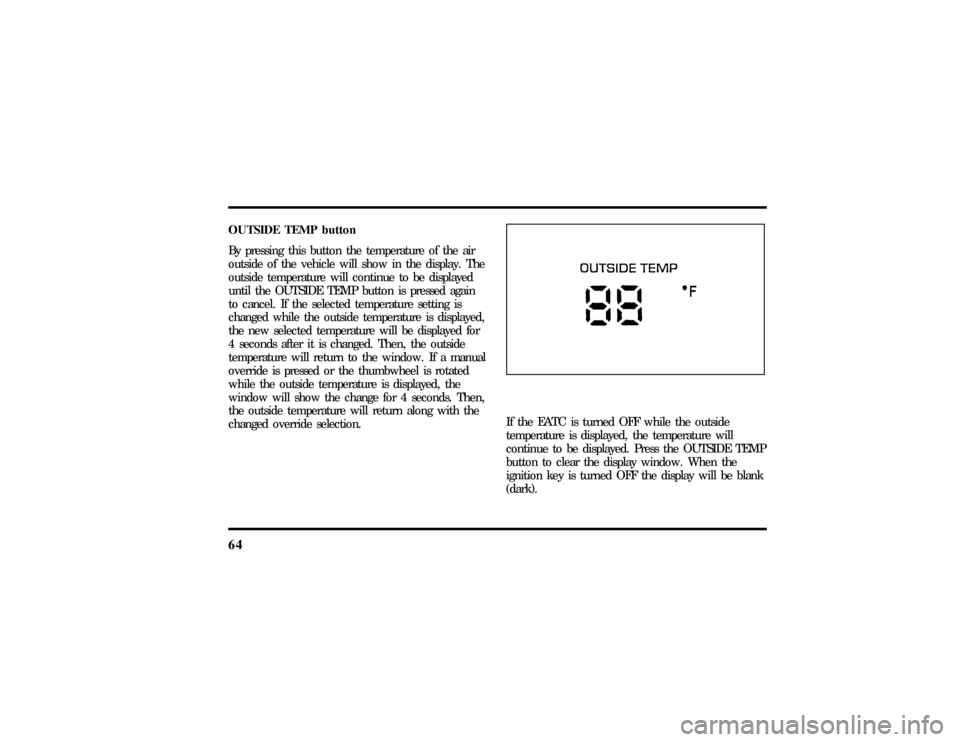
64OUTSIDE TEMP button
By pressing this button the temperature of the air
outside of the vehicle will show in the display. The
outside temperature will continue to be displayed
until the OUTSIDE TEMP button is pressed again
to cancel. If the selected temperature setting is
changed while the outside temperature is displayed,
the new selected temperature will be displayed for
4 seconds after it is changed. Then, the outside
temperature will return to the window. If a manual
override is pressed or the thumbwheel is rotated
while the outside temperature is displayed, the
window will show the change for 4 seconds. Then,
the outside temperature will return along with the
changed override selection.
If the EATC is turned OFF while the outside
temperature is displayed, the temperature will
continue to be displayed. Press the OUTSIDE TEMP
button to clear the display window. When the
ignition key is turned OFF the display will be blank
(dark).
File:05fncft.ex
Update:Mon Jun 17 13:49:49 1996
Page 71 of 305
67
After approximately 10 minutes, the defroster will
turn off. If the window or mirrors are still not clear,
turn the defroster on again.
The defroster will turn off when the ignition key is
turned to the OFF or START position.
The heating elements are bonded to the inside of
the rear window. Do not use sharp objects to
scrape the inside of the rear window or use
abrasive cleaners to clean it. Doing so could damage
the heating elements.
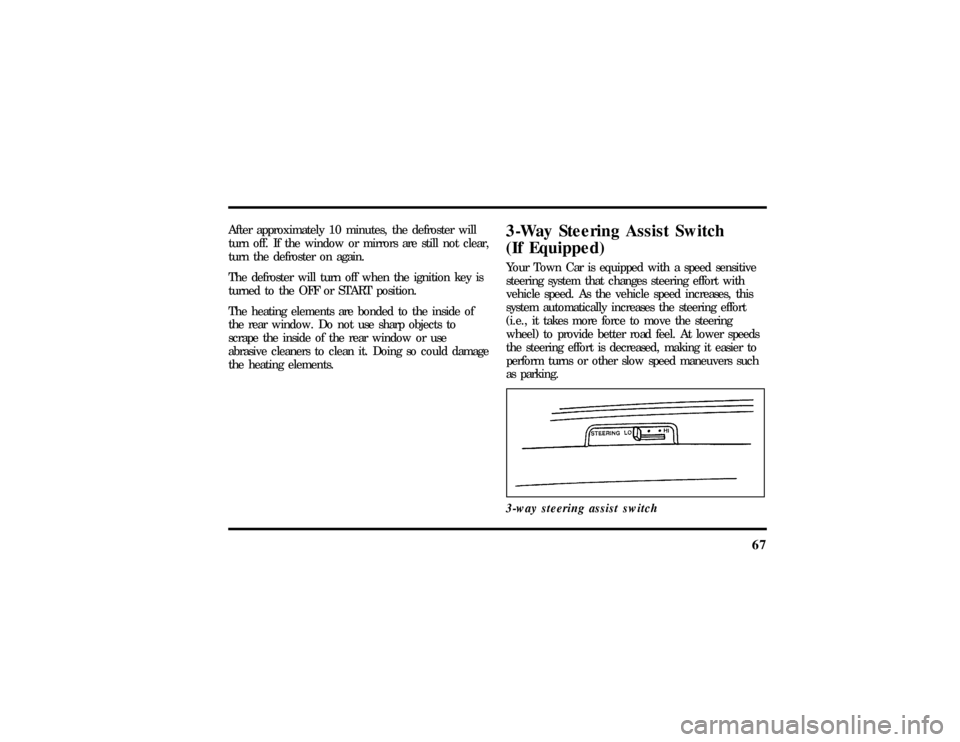
3-Way Steering Assist Switch
(If Equipped)Your Town Car is equipped with a speed sensitive
steering system that changes steering effort with
vehicle speed. As the vehicle speed increases, this
system automatically increases the steering effort
(i.e., it takes more force to move the steering
wheel) to provide better road feel. At lower speeds
the steering effort is decreased, making it easier to
perform turns or other slow speed maneuvers such
as parking.
3-way steering assist switch
File:05fncft.ex
Update:Mon Jun 17 13:49:49 1996
Page 85 of 305
81
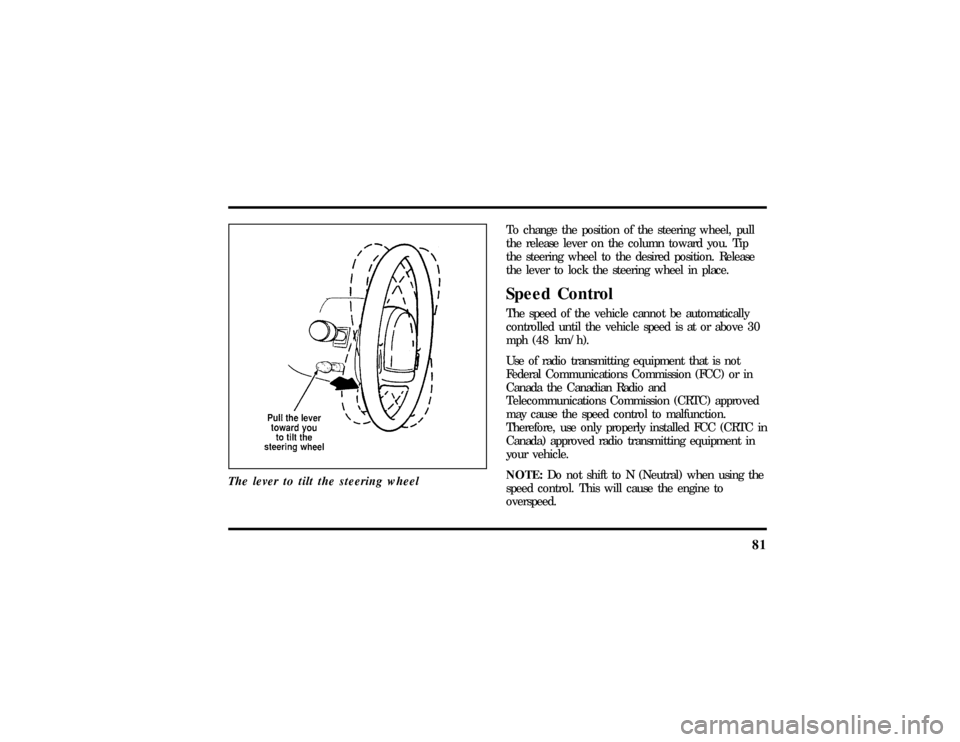
The lever to tilt the steering wheel
To change the position of the steering wheel, pull
the release lever on the column toward you. Tip
the steering wheel to the desired position. Release
the lever to lock the steering wheel in place.Speed ControlThe speed of the vehicle cannot be automatically
controlled until the vehicle speed is at or above 30
mph (48 km/h).
Use of radio transmitting equipment that is not
Federal Communications Commission (FCC) or in
Canada the Canadian Radio and
Telecommunications Commission (CRTC) approved
may cause the speed control to malfunction.
Therefore, use only properly installed FCC (CRTC in
Canada) approved radio transmitting equipment in
your vehicle.
NOTE:Do not shift to N (Neutral) when using the
speed control. This will cause the engine to
overspeed.
File:05fncft.ex
Update:Mon Jun 17 13:49:49 1996
Page 173 of 305

170Traction Assist
TM
(If equipped)
Your vehicle may be equipped with the optional
Traction Assist
TM
system. This system helps prevent
wheel spin in order to improve tire traction and is
an especially useful feature when you drive in hilly
areas or on slippery, icy or snowy roads.
Traction Assist
TM
works automatically by rapidly
applying and releasing the brakes to prevent one or
both of the rear drive wheels from spinning during
acceleration.
During the Traction Assist
TM
function, which most
often occurs during low speed acceleration on
slippery surfaces, a noise may be heard coming from
the engine compartment. This is normal and may
last for a few seconds during the acceleration of the
vehicle.
In general, this system improves your vehicle's
stability and acceleration performance when road
conditions warrant. Traction Assist
TM
is fully
effective up to approximately 25 mph (40 km/h).At 25 mph (40 km/h) the function begins to taper
off until it no longer operates above 34 mph
(55 km/h).
If the Traction Assis;
TM
system is cycled excessively,
the system will shut down to prevent the rear
brakes from overheating. A cooling down period is
required to prevent damage to the brakes. This time
period varies and depends on brake usage during
the cooling down period. Anti-Lock braking is not
affected and will function normally during the cool
down period.
After the cool down period, the Traction Assist
TM
function is restored.%Rear Air Suspension SystemYour vehicle is equipped with an automatic load
leveling rear air suspension system. This system
maintains the rear vehicle height at a constant level
by automatically adding air or releasing air from the
rear air springs to offset changes in vehicle loads.
File:09fngft.ex
Update:Mon Jun 17 13:52:03 1996
Page 196 of 305
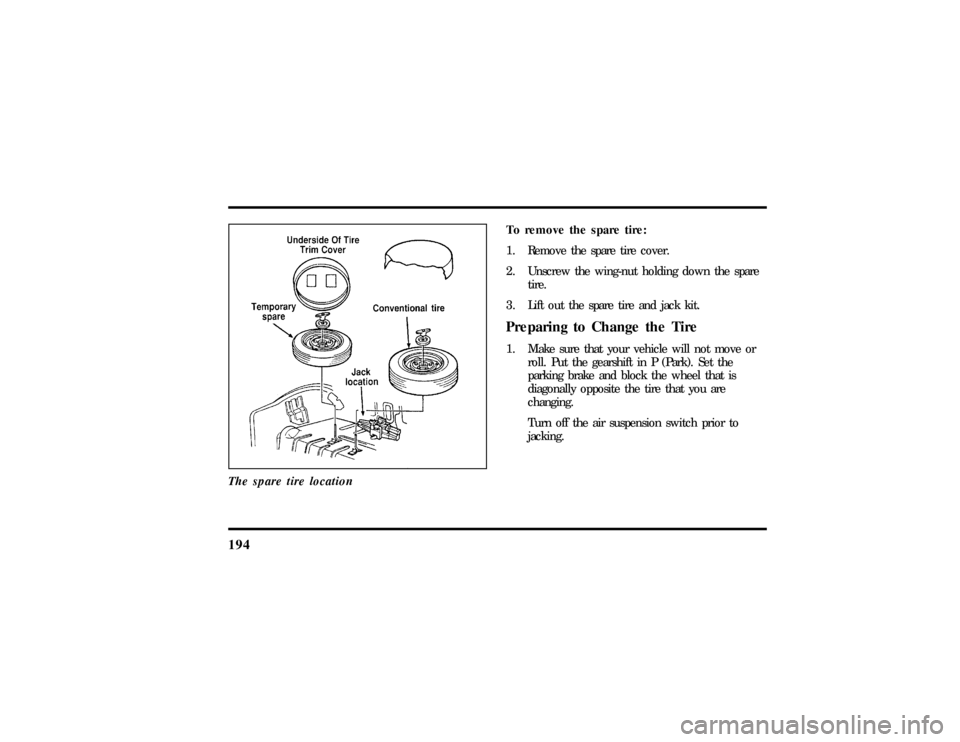
194The spare tire location
To remove the spare tire:
1. Remove the spare tire cover.
2. Unscrew the wing-nut holding down the spare
tire.
3. Lift out the spare tire and jack kit.Preparing to Change the Tire1. Make sure that your vehicle will not move or
roll. Put the gearshift in P (Park). Set the
parking brake and block the wheel that is
diagonally opposite the tire that you are
changing.
Turn off the air suspension switch prior to
jacking.
File:10fnert.ex
Update:Thu Jun 20 15:16:36 1996