audio LINCOLN TOWN CAR 2003 User Guide
[x] Cancel search | Manufacturer: LINCOLN, Model Year: 2003, Model line: TOWN CAR, Model: LINCOLN TOWN CAR 2003Pages: 272, PDF Size: 2.19 MB
Page 33 of 272
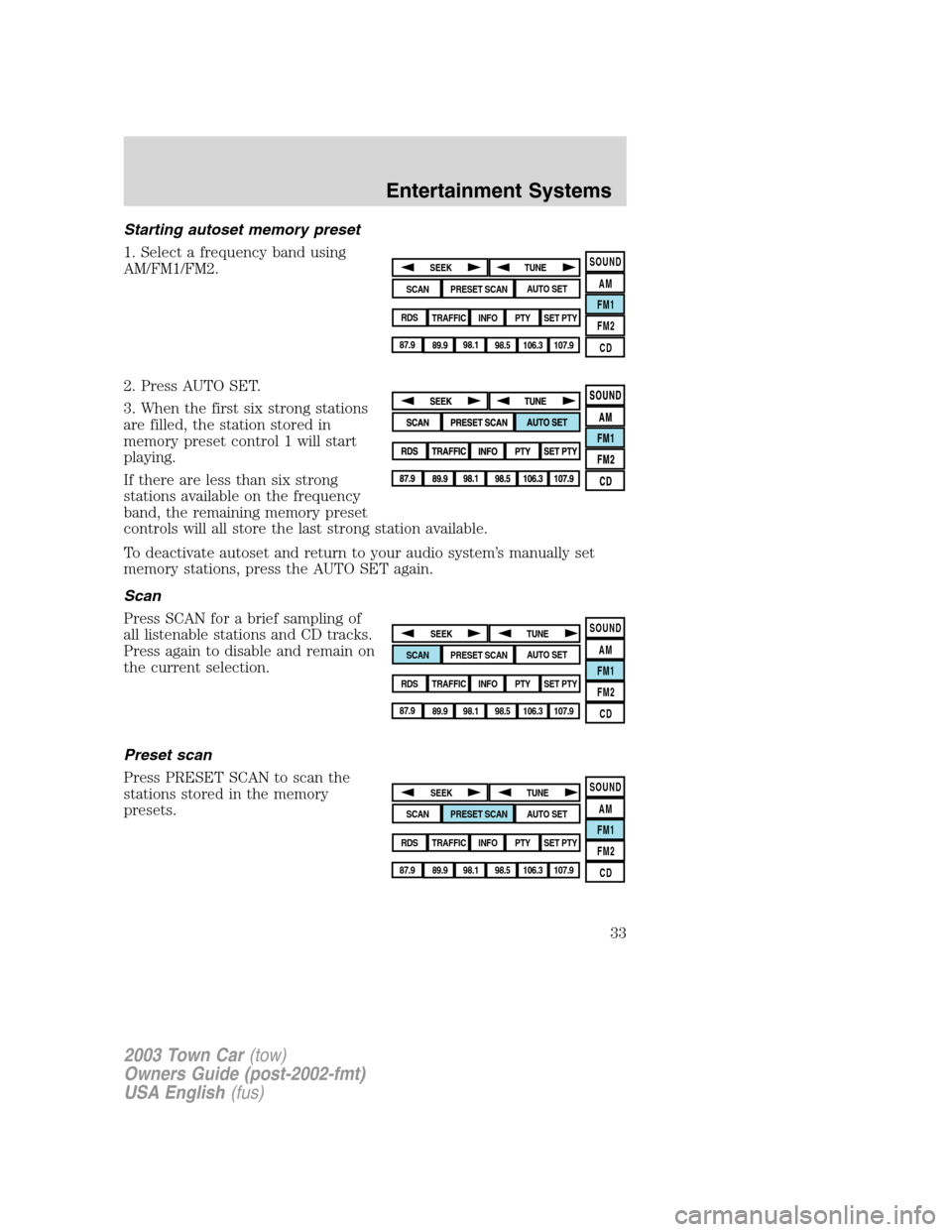
Starting autoset memory preset
1. Select a frequency band using
AM/FM1/FM2.
2. Press AUTO SET.
3. When the first six strong stations
are filled, the station stored in
memory preset control 1 will start
playing.
If there are less than six strong
stations available on the frequency
band, the remaining memory preset
controls will all store the last strong station available.
To deactivate autoset and return to your audio system’s manually set
memory stations, press the AUTO SET again.
Scan
Press SCAN for a brief sampling of
all listenable stations and CD tracks.
Press again to disable and remain on
the current selection.
Preset scan
Press PRESET SCAN to scan the
stations stored in the memory
presets.
SOUND
AM
FM1
FM2
CDSEEK
TUNE
PRESET SCANAUTO SET
SCAN
RDS
TRAFFIC
INFO PTYSET PTY
87.9
89.9 98.1
98.5 106.3 107.9
SOUND
AM
FM1
FM2
CDSEEK
TUNE
PRESET SCANAUTO SET
SCAN
RDS
TRAFFIC
INFO PTYSET PTY
87.9
89.9 98.1
98.5 106.3 107.9
SOUND
AM
FM1
FM2
CDSEEK
TUNE
PRESET SCANAUTO SET
SCAN
RDS
TRAFFIC
INFO PTYSET PTY
87.9
89.9 98.1
98.5 106.3 107.9
2003 Town Car(tow)
Owners Guide (post-2002-fmt)
USA English(fus)
Entertainment Systems
33
Page 34 of 272
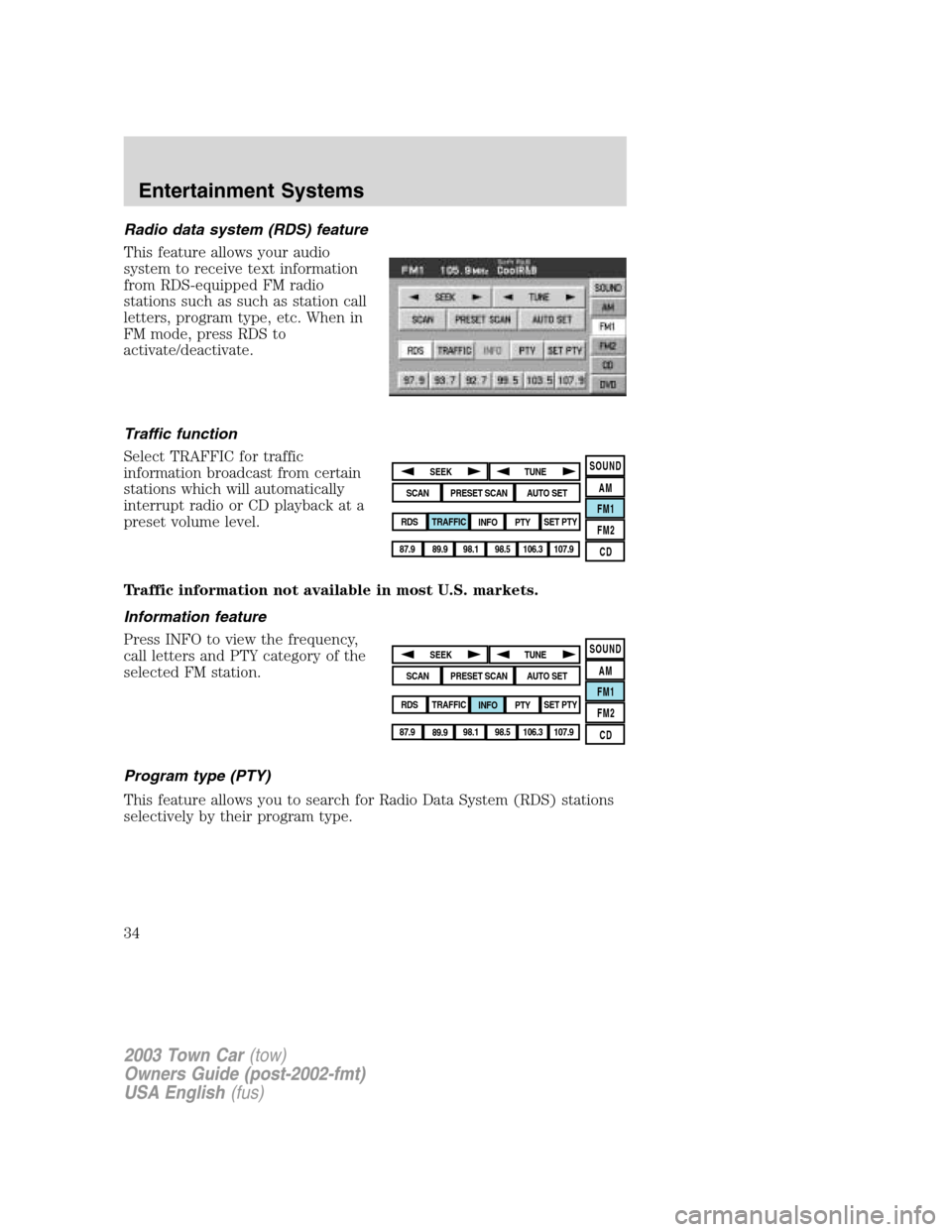
Radio data system (RDS) feature
This feature allows your audio
system to receive text information
from RDS-equipped FM radio
stations such as such as station call
letters, program type, etc. When in
FM mode, press RDS to
activate/deactivate.
Traffic function
Select TRAFFIC for traffic
information broadcast from certain
stations which will automatically
interrupt radio or CD playback at a
preset volume level.
Traffic information not available in most U.S. markets.
Information feature
Press INFO to view the frequency,
call letters and PTY category of the
selected FM station.
Program type (PTY)
This feature allows you to search for Radio Data System (RDS) stations
selectively by their program type.
SOUND
AM
FM1
FM2
CDSEEK
TUNE
PRESET SCANAUTO SET
SCAN
RDS
TRAFFIC
INFO PTYSET PTY
87.9
89.9 98.1
98.5 106.3 107.9
SOUND
AM
FM1
FM2
CDSEEK
TUNE
PRESET SCANAUTO SET
SCAN
RDS
TRAFFIC
INFO PTYSET PTY
87.9
89.9 98.1
98.5 106.3 107.9
2003 Town Car(tow)
Owners Guide (post-2002-fmt)
USA English(fus)
Entertainment Systems
34
Page 36 of 272
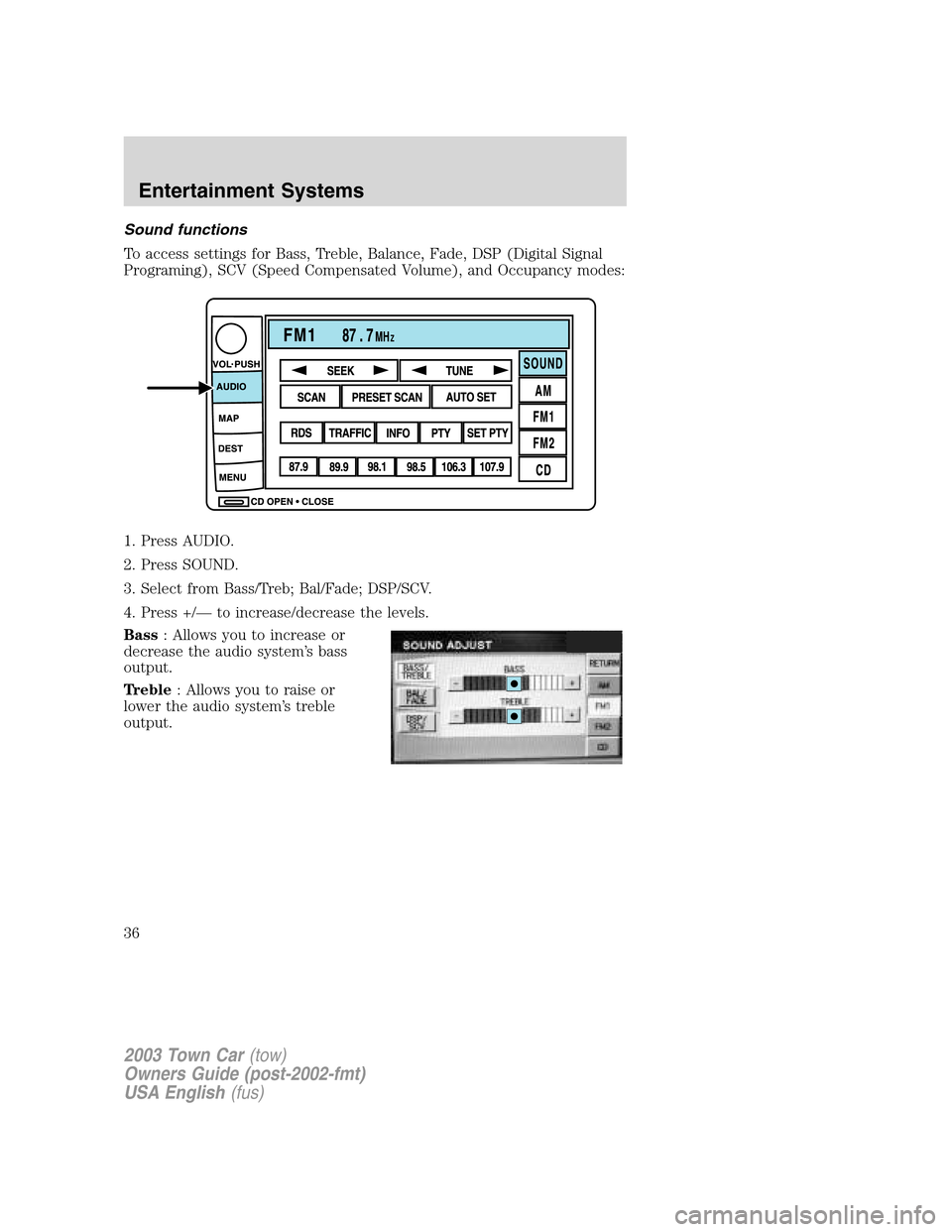
Sound functions
To access settings for Bass, Treble, Balance, Fade, DSP (Digital Signal
Programing), SCV (Speed Compensated Volume), and Occupancy modes:
1. Press AUDIO.
2. Press SOUND.
3. Select from Bass/Treb; Bal/Fade; DSP/SCV.
4. Press +/—to increase/decrease the levels.
Bass: Allows you to increase or
decrease the audio system’s bass
output.
Treble: Allows you to raise or
lower the audio system’s treble
output.
2003 Town Car(tow)
Owners Guide (post-2002-fmt)
USA English(fus)
Entertainment Systems
36
Page 37 of 272
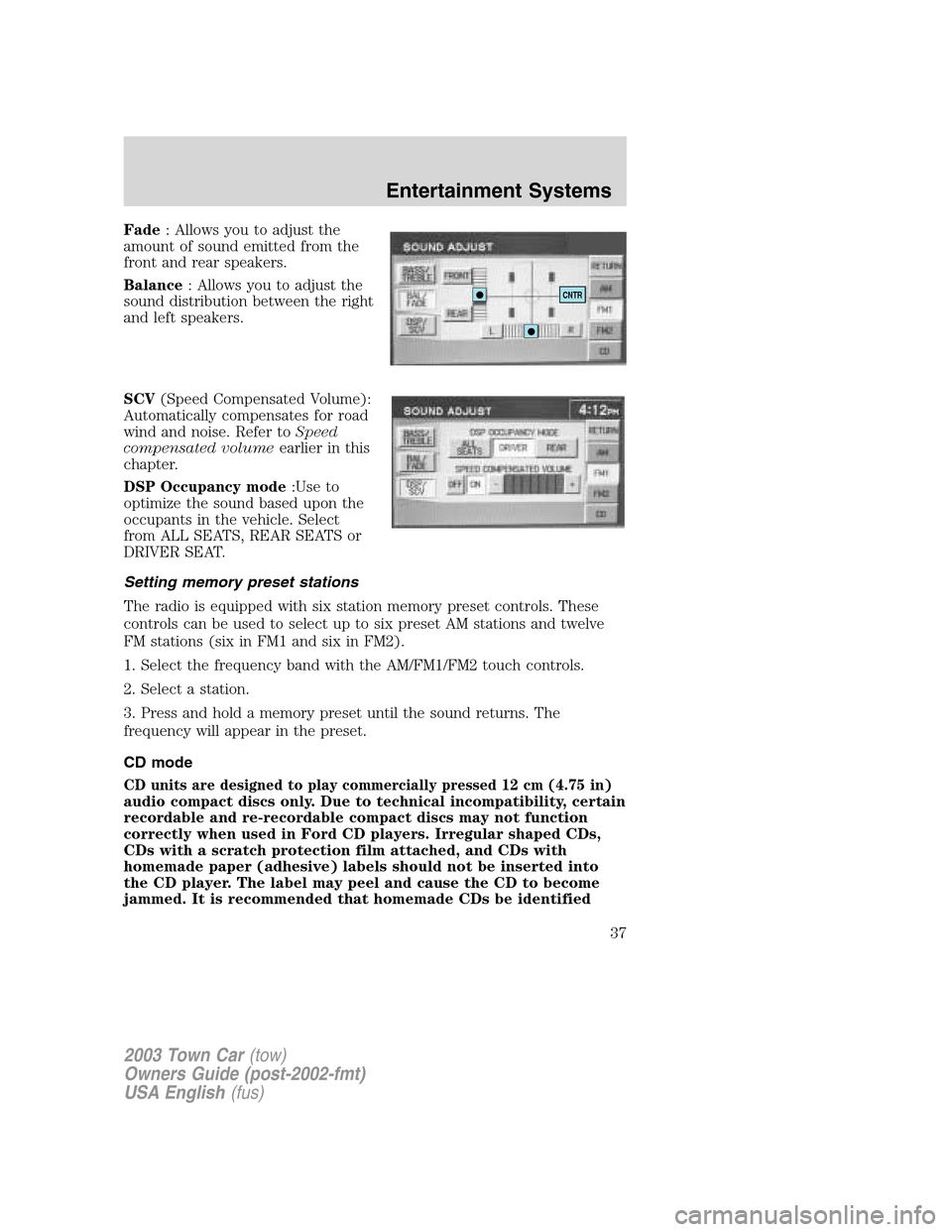
Fade: Allows you to adjust the
amount of sound emitted from the
front and rear speakers.
Balance: Allows you to adjust the
sound distribution between the right
and left speakers.
SCV(Speed Compensated Volume):
Automatically compensates for road
wind and noise. Refer toSpeed
compensated volumeearlier in this
chapter.
DSP Occupancy mode:Use to
optimize the sound based upon the
occupants in the vehicle. Select
from ALL SEATS, REAR SEATS or
DRIVER SEAT.
Setting memory preset stations
The radio is equipped with six station memory preset controls. These
controls can be used to select up to six preset AM stations and twelve
FM stations (six in FM1 and six in FM2).
1. Select the frequency band with the AM/FM1/FM2 touch controls.
2. Select a station.
3. Press and hold a memory preset until the sound returns. The
frequency will appear in the preset.
CD mode
CD units are designed to play commercially pressed 12 cm (4.75 in)
audio compact discs only. Due to technical incompatibility, certain
recordable and re-recordable compact discs may not function
correctly when used in Ford CD players. Irregular shaped CDs,
CDs with a scratch protection film attached, and CDs with
homemade paper (adhesive) labels should not be inserted into
the CD player. The label may peel and cause the CD to become
jammed. It is recommended that homemade CDs be identified
CNTR
2003 Town Car(tow)
Owners Guide (post-2002-fmt)
USA English(fus)
Entertainment Systems
37
Page 38 of 272
with permanent felt tip marker rather than adhesive labels. Ball
point pens may damage CDs. Please contact your dealer for
further information.
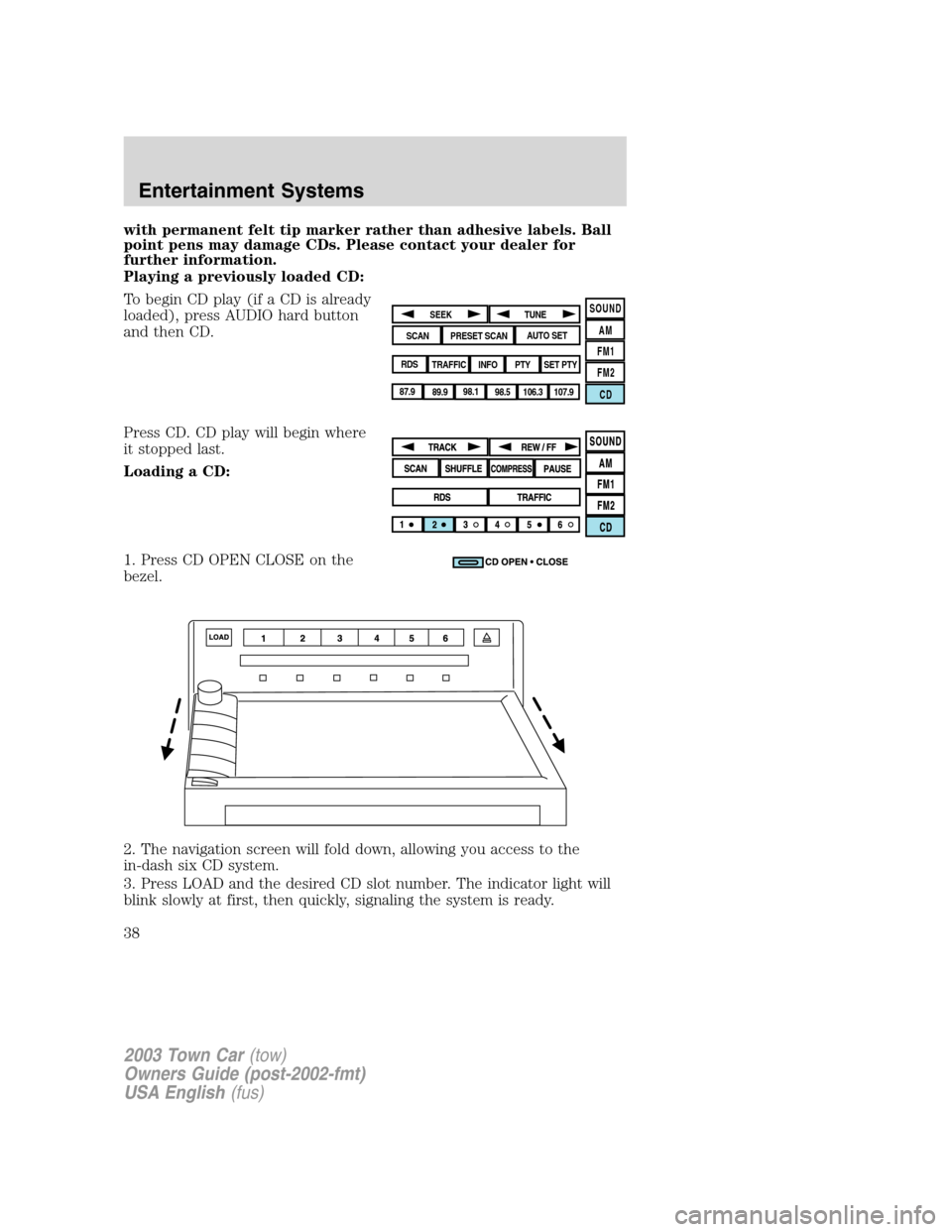
Playing a previously loaded CD:
To begin CD play (if a CD is already
loaded), press AUDIO hard button
and then CD.
Press CD. CD play will begin where
it stopped last.
Loading a CD:
1. Press CD OPEN CLOSE on the
bezel.
2. The navigation screen will fold down, allowing you access to the
in-dash six CD system.
3. Press LOAD and the desired CD slot number. The indicator light will
blink slowly at first, then quickly, signaling the system is ready.
SOUND
AM
FM1
FM2
CDSEEK
TUNE
PRESET SCANAUTO SET
SCAN
RDS
TRAFFIC
INFO PTYSET PTY
87.9
89.9 98.1
98.5 106.3 107.9
2003 Town Car(tow)
Owners Guide (post-2002-fmt)
USA English(fus)
Entertainment Systems
38
Page 55 of 272
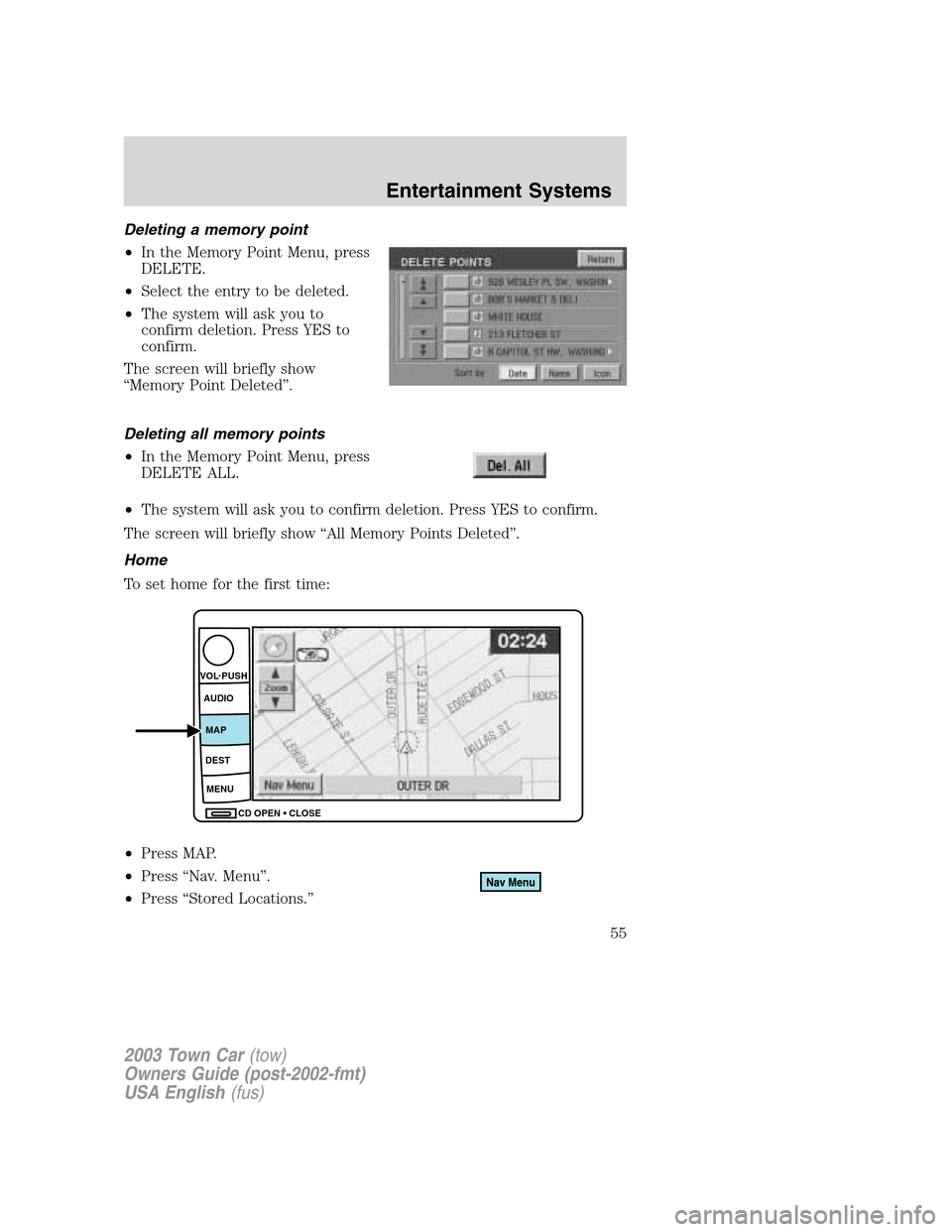
Deleting a memory point
•In the Memory Point Menu, press
DELETE.
•Select the entry to be deleted.
•The system will ask you to
confirm deletion. Press YES to
confirm.
The screen will briefly show
“Memory Point Deleted”.
Deleting all memory points
•In the Memory Point Menu, press
DELETE ALL.
•The system will ask you to confirm deletion. Press YES to confirm.
The screen will briefly show“All Memory Points Deleted”.
Home
To set home for the first time:
•Press MAP.
•Press“Nav. Menu”.
•Press“Stored Locations.”
CD OPEN CLOSE MENU DESTMAP AUDIO VOL PUSH
2003 Town Car(tow)
Owners Guide (post-2002-fmt)
USA English(fus)
Entertainment Systems
55
Page 69 of 272
Do not clean any part of the system with benzene, paint thinner or any
other solvent.
Do not spill liquids of any kind onto the unit.
Loading the map DVD
•Your navigation DVD unit is either located:
in the front lower center stack area by the passenger’s feet (access
door),
in the trunk,
or in the jack compartment.
•Ensure that the vehicle ignition is ON.
•If a DVD is already loaded in the Navigation unit, push the eject
button.
•Load the DVD with the printed side up. Do not allow moisture or
foreign objects to enter the slot.
The navigation system utilizes a database stored in a special format on a
DVD. It is recommended always to use the latest update of this map
DVD.
•The navigation system will only work with DVDs specifically intended
for your navigation system.
•Always store the map DVDs in their protective cases when not in use.
Ordering additional map DVDs
If you wish to order a replacement or additional map, please call
1–888–NAV-MAPS (1–888–628–6277) or to log onto www.navtech.com.
Latest map DVDs
The map content is constantly changing due to new roads, traffic
restrictions, etc. . Therefore, it is not always possible to exactly match
the DVD map with the current roadways. For best results, always use the
latest version of the map DVD. Map information is regularly updated, but
all areas are not necessarily covered to the same level of detail. Some
areas, in particular private roads, may not be included on the database.
To help with accuracy, always use the latest DVD version for navigation.
Customer service
If you need help operating your navigation/audio system, want to report
a map database error or want to obtain a map DVD, please call 1 (888)
628–6277 (NAV-MAPS) or log onto www.navtech.com.
2003 Town Car(tow)
Owners Guide (post-2002-fmt)
USA English(fus)
Entertainment Systems
69
Page 111 of 272
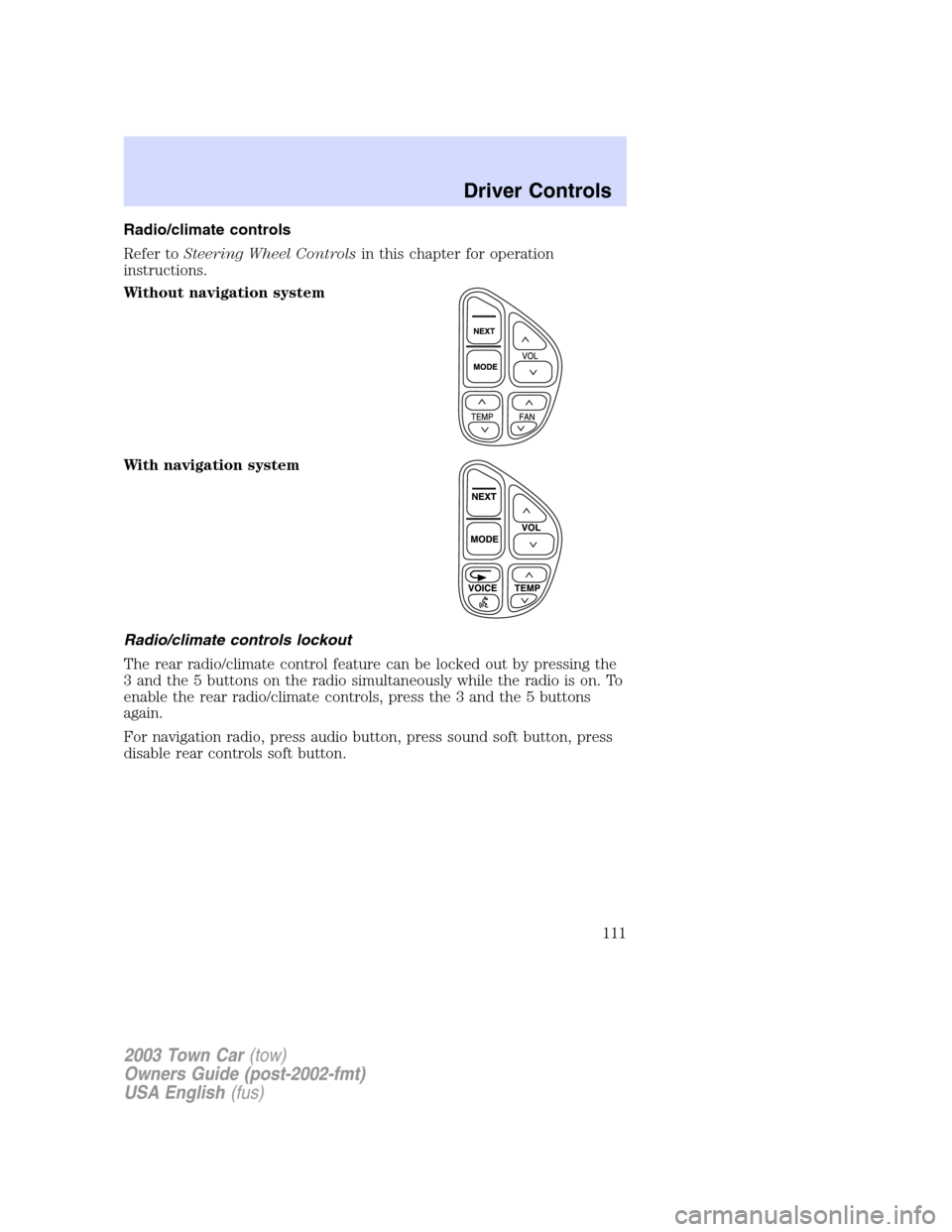
Radio/climate controls
Refer toSteering Wheel Controlsin this chapter for operation
instructions.
Without navigation system
With navigation system
Radio/climate controls lockout
The rear radio/climate control feature can be locked out by pressing the
3 and the 5 buttons on the radio simultaneously while the radio is on. To
enable the rear radio/climate controls, press the 3 and the 5 buttons
again.
For navigation radio, press audio button, press sound soft button, press
disable rear controls soft button.
2003 Town Car(tow)
Owners Guide (post-2002-fmt)
USA English(fus)
Driver Controls
111
Page 190 of 272
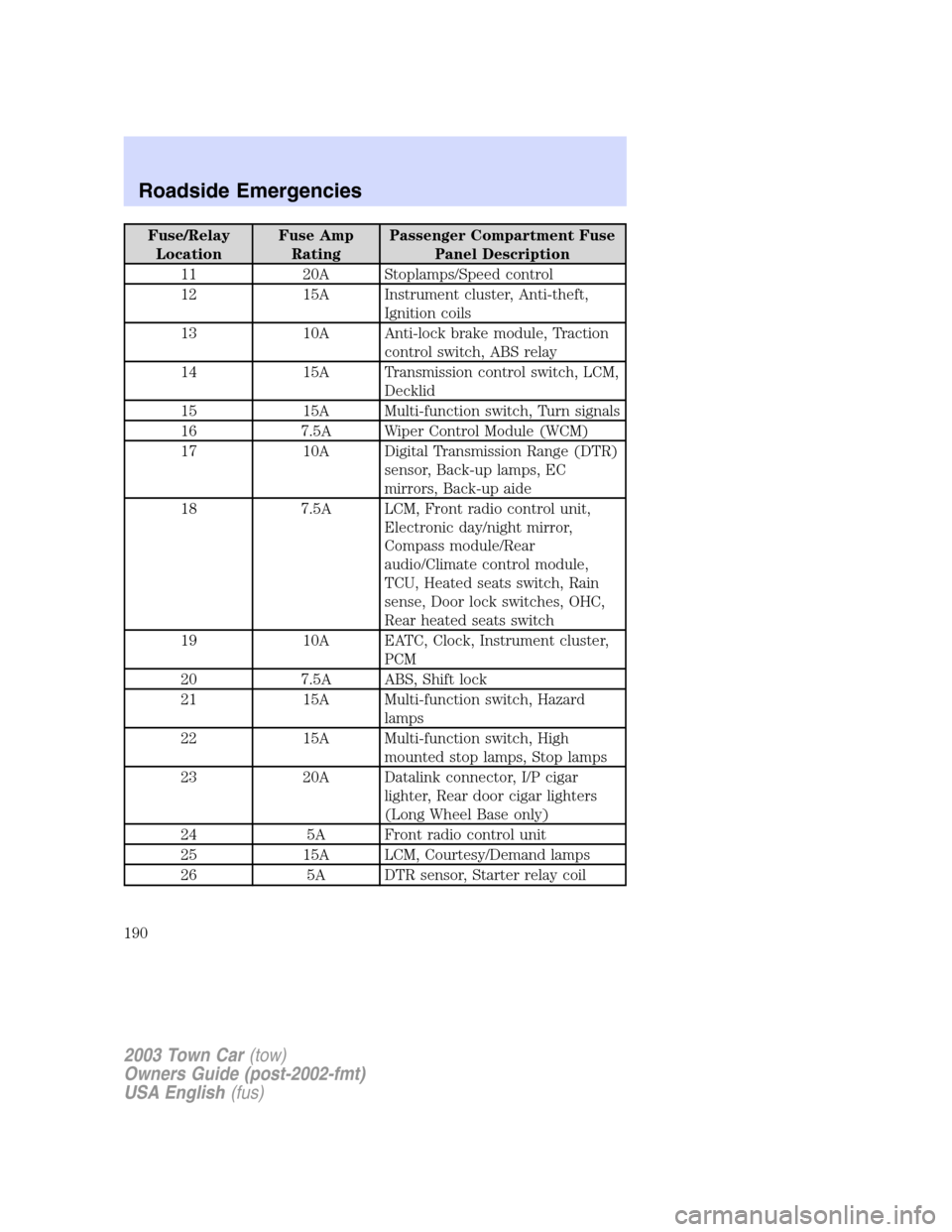
Fuse/Relay
LocationFuse Amp
RatingPassenger Compartment Fuse
Panel Description
11 20A Stoplamps/Speed control
12 15A Instrument cluster, Anti-theft,
Ignition coils
13 10A Anti-lock brake module, Traction
control switch, ABS relay
14 15A Transmission control switch, LCM,
Decklid
15 15A Multi-function switch, Turn signals
16 7.5A Wiper Control Module (WCM)
17 10A Digital Transmission Range (DTR)
sensor, Back-up lamps, EC
mirrors, Back-up aide
18 7.5A LCM, Front radio control unit,
Electronic day/night mirror,
Compass module/Rear
audio/Climate control module,
TCU, Heated seats switch, Rain
sense, Door lock switches, OHC,
Rear heated seats switch
19 10A EATC, Clock, Instrument cluster,
PCM
20 7.5A ABS, Shift lock
21 15A Multi-function switch, Hazard
lamps
22 15A Multi-function switch, High
mounted stop lamps, Stop lamps
23 20A Datalink connector, I/P cigar
lighter, Rear door cigar lighters
(Long Wheel Base only)
24 5A Front radio control unit
25 15A LCM, Courtesy/Demand lamps
26 5A DTR sensor, Starter relay coil
2003 Town Car(tow)
Owners Guide (post-2002-fmt)
USA English(fus)
Roadside Emergencies
190
Page 266 of 272
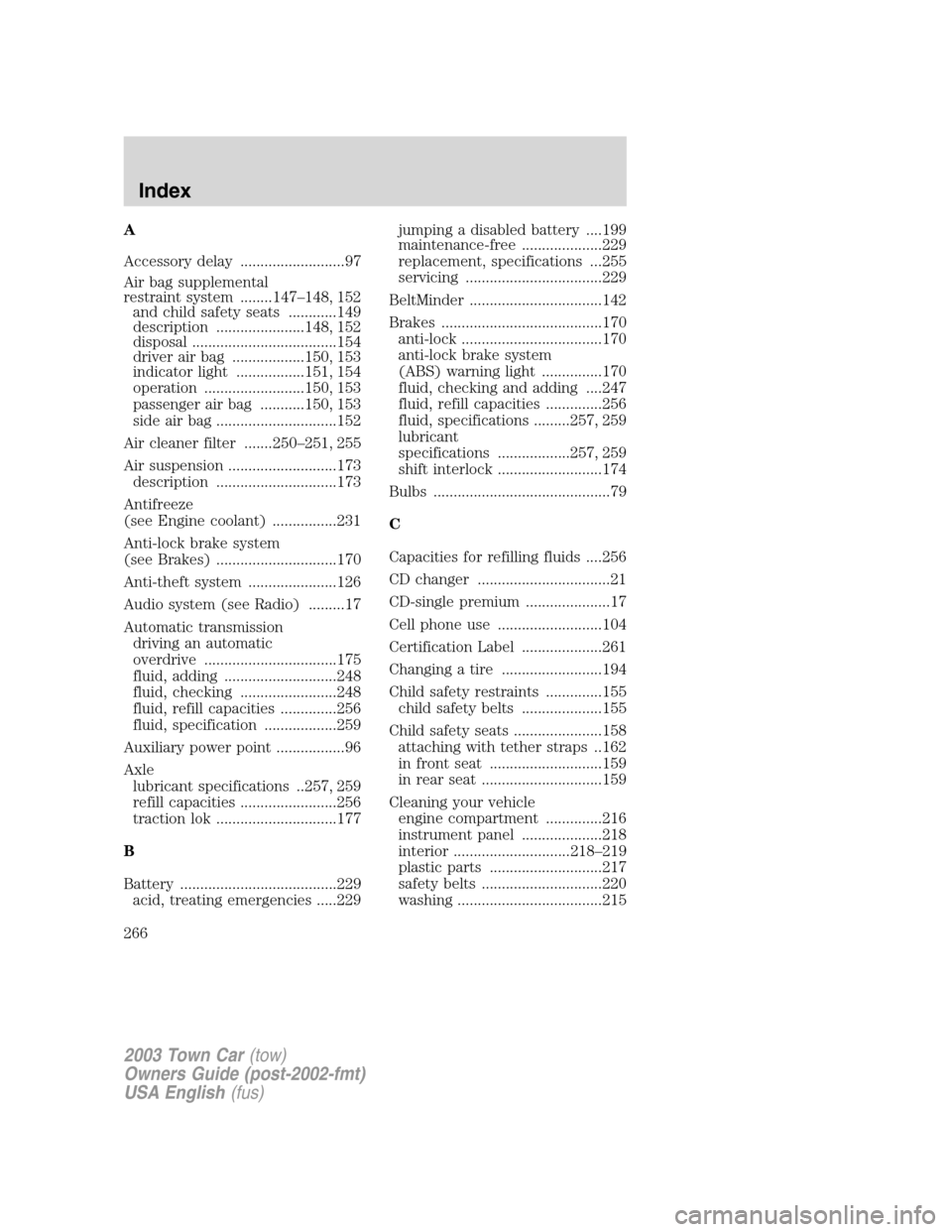
A
Accessory delay ..........................97
Air bag supplemental
restraint system ........147–148, 152
and child safety seats ............149
description ......................148, 152
disposal ....................................154
driver air bag ..................150, 153
indicator light .................151, 154
operation .........................150, 153
passenger air bag ...........150, 153
side air bag ..............................152
Air cleaner filter .......250–251, 255
Air suspension ...........................173
description ..............................173
Antifreeze
(see Engine coolant) ................231
Anti-lock brake system
(see Brakes) ..............................170
Anti-theft system ......................126
Audio system (see Radio) .........17
Automatic transmission
driving an automatic
overdrive .................................175
fluid, adding ............................248
fluid, checking ........................248
fluid, refill capacities ..............256
fluid, specification ..................259
Auxiliary power point .................96
Axle
lubricant specifications ..257, 259
refill capacities ........................256
traction lok ..............................177
B
Battery .......................................229
acid, treating emergencies .....229jumping a disabled battery ....199
maintenance-free ....................229
replacement, specifications ...255
servicing ..................................229
BeltMinder .................................142
Brakes ........................................170
anti-lock ...................................170
anti-lock brake system
(ABS) warning light ...............170
fluid, checking and adding ....247
fluid, refill capacities ..............256
fluid, specifications .........257, 259
lubricant
specifications ..................257, 259
shift interlock ..........................174
Bulbs ............................................79
C
Capacities for refilling fluids ....256
CD changer .................................21
CD-single premium .....................17
Cell phone use ..........................104
Certification Label ....................261
Changing a tire .........................194
Child safety restraints ..............155
child safety belts ....................155
Child safety seats ......................158
attaching with tether straps ..162
in front seat ............................159
in rear seat ..............................159
Cleaning your vehicle
engine compartment ..............216
instrument panel ....................218
interior .............................218–219
plastic parts ............................217
safety belts ..............................220
washing ....................................215
2003 Town Car(tow)
Owners Guide (post-2002-fmt)
USA English(fus)
Index
Index
266