ac hose LINCOLN TOWN CAR 2005 Owners Manual
[x] Cancel search | Manufacturer: LINCOLN, Model Year: 2005, Model line: TOWN CAR, Model: LINCOLN TOWN CAR 2005Pages: 328, PDF Size: 3.44 MB
Page 7 of 328
Special instructions
For your added safety, your vehicle is fitted with sophisticated electronic
controls.
Please read the sectionSupplemental restraint system (SRS)
in theSeating and Safety Restraintschapter. Failure to follow
the specific warnings and instructions could result in personal injury.
Front seat mounted rear-facing child or infant seats should
NEVERbe placed in front of an active passenger air bag.
MIDDLE EAST/NORTH AFRICA VEHICLE SPECIFIC INFORMATION
For your particular global region, your vehicle may be equipped with
features and options that are different from the ones that are described
in thisOwner’s Guide;therefore, a supplement has been supplied that
complements this book. By referring to the pages in the provided
supplement, you can properly identify those features, recommendations
and specifications that are unique to your vehicle.Refer to this
Owner’s Guide for all other required information and warnings.
2005 Town Car(tow)
Owners Guide (post-2002-fmt)
USA_English(fus)
Introduction
7
Page 33 of 328
•REAR SEATS
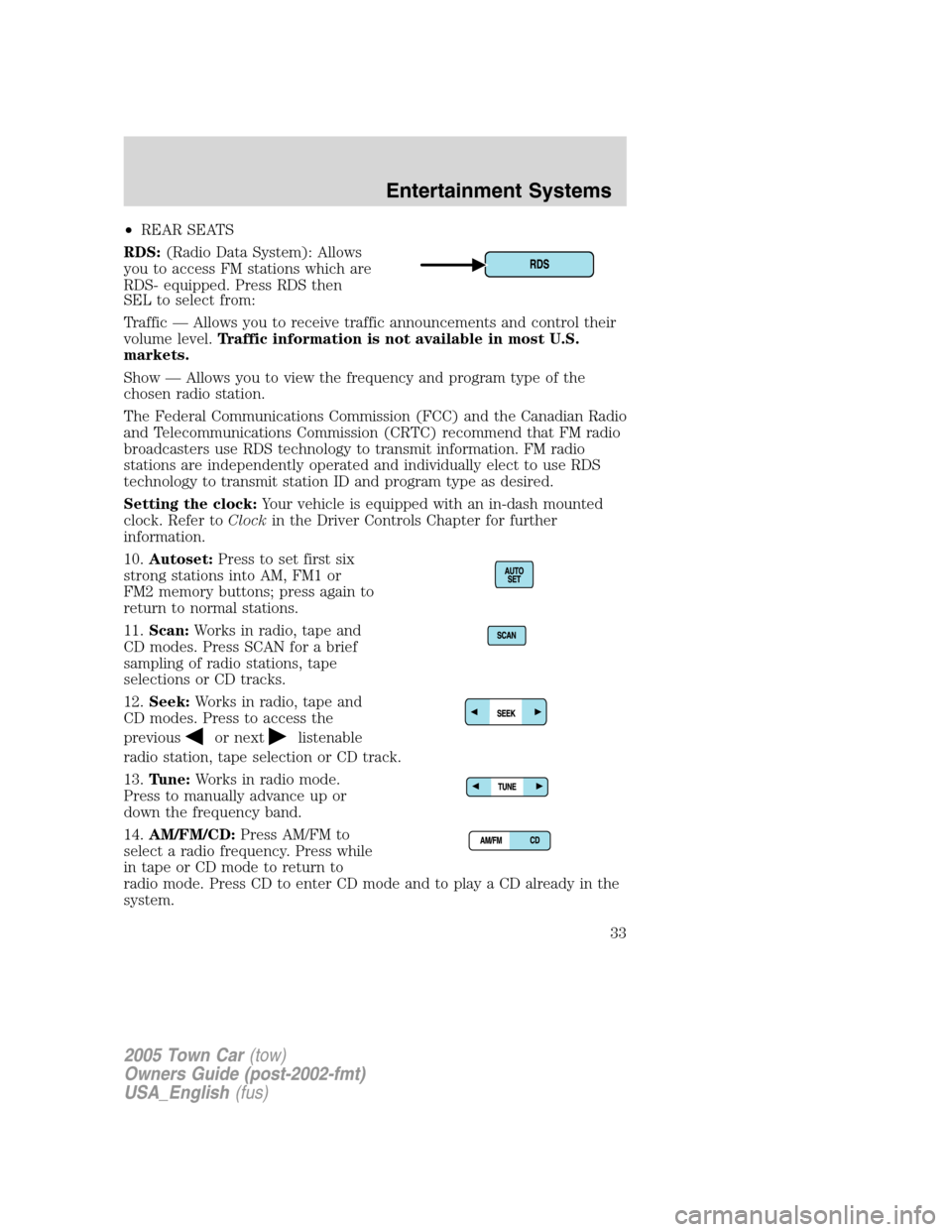
RDS:(Radio Data System): Allows
you to access FM stations which are
RDS- equipped. Press RDS then
SEL to select from:
Traffic — Allows you to receive traffic announcements and control their
volume level.Traffic information is not available in most U.S.
markets.
Show — Allows you to view the frequency and program type of the
chosen radio station.
The Federal Communications Commission (FCC) and the Canadian Radio
and Telecommunications Commission (CRTC) recommend that FM radio
broadcasters use RDS technology to transmit information. FM radio
stations are independently operated and individually elect to use RDS
technology to transmit station ID and program type as desired.
Setting the clock:Your vehicle is equipped with an in-dash mounted
clock. Refer toClockin the Driver Controls Chapter for further
information.
10.Autoset:Press to set first six
strong stations into AM, FM1 or
FM2 memory buttons; press again to
return to normal stations.
11.Scan:Works in radio, tape and
CD modes. Press SCAN for a brief
sampling of radio stations, tape
selections or CD tracks.
12.Seek:Works in radio, tape and
CD modes. Press to access the
previous
or nextlistenable
radio station, tape selection or CD track.
13.Tune:Works in radio mode.
Press to manually advance up or
down the frequency band.
14.AM/FM/CD:Press AM/FM to
select a radio frequency. Press while
in tape or CD mode to return to
radio mode. Press CD to enter CD mode and to play a CD already in the
system.
2005 Town Car(tow)
Owners Guide (post-2002-fmt)
USA_English(fus)
Entertainment Systems
33
Page 34 of 328
15.Mute mode:Press to mute the
playing media.
16.Power/volume:Press to turn
the system on/off. Turn to
raise/lower the volume.
17.Tape:Press to play the tape.
18.CD door:Insert the disc with the playing side down and printed side
up.
19.Tape door:Insert the tape facing the right.
REAR CONSOLE AUDIO CONTROLS (IF EQUIPPED)
•NEXT:Press to access the next
radio memory preset, the next
CD track or the next tape
selection.
•VOL:Press the up arrow to
increase the volume or the down
arrow to decrease the volume.
•MODE:Press to toggle through
AM, FM1, FM2, TAPE or CD (if
equipped) modes.
ACCESSORY DELAY
With accessory delay, the window switches, moon roof (if equipped) and
audio system may be used for up to ten minutes after the ignition switch
is turn to the OFF position or until any door is opened.
RADIO FREQUENCIES
AM and FM frequencies are established by the Federal Communications
Commission (FCC) and the Canadian Radio and Telecommunications
Commission (CRTC). Those frequencies are:
AM - 530, 540–1700, 1710 kHz
FM- 87.7, 87.9–107.7, 107.9 MHz
2005 Town Car(tow)
Owners Guide (post-2002-fmt)
USA_English(fus)
Entertainment Systems
34
Page 62 of 328
Route preferences
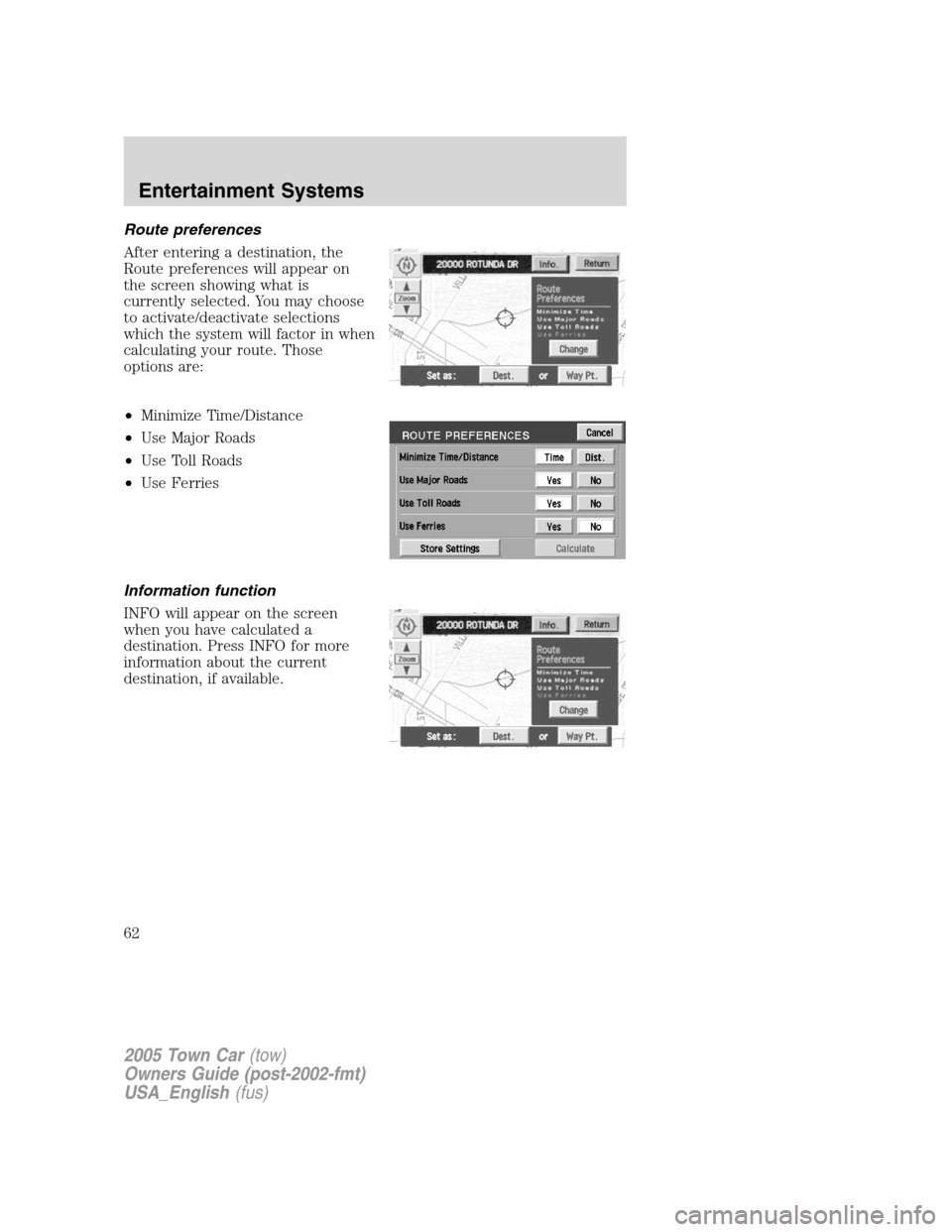
After entering a destination, the
Route preferences will appear on
the screen showing what is
currently selected. You may choose
to activate/deactivate selections
which the system will factor in when
calculating your route. Those
options are:
•Minimize Time/Distance
•Use Major Roads
•Use Toll Roads
•Use Ferries
Information function
INFO will appear on the screen
when you have calculated a
destination. Press INFO for more
information about the current
destination, if available.
2005 Town Car(tow)
Owners Guide (post-2002-fmt)
USA_English(fus)
Entertainment Systems
62
Page 65 of 328
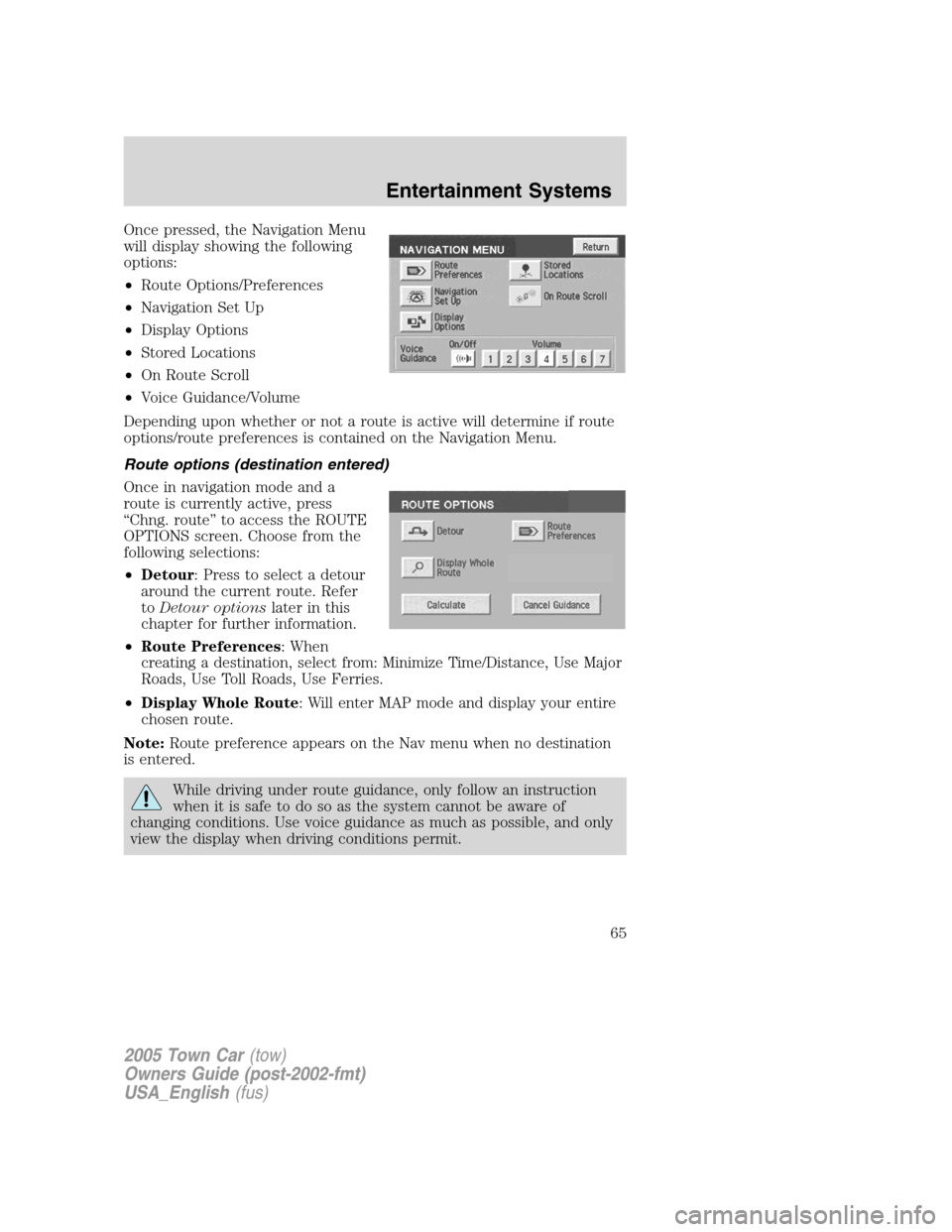
Once pressed, the Navigation Menu
will display showing the following
options:
•Route Options/Preferences
•Navigation Set Up
•Display Options
•Stored Locations
•On Route Scroll
•Voice Guidance/Volume
Depending upon whether or not a route is active will determine if route
options/route preferences is contained on the Navigation Menu.
Route options (destination entered)
Once in navigation mode and a
route is currently active, press
“Chng. route” to access the ROUTE
OPTIONS screen. Choose from the
following selections:
•Detour: Press to select a detour
around the current route. Refer
toDetour optionslater in this
chapter for further information.
•Route Preferences: When
creating a destination, select from: Minimize Time/Distance, Use Major
Roads, Use Toll Roads, Use Ferries.
•Display Whole Route: Will enter MAP mode and display your entire
chosen route.
Note:Route preference appears on the Nav menu when no destination
is entered.
While driving under route guidance, only follow an instruction
when it is safe to do so as the system cannot be aware of
changing conditions. Use voice guidance as much as possible, and only
view the display when driving conditions permit.
2005 Town Car(tow)
Owners Guide (post-2002-fmt)
USA_English(fus)
Entertainment Systems
65
Page 82 of 328
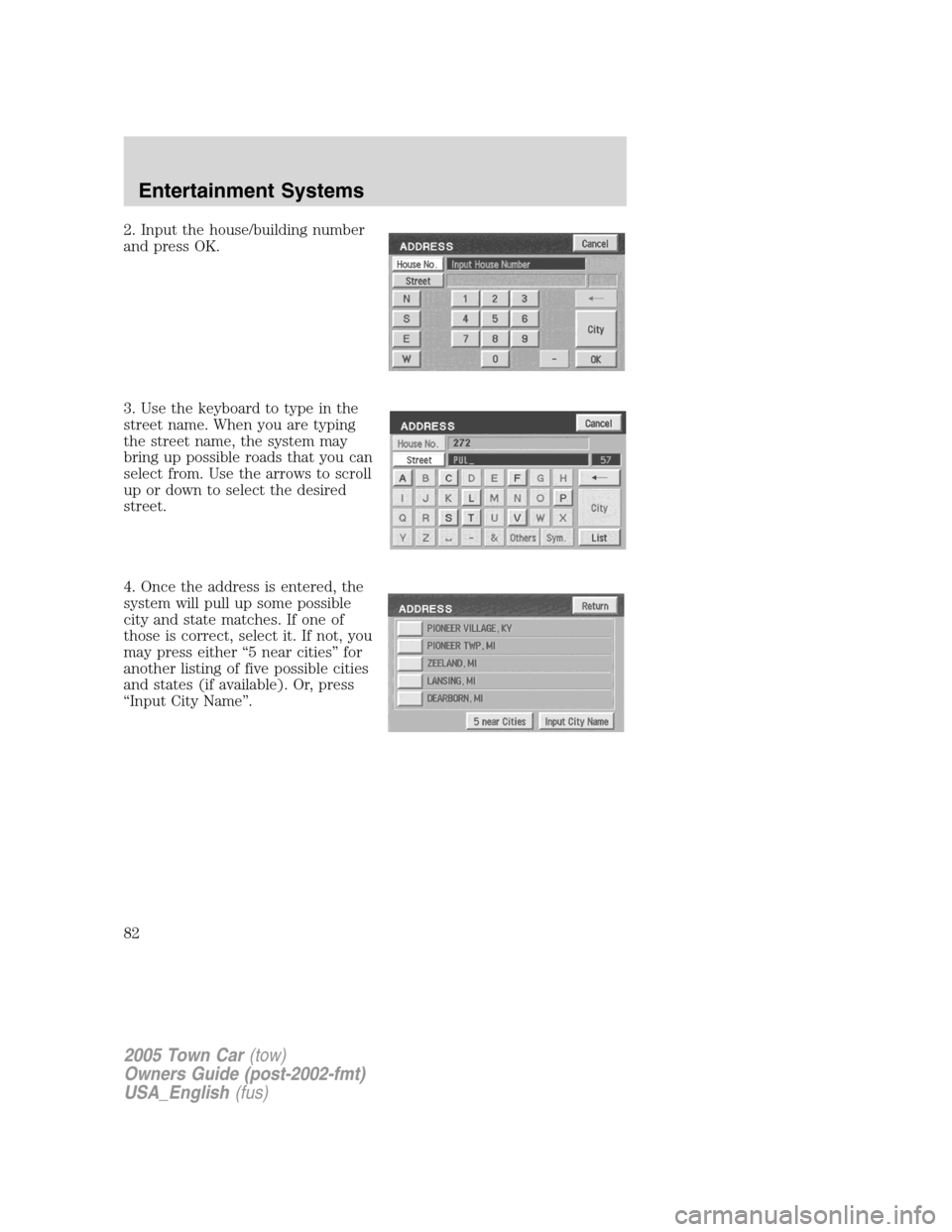
2. Input the house/building number
and press OK.
3. Use the keyboard to type in the
street name. When you are typing
the street name, the system may
bring up possible roads that you can
select from. Use the arrows to scroll
up or down to select the desired
street.
4. Once the address is entered, the
system will pull up some possible
city and state matches. If one of
those is correct, select it. If not, you
may press either “5 near cities” for
another listing of five possible cities
and states (if available). Or, press
“Input City Name”.
2005 Town Car(tow)
Owners Guide (post-2002-fmt)
USA_English(fus)
Entertainment Systems
82
Page 91 of 328
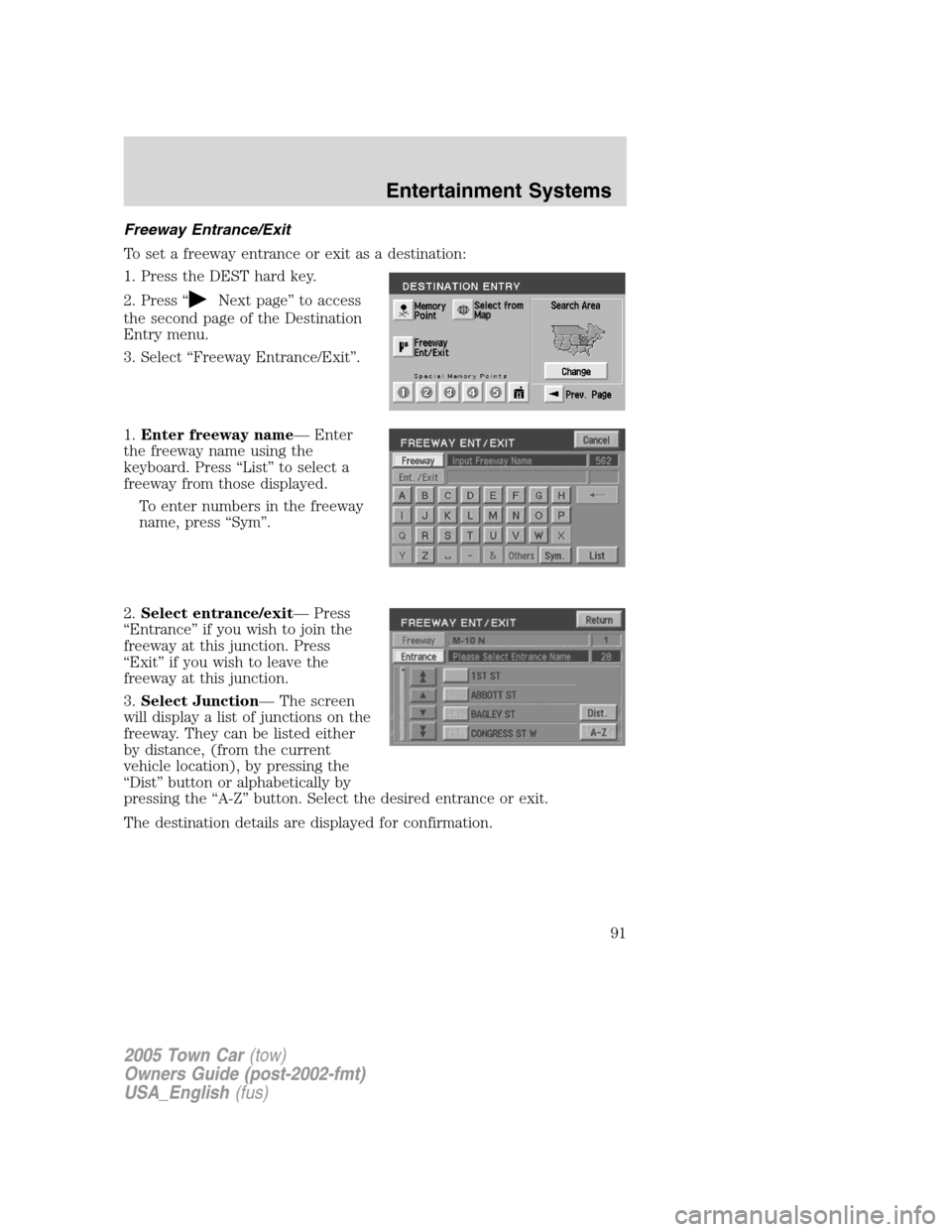
Freeway Entrance/Exit
To set a freeway entrance or exit as a destination:
1. Press the DEST hard key.
2. Press “
Next page” to access
the second page of the Destination
Entry menu.
3. Select “Freeway Entrance/Exit”.
1.Enter freeway name— Enter
the freeway name using the
keyboard. Press “List” to select a
freeway from those displayed.
To enter numbers in the freeway
name, press “Sym”.
2.Select entrance/exit— Press
“Entrance” if you wish to join the
freeway at this junction. Press
“Exit” if you wish to leave the
freeway at this junction.
3.Select Junction— The screen
will display a list of junctions on the
freeway. They can be listed either
by distance, (from the current
vehicle location), by pressing the
“Dist” button or alphabetically by
pressing the “A-Z” button. Select the desired entrance or exit.
The destination details are displayed for confirmation.
2005 Town Car(tow)
Owners Guide (post-2002-fmt)
USA_English(fus)
Entertainment Systems
91
Page 184 of 328
Do not attempt to service, repair, or modify the steering column,
its adaptive module, or its fuses. See your Ford or
Lincoln/Mercury dealer.
To properly position yourself away from the airbag:
•Move your seat to the rear as far as you can while still reaching the
pedals comfortably.
•Recline the seat slightly one or two degrees from the upright position.
Do not put anything on or over the air bag module. Placing
objects on or over the air bag inflation area may cause those
objects to be propelled by the air bag into your face and torso causing
serious injury.
Do not attempt to service, repair, or modify the airbag
supplemental restraint systems or its fuses. See your Ford or
Lincoln/Mercury dealer.
The front passenger airbag is not designed to offer protection to
an occupant in the center front seating position.
Modifying or adding equipment to the front end of the vehicle
(including frame, bumper, front end body structure and tow
hooks) may affect the performance of the airbag system, increasing the
risk of injury. Do not modify the front end of the vehicle.
2005 Town Car(tow)
Owners Guide (post-2002-fmt)
USA_English(fus)
Seating and Safety Restraints
184
Page 195 of 328
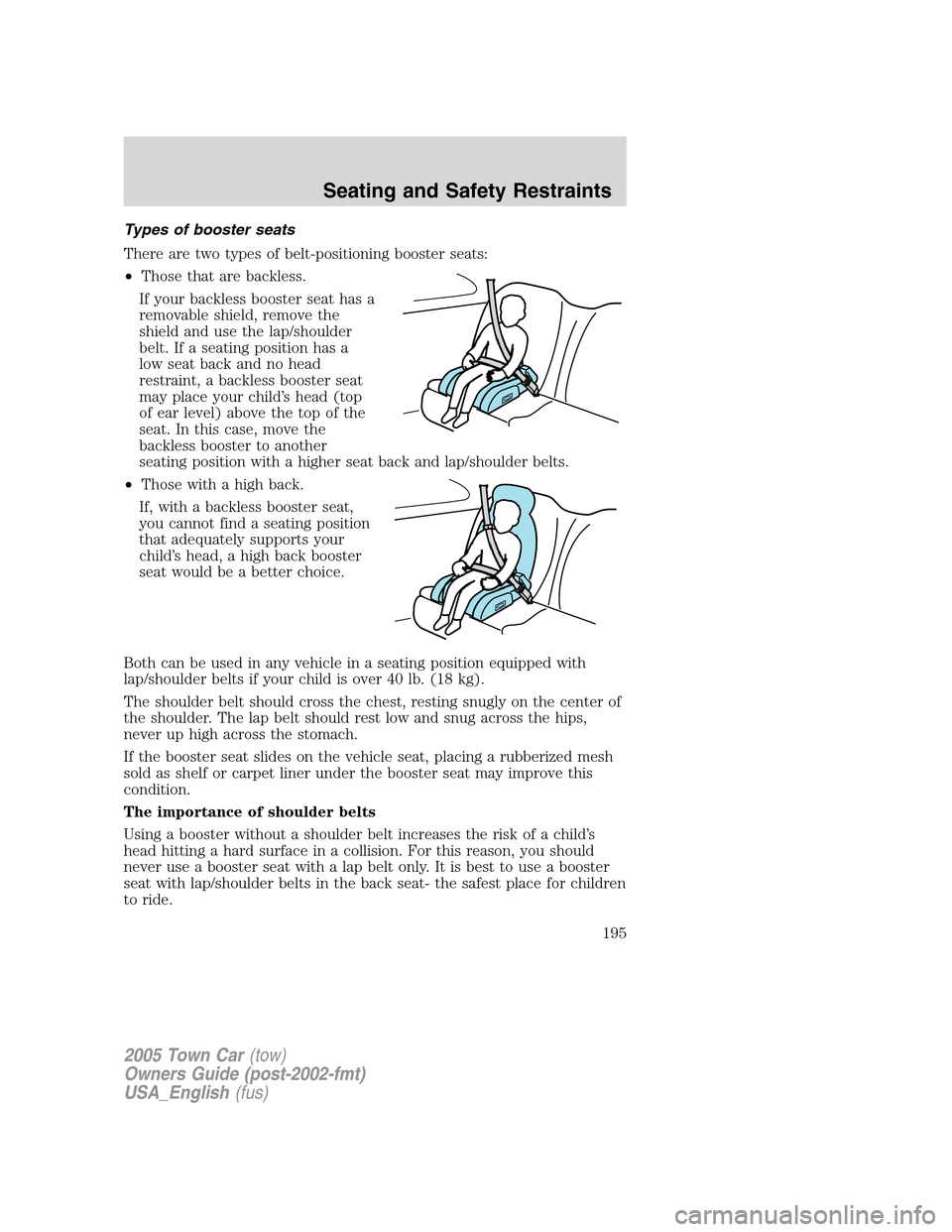
Types of booster seats
There are two types of belt-positioning booster seats:
•Those that are backless.
If your backless booster seat has a
removable shield, remove the
shield and use the lap/shoulder
belt. If a seating position has a
low seat back and no head
restraint, a backless booster seat
may place your child’s head (top
of ear level) above the top of the
seat. In this case, move the
backless booster to another
seating position with a higher seat back and lap/shoulder belts.
•Those with a high back.
If, with a backless booster seat,
you cannot find a seating position
that adequately supports your
child’s head, a high back booster
seat would be a better choice.
Both can be used in any vehicle in a seating position equipped with
lap/shoulder belts if your child is over 40 lb. (18 kg).
The shoulder belt should cross the chest, resting snugly on the center of
the shoulder. The lap belt should rest low and snug across the hips,
never up high across the stomach.
If the booster seat slides on the vehicle seat, placing a rubberized mesh
sold as shelf or carpet liner under the booster seat may improve this
condition.
The importance of shoulder belts
Using a booster without a shoulder belt increases the risk of a child’s
head hitting a hard surface in a collision. For this reason, you should
never use a booster seat with a lap belt only. It is best to use a booster
seat with lap/shoulder belts in the back seat- the safest place for children
to ride.
2005 Town Car(tow)
Owners Guide (post-2002-fmt)
USA_English(fus)
Seating and Safety Restraints
195
Page 209 of 328
7. Check the sidewalls to make sure there are no gouges, cuts or bulges.
TIRE REPLACEMENT REQUIREMENTS
Your vehicle is equipped with tires designed to provide a safe ride and
handling capability.
Only use replacement tires and wheels that are the same size
and type (such as P-metric versus LT-metric or all-season versus
all-terrain) as those originally provided by Ford. Use of any tire or
wheel not recommended by Ford can affect the safety and
performance of your vehicle, which could result in an increased risk of
loss of vehicle control, vehicle rollover, personal injury and death.
Additionally the use of non-recommended tires and wheels could cause
steering, suspension, axle or transfer case/power transfer unit failure. If
you have questions regarding tire replacement, see an authorized Ford
or Lincoln/Mercury dealer.
Make sure all tires and wheels on the vehicle are of the same size, type,
tread design, brand, load-carrying capacity and speed rating because it
can affect the safety and performance of your vehicle, which could result
in an increased risk of loss of vehicle control, vehicle rollover, personal
injury and death.
Important:Remember to replace the spare tire when you replace the
road tires at the end of their useful life. Even if it has never been used,
the spare tire should be replaced because tires degrade over time.
Important:Remember to replace the wheel air valves when the road
tires are replaced at the end of their useful life.
CHANGING THE TIRES
If you get a flat tire while driving:
•do not brake heavily.
•gradually decrease the vehicle’s speed.
•hold the steering wheel firmly.
•slowly move to a safe place on the side of the road.
The use of tire sealants is not recommended and may damage
your tires.
2005 Town Car(tow)
Owners Guide (post-2002-fmt)
USA_English(fus)
Tires, Wheels and Loading
209