airbag LUCID AIR 2022 User Guide
[x] Cancel search | Manufacturer: LUCID, Model Year: 2022, Model line: AIR, Model: LUCID AIR 2022Pages: 241, PDF Size: 5.15 MB
Page 66 of 241
Effects of Airbag InflationWARNING: When airbags deploy, a
fine powder is normally released.
This powder can cause irritation.
Thoroughly flush the power from the
eyes and skin, including any cuts or
abrasions. The powder may aggravate
asthma for some people.WARNING: Following inflation, some
airbag components are hot. Do not
touch until they have cooled.
After inflation, the airbags deflate to provide
a gradual cushioning effect, and also to clear
the driver
Page 73 of 241
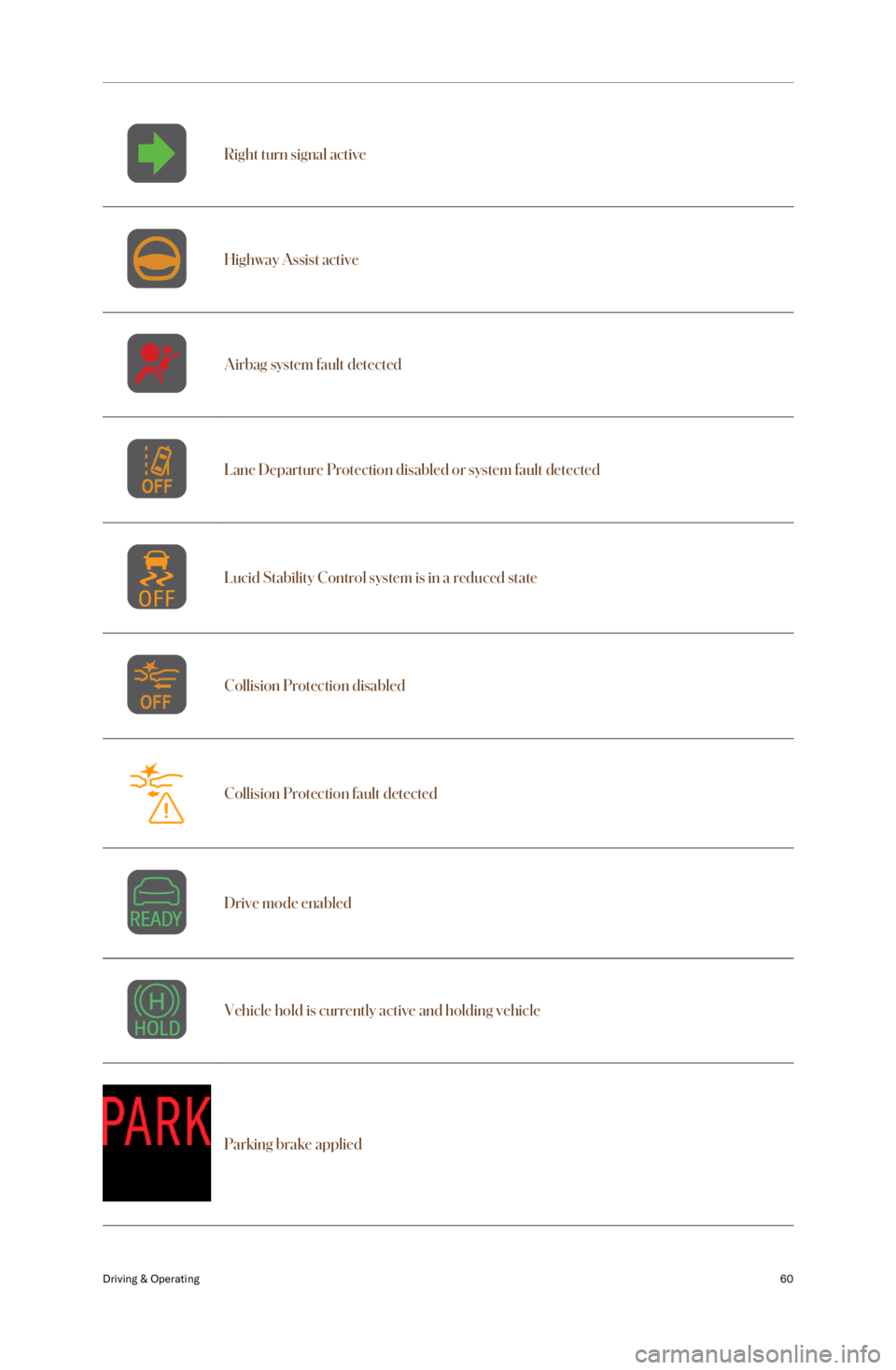
Right turn signal activeHighway Assist activeAirbag system fault detectedLane Departure Protection disabled or system fault detectedLucid Stability Control system is in a reduced stateCollision Protection disabledCollision Protection fault detectedDrive mode enabledVehicle hold is currently active and holding vehicle
Parking brake applied
Driving & Operating60
Page 88 of 241

Hazard Warning Lights
Note: The hazard warning lights can be
operated even when a key fob is not in the
vehicle.
To turn on the hazard warning lights, press the switch located on the overhead console.
All turn signals will flash along with the turn
signal indicators on the Center Cockpit Panel.
Press the switch again to switch off the
hazard warning lights.
Note: You should only use hazard warning
lights in an emergency to warn other road
users of a breakdown or other potential
danger. Remember to switch off when the
hazardous situation has been resolved.
After a collision
If you are involved in a collision that causes
the airbags to be deployed, the hazard
warning lights will automatically switch on.
Driving & Operating75
Page 178 of 241

CAUTION: Do not use statically-
charged materials (such as a cloth
that was recently machine-washed
and dried) on the displays.CAUTION: Do not use cleansers (such
as glass cleaner) to clean displays.
Display screens should only be cleaned using
a soft, lint-free cloth designed for cleaning
screens and monitors.
Before cleaning the display screens, use the
Pilot Panel to enable screen cleaning mode
to prevent accidental operation of vehicle
controls. Select
> Displays > Displays
& Accessibility > SCREEN CLEANING MODE.
Airbags
WARNING: Airbag covers should only
be cleaned using a slightly dampened
cloth or cleaning wipe. Water or any
other liquid entering into an airbag
or its associated electrical wiring may
cause the airbags to deploy or not
function properly in an accident.WARNING: Any damage or cracks on
an airbag cover should be referred to a
Lucid Service Center for inspection.
Seats
WARNING: Never use steam or
upholstery cleaners on the seats,
or any cleaning method that would
saturate the seat with liquid. This can
damage the occupancy weight sensor
in the seat, which in turn can affect
the operation of the airbag system and
result in serious injury or death.
For cloth seats:
-If necessary, gently vacuum the seats
first to remove any loose dust, dirt, or
debris.
- Use a soft, colorless cloth moistened
with warm water and (if necessary) non- detergent soap. Wipe gently in a circular
motion. Allow the seats to air dry after
cleaning.
For leather and artificial leather seats:
-To clean, use a soft, colorless cloth
moistened only with warm water. Do
not use polishes, oils, cleaning fluids,
solvents, or detergents.
- Avoid vacuuming. Instead, use your
moistened cleaning cloth to gently
remove any loose particles.
- Application of a leather conditioner is
not necessary to maintain the original
condition of the seats.
Seat beltsWARNING: Never allow any substance
to enter a seat belt mechanism,
as this can negatively affect its
performance in an impact.
Extend the seat belt and clean using a cloth
moistened only with water. Do not use any
type of detergent or chemical cleaning agent.
Allow the belts to air dry while extended, away
from direct sunlight if possible.
Chrome and metal surfaces
Do not use abrasive cleansers, rough cloths,
or polish, as these materials can damage the
finish of these surfaces.
Plastic materials
WARNING: Do not use polish or wax
cleaner on the upper surfaces of the dashboard. Polished surfaces are
reflective and may interfere with the
driver
Page 213 of 241
Disabling the Power System
Safety PrecautionsWARNING: In the event of fire,
immediately contact your local fire
emergency responders.WARNING: ALWAYS ASSUME THAT
HIGH-VOLTAGE COMPONENTS ARE
ENERGIZED. Cutting, crushing, or
touching high-voltage components
can result in serious injury or death.WARNING: High-voltage cables and
components may remain energized for
up to 2 minutes after disabling.WARNING: High-voltage batteries can
self-ignite even after extinguishing the
initial fire.WARNING: The airbags and other
supplemental restraint systems may
remain powered for up to 2 minutes
after disabling.WARNING: In the event of a fire
involving a charging station, treat it as
an energized electrical fire until power
to the charger is confirmed to shut off.WARNING: This vehicle does not
have an internal combustion engine.
Lack of engine noise does not mean
the vehicle is OFF. Silent movement
capability exists until the vehicle
completely shuts down.
Emergency Responder Cut Loop
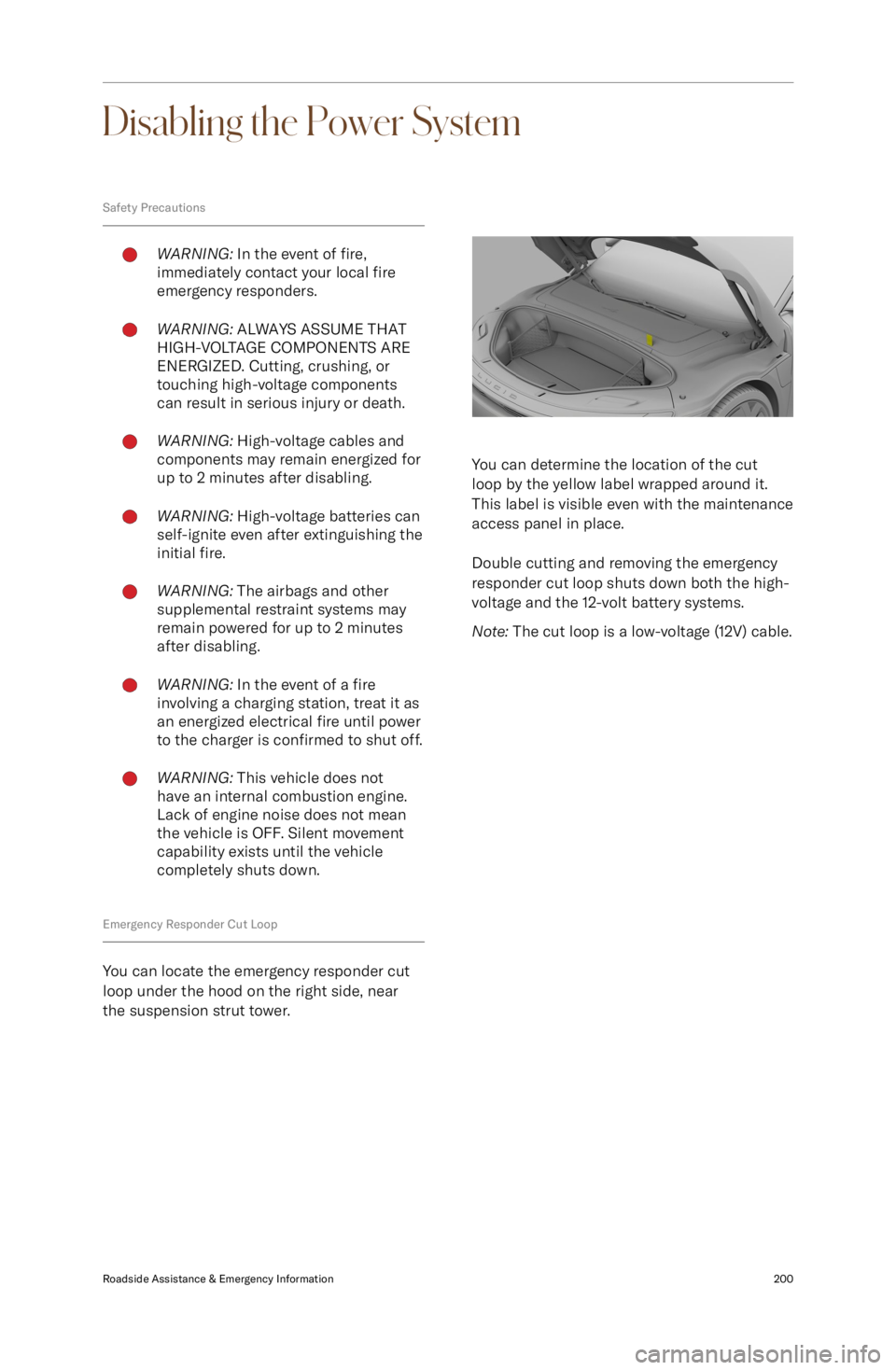
You can locate the emergency responder cut
loop under the hood on the right side, near
the suspension strut tower.
You can determine the location of the cut
loop by the yellow label wrapped around it.
This label is visible even with the maintenance
access panel in place.
Double cutting and removing the emergency
responder cut loop shuts down both the high-
voltage and the 12-volt battery systems.
Note: The cut loop is a low-voltage (12V) cable.
Roadside Assistance & Emergency Information200
Page 214 of 241

Vehicle Fire
FirefightingWARNING: When a fire is involved,
consider the entire vehicle to be
energized. Always wear full personal
protective equipment (PPE), including
a self-contained breathing apparatus
(SCBA).WARNING: Extinguishing any vehicle
fire is best accomplished by
firefighting professionals. Contact
your local authorities or fire
department for help.
A vehicle battery fire presents a risk of
exposure to high heat or toxic gases. It
can take copious amounts of water applied
directly to the battery to extinguish and cool a
battery fire. Establish or request an additional
water supply from nearby sources.
In the absence of a water supply, use dry
chemicals, such as Carbon dioxide (CO2), foam, or any other typical fire-extinguishing
agent, to fight the fire until a water supply is
available.
Extinguishing smaller fires that do not involve
a high-voltage battery follows the standard
firefighting procedures.
A burning or a heated battery releases toxic
vapors. Responders should always protect
themselves with full PPE (including a SCBA)
and take appropriate measures to protect
civilians from the incident. Use fog streams
or positive-pressure ventilation fans (PPV) to
direct smoke and vapors away from other
responders and civilians.
After knock down
Make sure any fires are knocked down before
entering a hot zone. Heat combined with
flames can compromise the airbag inflators,
stored gas inflation cylinders, gas struts, and
other components, resulting in an unexpected
explosion.
During vehicle inspections, always use
insulated tools and do not make contact with
any high-voltage components.
Use a thermal imaging camera to measure the temperature of the high-voltage battery
and monitor heating or cooling trends.
Before releasing the vehicle to second
responders (such as law enforcement or vehicle transporters) or otherwise leaving the
incident, completely cool the battery with no
fire, smoke, or heating present for at least one
hour. Always notify second responders of the
risk of battery re-ignition.Roadside Assistance & Emergency Information201
Page 238 of 241

IndexA
Accessory mode 65
Adaptive Cruise Control 97
Air filter replacement 161Airbags 46Obstruction of 49
Warning indicator 53
Alerts and notifications 55
Anti-Lock Braking System (ABS) 78
Anti-theft system 28
AudioPhysical controls 123
Playing from devices 126
Settings 127Automatic parkingAutomatic Park In 111
Automatic Park Out 112
Distance warning 115
B
Batteries (12V)Specifications 194Battery (high-voltage) 147Charging 148
Emergency disabling 200
Health 147
Specifications 194
Temperature limits 147
Battery (key fob) 18
Blind Spot Display 109
Blind Spot Monitoring 109
Bluetooth
Page 240 of 241

Rear suspension specifications 193
Rear view camera 115
Regenerative braking 79
Reporting safety defects 212Rescue operationsFirefighting 201
S
Safety instructionsElectrical/high voltage safety 154
Obstruction of air bags 49Seat beltsFastening and releasing 38
In a collision 39
Reminders 38
Testing 40
Wearing correctly 37
Wearing when pregnant 39SeatsAdjustment 30
Folding (rear) 33
Heating (rear) 33
Heating and ventilation 31
Massage 31
Pass-through hatch 33ServiceData recording 213
Side airbags 48
Specifications12V battery 194
Brakes 191
Front suspension 192
High-voltage battery
194
Rear suspension 193
Steering 190
Tire pressures 189
Tires 188
Wheels 188
Steering specifications 190
Steering wheelMedia controls 123
Sunshades 22
T
Tire and loading information label 174
Tire care 176
Tire Identification Number (TIN) 171
Tire pressure checking 177
Tire Pressure Monitoring SystemMalfunction 181
Operation 181Tires 170Asymmetric 179
Chains 180
Degradation 177
Flat spots 178
Grading 173Tires (continued)Markings 170
Pressure label 174
Pressure monitoring 181
Pressures 177
Quality 173
Replacement of 179
Rotation 176
Run-flat 179
Socks 180
Specifications 188
Wear 176
Wheel alignment 176
Winter 180
TPMS 181
Traction control 82
Traffic Drive-Off Alert 102
Traffic Sign Recognition 101
Trailer towing 183
Trip information 55
Trunk 26Interior emergency release 27
U
Uniform tire quality grading 173
Unlocking your vehicle 16
User ProfileCreating 118
Loading preferences 120
Managing 120
Settings 119
Types 118
Using 16
V
VehicleAccessories and modifications 167
Certification label 10
Modifications 4
Vehicle Identification Number (VIN) 10
Vehicle lashing 198
Vehicle loading 183Determining correct load limit 183
Example load calculations 184
Vehicle weights 187
W
WashersChecking fluid level 158
Cleaning washer jets 159WheelsReplacement 179
Specifications 188
Wi-Fi 137
Window lock 22
Windows