ad blue MASERATI GHIBLI 2019 User Guide
[x] Cancel search | Manufacturer: MASERATI, Model Year: 2019, Model line: GHIBLI, Model: MASERATI GHIBLI 2019Pages: 384, PDF Size: 13.33 MB
Page 197 of 384
NOTE:
On the Maserati website, at
www.maserati.com , or through an
Authorized Maserati Dealer you may
consult the list of telephones that are
compatible with the MTC+, and their
level of compatibility.
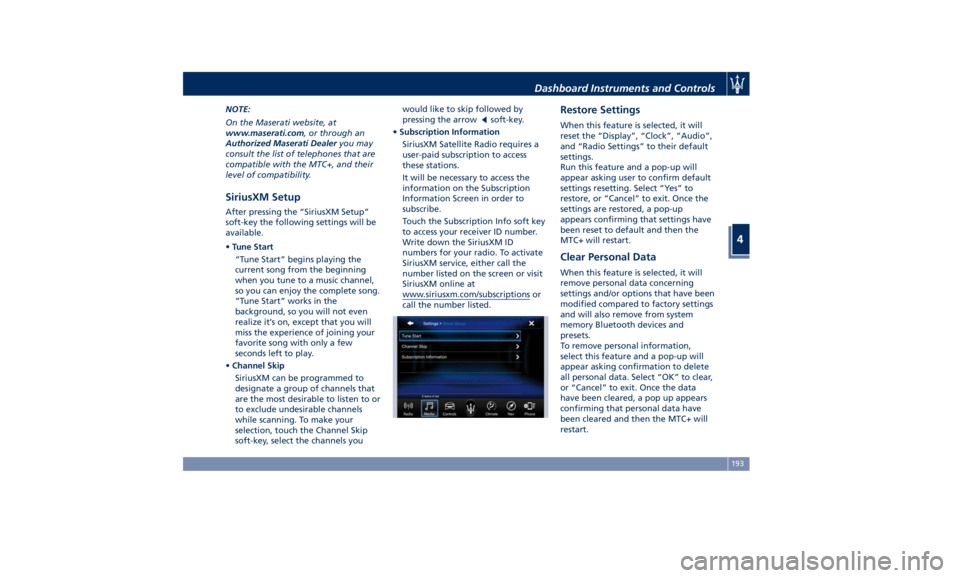
SiriusXM Setup After pressing the “SiriusXM Setup”
soft-key the following settings will be
available.
• Tune Start
“Tune Start” begins playing the
current song from the beginning
when you tune to a music channel,
so you can enjoy the complete song.
“Tune Start” works in the
background, so you will not even
realize it’s on, except that you will
miss the experience of joining your
favorite song with only a few
seconds left to play.
• Channel Skip
SiriusXM can be programmed to
designate a group of channels that
are the most desirable to listen to or
to exclude undesirable channels
while scanning. To make your
selection, touch the Channel Skip
soft-key, select the channels you would like to skip followed by
pressing the arrow
soft-key.
• Subscription Information
SiriusXM Satellite Radio requires a
user-paid subscription to access
these stations.
It will be necessary to access the
information on the Subscription
Information Screen in order to
subscribe.
Touch the Subscription Info soft key
to access your receiver ID number.
Write down the SiriusXM ID
numbers for your radio. To activate
SiriusXM service, either call the
number listed on the screen or visit
SiriusXM online at
www.siriusxm.com/subscriptions or
call the number listed. Restore Settings When this feature is selected, it will
reset the “Display”, “Clock”, “Audio”,
and “Radio Settings” to their default
settings.
Run this feature and a pop-up will
appear asking user to confirm default
settings resetting. Select “Yes” to
restore, or “Cancel” to exit. Once the
settings are restored, a pop-up
appears confirming that settings have
been reset to default and then the
MTC+ will restart.
Clear Personal Data When this feature is selected, it will
remove personal data concerning
settings and/or options that have been
modified compared to factory settings
and will also remove from system
memory Bluetooth devices and
presets.
To remove personal information,
select this feature and a pop-up will
appear asking confirmation to delete
all personal data. Select “OK” to clear,
or “Cancel” to exit. Once the data
have been cleared, a pop up appears
confirming that personal data have
been cleared and then the MTC+ will
restart.Dashboard Instruments and Controls
4
193
Page 202 of 384
“Media”, “Controls”, etc.) the driver
and passenger temperature settings
will be indicated on the upper part of
the display.
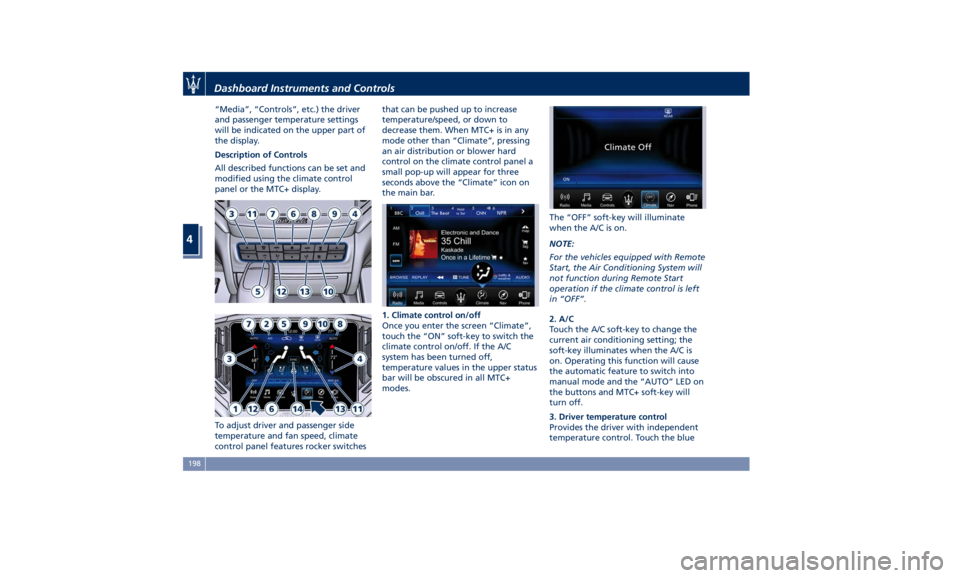
Description of Controls
All described functions can be set and
modified using the climate control
panel or the MTC+ display.
To adjust driver and passenger side
temperature and fan speed, climate
control panel features rocker switches that can be pushed up to increase
temperature/speed, or down to
decrease them. When MTC+ is in any
mode other than “Climate”, pressing
an air distribution or blower hard
control on the climate control panel a
small pop-up will appear for three
seconds above the “Climate” icon on
the main bar.
1. Climate control on/off
Once you enter the screen “Climate”,
touch the “ON” soft-key to switch the
climate control on/off. If the A/C
system has been turned off,
temperature values in the upper status
bar will be obscured in all MTC+
modes. The “OFF” soft-key will illuminate
when the A/C is on.
NOTE:
For the vehicles equipped with Remote
Start, the Air Conditioning System will
not function during Remote Start
operation if the climate control is left
in “OFF”.
2. A/C
Touch the A/C soft-key to change the
current air conditioning setting; the
soft-key illuminates when the A/C is
on. Operating this function will cause
the automatic feature to switch into
manual mode and the “AUTO” LED on
the buttons and MTC+ soft-key will
turn off.
3. Driver temperature control
Provides the driver with independent
temperature control. Touch the blueDashboard Instruments and Controls
4
198
Page 208 of 384
plug the water drains. In winter
make sure the air intake is clear of
ice, slush, and snow.
• The temperature can be displayed in
U.S. or Metric units by selecting the
“Units” customer programmable
feature. See “MTC+ Settings” in this
section.
• Any time you store your vehicle or
keep it stationary (i.e., during
vacation) for two weeks or more, run
the air conditioning system at idle
for about five minutes in the fresh
air by high blower setting. This will
ensure adequate system lubrication
and minimize the possibility of
compressor damage when the system
is started again.
A/C Filter The climate control system filters
outside air containing dust, pollen and
some odors. Strong odors cannot be
totally removed by A/C filter at the
entrance of the air climate system. See
“Maintenance Procedures” in section
“Maintenance and Care” for filter
replacement instructions. Phone and Voice Controls
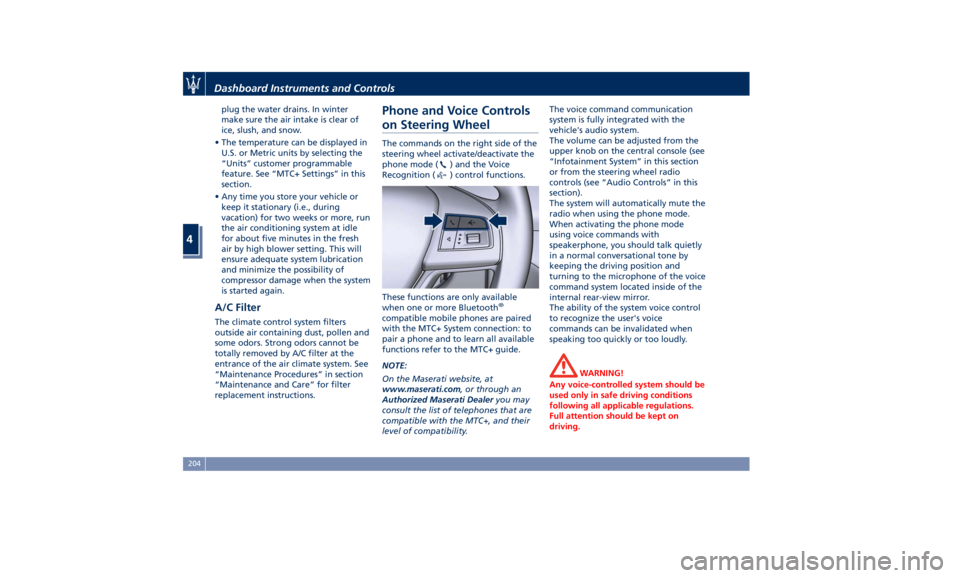
on Steering Wheel The commands on the right side of the
steering wheel activate/deactivate the
phone mode (
) and the Voice
Recognition (
) control functions.
These functions are only available
when one or more Bluetooth ®
compatible mobile phones are paired
with the MTC+ System connection: to
pair a phone and to learn all available
functions refer to the MTC+ guide.
NOTE:
On the Maserati website, at
www.maserati.com , or through an
Authorized Maserati Dealer you may
consult the list of telephones that are
compatible with the MTC+, and their
level of compatibility. The voice command communication
system is fully integrated with the
vehicle's audio system.
The volume can be adjusted from the
upper knob on the central console (see
“Infotainment System” in this section
or from the steering wheel radio
controls (see “Audio Controls” in this
section).
The system will automatically mute the
radio when using the phone mode.
When activating the phone mode
using voice commands with
speakerphone, you should talk quietly
in a normal conversational tone by
keeping the driving position and
turning to the microphone of the voice
command system located inside of the
internal rear-view mirror.
The ability of the system voice control
to recognize the user's voice
commands can be invalidated when
speaking too quickly or too loudly.
WARNING!
Any voice-controlled system should be
used only in safe driving conditions
following all applicable regulations.
Full attention should be kept on
driving.Dashboard Instruments and Controls
4
204
Page 209 of 384
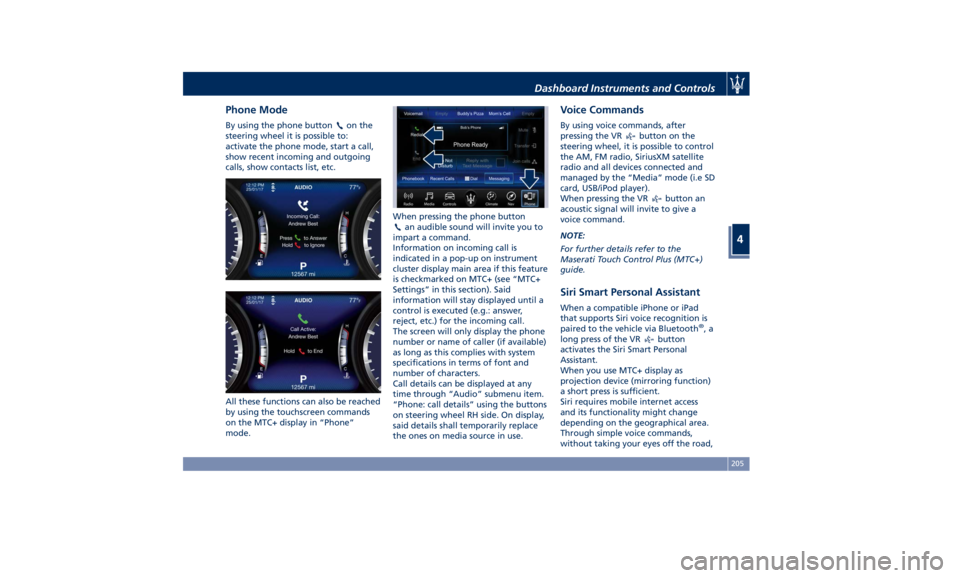
Phone Mode By using the phone button on the
steering wheel it is possible to:
activate the phone mode, start a call,
show recent incoming and outgoing
calls, show contacts list, etc.
All these functions can also be reached
by using the touchscreen commands
on the MTC+ display in “Phone”
mode. When pressing the phone button
an audible sound will invite you to
impart a command.
Information on incoming call is
indicated in a pop-up on instrument
cluster display main area if this feature
is checkmarked on MTC+ (see “MTC+
Settings” in this section). Said
information will stay displayed until a
control is executed (e.g.: answer,
reject, etc.) for the incoming call.
The screen will only display the phone
number or name of caller (if available)
as long as this complies with system
specifications in terms of font and
number of characters.
Call details can be displayed at any
time through “Audio” submenu item.
“Phone: call details” using the buttons
on steering wheel RH side. On display,
said details shall temporarily replace
the ones on media source in use. Voice Commands By using voice commands, after
pressing the VR
button on the
steering wheel, it is possible to control
the AM, FM radio, SiriusXM satellite
radio and all devices connected and
managed by the “Media” mode (i.e SD
card, USB/iPod player).
When pressing the VR
button an
acoustic signal will invite to give a
voice command.
NOTE:
For further details refer to the
Maserati Touch Control Plus (MTC+)
guide.
Siri Smart Personal Assistant When a compatible iPhone or iPad
that supports Siri voice recognition is
paired to the vehicle via Bluetooth ®
,a
long press of the VR
button
activates the Siri Smart Personal
Assistant.
When you use MTC+ display as
projection device (mirroring function)
a short press is sufficient.
Siri requires mobile internet access
and its functionality might change
depending on the geographical area.
Through simple voice commands,
without taking your eyes off the road,Dashboard Instruments and Controls
4
205
Page 341 of 384
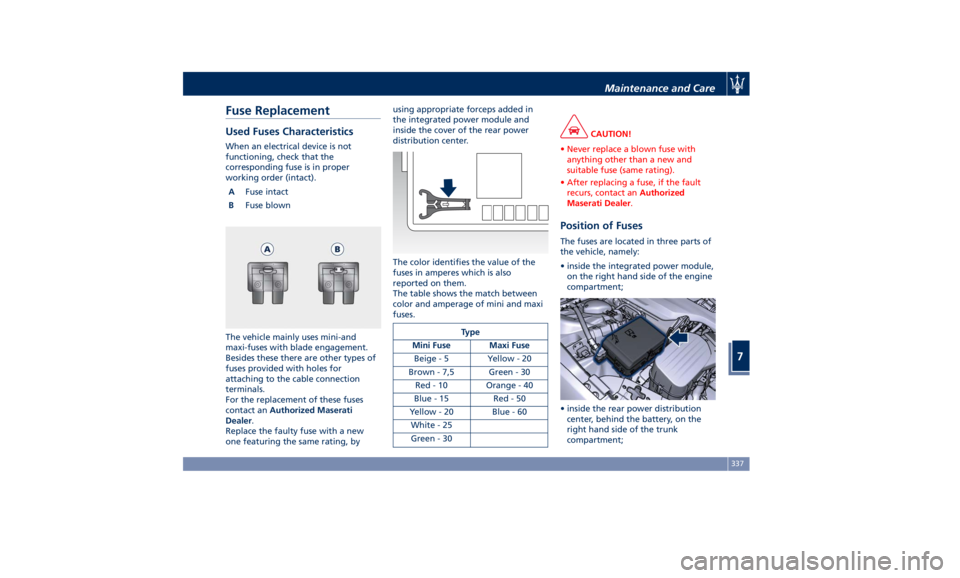
Fuse Replacement Used Fuses Characteristics When an electrical device is not
functioning, check that the
corresponding fuse is in proper
working order (intact).
A Fuse intact
B Fuse blown
The vehicle mainly uses mini-and
maxi-fuses with blade engagement.
Besides these there are other types of
fuses provided with holes for
attaching to the cable connection
terminals.
For the replacement of these fuses
contact an Authorized Maserati
Dealer .
Replace the faulty fuse with a new
one featuring the same rating, by using appropriate forceps added in
the integrated power module and
inside the cover of the rear power
distribution center.
The color identifies the value of the
fuses in amperes which is also
reported on them.
The table shows the match between
color and amperage of mini and maxi
fuses.
Type
Mini Fuse Maxi Fuse
Beige - 5 Yellow - 20
Brown - 7,5 Green - 30
Red - 10 Orange - 40
Blue-15 Red-50
Yellow - 20 Blue - 60
White - 25
Green - 30 CAUTION!
• Never replace a blown fuse with
anything other than a new and
suitable fuse (same rating).
• After replacing a fuse, if the fault
recurs, contact an Authorized
Maserati Dealer .
Position of Fuses The fuses are located in three parts of
the vehicle, namely:
• inside the integrated power module,
on the right hand side of the engine
compartment;
• inside the rear power distribution
center, behind the battery, on the
right hand side of the trunk
compartment;Maintenance and Care
7
337
Page 376 of 384
Abbreviations .................8
Accessories
Aftermarket Parts and Accessories
Statement .................13
Active Blind Spot Assist - ABSA . . . .271
Adaptive Cruise Control (ACC) . . . .247
Activation/Deactivation ...... .250
Display Warnings and
Maintenance ............. .255
Precautions while Driving with
ACC ................... .256
Setting the Following Distance . .252
Setting the Speed .......... .251
Airbag.....................64
Advanced Front Air Bag
Properties .................65
Air Bag Deployment Result .....70
Air Bag Deployment Sensors and
Controls ..................15
Air Bag System Components .....64
Front Air Bag Inflator Units .....68
Passenger Air bag Labels .......20
Supplemental Driver Side Knee Air
bag......................67
Supplemental Restraint System
(SRS) .....................64
Supplemental Seat-mounted Side
Air Bags (SAB) ..............66
Supplemental Side Air Bag Inflatable
Curtain (SABIC) ..............67
Transport of persons with
disability ..................71
Air Conditioning (A/C) System . . . .197 A/C Distribution ........... .142
Alarm, Vehicle Security ..........27
ALR (Automatic Locking Retractor) . .61
Anti-Lock Braking System (ABS) and
Electronic Brake-force Distribution
(EBD) ................... .239
Assistance ...................11
Assistance, if you need ..........11
ATC (Automatic Temperature
Control) ................. .202
Audio Controls .............. .176
Audio Controls on Central
Console ................. .176
Steering Wheel Audio Controls . .176
Audio, setting .............. .191
Audio System ............... .177
Automatic Transmission
Manual Release of Transmission .315
AWD
All-Wheel Drive, drive mode . . . .223
BAS (Brake Assist System) ...... .240
Battery ................... .332
Battery Recharge .......... .335
Battery Remote Posts Position. . .313
Maintaining Battery Charge . . . .356
To Disconnect the Battery .... .332
To Reconnect the Battery ..... .334
Blind Spot Alert ............. .266
RCP - Rear Cross Path ........ .268
Bluetooth, Customer settings .... .192
Bodywork
Maintenance and
Care . .350
Pre-Short Drop Function ..... .353 Protection from Atmospheric
Agents ................. .350
Useful Advice to Keep the Bodywork
in Good Condition ......... .351
Brakes
Brake and Stability Control System
(ESC) ................... .238
Brake Overheating ......... .242
Brake System ............. .238
Manual Release of Parking
Brake .................. .311
Parking Brake ............. .233
Using the Brakes ........... .241
Capacity/Refillings ........... .360
Cargo Area ................ .133
Loading with Rear Seatbacks Folded
Down .................. .134
Vehicle Load Carrying Capacity . .133
Child Restraint Systems ..........72
Children too large for Booster
Seats .....................73
Infants and Child Restraints .....72
Installing Child Restraint Systems
using the Vehicle Seat Belt equipped
with ALR ..................74
Lower Anchors and Tether for
Children (LATCH) ............75
Older Children and Child
Restraints .................73
Tips on getting the most out of your
child restraint ...............74
Climate Control ............. .197Index
9 372
Page 379 of 384
Mirrors Positioning ......... .108
Rearview Mirrors .......... .107
Tilt Mirrors in Reverse ....... .108
MTC+ “Controls” Screen ....... .179
MTC+ Settings - Customer
Programmable Features ...... .183
Auto-On Comfort & Remote
Start ................... .190
Clear Personal Data ........ .193
Clock & Date ............. .186
Display ................. .184
Doors & Locks ............ .188
Engine Off Options ......... .190
Lights .................. .188
Restore Settings ........... .193
Safety and Driving Assistance . . .187
Voice Commands .......... .185
Occupant Restraint System .......55
On Board Diagnostics ......... .243
ORC (Occupant Restraint
Controller) .................67
Park Assist ..................85
Enabling and Disabling Park
Assist ....................88
Parking .................. .236
Parking Brake .............. .233
Passive Entry System ...........41
Pedals, adjustable ........... .107
Pedestrian Emergency Braking
(PEB) ................... .258
Pets, transporting .............78 Phone and Voice Controls on Steering
Wheel .................. .204
Phone Mode ............. .205
Phone/Bluetooth, Customer
settings ................. .192
Power Outlets .............. .126
Power Outlet Inside the Central
Console ................. .127
Power Outlet Inside the
Cupholder ............... .126
Power Outlet Inside the Trunk . .127
Rear Power Outlets ......... .127
Rear Parking Camera ...........78
Refueling ................. .296
Fuel Filler Neck Access
....... .296
Remote
Start System ...........
36
Restarting the Vehicle ........ .355
Restraint System ..............64
Child Restraint Systems ........72
RKE (Remote Keyless Entry)
Transmitter .................24
Roadside Assistance Program .....16
Roll-Over Warning .............15
Safety
Child Restraint Systems ........72
Reporting Safety Defects .......12
Safety Tips ..................55
Scheduled Maintenance Service . . .318
Scheduled Service Plan
Scheduled Maintenance
Indicator ................ .318 Seat Belt ...................55
Automatic Locking Retractor (ALR)
Mode ....................61
Enhanced Seat Belt Use Reminder
System (SBR) ...............62
Passenger Seat Belts ..........60
Seat Belt Reminder Light ..... .150
Seat Belts and Pregnant Women .63
Seat Belts Pretensioners .......62
Three-Point Seat Belts .........57
Three-Point Seat Belts Height
Adjustment ................59
Three-Point Seat Belts Untwisting
Procedure .................60
Three-Point Seat Belts Use
Instructions ................58
Using the Seat Belt in Automatic
Locking Retractor Mode (ALR) . . .61
Seats ......................96
Driver Memory Seat ..........99
Easy Entry/Exit Seats ........ .100
Front Heated Seats ...........97
Front Power Seats ...........96
Front Ventilated Seats .........98
Power Lumbar Seats ..........97
Rear Armrest ............. .101
Rear Seats ............... .101
Rear Side Heated Seats ...... .102
Seat Adjustment ............96
Service .....................10
Siri Smart Personal Assistant .... .205
Smoking Kit ............... .131
Snow Chains ............... .288Index
9 375