lights MASERATI GHIBLI 2019 User Guide
[x] Cancel search | Manufacturer: MASERATI, Model Year: 2019, Model line: GHIBLI, Model: MASERATI GHIBLI 2019Pages: 384, PDF Size: 13.33 MB
Page 48 of 384
will cancel vehicle lock and alarm
system arming thus leaving vehicle
unlocked.
Since when the doors are locked, the
"Passive Entry" system waits for about
16 seconds before verifying if a key
fob RKE transmitter is present inside
the vehicle.
Release the Lid and Enter the
Trunk For vehicles equipped with manual
trunk lid, with the key fob within 3.3 ft
(1 m) of the lid, press the button
located between the licence plate
lights and lift it manually.
For vehicles equipped with Power
Trunk Lid/Hands Free, with the key fob
within 3.3 ft (1 m) of the lid, press the
button located between the license
plate lights, the power trunk lid will
automatically open until it has reached
its maximum height; if the same
button is not pressed again to stop it
(for more information, see chapter
“Trunk Lid Operation” in this section).
If the vehicle had already been
unlocked through key fob or “Passive
Entry”, the presence of the key fob is
not required; simply use the button
located between the license plate
lights to open the trunk lid manually
or automatically. Manual Door Lock from
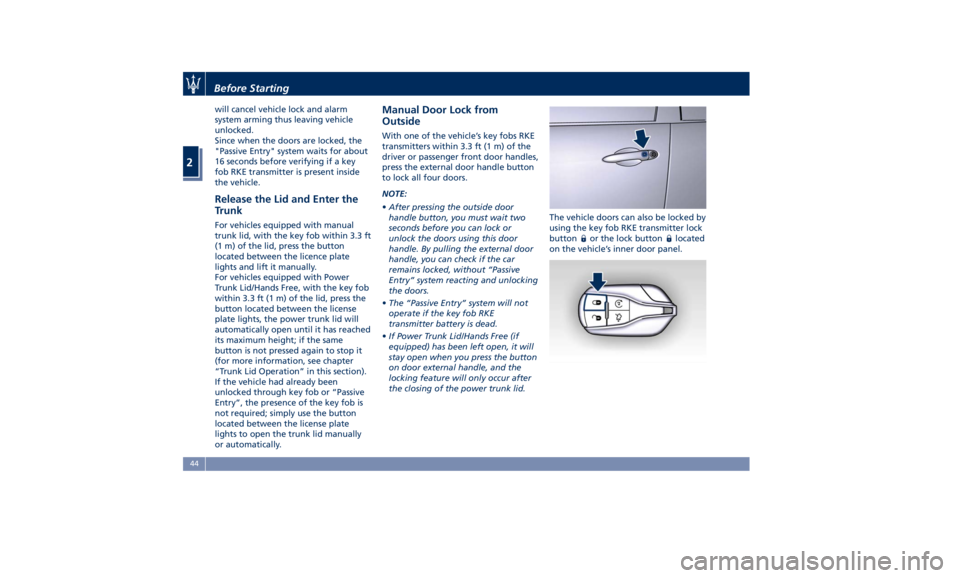
Outside With one of the vehicle’s key fobs RKE
transmitters within 3.3 ft (1 m) of the
driver or passenger front door handles,
press the external door handle button
to lock all four doors.
NOTE:
• After pressing the outside door
handle button, you must wait two
seconds before you can lock or
unlock the doors using this door
handle. By pulling the external door
handle, you can check if the car
remains locked, without “Passive
Entry” system reacting and unlocking
the doors.
• The “Passive Entry” system will not
operate if the key fob RKE
transmitter battery is dead.
• If Power Trunk Lid/Hands Free (if
equipped) has been left open, it will
stay open when you press the button
on door external handle, and the
locking feature will only occur after
the closing of the power trunk lid. The vehicle doors can also be locked by
using the key fob RKE transmitter lock
button
or the lock button located
on the vehicle’s inner door panel.Before Starting
2
44
Page 53 of 384
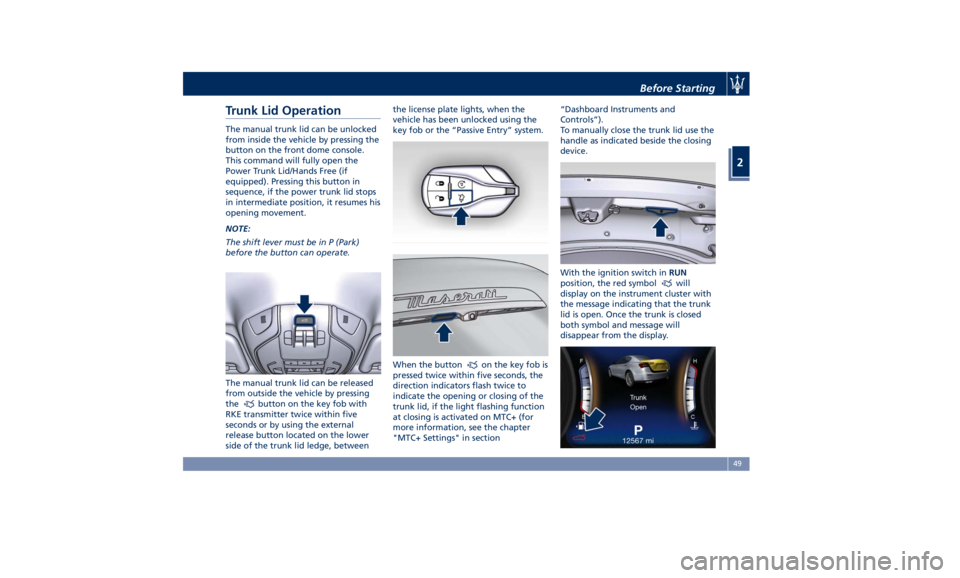
Trunk Lid Operation The manual trunk lid can be unlocked
from inside the vehicle by pressing the
button on the front dome console.
This command will fully open the
Power Trunk Lid/Hands Free (if
equipped). Pressing this button in
sequence, if the power trunk lid stops
in intermediate position, it resumes his
opening movement.
NOTE:
The shift lever must be in P (Park)
before the button can operate.
The manual trunk lid can be released
from outside the vehicle by pressing
the
button on the key fob with
RKE transmitter twice within five
seconds or by using the external
release button located on the lower
side of the trunk lid ledge, between the license plate lights, when the
vehicle has been unlocked using the
key fob or the “Passive Entry” system.
When the button
on the key fob is
pressed twice within five seconds, the
direction indicators flash twice to
indicate the opening or closing of the
trunk lid, if the light flashing function
at closing is activated on MTC+ (for
more information, see the chapter
"MTC+ Settings" in section “Dashboard Instruments and
Controls”).
To manually close the trunk lid use the
handle as indicated beside the closing
device.
With the ignition switch in RUN
position, the red symbol
will
display on the instrument cluster with
the message indicating that the trunk
lid is open. Once the trunk is closed
both symbol and message will
disappear from the display.Before Starting
2
49
Page 54 of 384
With the ignition device in the OFF
position, the trunk open symbol and
message will display until closure.
See “Passive Entry System” in this
section for more information on trunk
lid operation with the “Passive Entry”
feature.
Power Trunk Lid/Hands Free
(optional) Automatic opening and closing
movement of the trunk lid is driven by
electric actuators and a motorized
latch ensuring lid locking upon closing.
Power Trunk lid can be opened using
button
on the key fob RKE
transmitter and the button on the
front dome console used also for
non-power version.
The
button on key fob and button
on dome console not only allows user
to completely open the Power Trunk
Lid/Hands Free, but also to stop it at
any intermediate position by pressing
the button again at anytime you wish
to stop and resume the opening
process.
In addition to these commands, it is
possible open and close the Power
Trunk Lid/Hands Free by simply moving
your foot under the rear bumper, if
the vehicle is so equipped with the
kick sensor option, as specified in the paragraph “Hands Free Power Trunk
Release and Closing”. In this latter
case, the lid will be opened and closed
only if the “Passive Entry” system
acknowledges the presence of the key
fob RKE transmitter within 3.3 ft (1 m)
of the trunk lid.
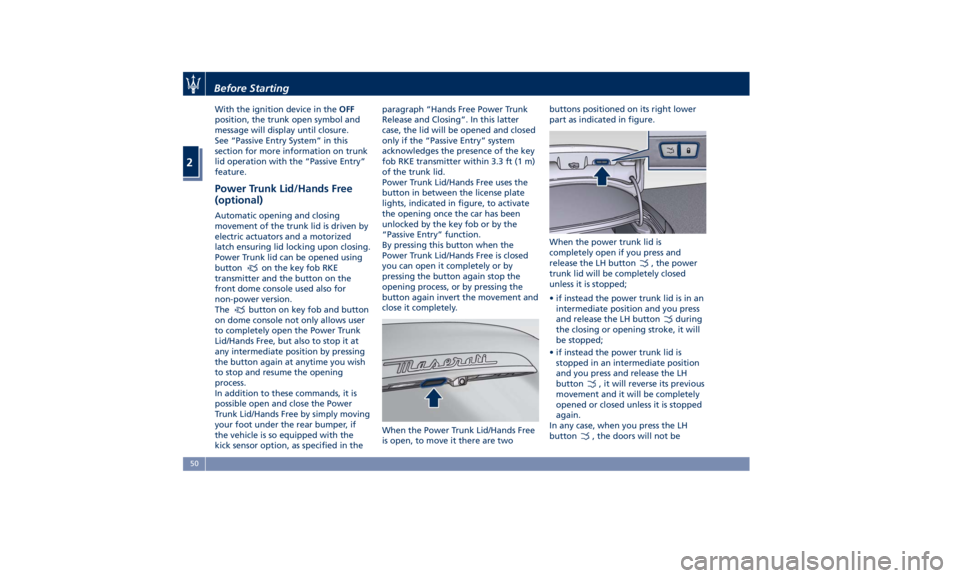
Power Trunk Lid/Hands Free uses the
button in between the license plate
lights, indicated in figure, to activate
the opening once the car has been
unlocked by the key fob or by the
“Passive Entry” function.
By pressing this button when the
Power Trunk Lid/Hands Free is closed
you can open it completely or by
pressing the button again stop the
opening process, or by pressing the
button again invert the movement and
close it completely.
When the Power Trunk Lid/Hands Free
is open, to move it there are two buttons positioned on its right lower
part as indicated in figure.
When the power trunk lid is
completely open if you press and
release the LH button
, the power
trunk lid will be completely closed
unless it is stopped;
• if instead the power trunk lid is in an
intermediate position and you press
and release the LH button
during
the closing or opening stroke, it will
be stopped;
• if instead the power trunk lid is
stopped in an intermediate position
and you press and release the LH
button
, it will reverse its previous
movement and it will be completely
opened or closed unless it is stopped
again.
In any case, when you press the LH
button
, the doors will not beBefore Starting
2
50
Page 73 of 384
quantity of nontoxic gas is generated
to inflate the advanced front air bags.
The steering wheel hub trim cover and
the upper right side of the dashboard
separate and fold out of the way as
the air bags inflate to their full size.
The air bags then quickly deflate while
helping to restrain the driver and
front passenger. The advanced front
air bag gas is vented through the vent
holes in the sides of the air bag. In this
way, the air bags do not interfere with
your control of the vehicle.
Supplemental Driver Side Knee Air
Bag Inflator Unit
The supplemental driver side knee air
bag unit is located in the dashboard
trim beneath the steering column.
When the ORC detects a collision
requiring the air bag, it signals the
inflator units. A large quantity of
non-toxic gas is generated to inflate
the supplemental driver side knee air
bag. The trim cover separates and
folds out of the way allowing the air
bag to inflate to the full size.
Supplemental Seat-Mounted Side Air
Bag (SAB) Inflator Units
The ORC unit determines if a side
collision requires the side air bags to
inflate, based on the severity and type
of collision. Based on the severity and type of collision, the side air bag
inflator on the crash side of the
vehicle may be triggered, releasing a
quantity of nontoxic gas.
The inflating SAB exits through the
seat seam into the space between the
occupant and the door. The side air
bag moves at a very high speed and
with such a high force that it could
injure you if you are not seated
properly, or if items are positioned in
the area where the side air bag
inflates. This especially applies to
children.
Supplemental Side Air Bag Inflatable
Curtain (SABIC) Inflator Units
During collisions where the impact is
confined to a particular area of the
side of the vehicle, the ORC may
deploy the SABIC air bags, depending
on the severity and type of collision. In
these events, the ORC will deploy the
SABIC only on the impact side of the
vehicle. A quantity of non-toxic gas is
generated to inflate the side curtain
air bag.
The inflating side curtain air bag
pushes the head/s of the occupant/s
seating in the outside seats from the
edge of the headliner out of the way
and covers the window. The air bag
inflates with enough force to possibly injure you if you are not belted and
seated properly, or if items are
positioned in the area where the side
curtain air bag inflates. This especially
applies to children.
The SABICs may also help reduce the
risk of partial or complete ejection of
vehicle occupants through side
windows in certain rollover events
(because equipped with rollover
sensing).
Front and Side Impact Sensors
In front and side impacts, impact
sensors can aid the ORC in
determining appropriate response to
impact events.
Enhanced Accident Response System
In the event of an impact causing air
bag deployment, if the
communication network and the
power remains intact, depending on
the nature of the accident, the ORC
will determine whether the enhanced
accident response system will have to
perform the following functions:
• cut off fuel to the engine;
• turn hazard lights and interior lights
on as long as the battery has power
or until the ignition switch is turned
off;
• unlock the doors automatically;Before Starting
2
69
Page 84 of 384
Surround View Camera
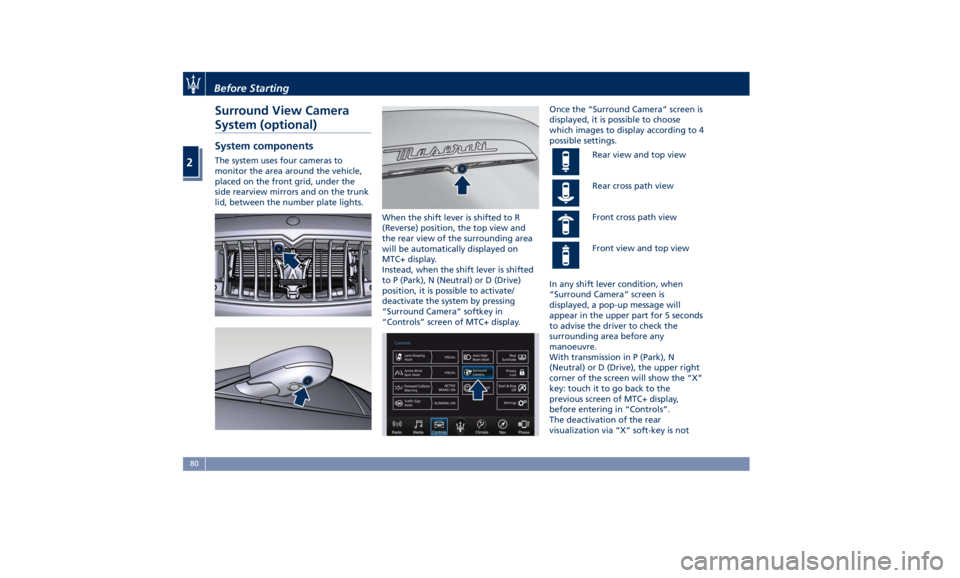
System (optional) System components The system uses four cameras to
monitor the area around the vehicle,
placed on the front grid, under the
side rearview mirrors and on the trunk
lid, between the number plate lights.
When the shift lever is shifted to R
(Reverse) position, the top view and
the rear view of the surrounding area
will be automatically displayed on
MTC+ display.
Instead, when the shift lever is shifted
to P (Park), N (Neutral) or D (Drive)
position, it is possible to activate/
deactivate the system by pressing
“Surround Camera” softkey in
“Controls” screen of MTC+ display. Once the “Surround Camera” screen is
displayed, it is possible to choose
which images to display according to 4
possible settings.
Rear view and top view
Rear cross path view
Front cross path view
Front view and top view
In any shift lever condition, when
“Surround Camera” screen is
displayed, a pop-up message will
appear in the upper part for 5 seconds
to advise the driver to check the
surrounding area before any
manoeuvre.
With transmission in P (Park), N
(Neutral) or D (Drive), the upper right
corner of the screen will show the “X”
key: touch it to go back to the
previous screen of MTC+ display,
before entering in “Controls”.
The deactivation of the rear
visualization via “X” soft-key is notBefore Starting
2
80
Page 89 of 384
• Check the tires (see “Tire Inflation
Pressure” chapter in section
“Features and Specifications”) for
proper cold inflation pressure.
Lights and Indicator Lights
• Have someone observe the
operation of exterior lights while
you operate the controls (see
“Lights” chapter in section
“Understanding the Vehicle”).
• Check turn signal and high beam
indicator lights on the instrument
cluster (see “Instrument Cluster”
chapter in section “Dashboard
Instruments and Controls”).
Door Latches
• Check for positive closing, latching,
and locking of doors and trunk lid
(see “Unlock the Vehicle with Key
fob” chapter in this section).
Fluid Leaks
• Check area under vehicle after
overnight parking for recent fluid
leaks (oil, fuel, etc.).
• If gasoline fumes are detected or
fluid leaks are suspected, contact the
Authorized Maserati Dealer . WARNING!
California Proposition 65
Operating, servicing and maintaining
a passenger vehicle or off-road vehicle
can expose you to chemicals including
such as, engine exhaust, carbon
monoxide, phthalates and lead, that
which are known to the State of
California to cause cancer and birth
defects or other reproductive harm. To
minimize exposure, avoid breathing
exhaust, do not idle the engine except
as necessary, service your vehicle in a
well-ventilated area and wear gloves
or wash your hands frequently when
servicing your vehicle. For more
information go to:
www.P65Warnings.ca.gov/passenger-
vehiclePark Assist (if equipped) The Park Assist (also called
“ParkSense”) system provides visual
and audible indications of the distance
between the rear and/or front bumper
and a detected obstacle when backing
up or moving forward, e.g. during a
parking maneuver.
Besides the use of the sensors
available on the bumpers and of the
rear parking camera, the vehicle may
be equipped with surround view
cameras (optional) to assist the driver
during maneuvers on dead-ends/roads
and on intersections. For more details
on this option, see chapter "Surround
View Camera System (optional)" in
this section.
Refer to “Park Assist System Usage
Precautions” for limitations of this
system and recommendations.
Park Assist system will retain the last
system state (enabled or disabled)
from the last ignition cycle when the
ignition is changed to the RUN
position.
Park Assist system can be active only
when the shift lever is in R (Reverse) or
D (Drive).
If Park Assist is enabled at one of
these shift lever positions, the system
will remain active until the vehicleBefore Starting
2
85
Page 95 of 384
3 – Understanding the Vehicle Interior Components ..................................... 92
Front Power Seats ....................................... 96
Driver Memory Seat ...................................... 99
Rear Seats ............................................ 101
Head Restraints ........................................ 103
Power Steering Wheel Adjustment .......................... 105
Adjustable Pedals (if equipped) ............................ 107
Rearview Mirrors ....................................... 107
Lights ................................................ 110
Windshield Wipers and Washers ........................... 122
Interior Features ....................................... 126
Cargo Area ........................................... 133
Power Sunroof with Sunshade ............................. 136
HomeLink (optional) .................................... 138
Air Conditioning Distribution ............................. 142
91
Page 97 of 384
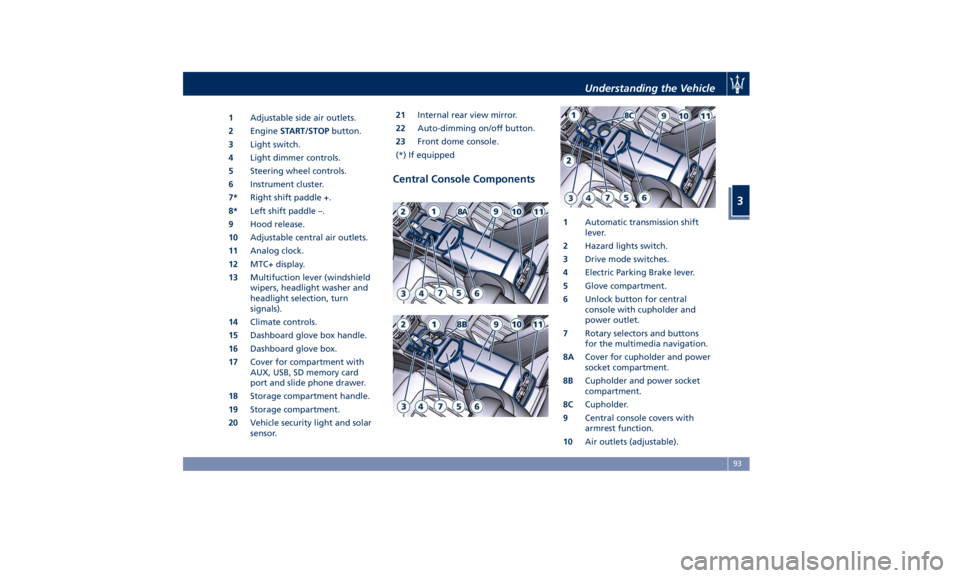
1 Adjustable side air outlets.
2 Engine START/STOP button.
3 Light switch.
4 Light dimmer controls.
5 Steering wheel controls.
6 Instrument cluster.
7* Right shift paddle +.
8* Left shift paddle –.
9 Hood release.
10 Adjustable central air outlets.
11 Analog clock.
12 MTC+ display.
13 Multifuction lever (windshield
wipers, headlight washer and
headlight selection, turn
signals).
14 Climate controls.
15 Dashboard glove box handle.
16 Dashboard glove box.
17 Cover for compartment with
AUX, USB, SD memory card
port and slide phone drawer.
18 Storage compartment handle.
19 Storage compartment.
20 Vehicle security light and solar
sensor. 21 Internal rear view mirror.
22 Auto-dimming on/off button.
23 Front dome console.
(*) If equipped
Central Console Components 1 Automatic transmission shift
lever.
2 Hazard lights switch.
3 Drive mode switches.
4 Electric Parking Brake lever.
5 Glove compartment.
6 Unlock button for central
console with cupholder and
power outlet.
7 Rotary selectors and buttons
for the multimedia navigation.
8A Cover for cupholder and power
socket compartment.
8B Cupholder and power socket
compartment.
8C Cupholder.
9 Central console covers with
armrest function.
10 Air outlets (adjustable).Understanding the Vehicle
3
93
Page 98 of 384
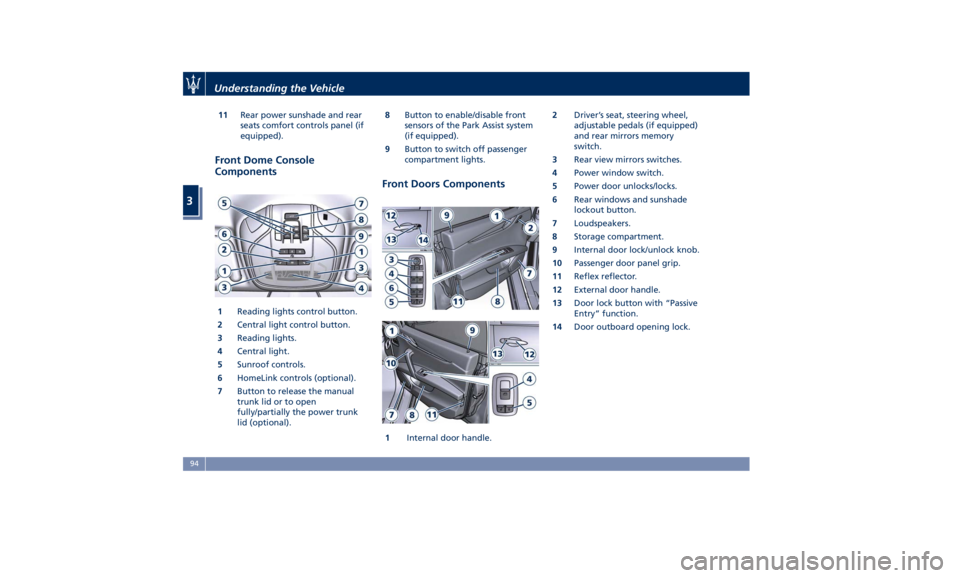
11 Rear power sunshade and rear
seats comfort controls panel (if
equipped).
Front Dome Console
Components
1 Reading lights control button.
2 Central light control button.
3 Reading lights.
4 Central light.
5 Sunroof controls.
6 HomeLink controls (optional).
7 Button to release the manual
trunk lid or to open
fully/partially the power trunk
lid (optional). 8 Button to enable/disable front
sensors of the Park Assist system
(if equipped).
9 Button to switch off passenger
compartment lights.
Front Doors Components
1 Internal door handle. 2 Driver’s seat, steering wheel,
adjustable pedals (if equipped)
and rear mirrors memory
switch.
3 Rear view mirrors switches.
4 Power window switch.
5 Power door unlocks/locks.
6 Rear windows and sunshade
lockout button.
7 Loudspeakers.
8 Storage compartment.
9 Internal door lock/unlock knob.
10 Passenger door panel grip.
11 Reflex reflector.
12 External door handle.
13 Door lock button with “Passive
Entry” function.
14 Door outboard opening lock.Understanding the Vehicle
3
94
Page 99 of 384
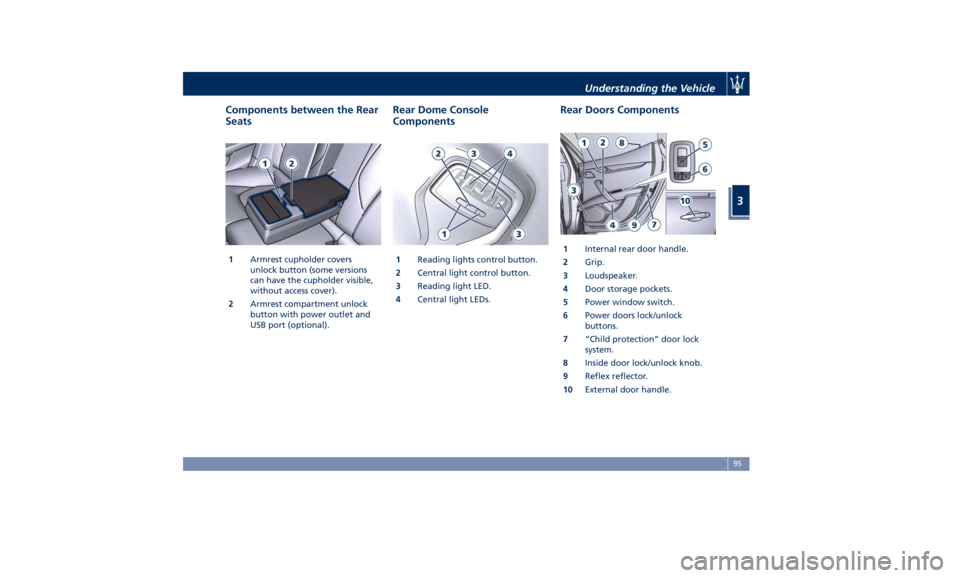
Components between the Rear
Seats
1 Armrest cupholder covers
unlock button (some versions
can have the cupholder visible,
without access cover).
2 Armrest compartment unlock
button with power outlet and
USB port (optional). Rear Dome Console
Components
1 Reading lights control button.
2 Central light control button.
3 Reading light LED.
4 Central light LEDs. Rear Doors Components
1 Internal rear door handle.
2 Grip.
3 Loudspeaker.
4 Door storage pockets.
5 Power window switch.
6 Power doors lock/unlock
buttons.
7 “Child protection” door lock
system.
8 Inside door lock/unlock knob.
9 Reflex reflector.
10 External door handle.Understanding the Vehicle
3
95