start stop button MASERATI GHIBLI 2019 Owner's Manual
[x] Cancel search | Manufacturer: MASERATI, Model Year: 2019, Model line: GHIBLI, Model: MASERATI GHIBLI 2019Pages: 384, PDF Size: 13.33 MB
Page 215 of 384

Pressing the brake pedal and shifting
transmission into D (Drive) or R
(Reverse) will deactivate the
“AutoStop” condition and restart the
engine.
Start&Stop Deactivated Start&Stop function is deactivated
under the following conditions:
• When SPORT drive mode is activated.
• When
(ESC OFF) drive mode is
activated.
• If it has been disabled through the
main menu item “Start&Stop”, via
the controls located on the right side
of the steering wheel, or through
the Start & Stop hard button on the
central console (see chapter “Drive
Mode” in this section) or via the
MTC+ in the "Controls" page (see
“MTC+ “Controls” Screen” in section "Dashboard Instruments and
Controls") .
Start&Stop Not Active For keeping driving safety, interior
comfort and a correct functioning of
engine and vehicle, the Start&Stop
function does not activate under the
following conditions:
• When the driver’s seat belt is
unbuckled (see example).
• When the driver door is open.
• When the fuel level is too low.
• When the vehicle is stopped on a
very steep road.
• When the vehicle is stopped with
steered wheels (over 135° of steering
wheel angle for each part).
• When the vehicle is manoeuvring:
shift lever in R (Reverse). • When the temperature conditions
inside the vehicle do not correspond
to the air conditioning setting.
• When the front and rear “defroster”
function is activated.
• When the engine coolant and the
engine oil temperature are not on
proper functioning level.
• When the external temperature is
too cold.
• When the battery charge is below
safety value.
• When the previous stop had just
happened (few seconds) and the
minimum speed has not yet been
achieved.
• Shortly after R (Reverse) has been set
or when driving under a certain
speed level.
• When the hood is open.
• The sensors managing the
Start&Stop have been damaged.
• Start&Stop system faults are present.
• When Adaptive Cruise Control (ACC)
and/or Highway Assist (HAS) system
are engaged.
Automatic Restarting of the
Engine The engine may automatically restart,
before the brake pedal has beenDriving
5
211
Page 216 of 384
released, when one of the following
conditions occurs:
• The SPORT drive mode or (ESC
OFF) drive mode is being activated.
• If the Start&Stop function has been
disabled through the main menu
voice “Start & Stop” (see chapter
“Instrument cluster” in section
“Dashboard Instruments and
Controls”) or through the Start&Stop
hard button on the central console
(see chapter “Drive Mode” in this
section) or via MTC+ in the “Control”
page (see “MTC+ ”Control” Screen”
in section “Dashboard Instruments
and Controls”).
• If shift lever is moved to R (Reverse).
• If the steering wheel is moved to
steer the wheels.
• When the temperature conditions
inside the vehicle do not correspond
to the air conditioning setting.
• When changing the temperature
setting on the air conditioning.
• When the defroster function is being
activated.
• When the battery charge is below
safety value.
• When the accelerator pedal is being
pressed (together with the brake
pedal). • If a long time has passed since the
last automatic stop of the engine.
Occupants Safety Function To enhance occupants safety, the
Start&Stop system monitors if the
driver is present and does not allow
automatic restarting of the engine if
one of the following maneuvers is
being performed while in “AutoStop”
condition:
• The driver unbuckles his/her seat belt
and releases the brake pedal.
• The driver opens the door and
releases the brake pedal.
• The driver unbuckles the seat belt
and opens the door.
• The driver opens the hood.
All the above-mentioned conditions
deactive the Start&Stop function (the
“AutoStart” is deactivated and the
engine remains off) and the
transmission shifts automatically in P
(Park).
The
telltale will flash to indicate
the Start&Stop function disabling. To
restart the engine it is necessary to
press the brake pedal and push the
START/STOP button.
Move the shift lever to D (Drive) to
drive away. WARNING!
• Even when the vehicle is stopped in
the “Stop (AutoStop)” phase, the
driver is responsible for the vehicle
and the occupants and shall take
care of what happens inside and
outside the vehicle.
• Even when the vehicle is stopped
within the “Stop (AutoStop)” phase,
the vehicle driver is responsible for
the vehicle, the vehicle’s occupants
and the vehicle’s surrounding area.
Never leave the vehicle unattended
with the engine running; doing so
poses a risk of danger. It is a good
practice to always ensure to set the
parking brake and place the
transmission gear selector lever into
the P (Park) position, thereby
ensuring the vehicle will not move,
when performing any vehicle checks,
maintenance and/or service
procedures on the vehicle.
Start&Stop Function Disabling Start & Stop enabled is the default
status.
Under certain driving conditions, when
frequent stops and restarts of the
engine may become annoying, it isDriving
5
212
Page 217 of 384
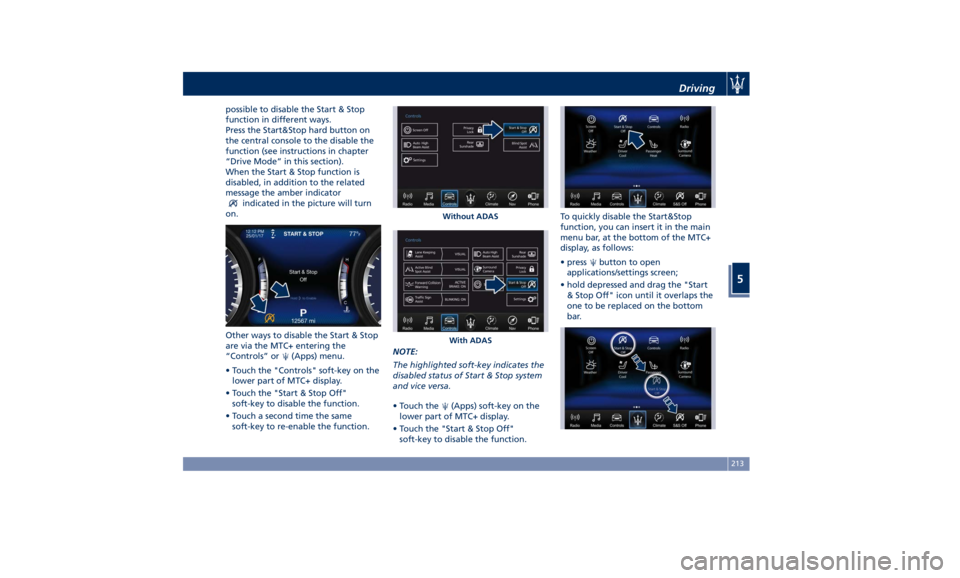
possible to disable the Start & Stop
function in different ways.
Press the Start&Stop hard button on
the central console to the disable the
function (see instructions in chapter
“Drive Mode” in this section).
When the Start & Stop function is
disabled, in addition to the related
message the amber indicator
indicated in the picture will turn
on.
Other ways to disable the Start & Stop
are via the MTC+ entering the
“Controls” or
(Apps) menu.
• Touch the "Controls" soft-key on the
lower part of MTC+ display.
• Touch the "Start & Stop Off"
soft-key to disable the function.
• Touch a second time the same
soft-key to re-enable the function. NOTE:
The highlighted soft-key indicates the
disabled status of Start & Stop system
and vice versa.
• Touch the
(Apps) soft-key on the
lower part of MTC+ display.
• Touch the "Start & Stop Off"
soft-key to disable the function. To quickly disable the Start&Stop
function, you can insert it in the main
menu bar, at the bottom of the MTC+
display, as follows:
• press
button to open
applications/settings screen;
• hold depressed and drag the "Start
& Stop Off" icon until it overlaps the
one to be replaced on the bottom
bar.Without ADAS
With ADAS Driving
5
213
Page 218 of 384
Once it is set in the menu bar, the new
menu will be immediately operational.
NOTE:
The yellow LED on the button
indicates the disabled status of
Start&Stop system and vice versa.
If the driving conditions allow it, the
user can re-enable the Start&Stop
function at any time using one of
previous ways.
NOTE:
After user intervention, the Start&Stop
system will automatically update the
status of the function in all contexts
where it can be modified.
Start&Stop System Failure When the indicator light and the
related message illuminate on the TFT
display (see chapter “Instrument
Cluster” in section “Dashboard
Instruments and Controls”) there is a
malfunction in the Start&Stop system
and the engine cannot be switched off
and restarted automatically. To switch
off or restart the engine it is necessary
to push the START/STOP . Have the
vehicle checked at an Authorized
Maserati Dealer .Automatic Transmission The vehicle is equipped with an
electronically controlled 8-speed
automatic transmission, which
automatically changes gear according
to the vehicle's instantaneous usage
parameters (vehicle speed, road
gradient and accelerator pedal
position).
It is possible to change gear manually
thanks to the “M +/-“ (Manual)
position for the shift lever.
The electronic shift lever replaces the
conventional mechanical lever and has
no mechanical connection to the
transmission. The transmission is
operated by electrical actuators on the
hydraulic system and all commands to
the control system are transmitted by
the CAN network. The lever itself
represents a mere user interface. Gear
positions are simulated by solenoids
inside the lever body, which are
computer-controlled and enable or
disable certain positions of the lever.
The solenoids inside the shift lever
prevent the movement of the lever
towards invalid positions.
The electronically-controlled
transmission provides a precise shift
schedule. The transmission electronics
are self-calibrating, therefore the gearshift behaviour could become
perfect as expected after few
hundreds of miles/km.
CAUTION!
In order to properly use the automatic
transmission, it is essential that you
read through the whole chapter, so
that you can understand right from
the start what the correct and granted
operations are.
Damage to the transmission may occur
if the following precautions are not
observed:
• Shift into P (Park) only after the
vehicle has come to a complete stop:
this is the default position of the
lever. After engaged P (Park) it is
possible set the ignition switch to
OFF .
• Shift into or out of R (Reverse) only
after the vehicle has come to a
complete stop and the engine is at
idle speed.
• Do not shift between P (Park), R
(Reverse), N (Neutral) or D (Drive)
when the engine is above idle speed
• To effect any change from vehicle
stop to R (Reverse), D (Drive), 1 st
orDriving
5
214
Page 223 of 384
R (Reverse)
This range is used to move the vehicle
backward.
Switching to R (Reverse) starting from
N (Neutral) is only possible if the
vehicle is moving backwards.
We recommend to shift into R
(Reverse) only after the vehicle has
come to a complete stop.
• Vehicle stationary: switching
between R (Reverse) and D (Drive),
passing from N (Neutral), requires
brake pedal pressed and action on
the lever.
• Vehicle moving: the driver can switch
from R (Reverse) to N (Neutral)
acting on the shift lever without
pressing the unlock button and the
brake pedal.
N (Neutral)
• Vehicle stationary and engine
started: switching from N (Neutral)
to P (Park) requires “P” button
pressed only. Switching from N
(Neutral) to R (Reverse) and/or D
(Drive) requires brake pedal and
unlock button pressed and the
action on the shift lever.
• Vehicle moving: switching from N
(Neutral) to R (Reverse) and/or D
(Drive) requires pressing the unlock button and the action on the shift
lever. Switching to R (Reverse)
starting from N (Neutral) is only
possible if the vehicle is moving
backwards, while switching to D
(Drive) starting from N (Neutral) is
only possible if the vehicle is moving
forwards.
Set the parking brake and shift the
transmission into P (Park) if you must
leave the vehicle.
WARNING!
Do not switch to N (Neutral) and/or
never turn off the ignition to coast
downhill. These are unsafe practices
that limit driver’s response to
changing traffic or road conditions. It
is possible to lose control of the
vehicle and have a collision.
CAUTION!
Towing the vehicle, coasting, or
driving for any other reason with the
transmission in N (Neutral) can result
in severe transmission damage. See
“Towing a Disabled Vehicle” in section
“In an Emergency” for further
information. D (Drive)
This
range should
be used for most
city and highway driving. It provides
the smoothest upshifts and downshifts
and the best fuel economy. The
transmission automatically shifts up
and down through all gears. The D
(Drive) mode provides optimum
driving characteristics under all normal
operating conditions of the vehicle.
• Vehicle stationary: to switch from D
(Drive) to R (Reverse) requires brake
pedal and unlock button pressed
and the action on the shift lever: to
reach N (Neutral) starting from D
(Drive) is possible by only acting on
the shift lever.
• To enable special operations while
the car is moving at a low speed,
such as getting out of marsh or
snow, it is possible to run quickly
from D (Drive) to R (Reverse), and
vice versa, by pressing the unlock
button and acting on the shift lever
passing from N (Neutral).
• Vehicle moving: switching to N
(Neutral) from D (Drive) it is not
necessary to press brake pedal.
• From D (Drive) selected mode it is
always possible to switch to M +/-
(Manual) mode, by move the shift
lever to the left (see followingDriving
5
219
Page 228 of 384
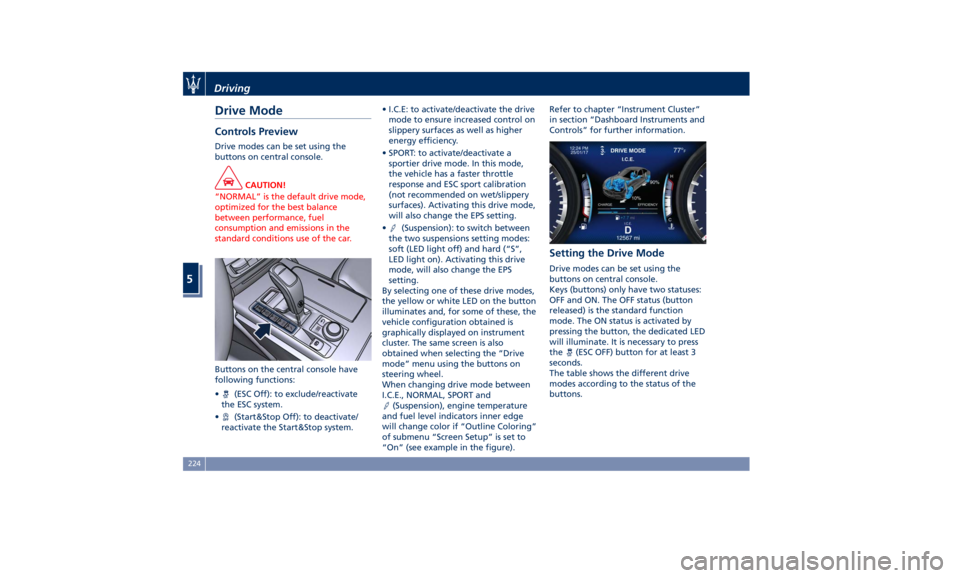
Drive Mode Controls Preview Drive modes can be set using the
buttons on central console.
CAUTION!
“NORMAL” is the default drive mode,
optimized for the best balance
between performance, fuel
consumption and emissions in the
standard conditions use of the car.
Buttons on the central console have
following
functions:
•
(ESC Off): to exclude/reactivate
the ESC system.
•
(Start&Stop Off): to deactivate/
reactivate the Start&Stop system. • I.C.E: to activate/deactivate the drive
mode to ensure increased control on
slippery surfaces as well as higher
energy efficiency.
• SPORT: to activate/deactivate a
sportier drive mode. In this mode,
the vehicle has a faster throttle
response and ESC sport calibration
(not recommended on wet/slippery
surfaces). Activating this drive mode,
will also change the EPS setting.
•
(Suspension): to switch between
the two suspensions setting modes:
soft (LED light off) and hard (“S”,
LED light on). Activating this drive
mode, will also change the EPS
setting.
By selecting one of these drive modes,
the yellow or white LED on the button
illuminates and, for some of these, the
vehicle configuration obtained is
graphically displayed on instrument
cluster. The same screen is also
obtained when selecting the “Drive
mode” menu using the buttons on
steering wheel.
When changing drive mode between
I.C.E., NORMAL, SPORT and
(Suspension), engine temperature
and fuel level indicators inner edge
will change color if “Outline Coloring”
of submenu “Screen Setup” is set to
“On” (see example in the figure). Refer to chapter “Instrument Cluster”
in section “Dashboard Instruments and
Controls” for further information.
Setting the Drive Mode Drive modes can be set using the
buttons on central console.
Keys (buttons) only have two statuses:
OFF and ON. The OFF status (button
released) is the standard function
mode. The ON status is activated by
pressing the button, the dedicated LED
will illuminate. It is necessary to press
the
(ESC OFF) button for at least 3
seconds.
The table shows the different drive
modes according to the status of the
buttons.Driving
5
224
Page 229 of 384
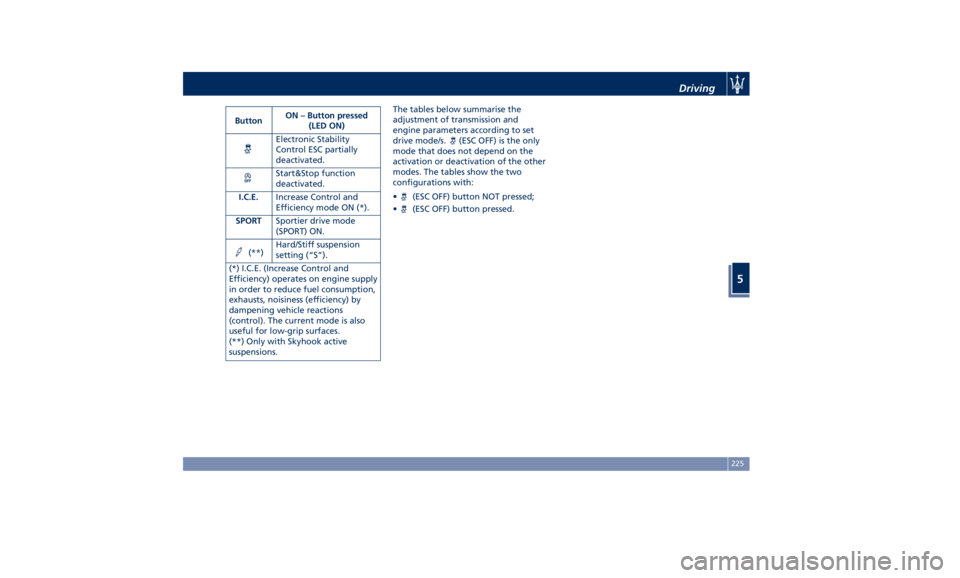
Button ON – Button pressed
(LED ON)
Electronic Stability
Control ESC partially
deactivated.
Start&Stop function
deactivated.
I.C.E. Increase Control and
Efficiency mode ON (*).
SPORT Sportier drive mode
(SPORT) ON.
(**) Hard/Stiff suspension
setting (“S”).
(*) I.C.E. (Increase Control and
Efficiency) operates on engine supply
in order to reduce fuel consumption,
exhausts, noisiness (efficiency) by
dampening vehicle reactions
(control). The current mode is also
useful for low-grip surfaces.
(**) Only with Skyhook active
suspensions. The tables below summarise the
adjustment of transmission and
engine parameters according to set
drive mode/s.
(ESC OFF) is the only
mode that does not depend on the
activation or deactivation of the other
modes. The tables show the two
configurations with:
•
(ESC OFF) button NOT pressed;
•
(ESC OFF) button pressed. Driving
5
225
Page 233 of 384
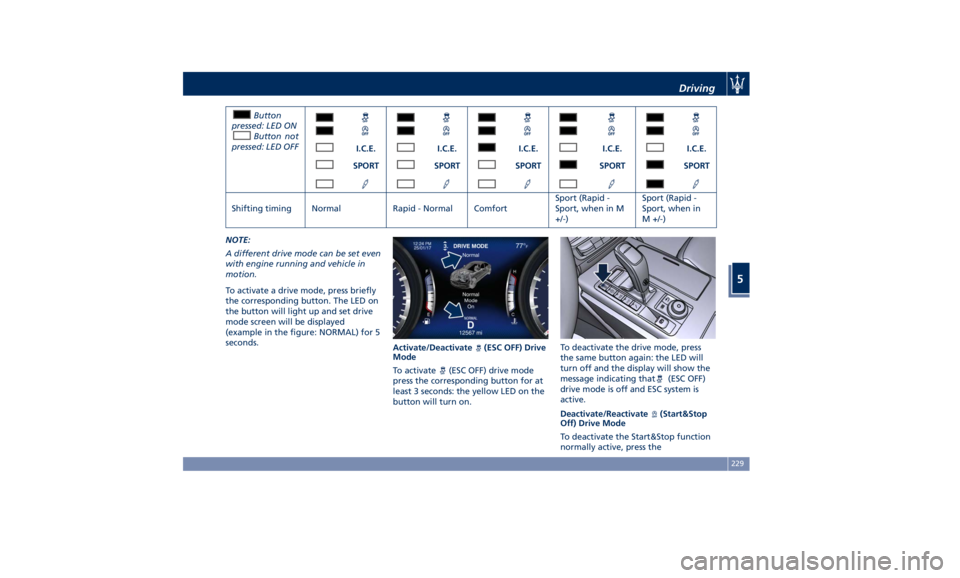
Button
pressed: LED ON
Button not
pressed: LED OFF
I.C.E. I.C.E. I.C.E. I.C.E. I.C.E.
SPORT SPORT SPORT SPORT SPORT
Shifting timing Normal Rapid - Normal Comfort Sport (Rapid -
Sport, when in M
+/-) Sport (Rapid -
Sport, when in
M +/-)
NOTE:
A different drive mode can be set even
with engine running and vehicle in
motion.
To activate a drive mode, press briefly
the corresponding button. The LED on
the button will light up and set drive
mode screen will be displayed
(example in the figure: NORMAL) for 5
seconds.
Activate/Deactivate
(ESC OFF) Drive
Mode
To activate (ESC OFF) drive mode
press the corresponding button for at
least 3 seconds: the yellow LED on the
button will turn on. To deactivate the drive mode, press
the same button again: the LED will
turn off and the display will show the
message indicating that
(ESC OFF)
drive mode is off and ESC system is
active.
Deactivate/Reactivate
(Start&Stop
Off) Drive Mode
To deactivate the Start&Stop function
normally active, press theDriving
5
229
Page 234 of 384
corresponding button once: the yellow
LED on the button will turn on.
To reactivate the Start&Stop function,
press the same button again: the LED
will turn off.
Activate/Deactivate I.C.E., SPORT and
(Suspension) Drive Mode
To activate one of these drive mode,
press the corresponding button once:
the white LED on the button will turn
on.
To disable the drive mode activated,
press the same button again: the LED
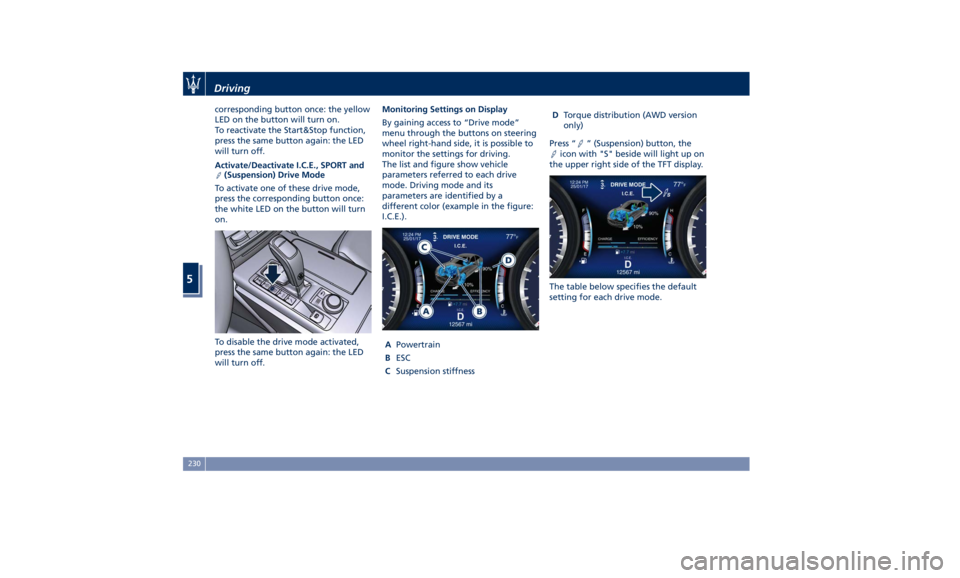
will turn off. Monitoring Settings on Display
By gaining access to “Drive mode”
menu through the buttons on steering
wheel right-hand side, it is possible to
monitor the settings for driving.
The list and figure show vehicle
parameters referred to each drive
mode. Driving mode and its
parameters are identified by a
different color (example in the figure:
I.C.E.).
A Powertrain
B ESC
C Suspension stiffness D Torque distribution (AWD version
only)
Press “
” (Suspension) button, the
icon with "S" beside will light up on
the upper right side of the TFT display.
The table below specifies the default
setting for each drive mode.Driving
5
230
Page 243 of 384
deactivate the system see “Drive
Mode” in this section.
WARNING!
In SPORT mode the ESC control
thresholds are higher for maximum
performance on dry road surface. To
ensure maximum security of the ESC,
it is recommended not to activate
SPORT mode on surfaces with
medium- and low-grip (e.g., wet,
snow, dirt, etc..) with ESC system
active (
(ESC OFF) button not
pressed).
NOTE:
• When in “ESC off” mode, the TCS
functionality of ESC is deactivated
(except for the limited slip feature
described in the TCS paragraph of
this chapter). All other stability
features of ESC function regularly.
• To improve the vehicle's traction
when driving with snow chains, or
when starting off in deep snow,
sand, or gravel, it may be desirable
to switch to the “ESC off” mode by
pressing the
(ESC OFF) button and
remain in this operational mode no
longer than needed. Once the
situation requiring “ESC off” mode is overcome, turn the ESC on again by
pressing the
(ESC OFF) button.
This may also be performed while in
motion.
Anti-Lock Braking System (ABS)
and Electronic Brake-force
Distribution (EBD) The Anti-Lock Braking System (ABS)
provides increased vehicle stability and
brake performance under most
braking conditions. The system
automatically “pumps” the brakes
during severe braking to prevent
wheel lock-up.
The Electronic Brake-force Distribution
(EBD) prevents the rear wheels from
over-braking and provides greater
control of available braking forces
applied to the rear axle.
WARNING!
The ABS helps prevent the wheels
from locking, but it does not increase
the physical grip limits between the
tires and the road. Therefore, always
keep a safe distance from the vehicle
in front of yours and reduce your
speed when entering a curve. NOTE:
• When
the vehicle's speed is higher
than 7 mph (11 km/h), you may hear
a slight clicking sound as well as
other motor noises. The system is
performing a self-check cycle to
ensure that the ABS is working
properly.
• This self-check occurs each time the
vehicle is started and accelerated
past 7 mph (11 km/h).
ABS is activated during braking under
certain road or stopping conditions.
ABS-inducing conditions can include
ice, snow, gravel, bumps, railroad
tracks, loose debris.
You may also experience the following
when the brake system goes into Anti-
Lock:
• The ABS motor running (it may
continue to run for a short time
after the vehicle stops).
• The clicking sound of solenoid
valves.
• Brake pedal pulsations.
• A slight drop or fall away of the
brake pedal at the end of the stop.
These are all normal characteristics
of ABS functioning.Driving
5
239