windshield MASERATI GHIBLI 2019 Owner's Manual
[x] Cancel search | Manufacturer: MASERATI, Model Year: 2019, Model line: GHIBLI, Model: MASERATI GHIBLI 2019Pages: 384, PDF Size: 13.33 MB
Page 259 of 384

Display Warnings and
Maintenance of ACC and FCW
Systems Wipe Front Radar Sensor Warning
This warning will display and a signal
will indicate when conditions
temporarily limit system performance
due to sensor poor or failed signal
reception. This most often occurs at
times of poor visibility, such as in snow
or heavy rain. The ACC and FCW
systems may also become temporarily
blinded due to obstructions, such as
mud, dirt or ice on the radar sensor. In
these cases, the system will be
disabled.
This message can sometimes be
displayed while driving in highly
reflective areas (i.e. tunnels with
reflective tiles, or ice and snow). The
ACC and FCW systems will recover
operation after the vehicle has left
these areas. Under rare conditions,
when the radar is not tracking any
vehicles or objects in its path this
warning may temporarily occur.
If weather conditions are not a factor,
the driver should examine the sensor.
It may require cleaning or removal of
an obstruction. The sensor is located in
the center of the front grille, behind
the Maserati trident. To keep the ACC System operating
properly, it is important to note the
following maintenance items:
• Always keep the sensor clean.
Carefully wipe the sensor lens with a
soft cloth. Be cautious not to
damage it.
• Do not remove any screws from the
sensor. Doing so could cause an ACC
system malfunction or failure and
require a sensor realignment.
• If the sensor or front end of the
vehicle is damaged due to a collision,
see your authorized dealer for
service.
• Do not attach or install any
accessories near the sensor, including
transparent material or aftermarket
grilles. Doing so could cause an ACC
system failure or malfunction. When
the condition that deactivated the
system is no longer present, the
system will return to the “Adaptive
Cruise Control Off” state and will
resume function by simply
reactivating it. NOTE:
If the radar sensor wipe warning
message occurs frequently (e.g. more
than once on every trip) without any
snow, rain, mud, or other obstruction,
have the radar sensor realigned at an
Authorized Maserati Dealer .
Clean Front Windshield Warning
This warning will display and a signal
will indicate when conditions
temporarily limit system performance
due to failed signal reception. This
most often occurs at times of poor
visibility, such as in snow or heavy rain
and fog. The ACC and FCW systems
may also become temporarily blinded
due to obstructions, such as mud, dirt,
or ice on the windshield and fog on
the inside of glass or when driving in
bad weather. In these cases, the
system will have degraded
performance.
The ACC and FCW systems will recover
operation after the vehicle has left
these areas. Under rare conditions,
when the camera is not tracking any
vehicles or objects in its path this
warning may temporarily occur.
If weather conditions are not a factor,
the driver should examine the
windshield and the camera. They mayDriving
5
255
Page 260 of 384

require cleaning or removal of an
obstruction.
When the condition that created
limited functionality is no longer
present, the ACC and FCW systems will
return to full functionality.
NOTE:
If the windshield wiper warning
message occurs frequently (e.g. more
than once on every trip) without any
snow, rain, mud, or other obstruction,
have the windshield and forward-
facing camera inspected at an
Authorized Maserati Dealer .
Service ACC/FCW Warning
If the ACC and FCW systems turn off,
and the system displays a service
warning, there may be an internal
system fault or a temporary
malfunction that limits functionality.
Although the vehicle is still driveable
under normal conditions, ACC and
FCW will be temporarily unavailable. If
this occurs, try activating ACC and FCW
again later, following a key cycle. If the
problem persists, contact an
Authorized Maserati Dealer .Precautions while Driving with
ACC Offset Driving
ACC may not detect a vehicle in the
same lane that is offset from your
direct line of travel, or a vehicle
merging in from a side lane. There
may not be sufficient distance to the
vehicle ahead. The offset vehicle may
move in and out of the line of travel,
which can cause your vehicle to brake
or accelerate unexpectedly. Turns and Bends
When driving on a curve with ACC
engaged, the system may decrease the
vehicle speed and acceleration for
stability reasons, with no target vehicle
detected. Once the vehicle is out of
the curve the system will resume your
original Set Speed. This is a part of
normal ACC system functionality.
Moreover, the radar sensor might
detect a vehicle on a nearby lane or no
longer detect the target vehicle.Driving
5
256
Page 269 of 384

rain, snow, wet roads, fog, direct sun
on the camera, etc.).
NOTE:
• The presence of the hands on the
steering wheel is detected by a logic
combination of a capacitive sensor
installed in the steering wheel and
the measured applied torque at the
steering column. This leads to a
more robust hands detection when
hands are actually on the steering
wheel (at least one).
• The sensors are not able to detect
the presence of the hands on the
steering wheel areas covered in
wood, plastic bezels or carbon
inserts (where present).
Sharp turns, slopes and change in
slopes, poor lane boundaries, as well
as construction areas and all the
scenario described in this paragraph
may challenge the system, therefore
be always ready to prevent any
unexpected behaviour of the car.
Damaged front bumper, windshield
replaced without proper technical
intervention may also lead to system
malfunction or system unavailability.
Other conditions such as fault, but not
explicitly indicated here may also prevent/interrupt the system
intervention.
WARNING!
If the driver fails to adapt his/her
driving style, Lane Keeping Assist
(LKA) can neither reduce the risk of an
accident nor override the laws of
physics. It cannot take into account
road, weather or traffic conditions.
Active LKA is only an aid. Driver is
always responsible for the distance to
the vehicle in front, for vehicle speed,
for braking in good time and for
staying in lane.
System in Fault When the LKA cannot properly
operate due to a fault of its
components or because the
windshield in front of the forward
facing camera is dirty, the amber light
and/or the corresponding message will
be displayed. If message suggestion does not allow
fixing the fault, do not use the system
and have the vehicle inspected at an
Authorized Maserati Dealer .
Radar Device - Regulatory
Information The “Regulatory Information” for all
the radio frequency and radar devices
can be consulted by accessing the
“Services” section on the website
www.maserati.com.Driving
5
265
Page 276 of 384
Speed Range of Use Speed mph (km/h)
Minimum 37 (60)
Engaged/activated 37 (60)
Maximum 112 (180)
System Limitation Because of physical limits the system to
properly operate needs good visibility
(it might not work or not properly
operate in case of heavy rain, snow,
wet roads, fog, direct sun on the
camera, dirty windshield, low
illumination etc.)
Sharp turns, slopes and change in
slopes, poor lane boundaries, as well
as construction areas and all the
scenarios described in this paragraph
may challenge the system, therefore
be always ready to prevent any
unexpected behaviour of the car.
Damaged front bumper, windshield
replaced without proper technical
intervention may also lead to system
malfunction or system unavailability.
Other conditions such as faults, but
not explicitly indicated here may also
prevent/interrupt the system
intervention. ABSA Setting ABSA is configurable by the customer
in order to maximize its efficiency
based on the driver driving style and
his/her expectation of the system,
reducing at the same time the possible
invasiveness.
Setting modes can be selected from
the MTC+ System (see "MTC+
"Controls" Screen" in section
"Dashboard Instruments and Controls"
for further information).
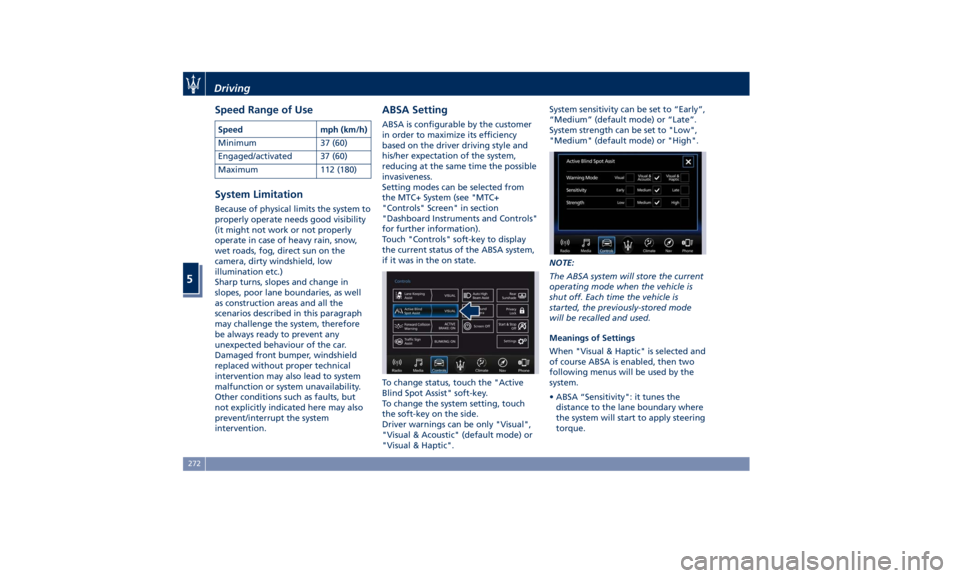
Touch "Controls" soft-key to display
the current status of the ABSA system,
if it was in the on state.
To change status, touch the "Active
Blind Spot Assist" soft-key.
To change the system setting, touch
the soft-key on the side.
Driver warnings can be only "Visual",
"Visual & Acoustic" (default mode) or
"Visual & Haptic". System sensitivity can be set to “Early”,
“Medium” (default mode) or “Late”.
System strength can be set to "Low",
"Medium" (default mode) or "High".
NOTE:
The ABSA system will store the current
operating mode when the vehicle is
shut off. Each time the vehicle is
started, the previously-stored mode
will be recalled and used.
Meanings of Settings
When "Visual & Haptic" is selected and
of course ABSA is enabled, then two
following menus will be used by the
system.
• ABSA “Sensitivity": it tunes the
distance to the lane boundary where
the system will start to apply steering
torque.Driving
5
272
Page 278 of 384

windshield where the forward-facing
camera is located or on the rear
bumper fascia where the radar sensors
are located is dirty. In these cases the
amber warning light and the related
message will be displayed on the
instrument cluster.
In these cases do not use the system
and have the vehicle inspected at an
Authorized Maserati Dealer .
Radar Device - Regulatory
Information The “Regulatory Information” for all
the radio frequency and radar devices
can be consulted by accessing the
“Services” section on the website
www.maserati.com. Highway Assist – HAS
(optional, with ACC only) The Highway Assist (HAS) is a level 2
Autonomy system (in reference to
NHTSA standards) that is designed to
aid the driver in the steering,
acceleration, and braking functions of
the vehicle.
HAS is designed to only function on
highways or limited access freeways.
HAS centers the vehicle by controlling
the EPS system based off of lane line
information from the forward-facing
camera and data from the front radar
sensor.
HAS combines ACC and LKA to
manage the steering and speed of the
vehicle under specific conditions. The
conditions to engage HAS are listed in
the next paragraph. If a lane line cross
is imminent, the steering wheel will vibrate and a graphic will display on
the instrument cluster.
WARNING!
• In case the vehicle approaches a
curve that is too tight in relation to
the current speed the system will
disengage, therefore the driver must
be prepared to take over control of
the vehicle immediately at any time.
To avoid this situation it is important
that the vehicle speed is not set
higher than the current speed limit
of the road.
• Highway Assist (HAS) is a hands-on
feature! You must keep your hands
on the steering wheel at all times.
The HAS system will disengage and
ACC will cancel if your hands are
removed from the steering wheels
for a set amount of time.
• HAS is intended for use only on
highways or limited access freeways
with a fully attentive driver. When
using HAS, hold the steering wheel
and be aware of surrounding traffic
and road conditions. Always be
prepared to immediately take over
control of the vehicle from the HAS
system. Failure to follow theseDriving
5
274
Page 279 of 384
instructions could result in serious
injury or death.
• The following list does not fully
represent all situations in which HAS
may not function as intended. Do
NOT solely rely on the HAS system
to control the vehicle. It is the
driver’s responsibility to stay alert
and safely control the vehicle at all
times.
• If the windshield is replaced, you
must have the forward-facing
camera remounted and aligned by
an Authorized Maserati Dealer.
Many factors can impact the
performance
of HAS
causing the
system to be unable to function as
intended. These include (but are not
limited to):
• Narrow, winding or curvy roads.
• Poor visibility (due to heavy rain,
snow, fog, etc.).
• Bright light (oncoming headlights or
direct sunlight) or shadows.
• Damage or obstruction caused by
mud, ice, snow, etc.
• A damaged or misaligned bumper.
• Interference from other equipment
that generates electromagnetic
waves. • Wet roads, roads covered or partially
covered by snow.
• Construction zones.
HAS Operation With ACC set (see “Adaptive Cruise
Crontrol – ACC” in this section), HAS
system activates by simply pressing the
button on the steering wheel.
Once the conditions are met, HAS will
engage.
CAUTION!
The Highway Assist (HAS) system may
take up to 5 seconds to engage once
all conditions are met.
The conditions for HAS to engage are
as
follows:
• HAS must be turned on or enabled.
NOTE:
In case of wet road or raining
conditions the function could be
disabled by the system in order to
minimize the risks.
• The vehicle must be on the highway
or limited access freeway.
• Adaptive Cruise Control (ACC) must
be engaged.
• Left and right visible lane lines. • Vehicle speed must be between 0 to
90 mph (0 and 145 km/h).
• No faults in the forward facing
camera, radar, EPS, or MTC+.
• Lane width between 3 to 4.6 yd (2.8
and 4.2 m).
• Turn signal not activated.
• No faults related to this system.
Speed Range of Use Speed mph (km/h)
Minimum 0 (0)
Engaged/activated
(with ACC engaged) 0 (0)
Engaged/activated
(with ACC not
engaged) 18 (30)
Maximum 90 (145)
• If set above the maximum speed,
HAS will not function after the
vehicle speed will reach the
maximum speed.
• If set below the maximum speed and
the ACC target speed is increased,
HAS will function up to the
maximum speed and then the system
will turn off automatically.
• When the ACC target speed is
reduce and speed is lower than theDriving
5
275
Page 283 of 384

• Lateral accelerations exceeds the
limits.
NOTE:
• When HAS cancels, the symbol
will turn red then grey.
• The presence of the hands on the
steering wheel is detected by a logic
combination of a capacitive sensor
installed in the steering wheel and
the measured applied torque at the
steering column. This leads to a
more robust hands detection.
System Limitations HAS is unable to guide the vehicle
when the following conditions occur.
• Lane markings are not clear or
visibility is poor (i.e. heavy rain,
snow, fog, etc.).
• Obstructed, covered or damaged
forward-facing camera or sensor.
• When driving on hills or sharp
curves.
• When approaching toll booths.
• When the highway entrance or exit
is wider than 20 ft (6 meters).
• Bright light (ex. direct sunlight or
glare) facing the forward camera. WARNING!
Many unforeseen conditions can occur
that can affect the performance of
Highway Assist (HAS). Always keep
this in mind and drive attentively. It is
the drivers responsibility to keep
control of the vehicle at all times.
Radar Device - Regulatory
Information The “Regulatory Information” for all
the radio frequency and radar devices
can be consulted by accessing the
“Services” section on the website
www.maserati.com.Traffic Sign Assist – TSA
(optional) TSA detects traffic signs through the
use of a forward-facing digital camera
mounted on windshield, behind the
rear-view mirror. TSA assists the driver
by displaying on the instrument
cluster detected speed limits and
traffic signs with a restriction
indicated by an additional sign (e.g. in
snow conditions). TSA also uses the
data of the navigation system, in
order to provide information to the
driver in all cases in which the camera
is not able to detect the traffic signs
that are present on the road where
the car is travelling.
Some examples of these are: due to
low visibility, light reflection, damaged
traffic signs, traffic signs in wrong
position like rotated or fallen poles.
NOTE:
• Overtaking restriction signs are not
displayed by the TSA system.
• TSA provides a visual warning to the
driver when he/she unintentionally
reaches the maximum speed limit
allowed or when it exceeds the set
“Sensitivity” value.
(Continued)Driving
5
279
Page 285 of 384
speed stays above the unconditioned
speed limit for several seconds the
unconditioned speed limit sign will
stop blinking because the manoeuvre
is evaluated as intentional. If the TSA
is not able to determine any kind of
valid speed limit neither from camera
nor from digital maps the following
image will be shown in sector 2 .
Since TSA also uses the data provided
by the navigation system, it can
update the sector 2 of the display in
the following situations without
detecting traffic signs:
• When the vehicle changes road.
• Highway enter/exit.
• Urban area stored in the digital map
enter/exit.
System Limitations TSA may be impaired or may not
function in the following situations:
• If there is poor visibility, e.g. due to
insufficient illumination of the road,
if there are highly variable shade
conditions or in rain, snow or fog.
• If there is glare, e.g. from oncoming
traffic, direct sunlight or reflections
from other vehicles. • If the windshield in the area of the
camera is dirty, or if the camera is
fogged up, damaged or covered.
• If the traffic signs are hard to detect,
e.g. due to dirt or snow, or because
they are covered or because of
insufficient lighting.
• If the information in the navigation
system's digital map is incorrect or
out-of-date.
• If the signs are ambiguous, e.g.
traffic signs on construction sites or
in adjacent lanes.
• When passing buses or trucks with a
speed sticker.Tires - General
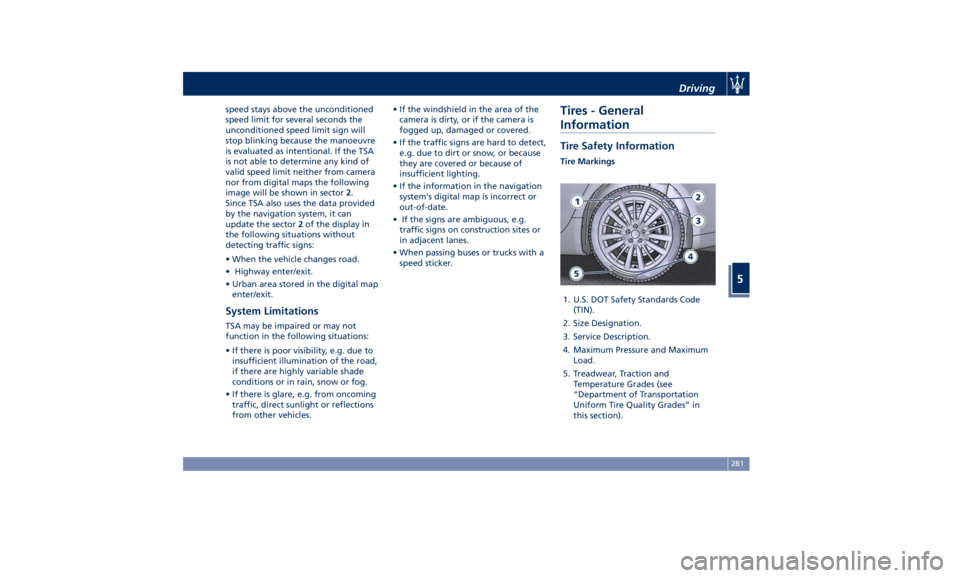
Information Tire Safety Information Tire Markings
1. U.S. DOT Safety Standards Code
(TIN).
2. Size Designation.
3. Service Description.
4. Maximum Pressure and Maximum
Load.
5. Treadwear, Traction and
Temperature Grades (see
“Department of Transportation
Uniform Tire Quality Grades” in
this section).Driving
5
281
Page 302 of 384
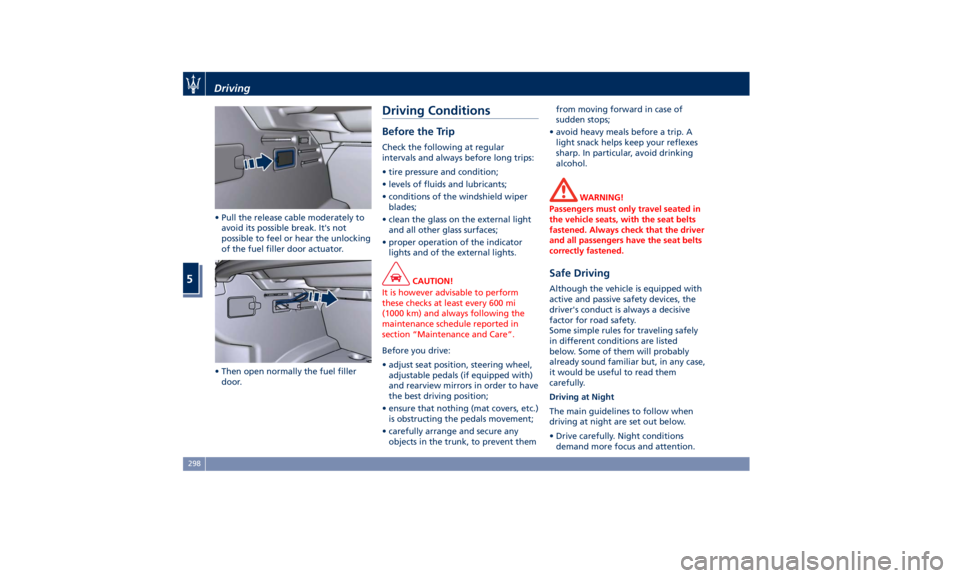
• Pull the release cable moderately to
avoid its possible break. It's not
possible to feel or hear the unlocking
of the fuel filler door actuator.
• Then open normally the fuel filler
door. Driving Conditions Before the Trip Check the following at regular
intervals and always before long trips:
• tire pressure and condition;
• levels of fluids and lubricants;
• conditions of the windshield wiper
blades;
• clean the glass on the external light
and all other glass surfaces;
• proper operation of the indicator
lights and of the external lights.
CAUTION!
It is however advisable to perform
these checks at least every 600 mi
(1000 km) and always following the
maintenance schedule reported in
section “Maintenance and Care”.
Before you drive:
•
adjust seat position, steering wheel,
adjustable pedals (if equipped with)
and rearview mirrors in order to have
the best driving position;
• ensure that nothing (mat covers, etc.)
is obstructing the pedals movement;
• carefully arrange and secure any
objects in the trunk, to prevent them from moving forward in case of
sudden stops;
• avoid heavy meals before a trip. A
light snack helps keep your reflexes
sharp. In particular, avoid drinking
alcohol.
WARNING!
Passengers must only travel seated in
the vehicle seats, with the seat belts
fastened. Always check that the driver
and all passengers have the seat belts
correctly fastened.
Safe Driving Although the vehicle is equipped with
active and passive safety devices, the
driver's conduct is always a decisive
factor for road safety.
Some simple rules for traveling safely
in different conditions are listed
below. Some of them will probably
already sound familiar but, in any case,
it would be useful to read them
carefully.
Driving at Night
The main guidelines to follow when
driving at night are set out below.
• Drive carefully. Night conditions
demand more focus and attention.Driving
5
298
Page 303 of 384
• Reduce your speed, especially on
roads with no streetlights.
• Stop at early signs of drowsiness.
Continuing to drive would be a risk
for yourself and for others. Have a
rest before continuing your trip.
• Keep the vehicle at a greater
distance from vehicles in front of
you than you would during the day:
it is difficult to assess the speed of
other vehicles when you only see the
lights.
• Use the high beams only outside of
densely-populated areas and when
you are sure that they will not
disturb other drivers.
• When another vehicle is
approaching, switch from high
beams (if on) to low beams.
• Keep lights and headlights clean.
• Outside of densely-populated areas,
beware of animals crossing the road.
Driving in the Rain
Rain and wet roads are dangerous. On
a wet road all maneuvers are more
difficult since wheel grip on the road
is significantly reduced. This means
that braking distances increase
considerably and road grip decreases.
Some advices for driving in the rain
are listed below. • Reduce your speed and keep a
greater safety distance from the
vehicles in front of you. High speed
may result in a loss of vehicle
control.
• When driving on wet or slushy roads,
it is possible for a wedge of water to
build up between the tire and road
surface. This is known as
aquaplaning and may cause partial
or complete loss of vehicle control
and stopping ability. To reduce this
possibility: slow down if the road has
standing water or puddles.
• Heavy rain substantially reduces
visibility. In these circumstances, even
during the day, turn on the low
beams, to be more visible to other
drivers.
• Set the air conditioning and heating
system controls on the defogging
function, in order to avoid any
visibility problem.
• Periodically check the conditions of
the windshield wiper blades.
• In low grip conditions use “I.C.E.”
driving mode (see chapters “Drive
Mode” in this section).
• Avoid driving with ESC OFF as this
will likely cause a loss of control of
the vehicle. Driving in Fog
If the fog is dense, avoid traveling if
possible.
When driving in mist, blanket fog or
when there is the possibility of banks
of fog, please consider some advices
listed below.
• Keep a moderate speed.
• Even in daytime, turn on the low
beams and rear fog lights. Do not
use the high beams.
• Remember that fog creates
dampness on the asphalt and thus
any type of maneuver is more
difficult and braking distances are
extended.
• Keep a safe distance from the
vehicle in front of you.
• Avoid sudden changes in speed as
much as possible.
• Whenever possible, avoid
overtaking.
• If you are forced to stop the vehicle
(breakdowns, impossibility of
proceeding due to poor visibility,
etc.), first of all, try to stop off of the
travel lane. Then turn on the hazard
warning flashers and, if possible, the
low beams.Driving
5
299