stop start MASERATI GHIBLI 2019 Workshop Manual
[x] Cancel search | Manufacturer: MASERATI, Model Year: 2019, Model line: GHIBLI, Model: MASERATI GHIBLI 2019Pages: 384, PDF Size: 13.33 MB
Page 258 of 384
NOTE:
The displayed warning is a warning for
the driver to take action and does not
necessarily mean that the Forward
Collision Warning (FCW) system is
applying the brakes autonomously.
Overtake Aid When driving with ACC engaged and
following a target vehicle, the system
will provide an additional acceleration
to assist in passing vehicles in front.
This additional acceleration is
triggered when the driver utilizes the
left turn signal to start overtaking. In
locations with left hand drive traffic,
overtake aid is active only when
passing on the left hand side of the
target vehicle.
When a vehicle goes from a location
with left hand drive traffic to a
location with right hand drive traffic,
the ACC system will automatically
detect traffic direction. In this
condition, overtake aid is active only
when passing on the right side of the
target vehicle. This additional
acceleration is triggered when the
driver utilizes the right turn signal to
start overtaking. In this condition the
ACC system will no longer provide
overtake aid on the left side until it determines that the vehicle has moved
back to a location with left hand drive.
ACC Operation Before and
During Stop If an ACC host vehicle follows a target
vehicle to a standstill, after two or
three seconds the system will not be
able to resume driving the car
autonomously. In this condition, TFT
displays an instruction message pop up
for 5 seconds.
When the ACC system brings the
vehicle to a standstill while following a
target vehicle, the brakes are released
after two-three seconds after the stop
and at the same time the system
inserts the parking brake. When
parking brake engages the ACC
deactivates going to ready state.
At this point the driver must reengage
the system acting on the multifunction
control (RES + or SET -) or alternatively
on the accelerator pedal. While ACC
with Stop is holding your vehicle at a
standstill, if the driver unbuckles the
seatbelt or opens the door, the ESC
system will activate the EPB. During
standstill, ACC system monitors the
occupant detection signals: if the
driver's seatbelt becomes unbuckled,
the ACC system shall be cancelled
when the EPB is applied. WARNING!
• When the ACC system is resumed,
the driver must ensure that there are
no pedestrians, vehicles or objects in
the path of the vehicle. Failure to
follow these warnings can result in a
collision and death or serious
personal injury.
• During the automatic stopping
behind a vehicle in some rare cases it
may happen that the system does
not recognize the rearmost point of
the vehicle ahead but a target under
the vehicle ahead (e.g. the back axis
of a truck with a high loading edge
or a bumper of a vehicle although
overhanging load is hanging over
the vehicle’s rear). In these cases the
system cannot guarantee the
appropriate stopping distance
leading to collision in the worst case.
For this reason the driver has to be
attentive and ready to brake during
automatic stops.Driving
5
254
Page 309 of 384
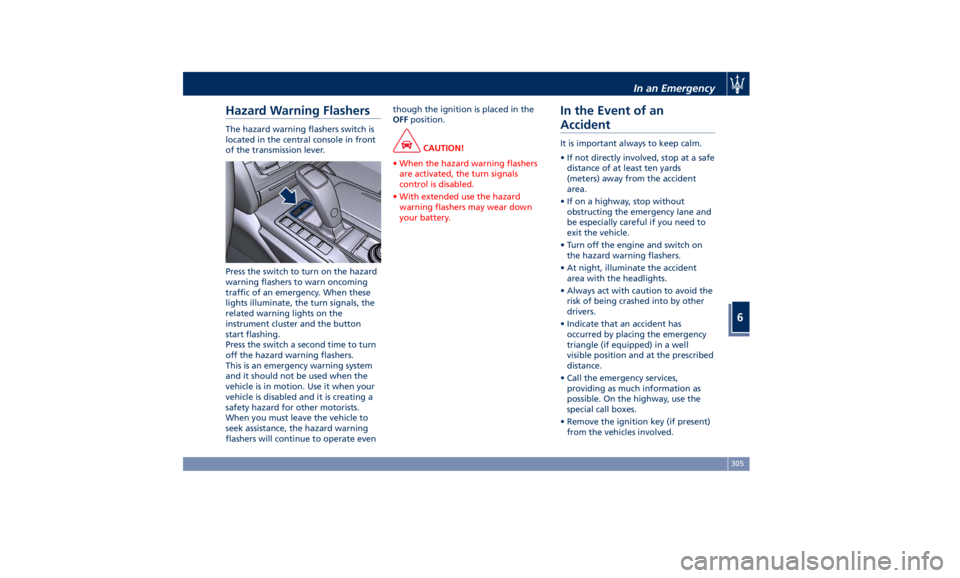
Hazard Warning Flashers The hazard warning flashers switch is
located in the central console in front
of the transmission lever.
Press the switch to turn on the hazard
warning flashers to warn oncoming
traffic of an emergency. When these
lights illuminate, the turn signals, the
related warning lights on the
instrument cluster and the button
start flashing.
Press the switch a second time to turn
off the hazard warning flashers.
This is an emergency warning system
and it should not be used when the
vehicle is in motion. Use it when your
vehicle is disabled and it is creating a
safety hazard for other motorists.
When you must leave the vehicle to
seek assistance, the hazard warning
flashers will continue to operate even though the ignition is placed in the
OFF position.
CAUTION!
• When the hazard warning flashers
are activated, the turn signals
control is disabled.
• With extended use the hazard
warning flashers may wear down
your battery.
In the Event of an
Accident It is important always to keep calm.
• If not directly involved, stop at a safe
distance of at least ten yards
(meters) away from the accident
area.
• If on a highway, stop without
obstructing the emergency lane and
be especially careful if you need to
exit the vehicle.
• Turn off the engine and switch on
the hazard warning flashers.
• At night, illuminate the accident
area with the headlights.
• Always act with caution to avoid the
risk of being crashed into by other
drivers.
• Indicate that an accident has
occurred by placing the emergency
triangle (if equipped) in a well
visible position and at the prescribed
distance.
• Call the emergency services,
providing as much information as
possible. On the highway, use the
special call boxes.
• Remove the ignition key (if present)
from the vehicles involved.In an Emergency
6
305
Page 312 of 384
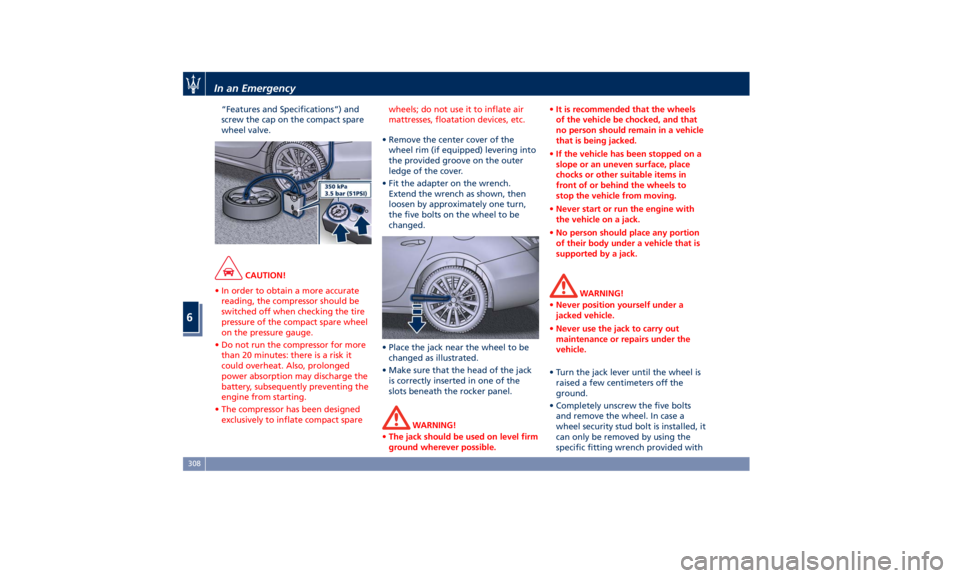
“Features and Specifications”) and
screw the cap on the compact spare
wheel valve.
CAUTION!
• In order to obtain a more accurate
reading, the compressor should be
switched off when checking the tire
pressure of the compact spare wheel
on the pressure gauge.
• Do not run the compressor for more
than 20 minutes: there is a risk it
could overheat. Also, prolonged
power absorption may discharge the
battery, subsequently preventing the
engine from starting.
• The compressor has been designed
exclusively to inflate compact spare wheels; do not use it to inflate air
mattresses, floatation devices, etc.
• Remove the center cover of the
wheel
rim (if equipped) levering into
the provided groove on the outer
ledge of the cover.
• Fit the adapter on the wrench.
Extend the wrench as shown, then
loosen by approximately one turn,
the five bolts on the wheel to be
changed.
• Place the jack near the wheel to be
changed as illustrated.
• Make sure that the head of the jack
is correctly inserted in one of the
slots beneath the rocker panel.
WARNING!
• The jack should be used on level firm
ground wherever possible. • It is recommended that the wheels
of the vehicle be chocked, and that
no person should remain in a vehicle
that is being jacked.
• If the vehicle has been stopped on a
slope or an uneven surface, place
chocks or other suitable items in
front of or behind the wheels to
stop the vehicle from moving.
• Never start or run the engine with
the vehicle on a jack.
• No person should place any portion
of their body under a vehicle that is
supported by a jack.
WARNING!
• Never position yourself under a
jacked vehicle.
• Never use the jack to carry out
maintenance or repairs under the
vehicle.
• Turn the jack lever until the wheel is
raised a few
centimeters off the
ground.
• Completely unscrew the five bolts
and remove the wheel. In case a
wheel security stud bolt is installed, it
can only be removed by using the
specific fitting wrench provided withIn an Emergency
6
308
Page 344 of 384
Ref. Type Function
36 Mini – 30A PCM module
primary load
37 Mini – 15A Engine secondary
load
38 Mini – 15A Lambda sensor
39 Mini – 7,5A Flow meters,
tank lackage,
canister, exhaust
by-pass valve and
relay coil
48 – –
49 Mini – 10A Pedal brake
switch - TCM
module
50 Mini – 15A +30 PCM module
51 Mini – 30A Fuel pump relay
input
52 Mini – 5A Starter solenoid
signal for PCM
and voltage
stabilizer
53 Mini – 10A AWD module
(AWD version
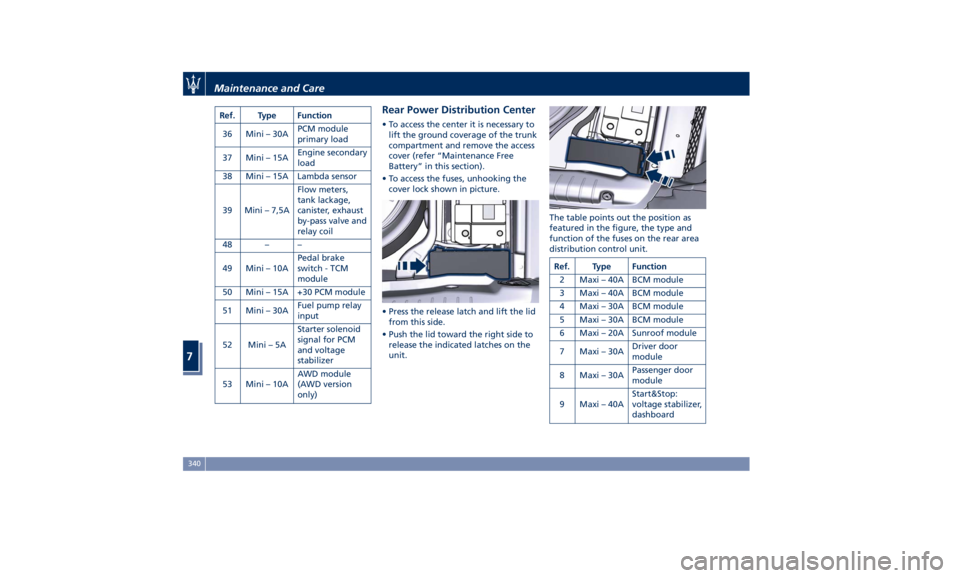
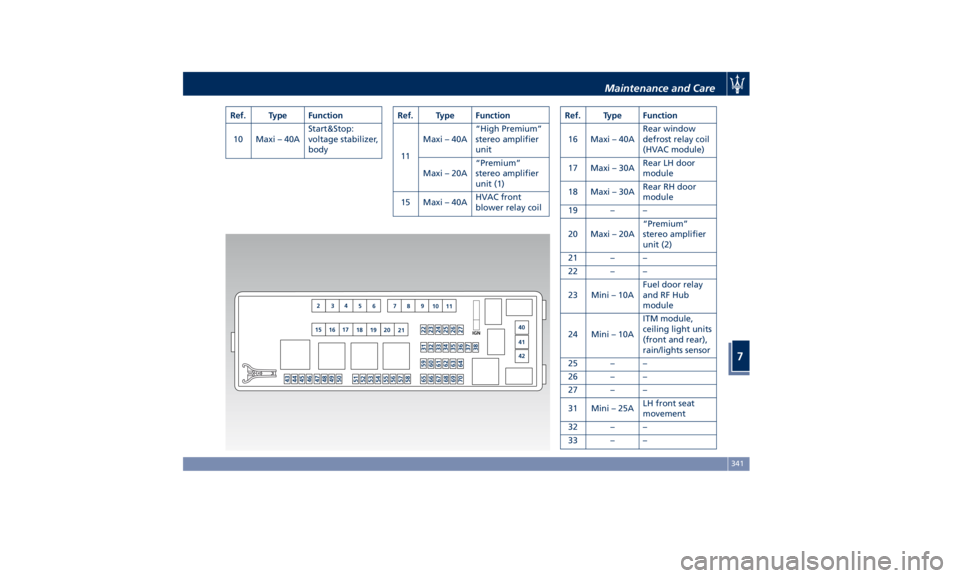
only) Rear Power Distribution Center • To access the center it is necessary to
lift the ground coverage of the trunk
compartment and remove the access
cover (refer “Maintenance Free
Battery” in this section).
• To access the fuses, unhooking the
cover lock shown in picture.
• Press the release latch and lift the lid
from this side.
• Push the lid toward the right side to
release the indicated latches on the
unit. The table points out the position as
featured in the figure, the type and
function of the fuses on the rear area
distribution control unit.
Ref. Type Function
2 Maxi – 40A BCM module
3 Maxi – 40A BCM module
4 Maxi – 30A BCM module
5 Maxi – 30A BCM module
6 Maxi – 20A Sunroof module
7 Maxi – 30A Driver door
module
8 Maxi – 30A Passenger door
module
9 Maxi – 40A Start&Stop:
voltage stabilizer,
dashboardMaintenance and Care
7
340
Page 345 of 384
Ref. Type Function
10 Maxi – 40A Start&Stop:
voltage stabilizer,
body Ref. Type Function
11 Maxi – 40A “High Premium”
stereo amplifier
unit
Maxi – 20A “Premium”
stereo amplifier
unit (1)
15 Maxi – 40A HVAC front
blower relay coil Ref. Type Function
16 Maxi – 40A Rear window
defrost relay coil
(HVAC module)
17 Maxi – 30A Rear LH door
module
18 Maxi – 30A Rear RH door
module
19 – –
20 Maxi – 20A “Premium”
stereo amplifier
unit (2)
21 – –
22 – –
23 Mini – 10A Fuel door relay
and RF Hub
module
24 Mini – 10A ITM module,
ceiling light units
(front and rear),
rain/lights sensor
25 – –
26 – –
27 – –
31 Mini – 25A LH front seat
movement
32 – –
33 – –Maintenance and Care
7
341
Page 347 of 384
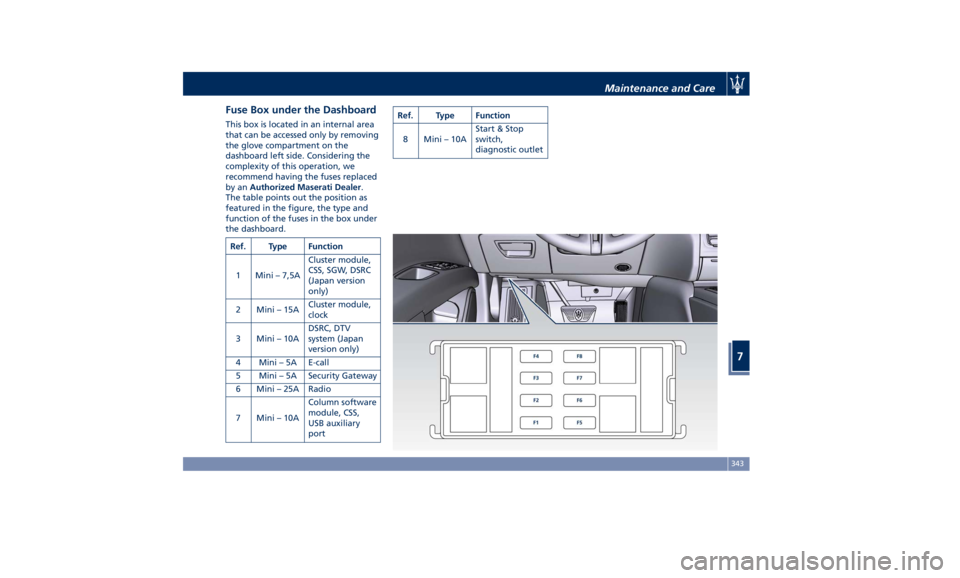
Fuse Box under the Dashboard This box is located in an internal area
that can be accessed only by removing
the glove compartment on the
dashboard left side. Considering the
complexity of this operation, we
recommend having the fuses replaced
by an Authorized Maserati Dealer .
The table points out the position as
featured in the figure, the type and
function of the fuses in the box under
the dashboard.
Ref. Type Function
1 Mini – 7,5A Cluster module,
CSS, SGW, DSRC
(Japan version
only)
2 Mini – 15A Cluster module,
clock
3 Mini – 10A DSRC, DTV
system (Japan
version only)
4 Mini – 5A E-call
5 Mini – 5A Security Gateway
6 Mini – 25A Radio
7 Mini – 10A Column software
module, CSS,
USB auxiliary
port Ref. Type Function
8 Mini – 10A Start & Stop
switch,
diagnostic outlet
Maintenance and Care
7
343
Page 380 of 384
Spare parts service
Genuine Parts ..............13
Scheduled Maintenance .......13
Spare Parts Service .............13
SRS (Supplemental Restraint
System) ....................64
Start&Stop System ........... .210
Occupant Safety Function .... .212
Start&Stop Active Indicator . . . .148
Start&Stop Disable Indicator . . . .167
Start&Stop Failure Indicator
Light ................... .167
Start&Stop Function Disabling
Indicator ................ .212
Start&Stop Menu .......... .158
Start&Stop System Failure .... .214
Start the Engine
Engine Start Failure ......... .209
Engine Turn Off ........... .210
Steering Wheel
Heated Steering Wheel ...... .106
Phone and Voice Controls on
Steering Wheel ............ .204
Sunroof
Pinch Protect Feature ....... .137
Slide Opening Sunroof ....... .137
Sunroof Maintenance ....... .138
Venting Sunroof ........... .137
Sunshades ................. .136
Power Sunshades ............47
Sun Visors ................. .130
Surround View Camera System ....80
Symbols ....................14 Danger Symbols .............14
Symbols of Prohibitions and
Compulsory Measures .........14
TCS (Traction Control System) .... .240
Technical Data .............. .364
Telltales
Telltales on Speedometer ..... .146
Telltales on Tachometer ...... .148
Warning/Indicator Lights of Set
Modes/Functions on Display . . . .163
TFT Display: Menus and Settings . . .150
Tires
Change a Tire ............. .306
Compact spare tire ......... .289
Department of Transportation
Uniform Tire Quality Grades . . . .285
General Information ........
.281
Inflation
Pressure .......... .370
Punctured Tire, use ......... .306
Replacement Tires .......... .287
Tire Pressure .............. .286
Tire Pressure Checkup ....... .286
Tire Safety Information ...... .281
TPMS - Tire Pressure Monitoring
System .................. .289
Winter Tires .............. .288
ToolKit................... .304
Towing
Towing a Disabled Vehicle .... .315
Towing the Vehicle ......... .315
Vehicle Towing Conditions .... .315
TPMS System ............... .289 Tire Pressure Low Warning .... .291
TPMS Deactivation ......... .293
Traffic Sign Assist - TSA ........ .279
Transmission, Automatic ....... .214
Automatic Transmission Lever . . .215
Automatic Transmission Range . .218
Malfunction and Overheating
Conditions ............... .222
Transmission Manual Release of P
(Park) Position ............ .312
Transmitter, Key fob RKE
Preventing Inadvertent Locking of
Key fob RKE Transmitter Inside the
Vehicle ...................43
Trunk
Power Trunk Lid/Hand Free
(optional) .................50
Trunk Safety ...............54
Trunk Lid
Power Trunk Lid/Hand Free
(optional) .................50
Trunk Lid Emergency Release from
inside the Trunk .............53
Trunk Lid Operation ..........49
Updating ....................9
Vehicle Identification Number (VIN) .18
Vehicle Stored for Long Periods . . .355
Voice Commands ............ .205
Warning icons .................8
Warnings when Driving .........15Index
9 376