TPMS MASERATI GRANTURISMO 2020 User Guide
[x] Cancel search | Manufacturer: MASERATI, Model Year: 2020, Model line: GRANTURISMO, Model: MASERATI GRANTURISMO 2020Pages: 286, PDF Size: 6.7 MB
Page 189 of 286
that prevent the TPMS from
functioning properly. Always check the
TPMS malfunction telltale after
replacing one or more tires or wheels
on your vehicle to ensure that the
replacement or alternate tires and
wheels allow the TPMS to continue to
function properly.
General Information
The Tire Pressure Monitoring System
(TPMS) will warn the driver of a low
tire pressure according to the vehicle
recommended cold pressure indicated
on the table “Tire Inflation Pressure”
in section “Features and
Specifications” and on the label
applied on the driver's side at the base
of the rear door pillar.
The cold tire inflation pressure must
not exceed the maximum inflation
pressure molded into the tire sidewall.
Check “Tires – General Information” in
section “Driving” for information on
how to properly inflate the tires.
The tire pressure will also increase as
the vehicle is driven - this is normal
and there is no adjustment required
when this occurs.
The TPMS will warn the driver of a low
tire pressure if the tire pressure falls
below the low-pressure warning limit
for any reason, including lowtemperature effects and natural
pressure loss of the tire.
The TPMS will continue to warn the
driver of low tire pressure as long as
the condition persists and will not turn
off until the tire pressure is equal or
above the recommended cold
inflation pressure.
The TPMS monitors the tire pressure
by means of special sensors fitted
inside the wheel rims, in position with
the inflation valve.
These sensors transmit a signal that is
detected by the antenna integrated in
the ECU.
The ECU processes this information
and, via the CAN line, transmits a
series of tire pressure data and system
errors, if any, to the instrument cluster.
The display may show the information
received by means of specific screen
pages, which can be recalled by
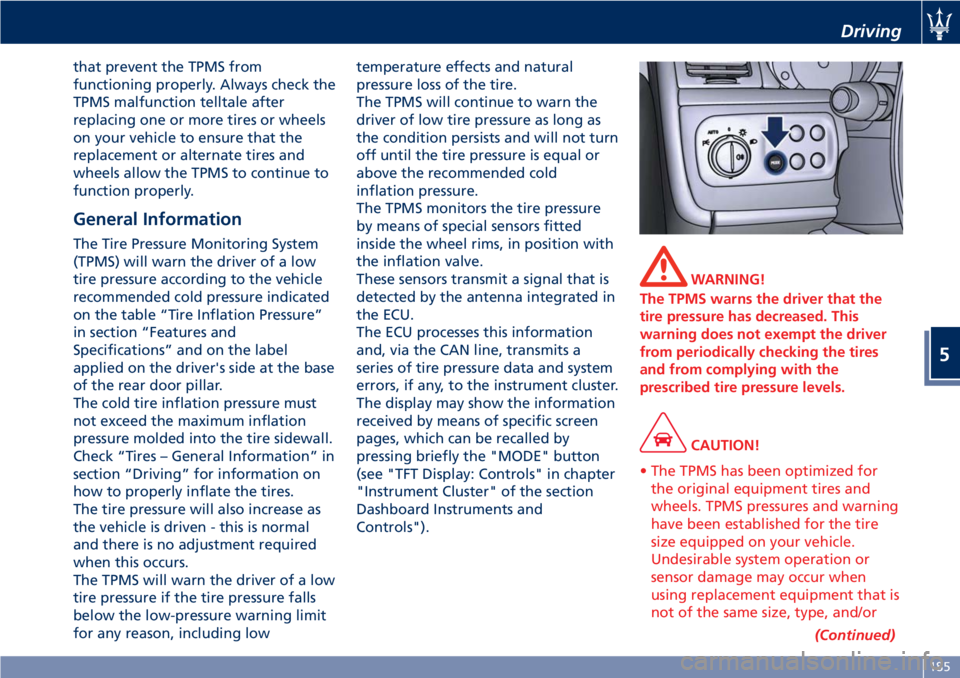
pressing briefly the "MODE" button
(see "TFT Display: Controls" in chapter
"Instrument Cluster" of the section
Dashboard Instruments and
Controls").
WARNING!
The TPMS warns the driver that the
tire pressure has decreased. This
warning does not exempt the driver
from periodically checking the tires
and from complying with the
prescribed tire pressure levels.
CAUTION!
• The TPMS has been optimized for
the original equipment tires and
wheels. TPMS pressures and warning
have been established for the tire
size equipped on your vehicle.
Undesirable system operation or
sensor damage may occur when
using replacement equipment that is
not of the same size, type, and/or
(Continued)
Driving
5
185
Page 190 of 286
(Continued)
style. Aftermarket wheels can cause
sensor damage. Do not use
aftermarket tire sealants or balance
beads, as damage to the sensors may
result.
• The system can temporarily
experience radio-electric interference
emitted by devices using similar
frequencies.
• After inspecting or adjusting the tire
pressure, always reinstall the valve
stem cap. This will prevent moisture
and dirt from entering the valve
stem and damage the TPMS internal
sensor.
NOTE:
•Driving on a significantly
underinflated tire causes the tire to
overheat and may lead to tire failure.
Under-inflation also reduces fuel
efficiency and tire tread life, and may
affect the vehicle’s handling and
stopping ability.
•The TPMS is not a substitute for
proper tire maintenance, and it is the
driver’s responsibility to maintain
correct tire pressure using an
accurate tire pressure gage, even if
under-inflation has not reached thelevel to trigger illumination of the
TPMS light
.
•Seasonal temperature changes will
affect tire pressure, and the TPMS
will monitor the actual tire pressure
in the tire.
Viewing Messages on the
Display
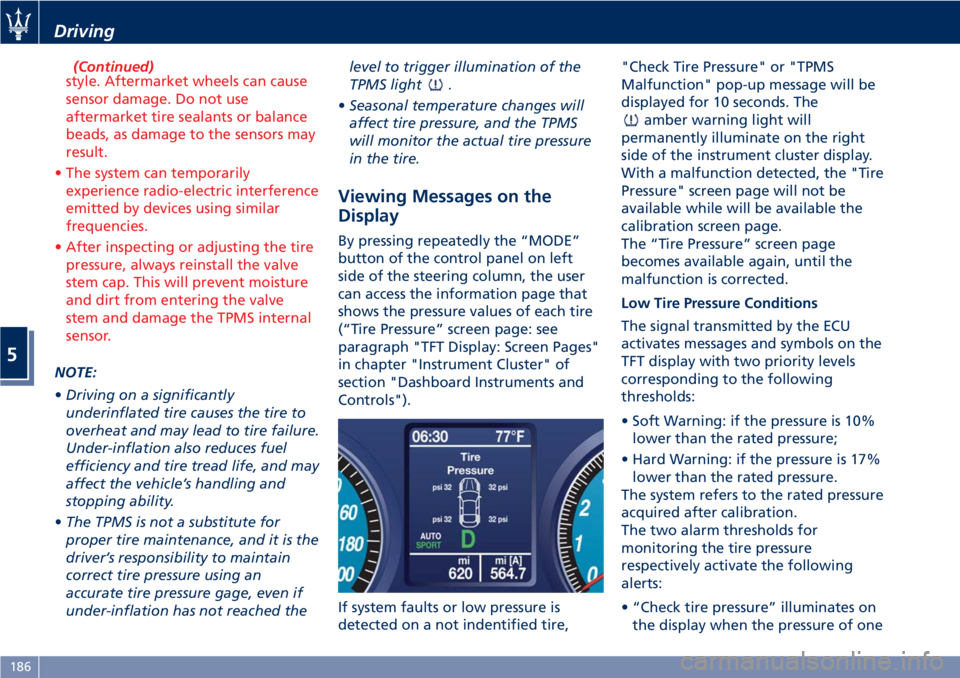
By pressing repeatedly the “MODE”
button of the control panel on left
side of the steering column, the user
can access the information page that
shows the pressure values of each tire
(“Tire Pressure” screen page: see
paragraph "TFT Display: Screen Pages"
in chapter "Instrument Cluster" of
section "Dashboard Instruments and
Controls").
If system faults or low pressure is
detected on a not indentified tire,"Check Tire Pressure" or "TPMS
Malfunction" pop-up message will be
displayed for 10 seconds. The
amber warning light will
permanently illuminate on the right
side of the instrument cluster display.
With a malfunction detected, the "Tire
Pressure" screen page will not be
available while will be available the
calibration screen page.
The “Tire Pressure” screen page
becomes available again, until the
malfunction is corrected.
Low Tire Pressure Conditions
The signal transmitted by the ECU
activates messages and symbols on the
TFT display with two priority levels
corresponding to the following
thresholds:
• Soft Warning: if the pressure is 10%
lower than the rated pressure;
• Hard Warning: if the pressure is 17%
lower than the rated pressure.
The system refers to the rated pressure
acquired after calibration.
The two alarm thresholds for
monitoring the tire pressure
respectively activate the following
alerts:
• “Check tire pressure” illuminates on
the display when the pressure of one
Driving
5
186
Page 191 of 286
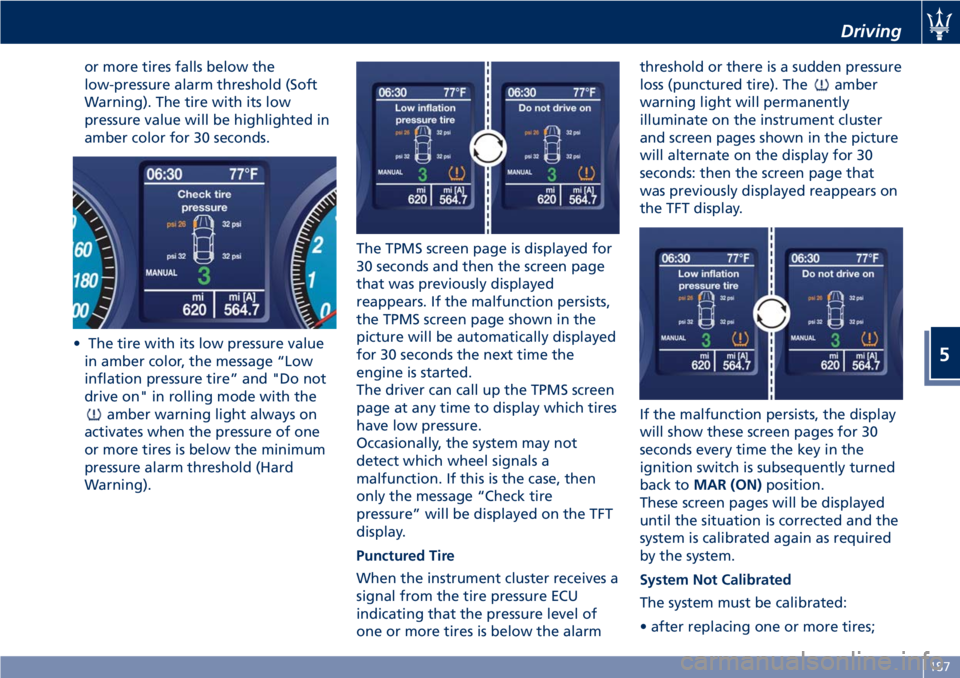
or more tires falls below the
low-pressure alarm threshold (Soft
Warning). The tire with its low
pressure value will be highlighted in
amber color for 30 seconds.
• The tire with its low pressure value
in amber color, the message “Low
inflation pressure tire” and "Do not
drive on" in rolling mode with the
amber warning light always on
activates when the pressure of one
or more tires is below the minimum
pressure alarm threshold (Hard
Warning).The TPMS screen page is displayed for
30 seconds and then the screen page
that was previously displayed
reappears. If the malfunction persists,
the TPMS screen page shown in the
picture will be automatically displayed
for 30 seconds the next time the
engine is started.
The driver can call up the TPMS screen
page at any time to display which tires
have low pressure.
Occasionally, the system may not
detect which wheel signals a
malfunction. If this is the case, then
only the message “Check tire
pressure” will be displayed on the TFT
display.
Punctured Tire
When the instrument cluster receives a
signal from the tire pressure ECU
indicating that the pressure level of
one or more tires is below the alarmthreshold or there is a sudden pressure
loss (punctured tire). The
amber
warning light will permanently
illuminate on the instrument cluster
and screen pages shown in the picture
will alternate on the display for 30
seconds: then the screen page that
was previously displayed reappears on
the TFT display.
If the malfunction persists, the display
will show these screen pages for 30
seconds every time the key in the
ignition switch is subsequently turned
back toMAR (ON)position.
These screen pages will be displayed
until the situation is corrected and the
system is calibrated again as required
by the system.
System Not Calibrated
The system must be calibrated:
• after replacing one or more tires;
Driving
5
187
Page 192 of 286
• after inverting the wheels;
• if you are not sure whether at least
one of the operations above was
performed.
If you simply corrected the tire
inflation pressure, you do not need to
recalibrate the system.
In the event that the system has not
been calibrated or calibration has been
performed incorrectly and following
replacement or reversal of one or
more tires, the
amber warning light
will flash for 85 seconds on instrument
cluster, and the TFT display will show
screen page with dashes “--,--” in the
place of the pressure levels of each
tire.
When the TPMS display cycle ends (30
seconds), the car symbol with message
will disappear and reappears the
screen page that was previously
displayed will reappear: the
amberwarning light remains on until the
system has been calibrated.
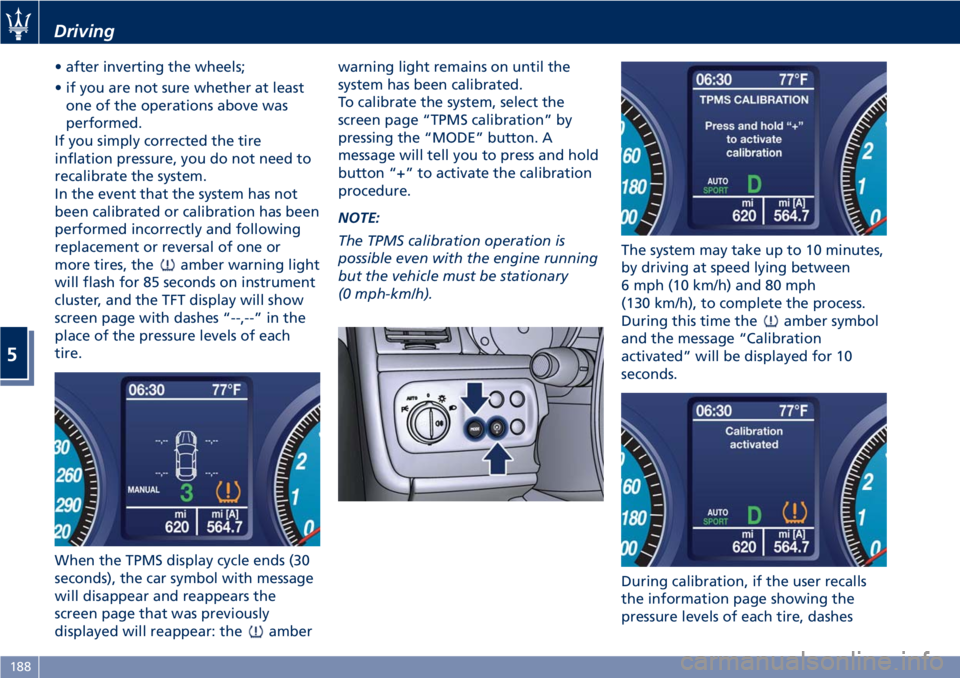
To calibrate the system, select the
screen page “TPMS calibration” by
pressing the “MODE” button. A
message will tell you to press and hold
button “+” to activate the calibration
procedure.
NOTE:
The TPMS calibration operation is
possible even with the engine running
but the vehicle must be stationary
(0 mph-km/h).The system may take up to 10 minutes,
by driving at speed lying between
6 mph (10 km/h) and 80 mph
(130 km/h), to complete the process.
During this time the
amber symbol
and the message “Calibration
activated” will be displayed for 10
seconds.
During calibration, if the user recalls
the information page showing the
pressure levels of each tire, dashes
Driving
5
188
Page 193 of 286
“--,--” will be displayed in the place of
the values.
NOTE:
•The system will not perform
calibration if the pressure is below 2
bar (29 psi).
•To allow the system to acquire the
sensors’s data, after the startup of
the car, if possible avoid to stop.
During this interval the TFT display
can show screen page with dashes
“--,--” in the place of the pressure
levels of each tire.
•If calibration is not completed within
10 minutes of driving the car, the
instrument cluster shows “TPMS
Malfunction” pop-up message and
“Tire Pressure” screen disappear. The
warning light remains light on.
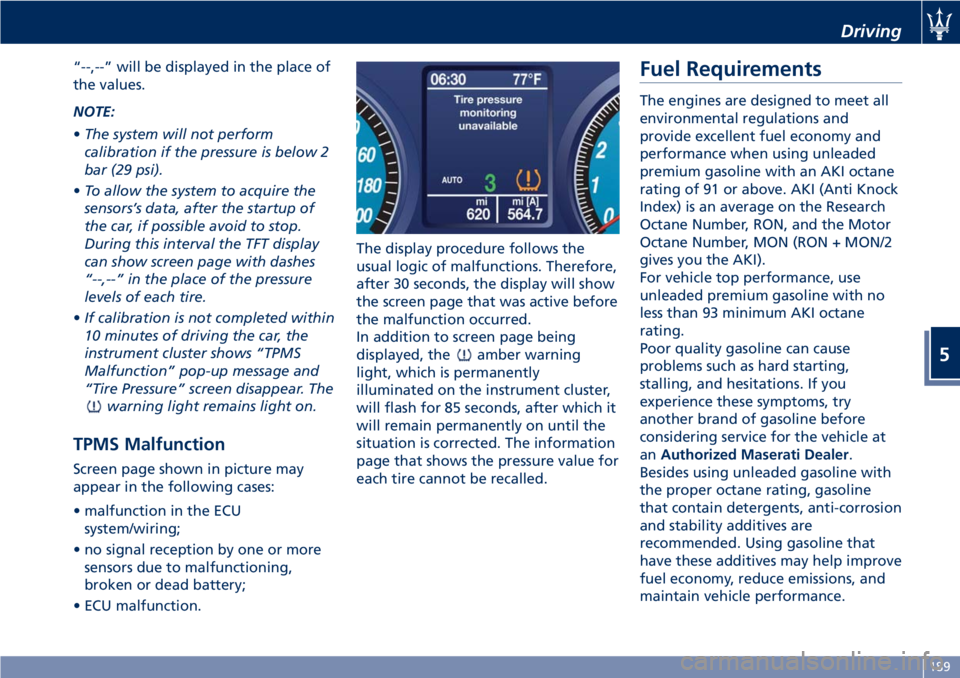
TPMS Malfunction
Screen page shown in picture may
appear in the following cases:
• malfunction in the ECU
system/wiring;
• no signal reception by one or more
sensors due to malfunctioning,
broken or dead battery;
• ECU malfunction.The display procedure follows the
usual logic of malfunctions. Therefore,
after 30 seconds, the display will show
the screen page that was active before
the malfunction occurred.
In addition to screen page being
displayed, the
amber warning
light, which is permanently
illuminated on the instrument cluster,
will flash for 85 seconds, after which it
will remain permanently on until the
situation is corrected. The information
page that shows the pressure value for
each tire cannot be recalled.
Fuel Requirements
The engines are designed to meet all
environmental regulations and
provide excellent fuel economy and
performance when using unleaded
premium gasoline with an AKI octane
rating of 91 or above. AKI (Anti Knock
Index) is an average on the Research
Octane Number, RON, and the Motor
Octane Number, MON (RON + MON/2
gives you the AKI).
For vehicle top performance, use
unleaded premium gasoline with no
less than 93 minimum AKI octane
rating.
Poor quality gasoline can cause
problems such as hard starting,
stalling, and hesitations. If you
experience these symptoms, try
another brand of gasoline before
considering service for the vehicle at
anAuthorized Maserati Dealer.
Besides using unleaded gasoline with
the proper octane rating, gasoline
that contain detergents, anti-corrosion
and stability additives are
recommended. Using gasoline that
have these additives may help improve
fuel economy, reduce emissions, and
maintain vehicle performance.
Driving
5
189
Page 283 of 286
Menus and Settings.........114
Screen Pages..............115
Tire Repair Kit...............204
Tires
Department of Transportation
Uniform Tire Quality Grades. . . .179
General Information.........177
Inflation Pressure...........274
Punctured Tire.............204
Replacement Tires..........182
Snow Chains..............183
Tire Pressure..............180
Tire Pressure Checkup........181
Tire Repair Kit.............204
Tire Safety Information.......177
Tires Durability.............182
TPMS - Tire Pressure Monitoring
System..................184
Tread Wear Indicators........181
Winter Tires...............183
ToolKit ...................202
Towing the Vehicle...........216
TPMS System................184
Transmission, Automatic
Automatic Transmission Lever . .150
Malfunction and Overheating
Conditions................156
Transmission Manual Release of
P (Park) Position............210
Trip - Onboard Computer.......157
Trunk
Trunk Safety...............37
Trunk Compartment Lid.........35Trunk Lid
Trunk Lid Emergency Release from
inside the Trunk.............37
Updating....................7
USB, AUX and SD Memory Card
Ports....................122
Vehicle Identification Data
Homologation Labels.........18
Vehicle Identification Number
(VIN)....................17
Warning and Information
Labels....................18
Voice Commands.............145
Warning Icons.................6
Warning/Indicator Lights on TFT
Display...................116
Warnings when Driving
.........14
Warranty and Service............8
Warranty Information..........10
Wheels
Tires Maintenance..........254
Wheels Rims Maintenance.....255
Windows
Auto Down/Auto Up Feature....34
Reset Auto-Up/Down.........35
Windshield Wipers and Washers . . .90
Adding Washer, Headlight Washer
Fluid....................233
Rain Sensing Wipers..........91Windshield and Headlight
Washers..................92
Windshield Wipers...........90
Wiper Maintenance and Blades
Replacement..............235
Index
9
279