ignition MASERATI GRANTURISMO 2020 User Guide
[x] Cancel search | Manufacturer: MASERATI, Model Year: 2020, Model line: GRANTURISMO, Model: MASERATI GRANTURISMO 2020Pages: 286, PDF Size: 6.7 MB
Page 39 of 286
•Before activating the alarm, ensure
that all the windows are closed; this
will help prevent the alarm being
triggered accidentally.
Reset Auto-Up/Down
Should the auto-up/down feature stop
working, the window probably needs
to be reset.
To reset auto-up/down, pull the
window switch up to close the
window completely and push the
window switch down to open the
window completely.
If You have to Disconnect the
Battery
Before disconnecting the battery,
lower the side windows by at least 1-2
in (4-5 cm) to avoid damaging the seal
when opening and closing the door.
When the battery is connected, this
operation is performed automatically
when the door is opened and closed.
The windows must remain lowered
until the charged battery is
reconnected.
If the battery is completely discharged
when the windows are fully raised,
only open the door if absolutely
necessary, with the utmost care; donot close the door again until it is
possible to lower the window.
Open and Close the Trunk
Lid
Opening
The trunk compartment lid can be
opened from inside or outside the
vehicle.
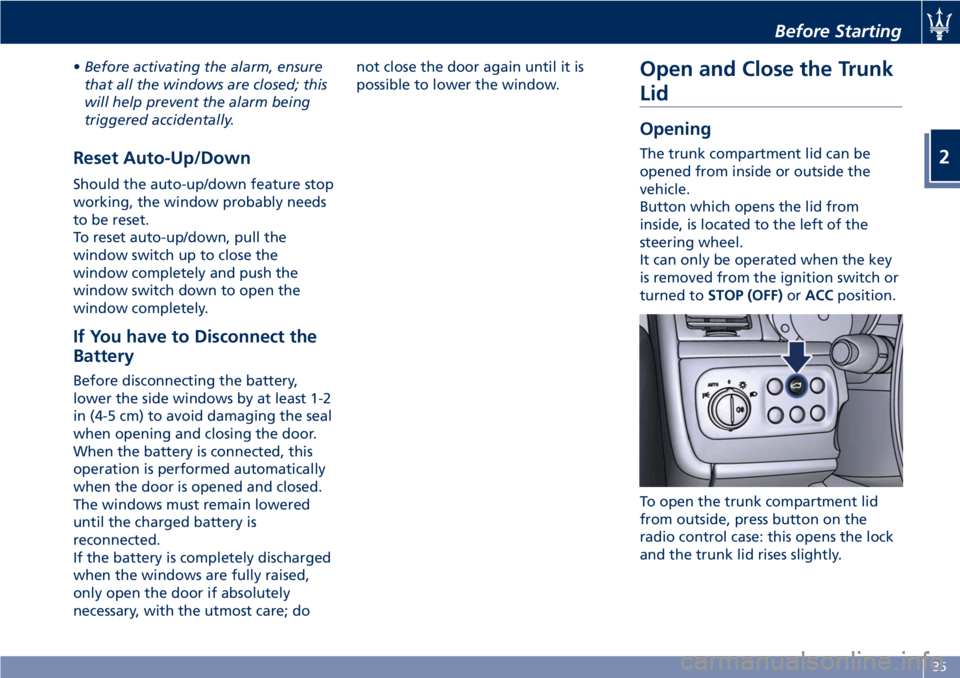
Button which opens the lid from
inside, is located to the left of the
steering wheel.
It can only be operated when the key
is removed from the ignition switch or
turned toSTOP (OFF)orACCposition.
To open the trunk compartment lid
from outside, press button on the
radio control case: this opens the lock
and the trunk lid rises slightly.
Before Starting
2
35
Page 40 of 286
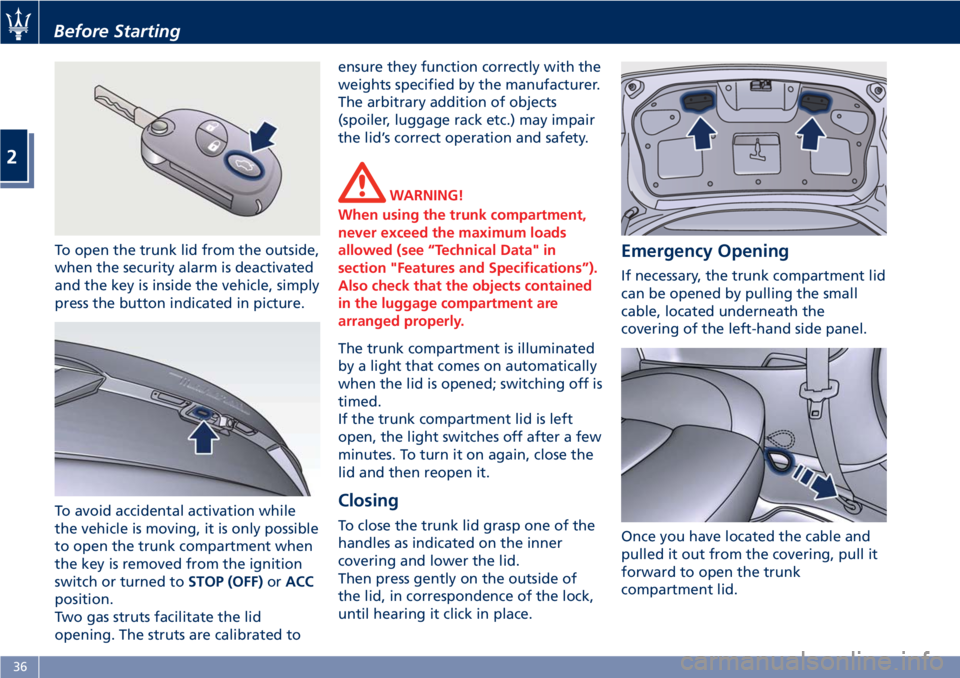
To open the trunk lid from the outside,
when the security alarm is deactivated
and the key is inside the vehicle, simply
press the button indicated in picture.
To avoid accidental activation while
the vehicle is moving, it is only possible
to open the trunk compartment when
the key is removed from the ignition
switch or turned toSTOP (OFF)orACC
position.
Two gas struts facilitate the lid
opening. The struts are calibrated toensure they function correctly with the
weights specified by the manufacturer.
The arbitrary addition of objects
(spoiler, luggage rack etc.) may impair
the lid’s correct operation and safety.
WARNING!
When using the trunk compartment,
never exceed the maximum loads
allowed (see “Technical Data" in
section "Features and Specifications”).
Also check that the objects contained
in the luggage compartment are
arranged properly.
The trunk compartment is illuminated
by a light that comes on automatically
when the lid is opened; switching off is
timed.
If the trunk compartment lid is left
open, the light switches off after a few
minutes. To turn it on again, close the
lid and then reopen it.
Closing
To close the trunk lid grasp one of the
handles as indicated on the inner
covering and lower the lid.
Then press gently on the outside of
the lid, in correspondence of the lock,
until hearing it click in place.
Emergency Opening
If necessary, the trunk compartment lid
can be opened by pulling the small
cable, located underneath the
covering of the left-hand side panel.
Once you have located the cable and
pulled it out from the covering, pull it
forward to open the trunk
compartment lid.
Before Starting
2
36
Page 42 of 286
Open and Close the Hood
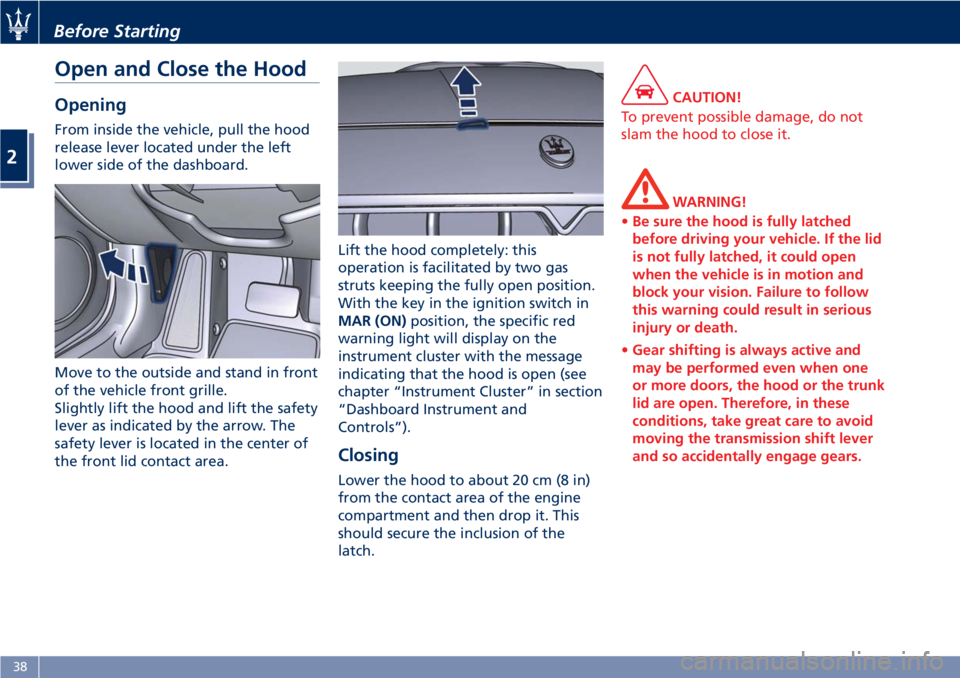
Opening
From inside the vehicle, pull the hood
release lever located under the left
lower side of the dashboard.
Move to the outside and stand in front
of the vehicle front grille.
Slightly lift the hood and lift the safety
lever as indicated by the arrow. The
safety lever is located in the center of
the front lid contact area.Lift the hood completely: this
operation is facilitated by two gas
struts keeping the fully open position.
With the key in the ignition switch in
MAR (ON)position, the specific red
warning light will display on the
instrument cluster with the message
indicating that the hood is open (see
chapter “Instrument Cluster” in section
“Dashboard Instrument and
Controls”).
Closing
Lower the hood to about 20 cm (8 in)
from the contact area of the engine
compartment and then drop it. This
should secure the inclusion of the
latch.
CAUTION!
To prevent possible damage, do not
slam the hood to close it.
WARNING!
•Be sure the hood is fully latched
before driving your vehicle. If the lid
is not fully latched, it could open
when the vehicle is in motion and
block your vision. Failure to follow
this warning could result in serious
injury or death.
•Gear shifting is always active and
may be performed even when one
or more doors, the hood or the trunk
lid are open. Therefore, in these
conditions, take great care to avoid
moving the transmission shift lever
and so accidentally engage gears.
Before Starting
2
38
Page 55 of 286
In the event of a side impact, the
Occupant Restraint Controller (ORC)
processes the signals coming from side
sensors and activates air bag
deployment when necessary.
The air bag deploys almost
instantaneously, placing itself between
the occupants and the side of the
vehicle. The air bag deflates
immediately afterward.
In the case of low-severity side
collisions (for which the restraining
action of the seat belts provides
adequate protection), the air bags do
not deploy.
The side air bags are not a substitute
of the seat belts but rather act in
combination with them. As a
consequence, the seat belts must
always be worn as provided for by
applicable legislation in Europe and in
most non-European countries.
WARNING!
•If the
warning light comes on
while driving (fault signal), stop the
vehicle and contact an Authorized
Maserati Dealer to have the system
checked.
•In the event of a collision with
consequent air bag deployment,contact an Authorized Maserati
Dealer for replacement of the entire
safety system, Occupant Restraint
Controller (ORC), seat belts,
pretensioners, and to have the
vehicle electrical system checked.
•Any and all inspections, repairs and
replacements regarding the air bag
must be performed by an
Authorized Maserati Dealer.
NOTE:
•To scrap the vehicle, please contact
anAuthorized Maserati Dealerin
order to have the air bag system
deactivated.
•If the vehicle is sold, the new owners
must read the above described
instructions for use and warnings on
this “Owner’s Manual” that is an
integral part of the car.
Occupant Restraint Controller
(ORC)
The Occupant Restraint Controller
(ORC) determines if deployment of the
front air bags and/or side air bags in a
frontal or side collision is required.
Based on the impact sensor's signals,
the central electronic ORC deploys the
front air bags, the side air bags andseat belt pretensioners, as required,
depending on the severity and type of
impact.
The ORC monitors the readiness of the
electronic parts of the air bag system
whenever the key in the ignition
switch is in theMAR (ON)position. If
the key is in theSTOP (OFF)position,
in theACCposition, or not active, the
air bag system is not activated and the
air bags will not inflate.
The ORC contains a backup power
supply system that may deploy the air
bags even if the battery has low
power or it becomes disconnected
prior to deployment. When starting
the vehicle, ORC turns on the
air
bag warning light on the instrument
cluster for approximately 4 to 8
seconds for a test.
After the test, the
air bag warning
light will turn off. If the ORC, during
the diagnosis phase detects a
malfunction that could affect the air
bag system, it turns on the
air bag
warning light and the “Airbag failure
go to dealer” message either
momentarily or continuously. The
diagnostics also record the nature of
the malfunction. A beep will sound if
the
air bag warning light
illuminates again after initial startup.
Before Starting
2
51
Page 56 of 286
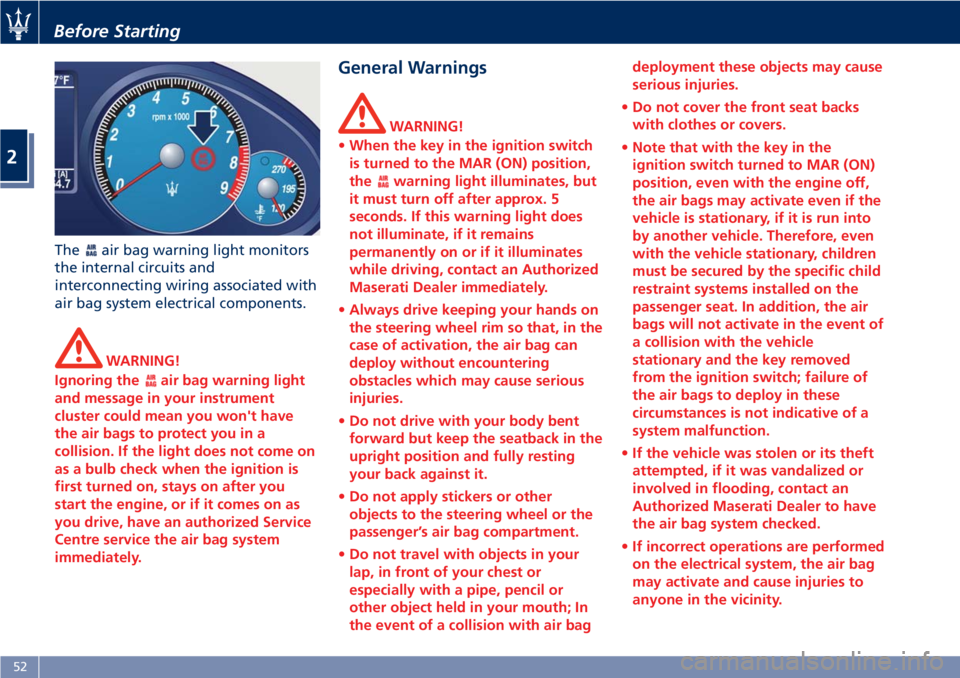
Theair bag warning light monitors
the internal circuits and
interconnecting wiring associated with
air bag system electrical components.
WARNING!
Ignoring the
air bag warning light
and message in your instrument
cluster could mean you won't have
the air bags to protect you in a
collision. If the light does not come on
as a bulb check when the ignition is
first turned on, stays on after you
start the engine, or if it comes on as
you drive, have an authorized Service
Centre service the air bag system
immediately.
General Warnings
WARNING!
•When the key in the ignition switch
is turned to the MAR (ON) position,
the
warning light illuminates, but
it must turn off after approx. 5
seconds. If this warning light does
not illuminate, if it remains
permanently on or if it illuminates
while driving, contact an Authorized
Maserati Dealer immediately.
•Always drive keeping your hands on
the steering wheel rim so that, in the
case of activation, the air bag can
deploy without encountering
obstacles which may cause serious
injuries.
•Do not drive with your body bent
forward but keep the seatback in the
upright position and fully resting
your back against it.
•Do not apply stickers or other
objects to the steering wheel or the
passenger’s air bag compartment.
•Do not travel with objects in your
lap, in front of your chest or
especially with a pipe, pencil or
other object held in your mouth; In
the event of a collision with air bagdeployment these objects may cause
serious injuries.
•Do not cover the front seat backs
with clothes or covers.
•Note that with the key in the
ignition switch turned to MAR (ON)
position, even with the engine off,
the air bags may activate even if the
vehicle is stationary, if it is run into
by another vehicle. Therefore, even
with the vehicle stationary, children
must be secured by the specific child
restraint systems installed on the
passenger seat. In addition, the air
bags will not activate in the event of
a collision with the vehicle
stationary and the key removed
from the ignition switch; failure of
the air bags to deploy in these
circumstances is not indicative of a
system malfunction.
•If the vehicle was stolen or its theft
attempted, if it was vandalized or
involved in flooding, contact an
Authorized Maserati Dealer to have
the air bag system checked.
•If incorrect operations are performed
on the electrical system, the air bag
may activate and cause injuries to
anyone in the vicinity.
Before Starting
2
52
Page 65 of 286
Always stop when the acoustic
signal becomes steady.
Stop & Go Feature
This function is enabled by the
manufacturer and it can be disabled
by the MTC+ (see chapter "MTC+
Settings" in section "Dashboard
Instruments and Controls"), select and
tick the “Stop & Go Parking Sensors”
feature.
When vehicle speed is equal to or
lower than 6 mph (10 km/h), this
function helps the driver under special
traffic conditions as it signals that the
vehicle before you is at a min.
distance.
System with Enabled Stop &
Go Feature
When the "Stop & Go" feature is
enabled through the MTC+, all sensors
are automatically enabled with the
key in the ignition switch turned to
MAR (ON)position, but they are not
displayed on the instrument cluster.
When the R (Reverse) gear is engaged
or an obstacle is detected, the
corresponding detection areas are
displayed on the instrument cluster. As
soon as the R (Reverse) gear is
disengaged, all sensors are still active:the rear ones for approx. 10 seconds
or until a speed of approx. 6 mph
(10 km/h) is exceeded, and the front
ones until a speed of approx. 6 mph
(10 km/h) is exceeded. When driving at
a speed equal to or lower than 6 mph
(10 km/h), as soon as the system
detects an obstacle, the front sensor
detection areas are displayed, and the
acoustic signals start to be emitted. If
no obstacle is detected for 10 seconds,
the displayed information disappears.
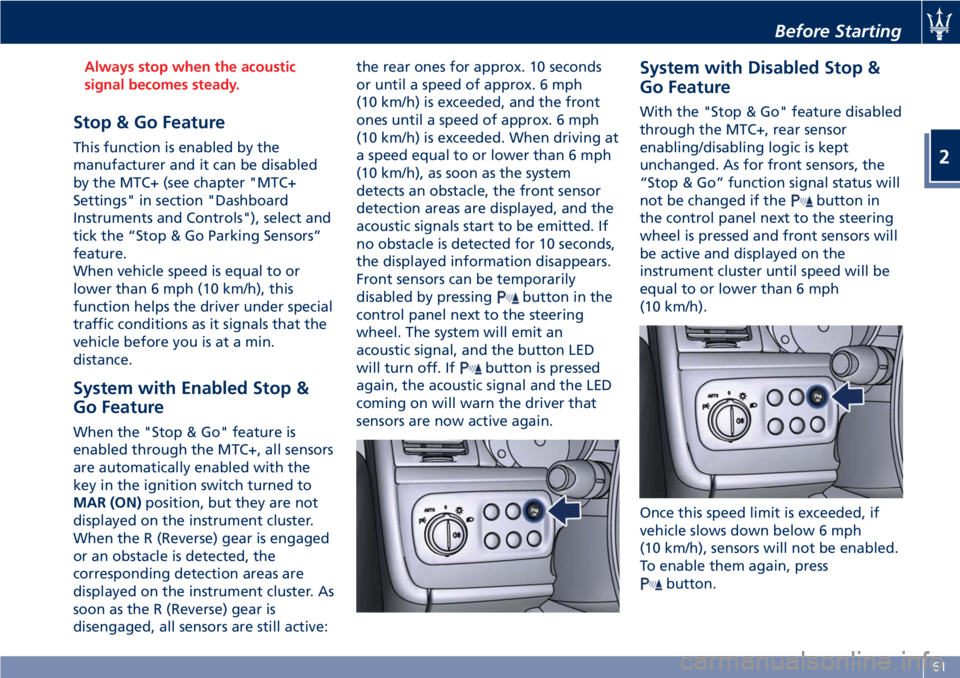
Front sensors can be temporarily
disabled by pressing
button in the
control panel next to the steering
wheel. The system will emit an
acoustic signal, and the button LED
will turn off. If
button is pressed
again, the acoustic signal and the LED
coming on will warn the driver that
sensors are now active again.
System with Disabled Stop &
Go Feature
With the "Stop & Go" feature disabled
through the MTC+, rear sensor
enabling/disabling logic is kept
unchanged. As for front sensors, the
“Stop & Go” function signal status will
not be changed if the
button in
the control panel next to the steering
wheel is pressed and front sensors will
be active and displayed on the
instrument cluster until speed will be
equal to or lower than 6 mph
(10 km/h).
Once this speed limit is exceeded, if
vehicle slows down below 6 mph
(10 km/h), sensors will not be enabled.
To enable them again, press
button.
Before Starting
2
61
Page 66 of 286
NOTE:
Front sensors are enabled only when
button LED is illuminated. In
addition, any pressing of
button
when vehicle speed is above 6 mph
(10 km/h) will be ignored by the
system.
Obstacle Signalling
The acoustic signals are emitted by
two buzzers, one under the dashboard
and one in proximity of the luggage
shelf.
When the obstacle is located at a
distance of less than 14 in (35 cm) from
the bumper, the beep is continuous.
The warning beep stops immediately if
the distance between the vehicle and
the obstacle increases. The tone cycle is
constant if the distance measured by
the central sensors remains unaltered.
If this occurs with the lateral sensors,
the signal stops after approximately 7
seconds, to prevent for example
continuous beeps in the event of
maneuvers alongside walls.
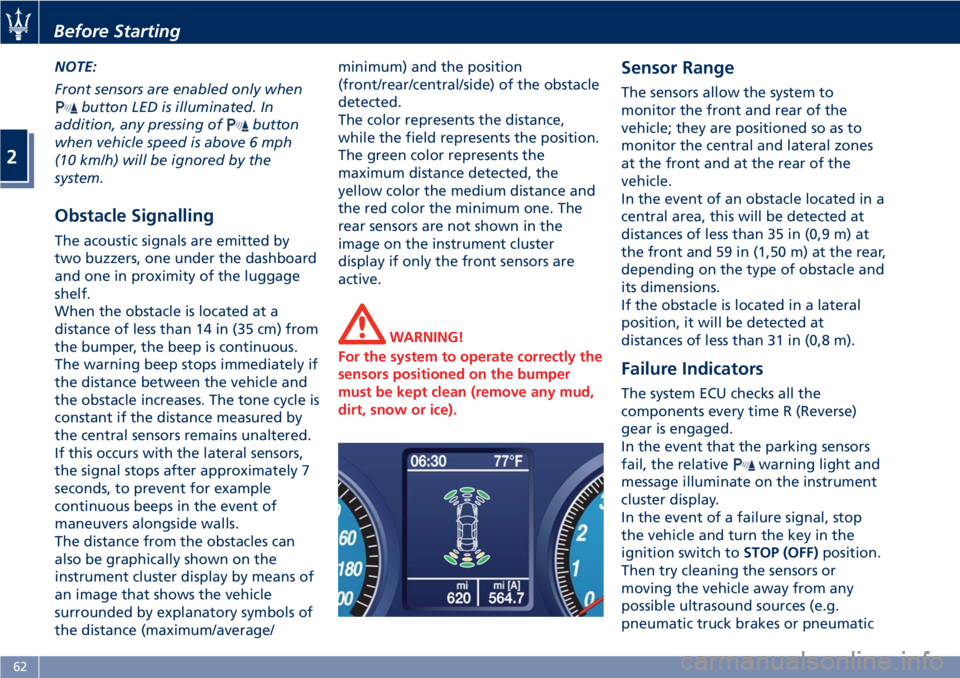
The distance from the obstacles can
also be graphically shown on the
instrument cluster display by means of
an image that shows the vehicle
surrounded by explanatory symbols of
the distance (maximum/average/minimum) and the position
(front/rear/central/side) of the obstacle
detected.
The color represents the distance,
while the field represents the position.
The green color represents the
maximum distance detected, the
yellow color the medium distance and
the red color the minimum one. The
rear sensors are not shown in the
image on the instrument cluster
display if only the front sensors are
active.
WARNING!
For the system to operate correctly the
sensors positioned on the bumper
must be kept clean (remove any mud,
dirt, snow or ice).
Sensor Range
The sensors allow the system to
monitor the front and rear of the
vehicle; they are positioned so as to
monitor the central and lateral zones
at the front and at the rear of the
vehicle.
In the event of an obstacle located in a
central area, this will be detected at
distances of less than 35 in (0,9 m) at
the front and 59 in (1,50 m) at the rear,
depending on the type of obstacle and
its dimensions.
If the obstacle is located in a lateral
position, it will be detected at
distances of less than 31 in (0,8 m).
Failure Indicators
The system ECU checks all the
components every time R (Reverse)
gear is engaged.
In the event that the parking sensors
fail, the relative
warning light and
message illuminate on the instrument
cluster display.
In the event of a failure signal, stop
the vehicle and turn the key in the
ignition switch toSTOP (OFF)position.
Then try cleaning the sensors or
moving the vehicle away from any
possible ultrasound sources (e.g.
pneumatic truck brakes or pneumatic
Before Starting
2
62
Page 70 of 286
WARNING!
California Proposition 65
Operating, servicing and maintaining
a passenger vehicle or off-road vehicle
can expose you to chemicals including
such as, engine exhaust, carbon
monoxide, phthalates and lead, that
which are know to the State of
California to cause cancer and birth
defects or other reproductive harm. To
minimize exposure, avoid breathing
exhaust, do not idle the engine except
as necessary, service your vehicle in a
well-ventilated area and wear gloves
or wash your hands frequently when
servicing your vehicle. For more
information go to:
www.P65Warnings.ca.gov/passenger-
vehicle
Vehicle Safety Checks
Seat Belts
• Inspect the belt system periodically,
checking for cuts, frays, and loose
parts. Damaged parts must be
replaced immediately.
• Do not disassemble or modify the
system.
• If the belt has been sharply pulled,
for example as the result of anaccident, the safety belt, together
with the anchoring devices, the
anchoring device mounting screws
and the pretensioner must be
completely replaced. Even if the belt
does not present any exterior signs
of wear or damage, it may have lost
its restraining properties.
Air bag Warning Light
The
warning light should illuminate
and remain lit for a few seconds bulb
checking when the key in the ignition
switch is turned inMAR (ON)position
(see “Supplemental Restraint System
(SRS) — Air bags” chapter in this
section).
•Ifthe
warning light does not
illuminate while starting, contact an
Authorized Maserati Dealer.
•Ifthe
warning light stays on,
flickers, or comes on while driving,
have the system checked by an
Authorized Maserati Dealer.
Defroster
Check operation by selecting the
defrost mode and place the fan system
on high speed (see “Air Conditioning
Controls” chapter in section
“Dashboard Instruments and
Controls”).You should be able to feel the air
directed against the windshield and
front side windows. Contact an
Authorized Maserati Dealerfor service
if your defroster is inoperable.
Floor Mat
Always use floor mats designed to fit
the footwell of your vehicle. Use only
floor mats that leave the pedal area
unobstructed and that are firmly
secured so that they cannot slip out of
position and interfere with the pedals
or impair safe operation of your
vehicle.
NOTE:
TheAuthorized Maserati Dealercan
provide you with any information
about the available Maserati floor
mats included in the “Genuine
Accessories” range.
WARNING!
Pedals that cannot move freely can
cause loss of vehicle control and
increase the risk of serious personal
injury.
•Always make sure that floor mats
are properly attached to the proper
fasteners.
Before Starting
2
66
Page 75 of 286
1Adjustable side air vents.
2Hood lid opening lever.
3Headlight and fog light switch.
4"Mode" and adjust "+" and
"–" buttons.
5Front parking sensors
disabling/enabling.
6Trunk lid opening button.
7Fuel tank door opening button
(see "Refueling" in section
"Driving" for operation).
8Multifunction lever (Cruise
Control, turn signals, headlight
washer and headlight
selection).
9Lower gearshift paddle
"DOWN".
10Instrument cluster.
11Steering wheel height and
depth adjustment lever.
12Upper air vent.
13Sun radiation sensor.
14Horn control.
15Multimedia controls repeated
on the steering wheel.
16Windshield/headlight
wiper/washer control lever.17Upper gearshift paddle "UP".
18Ignition switch.
19Clock.
20Central adjustable air vents.
21MTC+ display.
22Glove compartment.
23Side window vents.
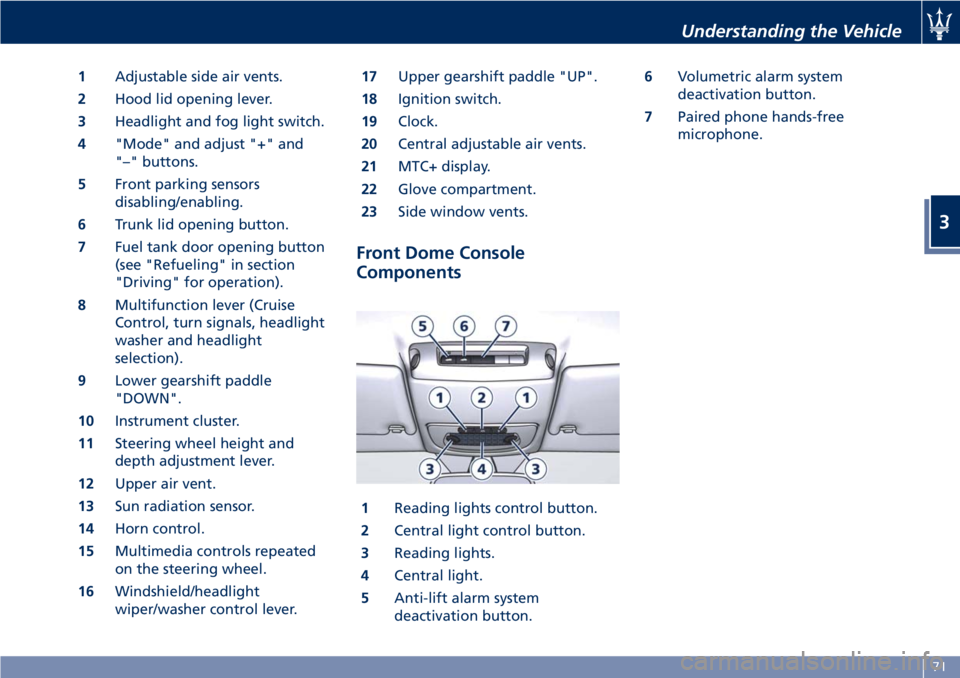
Front Dome Console
Components
1Reading lights control button.
2Central light control button.
3Reading lights.
4Central light.
5Anti-lift alarm system
deactivation button.6Volumetric alarm system
deactivation button.
7Paired phone hands-free
microphone.
Understanding the Vehicle
3
71
Page 78 of 286
Front Seats
Seats and seat belts are part of the
Occupant Restraint System of the
vehicle. For further information, see
chapter “Occupant Restraint System”
in Section “Before Starting”.
WARNING!
Be sure everyone in your vehicle is in a
seat and using a seat belt properly.
Seat Adjustments
The seats can only be adjusted with
the key in the ignition switch inMAR
(ON)position.
It is however possible, when the door
is closed, to operate the seat for
approx. 15 seconds after turning the
key toSTOP (OFF)position and then
for other 15 seconds after the last
operation.
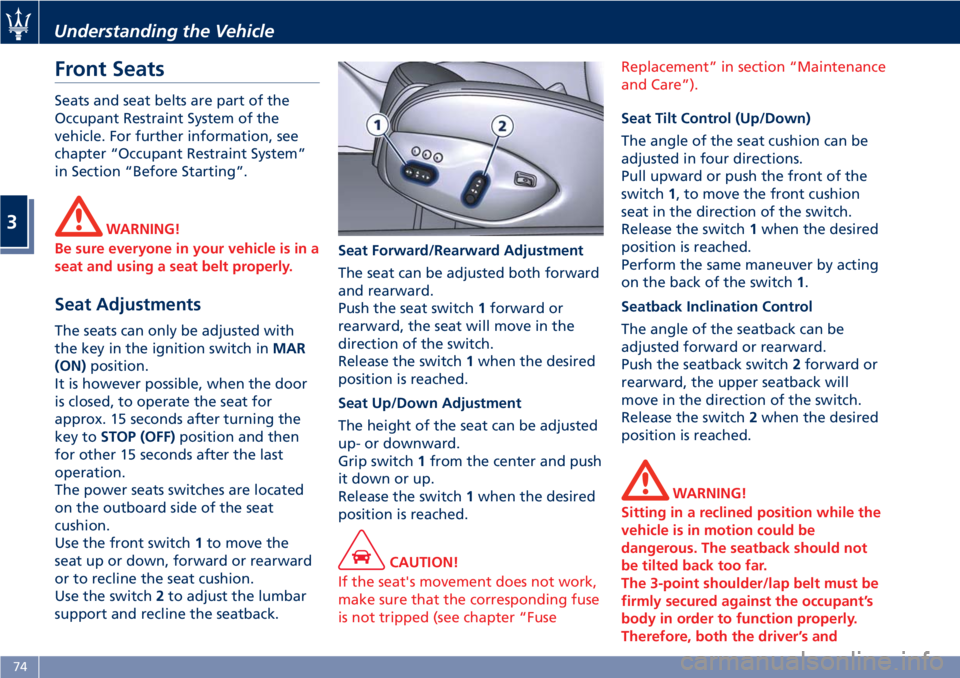
The power seats switches are located
on the outboard side of the seat
cushion.
Use the front switch1to move the
seat up or down, forward or rearward
or to recline the seat cushion.
Use the switch2to adjust the lumbar
support and recline the seatback.Seat Forward/Rearward Adjustment
The seat can be adjusted both forward
and rearward.
Push the seat switch1forward or
rearward, the seat will move in the
direction of the switch.
Release the switch1when the desired
position is reached.
Seat Up/Down Adjustment
The height of the seat can be adjusted
up- or downward.
Grip switch1from the center and push
it down or up.
Release the switch1when the desired
position is reached.
CAUTION!
If the seat's movement does not work,
make sure that the corresponding fuse
is not tripped (see chapter “FuseReplacement” in section “Maintenance
and Care”).
Seat Tilt Control (Up/Down)
The angle of the seat cushion can be
adjusted in four directions.
Pull upward or push the front of the
switch1, to move the front cushion
seat in the direction of the switch.
Release the switch1when the desired
position is reached.
Perform the same maneuver by acting
on the back of the switch1.
Seatback Inclination Control
The angle of the seatback can be
adjusted forward or rearward.
Push the seatback switch2forward or
rearward, the upper seatback will
move in the direction of the switch.
Release the switch2when the desired
position is reached.
WARNING!
Sitting in a reclined position while the
vehicle is in motion could be
dangerous. The seatback should not
be tilted back too far.
The 3-point shoulder/lap belt must be
firmly secured against the occupant’s
body in order to function properly.
Therefore, both the driver’s and
Understanding the Vehicle
3
74